reset Citroen C4 2015 2.G User Guide
[x] Cancel search | Manufacturer: CITROEN, Model Year: 2015, Model line: C4, Model: Citroen C4 2015 2.GPages: 494, PDF Size: 20.49 MB
Page 302 of 494
04
C4-2_en_Chap13b_SMEGplus_ed01-2015
C4-2_en_Chap13b_SMEGplus_ed01-2015
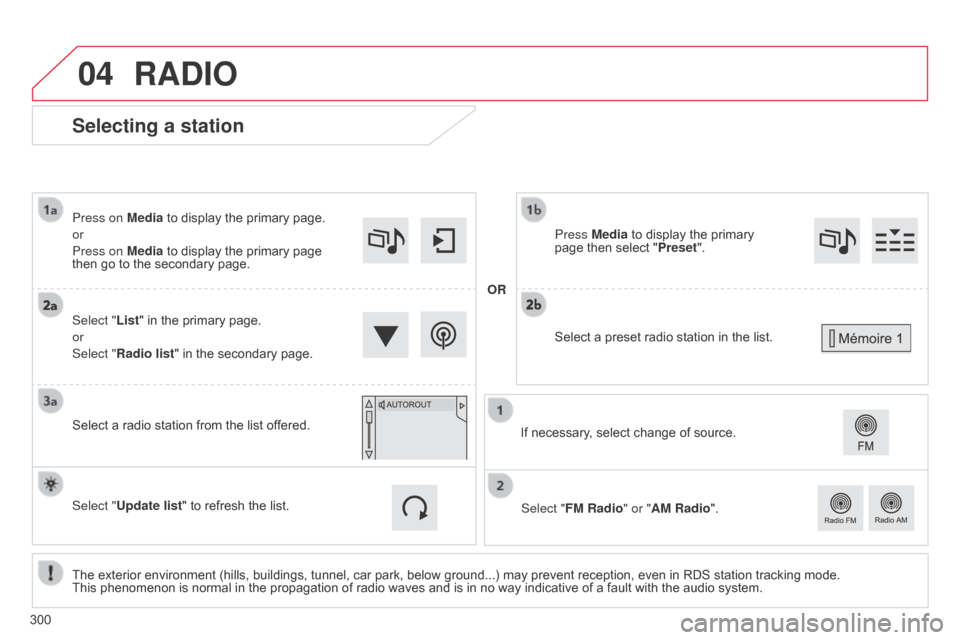
Selecting a station
The exterior environment (hills, buildings, tunnel, car park, below ground...) may prevent reception, even in RDS station tracking mode. This phenomenon is normal in the propagation of radio waves and is in no way indicative of a fault with the audio system.
Select "List"
in the primary page.
or
Select "Radio list" in the secondary page.
Press on Media to display the primary page.
or
Press on Media to display the primary page
then
go to the secondary page.
Select a radio station from the list offered.
If necessary, select change of source.
Press Media to display the primary
page
then select "
Preset ".
Select "FM Radio" or "AM Radio".
OR
Select "Update list" to refresh the list.
RADIO
Select a preset radio station in the list.
300
Page 304 of 494
04
C4-2_en_Chap13b_SMEGplus_ed01-2015
C4-2_en_Chap13b_SMEGplus_ed01-2015
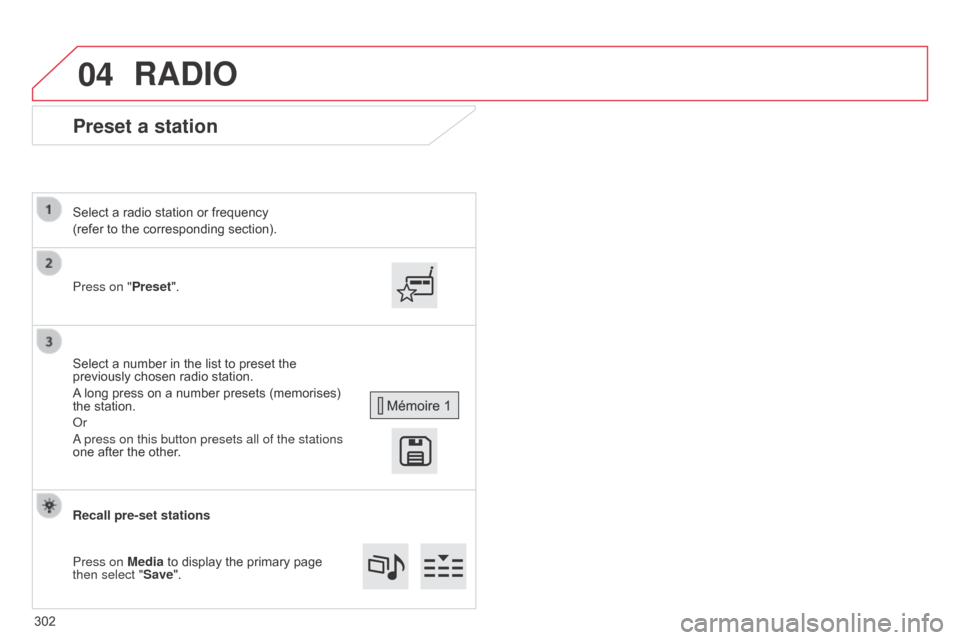
Preset a station
Press on "Preset".
Select a radio station or frequency
(refer to the corresponding section).
Select a number in the list to preset the
previously
chosen radio station.
A
long press on a number presets (memorises)
the
station.
o
r
a press on this button presets all of the stations
one
after the other.
Recall pre-set stations
Press on Media
to display the primary page
then select "
Save".
RADIO
302
Page 306 of 494
04
304
C4-2_en_Chap13b_SMEGplus_ed01-2015
C4-2_en_Chap13b_SMEGplus_ed01-2015
RADIO
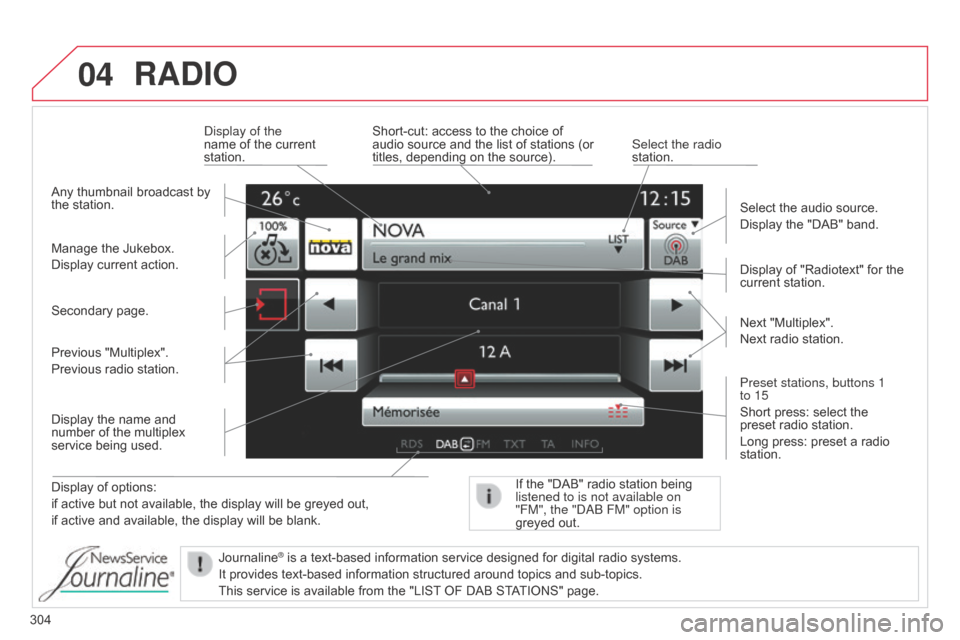
Display of options:
if active but not available, the display will be greyed out,
if
active and available, the display will be blank. Display
of "Radiotext" for the
current
station.
Manage the Jukebox.
Display current action.
Select the audio source.
Display the "DAB" band.
d
isplay of the
name of the current
station.
Short-cut:
access to the choice of
audio
source and the list of stations (or
titles,
depending on the source).
Select the radio
station.
If the "DAB" radio station being listened to is not available on
"FM", the "
dab FM" option is
greyed
out.
Any
thumbnail broadcast by
the
station.
Preset stations, buttons 1
to 15
Short press: select the
preset
radio station.
Long press: preset a radio
station. Next
"Multiplex".
Next radio station.
Secondary page.
Display the name and
number
of the multiplex
service
being used.
Previous "Multiplex".
Previous radio station.
Journaline
® is a text-based information service designed for digital radio systems.
It
provides
text-based information structured around topics and sub-topics.
This
service is available from the "LIST
OF DAB STATIONS" page.
Page 362 of 494
01
360
C4-2_en_Chap13c_RD5_ed01-2015
C4-2_en_Chap13c_RD5_ed01-2015
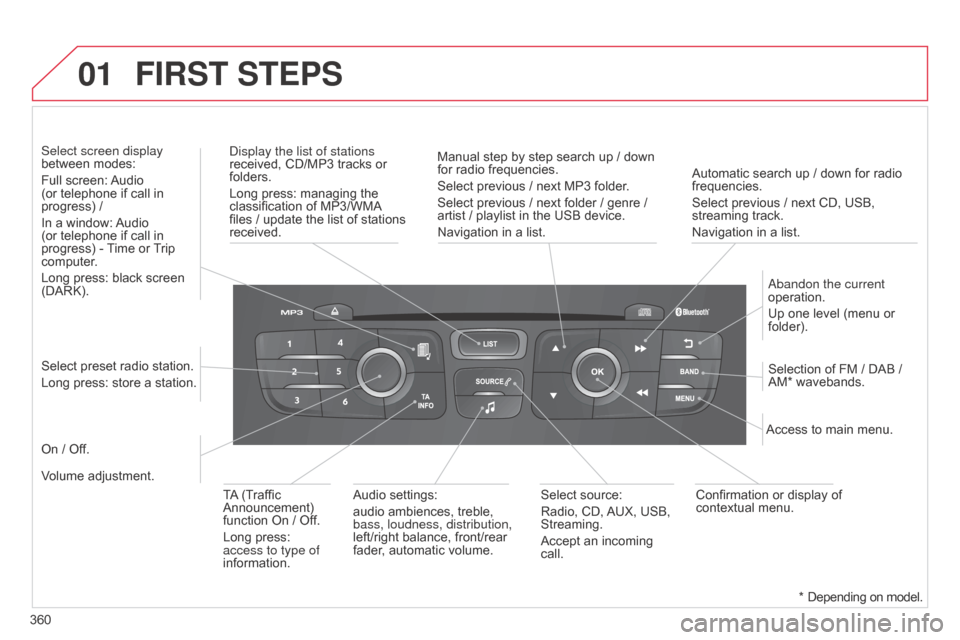
Automatic search up / down for radio frequencies.
Select previous / next CD, USB,
streaming
track.
Navigation
in a list.
d
isplay the list of stations
received,
CD/MP3
tracks
or
folders.
Long
press:
managing
the
classification
of
MP3/WMA
files
/
update
the
list
of
stations
received.
a
bandon the current
operation.
Up
one level (menu or
folder).
On
/
Off. Selection
of FM / DAB /
AM*
wavebands.
Select
preset
radio
station.
Long
press:
store
a
station.
Select screen display
between
modes:
Full
screen:
Audio
(or
telephone
if
call
in
progress)
/
In
a
window:
Audio
(or
telephone
if
call
in
progress)
-
T
ime
or
T
rip
computer
.
Long
press:
black
screen
(DARK).
Audio
settings:
audio
ambiences,
treble,
bass, loudness, distribution,
left/right
balance,
front/rear
fader
,
automatic
volume. Access
to main menu.
TA
(Traffic
Announcement)
function
On
/
Off.
Long
press:
access to type of
information. Select
source:
Radio,
CD,
AUX,
USB,
Streaming.
Accept
an
incoming
call. Confirmation
or display of
contextual
menu.
Manual
step
by
step
search
up
/
down
for
radio
frequencies.
Select
previous
/
next
MP3
folder.
Select
previous
/
next
folder
/
genre
/
artist
/
playlist
in
the
USB
device.
Navigation
in
a
list.
Volume
adjustment.
FIRST STEPS
* Depending on model.
Page 368 of 494
04
C4-2_en_Chap13c_RD5_ed01-2015
C4-2_en_Chap13c_RD5_ed01-2015
AUDIO
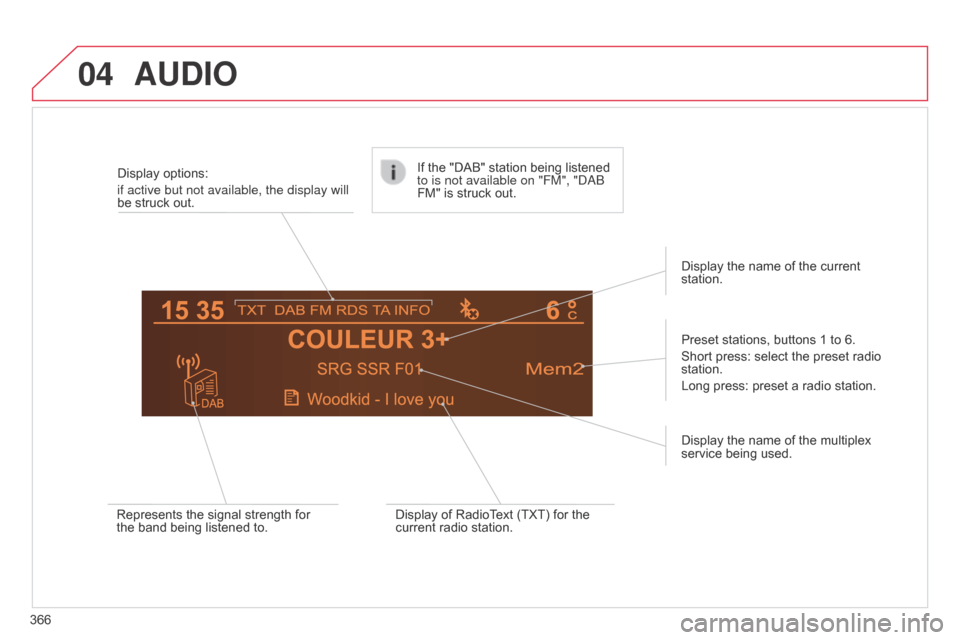
366Display options:
if active but not available, the display will
be struck out.
Preset stations, buttons 1 to 6.
Short press: select the preset radio
station.
Long
press: preset a radio station.
Display the name of the multiplex
service
being used.
Represents the signal strength for
the
band being listened to.If the "DAB" station being listened
to is not available on "FM", "
dab
FM" is struck out.
Display of RadioText (TXT) for the
current
radio station.Display the name of the current
station.
Page 390 of 494
388
C4-2_en_Chap13c_RD5_ed01-2015
C4-2_en_Chap13c_RD5_ed01-2015
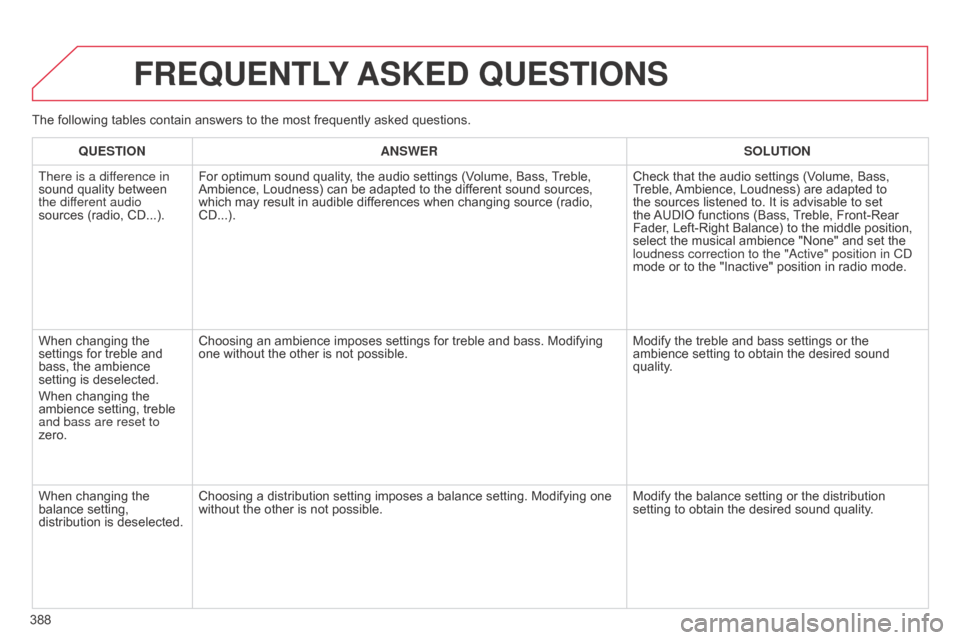
FREqUENTLY ASKED q UESTIONS
qUESTION ANSWER SOLUTION
There is a dif ference in
sound
quality between
the dif
ferent audio
sources
(radio, CD...). For
optimum sound quality, the audio settings (Volume, Bass,
T
reble,
Ambience,
Loudness) can be adapted to the different sound sources,
which
may result in audible differences when changing source (radio,
CD...).Check
that the audio settings (Volume, Bass,
T
reble,
Ambience,
Loudness) are adapted to
the
sources listened to. It is advisable to set
the
AUDIO
functions (Bass,
T
reble, Front-Rear
Fader
, Left-Right Balance) to the middle position,
select
the musical ambience "None" and set the
loudness correction to the "
a ctive" position in C d
mode
or to the "Inactive" position in radio mode.
When
changing the
settings
for treble and
bass,
the ambience
setting
is deselected.
When
changing the
ambience
setting, treble
and bass are reset to
zero. Choosing
an ambience imposes settings for treble and bass. Modifying
one
without the other is not possible.Modify
the treble and bass settings or the
ambience
setting to obtain the desired sound
quality
.
When
changing the
balance
setting,
distribution
is deselected. Choosing
a distribution setting imposes a balance setting. Modifying one
without
the other is not possible. Modify
the balance setting or the distribution
setting
to obtain the desired sound quality.
The
following tables contain answers to the most frequently asked questions.
Page 398 of 494
396
C4-2_en_Chap14_index-alpha_ed01-2015
C4-2_en_Chap14_index-alpha_ed01-2015
Paint colour code .........................................28 6
Panoramic glass
sunroof
................
......................................... 78
Parcel shelf, rear
................................... 11
4 ,
11
7
Parking
brake
........................................1
77, 220
Parking
brake, electric
............................1
8, 170
Parking
lam
ps
.............................................. 12
2
Parking
sensors, front
..................................20
6
Parking
sensors, rear................................... 205
Particle filter
.......................................... 21
8,
21
9
Passenger
c
ompartment
f
ilter
........
..................................................... 219
Personalisation
...............................
...............36
Player,
CD MP3
............................ 3
06, 369, 370
Port,
USB
..................................... 1
03, 306, 371
Priming
the fuel system
................................2
11
Protecting
children
................. 1
35 -149, 157, 159
Puncture
................
....................................... 229Quickly
detachable towball
..........................
2
67
P
Navigation ...............................
......................312 N
umber plate lamps ..................................... 25
0
oil
filter
...............
...........................................
219
oi
l level
................................................... 29, 215
Opening the bonnet
......................................
2
12
Opening the boot
..............................
. 59, 72, 73
Opening the doors
...............................
.... 59, 71
Opening the panoramic
sunroof blind
................................................ 78ope
ration indicator
lamps
..............................
........................
16 -28
N
Main beam .............................. ......118, 242, 245
Maintenance .............................. ....................10
Map
reading lamps
...................................... 13
3
Markings,
id
entification
................................ 28
6
Massage
function
...............................
...........94
Mat
.......
......................................................... 11 0
Memorising
a speed
.................................... 19
9
Menu
....................................2
94, 296, 298, 312,
314,
316, 332, 342, 344
Menu,
main
..............................
....................362
Menus (Touch
screen tablet)
.................................29
0
Mirror, rear view
........................................... 10
0
Mirrors, door ..................................... 98,
99, 196
Misfuel prevention
...............................
.........210
Motorway function (direction
i
ndicators)
.................................. 15
0
Mountings
for ISOFIX
seats
...............
........................................... 14 4
MP3
CD
................
........................ 306, 369, 370 Radio
...............
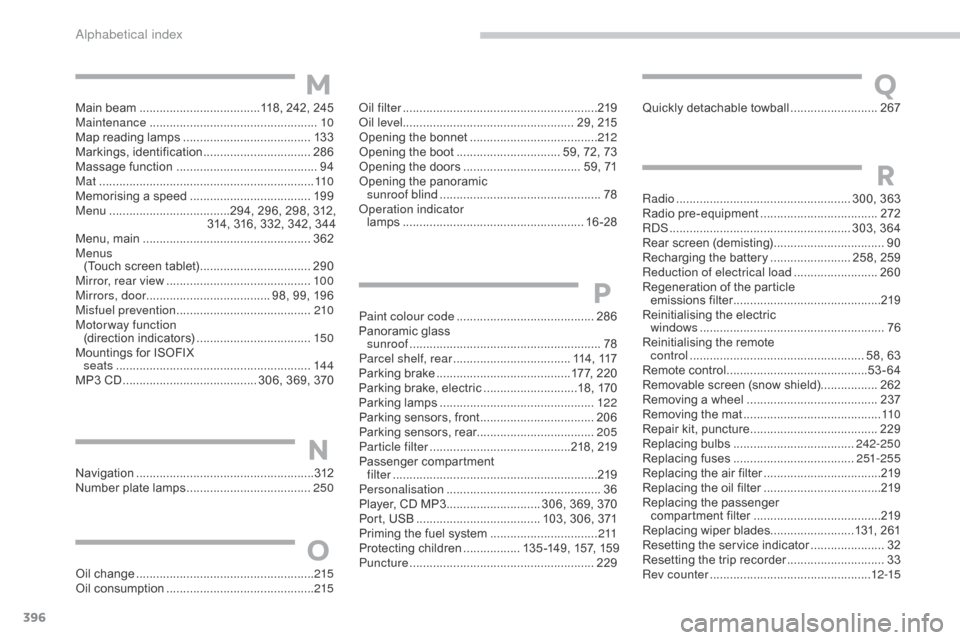
..................................... 300, 363
Radio
pr
e-equipment
...................................2
72
R
dS ................
...................................... 303, 364
Rear
s
creen
(
demisting)
.................................90
R
echarging the battery
........................ 2
58, 259
Reduction of electrical load
......................... 26
0
Regeneration
of the particle
emissions
f
ilter
............................................2
19
Reinitialising
the electric
windows
....................................................... 76
R
einitialising the remote
control
.................................................... 5
8, 63
Remote
control
..........................................53
-64
Removable
screen (snow shield).................262
Removing
a wheel
..............................
.........237
Removing
the mat
...............................
..........11 0
Repair
kit, puncture
......................................2
29
Replacing
bu
lbs
..............................
......242-250
Replacing
f
uses
..............................
......251-255
Replacing
the air filter
...................................2
19
Replacing
the oil filter
...................................2
19
Replacing
t
he
p
assenger
c
ompartment filter
......................................2
19
Replacing
wiper blades.........................131, 261
Resetting
the service indicator
......................32
R
esetting the trip recorder
.............................33
R
ev counter
................................................1
2-15
R
Oil change .....................................................215
Oil consumption ............................................ 2
15
O
QM
alphabetical index
Page 410 of 494
Driving
6
C4-2-add_en_Chap09_conduite_ed01-2015
Stop & Start
Operation
Going into engine STOP mode
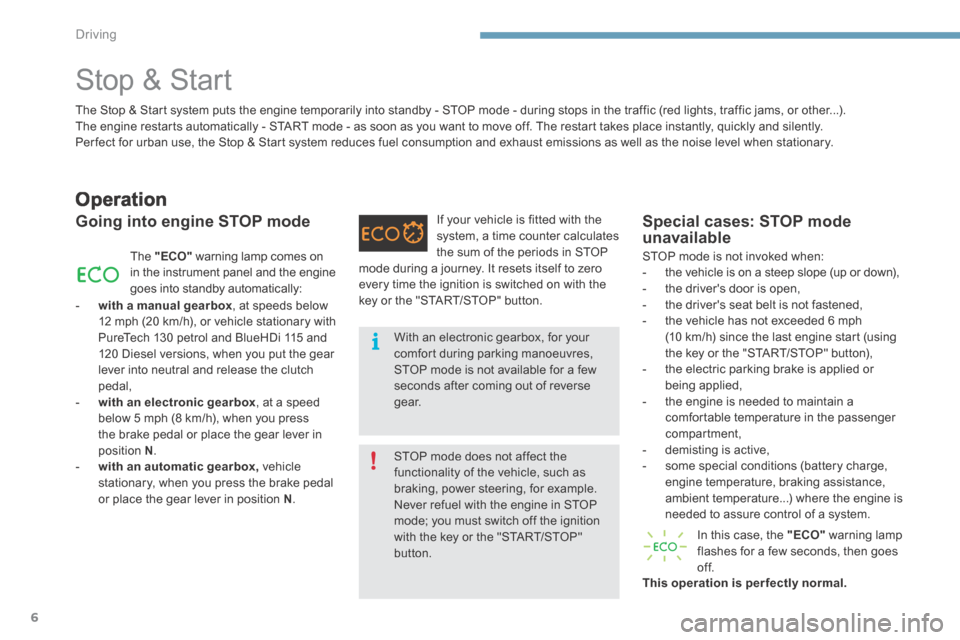
The "ECO" warning lamp comes on in the instrument panel and the engine goes into standby automatically:
- with a manual gearbox , at speeds below 12 mph (20 km/h), or vehicle stationary with PureTech 130 petrol and BlueHDi 115 and 120 Diesel versions, when you put the gear lever into neutral and release the clutch pedal, - with an electronic gearbox , at a speed below 5 mph (8 km/h), when you press the brake pedal or place the gear lever in position N . - with an automatic gearbox, vehicle stationary, when you press the brake pedal or place the gear lever in position N .
If your vehicle is fitted with the system, a time counter calculates the sum of the periods in STOP
Special cases: STOP mode unavailable
STOP mode is not invoked when: - the vehicle is on a steep slope (up or down), - the driver's door is open, - the driver's seat belt is not fastened, - the vehicle has not exceeded 6 mph (10 km/h) since the last engine start (using the key or the "START/STOP" button), - the electric parking brake is applied or being applied, - the engine is needed to maintain a comfortable temperature in the passenger compartment, - demisting is active, - some special conditions (battery charge, engine temperature, braking assistance, ambient temperature...) where the engine is needed to assure control of a system.
In this case, the "ECO" warning lamp flashes for a few seconds, then goes of f. This operation is perfectly normal.
The Stop & Start system puts the engine temporarily into standby - STOP mode - during stops in the traffic (red lights, traffic jams, or other...). The engine restarts automatically - START mode - as soon as you want to move off. The restart takes place instantly, quickly and silently. Per fect for urban use, the Stop & Start system reduces fuel consumption and exhaust emissions as well as the noise level when stationary.
STOP mode does not affect the functionality of the vehicle, such as braking, power steering, for example. Never refuel with the engine in STOP mode; you must switch off the ignition
with the key or the "START/STOP" button.
With an electronic gearbox, for your comfort during parking manoeuvres, STOP mode is not available for a few seconds after coming out of reverse g e a r.
mode during a journey. It resets itself to zero every time the ignition is switched on with the key or the "START/STOP" button.
Page 443 of 494
Audio and Telematics
40
C4-2-add_en_Chap13b_SMEGplus_ed01-2015
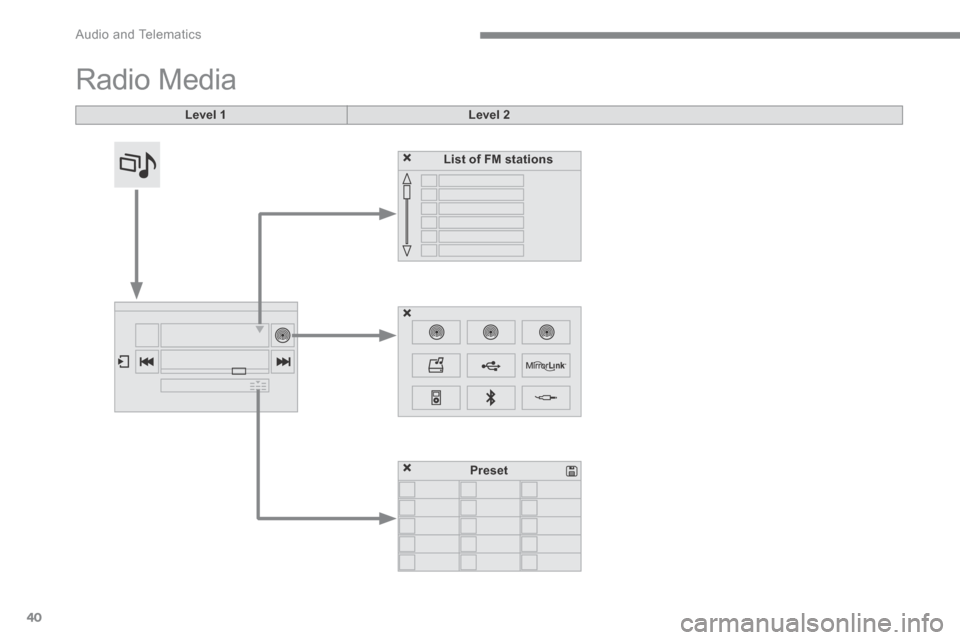
Radio Media
Level 1Level 2
List of FM stations
Preset
Page 444 of 494
.
Audio and Telematics 41
C4-2-add_en_Chap13b_SMEGplus_ed01-2015
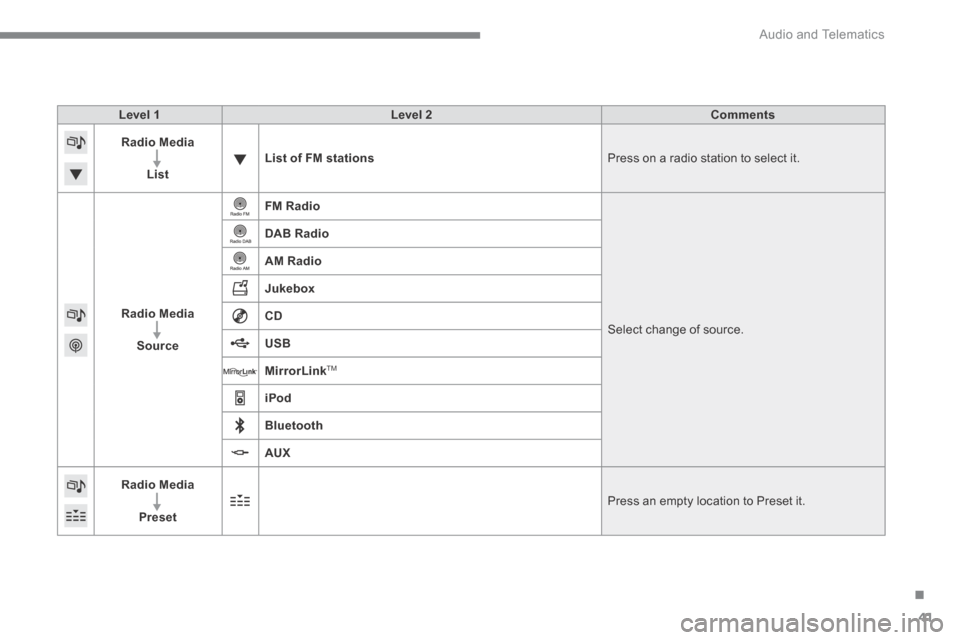
Level 1Level 2Comments
Radio Media
ListList of FM stations Press on a radio station to select it.
Radio Media
Source
FM Radio
Select change of source .
DAB Radio
AM Radio
Jukebox
CD
USB
MirrorLinkTM
iPod
Bluetooth
AUX
Radio Media
Preset Press an empty location to Preset it.