reset Citroen C4 2016 2.G User Guide
[x] Cancel search | Manufacturer: CITROEN, Model Year: 2016, Model line: C4, Model: Citroen C4 2016 2.GPages: 396, PDF Size: 10.22 MB
Page 307 of 396
305
C4-2_en_Chap10b_SMEGplus_ed02-2015
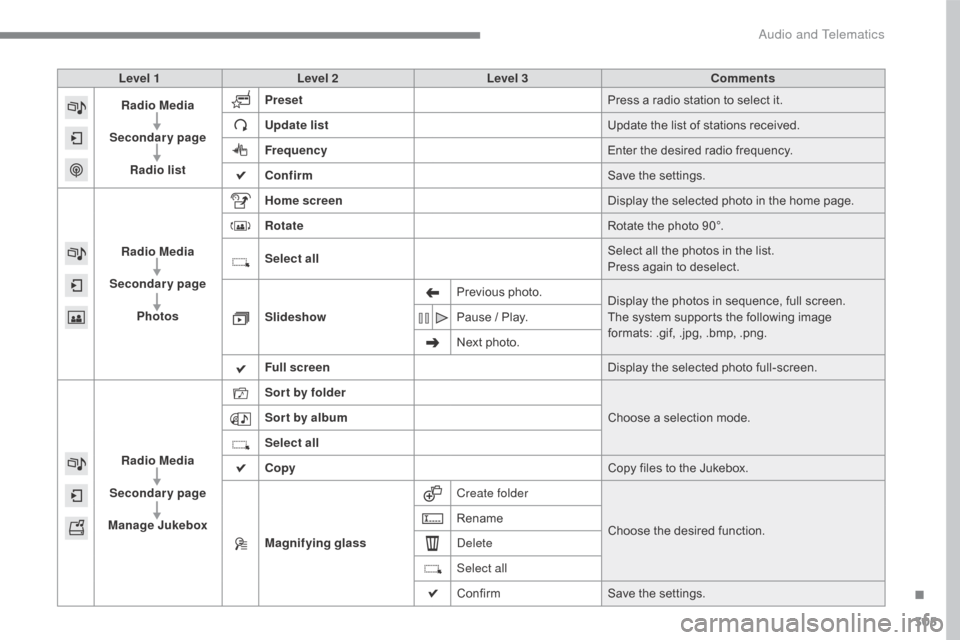
Level 1Level 2 Level 3 Comments
Radio Media
Secondary page Radio list Preset
Press
a radio station to select it.
Update list Update
the list of stations received.
Frequency Enter
the desired radio frequency.
Confirm Save
the settings.
Radio Media
Secondary page Photos Home screen
Display
the selected photo in the home page.
Rotate Rotate
the photo 90°.
Select all Select
all the photos in the list.
Press
again to deselect.
Slideshow Previous
pho
to.Display
the photos in sequence, full screen.
The
system supports the following image
f
ormats: .gif, .jpg, .bmp, .png.
Pause
/ Play.
Next
photo.
Full screen Display
the selected photo full-screen.
Radio Media
Secondary page
Manage Jukebox Sor t by folder
Choose
a selection mode.
Sor t by album
Select all
Copy Copy
files to the Jukebox.
Magnifying glass Create folder
Choose
the desired function.
Rename
Delete
Select all
Confirm
Save
the settings.
.
Audio and Telematics
Page 310 of 396
308
C4-2_en_Chap10b_SMEGplus_ed02-2015
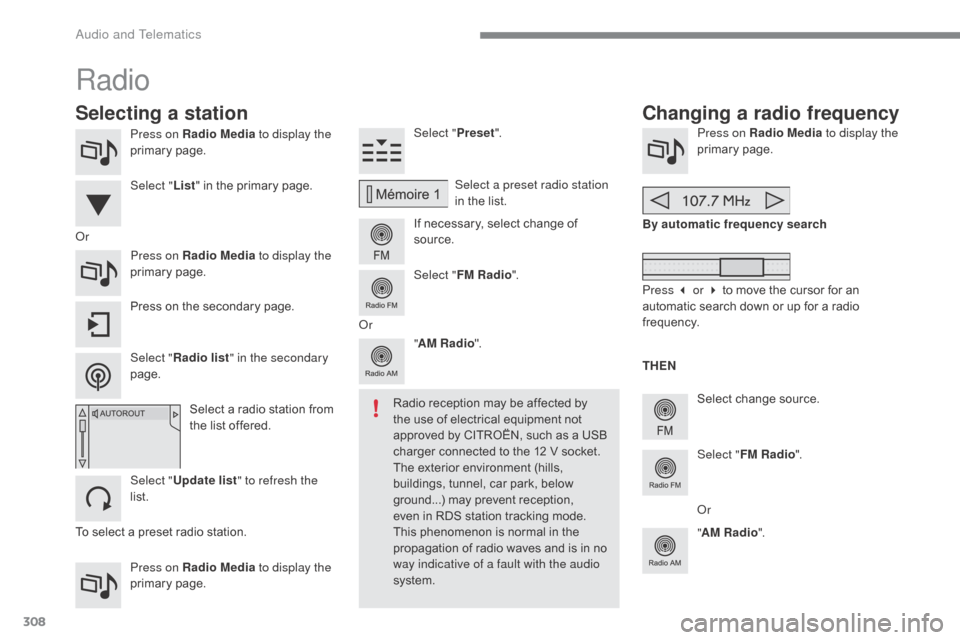
Press on Radio Media to display the
primary pag e.
Press on Radio Media to display the
primary
pag
e. Select "
Preset".
If necessary, select change of
s
ource.Press on Radio Media
to display the
primary pag e.
Select
change source.
"
AM Radio ". By automatic frequency search
Select "FM Radio ".
" AM Radio ".
Press
on the secondary page. Select a preset radio station
in
the list.
Select " FM Radio ".
Select
a radio station from
t
he list offered.
Select " Update list " to refresh the
list. Select " List"
in the primary page.
Press on Radio Media to display the
primary
pag
e.
Radio
Changing a radio frequency
Selecting a station
To select a preset radio station. TH EN
Radio reception may be affected by
t
he use of electrical equipment not
a
pproved by CITROËN, such as a USB
c
harger connected to the 12 V socket.
The exterior environment (hills,
b
uildings, tunnel, car park, below
g
round...) may prevent reception, e
ven in RDS station tracking mode. T
his phenomenon is normal in the
p
ropagation of radio waves and is in no
w
ay indicative of a fault with the audio
system.
Or
Select "Radio list " in the secondary
page. Or
Press 3 or 4 to move the cursor for an
a
utomatic search down or up for a radio
f
requency.
Or
Audio and Telematics
Page 311 of 396
309
C4-2_en_Chap10b_SMEGplus_ed02-2015
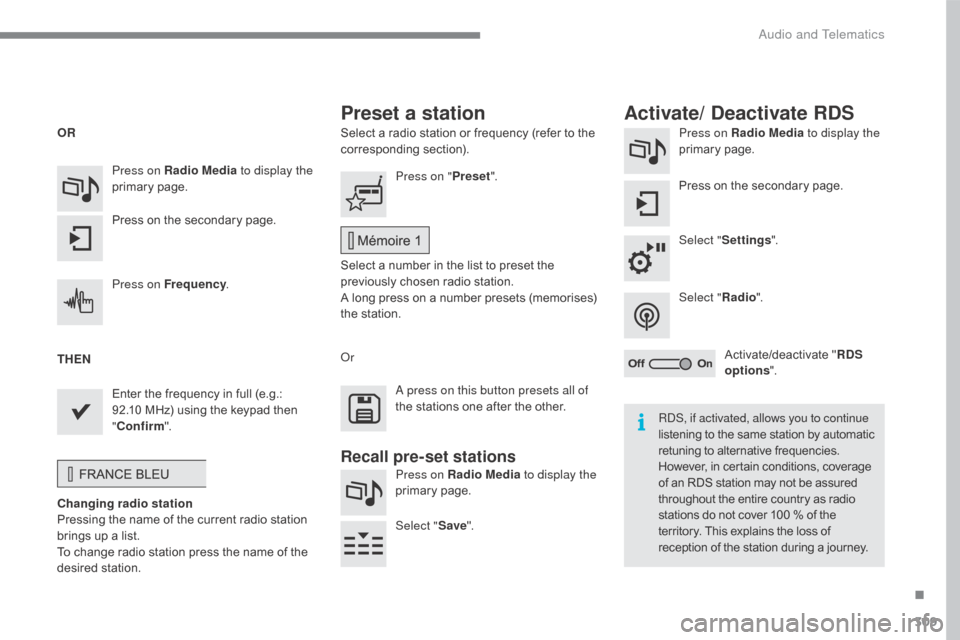
Select a radio station or frequency (refer to the corresponding s ection). Press on Radio Media
to display the
primary pag e.
Press
on the secondary page.
Select " Settings ".
Select " Radio".
Activate/deactivate
" R
DS
options ".
Press on Radio Media
to display the
primary
pag
e.
Press
on
the
secondary
page. Press on "
Preset".
Select
a number in the list to preset the
p
reviously chosen radio station.
A
long press on a number presets (memorises)
t
he station.
Press on Frequency
.
Enter
the
frequency
in
full
(e.g.:
9
2.10
MHz)
using
the
keypad
then
" Co
nfirm ".
Changing radio station
Pressing
the
name
of
the
current
radio
station
b
rings
up
a
list.
To
change
radio
station
press
the
name
of
the
de
sired
s
tation. Or
Press on Radio Media to display the
primary
pag
e.
Select " Save".
Preset a station Activate/ Deactivate RDS
OR
THEN
A press on this button presets all of
the
stations one after the other.
Recall pre-set stations
RDS, if activated, allows you to continue
listening to the same station by automatic r
etuning to alternative frequencies.
H
owever, in certain conditions, coverage
o
f an RDS station may not be assured
t
hroughout the entire country as radio
s
tations do not cover 100 % of the
t
erritory. This explains the loss of
r
eception of the station during a journey.
.
Audio and Telematics
Page 312 of 396
310
C4-2_en_Chap10b_SMEGplus_ed02-2015
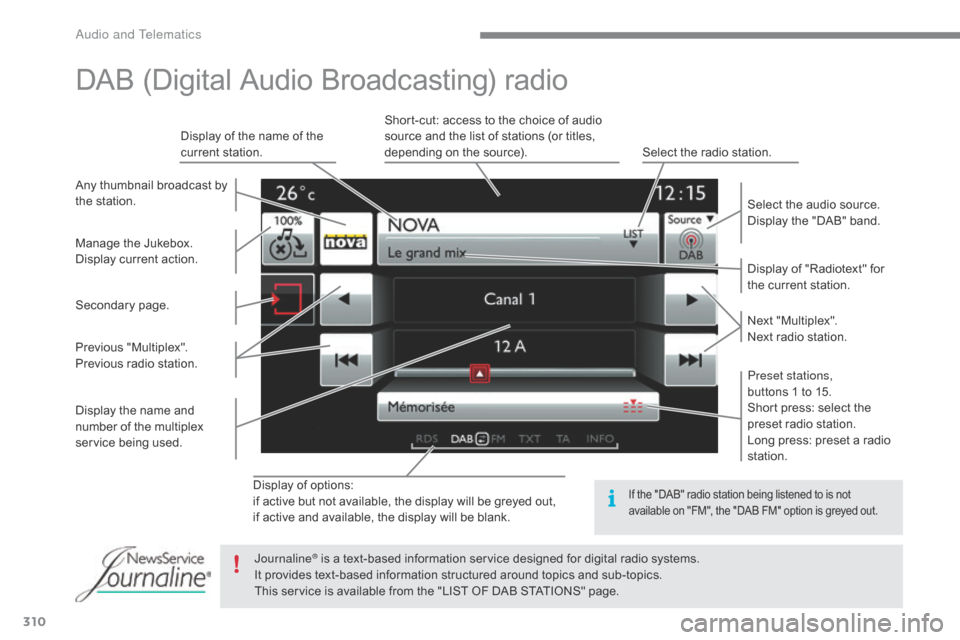
Display of options:
i f active but not available, the display will be greyed out,
if
active and available, the display will be blank. Display
of "Radiotext" for
t
he current station.
Manage
the
Jukebox.
Display
current
action.
Select the audio source.
Display the "DAB" band.
Display
of
the name of the
c
urrent
station.
Short-cut: access to the choice of audio
s
ource and the list of stations (or titles,
d
epending on the source).
Select the radio station.
Any
thumbnail
broadcast
by
t
he
station.
Preset stations,
buttons 1 to 15.
Short press: select the
p
reset radio station.
Long press: preset a radio
s
tation.
Next
"
Multiplex".
Next radio station.
Secondary
p
age.
Display
the
name
and
n
umber
of
the
multiplex
ser
vice
b
eing
u
sed.
Previous
"
Multiplex".
Previous
radio
station.
DAB (Digital Audio Broadcasting) radio
If the "DAB" radio station being listened to is not a
vailable on "FM", the "DAB FM" option is greyed out.
Journaline® is a text-based information service designed for digital radio systems.
I
t
provides
text-based information structured around topics and sub-topics.
This
service is available from the "LIST OF DAB STATIONS" page.
Audio and Telematics
Page 329 of 396
327
C4-2_en_Chap10b_SMEGplus_ed02-2015
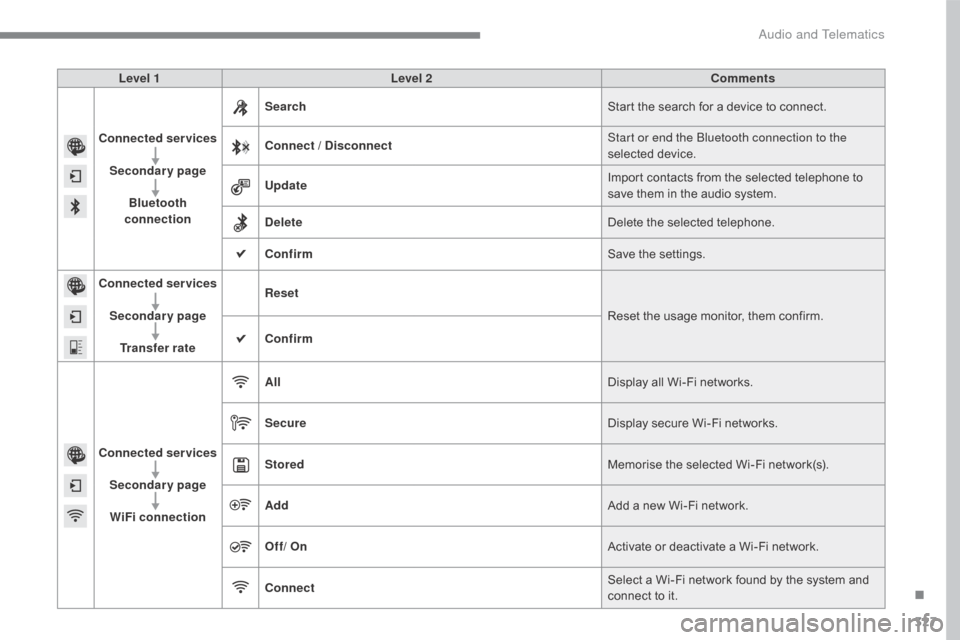
Level 1Level 2 Comments
Connected services Secondary page Bluetooth
connection Search
Start
the search for a device to connect.
Connect / Disconnect Start or end the Bluetooth connection to the
selected
d
evice.
Update Import
contacts from the selected telephone to
s
ave them in the audio system.
Delete Delete
the selected telephone.
Confirm Save
the settings.
Connected services
Secondary pageTransfer rate Reset
Reset
the usage monitor, them confirm.
Confirm
Connected services Secondary pageWiFi connection All
Display
all Wi-Fi networks.
Secure Display
secure Wi-Fi networks.
Stored Memorise
the selected Wi-Fi network(s).
Add Add
a new Wi-Fi network.
Off/ On Activate
or deactivate a Wi-Fi network.
Connect Select
a Wi-Fi network found by the system and
c
onnect to it.
.
Audio and Telematics
Page 356 of 396
354
C4-2_en_Chap10c_RD5_ed02-2015
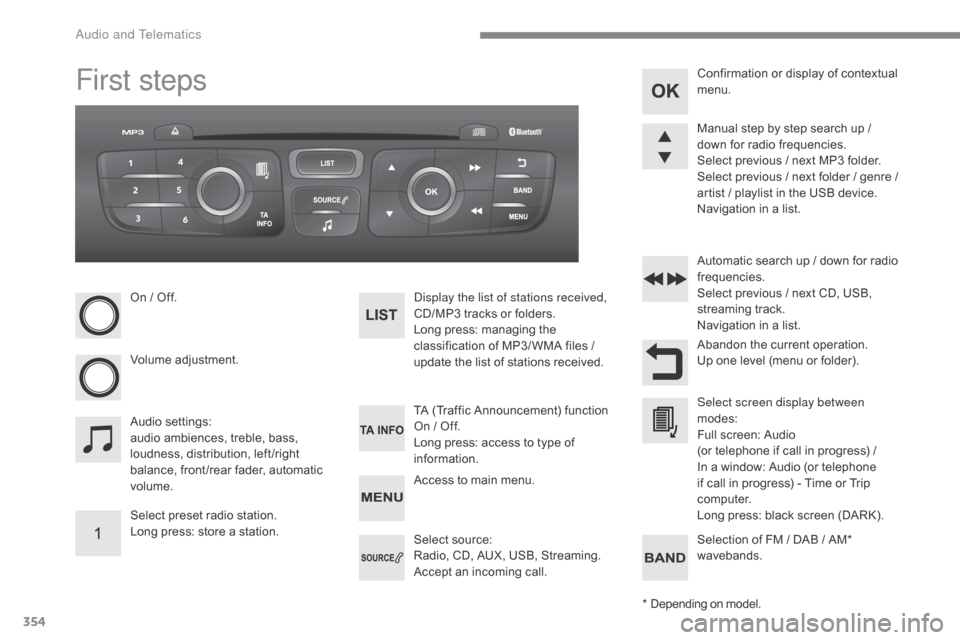
First steps
On / Off.
V olume
adj
ustment.
Select
preset radio station.
Long
press: store a station. Display the list of stations received,
CD/MP3
tracks or folders.
Long
press: managing the
c
lassification of MP3/ WMA files /
u
pdate the list of stations received.
Audio
se
ttings:
audio
ambiences, treble, bass,
l
oudness, distribution, left /right
b
alance, front /rear fader, automatic
vo
lume. TA
(Traffic Announcement) function
O
n / Off.
Long
press: access to type of
i
nformation.Automatic
search up / down for radio
f
requencies.
Select previous / next CD, USB, s
treaming t rack.
Navigation
in a list.
Access
to main menu.Abandon
the current operation.
Up
one level (menu or folder).
Confirmation
or display of contextual
m
enu.
Manual step by step search up /
d
own for radio frequencies.
Select previous / next MP3 folder.
Select previous / next folder / genre /
a
rtist / playlist in the USB device.
Navigation in a list.
Select
s
ource:
Radio,
CD, AUX, USB, Streaming.
Accept
an incoming call.Select screen display between
modes:
Full
screen: Audio
(or
telephone if call in progress) /
In
a window: Audio (or telephone
i
f call in progress) - Time or Trip
c
omputer.
Long
press: black screen (DARK).
*
D
epending on model.
Selection
of FM / DAB / AM*
w
avebands.
Audio and Telematics
Page 361 of 396
359
C4-2_en_Chap10c_RD5_ed02-2015
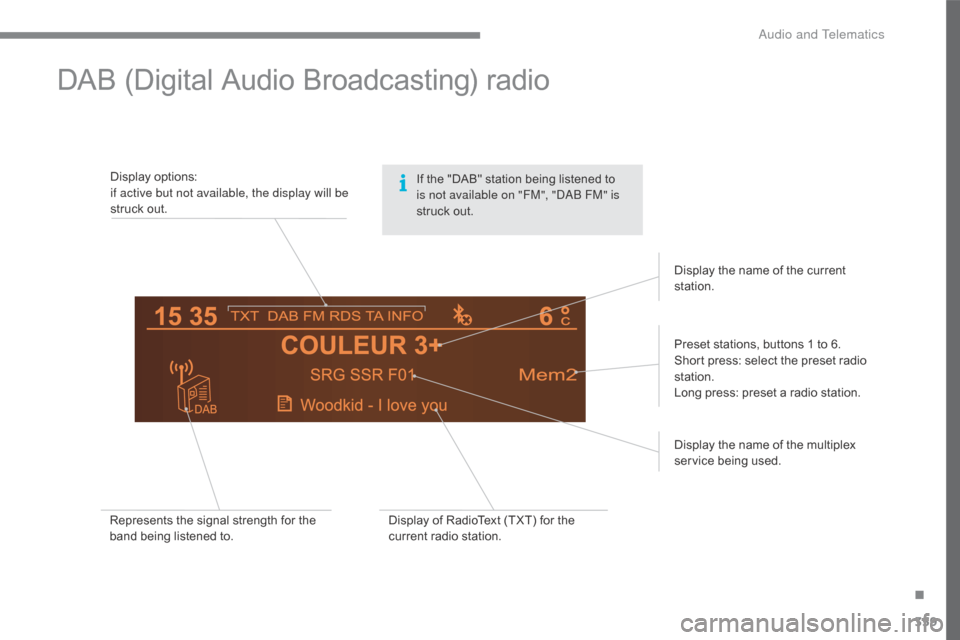
DAB (Digital Audio Broadcasting) radio
Display options:if active but not available, the display will be
struck
out.
Preset
stations, buttons 1 to 6.
Short
press: select the preset radio
s
tation.
Long
press: preset a radio station.
Display
the name of the multiplex
ser
vice
b
eing
u
sed.
Represents
the signal strength for the
b
and being listened to. Display
of RadioText (TXT) for the
c
urrent radio station.Display
the name of the current
s
tation.
If
the "DAB" station being listened to
i
s not available on "FM", "DAB FM" is
struck
out.
.
Audio and Telematics
Page 388 of 396
386
C4-2_en_Chap11_index-alpha_ed02-2015
Safety, children ...................... 146, 148, 151-165
Screen, cold climate ..................................... 2
13
Screen
menu map
....... 2
88, 290, 294, 302, 304,
306,
316, 318, 320, 336, 338, 374-376
Screen,
m
ultifunction
............... 4
0, 42, 356, 374
Screenwash, front
......................................... 13
7
Screenwash, rear
...............................
..........13 8
SCR
(Selective Catalytic
Reduction)
................................................. 2
32
Seat belts
...................................... 14
3 -146,
1
57
Seats, electric
................................................ 8
2
Seats, front
...............................
.......... 81, 82, 85
Seats, heated
...............................
..................83
Seats, rear
..................................................... 11
5
S erial
number,
vehicle
...............................
.........................279
Service indicator
............................................ 3
0
Servicing
...............................
.........................10
S
Settings, equipment ........................... 4 1, 44, 49
Settings ( Menus) .................. 3 16, 318, 320, 323
Sidelamps
.................... 1
24, 128, 251, 255, 257
Side repeater
..............................
.................256
Ski
flap
..............................
............................117
Snow chains
.................................................. 2
12
Socket,
12 V accessory
............... 1
03, 109, 120
Sockets,
audio
............................. 1
04, 363, 364
Speakers
(
fitting)
.......................................... 2
20
Speed
l
imiter
...............................
......... 198, 204
Speedometer
..............................
...............12-14
Spotlamps,
si
de
................................... 1
30, 256
Starting
the engine
...................................... 16
8
Starting
using another
battery
........................................................ 26
6
Station, radio
........................................ 3
08, 357
Stay, bonnet
...............................
..................223
Steering
wheel,
adjustment
................................................... 86
St
op & Start
........................ 2
7, 55, 96, 100, 188,
209,
223, 230, 265
Storage
................
.. 102, 103, 108, 110, 111, 118
Storage
c
ompartments
................................ 10
8
Storing
driving positions
................................85
S
towing
r
ings
..............................
..................118
Sun visor
...................................................... 10
3
Switching
off the engine
..............................16
8
Synchronising
the remote
control
.....................................................6
1, 67
Replacing
the
oil
filter
.................................. 23
0
Replacing t
he p
assenger
c
ompartment
filter
..................................... 23
0
Resetting
the
service
indicator
...................... 32
R
esetting
the
trip
recorder
............................. 36
R
ev counter
................................................ 1
2-15
Reversing
lam
ps
.......................................... 2
57
Risk
areas
(update)
...................................... 29
9
Roof bars
...................................................... 2
22
Running
out
of
fuel
(Diesel)
......................... 23
8 Table
of weights ........................... 2 72, 275, 277
Tables of engines ............................... ...271, 273
Tables of fuses
.............................................26
0
Tank,
AdBlue
® additive ................................2 32
Tank,
fuel
............................... ................2 0 9 , 2 11
Technical data
....................................... 2
71-278
Telephone
............................................ 3
36, 366
Three flashes (direction
i
ndicators)
................................... 13
1
Ticket
holder
................................................ 10
2
Time
(setting)
..............................
.. 37, 41, 46, 50
TMC
(Traffic
info)
......................................... 3
00
To o l s
................
............................................. 244
Topping-up
the AdBlue
® additive ................ 23 3
To r c h ..............................
.............................. 120
Total distance recorder
.................................. 36
T
ouch screen tablet
....................................... 47
T
ouch screen tablet ( M e nu s)
...............................
... 48, 50, 283, 287
Towball,
quickly
detachable
.......................... 2
14
To w b a r
................
................................... 167, 213
Towbar
with
quickly
detachable
towball
...............................
.......................... 214
Towed loads
................................. 2
72, 275, 277
Towing
another
vehicle
................................ 26
9
Traction
control
(ASR)
.................................. 1
41
Traffic
information
(TA)
........................ 3
01, 358
Traffic
information
(TMC)
............................. 3
00
Tr a i l e r
...............
..................................... 167, 213
Trajectory
control
systems
............................ 1
41
Trip
computer
............................................ 5
2-55
Trip distance recorder
.................................... 36
T
y r e s
..............................................................
.10
Tyre under-inflation detection
...................... 19
2
T
Alphabetical index