radio CITROEN C4 2018 User Guide
[x] Cancel search | Manufacturer: CITROEN, Model Year: 2018, Model line: C4, Model: CITROEN C4 2018Pages: 317, PDF Size: 9.31 MB
Page 244 of 317
242
C4-cactus_en_Chap10b_SMEGplus_ed01-2016
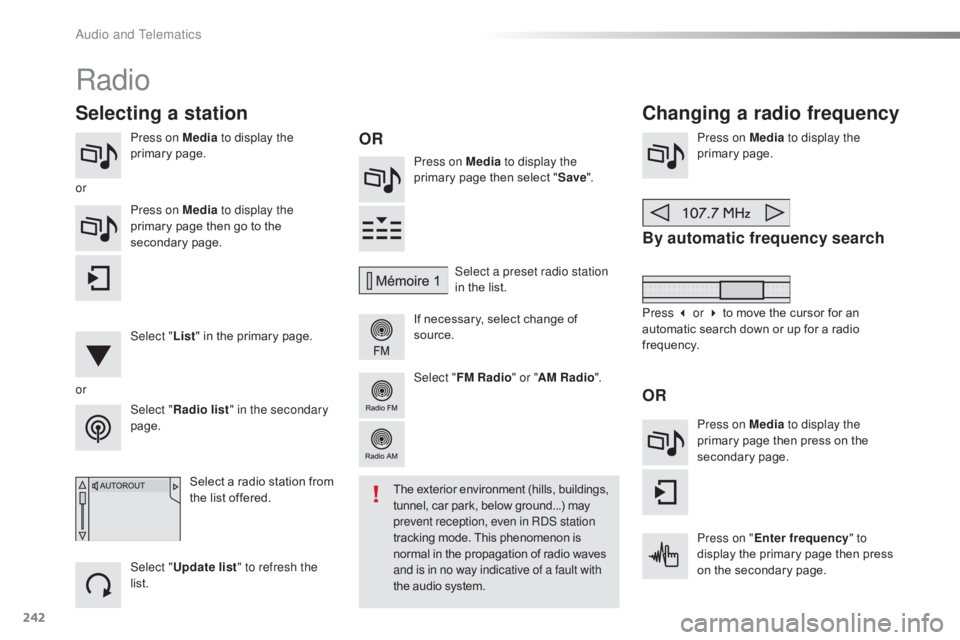
Press on Media to display the
primary pag e. Press on Media to display the
primary
page then select "Save ".
If
necessary, select change of
s
ource.Press on Media
to display the
primary pag e.
By automatic frequency search
Select "Radio list " in the secondary
page. Select a preset radio station
in
the list.
Select " FM Radio " or "AM Radio ".
Select a radio station from
t
he list offered.
Select " Update list " to refresh the
list. Press on Media to display the
primary page then go to the
s
econdary
pag
e.
Select " List" in the primary page.
Radio
Changing a radio frequency
Selecting a station
OR
orOR
The exterior environment (hills, buildings, t
unnel, car park, below ground...) may p
revent reception, even in RDS station
tracking
mode. This phenomenon is
n
ormal in the propagation of radio waves
a
nd is in no way indicative of a fault with
the
audio system.
or
Press 3 or 4 to move the cursor for an
a
utomatic search down or up for a radio
f
requency.
Press on Media to display the
primary page then press on the
s
econdary
pag
e.
Press on " Enter frequency " to
display
the primary page then press
o
n the secondary page.
Audio and Telematics
Page 245 of 317

243
C4-cactus_en_Chap10b_SMEGplus_ed01-2016
Select the change of source.
Sel ect " FM Radio " or "AM Radio ".Select
a radio station or frequency
(refer to the corresponding section).
Press on Media
to display the
primary page then go to the s
econdary pag e.
Select " Settings ".
Select " Radio".
Activate/deactivate
" R
DS
options ".
Press on "
Save".
Select
a number in the list to preset the
p
reviously chosen radio station.
A
long press on a number presets (memorises)
t
he station.
Enter
the frequency in full
(e.g.: 92.10
MHz) using the keypad
t
hen " Confirm ".
By alphabetical list
Press the current radio band then choose the
radio
station from the list offered. Or
Press on Media to display the
primary page then select "
Save ".
Preset a station Activate/ Deactivate RDS
THEN
OR
A press on this button presets all of
the
stations one after the other.
Recall preset stations
RDS, if activated, allows you to continue
listening to the same station by automatic r
etuning to alternative frequencies.
H
owever, in certain conditions, coverage
o
f an RDS station may not be assured
t
hroughout the entire country as
r
adio stations do not cover 100% of
the
territory. This explains the loss of
r
eception of the station during a journey.
.
Audio and Telematics
Page 246 of 317
244
C4-cactus_en_Chap10b_SMEGplus_ed01-2016
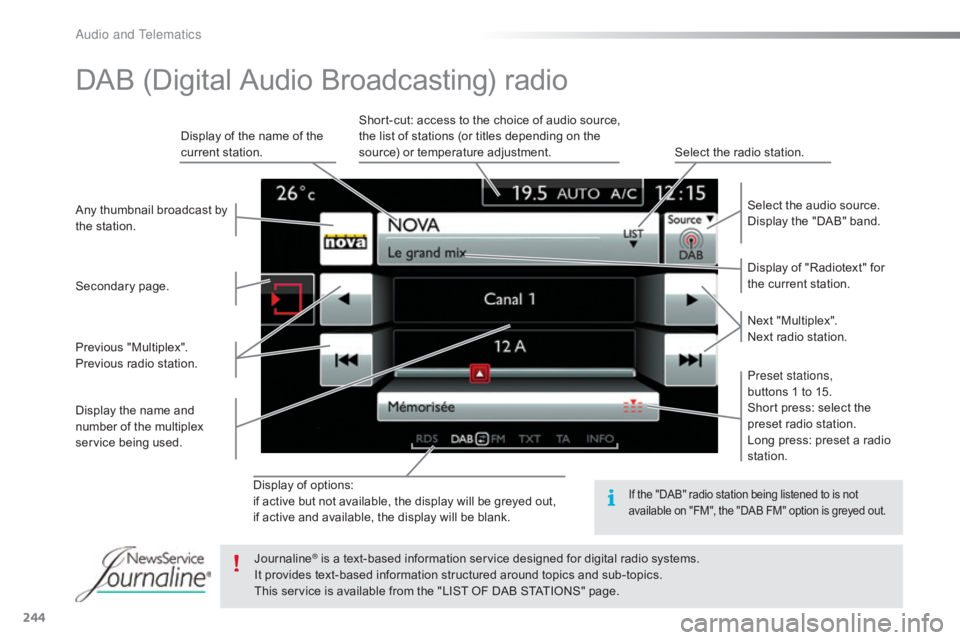
Display of options:
i f active but not available, the display will be greyed out,
if
active and available, the display will be blank. Display
of "Radiotext" for
t
he current station.
Select the audio source.
Display the "DAB" band.
Display
of
the name of the
c
urrent
station.
Short-cut: access to the choice of audio source,
t
he list of stations (or titles depending on the
s
ource) or temperature adjustment.
Select the radio station.
Any
thumbnail
broadcast
by
t
he
station.
Preset stations,
buttons 1 to 15.
Short press: select the
p
reset radio station.
Long press: preset a radio
s
tation.
Next
"
Multiplex".
Next radio station.
Secondary
p
age.
Display
the
name
and
n
umber
of
the
multiplex
ser
vice
b
eing
u
sed.
Previous
"
Multiplex".
Previous
radio
station.
DAB (Digital Audio Broadcasting) radio
If the "DAB" radio station being listened to is not a
vailable on "FM", the "DAB FM" option is greyed out.
Journaline® is a text-based information service designed for digital radio systems.
I
t
provides
text-based information structured around topics and sub-topics.
This
service is available from the "LIST OF DAB STATIONS" page.
Audio and Telematics
Page 247 of 317

245
C4-cactus_en_Chap10b_SMEGplus_ed01-2016
Select change of source.
P ress on Media
to display the
primary
pag
e.
Select " DAB Radio ".
Select " List"
in the primary page.
Select
the radio station from the list offered.Press Media
to display the primary
p
age then press on the secondary
pag
e.
Select " Settings ".
Select " Radio".
Select " Digital/FM auto
tracking " then "Confirm ".
Digital radio - DAB / FM
auto tracking
DAB
(Digital Audio Broadcasting)
Digital radio
"DAB" does not cover 100% of the
te r r i to r y.
When
the digital radio signal is weak,
"
DAB/FM
s
tation
t
racking"
a
llows
y
ou
t
o
c
ontinue listening to the same station,
b
y automatically switching to the
c
orresponding "FM" analogue station
(
if there is one). If
"DAB/FM station tracking" is a
ctivated, there is a difference of a few
seconds
when the system switches to
"
FM" analogue radio with sometimes a
v
ariation in volume.
When
the digital signal is restored, the
s
ystem automatically changes back to
"
DA B ".
Digital
radio
provides
higher
quality
r
eception
and
also
the
graphical
display o
f
current
information
on
the
radio
s
tation
being
listened
to.
Select
"List"
in
t
he
primary
page.
The
range
of
multiplexes
available
is
d
isplayed
in
alphabetical
order. If
the "DAB" station being listened to
i
s not available on "FM" ("DAB/FM"
option
greyed out), or "DAB/FM station
t
racking" is not activated, the sound
w
ill cut out while the digital signal is too
w
eak.
or Select "Radio list " in the secondary
page.
.
Audio and Telematics
Page 265 of 317
263
C4-cactus_en_Chap10b_SMEGplus_ed01-2016
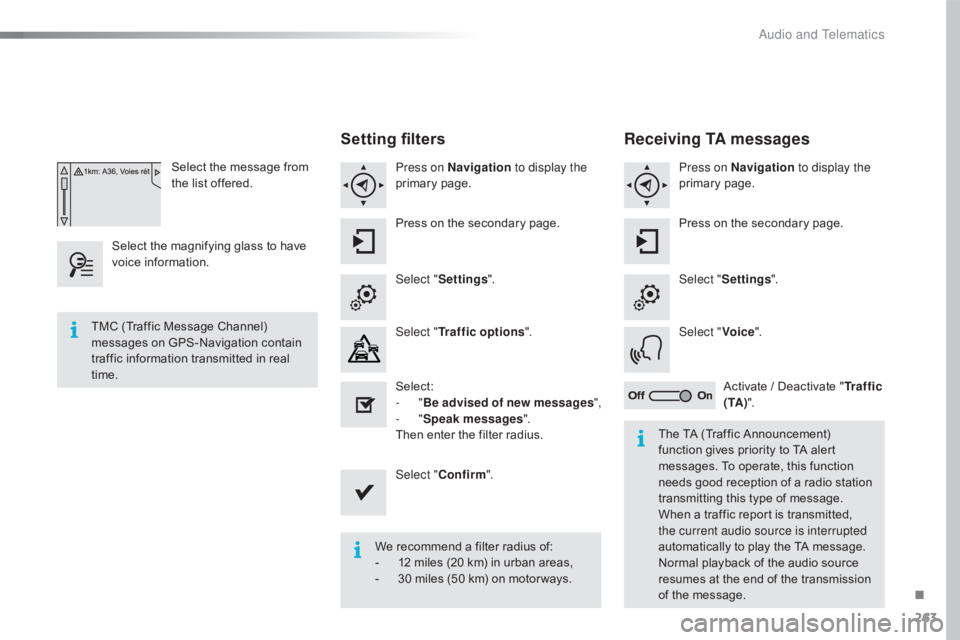
Select the message from the list offered.
Select
the
magnifying glass to have
v
oice
i
nformation.
Setting filters
Press on Navigation to display the
primary pag e.
Press
on the secondary page.
Select " Settings ".
Select " Traffic options ".
Select:
-
"Be advised of new messages ",
-
"Speak messages ".
Then
enter the filter radius.
Select " Confirm ".
We
recommend a filter radius of:
-
1
2 miles (20 km) in urban areas,
-
3
0 miles (50 km) on motor ways.
TMC
(Traffic
Message
Channel)
m
essages
on
GPS-Navigation
contain
t
raffic
information
transmitted
in
real
t
ime. The
TA (Traffic Announcement)
f
unction gives priority to TA alert
m
essages. To operate, this function
n
eeds good reception of a radio station
t
ransmitting this type of message.
W
hen a traffic report is transmitted,
t
he current audio source is interrupted
automatically
to play the TA message.
N
ormal playback of the audio source
r
esumes at the end of the transmission
o
f the message.
Receiving TA messages
Press on Navigation to display the
primary pag e.
Press
on the secondary page.
Select " Settings ".
Select " Voice".
Activate
/ Deactivate "Tr a f f i c
( TA ) ".
.
Audio and Telematics
Page 286 of 317
284
C4-cactus_en_Chap10b_SMEGplus_ed01-2016
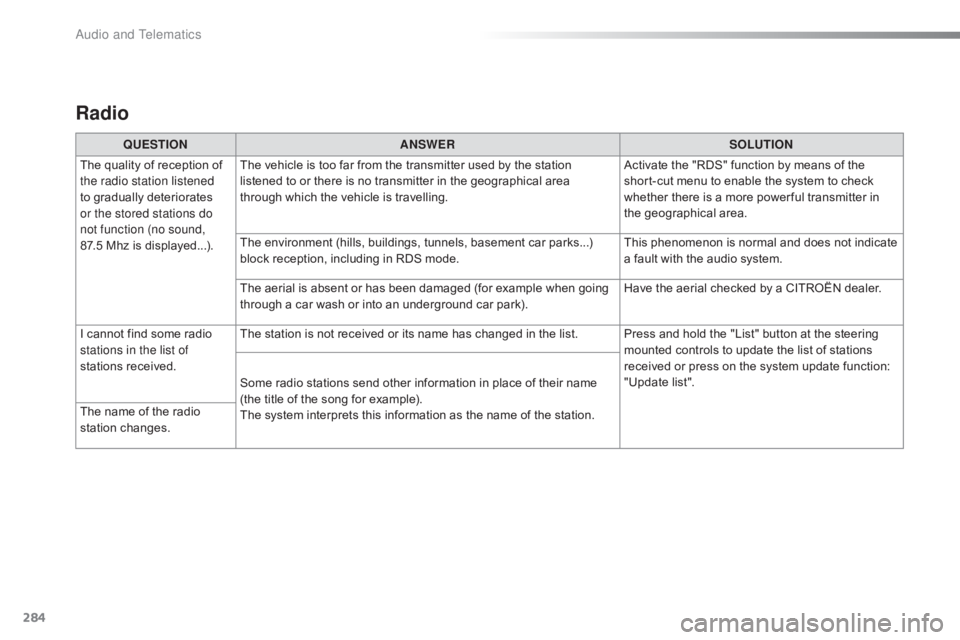
Radio
QUESTIONANSWER SOLUTION
The
quality of reception of
t
he radio station listened
to
gradually deteriorates
o
r the stored stations do
not function (no sound,
87.5 Mhz
is displayed...). The
vehicle is too far from the transmitter used by the station
l
istened to or there is no transmitter in the geographical area
t
hrough which the vehicle is travelling.Activate
the "RDS" function by means of the
s
hort-cut menu to enable the system to check
w
hether there is a more power ful transmitter in
t
he geographical area.
The
environment (hills, buildings, tunnels, basement car parks...)
b
lock reception, including in RDS mode.This
phenomenon is normal and does not indicate
a
fault with the audio system.
The
aerial is absent or has been damaged (for example when going
t
hrough a car wash or into an underground car park).Have
the aerial checked by a CITROËN dealer.
I
cannot find some radio
s
tations in the list of
stations
r
eceived. The
station is not received or its name has changed in the list. Press and hold the "List" button at the steering
m
ounted controls to update the list of stations
r
eceived or press on the system update function:
"
Update list".
Some
radio stations send other information in place of their name
(
the title of the song for example).
The
system interprets this information as the name of the station.
The
name of the radio
s
tation
c
hanges.
Audio and Telematics
Page 290 of 317
288
C4-cactus_en_Chap10b_SMEGplus_ed01-2016
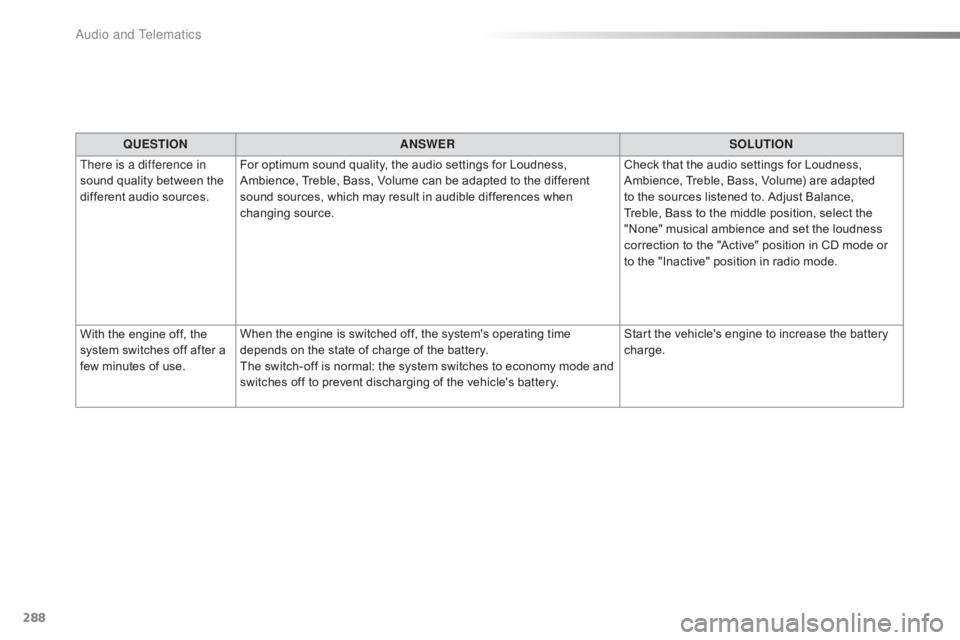
QUESTIONANSWER SOLUTION
There is a difference in
sound
quality between the
d
ifferent audio sources. For
optimum sound quality, the audio settings for Loudness,
A
mbience, Treble, Bass, Volume can be adapted to the different
s
ound sources, which may result in audible differences when
c
hanging
s
ource. Check
that the audio settings for Loudness,
A
mbience, Treble, Bass, Volume) are adapted
t
o the sources listened to. Adjust Balance,
T
reble, Bass to the middle position, select the
"
None" musical ambience and set the loudness
c
orrection to the "Active" position in CD mode or
t
o the "Inactive" position in radio mode.
With
the engine off, the
s
ystem
switches off after a
f
ew
minutes of use. When
the engine is switched off, the system's operating time
d
epends on the state of charge of the battery.
The
switch-off is normal: the system switches to economy mode and
s
witches off to prevent discharging of the vehicle's battery.Start
the vehicle's engine to increase the battery
c
harge.
Audio and Telematics
Page 293 of 317

291
C4-cactus_en_Chap11_index-alpha_ed01-2016
D
Earth point, remote ...............................16 8, 16 9
EBA ............................................................. ....91
Eco-driving
(
advice)
.......................................... 9
E
conomy mode
...............................
..............160
Electronic
brake force distribution
(EBFD)
...............................
...........................91
Electronic
gearbox system
...........................13
0
Emergency
c
all
...................................... 9
0, 226
Emissions
control system, SCR
.....................20
E
nergy economy mode
.................................16
0
Engine
c
ompartment
............................ 16
8,
16
9
Engine,
Diesel
.........1
4, 156, 169, 218, 221, 222 Hazard
w
arning
lam
ps
............................9
0, 184
Headlamps, automatic illumination
..........7
9, 82
Headlamps, dipped beam
.................7
8, 79, 198
Headlamps, main beam
............ 7
8, 79, 197, 199
Head restraints, front
......................................
50
H
ead restraints, rear
.......................................
52
H
eating
................
............................ 9, 57, 59, 61
Hill start assist ...............................................
13 1
Horn ................................................................. 90
F
H
Filling the fuel tank ........................153, 155, 156
Filter, air ............... ......................................... 173
Filter, oil
......................................................... 17
3
Filter, particle
........................................ 17
2 ,
17
3
Filter,
p
assenger
c
ompartment
.....................17
3
Fitting
roof bars
............................................. 16
4
Fittings,
boot
.............................................7
5, 77
Fittings,
in
terior
.......................................... 6
9 -74
Flap, fuel filler
...............................
.........153,
15
5
Foglamp,
r
ear
...............................
...........80, 202
Foglamps,
f
ront
.........................8
0, 85, 197, 200
Frequency
(radio)
..................................2
42, 243
Fuel ................................................................ 15 6
Fuel
c
onsumption
.............................................. 9
F
uel tank........................................................ 153
Fuses
................
.....................................205, 207
E
DAB (Digital Audio Broadcasting) -
D igital r adio ......................................... 244, 245
Date
(setting)
...............................
....................38
Daytime
running lamps
.......................7
8, 79, 83
Daytime
running lamps, LED
................19
7,
19
8
Deactivating
t
he
p
assenger
ai
rbag
.................................................. 10
0, 107
Defrosting
...............................
...................65, 66
Demisting
...............................
...................65, 66
Diesel
...............................
.............................15 6
Dimensions
..............................
.....................223
Dipstick
................
.................................... 2 7, 17 0
Direction indicators
........... 8
1, 83, 197, 199, 202
Doors
..............................................................
.45
Driving
e
conomically ......................................... 9
Dynamic
stability control
(
DSC)
....................................1
6, 18, 91, 93, 95Engine,
petrol ........................1 56, 168, 219, 220
Engines ..............................
...................219, 2
21
Environment
...............................
................. 9, 42
ESC (electronic stability control)
.............. 1
6, 91, 94Gauge,
fuel.............................................. 11, 153
Gearbox, e
lectronic ....................9
, 23, 70, 73, 127,
1
32, 133, 174
Gearbox,
m
anual
...........9
, 69, 73, 125, 131, 132,
1
33, 174
Gear shift indicator
....................................... 12
6
Gear
lever, manual gearbox
.........................12
5
Glove
box
...................................................6
9 -71
Grip control
.....................................................94
G
Identification, vehicle ....................................2 24
Ignition ................ .....................................64, 123
I
.
Alphabetical index
Page 295 of 317

293
C4-cactus_en_Chap11_index-alpha_ed01-2016
Radio ............................................................. 242
Radio, digital (Digital Audio Broadcasting -
D
A B) ............................................................ 244
RDS
................
............................................... 243
Rear
screen, demisting / defrosting................66
Recharging
the battery
.........................21
2, 214
Recirculation, air
...............................
. 58, 60, 64Safety, children
...............
10
0, 104 -107, 110 -118
Screen,
cold climate
.....................................15
8
Screen, colour
................................ 2
9, 234, 235
S
R
Screenwash, front ...........................................87
S creenwash, rear ............................... .............87
SCR (Selective Catalytic Reduction)
............ 17
5
Seat belts
.......................................... 9
6 -98, 110
Seat, rear bench
..............................
...............51
Seats, front
...............................
.......................49
Seats, heated
...............................
...................50
Seats, rear
....................................................... 51
S
erial number, vehicle
..................................2
24
Service indicator
............................................. 24
S
ervicing
...............................
..........................10
Settings,
e
quipment
........................................ 28
S
ettings
(
Menus)
...............................
............264
Settings,
system
...............................
.............271
Sidelamps
......................... 7
8, 83, 197, 198, 202
Side repeater
..............................
..................201
Snow chains
.................................................. 15
7
Socket,
12 V accessory
.............................6
9 -71
Socket,
auxiliary
...............................
.......72, 246
Socket,
JACK
...............................
...........72, 246
Sockets,
audio
................................................ 72
Spe
ed
l
imiter
...............................
.......... 135, 141
Stability control (ESC) ............................... 16,
91
Starting
the engine
............................... 12
1, 127
Starting
using another battery
......................2
13
Station, radio
.........................................2
42, 243
Stay, bonnet
...............................
...................167
Steering
wheel, adjustment
............................54
S
topping the vehicle
..................................... 12
1
Stop & Start
........................ 1
5, 36, 65, 132, 145,
153,
167, 173, 212, 215
Stop
(warning lamp)
........................................ 17
St
orage
................
...................................... 71, 73
Sun visor
.................................................... 6
9 -71
Switching
off the engine
...............................12
1
Synchronising
the remote
control
........................................................... 42
P
aint colour code
.......................................... 2
24
Panoramic
glass
sunroof
................
.......................................... 68
Parcel shelf, rear
....................................... 76
, 77
Park
Assist
...............................
..................... 145
Parking
brake
........................................ 1
2 4 , 174
Parking
sensors,
front
................................... 14
3
Parking
sensors,
rear.................................... 142
Plates, identification ...................................... 224
Player, Apple
® .............................. .................248
Player,
MP3
CD ............................... ..............246
Player, USB
................................................... 24
6
Plip
..............................
.............................. 4 0 , 41
Pre-heater, Diesel
...............................
............14
Pressures, tyres
............................
185, 190, 224
Pre-tensioning
seat belts
................................ 98
P
riming
pu
mp
...............................
.................218
Priming
the
fuel system
................................ 2
18
Protecting
c
hildren
......................... 10
0, 104 -107, 110 -118
Protectors
...................................................... 18
2
Puncture
................
........................................ 185
PReduction of electrical load ..........................16 0
Regeneration of the particle
filter
........
..................................................... 173
Reinitialisation of the under-inflation detection
system
......................................... 1
51
Reinitialising
the remote control
.....................42
R
eminder, lighting on
...................................... 81
R
emote control
................................................ 40
R
emoving a wheel
..............................
..........193
Removing
the mat
...............................
............74
Replacing
bu
lbs
..............................
..............197
Replacing
f
uses
..............................
..............205
Replacing
the air filter
...................................17
3
Replacing
the oil filter
................................... 17
3
Replacing
t
he
p
assenger
c
ompartment filter
...................................... 17
3
Reservoir, screenwash
................................. 17
2
Resetting
the service
indicator
...............................
.........................26
Resetting
the trip recorder
..............................37
R
eversing
c
amera
...............................
..........14 4
Reversing
lam
p
............................................. 2
02
Risk
areas (update)
....................................... 2
61
Roof bars
....................................................... 16
4
Running
out of fuel
(Diesel)
....................................................... 2
18
.
Alphabetical index