wheel CITROEN C4 2018 User Guide
[x] Cancel search | Manufacturer: CITROEN, Model Year: 2018, Model line: C4, Model: CITROEN C4 2018Pages: 317, PDF Size: 9.31 MB
Page 95 of 317
93
C4-cactus_en_Chap05_securite_ed01-2016
Dynamic stability control
(DSC) and anti-slip regulation
(ASR)The DSC system offers exceptional safety in normal driving, but this should
n
ot encourage the driver to take extra
r
isks or drive at high speed.
The
correct operation of the system
d
epends on observation of the
manufacturer's
r
ecommendations
r
egarding the wheels (tyres and rims),
t
he braking components, the electronic
c
omponents and the CITROËN
a
ssembly and operation procedures.
After
an impact, have the system
c
hecked by a CITROËN dealer or a
q
ualified
w
orkshop.
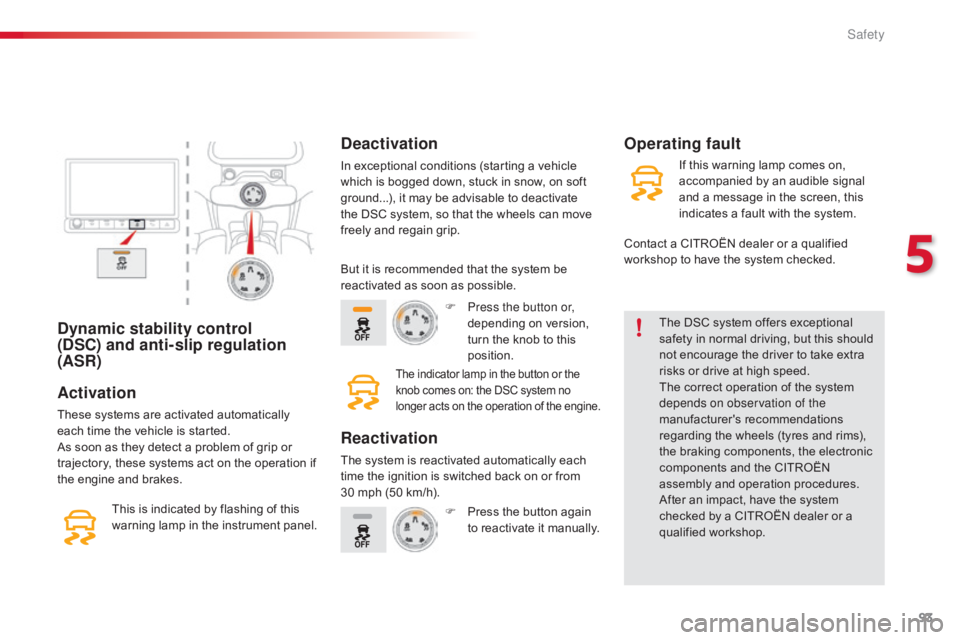
Activation
These systems are activated automatically each time the vehicle is started.
As
soon as they detect a problem of grip or
t
rajectory, these systems act on the operation if
t
he engine and brakes.
Deactivation
In exceptional conditions (starting a vehicle which is bogged down, stuck in snow, on soft
g
round...), it may be advisable to deactivate
t
he DSC system, so that the wheels can move
f
reely and regain grip.
This
is
indicated
by
flashing
of
this
w
arning
lamp
in
the
instrument
panel.
Operating fault
But it is recommended that the system be r eactivated as soon as possible.
F
P
ress the button or,
depending
on version,
t
urn the knob to this
p
osition.
The indicator lamp in the button or the knob comes on: the DSC system no l
onger acts on the operation of the engine.
Reactivation
The system is reactivated automatically each time the ignition is switched back on or from
3
0 mph (50 km/h).F
P
ress the button again
t
o reactivate it manually.If
this warning lamp comes on,
a
ccompanied by an audible signal
a
nd a message in the screen, this
i
ndicates a fault with the system.
Contact a CITROËN dealer or a qualified
w
orkshop to have the system checked.
5
Safety
Page 96 of 317
94
C4-cactus_en_Chap05_securite_ed01-2016
Grip control
Special patented traction control system which improves traction on snow, mud and sand.
This
system, the operation of which has been
o
ptimised for each situation, allows you to
m
anoeuvre in most conditions of poor grip
(
encountered
d
uring
t
ouring
u
se).
The accelerator pedal should be pressed
sufficiently
t
o
a
llow
t
he
s
ystem
t
o
u
se
t
he
p
ower
o
f the engine. Operation at high engine speeds
i
s completely normal.
Associated with all-seasons M+S (Mud and
Snow)
205/50 R 17 tyres, this system offers
a
compromise between safety, adhesion and
t
raction. These tyres work equally well in winter
a
nd summer.
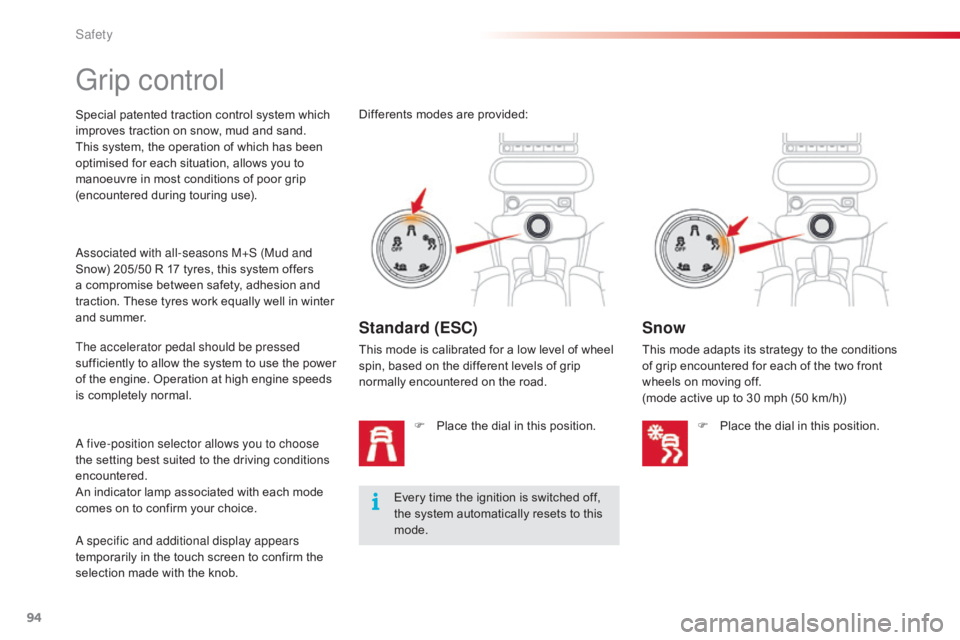
A five-position selector allows you to choose
the
setting best suited to the driving conditions
en
countered.
An
indicator lamp associated with each mode
c
omes on to confirm your choice.
A specific and additional display appears
temporarily
in the touch screen to confirm the
s
election made with the knob. Every
time the ignition is switched off,
t
he system automatically resets to this
m
ode.
Differents
modes are provided:
Standard (ESC)
This mode is calibrated for a low level of wheel s
pin, based on the different levels of grip
n
ormally encountered on the road.
F
P
lace the dial in this position.
Snow
This mode adapts its strategy to the conditions of grip encountered for each of the two front
w
heels on moving off.
(mode
active up to 30 mph (50 km/h))
F
P
lace the dial in this position.
Safety
Page 97 of 317
95
C4-cactus_en_Chap05_securite_ed01-2016
Driving advice
Your vehicle is designed principally to drive on tarmac roads but it allows you
t
o drive on other less passable terrain
occasionally.
However,
it does not permit off-road
d
riving such as:
-
c
rossing and driving on terrain
w
hich could damage the underbody
o
r strip away components (fuel
p
ipe, fuel cooler...) due to obstacles
o
r stones in particular,
-
d
riving on terrain with steep
g
radients and poor grip,
-
c
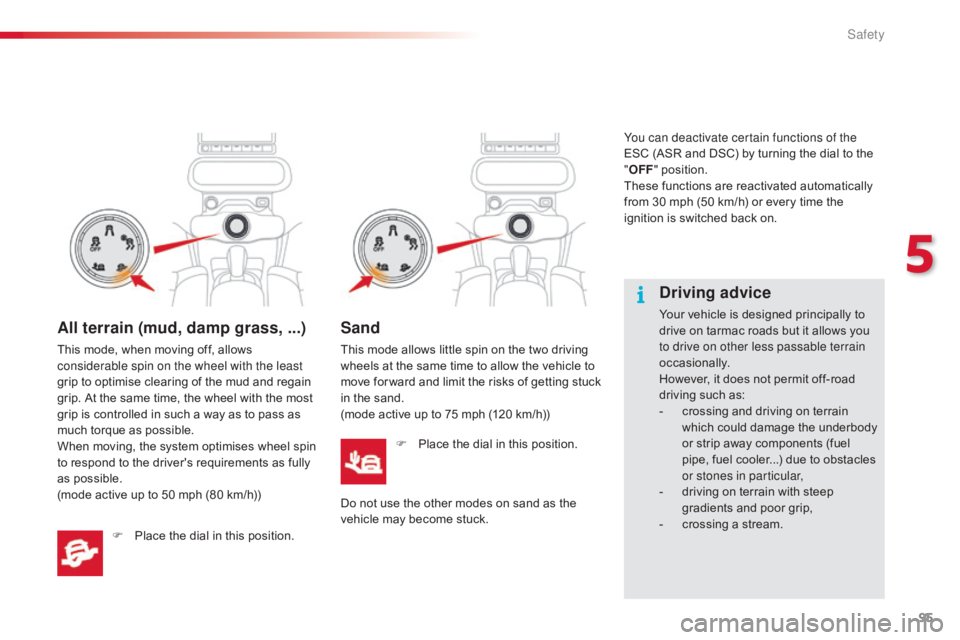
rossing a stream.All terrain (mud, damp grass, ...)
This mode, when moving off, allows considerable spin on the wheel with the least
grip
to optimise clearing of the mud and regain
g
rip. At the same time, the wheel with the most
g
rip is controlled in such a way as to pass as
m
uch torque as possible.
When
moving, the system optimises wheel spin
t
o respond to the driver's requirements as fully
a
s possible.
(mode
active up to 50 mph (80 km/h))
F
P
lace the dial in this position.
Sand
This mode allows little spin on the two driving wheels at the same time to allow the vehicle to
m
ove for ward and limit the risks of getting stuck
i
n the sand.
(mode
active up to 75 mph (120 km/h))
F
P
lace the dial in this position.
Do
not use the other modes on sand as the
v
ehicle may become stuck. You can deactivate certain functions of the
ESC
(ASR and DSC) by turning the dial to the
"
O
FF
" position.
These functions are reactivated automatically
f
rom 30 mph (50 km/h) or every time the
i
gnition is switched back on.
5
Safety
Page 102 of 317
100
C4-cactus_en_Chap05_securite_ed01-2016
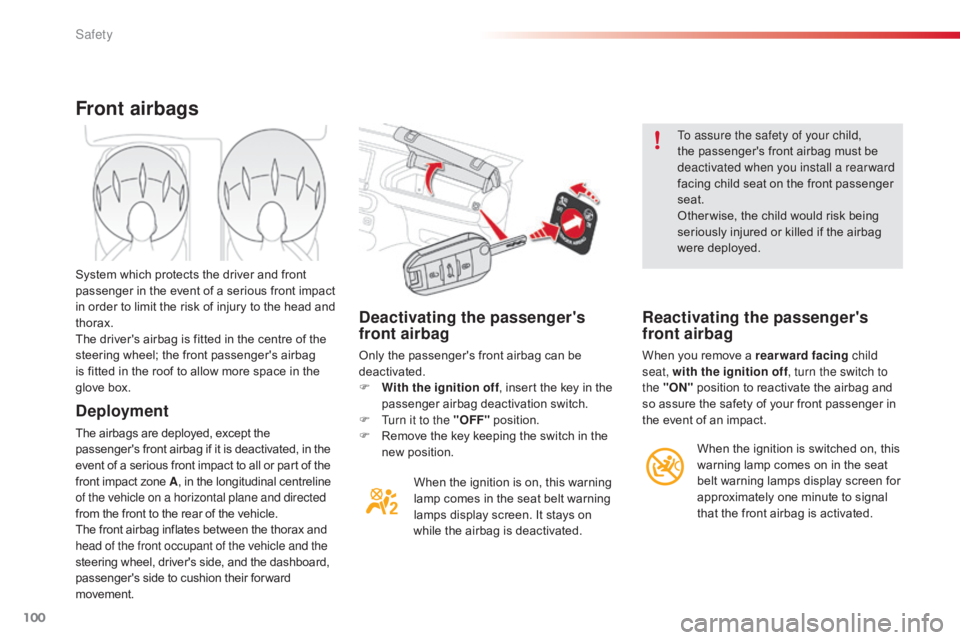
Deactivating the passenger's
front airbag
Only the passenger's front airbag can be deactivated.
F
W
ith the ignition off ,
insert the key in the
p
assenger airbag deactivation switch.
F
T
urn it to the "OFF"
p
osition.
F
R
emove the key keeping the switch in the
n
ew position.When
the ignition is on, this warning
l
amp comes in the seat belt warning
l
amps display screen. It stays on
w
hile the airbag is deactivated. To assure the safety of your child,
the
passenger's front airbag must be
d
eactivated when you install a rear ward
facing child seat on the front passenger
sea
t.
Other wise, the child would risk being
s
eriously injured or killed if the airbag
w
ere deployed.
Reactivating the passenger's
front airbag
When you remove a rearward facing
c hild
seat, with the ignition off , turn the switch to
the "ON"
position to reactivate the airbag and
s
o assure the safety of your front passenger in
t
he event of an impact.
Front airbags
Deployment
The airbags are deployed, except the passenger's front airbag if it is deactivated, in the e
vent of a serious front impact to all or part of the
f
ront impact zone A,
in the longitudinal centreline
o
f the vehicle on a horizontal plane and directed
from
the front to the rear of the vehicle.
The
front airbag inflates between the thorax and
h
ead of the front occupant of the vehicle and the
steering
wheel, driver's side, and the dashboard,
p
assenger's side to cushion their for ward
m
ovement.
System
which protects the driver and front
p
assenger in the event of a serious front impact
i
n order to limit the risk of injury to the head and
t
horax.
The driver's airbag is fitted in the centre of the
s
teering wheel; the front passenger's airbag
i
s fitted in the roof to allow more space in the
g
love box.
When the ignition is switched on, this
w
arning lamp comes on in the seat
b
elt warning lamps display screen for
a
pproximately one minute to signal
t
hat the front airbag is activated.
Safety
Page 105 of 317
103
C4-cactus_en_Chap05_securite_ed01-2016
Sit in a normal upright position.
W ear a correctly adjusted seat belt.
Do
not leave anything between the
o
ccupants and the airbags (a child, pet,
o
bject...), nor fix or attach anything close to
t
he inflation trajectory of the airbags; this
c
ould cause injuries during their deployment.
Never
modify the original definition of your
v
ehicle, particularly in the area directly
around
the airbags.
After an accident or if the vehicle has been
stolen
or broken into, have the airbag
s
ystems checked.
All
work on the airbag system must be
c
arried out by a CITROËN dealer or a
qualified
w
orkshop.
Even
if all of the precautions mentioned
a
re observed, a risk of injury or of minor
b
urns to the head, chest or arms when an
a
irbag is deployed cannot be ruled out. The
b
ag inflates almost instantly (within a few
m
illiseconds) then deflates within the same
t
ime discharging the hot gas via openings
p
rovided for this purpose.Front airbags
Do not drive holding the steering wheel by its spokes or resting your hands on the centre
p
art of the wheel.
Passengers
must not place their feet on the
das
hboard.
Do
not smoke as deployment of the airbags
c
an cause burns or the risk of injury from a
c
igarette or pipe.
Never
remove
or
pierce
the
steering
wheel
or
h
it it violently.
Do
not fit or attach anything to the steering
w
heel, the dashboard or the passenger's
s
un visor as this could cause injuries with
d
eployment of the airbags.
Advice
Lateral airbags
Use only approved covers on the seats,
compatible with the deployment the lateral
a
irbags. For information on the range of seat
c
overs suitable for your vehicle, you can
contact
a CITROËN dealer.
For
more information on accessories, refer
t
o the corresponding section.
Do
not fix or attach anything to the seat
b
acks (clothing...). This could cause injury
t
o the chest or arms if the lateral airbag is
d
eployed.
Do not sit with the upper part of the body any
nearer
to the door than necessary.
Curtain airbags
Do not fix or attach anything to the roof. This could cause injury to the head if the curtain
a
irbag is deployed.
If
fitted on your vehicle, do not remove the
g
rab handles installed on the roof, they play
a
part in securing the curtain airbags.
For the airbags to be fully effective, observe the safety recommendations below:
5
Safety
Page 121 of 317

119
C4-cactus_en_Chap06_conduite_ed01-2016
A few driving recommendations
Observe the driving regulations at all times and remain vigilant whatever the traffic conditions.
Pay
close attention to the traffic and keep your
h
ands on the wheel so that you are ready to
react
at any time to any eventuality.
On
a long journey, a break every two hours is
s
trongly
re
commended.
In
difficult weather, drive smoothly, anticipate
t
he need to brake and increase the distance
f
rom other vehicles.
Driving on flooded
roads
We strongly advise against driving on flooded roads, as this could cause serious damage
t
o the engine or gearbox, as well as to the
e
lectrical systems of your vehicle.If
you are obliged to drive through water:
-
c
heck that the depth of water does not
e
xceed 15 cm, taking account of waves
t
hat might be generated by other users,
-
d
eactivate the Stop & Start system,
-
d
rive as slowly as possible without
stalling. In all cases, do not exceed 6 mph
(
10 km/h),
- d o not stop and do not switch off the
engine.
On
leaving the flooded road, as soon as
c
ircumstances allow, make several light brake
a
pplications to dry the brake discs and pads.
If in doubt on the state of your vehicle, contact
a
CITROËN dealer or a qualified workshop.
Important!
Never drive with the parking brake applied - Risk of overheating and
d
amage to the braking system!
Do
not park or run the engine when
s
tationary in areas where inflammable
s
ubstances and materials (dry grass,
d
ead leaves...) might come into
c
ontact with the hot exhaust system -
R
isk of fire!
Never leave a vehicle unsupervised
with
the engine running. If you have
t
o leave your vehicle with the engine
r
unning, apply the parking brake
a
nd put the gearbox into neutral or
p
osition
N or P,
depending on the type
o
f gearbox.
6
Driving
Page 123 of 317

121
C4-cactus_en_Chap06_conduite_ed01-2016
Starting
The parking brake must be applied.
F
W
ith
a manual gearbox, place the gear
l
ever in neutral then depress the clutch
pedal
f
ully.
F
W
ith
an electronic gearbox, place the
c
ontrol at N then press the brake pedal
f
i r m l y.
F
I
nsert
the key into the ignition switch; the
s
ystem recognises the code.
F
U
nlock the steering column by simultaneously
t
urning the steering and the key.
In
certain cases, you may have to apply
m
ore force to the steering (wheels on
f
ull
lock, for example).
F
W
ith
a petrol engine, operate the starter
m
otor
by turning the key to position 3
without
pressing the accelerator pedal,
u
ntil
the engine starts. Once the engine is
r
unning, release the key.
Starting-switching off the engine
It has 3 positions:
- position 1 (Stop):
insert and removing
the
key,
-
position 2 (Ignition on) :
steering column
u
nlocked, ignition on, Diesel preheating,
e
ngine
r
unning,
-
position 3 (Starting) .
Ignition switch
Switching off the engine leads to a loss o
f braking assistance.
Ignition on position (2)
It allows the use of the vehicle's electric equipment or portable devices to be charged.
Once
the state of charge of the battery drops
t
o the reserve level, the system switches to
e
nergy economy mode: the power supply is
c
ut off automatically to preserve the remaining
b
attery charge.
Avoid
attaching heavy objects to the
k
ey, which would weigh down on its
b
lade in the ignition switch and could
c
ause a malfunction.
It
could adversely affect the deployment
o
f the front airbag.
6
Driving
Page 129 of 317

127
C4-cactus_en_Chap06_conduite_ed01-2016
ETG electronic gearbox
N Neutral: with your foot on the brake, press t
his control to put the gearbox into neutral
a
nd for starting the engine.
D
D
rive: press this control to engage for ward
d
rive with automatic operation of the gears.
R
R
everse: with your foot on the brake, press
t
his control to engage reverse.
Control panel
F Operate the paddle to the right of the steering wheel to
ch
ange
up.
Steering mounted controls
The steering mounted paddles do not a
llow neutral to be selected, or reverse
gear
to be engaged or disengaged.
Five
or
six-speed
electronically
controlled
gearbox
which
offers the comfort of automatic control of the gears, without any action by the driver.
You
can
temporarily
take
control
of
gear
changes
at
any
time, using the steering mounted control paddles.
F
O
perate the paddle to the left
of the steering wheel to change
down .
Display in the instrument panel
F Place your foot on the brake
when this warning lamp flashes.
N
Neutral
D and 1 2 3 4 5 / 6
D
rive (for ward drive) and
the
g
ear
enga
ged.
R
Reverse
6
Driving
Page 138 of 317

136
C4-cactus_en_Chap06_conduite_ed01-2016
Switching on / Pause
F Turn wheel 1 to the "LIMIT" position: the s
peed limiter mode is selected but is not
s
witched on (Pause).
F
S
witch the speed limiter back on by
p
ressing button 4, if the speed displayed
is suitable (by default, the last speed
programmed).
F
Y
ou can temporarily stop the the speed
l
imiter by pressing button 4 again: the
d
isplay confirms that it has been stopped
(
Pause). After
first selecting speed limiter mode (wheel 1
in position " LIMIT"),
you can modify the speed
s
etting by:
-
a p
ress on button 5:
F
t
he six speeds memorised are displayed
i
n the touch screen tablet,
F
c
hoosing a speed: it is displayed in the
in
strument
pan
el.
T
he selection screen closes after a
few moments. Speed
limits can be memorised in the
"
Driving assistance"
menu.
For
more information on memorising
s
peeds, refer to the corresponding
s
ection.
You do not have to switch the speed
limiter
on in order to set the speed.
The speed limiter is switched on
manually: it requires a programmed
s
peed of at least 20 mph (30 km/h).
Adjusting the speed limit
setting
Or:
-
u sing buttons 2 and 3,
increasing or
d
ecreasing the speed displayed:
F
b
y successive short presses, to modify
b
y + or - 1 mph (km/h),
F
b
y a maintained press, to modify in steps
o
f + or - 5 mph (km/h).
Driving
Page 139 of 317

137
C4-cactus_en_Chap06_conduite_ed01-2016
On sharp acceleration, as when
descending a steep hill, the speed
l
imiter will not be able to prevent
t
he vehicle from exceeding the
pro
grammed
s
peed.
The
limiter is temporarily deactivated
a
nd the displayed programmed speed
f
lashes.
An
audible signal accompanies the
f
lashing of the programmed speed
w
hen exceeding the speed is not due to
a
n action by the driver.
The
use of mats not approved by
C
ITROËN may inter fere with the
o
peration of the speed limiter.
To
avoid any risk of jamming of the
ped
als:
-
e
nsure that the mat is secured
c
o r r e c t l y,
-
d
o not fit one mat on top of another.
Flashing
of
the
dashes
indicates
a
fault
with
the
sp
eed l
imiter.
Have
it
checked
by
a
CITROËN
dealer
or
a
q
ualified
w
orkshop.
Operating fault
Switching off
F Turn wheel 1 to the "0" p osition. T
he display of information related to the
sp
eed
l
imiter
d
isappears.
F
Press
firmly on the accelerator pedal,
going beyond the point of resistance
, to
exceed the programmed speed limit.
The speed limiter is deactivated temporarily
a
nd the displayed programmed speed flashes.
Temporarily exceeding the
programmed speed
As soon as the vehicle's speed returns to the p
rogrammed value, the limiter operates again:
t
he display of the programmed speed setting
b
ecomes steady again.
An
audible signal accompanies the
f
lashing of the programmed speed
w
hen exceeding the speed is not due to
a
n action by the driver (steep hill...).
6
Driving