service CITROEN C4 2018 Owner's Guide
[x] Cancel search | Manufacturer: CITROEN, Model Year: 2018, Model line: C4, Model: CITROEN C4 2018Pages: 317, PDF Size: 9.31 MB
Page 237 of 317
235
C4-cactus_en_Chap10b_SMEGplus_ed01-2016
Telephone
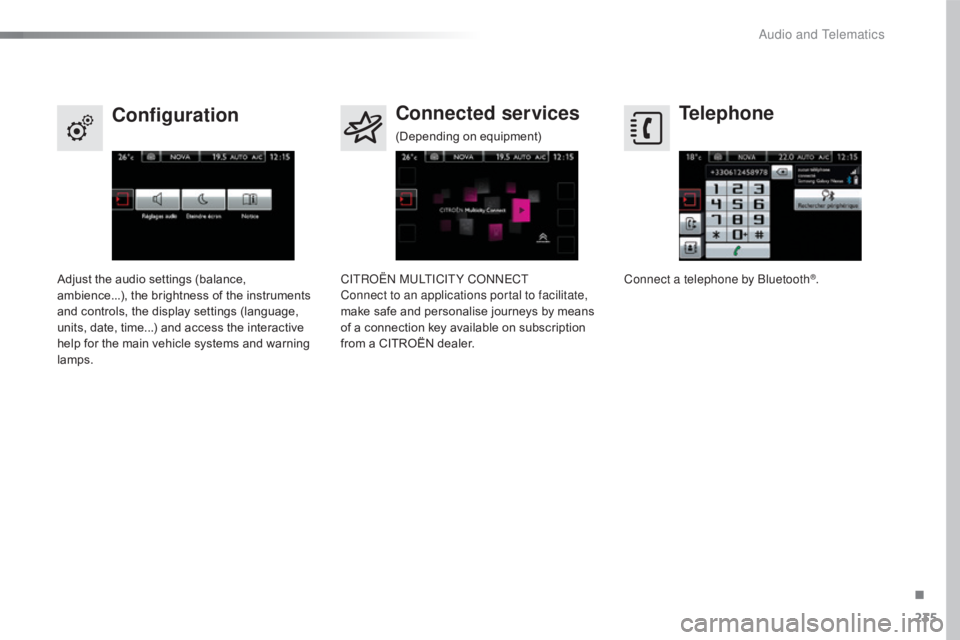
Configuration Connected services
Connect a telephone by Bluetooth®.
Adjust
the
audio
settings
(balance,
a
mbience...),
the
brightness
of
the
instruments
a
nd
controls,
the
display
settings
(language,
u
nits,
date,
time...)
and
access
the
interactive
h
elp
for
the
main
vehicle
systems
and
warning
lam
ps. CITROËN MULTICITY CONNECT
Connect to an applications portal to facilitate,
make
safe
and
personalise
journeys
by
means
o
f
a
connection
key
available
on
subscription
f
rom
a
CITROËN
dealer.
(Depending
o
n
e
quipment)
.
Audio and Telematics
Page 246 of 317
244
C4-cactus_en_Chap10b_SMEGplus_ed01-2016
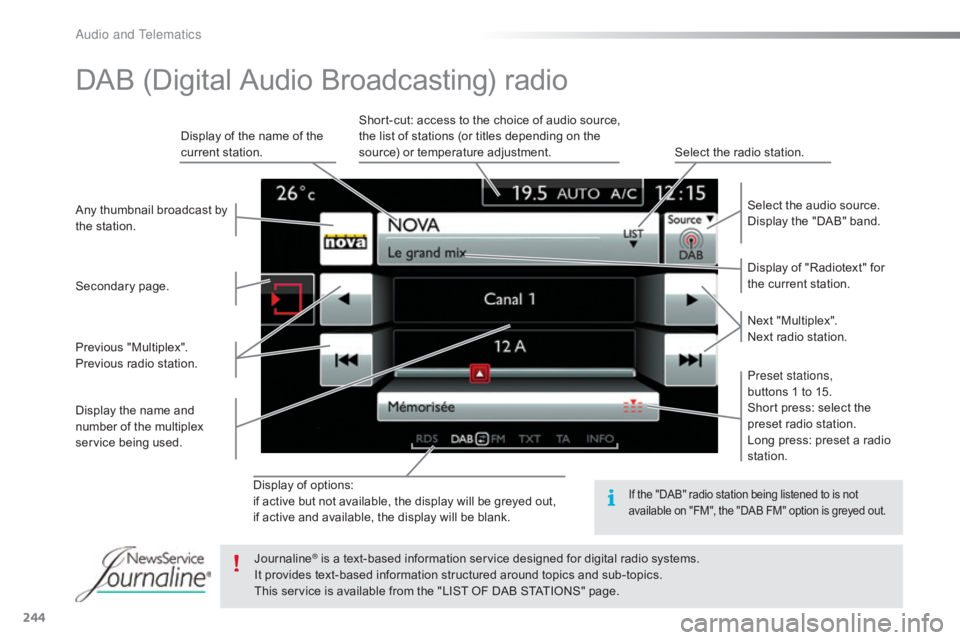
Display of options:
i f active but not available, the display will be greyed out,
if
active and available, the display will be blank. Display
of "Radiotext" for
t
he current station.
Select the audio source.
Display the "DAB" band.
Display
of
the name of the
c
urrent
station.
Short-cut: access to the choice of audio source,
t
he list of stations (or titles depending on the
s
ource) or temperature adjustment.
Select the radio station.
Any
thumbnail
broadcast
by
t
he
station.
Preset stations,
buttons 1 to 15.
Short press: select the
p
reset radio station.
Long press: preset a radio
s
tation.
Next
"
Multiplex".
Next radio station.
Secondary
p
age.
Display
the
name
and
n
umber
of
the
multiplex
ser
vice
b
eing
u
sed.
Previous
"
Multiplex".
Previous
radio
station.
DAB (Digital Audio Broadcasting) radio
If the "DAB" radio station being listened to is not a
vailable on "FM", the "DAB FM" option is greyed out.
Journaline® is a text-based information service designed for digital radio systems.
I
t
provides
text-based information structured around topics and sub-topics.
This
service is available from the "LIST OF DAB STATIONS" page.
Audio and Telematics
Page 274 of 317
272
C4-cactus_en_Chap10b_SMEGplus_ed01-2016
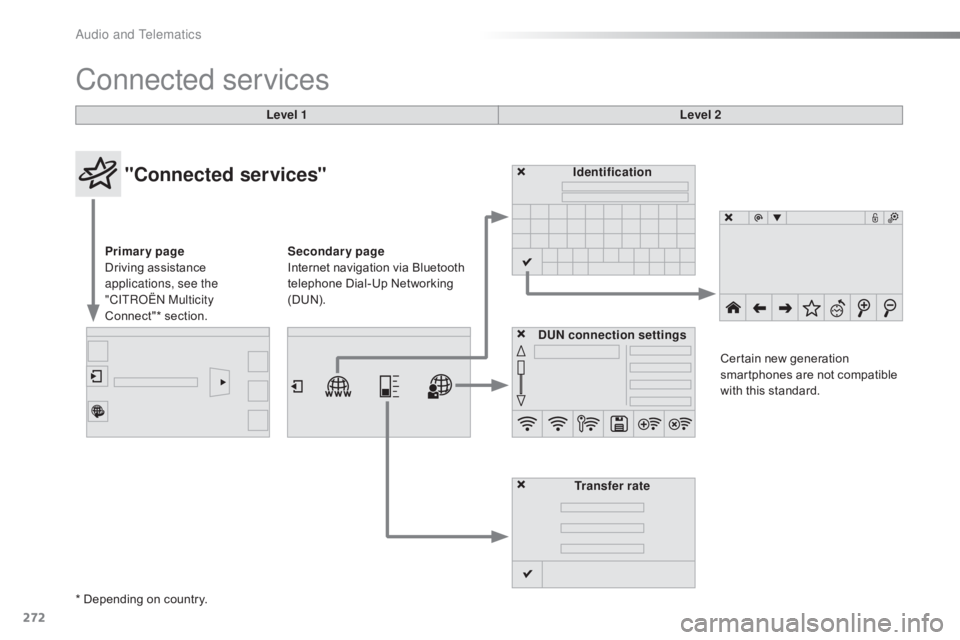
Connected services
Level 1Level 2
"Connected services"
Primary page
Driving assistance
a
pplications, see the
"CITROËN Multicity
Connect"*
s
ection. Identification
DUN connection settings Transfer rate Certain
new generation
s
martphones are not compatible
w
ith this standard.
Secondary page
Internet navigation via Bluetooth
t
elephone Dial-Up Networking
(
DUN).
* Depending
on country.
Audio and Telematics
Page 275 of 317
273
C4-cactus_en_Chap10b_SMEGplus_ed01-2016
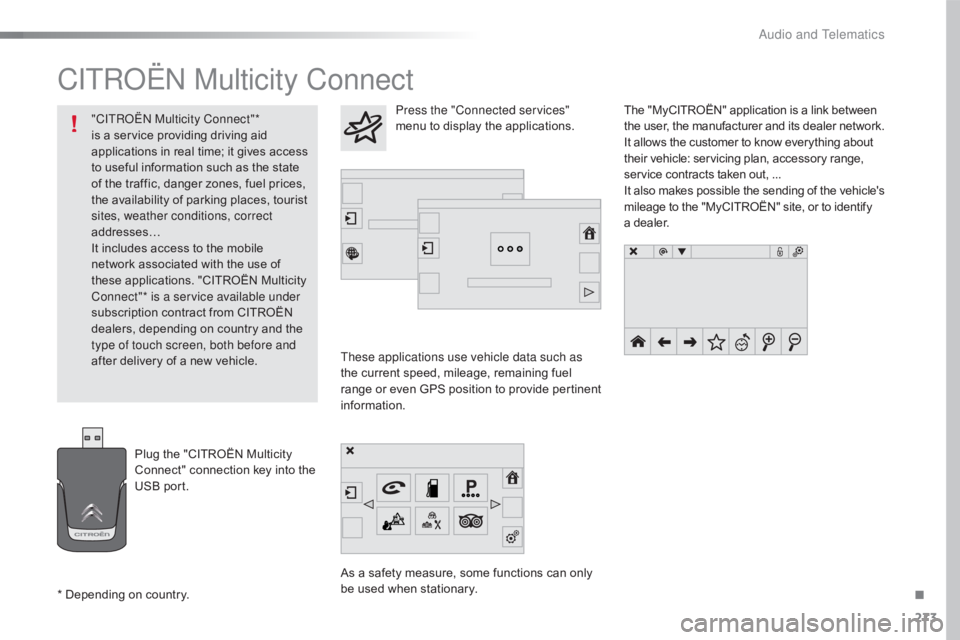
CITROËN Multicity Connect
These applications use vehicle data such as
the current speed, mileage, remaining fuel
r
ange
o
r
e
ven
G
PS
p
osition
t
o
p
rovide
p
ertinent
i
nformation.
As
a safety measure, some functions can only
b
e used when stationary. The
"MyCITROËN" application is a link between
t
he user, the manufacturer and its dealer network.
It allows the customer to know everything about
t
heir vehicle: servicing plan, accessory range,
s
ervice contracts taken out, ...
It
also
makes
possible
the
sending
of
the
vehicle's
m
ileage to the "MyCITROËN" site, or to identify
a
dealer.
Press the "Connected services"
menu to display the applications.
Plug
the
"CITROËN
Multicity
C
onnect"
connection
key
into
the
U
SB
port.
*
Depending
on
country.
"CITROËN Multicity Connect"*
is
a
service
providing
driving
aid
a
pplications
in
real
time;
it
gives
access
t
o
useful
information
such
as
the
state
o
f
the
traffic,
danger
zones,
fuel
prices,
t
he
availability
of
parking
places,
tourist
s
ites, weather conditions, correct
addresses…
It
includes
access
to
the
mobile
n
etwork
associated
with
the
use
of
t
hese
applications.
"CITROËN
Multicity
C
onnect"* is a service available under
subscription
contract
from
CITROËN
d
ealers,
depending
on
country
and
the
t
ype of touch screen, both before and
after
delivery
of
a
new
vehicle.
.
Audio and Telematics
Page 281 of 317
279
C4-cactus_en_Chap10b_SMEGplus_ed01-2016
The services available depend on
the network, the SIM card and the
c
ompatibility of the Bluetooth telephone
u
sed. Check the telephone manual and
w
ith your network provider for details of
t
he services available to you.
The
ability of the system to connect
w
ith only one profile depends on the
telephone.
The three profiles may all
c
onnect by default.
Visit
www.citroen.co.uk for more information
(
compatibility, additional help, ...).
The
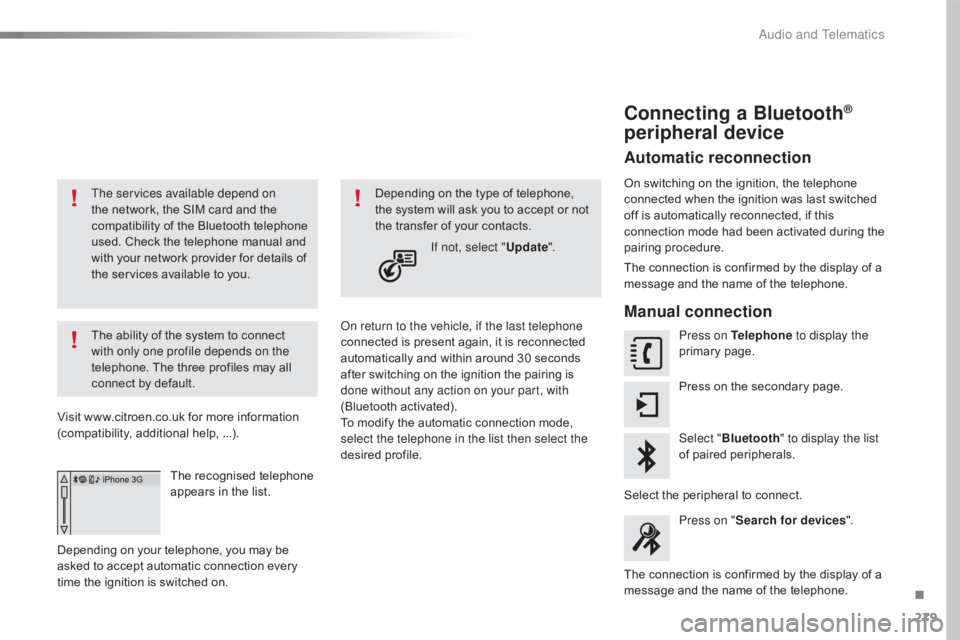
recognised telephone
a
ppears in the list.
Depending
on your telephone, you may be
a
sked
to accept automatic connection every
t
ime
the ignition is switched on. On return to the vehicle, if the last telephone
connected
is present again, it is reconnected
a
utomatically and within around 30 seconds
a
fter switching on the ignition the pairing is
d
one without any action on your part, with
(Bluetooth
a
ctivated).
To
modify the automatic connection mode,
s
elect the telephone in the list then select the
desired
p
rofile.
Depending
on the type of telephone, t
he system will ask you to accept or not
t
he transfer of your contacts.
If not, select " Update".
Connecting a Bluetooth®
peripheral device
Automatic reconnection
On switching on the ignition, the telephone c
onnected when the ignition was last switched
o
ff is automatically reconnected, if this
c
onnection mode had been activated during the
pa
iring
p
rocedure.
The
connection is confirmed by the display of a
m
essage and the name of the telephone.
Manual connection
Press on Telephone to display the
primary pag e.
Press
on the secondary page.
Select " Bluetooth " to display the list
of
paired peripherals.
Select
the peripheral to connect.
Press on " Search for devices ".
The
connection is confirmed by the display of a
m
essage
and the name of the telephone.
.
Audio and Telematics
Page 291 of 317

289
C4-cactus_en_Chap10b_SMEGplus_ed01-2016
Telephone
QUESTIONANSWER SOLUTION
I
cannot connect my
B
luetooth
t
elephone. The
telephone's Bluetooth function may be switched off or the
t
elephone may not be visible. Check
that your telephone's Bluetooth function is
s
witched on.
Check
in the telephone settings that it is "visible
t
o all".
The
Bluetooth telephone is not compatible with the system.You
can check the compatibility of your
t
elephone at www.citroen.co.uk (services).
The
volume of the
t
elephone connected
in
Bluetooth mode is
ina
udible. The
volume depends both on the system and on the telephone. Increase the volume of the audio system, to
m
aximum if required, and increase the volume of
t
he telephone if necessary.
The
ambient noise level has an influence on the quality of
t
elephone
c
ommunication. Reduce
the ambient noise level (close the
w
indows, reduce the booster fan speed, slow
down...).
Some
contacts are
d
uplicated in the list. The
options for synchronizing contacts are synchronizing the
c
ontacts on the SIM card, the contacts on the telephone, or both.
W
hen both synchronizations are selected, some contacts may be
dup
licated. Select "Display SIM card contacts" or "Display
telephone
c
ontacts".
Contacts are not shown in
alphabetical
o
rder. Some
telephones offer display options. Depending on the settings
c
hosen, contacts can be transferred in a specific order.Modify
the display setting in the telephone
d
i r e c to r y.
The
system does not
r
eceive
SMS
text
messages. The
Bluetooth mode does not permit sending SMS text messages
t
o the system.
.
Audio and Telematics
Page 295 of 317

293
C4-cactus_en_Chap11_index-alpha_ed01-2016
Radio ............................................................. 242
Radio, digital (Digital Audio Broadcasting -
D
A B) ............................................................ 244
RDS
................
............................................... 243
Rear
screen, demisting / defrosting................66
Recharging
the battery
.........................21
2, 214
Recirculation, air
...............................
. 58, 60, 64Safety, children
...............
10
0, 104 -107, 110 -118
Screen,
cold climate
.....................................15
8
Screen, colour
................................ 2
9, 234, 235
S
R
Screenwash, front ...........................................87
S creenwash, rear ............................... .............87
SCR (Selective Catalytic Reduction)
............ 17
5
Seat belts
.......................................... 9
6 -98, 110
Seat, rear bench
..............................
...............51
Seats, front
...............................
.......................49
Seats, heated
...............................
...................50
Seats, rear
....................................................... 51
S
erial number, vehicle
..................................2
24
Service indicator
............................................. 24
S
ervicing
...............................
..........................10
Settings,
e
quipment
........................................ 28
S
ettings
(
Menus)
...............................
............264
Settings,
system
...............................
.............271
Sidelamps
......................... 7
8, 83, 197, 198, 202
Side repeater
..............................
..................201
Snow chains
.................................................. 15
7
Socket,
12 V accessory
.............................6
9 -71
Socket,
auxiliary
...............................
.......72, 246
Socket,
JACK
...............................
...........72, 246
Sockets,
audio
................................................ 72
Spe
ed
l
imiter
...............................
.......... 135, 141
Stability control (ESC) ............................... 16,
91
Starting
the engine
............................... 12
1, 127
Starting
using another battery
......................2
13
Station, radio
.........................................2
42, 243
Stay, bonnet
...............................
...................167
Steering
wheel, adjustment
............................54
S
topping the vehicle
..................................... 12
1
Stop & Start
........................ 1
5, 36, 65, 132, 145,
153,
167, 173, 212, 215
Stop
(warning lamp)
........................................ 17
St
orage
................
...................................... 71, 73
Sun visor
.................................................... 6
9 -71
Switching
off the engine
...............................12
1
Synchronising
the remote
control
........................................................... 42
P
aint colour code
.......................................... 2
24
Panoramic
glass
sunroof
................
.......................................... 68
Parcel shelf, rear
....................................... 76
, 77
Park
Assist
...............................
..................... 145
Parking
brake
........................................ 1
2 4 , 174
Parking
sensors,
front
................................... 14
3
Parking
sensors,
rear.................................... 142
Plates, identification ...................................... 224
Player, Apple
® .............................. .................248
Player,
MP3
CD ............................... ..............246
Player, USB
................................................... 24
6
Plip
..............................
.............................. 4 0 , 41
Pre-heater, Diesel
...............................
............14
Pressures, tyres
............................
185, 190, 224
Pre-tensioning
seat belts
................................ 98
P
riming
pu
mp
...............................
.................218
Priming
the
fuel system
................................ 2
18
Protecting
c
hildren
......................... 10
0, 104 -107, 110 -118
Protectors
...................................................... 18
2
Puncture
................
........................................ 185
PReduction of electrical load ..........................16 0
Regeneration of the particle
filter
........
..................................................... 173
Reinitialisation of the under-inflation detection
system
......................................... 1
51
Reinitialising
the remote control
.....................42
R
eminder, lighting on
...................................... 81
R
emote control
................................................ 40
R
emoving a wheel
..............................
..........193
Removing
the mat
...............................
............74
Replacing
bu
lbs
..............................
..............197
Replacing
f
uses
..............................
..............205
Replacing
the air filter
...................................17
3
Replacing
the oil filter
................................... 17
3
Replacing
t
he
p
assenger
c
ompartment filter
...................................... 17
3
Reservoir, screenwash
................................. 17
2
Resetting
the service
indicator
...............................
.........................26
Resetting
the trip recorder
..............................37
R
eversing
c
amera
...............................
..........14 4
Reversing
lam
p
............................................. 2
02
Risk
areas (update)
....................................... 2
61
Roof bars
....................................................... 16
4
Running
out of fuel
(Diesel)
....................................................... 2
18
.
Alphabetical index
Page 296 of 317

294
C4-cactus_en_Chap11_index-alpha_ed01-2016
Warning lamps ................................................ 17
W arning lamp, SCR emissions
control
system
.............................................. 20
W
arning lamp, seat belts
................................97
W
arning lamp, Service.................................... 17
Warning
lamp, Stop
........................................ 17
W
ashing
(
advice)................................... 174,
183
Weights
...............
................................. 220, 222
Wheel, spare
......................................... 19
1,
19
2
Window controls
............................................. 48
W
indows, rear doors
...............................4
8, 183
Windows,
rear quarter
..................................18
3
Wiper
b
lades
(
changing)
.........................8
9, 163
Wiper, rear ....................................................... 87
Wipers
.......................................................1
5, 86
Wipers,
automatic rain sensitive
...............8
6, 88 T
Table of weights ...................................2 20, 222
Tables of engines ............................... ...219, 2
21
Tables of fuses
...................................... 2
0 7, 2 1 0
Tank,
AdBlue
® additive ......................... 17 5 , 17 9
Tank,
fuel
............................... ........................ 153
Technical data
....................................... 2
19-222
Telephone
..................................................... 2
74
Third
brake
lamp
........................................... 20
3
Three flashes (direction i n di c ato r s)
..................................................... 81
T
ime
(setting)
..............................
....................38
TMC (Traffic info)
.......................................... 2
62
To o l s
................
.............................. 185, 191, 192
Topping-up
the AdBlue
®
additive ...............
........................................ 179
Total distance recorder
................................... 37
T
ouch screen tablet
........................................ 28
T
ouch screen tablet ( M e nu s)
...............................
............ 29 -34, 230
To w b a r
................
................................... 120, 159
Towed loads
......................................... 2
20, 222
Towing
another
vehicle
......................... 21
6, 217
Towing
eye
...................................................... 76
T
raction control (ASR)
........................ 1
6, 18, 91
Traffic
information
(TA)
................................. 26
3
Traffic
information
(TMC)
.............................. 2
62
Tr a i l e r
...............
..................................... 120, 159
Triangle,
w
arning ..................................... 76, 18 4
Trip
computer
.................................................. 35
T
rip distance recorder
..................................... 37
T
y r e s
..............................................................
..10
Tyre under-inflation detection
...............
........................23, 150, 190Under
floor storage
.........................................
76
U
nder-inflation (detection)
............................
15
0
Unlocking
..............................
..........................
40
Unlocking from the inside
.........................4
4, 45
Unlocking the boot
....................................
4
0, 47
Unlocking the doors
...........................
4
0, 44, 46
Updating risk areas
.......................................
2
61
Updating the date
............................................
38
U
pdating the time
............................................
38
U
REA warning lamp
.............................
17
6 , 17 7
USB port ......................................69, 70, 72, 246
U
Ventilation ..............................
........ 9, 55, 56, 59
Visibility ............................... ............................65V
Warning and indicator lamps ........ 1 2, 13, 16, 17
Warning lam p, a irbag ................................ 1 5, 16
Warning
lamp, braking system
.......................18
W
arning lamp, Diesel engine
pre-heater
...............................
......................14
Warning
lamp, seat belt not fastened
.............97
W
arning lamp, low fuel level
...........................21
W
Alphabetical index
Page 310 of 317
3
5
Safety
Emergency or assistance call
If an impact is detected by the airbag control unit, and independently of the deployment of any airbags, an emergency call is made automatically.
Localised Emergency Call
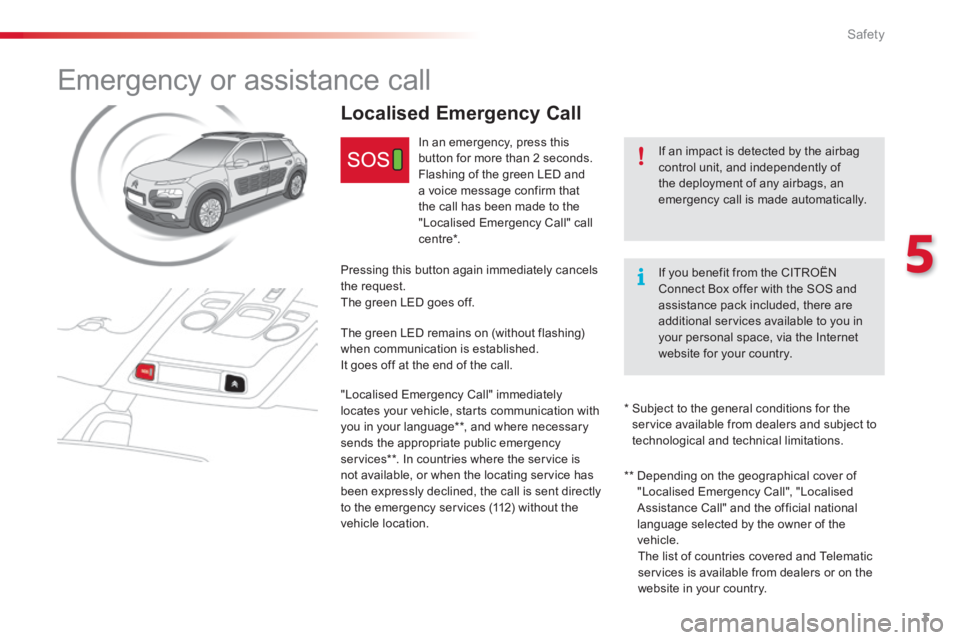
In an emergency, press this button for more than 2 seconds. Flashing of the green LED and a voice message confirm that the call has been made to the "Localised Emergency Call" call c e nt re * .
Pressing this button again immediately cancels the request. The green LED goes off.
The green LED remains on (without flashing) when communication is established. It goes off at the end of the call.
"Localised Emergency Call" immediately locates your vehicle, starts communication with you in your language ** , and where necessary sends the appropriate public emergency services ** . In countries where the service is not available, or when the locating service has been expressly declined, the call is sent directly to the emergency services (112) without the vehicle location.
* Subject to the general conditions for the service available from dealers and subject to technological and technical limitations.
If you benefit from the CITROËNConnect Box offer with the SOS and assistance pack included, there are additional services available to you in your personal space, via the Internet website for your country.
** Depending on the geographical cover of "Localised Emergency Call", "Localised Assistance Call" and the official national language selected by the owner of the vehicle. The list of countries covered and Telematic services is available from dealers or on the website in your country.
Page 311 of 317
4
Safety
Localised Assistance Call
If you purchased your vehicle outside the Brand's dealer network, we invite you to have a dealer check the configuration of these services and, if desired, modified to suit your wishes. In a multi-lingual country, configuration is possible in the official national language of your choice.
For technical reasons and in particular to improve the quality of "Telematic services" services to customers, the manufacturer reserves the right to carry out updates to the vehicle's on-board telematic system.
A fault with the system does not prevent the vehicle being driven.
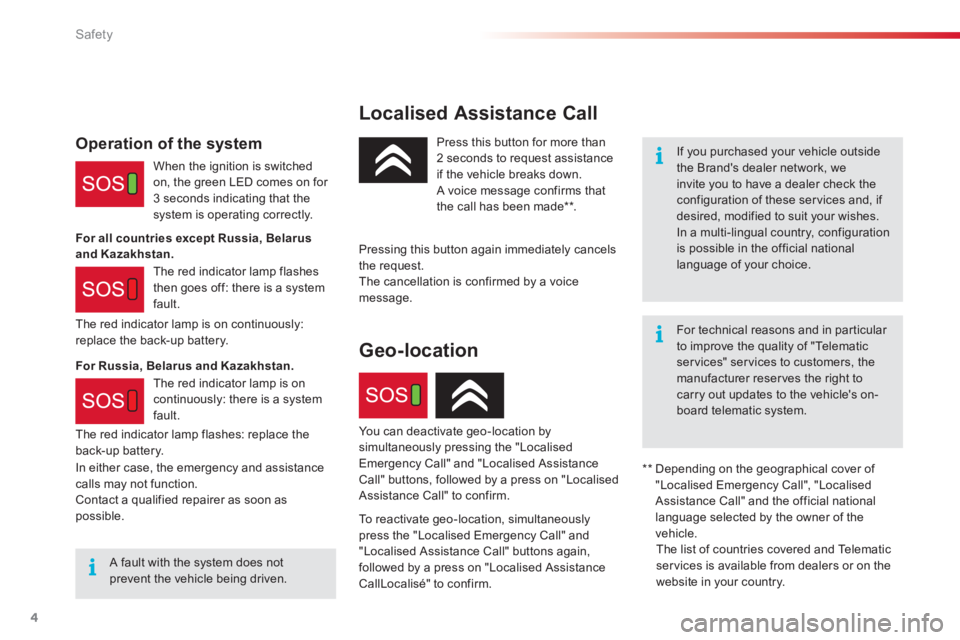
Press this button for more than 2 seconds to request assistance if the vehicle breaks down. A voice message confirms that the call has been made ** .
Pressing this button again immediately cancels the request. The cancellation is confirmed by a voice message.
The red indicator lamp is on continuously: replace the back-up battery.
Operation of the system
When the ignition is switched on, the green LED comes on for 3 seconds indicating that the system is operating correctly.
The red indicator lamp flashes then goes off: there is a system fault.
** Depending on the geographical cover of "Localised Emergency Call", "Localised Assistance Call" and the official national language selected by the owner of the vehicle. The list of countries covered and Telematic services is available from dealers or on the website in your country.
For all countries except Russia, Belarus and Kazakhstan.
For Russia, Belarus and Kazakhstan.
In either case, the emergency and assistance calls may not function. Contact a qualified repairer as soon as possible.
Geo-location
You can deactivate geo-location by simultaneously pressing the "Localised Emergency Call" and "Localised Assistance Call" buttons, followed by a press on "Localised Assistance Call" to confirm.
To reactivate geo-location, simultaneously press the "Localised Emergency Call" and "Localised Assistance Call" buttons again, followed by a press on "Localised Assistance CallLocalisé" to confirm.
The red indicator lamp is on continuously: there is a system fault.
The red indicator lamp flashes: replace the back-up battery.