ESP CITROEN C4 2018 Repair Manual
[x] Cancel search | Manufacturer: CITROEN, Model Year: 2018, Model line: C4, Model: CITROEN C4 2018Pages: 317, PDF Size: 9.31 MB
Page 204 of 317
202
C4-cactus_en_Chap08_En-cas-de-panne_ed01-2016
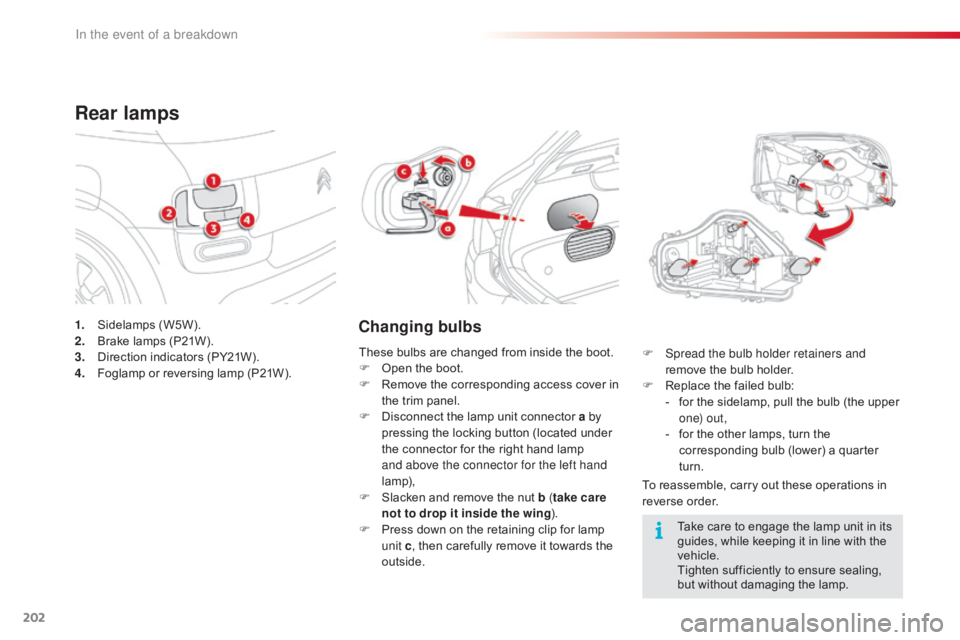
1. Sidelamps (W5W).
2. B rake lamps (P21W).
3.
D
irection indicators (PY21W).
4.
F
oglamp or reversing lamp (P21W).
Rear lamps
Changing bulbs
To reassemble, carry out these operations in reverse o rder.
F
S
pread the bulb holder retainers and
remove the bulb holder.
F
R
eplace the failed bulb:
-
f
or the sidelamp, pull the bulb (the upper
o
n e) o u t ,
-
f
or the other lamps, turn the
c
orresponding bulb (lower) a quarter
t
urn.
These
bulbs
are
changed
from
inside
the
boot.
F
O
pen
the
boot.
F
R
emove
the
corresponding
access
cover
in
t
he
trim
panel.
F
D
isconnect
the
lamp
unit
connector
a by
pressing
the
locking
button
(located
under
t
he
connector
for
the
right
hand
lamp
a
nd above the connector for the left hand
lamp),
F
S
lacken
and
remove
the
nut
b ( take care
not to drop it inside the wing ).
F
P
ress
down
on
the
retaining
clip
for
lamp
u
nit c,
then
carefully
remove
it
towards
the
o
utside. Take
care to engage the lamp unit in its
g
uides, while keeping it in line with the
v
ehicle.
Tighten
sufficiently to ensure sealing,
b
ut without damaging the lamp.
In the event of a breakdown
Page 208 of 317
206
C4-cactus_en_Chap08_En-cas-de-panne_ed01-2016
CITROËN will not accept responsibility
for the cost incurred in repairing your
v
ehicle or for rectifying malfunctions
r
esulting from the installation of
a
ccessories not supplied and not
recommended
by CITROËN and
n
ot installed in accordance with its
instructions, in particular when the
combined
consumption of all of the
a
dditional equipment connected
e
xceeds
1
0
mil
liamperes.
Installing electrical
accessories
Your vehicle's electrical system is designed to operate with standard or
o
ptional
e
quipment.
Before
installing other electrical
e
quipment or accessories on your
v
ehicle, contact a CITROËN dealer or a
qualified
w
orkshop.
In the event of a breakdown
Page 212 of 317
210
C4-cactus_en_Chap08_En-cas-de-panne_ed01-2016
Engine compartment fuses
Access to the fuses
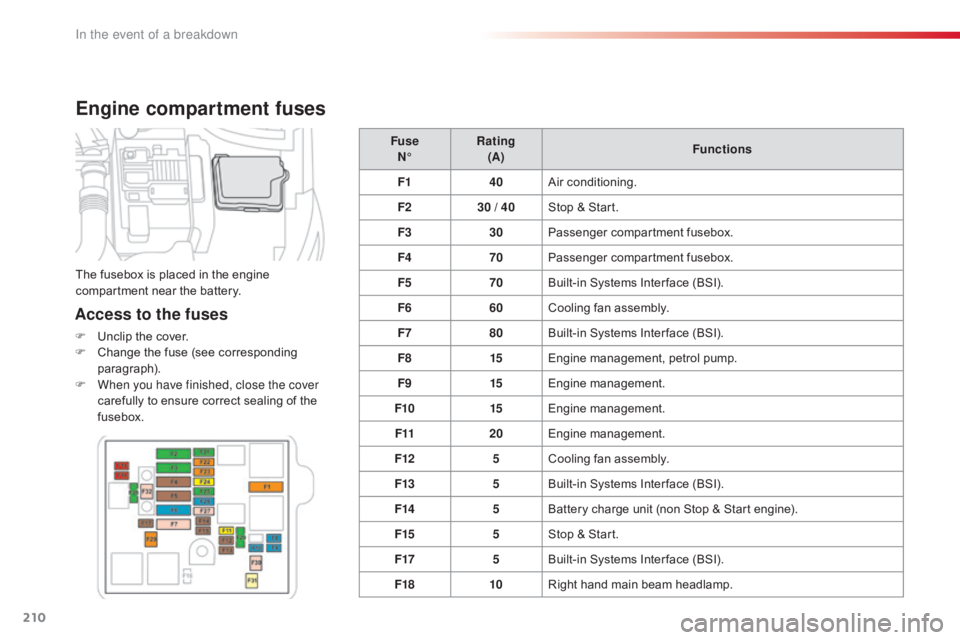
F Unclip the cover.
F C hange the fuse (see corresponding
par
agraph).
F
W
hen you have finished, close the cover
carefully
to ensure correct sealing of the
f
usebox. Fuse
N° Rating
(A) Functions
F1 40Air
c
onditioning.
F2 30 / 40Stop & Start.
F3 30Passenger
c
ompartment
f
usebox.
F4 70Passenger
c
ompartment
f
usebox.
F5 70Built-in Systems Inter face (BSI).
F6 60Cooling fan assembly.
F7 80Built-in Systems Inter face (BSI).
F8 15Engine
management, petrol pump.
F9 15Engine
m
anagement.
F10 15Engine
m
anagement.
F11 20Engine
m
anagement.
F12 5Cooling
fan assembly.
F13 5Built-in
Systems Inter face (BSI).
F14 5Battery
charge unit (non Stop & Start engine).
F15 5Stop
& Start.
F17 5Built-in
Systems Inter face (BSI).
F18 10Right
hand main beam headlamp.
The
fusebox is placed in the engine
c
ompartment near the battery.
In the event of a breakdown
Page 217 of 317
215
C4-cactus_en_Chap08_En-cas-de-panne_ed01-2016
Do not force the lever as locking will not be possible if the clamp is not
p
ositioned correctly; start the procedure
ag
ain.
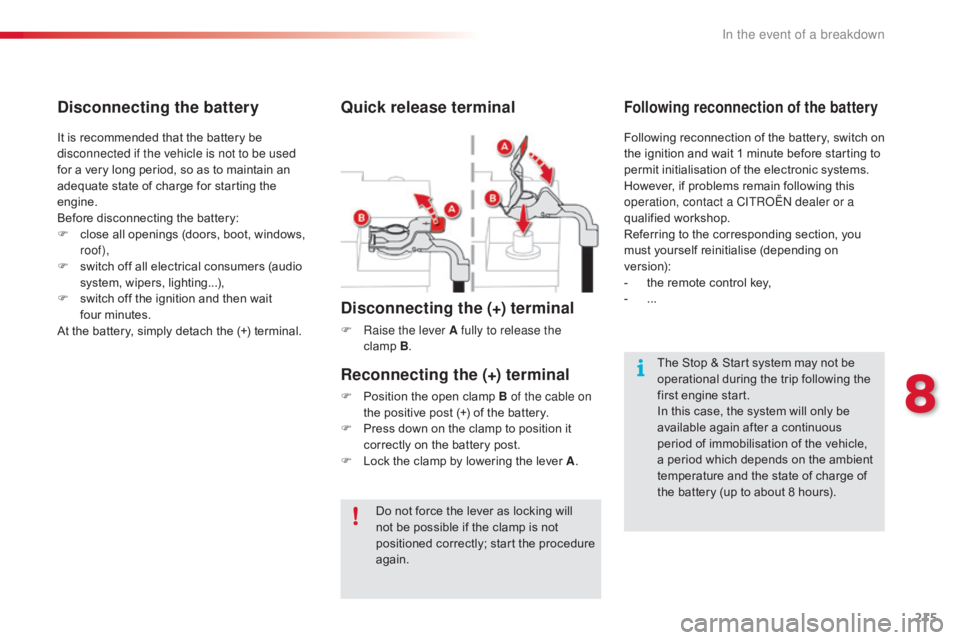
Quick release terminal
Disconnecting the (+) terminal
F Raise the lever A fully to release the clamp B.
The
Stop & Start system may not be
o
perational during the trip following the
f
irst engine start.
In
this case, the system will only be
a
vailable again after a continuous
p
eriod of immobilisation of the vehicle,
a
period which depends on the ambient
t
emperature and the state of charge of
t
he battery (up to about 8 hours).
It
is
recommended
that
the
battery
be
d
isconnected if the vehicle is not to be used
for
a
very
long
period,
so
as
to
maintain
an
a
dequate
state
of
charge
for
starting
the
e
ngine.
Before
disconnecting
the
battery:
F
c
lose
all
openings
(doors,
boot,
windows,
r
oof),
F
s
witch
off
all
electrical
consumers
(audio
s
ystem,
wipers,
lighting...),
F
s
witch
off
the
ignition
and
then
wait
f
our minutes.
At
the
battery,
simply
detach
the
(+)
terminal.
Disconnecting the battery
Following reconnection of the battery, switch on t
he ignition and wait 1 minute before starting to
p
ermit initialisation of the electronic systems.
H
owever, if problems remain following this
o
peration, contact a CITROËN dealer or a
qualified
w
orkshop.
Referring
to the corresponding section, you
m
ust
y
ourself
r
einitialise
(
depending
o
n
ve
rsion):
-
t
he remote control key,
-
...
Following reconnection of the battery
Reconnecting the (+) terminal
F Position the open clamp B of the cable on
the positive post (+) of the battery.
F
P
ress down on the clamp to position it
c
orrectly on the battery post.
F
L
ock the clamp by lowering the lever A.
8
In the event of a breakdown
Page 221 of 317
219
C4-cactus_en_Chap09_caracteristiques-techniques_ed01-2016
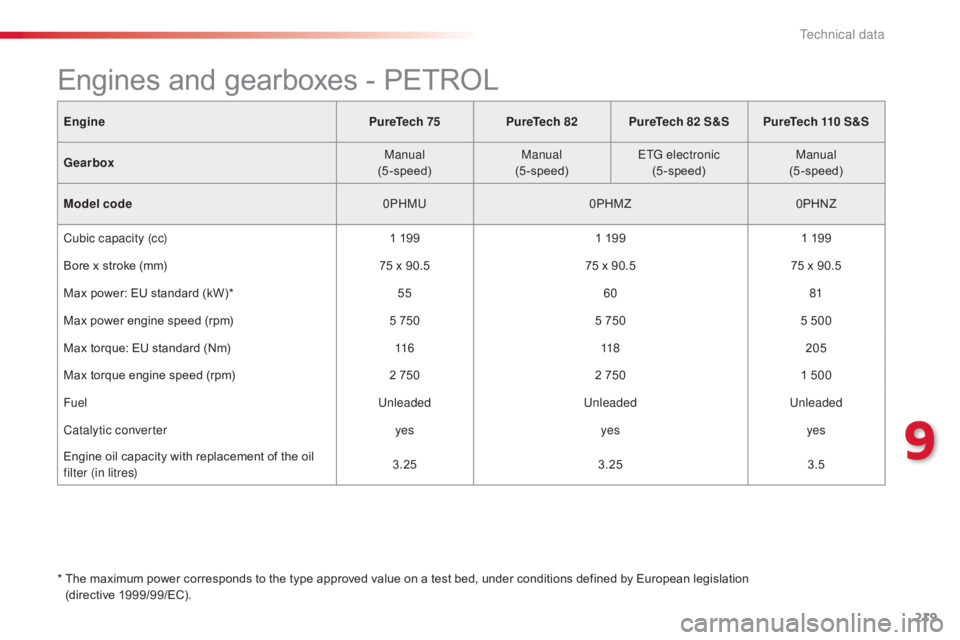
EnginePureTech 75PureTech 82PureTech 82 S&S PureTech 110 S&S
Gearbox Manual
(5-speed) Manual
(5-speed) ETG electronic
(5-speed) Manual
(5-speed)
Model code 0PHMU0PHMZ0PHNZ
Cubic capacity (cc) 1
1991
1991
199
Bore
x stroke (mm) 75
x 90.575
x 90.575
x 90.5
Max
power: EU standard (kW)* 55 60 81
Max
power engine speed (rpm) 5
7505
7505
500
Max
torque: EU standard (Nm) 11 6 118205
Max
torque engine speed (rpm) 2
7502
7501
500
Fuel UnleadedUnleadedUnleaded
Catalytic converter yesyesyes
Engine
oil capacity with replacement of the oil
f
ilter (in litres) 3.25
3.25 3.5
*
T
he maximum power corresponds to the type approved value on a test bed, under conditions defined by European legislation
(directive
1
999/99/EC).
Engines and gearboxes - PETROL
9
Technical data
Page 223 of 317
221
C4-cactus_en_Chap09_caracteristiques-techniques_ed01-2016
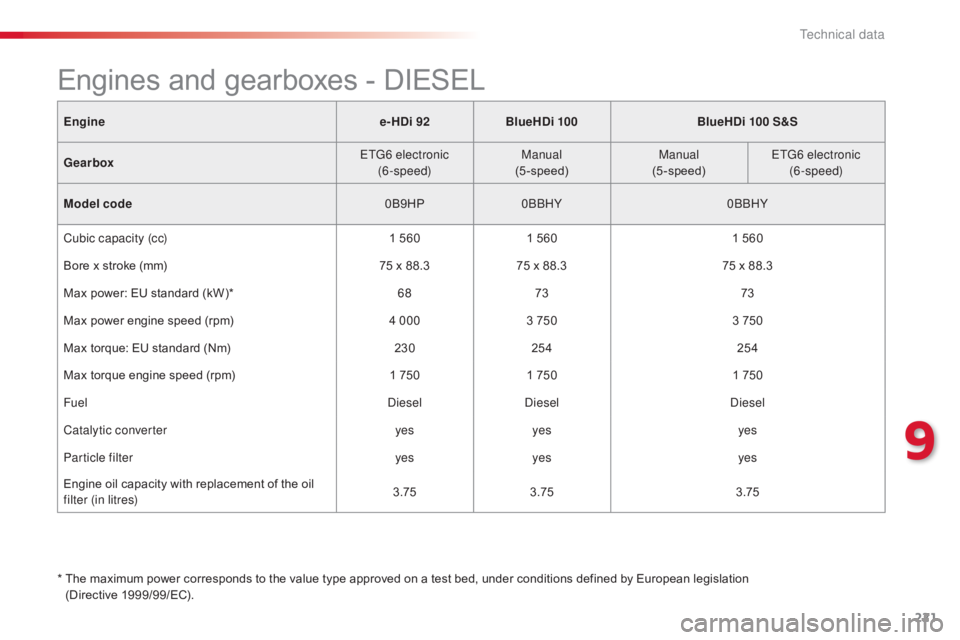
Enginee-HDi 92BlueHDi 100 BlueHDi 100 S&S
Gearbox ETG6 electronic
(6-speed) Manual
(5-speed) Manual
(5-speed) ETG6 electronic
(6-speed)
Model code 0B9HP0BBHY 0BBHY
Cubic capacity (cc) 1
5601
5601
560
Bore
x stroke (mm) 75
x 88.375
x 88.375
x 88.3
Max
power: EU standard (kW)* 6873 73
Max
power engine speed (rpm) 4 0003
7503
750
Max
torque: EU standard (Nm) 230254 254
Max
torque engine speed (rpm) 1
7501
7501
750
Fuel DieselDiesel Diesel
Catalytic converter yesyes yes
Particle filter yesyes yes
Engine
oil capacity with replacement of the oil
f
ilter (in litres) 3.75
3.75 3.75
*
T
he maximum power corresponds to the value type approved on a test bed, under conditions defined by European legislation
(Directive
1
999/99/EC).
Engines and gearboxes - DIESEL
9
Technical data
Page 245 of 317

243
C4-cactus_en_Chap10b_SMEGplus_ed01-2016
Select the change of source.
Sel ect " FM Radio " or "AM Radio ".Select
a radio station or frequency
(refer to the corresponding section).
Press on Media
to display the
primary page then go to the s
econdary pag e.
Select " Settings ".
Select " Radio".
Activate/deactivate
" R
DS
options ".
Press on "
Save".
Select
a number in the list to preset the
p
reviously chosen radio station.
A
long press on a number presets (memorises)
t
he station.
Enter
the frequency in full
(e.g.: 92.10
MHz) using the keypad
t
hen " Confirm ".
By alphabetical list
Press the current radio band then choose the
radio
station from the list offered. Or
Press on Media to display the
primary page then select "
Save ".
Preset a station Activate/ Deactivate RDS
THEN
OR
A press on this button presets all of
the
stations one after the other.
Recall preset stations
RDS, if activated, allows you to continue
listening to the same station by automatic r
etuning to alternative frequencies.
H
owever, in certain conditions, coverage
o
f an RDS station may not be assured
t
hroughout the entire country as
r
adio stations do not cover 100% of
the
territory. This explains the loss of
r
eception of the station during a journey.
.
Audio and Telematics
Page 247 of 317

245
C4-cactus_en_Chap10b_SMEGplus_ed01-2016
Select change of source.
P ress on Media
to display the
primary
pag
e.
Select " DAB Radio ".
Select " List"
in the primary page.
Select
the radio station from the list offered.Press Media
to display the primary
p
age then press on the secondary
pag
e.
Select " Settings ".
Select " Radio".
Select " Digital/FM auto
tracking " then "Confirm ".
Digital radio - DAB / FM
auto tracking
DAB
(Digital Audio Broadcasting)
Digital radio
"DAB" does not cover 100% of the
te r r i to r y.
When
the digital radio signal is weak,
"
DAB/FM
s
tation
t
racking"
a
llows
y
ou
t
o
c
ontinue listening to the same station,
b
y automatically switching to the
c
orresponding "FM" analogue station
(
if there is one). If
"DAB/FM station tracking" is a
ctivated, there is a difference of a few
seconds
when the system switches to
"
FM" analogue radio with sometimes a
v
ariation in volume.
When
the digital signal is restored, the
s
ystem automatically changes back to
"
DA B ".
Digital
radio
provides
higher
quality
r
eception
and
also
the
graphical
display o
f
current
information
on
the
radio
s
tation
being
listened
to.
Select
"List"
in
t
he
primary
page.
The
range
of
multiplexes
available
is
d
isplayed
in
alphabetical
order. If
the "DAB" station being listened to
i
s not available on "FM" ("DAB/FM"
option
greyed out), or "DAB/FM station
t
racking" is not activated, the sound
w
ill cut out while the digital signal is too
w
eak.
or Select "Radio list " in the secondary
page.
.
Audio and Telematics
Page 272 of 317
270
C4-cactus_en_Chap10b_SMEGplus_ed01-2016
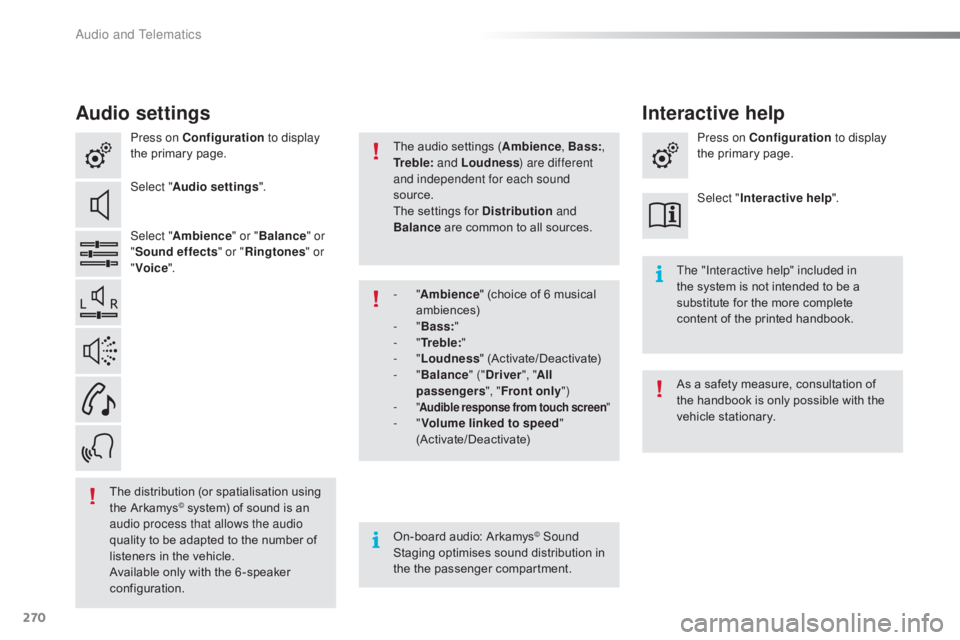
Audio settings
Press on Configuration to display
the primary page.
Select " Audio settings ".
Select " Ambience " or "Balance " or
" Sound effects " or "Ringtones " or
" Voice ".
On-board
audio: Arkamys
© Sound
Staging
optimises
sound
distribution in
t
he
t
he
p
assenger
c
ompartment. The "Interactive help" included in
the
system is not intended to be a
s
ubstitute for the more complete
c
ontent of the printed handbook.
The
distribution
(or
spatialisation
using
t
he
Arkamys
© system) of sound is an a
udio process that allows the audio
quality
to
be
adapted to the number of
l
isteners
in
the vehicle.
Available
only with the 6 -speaker
c
onfiguration. The
audio settings (Ambience
, Bass:,
Tr e b l e: and Loudness ) are different
and independent for each sound
source.
The settings for Distribution
and
Balance
are common to all sources.
As a safety measure, consultation of
t
he handbook is only possible with the
v
ehicle stationary.
- "
Ambience " (choice of 6 musical
am
biences)
- "
Bass: "
- "
Tr e b l e: "
- "
Loudness "
(
Activate/Deactivate)
- "
Balance " ("Driver ", "All
passengers ", "Front only ")
-
"
Audible response from touch screen "- "Volume linked to speed "
(Activate/Deactivate) Press on Configuration
to display
the primary page.
Select " Interactive help ".
Interactive help
Audio and Telematics
Page 307 of 317
11-15
C4-cactus_en_Chap12_couv-fin_ed01-2016
Labels are fitted in various areas of your vehicle. They carry
safety warnings as well as vehicle identification
information.
Do
not
remove
them:
they
form
an
integral
part
of
your vehicle.
Automobiles
CITROËN declares, by application of the
provisions
of the European regulation (Directive 2000/53)
relating
to End of Life Vehicles, that it achieves the
objectives
set by this regulation and that recycled materials
are
used in the manufacture of the products that it sells.
Reproduction
or translation of all or part of this document
is
prohibited without written authorisation from
Automobiles CITROËN. W
e draw your attention to the following points:
-
The
fitting of electrical equipment or accessories not
listed
by CITROËN may cause faults and failures
with
the electrical system of your vehicle. Contact
a
CITROËN dealer for information on the range of
recommended
accessories.
-
As
a safety measure, access to the diagnostic socket,
used
for the vehicle's electronic systems, is reserved
strictly
for CITROËN dealers or qualified workshops,
equipped
with the special diagnostic tool required (risk
of
malfunctions of the vehicle's electronic systems that
could
cause breakdowns or serious accidents).
The
manufacturer
cannot be held responsible if this advice is
not
followed.
-
Any
modification or adaptation not intended or
authorised
by
Automobiles
CITROËN or carried out
without
meeting the technical requirements defined by
the
manufacturer would lead to the suspension of the
legal
and contractual warranties.Printed in the EU
Anglais
For
any
work
on
your
vehicle,
use
a
qualified
workshop
that
has
the technical information, competence and equipment
required,
which a CITROËN dealer is able to provide.
* Subject to official publication of the results by the FIA.