cruise control CITROEN C4 2018 Owners Manual
[x] Cancel search | Manufacturer: CITROEN, Model Year: 2018, Model line: C4, Model: CITROEN C4 2018Pages: 317, PDF Size: 9.31 MB
Page 5 of 317
.
C4-cactus_en_Chap00a_sommaire_ed01-2016
Driving recommendations 119
Starting-switching off the engine
1
21
Parking
brake
1
24
5 -speed
manual gearbox
1
25
Gear shift indicator
1
26
ETG
electronic gearbox
1
27
Hill
start assist
1
31
Stop
& Start
1
32
Speed
limiter
1
35
Cruise
control
1
38
Memorising
speeds
1
41
Parking
sensors
1
42
Reversing
camera
1
44
Park
Assist
1
45
Under-inflation
d
etection
1
50
Driving
Fuel tank 1 53
Misfuel prevention (Diesel)
1
55
Snow
chains
1
57
Very
cold climate screens
1
58
Towing
a trailer
1
59
Energy
economy mode
1
60
Accessories
161
Changing
a wiper blade
1
63
Roof bars
1
64
Bonnet
167
Petrol
engines
1
68
Diesel
engines
1
69
Checking
levels
1
70
Checks
1
73
AdBlue
® additive and SCR system
(
BlueHDi Diesel) 1 75
AIRBUMP
® protectors 1 82
Advice
on
care and maintenance
1
83
Practical information
Temporary puncture
r epair kit 1 85
Spare
wheel
1
91
Changing
a bulb
1
97
Changing
a fuse
2
05
12 V battery
2
12
To w i n g
2
16
Running
out of fuel (Diesel)
2
18
In the event o f a b reakdown
Petrol engines 2 19
Petrol weights
2
20
Diesel
engines
2
21
Diesel
weights
2
22
Dimensions
2
23
Identification
ma
rkings
2
24
Technical data
Emergency or assistance 226
7-inch touch screen tablet
2
29
Audio and telematics
Alphabetical
in
dex
Contents
Page 9 of 317
7
C4-cactus_en_Chap00b_vue-ensemble_ed01-2016
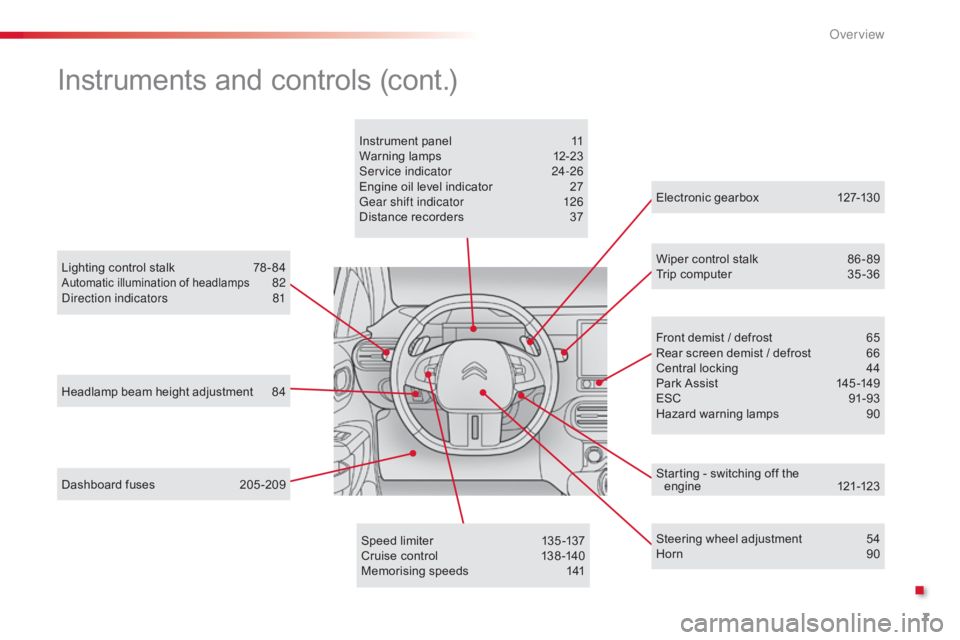
Headlamp beam height adjustment 84
Lighting control stalk
7
8 - 84
Automatic illumination of headlamps 82
D
irection indicators 8 1
Dashboard
fuses
2
05 -209 Electronic
gearbox
1
27-130
Wiper control stalk
8
6 - 89
Trip computer 3 5 -36
Speed limiter
1
35 -137
Cruise
control
1
38 -140
Memorising
speeds
1
41Front
demist / defrost
6
5
Rear
screen demist / defrost
6
6
Central
locking
4
4
Park
Assist
1
45 -149
ESC
9
1-93
Hazard
warning lamps
9
0
Instrument
panel
1
1
Warning
lam
ps
1
2-23
Service indicator
2
4-26
Engine oil level indicator
2
7
Gear shift indicator
1
26
Distance recorders
3
7
Steering wheel adjustment
5
4
Horn
9
0
Instruments and controls (cont.)
Starting - switching off the engine 12 1-123
.
Over view
Page 11 of 317
9
C4-cactus_en_Chap00c_eco-conduite_ed01-2016
Optimise the use of your gearbox
With a manual gearbox, move off gently and change up without waiting. During acceleration change up early.
The
gear efficiency indicator invites you engage the most suitable gear:
a
s soon as the indication is displayed in the instrument panel, follow it
s
traight away.
Control the use of your electrical
equipment
Before moving off, if the passenger compartment is too warm, ventilate it by opening the windows and air vents before using the air conditioning.
Above
30 mph (50 km/h), close the windows and leave the air vents
ope
n.
Remember
to make use of equipment that can help keep the
t
emperature in the passenger compartment down (sunroof and window
b
linds...).
To
save energy, do not set the air conditioning at too low a temperature.
As
soon as the desired temperature has been reached, limit the use of
t
he air conditioning, except if regulation is automatic.
Switch
off the demisting and defrosting controls as soon as you consider
p
ossible.
Switch
off the heated seat as soon as possible.
Switch
off the headlamps and foglamp when the level of light does not
r
equire their use.
Avoid
running the engine before moving off, particularly in winter; your
v
ehicle will warm up much faster while driving.
As
a passenger, if you avoid connecting your multimedia devices
(
film, music, video game...), you will contribute towards limiting the
c
onsumption of electrical energy, and so of fuel.
Disconnect
your portable devices before leaving the vehicle.
Eco-driving
Eco-driving is a range of everyday practices that allow the motorist to optimise their fuel consumption and CO2 emissions.
With
an
electronic
gearbox,
do
not
press
the
accelerator
pedal
heavily
o
r
s
uddenly.
Drive smoothly
Maintain a safe distance between vehicles, use engine braking rather t han the brake pedal, and press the accelerator progressively. These
p
ractices contribute towards a reduction in fuel consumption and CO
2
emissions
and
also
help
reduce
the
background
traffic
noise.
If
your
vehicle
has
cruise
control,
make
use
of
the
system
at
speeds
a
bove
25
mph
(40
km/h)
when
the
traffic
is
flowing
well.
.
Eco-driving
Page 33 of 317

31
C4-cactus_en_Chap01_Instruments-de-bord_ed01-2016
The functions with settings that can be adjusted are detailed in the following table.
Bu tton Corresponding function CommentsActivated Deactivated
Park Assist Activation
/ Deactivation of the function.
Stop & Star t Activation
/ Deactivation of the function.
Parking sensors Activation
/ Deactivation of the function.
Speed settings Memorisation
of speeds for use with the speed
l
imiter or cruise control.
Under-inflation initialisation Reinitialisation of the under-inflation detection
system.
1
Instruments
Page 76 of 317
74
C4-cactus_en_Chap03_Ergonomie-et-confort_ed01-2016
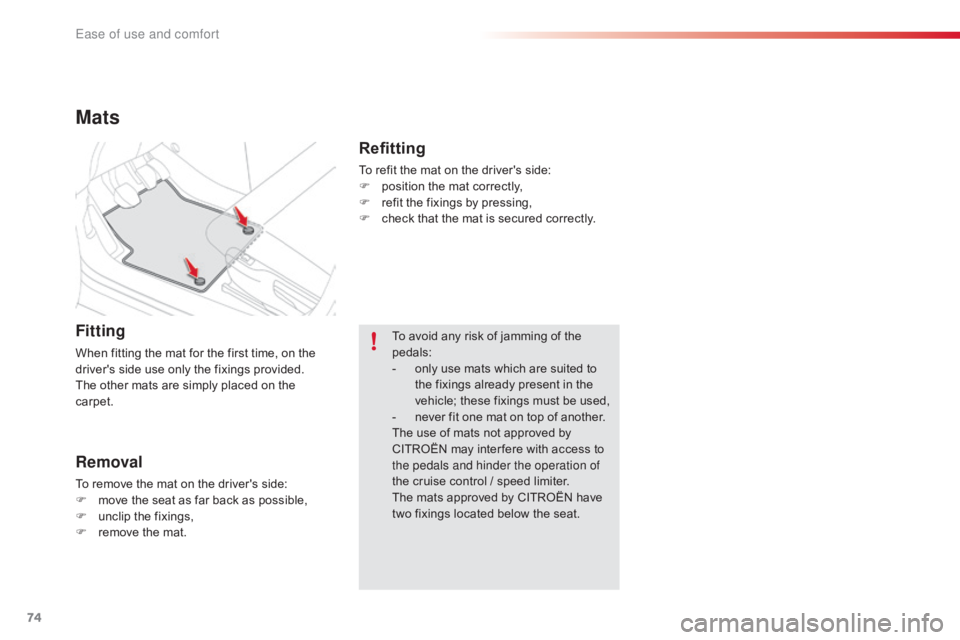
Mats
Fitting
When fitting the mat for the first time, on the driver's side use only the fixings provided.
The
other mats are simply placed on the
c
arpet.
Removal
To remove the mat on the driver's side:
F m ove the seat as far back as possible,
F
u
nclip the fixings,
F
r
emove the mat. To
avoid any risk of jamming of the
ped
als:
-
o
nly use mats which are suited to
t
he fixings already present in the
v
ehicle; these fixings must be used,
-
n
ever fit one mat on top of another.
The use of mats not approved by
C
ITROËN may inter fere with access to
t
he pedals and hinder the operation of
the cruise control / speed limiter.
The mats approved by CITROËN have
t
wo fixings located below the seat.
Refitting
To refit the mat on the driver's side:
F p osition the mat correctly,
F
r
efit the fixings by pressing,
F
c
heck that the mat is secured correctly.
Ease of use and comfort
Page 140 of 317

138
C4-cactus_en_Chap06_conduite_ed01-2016
Steering mounted controls
6. Cruise control pause / resume indication.
7. P rogrammed speed setting.
8.
C
ruise control mode selection indication.
Cruise control
System which automatically maintains the speed of the vehicle at the value programmed by the driver, without any action on the accelerator pedal.
The cruise control system cannot, in any circumstances, replace the need to o
bserve speed limits, nor can it replace the
n
eed for vigilance on the part of the driver.
You
are advised to keep your feet near the
p
edals at all times.
1. Select cruise control mode.
2. P rogramme a speed / Decrease the value.
3.
P
rogramme a speed / Increase the value.
4.
P
ause / resume cruise control.
5.
D
isplay the list of memorised speeds.
Display in the instrument panelSwitching off the ignition cancels any programmed speed value.
Driving
Page 141 of 317

139
C4-cactus_en_Chap06_conduite_ed01-2016
Switching on
With the cruise control switched on (ON), you
can then modify the speed setting in one of the
f
ollowing
w
ays:
-
b
y pressing button 5:
F
t
he six memorised speeds are displayed
i
n the the touch screen tablet,
F
p
ressing the the button for the speed
s
etting you have chosen.
T
he value is then displayed in the
instrument
pan
el.
T
he selection screen closes after a
few moments.
T
he modification is then accepted.
F
T
urn wheel 1 to the "CRUISE"
position:
the
c
ruise
control
mode
is
selected
but
is
not
s
witched
on
(Pause).
F
P
ress button 2 or 3 :
your
vehicle's
current
s
peed
becomes
the
cruise
speed.
The
cruise
control
is
activated
(ON).
Modification of the speed
setting
The cruise control is switched on
manually: it requires a minimum vehicle
s
peed of 25 mph (40 km/h).
The
memorised speeds can be
p
rogrammed in the "Driving
assistance "
menu.
For
more information on memorising
s
peeds, refer to the corresponding
s
ection.
Or
by:
-
u
sing buttons 2 or 3:
F
b
y successive short presses, to modify
t
he speed by + or - 1 mph (km/h),
F
b
y a long press, to modify the speed in
s
teps of + or - 5 mph (km/h).
6
Driving
Page 142 of 317

140
C4-cactus_en_Chap06_conduite_ed01-2016
Flashing of the dashes indicates a fault with the cruise control.
Have
it checked by a CITROËN dealer or a
q
ualified
w
orkshop.
Operating fault Switching off
F Turn wheel 1 to the "0" p osition. T
he display of information related to the
c
ruise control disappears. When the cruise control is switched on,
be
careful if you maintain the pressure o
n one of the programmed speed
c
hanging buttons: this may result in a
v
ery rapid change in the speed of your
v
ehicle.
Do not use the cruise control on
slippery
roads or in heavy traffic.
On a steep descent, the cruise control
will not be able to prevent the vehicle
from
exceeding the programmed speed.
On
steep climbs or when towing, the
p
rogrammed speed may not be reached
o
r maintained.
The
use of mats not approved by
C
ITROËN may inter fere with the
o
peration of the cruise control.
To
avoid any risk of jamming of the
ped
als:
-
e
nsure that the mat is secured
c
o r r e c t l y,
-
n
ever fit one mat on top of another.
It
is
possible
to
exceed
the
programmed
speed
t
emporarily
by
pressing
the
accelerator
pedal.
To
return
to
the
programmed
speed,
simply
r
elease the accelerator pedal until the
programmed
cruise
speed
is
reached
again.
Exceeding the programmed
speed
Once switched on, you can pause the cruise
control at any time by pressing button 4: the
s
creen confirms the pause.
Pause
If the programmed speed is exceeded, the displayed speed flashes.
Once the speed of the vehicle returns
to
the programmed speed setting, the
d
isplay becomes steady again.
The cruise control is paused
m
anually
o
r by pressing the brake or clutch pedal
o
r if the ESC system is invoked for
s
afety reasons.
Driving
Page 292 of 317

290
C4-cactus_en_Chap11_index-alpha_ed01-2016
ABS .................................................................91
Accessories .............................. ....................161
AdBlue
® ............................... .................... 19, 175
Adjusting h eadlamps ...................................... 84
A
djusting head restraints
................................ 50
A
djusting
s
eats
.......................................... 4
9, 51
Adjusting
the air distribution
.............. 5
8, 60, 63
Adjusting
the air flow
........................... 5
7, 59, 63
Adjusting
the date
........................................... 38
A
djusting the height
of
the
steering wheel
.................................... 54
A
djusting the temperature
.................. 5
7, 59, 61
Adjusting
the time
........................................... 38
A
dvice on care and
maintenance
................................. 6
8, 174, 183
Advice
on driving
..............................
.... 119, 120
Airbags
...............
........................... 15, 16, 21, 99
Airbags,
c
urtain
..................................... 10
2,
10
3
Airbags,
front......................................... 10 0,
10
3
Airbags,
la
teral
...................................... 10
1,
10
3
AIRBUMP
® ............................................ 18 2, 18 3
Air c
onditioning ............................... ......9, 56, 59
Air
conditioning, automatic
.......................5
6, 61
Air
c
onditioning,
m
anual
...........................5
6, 59
Air
intake
...............
....................... 55, 58, 60, 64
Air vents
..............................
............................ 55
Anti-lock
braking system (ABS)
......................91
A
nti-theft
..............................
...........................41
Armrest,
front
......................................6
9, 70, 73
ASR
(Anti-slip regulation)
...................9
1, 93, 95
Assistance call
...............................
........ 90, 226
Assistance,
em
ergency
b
raking
...............
........................................... 91
Audio
streaming (Bluetooth)
.........................24
8
Auxiliary
socket
............................................. 24
6
AChecking the levels ................................17 0 -172
Checking tyre pressures
(using
the kit)
..............................
........185, 190
Checks
...............
................................... 173 ,
17
4
Child
lock
...............................
........................118
Children (safety)
...................... 10
4 -107, 110 -118
Child seats
...............9
8, 104-106, 110, 111, 117
Child seats, conventional
.............................. 11
0
Child seats, i-Size
...............................
..........11 6
Child seats, ISOFIX
...............................11
3 -11 6
C
ITROËN
Connect Box
...............................2
26
C
ITROËN
L
ocalised
Emergency/Assistance
C
all
.......................2
26
CITROËN Multicity Connect
...............
....................................... 273
Cleaning
(
advice)
.......................................... 18
3
Closing
the boot
...............................
...............47
Closing
the doors
...............................
.............45
Coat
hooks
...............................
.......................73
Compressor,
tyre inflation
............................18
5
Configuration,
v
ehicle
..................................... 28
C
onnection, Bluetooth
..........................2
78, 279
Control, electric windows
................................ 48
C
ontrol,
em
ergency
b
oot release
...............................
...................47
Control, heated seats
...................................... 50
C
ontrols, steering
mounted
...................................................... 23
3
Control
stalk, lighting
...................................... 79
C
ontrol stalk, wipers
....................................... 86
C
ourtesy lamp
...............................
..........6 7, 2 0 4
Cruise control
................................................ 13
8
Cup holder
...............................
..................69, 70
Cable, audio
..................................................
24
6
Cable,
jack
..............................
...................... 246
Capacity,
fuel
tank
..............................
.......... 153
Cap, fuel filler
................................................ 15
3
CD
..............................
................................... 246
Central
locking
.................................... 4
1,
43,
44
Changing
a bu
lb
............................................ 19
7
Changing
a f
use
............................................ 20
5
Changing
a
wheel
...............................
.......... 191
Changing
a
wiper
blade
...............
......................................89,
163
Changing
the
remote
control
battery
........................................................... 42
C
hecking
the
engine
oil level
...............
........................................... 27
C
Bag hook ............................... ..........................76
Battery ............................... ..... 160, 173, 212-215
Battery,
c
harging
...............................
............214
Battery,
remote control
...................................42
B
lack screen
..............................
.....................39
Blanking
screen
(snow shield)
...............................
................15 8
BlueHDi
...............................
.................... 24, 175
Bluetooth (hands-free, telephone)
........2
78, 279
Bonnet
...............
............................................ 167
Boot
........
............................................. 47, 68, 75
Brake
discs, pads
...............................
...........174
Brake
lamps
...............................
...................202
Brakes
..................................................... 1
8 , 174
Bulbs
(
changing)
...............................
............197
B
Alphabetical index