instrument panel CITROEN C4 2019 Owner's Manual
[x] Cancel search | Manufacturer: CITROEN, Model Year: 2019, Model line: C4, Model: CITROEN C4 2019Pages: 317, PDF Size: 9.31 MB
Page 131 of 317
129
C4-cactus_en_Chap06_conduite_ed01-2016
Never select neutral (position N) when
moving.
Forward drive
F Press control D . T
he indicator lamp in the control comes on.
D
and the gear engaged appear in
t
he instrument panel.
The
gearbox then operates in auto-adaptive
m
ode, without any action on the part of the
d
river. It continuously selects the most suitable
g
ear taking account of:
-
o
ptimisation of fuel consumption,
-
d
riving style,
-
r
oad conditions,
-
v
ehicle load.
For
optimum acceleration, when
ov
ertaking another vehicle for example,
p
ress the accelerator pedal fully down,
beyond
the point of resistance.
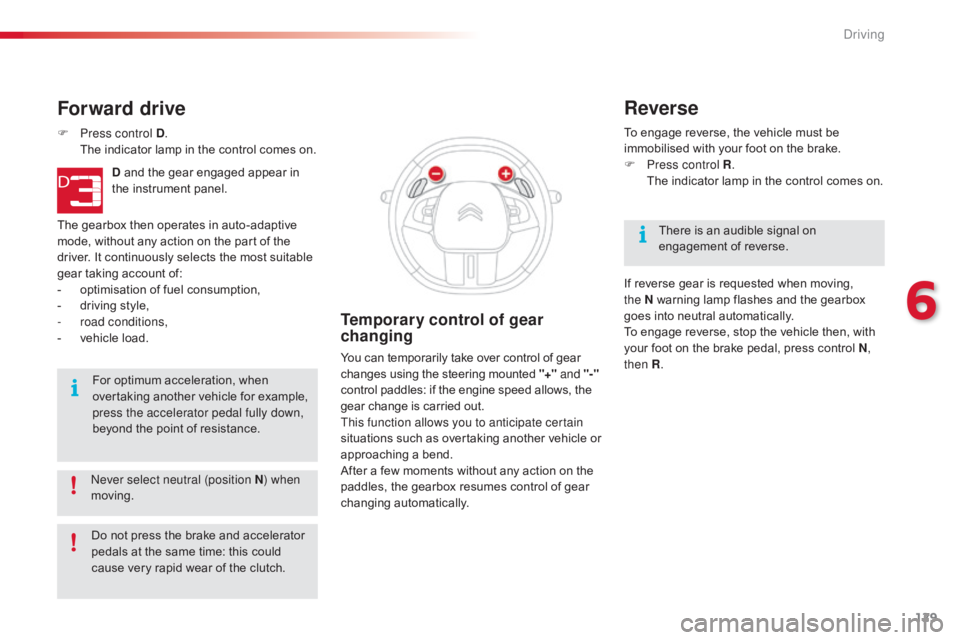
Temporary control of gear
changing
You can temporarily take over control of gear changes using the steering mounted "+" and
"-"
control
paddles: if the engine speed allows, the
g
ear change is carried out.
This function allows you to anticipate certain
situations
s
uch
a
s
ov
ertaking
a
nother
v
ehicle
o
r
a
pproaching a bend.
After
a few moments without any action on the
p
addles, the gearbox resumes control of gear
c
hanging
a
utomatically. To
engage reverse, the vehicle must be
i
mmobilised with your foot on the brake.
F
P
ress control R
.
T
he indicator lamp in the control comes on.
Reverse
There is an audible signal on enga
gement o f r everse.
If
reverse gear is requested when moving,
t
he
N
warning lamp flashes and the gearbox
g
oes
into neutral automatically.
To
engage reverse, stop the vehicle then, with
y
our
foot on the brake pedal, press control N,
then R .
Do
not
press
the
brake
and
accelerator
p
edals
at
the
same
time:
this
could
c
ause
very
rapid
wear
of
the
clutch.
6
Driving
Page 132 of 317
130
C4-cactus_en_Chap06_conduite_ed01-2016
Before switching off the engine:
- p ress control N to be in neutral,
or
-
l
eave the vehicle in gear; in this case the
v
ehicle cannot be moved.
Stopping the vehicle
For all parking situations, you must
ap ply the parking brake to immobilise
t
he vehicle.
When
immobilising the vehicle with
t
he engine running, you must select
neu
tral
N.
Operating fault
- - - appears in the instrument panel.
F
P
ress control N .
F
P
ress
the brake pedal.
F
W
ait
for around 30 seconds until N or a
gear
appears in the instrument panel.
F
P
ress control D , then N.
F
W
ith
your foot still on the brake pedal, start
t
he
eng
ine.
The
gearbox is operational again.
Reinitialisation
(5-speed electronic
gearbox)
Following disconnection of the battery, it is necessary to reinitialise the gearbox.
F
S
witch on the ignition.
In
exceptional circumstances, the
g
earbox may need an automatic
r
einitialisation: starting and gear
c
hanging are no longer possible.
- - -
appears in the instrument
pan
el.
Follow
the procedure described above.
Before
d
oing
a
nything
u
nder
t
he
b
onnet,
e
nsure that control N has been pressed
and
that
the
parking
brake
is
applied. With
the ignition on, illumination of t
his warning lamp, accompanied by
a
n audible signal and a message,
i
ndicates a gearbox fault.
Have
it checked by a CITROËN dealer or a
q
ualified
w
orkshop.
Driving
Page 134 of 317
132
C4-cactus_en_Chap06_conduite_ed01-2016
Stop & Start
Operation
Going into engine STOP
mode
The "ECO" warning lamp comes on i
n the instrument panel and the engine g
oes into standby automatically:
-
w
ith a manual gearbox , when stationary,
in neutral, and you release the clutch
pedal.
-
w
ith an electronic gearbox , when
stationary
or at speeds below 5 mph
(
8 km/h) (depending on version), in neutral
(
control on N )
or when you press the brake
ped
al. Never
refuel with the engine in STOP
m
ode; you must switch off the ignition.
For
your comfort, during parking
m
anoeuvres, STOP mode is not
a
vailable for a few seconds after
coming
out of reverse gear.
The
Stop & Start system does not affect
t
he the vehicle's other systems, such as
f
or example braking, power steering...
The
Stop
&
Start system
puts
the
engine
t
emporarily
into
standby
-
STOP
mode
-
during
s
tops
in
the
traffic
(red
lights,
traffic
jams,
or
o
ther...).
The
engine
restarts
automatically
-
S
TART
mode
-
as
soon
as
you
want
to
move
o
ff.
The
restart
takes
place
instantly,
quickly
a
nd
silently.
Per fect
for
urban
use,
the
Stop
&
Start
system
r
educes
fuel
consumption
and
exhaust
e
missions
as
well
as
the
noise
level
when
s
tationary.
Stop & Start time
counter
A cumulative time counter for periods i n STOP mode during a journey.
It
is
displayed in the trip computer (accessible
v
ia the " Driving assistance "
menu of the
t
ouch
screen tablet).
It
resets
to zero every time the ignition is
s
witched
on.
The
Stop
&
Start
system
requires
t
he use of a 12 V battery of special
technology
and
specification.
All
w
ork
on
this
type
of
battery
must
o
nly be done by a CITROËN dealer
or
a
qualified
workshop.
For
more
i
nformation
on
the
12
V
battery,
refer
to
t
he
corresponding
section.
Driving
Page 136 of 317
134
C4-cactus_en_Chap06_conduite_ed01-2016
A fault with the system is signalled in the " Driving assistance "
menu
(
primary page) of the touch screen
t
ablet.
Operating fault
In the event of a fault with the system, the symbol in the button changes to alert m
ode and the indicator lamp flashes for a
f
ew moments then stays on continuously.
If you press this button to reactivate the
system, the indicator lamp flashes again for a
f
ew moments and then stays on continuously.
In
certain
circumstances,
such
as
the
need
t
o
maintain
a
comfortable
temperature
in
the
p
assenger
compartment,
it
may
be
preferable
t
o
deactivate
the
Stop
&
Start
system.
The
system
can
be
deactivated
at
any
time,
o
nce
the
ignition
is
on.
If
the
system
is
deactivated
while
in
S
TOP mode,
the
engine
then
restarts.
The
Stop
&
Start
system
is
automatically
r
eactivated
every
time
the
engine
is
started.
Deactivation
The Stop & Start system can be deactivated a
nd manually reactivated in the touch screen
t
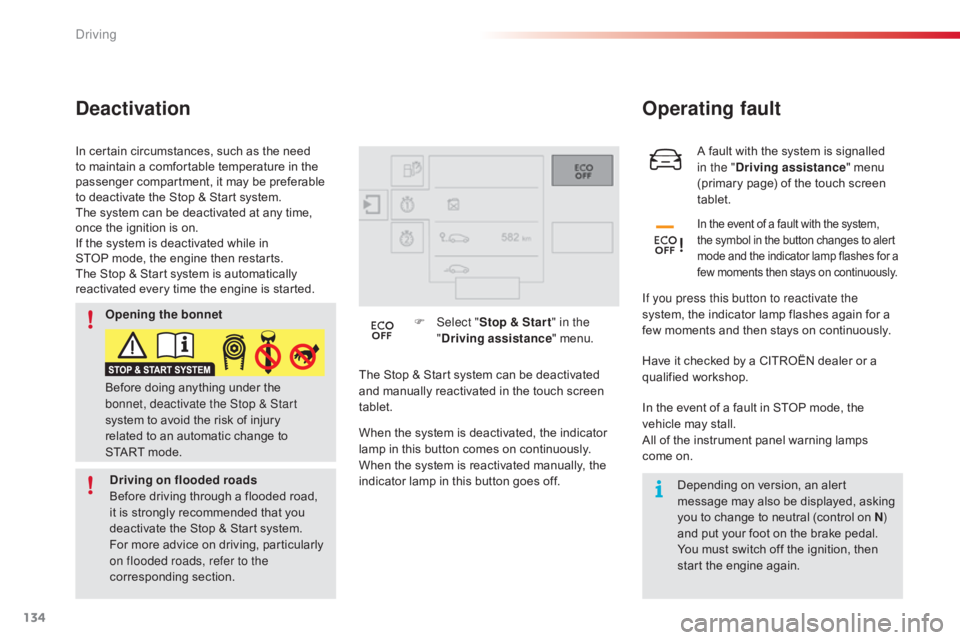
ablet. F
Sel
ect "
Stop & Star t " in the
" Driving assistance " menu.
When the system is deactivated, the indicator
l
amp in this button comes on continuously.
When
the system is reactivated manually, the
i
ndicator lamp in this button goes off.Have
it checked by a CITROËN dealer or a q
ualified w orkshop.
In
the event of a fault in STOP mode, the
v
ehicle may stall.
All
of the instrument panel warning lamps
come
on.Depending
on version, an alert
m
essage may also be displayed, asking
y
ou to change to neutral (control on N)
and
put your foot on the brake pedal.
You
must switch off the ignition, then
s
tart the engine again.
Before
doing
anything
under
the
b
onnet, deactivate the Stop & Start
system
to
avoid
the
risk
of
injury
r
elated
to
an
automatic
change
to
S
TART mode.
Opening the bonnet
Driving on flooded roads
Before
driving
through
a
flooded
road,
i
t
is
strongly
recommended
that
you
d
eactivate
the
Stop
&
Start
system.
For
more
advice
on
driving,
particularly
o
n flooded roads, refer to the
corresponding
s
ection.
Driving
Page 137 of 317
135
C4-cactus_en_Chap06_conduite_ed01-2016
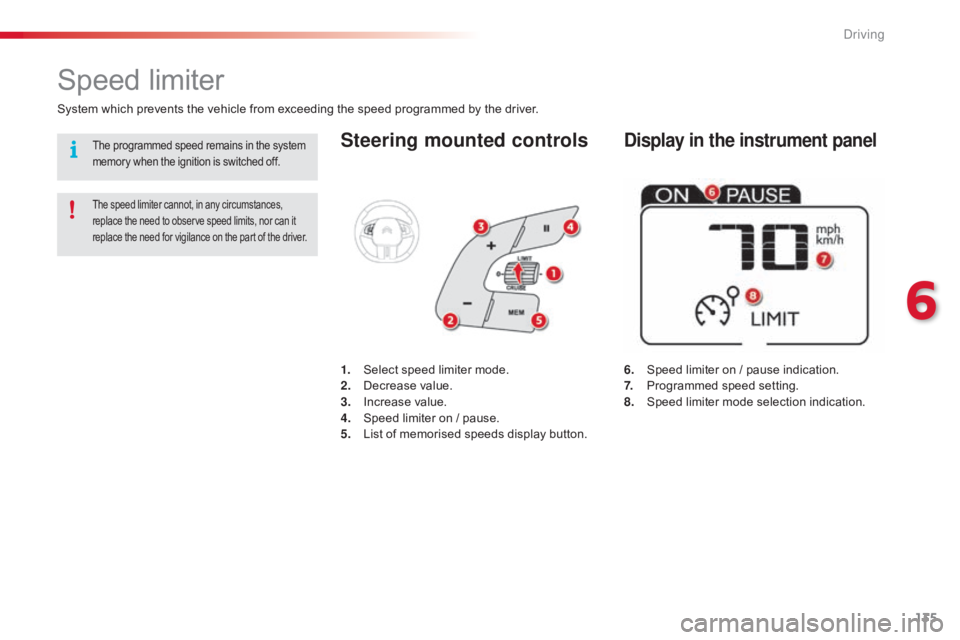
Steering mounted controls
6. Speed limiter on / pause indication.
7. P rogrammed speed setting.
8.
S
peed limiter mode selection indication.
Speed limiter
System which prevents the vehicle from exceeding the speed programmed by the driver.
The speed limiter cannot, in any circumstances, replace the need to observe speed limits, nor can it r
eplace the need for vigilance on the part of the driver.
1. Select speed limiter mode.
2. D ecrease value.
3.
In
crease
v
alue.
4.
S
peed limiter on / pause.
5.
L
ist of memorised speeds display button.
Display in the instrument panelThe programmed speed remains in the system memory when the ignition is switched off.
6
Driving
Page 140 of 317
138
C4-cactus_en_Chap06_conduite_ed01-2016
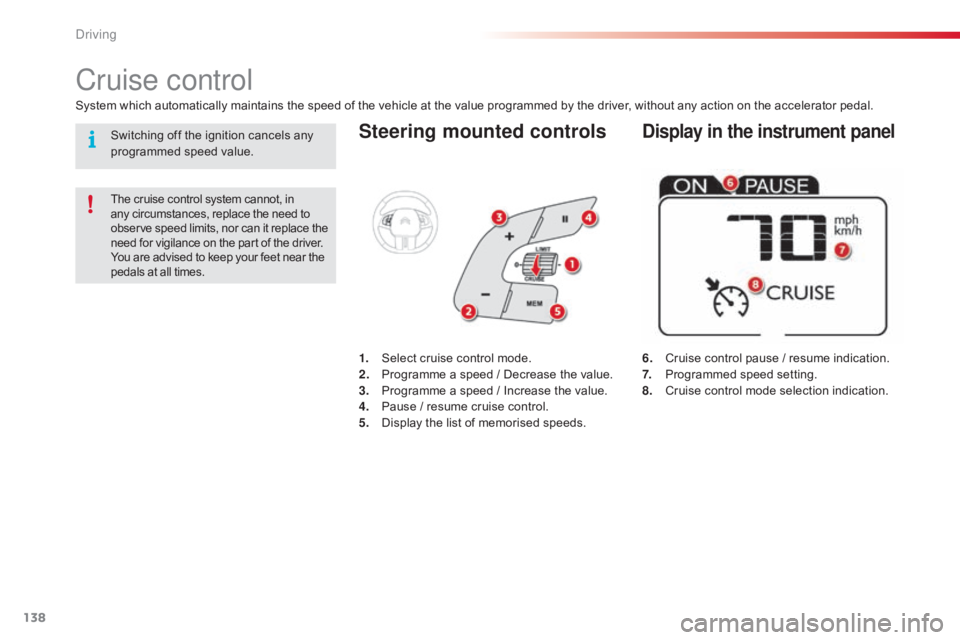
Steering mounted controls
6. Cruise control pause / resume indication.
7. P rogrammed speed setting.
8.
C
ruise control mode selection indication.
Cruise control
System which automatically maintains the speed of the vehicle at the value programmed by the driver, without any action on the accelerator pedal.
The cruise control system cannot, in any circumstances, replace the need to o
bserve speed limits, nor can it replace the
n
eed for vigilance on the part of the driver.
You
are advised to keep your feet near the
p
edals at all times.
1. Select cruise control mode.
2. P rogramme a speed / Decrease the value.
3.
P
rogramme a speed / Increase the value.
4.
P
ause / resume cruise control.
5.
D
isplay the list of memorised speeds.
Display in the instrument panelSwitching off the ignition cancels any programmed speed value.
Driving
Page 150 of 317
148
C4-cactus_en_Chap06_conduite_ed01-2016
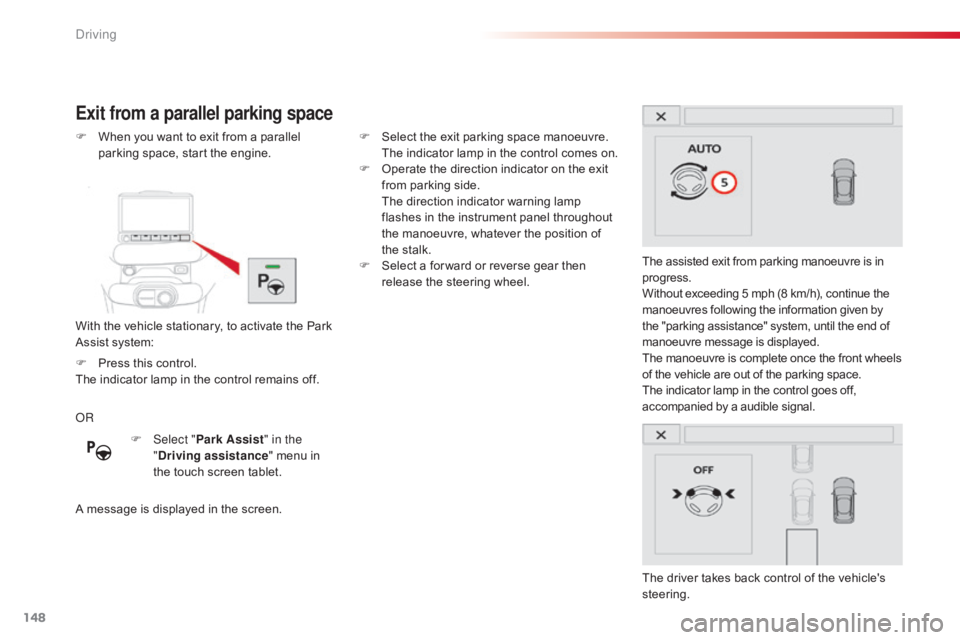
Exit from a parallel parking space
With the vehicle stationary, to activate the Park Assist system:
F
W
hen you want to exit from a parallel
p
arking space, start the engine.
The assisted exit from parking manoeuvre is in
p
rogress.
Without exceeding 5 mph (8 km/h), continue the
m
anoeuvres following the information given by
t
he "parking assistance" system, until the end of m
anoeuvre message is displayed.
The
manoeuvre is complete once the front wheels
o
f the vehicle are out of the parking space.
The
indicator lamp in the control goes off,
a
ccompanied by a audible signal.
The
driver takes back control of the vehicle's
s
teering.
OR
A
message is displayed in the screen.F
S
elect the exit parking space manoeuvre.
T
he indicator lamp in the control comes on.
F
O
perate the direction indicator on the exit
f
rom parking side.
T
he direction indicator warning lamp
f
lashes in the instrument panel throughout
t
he manoeuvre, whatever the position of
t
he stalk.
F
S
elect a for ward or reverse gear then
r
elease the steering wheel.
F
Sel
ect "Park Assist " in the
" Driving assistance "
menu in
t
he touch screen tablet.
F
P
ress this control.
The
indicator lamp in the control remains off.
Driving
Page 173 of 317
171
C4-cactus_en_Chap07_info-pratiques_ed01-2016
After topping-up the oil, the check when switching on the ignition with the oil
l
evel indicator in the instrument panel
i
s not valid during the 30 minutes after
t
opping up.
Topping-up the engine oil level
The location of the oil filler cap is shown in the
corresponding underbonnet layout view.
F
U
nscrew the oil filler cap to reveal the filler
aperture.
F
A
dd oil in small quantities, avoiding any
s
pills on engine components (risk of fire).
F
W
ait a few minutes before checking the
l
evel again using the dipstick.
F
A
dd more oil if necessary.
F
A
fter checking the level, carefully refit the
o
il filler cap and the dipstick in its tube.
Engine oil change
Refer to the manufacturer's service schedule for details of the interval for this operation.
In
order to maintain the reliability of the engine
a
nd emission control system, never use
a
dditives in the engine oil. The
brake fluid level should be close t
o the "MA X" mark. If it is not, check t
he brake pad wear.
Brake fluid level
Changing the fluid
Refer to the manufacturer's service schedule f
or details of the interval for this operation.
Fluid specification
The brake fluid must conform to the manufacturer's r ecommendations.
7
Practical information
Page 178 of 317
176
C4-cactus_en_Chap07_info-pratiques_ed01-2016
Range indicators
Once the AdBlue® tank is on reserve or after d
etection
of
a
fault with the SCR emissions
c
ontrol
system,
when the ignition is switched
o
n,
an
indicator
displays an estimate of the
d
istance
that
can
be covered, the range, before
e
ngine
starting
is
prevented.
In
the
event
of
simultaneous system fault and
l
ow AdBlue
® level, the shortest range figure is t
he
one
displayed. Range greater than 1 500 miles (2 400 km)
When
the ignition is switched on, no
i
nformation on range is displayed automatically
i
n the instrument panel.
The
engine start prevention system
r
equired by regulations is activated
a
utomatically once the AdBlue
® tank is e
m pt y.
In the event of the risk of non-starting related to a lack of AdBlue®
Remaining range between 350 and 1500 miles (600 and 2 400 km)
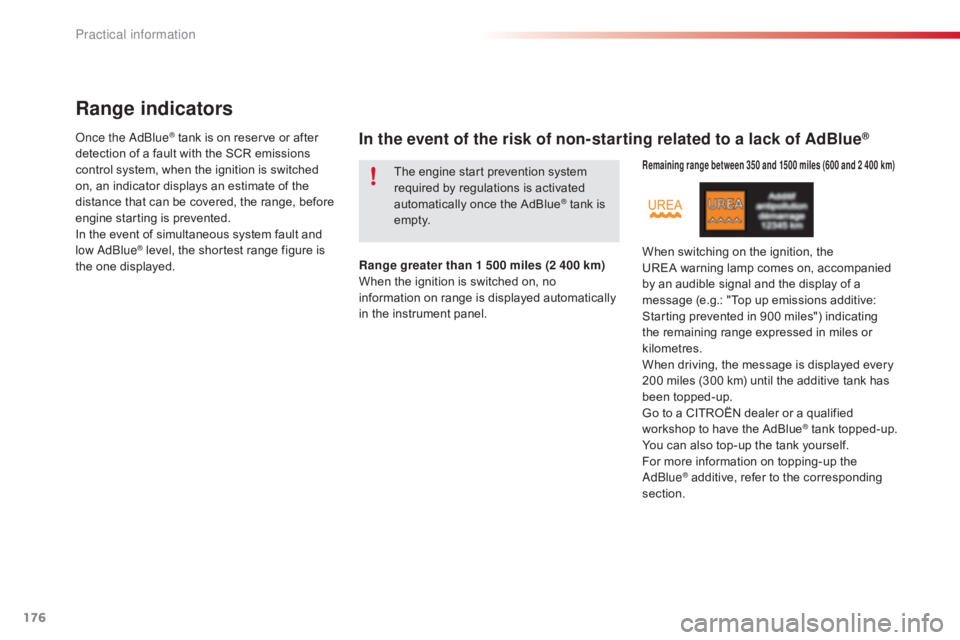
When switching on the ignition, the U REA warning lamp comes on, accompanied
b
y an audible signal and the display of a
m
essage (e.g.: "Top up emissions additive:
S
tarting prevented in 900 miles") indicating
t
he remaining range expressed in miles or
k
ilometres.
When
driving, the message is displayed every
2
00 miles (300 km) until the additive tank has
be
en
t
opped-up.
Go
to a CITROËN dealer or a qualified
w
orkshop to have the AdBlue
® tank topped-up.
Y
ou
can
also
top-up
the
tank
yourself.
For
more
information
on
topping-up the
Ad
Blue
® additive, refer to the corresponding s
ection.
Practical information
Page 195 of 317
193
C4-cactus_en_Chap08_En-cas-de-panne_ed01-2016
Removing a wheel
Parking the vehicle
Immobilise the vehicle where it does not block traffic: the ground must be level,
s
table and not slippery.
Apply
the parking brake, switch off the
i
gnition and engage first gear to block
t
he wheels.
Check
that the parking brake warning
l
amps in the instrument panel come on.
The
occupants must get out of the
v
ehicle and wait where they are safe.
Ensure
that the jack is correctly
p
ositioned at one of the vehicle's
j
acking points.
Incorrect
use of the jack could cause
t
he vehicle to drop.
Never
go underneath a vehicle raised
u
sing a jack; use an axle stand.
List of operations
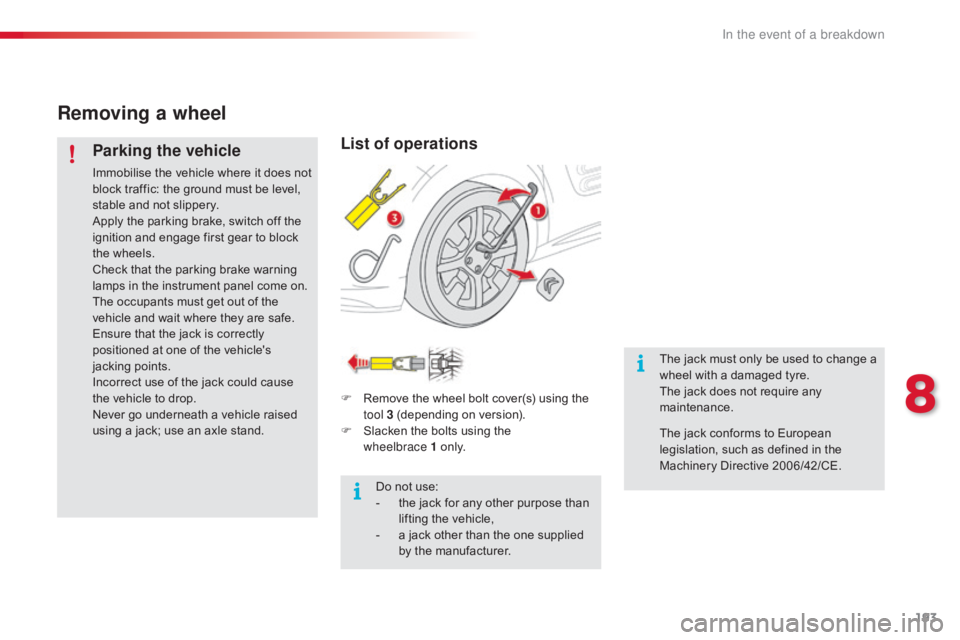
F Remove the wheel bolt cover(s) using the t
ool 3 (depending on version).
F
S
lacken the bolts using the
w
heelbrace
1 o n l y.
Do
not use:
-
t
he jack for any other purpose than
l
ifting the vehicle,
-
a
jack other than the one supplied
b
y the manufacturer. The
jack must only be used to change a
w
heel with a damaged tyre.
The jack does not require any m
aintenance.
The
jack conforms to European
l
egislation, such as defined in the
M
achinery Directive 2006/42/CE.
8
In the event of a breakdown