key CITROEN C4 2019 Owner's Manual
[x] Cancel search | Manufacturer: CITROEN, Model Year: 2019, Model line: C4, Model: CITROEN C4 2019Pages: 317, PDF Size: 9.31 MB
Page 182 of 317
180
C4-cactus_en_Chap07_info-pratiques_ed01-2016
Recommendations on storage
Never store bottles of AdBlue® in your
vehicle.
Procedure
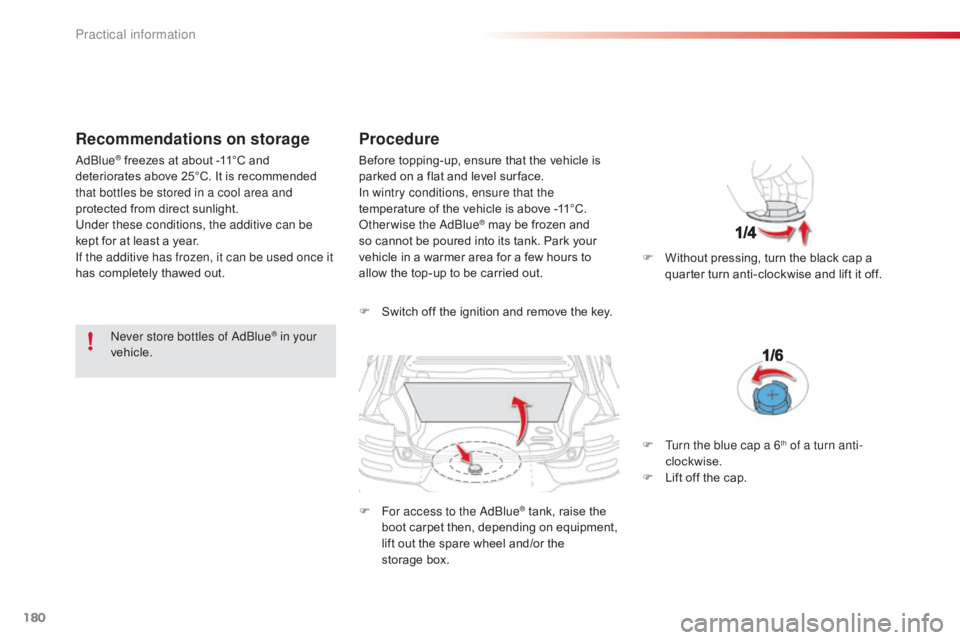
F Switch off the ignition and remove the key.
F
F
or access to the AdBlue
® tank, raise the b
oot
carpet
then,
depending on equipment,
l
ift
out
the
spare
wheel
and/or the
s
torage box. F
W
ithout pressing, turn the black cap a
q
uarter turn anti-clockwise and lift it off.
AdBlue
® freezes at about -11°C and d
eteriorates above 25°C. It is recommended
t
hat bottles be stored in a cool area and
protected
from direct sunlight.
Under these conditions, the additive can be
kept
for
at least a year.
If the additive has frozen, it can be used once it
has
completely thawed out. Before
topping-up, ensure that the vehicle is p
arked on a flat and level sur face.
In wintry conditions, ensure that the
temperature
of the vehicle is above -11°C.
O
therwise the AdBlue
® may be frozen and s
o
cannot
be
poured
into its tank. Park your
v
ehicle
in
a
warmer
area for a few hours to
a
llow
the
top-up
to
be
carried out.
F
T
urn the blue cap a 6
th of a turn anti-
clockwise.
F
L
ift
off
the
cap.
Practical information
Page 183 of 317
181
C4-cactus_en_Chap07_info-pratiques_ed01-2016
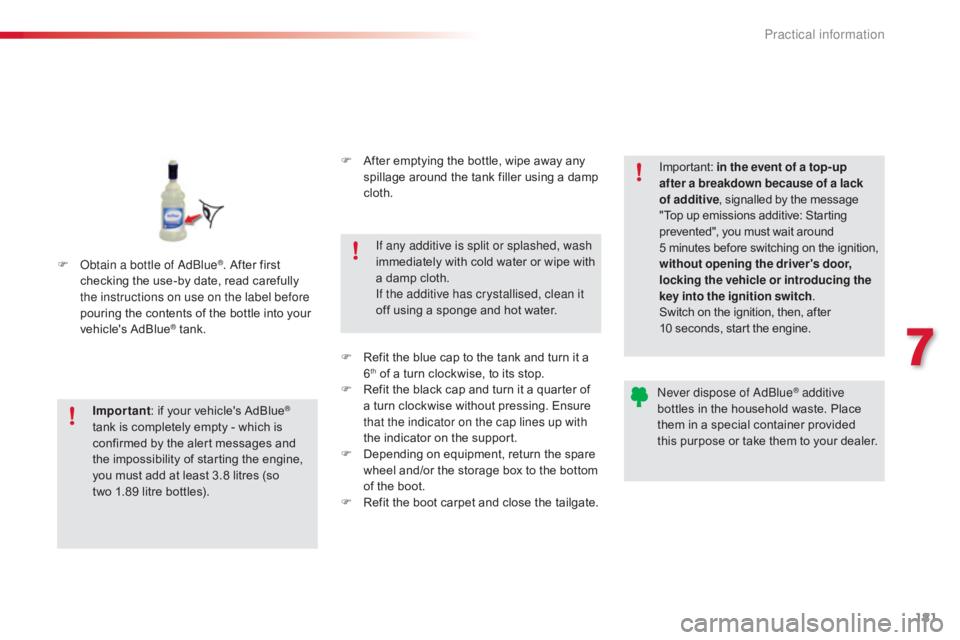
F Obtain a bottle of AdBlue®. After first c
hecking
the
use-by
date,
read carefully
t
he instructions on use on the label before
pouring
the
contents
of
the bottle into your
v
ehicle's
Ad
Blue
® tank.
I
mportant :
if
your vehicle's AdBlue
®
tank
is
completely
empty
-
which
is
c
onfirmed
by
the
alert
messages
and
t
he
impossibility
of
starting
the
engine,
y
ou
must
add
at
least
3.8
litres
(so
t
wo 1.89
litre
bottles). If any additive is split or splashed, wash
immediately
w
ith
c
old
w
ater
o
r
w
ipe
w
ith
a
damp cloth.
If the additive has crystallised, clean it
off using a sponge and hot water.Important:
i
n the event of a top-up
after a breakdown because of a lack
of additive , signalled by the message
"
Top up emissions additive: Starting
p
revented", you must wait around
5
minutes
before
switching
on
the
ignition,
w
ithout opening the driver's door,
locking the vehicle or introducing the
key into the ignition switch .
Switch on the ignition, then, after
1
0 seconds, start the engine.
Never dispose of AdBlue
® additive
bottles
in
the
household
waste. Place
t
hem
in
a
special
container provided
t
his
p
urpose
o
r
t
ake
t
hem
t
o
y
our
d
ealer.
F
A
fter
emptying
the
bottle,
wipe
away
any
s
pillage
around
the
tank
filler
using
a
damp
c
loth.
F
R
efit
the
blue
cap
to
the
tank
and
turn
it
a
6th of a turn clockwise, to its stop.
F
R
efit the black cap and turn it a quarter of
a
turn clockwise without pressing. Ensure
t
hat the indicator on the cap lines up with
the
indicator on the support.
F
D
epending on equipment, return the spare
w
heel and/or the storage box to the bottom
o
f
the boot.
F
R
efit the boot carpet and close the tailgate.
7
Practical information
Page 217 of 317
215
C4-cactus_en_Chap08_En-cas-de-panne_ed01-2016
Do not force the lever as locking will not be possible if the clamp is not
p
ositioned correctly; start the procedure
ag
ain.
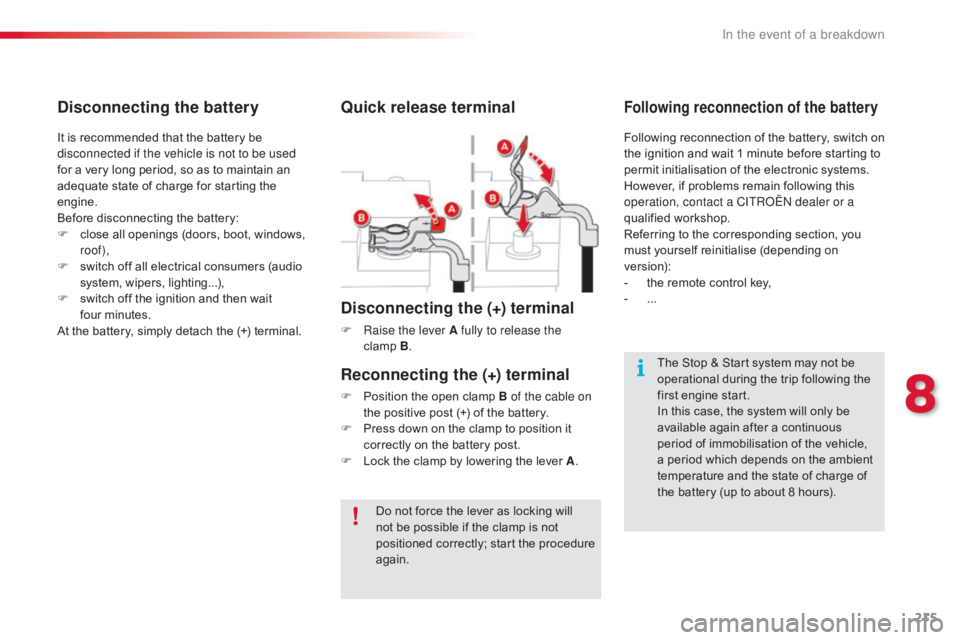
Quick release terminal
Disconnecting the (+) terminal
F Raise the lever A fully to release the clamp B.
The
Stop & Start system may not be
o
perational during the trip following the
f
irst engine start.
In
this case, the system will only be
a
vailable again after a continuous
p
eriod of immobilisation of the vehicle,
a
period which depends on the ambient
t
emperature and the state of charge of
t
he battery (up to about 8 hours).
It
is
recommended
that
the
battery
be
d
isconnected if the vehicle is not to be used
for
a
very
long
period,
so
as
to
maintain
an
a
dequate
state
of
charge
for
starting
the
e
ngine.
Before
disconnecting
the
battery:
F
c
lose
all
openings
(doors,
boot,
windows,
r
oof),
F
s
witch
off
all
electrical
consumers
(audio
s
ystem,
wipers,
lighting...),
F
s
witch
off
the
ignition
and
then
wait
f
our minutes.
At
the
battery,
simply
detach
the
(+)
terminal.
Disconnecting the battery
Following reconnection of the battery, switch on t
he ignition and wait 1 minute before starting to
p
ermit initialisation of the electronic systems.
H
owever, if problems remain following this
o
peration, contact a CITROËN dealer or a
qualified
w
orkshop.
Referring
to the corresponding section, you
m
ust
y
ourself
r
einitialise
(
depending
o
n
ve
rsion):
-
t
he remote control key,
-
...
Following reconnection of the battery
Reconnecting the (+) terminal
F Position the open clamp B of the cable on
the positive post (+) of the battery.
F
P
ress down on the clamp to position it
c
orrectly on the battery post.
F
L
ock the clamp by lowering the lever A.
8
In the event of a breakdown
Page 237 of 317
235
C4-cactus_en_Chap10b_SMEGplus_ed01-2016
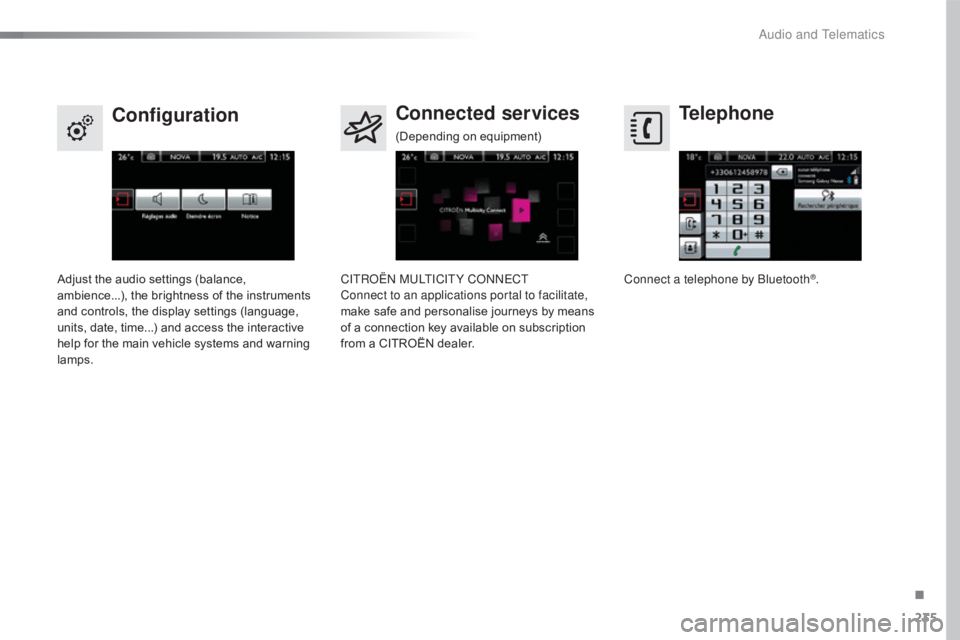
Telephone
Configuration Connected services
Connect a telephone by Bluetooth®.
Adjust
the
audio
settings
(balance,
a
mbience...),
the
brightness
of
the
instruments
a
nd
controls,
the
display
settings
(language,
u
nits,
date,
time...)
and
access
the
interactive
h
elp
for
the
main
vehicle
systems
and
warning
lam
ps. CITROËN MULTICITY CONNECT
Connect to an applications portal to facilitate,
make
safe
and
personalise
journeys
by
means
o
f
a
connection
key
available
on
subscription
f
rom
a
CITROËN
dealer.
(Depending
o
n
e
quipment)
.
Audio and Telematics
Page 245 of 317
243
C4-cactus_en_Chap10b_SMEGplus_ed01-2016
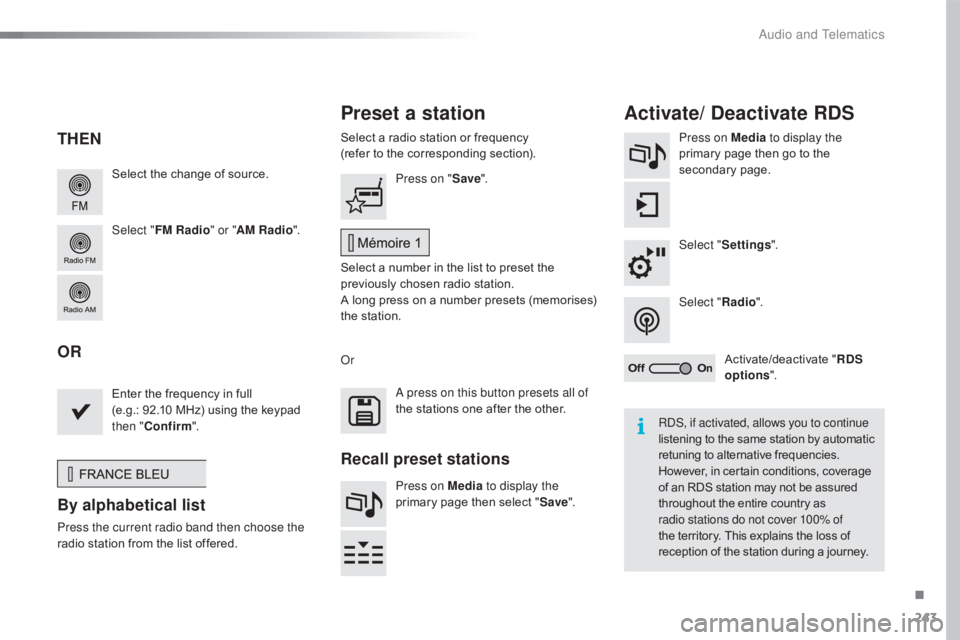
Select the change of source.
Sel ect " FM Radio " or "AM Radio ".Select
a radio station or frequency
(refer to the corresponding section).
Press on Media
to display the
primary page then go to the s
econdary pag e.
Select " Settings ".
Select " Radio".
Activate/deactivate
" R
DS
options ".
Press on "
Save".
Select
a number in the list to preset the
p
reviously chosen radio station.
A
long press on a number presets (memorises)
t
he station.
Enter
the frequency in full
(e.g.: 92.10
MHz) using the keypad
t
hen " Confirm ".
By alphabetical list
Press the current radio band then choose the
radio
station from the list offered. Or
Press on Media to display the
primary page then select "
Save ".
Preset a station Activate/ Deactivate RDS
THEN
OR
A press on this button presets all of
the
stations one after the other.
Recall preset stations
RDS, if activated, allows you to continue
listening to the same station by automatic r
etuning to alternative frequencies.
H
owever, in certain conditions, coverage
o
f an RDS station may not be assured
t
hroughout the entire country as
r
adio stations do not cover 100% of
the
territory. This explains the loss of
r
eception of the station during a journey.
.
Audio and Telematics
Page 275 of 317
273
C4-cactus_en_Chap10b_SMEGplus_ed01-2016
CITROËN Multicity Connect
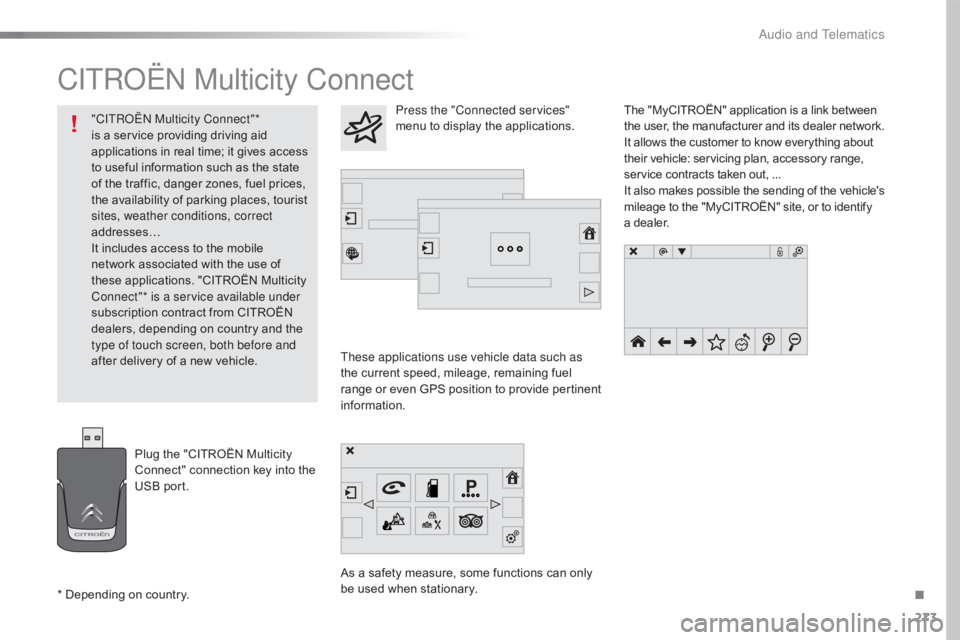
These applications use vehicle data such as
the current speed, mileage, remaining fuel
r
ange
o
r
e
ven
G
PS
p
osition
t
o
p
rovide
p
ertinent
i
nformation.
As
a safety measure, some functions can only
b
e used when stationary. The
"MyCITROËN" application is a link between
t
he user, the manufacturer and its dealer network.
It allows the customer to know everything about
t
heir vehicle: servicing plan, accessory range,
s
ervice contracts taken out, ...
It
also
makes
possible
the
sending
of
the
vehicle's
m
ileage to the "MyCITROËN" site, or to identify
a
dealer.
Press the "Connected services"
menu to display the applications.
Plug
the
"CITROËN
Multicity
C
onnect"
connection
key
into
the
U
SB
port.
*
Depending
on
country.
"CITROËN Multicity Connect"*
is
a
service
providing
driving
aid
a
pplications
in
real
time;
it
gives
access
t
o
useful
information
such
as
the
state
o
f
the
traffic,
danger
zones,
fuel
prices,
t
he
availability
of
parking
places,
tourist
s
ites, weather conditions, correct
addresses…
It
includes
access
to
the
mobile
n
etwork
associated
with
the
use
of
t
hese
applications.
"CITROËN
Multicity
C
onnect"* is a service available under
subscription
contract
from
CITROËN
d
ealers,
depending
on
country
and
the
t
ype of touch screen, both before and
after
delivery
of
a
new
vehicle.
.
Audio and Telematics
Page 294 of 317
292
C4-cactus_en_Chap11_index-alpha_ed01-2016
Maintenance (advice) ............................18 2, 18 3
Maintenance, routine ...................................... 10
M
ap reading lamps
......................................... 67
M
arkings,
id
entification
................................. 2
24
Mat
.......
............................................... 69, 70, 74
Memorising
a
speed
...............
........................................ 141
Mirror, rear view
.............................................. 54
M
irrors, door .................................................... 53Navigation
...............................
......................
256
Number plate lamps
......................................
20
3
M
N
Labels, identification .....................................
2 24
Lamp, boot ............................... ..............68, 204
Lamps .............................................................. 79
Leather (care)
...............................
.................183
LEDs
- Light-emitting
diodes
..............................
.................... 83, 204
Levels
and checks
..............................
...16 8 -172
Lighting,
c
ornering
...............................
...........85
Lighting
dimmer
..............................
................39
Lighting,
guide-me home
................................84
L
ighting,
i
nterior
.............................................. 67
Lo
ading
..............................
.............................10
Load
reduction mode
.................................... 16
0
Localised
Assistance /
Emergency
C
all
.......................................... 2
26
Locating
your vehicle
...................................... 41
L
ocking from the inside
...................................44
L
ocking the doors
..............................
.......44, 46
Low fuel level
..............................
..................153Misfuel prevention ...............................
..........155
Mountings, I
sofix ............................... ............113
L
Key with remote
c ontrol ............................................... 4 0, 41, 43
Kit, hands-free
......................................2
78, 279
Kit,
temporary puncture
repair
...............................
...................... 76, 185
K
Immobiliser, electronic .............................. 4 1, 43
Indicator, engine oil level ................................2
7
Indicator
lamps, operation
..............................13
I
ndicators, direction
................................ 81
,
19
9
Inflating
tyres
..............................
...................... 9
Inflating
tyres and accessories
(using
the kit)
..............................
................185
Instrument
panel
...............................
..............11
Interactive help
........................................3
3, 270
ISOFIX
...............
.................................... 113 -115
Jack
........
....................................... 191, 193, 194
Jump
starting
..............................
..................213
J
Oil change ............................... ..............170, 171
Oil consumption ............................................ 17
0
Opening
the bonnet
...................................... 16
7
Opening
the boot
..............................
..............47
Opening
the doors
...............................
...........45
O
Alphabetical index