cruise control CITROEN C4 2020 User Guide
[x] Cancel search | Manufacturer: CITROEN, Model Year: 2020, Model line: C4, Model: CITROEN C4 2020Pages: 260, PDF Size: 7.12 MB
Page 109 of 260

107
Driving
6The speed limiter is temporarily deactivated and
the displayed speed setting flashes.
►
Release the accelerator pedal to return to
below the speed setting.
When exceeding the speed is not due to the
driver's action (e.g.
in case of a steep slope), an
audible signal is triggered immediately.
On a steep descent or in the event of
sharp acceleration, the speed limiter will
not be able to prevent the vehicle from
exceeding the speed setting.
If necessary, apply the brakes to control your
vehicle’s speed.
When the vehicle speed returns to the speed
setting level, the speed limiter operates again:
the speed setting display becomes fixed again.
Off
► Press 1-LIMIT: the speed limiter information
display disappears.
Malfunction
In the event of a malfunction, dashes are
displayed flashing and then fixed instead of the
speed setting.
Have it checked by a CITROËN dealer or a
qualified workshop.
Cruise control - Specific
recommendations
The cruise control function does not guarantee compliance with the maximum
authorised speed and the safety distance
between vehicles, the driver remains
responsible for their driving.
In the interest of public safety, only use cruise
control if the traffic conditions enable vehicles
to drive at a steady speed and maintain an
adequate safety distance.
Remain vigilant while cruise control is
activated. If you press and hold one of the
speed setting modification buttons, your
vehicle may change speed very abruptly.
When descending a steep hill , the cruise
control system cannot prevent the vehicle
from exceeding the set speed. Brake if
necessary to control the vehicle speed.
On steep climbs or when towing, the set
speed may not be reached or maintained.
Exceeding the programmed speed
setting
You can temporarily exceed the speed
setting by pressing the accelerator pedal (the
programmed speed flashes).
To return to the speed setting, release the
accelerator pedal (when the set speed is
reached again, the displayed speed stops
flashing).
Operating limits
Never use the system in the following
situations:
–
In an urban area with the risk of
pedestrians crossing the road.
–
In heavy traffic (except versions with the
Stop & Go function).
–
On winding or steep roads.
–
On slippery or flooded roads.
–
In poor weather conditions.
–
Driving on a speed circuit.
–
Driving on a rolling road.
–
When using snow chains, non-slip covers
or studded tyres.
Cruise control
For more information, refer to the
General recommendations on the use
of driving and manoeuvring aids and the
Cruise control - particular
recommendations.
This system automatically maintains the vehicle’s speed at the value programmed
by the driver (speed setting), without the use of
the accelerator pedal.
Cruise control is switched on manually.
It requires a minimum vehicle speed of 25 mph
(40
km/h).
With a manual gearbox, third gear or higher must
be engaged.
Page 110 of 260

108
Driving
With an automatic gearbox, mode D or second
gear or higher in mode M must be engaged.
With a drive selector, mode
D or B must be
engaged.
Cruise control remains active after
changing gear, regardless of the gearbox
type, on engines fitted with the Stop & Start
function.
Switching off the ignition cancels any
speed setting.
Steering-mounted controls
1. Cruise control selection
2. Switch on/pause cruise control at the
previously saved speed setting 3.
Increase/Decrease the speed setting (if
cruise control activated)
Activation of cruise control in progress (if
cruise control deactivated)
4. Activation of cruise control in progress
Use the speed suggested by the Road signs
recognition
For more information on the Road signs
recognition
function, refer to the corresponding
section.
Information displayed on
the instrument panel
5. Cruise control mode selection indication
6. Cruise control on (green)/pause (grey)
indication
7. Speed setting value
8.Speed suggested by the Road signs
recognition function (depending on version)
Switching on/pausing
► Press button 1 to select the cruise control
mode; the function is paused (grey).
►
Press
3 upwards/downwards, or press 4-OK
to activate the cruise control and save a speed
setting as soon as the vehicle speed reaches the
desired level (green).
►
Pressing button 2-I I>
temporarily pauses the
function.
►
Pressing
2-I I> or 4-OK again will reactivate
cruise control (green).
Cruise control operation is also
temporarily interrupted (pause):
–
by pressing the brake pedal.
–
automatically
, if the electronic stability
control (ESC) system is triggered.
–
by shifting to neutral or engaging reverse
gear
.
–
by using the electric parking brake.
Modifying the speed setting
The cruise control must be active.
To change the speed setting using the vehicle’s
current speed:
►
For steps of +/- 1 mph (1 km/h),
make successive short presses upwards/
downwards
on 3 to increase/decrease.
Page 111 of 260

109
Driving
6► For steps of +/- 5 mph (5 km/h), press and
hold upwards/downwards on 3 to increase/
decrease.
Prolonged pressing and holding
upwards/downwards on 3 causes a very
rapid change in vehicle speed.
As a precaution, we recommend setting a cruise speed fairly close to the current
speed of your vehicle, to avoid any sudden
acceleration or deceleration of the vehicle.
To change the speed setting using the speed suggested by the Road signs recognition
displayed on the instrument panel:
–
When passing the sign:
►
Press
4-OK to save the suggested speed.
This value is then immediately shown as the new
speed setting on the instrument panel.
–
After passing the sign:
►
Press
4-OK. The message “OK?" is
displayed to confirm the request to save.
►
Press
4-OK again to save the suggested
speed. The new speed setting value is displayed
on the instrument panel.
Off
► Press 1: the cruise control information display
disappears.
Malfunction
In the event of a malfunction, dashes are
displayed flashing and then fixed instead of the
speed setting.
Have it checked by a CITROËN dealer or a
qualified workshop.
Highway Driver Assist
Only available on versions with the EAT8
automatic gearbox and drive selector.
This system automatically adjusts the speed
and corrects the trajectory of the vehicle, using
Adaptive cruise control with Stop&Go function in
conjunction with Lane Positioning Assist.
These two functions must be activated and in
operation.
For more information on Adaptive cruise
control and Lane Positioning Assist, refer to
the corresponding sections.
The system assists the driver by acting on the steering, acceleration and braking
within the physical limits
and capacities of the
vehicle. Certain road infrastructure elements
or vehicles in the surroundings may not be
properly seen or may be poorly interpreted by
the camera and radar, resulting in an
unexpected change in direction, a lack of
steering correction and/or inappropriate
management of acceleration or braking.
Primarily designed for driving on main
roads and motorways, this system only
works with moving vehicles driving in the
same direction as your vehicle.
Adaptive cruise control
For more information, refer to the
General recommendations on the use
of driving and manoeuvring aids and the
Cruise control - particular
recommendations.
This system automatically maintains the vehicle
speed at a value set by the driver (speed
setting), while respecting a safety distance from
the vehicle in front (target vehicle) previously set
by the driver. The system automatically manages
the acceleration and deceleration of the vehicle.
With the Stop function , the system manages
braking until the vehicle comes to a complete
stop.
With the Stop
& Go function , the system
manages braking until the vehicle comes to a
complete stop and restarts the vehicle.
The brake lamps come on if the vehicle is slowed down by the system.
It can be dangerous to drive if the brake
lamps are not in perfect working order.
Page 112 of 260
11 0
Driving
To do this, the system uses a camera fitted at the
top of the windscreen and a radar fitted in the
front bumper.
Primarily designed for driving on main
roads and motorways, this system only
works with moving vehicles driving in the
same direction as your vehicle.
If the driver activates the direction
indicator to overtake a slower vehicle,
cruise control may temporarily reduce the
distance to the target vehicle to facilitate
overtaking, without exceeding the speed
setting.
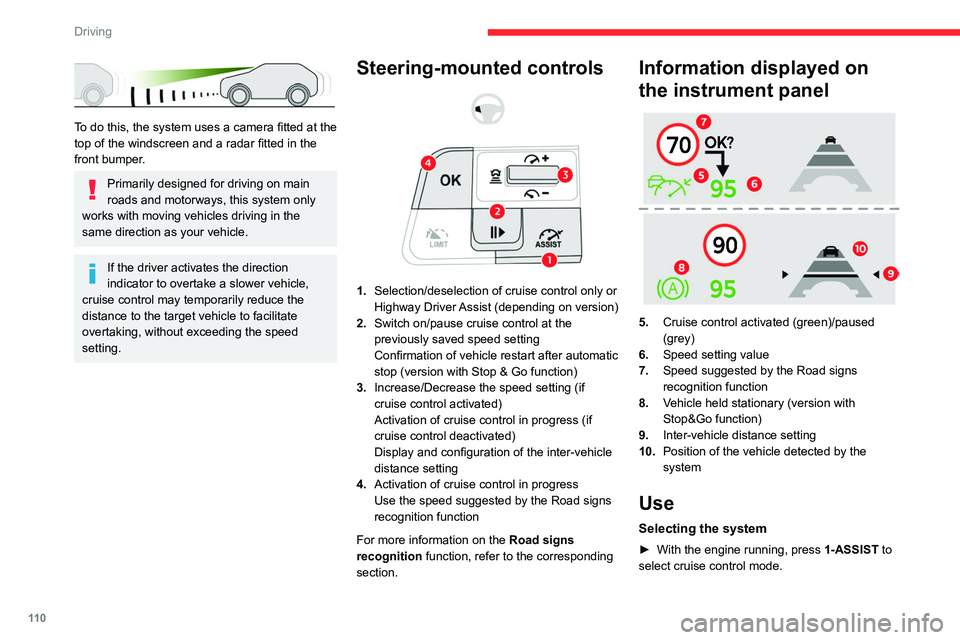
Steering-mounted controls
1. Selection/deselection of cruise control only or
Highway Driver Assist (depending on version)
2. Switch on/pause cruise control at the
previously saved speed setting
Confirmation of vehicle restart after automatic
stop (version with Stop & Go function)
3. Increase/Decrease the speed setting (if
cruise control activated)
Activation of cruise control in progress (if
cruise control deactivated)
Display and configuration of the inter-vehicle
distance setting
4. Activation of cruise control in progress
Use the speed suggested by the Road signs
recognition function
For more information on the Road signs
recognition
function, refer to the corresponding
section.
Information displayed on
the instrument panel
5. Cruise control activated (green)/paused
(grey)
6. Speed setting value
7. Speed suggested by the Road signs
recognition function
8. Vehicle held stationary (version with
Stop&Go function)
9. Inter-vehicle distance setting
10. Position of the vehicle detected by the
system
Use
Selecting the system
► With the engine running, press 1-ASSIST to
select cruise control mode.
Page 113 of 260

111
Driving
6The symbol for the Adaptive cruise control system is displayed on the instrument
panel.
Switching on cruise control
With an EAT8 automatic gearbox or a drive
selector, your speed must be between 0 and
112
mph (0 and 180 km/h).
System activation is also subject to the following
conditions:
–
driver's door closed.
–
driver's seat belt fastened.
–
mode D selected on the automatic gearbox.
–
parking brake released.
–
if the vehicle is stationary
, brake pedal
depressed.
►
Press
3 or 4-OK: the current speed becomes
the speed setting (minimum 19 mph (30
km/h))
and cruise control is immediately activated
(green display).
Modifying the speed setting
To change the speed setting using the vehicle’s
current speed:
►
For steps of +/- 1 mph (1 km/h), make
successive short presses upwards/downwards
on
3 to increase/decrease.
►
For steps of +/- 5 mph (5
km/h), press and
hold upwards/downwards on 3 to increase/
decrease.
Prolonged pressing and holding
upwards/downwards on 3 causes a rapid
change in vehicle speed. To change the speed setting using the
speed suggested by the Road signs
recognition
function and displayed on the
instrument panel:
–
When passing the sign:
►
Press
4-OK to save the suggested speed.
This value is then immediately shown as the new
speed setting on the instrument panel.
–
After passing the sign:
►
Press
4-OK. The message "OK?" is
displayed to confirm the request to save.
►
Press
4-OK again to save the suggested
speed. The new speed setting value is displayed
on the instrument panel.
Pausing/resumption of cruise control
► Press 2-I I> or depress the brake pedal. The
symbol turns grey.
Cruise control may also have been paused:
–
automatically
, if the electronic stability control
(ESC) system is triggered.
–
by shifting to neutral or engaging reverse gear
.
–
by using the electric parking brake.
–
by unfastening the seat belt.
–
by opening the driver's door
.
►
Press
2-I I> or 4-OK to reactivate cruise
control.
With an EAT8 gearbox or a drive selector,
following braking that has brought the vehicle
to a complete stop, if the traffic conditions do
not allow the vehicle to begin moving again
within 3
seconds of stopping, press
2-I I>
or the
accelerator pedal to move off.
Cruise control remains active following a
gear change.
When cruise control is paused and the
driver tries to reactivate it, the message
"Activation refused, conditions unsuitable "
is temporarily displayed if reactivation is
impossible (required conditions not met).
Changing the programmed speed setting
with the Road signs recognition function
► Press 4-OK to accept the speed suggested
by the function on the instrument panel, then
press again to confirm.
If the selected speed is far from the
current vehicle speed, a strong
acceleration or deceleration is felt.
Changing the inter-vehicle distance
► Press 3 to display the distance setting
thresholds (" Distant", "Normal" or "Close"),
then make successive short presses upwards/
downwards to select a threshold.
After a few seconds, the option is accepted and
will be memorised when the ignition is switched
off.
The driver must keep a sufficient safety distance
from the vehicle in front.
Temporarily exceeding the speed setting
► Depress the accelerator pedal. The system
is suspended as long as the acceleration is
Page 114 of 260

11 2
Driving
maintained. The speed next to the symbol
disappears from the instrument panel.
Deselecting the system
► Press 1-ASSIST until the symbols disappear
from the instrument panel.
Messages and alerts
The actual order of display of the messages or alerts may be different.
(grey symbol)
Cruise control selected, but
cannot be activated.
All the operating conditions have
not been met.
(grey symbol)
Cruise control selected, awaiting
activation.
All the operating conditions are
met.
(grey symbol)
Cruise control paused, but
cannot be reactivated.
All the operating conditions have
not been met.
(green symbol)
Cruise control active, vehicle
detected.
(green symbol)
Cruise control suspended,
following brief acceleration by
the driver.
(orange)
"Take back control"
►
Brake or accelerate, depending on the
context.
(red)
"Take back control"
►
T
ake back control of the vehicle
immediately: the system cannot manage the
current driving situation.
"Activation refused, conditions
unsuitable "
The system refuses to activate cruise control, as
the necessary conditions are not fulfilled.
Stop & Go function
(green symbols)
The system has brought the
vehicle to a complete stop. The
symbol "I I" is displayed.
Within 3 seconds of stopping, the vehicle
gradually and automatically begins moving
again.
Beyond 3 seconds of stopping, the driver must
accelerate or press 2-I I> to move off.
If the driver takes no action after the
vehicle has been stopped, the electric
parking brake is applied automatically after
about 5 minutes.
While the vehicle is immobilised, the
following recommendations apply:
–
The driver should not leave the vehicle.
–
Do not open the boot.
–
Do not drop off or pick up passengers.
–
Do not engage reverse gear
.
When restarting the vehicle, beware of
cyclists, pedestrians or animals who are
not taken into account by the system.
The driver must monitor their surroundings.
Operating limits
Cruise control operates by day and night, in dry
weather or moderate rainfall.
Certain situations cannot be managed by the
system and require driver intervention.
Cases not taken into account by the system:
–
Pedestrians, cyclists, animals.
–
Stationary vehicles (e.g.
traffic jams,
breakdown).
Page 116 of 260
11 4
Driving
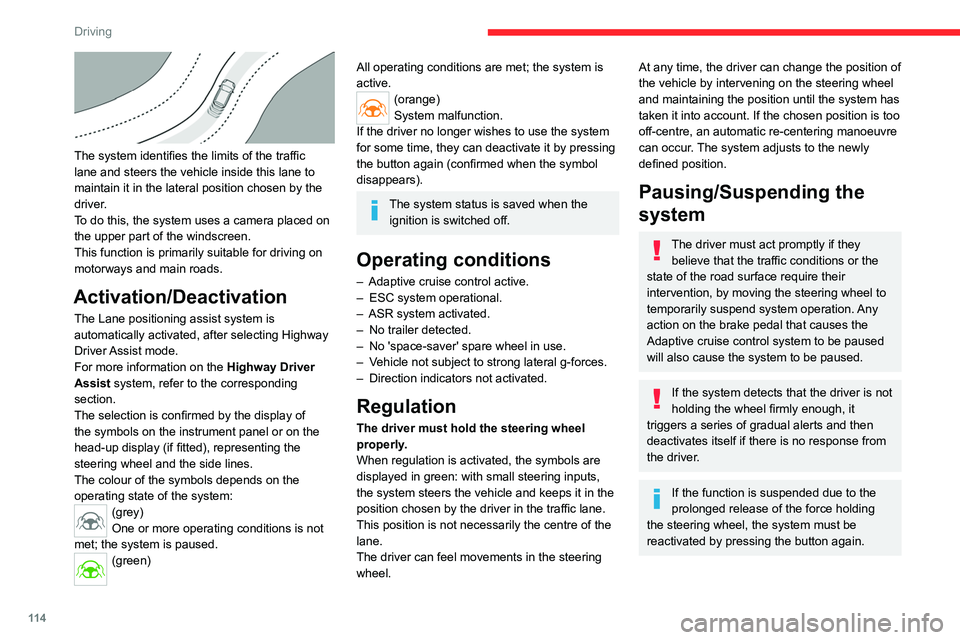
The system identifies the limits of the traffic
lane and steers the vehicle inside this lane to
maintain it in the lateral position chosen by the
driver.
To do this, the system uses a camera placed on
the upper part of the windscreen.
This function is primarily suitable for driving on
motorways and main roads.
Activation/Deactivation
The Lane positioning assist system is
automatically activated, after selecting Highway
Driver Assist mode.
For more information on the Highway Driver
Assist system, refer to the corresponding
section.
The selection is confirmed by the display of
the symbols on the instrument panel or on the
head-up display (if fitted), representing the
steering wheel and the side lines.
The colour of the symbols depends on the
operating state of the system:
(grey)
One or more operating conditions is not
met; the system is paused.
(green)
All operating conditions are met; the system is
active.
(orange)
System malfunction.
If the driver no longer wishes to use the system
for some time, they can deactivate it by pressing
the button again (confirmed when the symbol
disappears).
The system status is saved when the ignition is switched off.
Operating conditions
– Adaptive cruise control active.
– ESC system operational.
–
ASR system activated.
–
No trailer detected.
–
No 'space-saver' spare wheel in use.
–
V
ehicle not subject to strong lateral g-forces.
–
Direction indicators not activated.
Regulation
The driver must hold the steering wheel
properly.
When regulation is activated, the symbols are
displayed in green: with small steering inputs,
the system steers the vehicle and keeps it in the
position chosen by the driver in the traffic lane.
This position is not necessarily the centre of the
lane.
The driver can feel movements in the steering
wheel.
At any time, the driver can change the position of
the vehicle by intervening on the steering wheel
and maintaining the position until the system has
taken it into account. If the chosen position is too
off-centre, an automatic re-centering manoeuvre
can occur. The system adjusts to the newly
defined position.
Pausing/Suspending the
system
The driver must act promptly if they believe that the traffic conditions or the
state of the road surface require their
intervention, by moving the steering wheel to
temporarily suspend system operation. Any
action on the brake pedal that causes the
Adaptive cruise control
system to be paused
will also cause the system to be paused.
If the system detects that the driver is not
holding the wheel firmly enough, it
triggers a series of gradual alerts and then
deactivates itself if there is no response from
the driver.
If the function is suspended due to the
prolonged release of the force holding
the steering wheel, the system must be
reactivated by pressing the button again.
Page 117 of 260
11 5
Driving
6Automatic suspension
Suspension of the system is accompanied by a
specific audible signal.
–
T
riggering of the ESC system.
–
Insufficient lane detection. In this case, the
Active lane departure warning system function
can take over
, and the system will reactivate itself once the operating conditions are met
again.Paused by the driver
– Travelling outside the lane limits.
–
T oo tight a grip on the steering wheel or
dynamic action on the steering wheel. –
Action on the brake pedal (resulting in a pause
until cruise control is reactivated) or accelerator
pedal (suspension for as long as the pedal is
depressed).
–
Pausing of the Adaptive cruise control system.
–
Deactivation of the
ASR system.
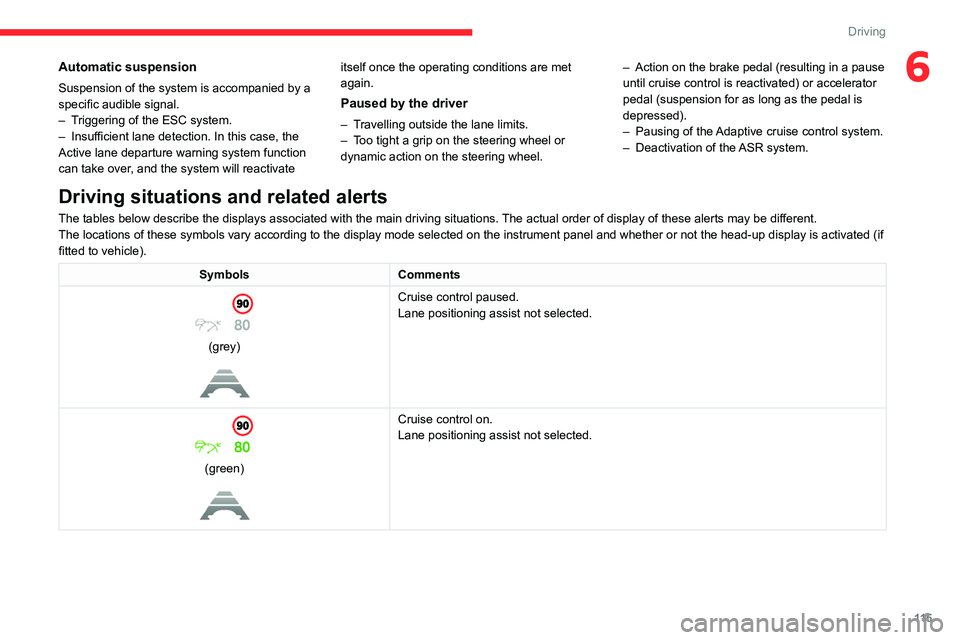
Driving situations and related alerts
The tables below describe the displays associated with the main driving situations. The actual order of display of these alerts may be different.
The locations of these symbols vary according to the display mode select\
ed on the instrument panel and whether or not the head-up display is act\
ivated (if
fitted to vehicle).
Symbols Comments
(grey)
Cruise control paused.
Lane positioning assist not selected.
(green)
Cruise control on.
Lane positioning assist not selected.
Page 119 of 260

(green)
Highway Driver Assist system activated.
All the operating conditions for lane positioning assist have not been m\
et.
(grey)
(green)
Highwa")
11 7
Driving
6SymbolsComments
(grey)
(green)
Highway Driver Assist system activated.
All the operating conditions for lane positioning assist have not been m\
et.
(grey)
(green)
Highway Driver Assist system suspended.
Cruise control and lane positioning assist are suspended.
Messages Driving situations
"Keep your hands on the steering wheel " Prolonged driving without holding the steering wheel, holding it imprope\
rly or without
applying any force.
"Hold the steering wheel "Actual or imminent loss of lane positioning assist.
"Take back control" Simultaneous loss of cruise control and lane positioning assist.
Page 173 of 260

171
In the event of a breakdown
8Fitting a wheel
Fitting a steel or "space-saver" type
spare wheel
If the vehicle is fitted with alloy wheels, the
washers A do not make contact with the steel
or "space-saver" type spare wheel. The wheel
is held in place by the conical contact surface
B of each bolt.
► Fit the wheel on the hub.
► Screw in the bolts by hand as far as possible.
►
Pre-tighten the security bolt using the
wheelbrace
5
equipped with a security socket
2
.
►
Pre-tighten the other bolts using the
wheelbrace
5
only.
► Lower the vehicle again fully .
► Fold jack 6 and remove it.
► Tighten the security bolt using the
wheelbrace 5 equipped with a security socket 2 .
►
T
ighten the other bolts using the
wheelbrace
5
only.
►
Refit the bolt covers to each of the bolts
(depending on equipment).
►
Store the tools.
After changing a wheel
With a "space-saver" type spare wheel
Deactivate certain driving aid functions
(Active Safety Brake, Adaptive cruise control,
etc.).
Do not exceed the maximum authorised
speed of 50 mph (80 km/h).
Driving with more than one "space-saver"
type spare wheel is prohibited.
Visit a CITROËN dealer or a qualified
workshop.
Have the tightening of the spare wheel's bolts
and its tyre pressure checked.
Have the punctured tyre examined. After
inspection, the technician will advise you on
whether the tyre can be repaired or if it must
be replaced.
Changing a bulb
In some weather conditions (e.g. low
temperature or humidity), misting on the
internal surface of the glass of the headlamps
and rear lamps is normal, and will disappear