charging CITROEN C4 2020 Owner's Guide
[x] Cancel search | Manufacturer: CITROEN, Model Year: 2020, Model line: C4, Model: CITROEN C4 2020Pages: 260, PDF Size: 7.12 MB
Page 178 of 260

176
In the event of a breakdown
For more information, refer to the
handbook.
Explosive gases can be present close to
the battery.
Accessing the battery
The battery is located under the bonnet.
For access to the (+) terminal:
► Release the bonnet by pulling the internal
release lever
, then the external safety catch.
►
Raise the bonnet.
(+)
Positive terminal with a quick-release
terminal.
(-) Negative terminal.
Starting using another
battery
If the vehicle's battery is flat, the engine can be
started using a backup battery (either external or
from another vehicle) and jump leads or using a
battery booster.
Never start the engine by connecting a
battery charger.
Never use a 24
V or higher battery booster.
Check beforehand that the backup battery
has a nominal voltage of 12 V and a capacity
at least equal to that of the discharged
battery.
The two vehicles must not be in contact with
each other.
Switch off all electricity-consuming equipment
on both vehicles (audio system, wipers,
lighting, etc.).
Make sure that the jump leads are well away
from the engine’s moving parts (fan, belt,
etc.).
Do not disconnect the (+) terminal while the
engine is running.
► Lift the plastic cover on the (+) terminal, if the
vehicle has one.
►
Connect the red cable to the (+) terminal of
flat battery
A (at the metal elbow), then to the
(+) terminal of the backup battery
B or of the
booster.
►
Connect one end of the green or black cable
to the (-) terminal of the backup battery
B or of
the booster (or to an earth point on the assisting
vehicle).
►
Connect the other end of the green or black
cable to the (-) terminal of flat battery
A.
►
Start the engine on the assisting vehicle and
leave it running for a few minutes.
►
Operate the starter on the broken down
vehicle and let the engine run.
If the engine does not start immediately
, switch
off the ignition and wait a few moments before
trying again.
►
W
ait for it to return to idle.
►
Disconnect the jump leads in reverse order.
►
Refit the plastic cover to the (+) terminal, if
the vehicle has one.
►
Allow the engine to run for at least
30
minutes, with the vehicle stationary, so that
the battery reaches an adequate state of charge.
Driving immediately without having
reached a sufficient level of charge may
affect some of the vehicle's functions (e.g.
Stop & Start).
Charging the battery using a
battery charger
For optimum service life of the battery, it is
essential to maintain an adequate state of
charge.
In some circumstances, it may be necessary to
charge the battery:
Page 179 of 260
177
In the event of a breakdown
8– When using the vehicle mainly for short
journeys.
–
If the vehicle is to be taken off the road for
several weeks.
Contact a CITROËN dealer or a qualified
workshop.
To charge the vehicle's battery yourself, use only a charger compatible with
lead-acid batteries with a nominal voltage of
12
V.
Follow the instructions provided by the
manufacturer of the charger.
Never reverse polarities.
It is not necessary to disconnect the
battery.
►
Switch the ignition off.
►
Switch off all electrical consumers (audio
system, lighting, wipers, etc.).
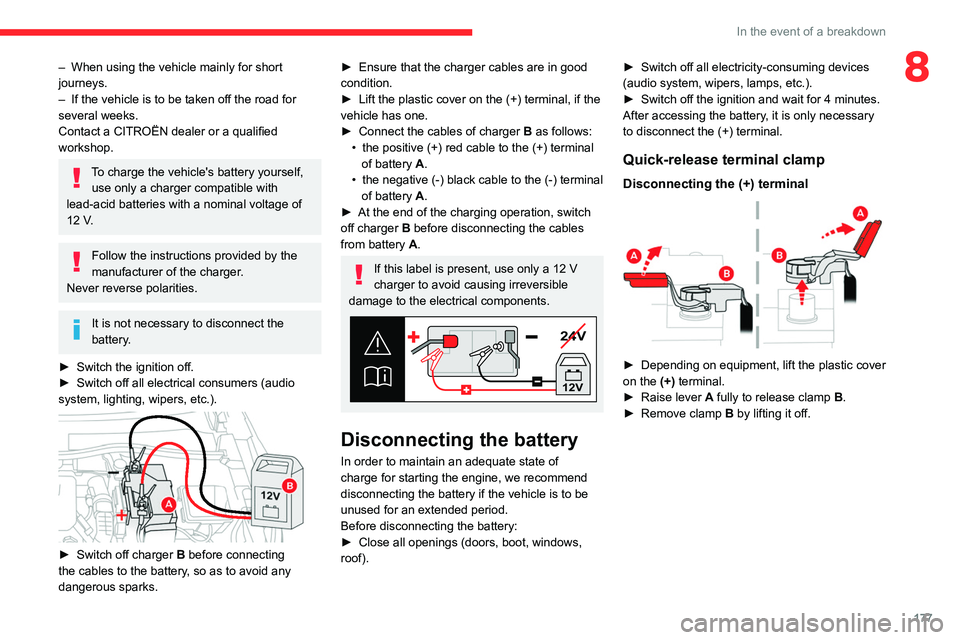
► Switch off charger B before connecting
the cables to the battery, so as to avoid any
dangerous sparks.
► Ensure that the charger cables are in good
condition.
►
Lift the plastic cover on the (+) terminal, if the
vehicle has one.
►
Connect the cables of charger B
as follows:
•
the positive (+) red cable to the (+) terminal
of battery
A.
•
the negative (-) black cable to the (-) terminal
of battery
A.
►
At the end of the charging operation, switch
off charger B
before disconnecting the cables
from battery A.
If this label is present, use only a 12 V
charger to avoid causing irreversible
damage to the electrical components.
24V
12V
Disconnecting the battery
In order to maintain an adequate state of
charge for starting the engine, we recommend
disconnecting the battery if the vehicle is to be
unused for an extended period.
Before disconnecting the battery:
►
Close all openings (doors, boot, windows,
roof). ►
Switch off all electricity-consuming devices
(audio system, wipers, lamps, etc.).
►
Switch off the ignition and wait for 4
minutes.
After accessing the battery, it is only necessary
to disconnect the (+) terminal.
Quick-release terminal clamp
Disconnecting the (+) terminal
► Depending on equipment, lift the plastic cover
on the (+) terminal.
►
Raise lever
A
fully to release clamp
B
.
►
Remove clamp
B
by lifting it off.
Page 186 of 260

184
Technical data
Electric motor
Model codes:BCZKXC
Braked trailer (within the GTW limit) (kg)
on a 10% or 12% gradient 0
Unbraked trailer (kg) 0
Maximum authorised nose weight (kg) 0
Electric motor
TechnologySynchronous with permanent magnets
Max. power : EC standard (kW)/(hp) 100/136
Traction battery
Technology Lithium-Ion
Installed capacity (kWh) 50
Domestic charging Mode 2
Alternating current (AC) voltage
Rating (A) 230 (single-phase)
8 or 16
Accelerated charging Mode 3
Alternating current (AC) voltage
Rating (A) 230 (single-phase or three-phase)
16 or 32
Superfast charging Mode 4
Direct current (DC) voltage 400
Page 222 of 260

220
CITROËN Connect Nav
Displaying charging station
details
Press Navigation to display the main
page.
Press this button to display the list of
services.
Press "POI on map" to display the list
of points of interest.
Press one of the buttons to search for
"Stations".
Activate/deactivate "Stations".
Press this button to display a secondary
page.
Select the "Settings" tab.
Select the desired connector type.
Press "OK" to save.
Displaying weather
information
Press Navigation to display the main
page.
Press this button to display the list of
services.
Select "View map".
Select "Weather".
Press this button to display basic
information.
Press this button to display detailed
weather information.
The temperature displayed at 6 a.m. will be the maximum temperature for the day.
The temperature displayed at 6 p.m. will be
the minimum temperature for the night.
Applications
USB sockets
Depending on equipment, for more information
on the USB sockets compatible with CarPlay® or
Android Auto applications, refer to the "Ease of
use and comfort" section.
For the list of compatible smartphones,
visit the Manufacturer's website in your
country.
Synchronising a smartphone enables
users to display applications that support
the smartphone’s CarPlay
® or Android Auto
technology on the vehicle’s screen. For
CarPlay
® technology, the CarPlay® function
must first be activated on the smartphone.
Unlock the smartphone for the communication
process between the smartphone and the
system to work.
As principles and standards are constantly
changing, we recommend keeping the
smartphone's operating system up-to-
date, together with the date and time on
the smartphone and the system.
Connectivity
Press Applications to display the main
page.
Press "Connectivity" to access the CarPlay
® or
Android Auto functions.
CarPlay® smartphone
connection
Depending on country.
On connecting the USB cable, the
CarPlay® function deactivates the
system's Bluetooth® mode.
The "CarPlay " function requires the use of
a compatible smartphone and compatible
applications.
Connect the USB cable. The smartphone
charges when connected by the USB
cable.
Press "Telephone" to display the
CarPlay® interface.
Or
Connect the USB cable. The smartphone
charges when connected by the USB
cable.
Page 239 of 260

237
Alphabetical index
180° rear vision 131
360 Vision
130
A
ABS 69
Accelerated charging unit (Wallbox)
141
Accessories
66
Active Safety Brake
122–124
AdBlue®
20, 160
AdBlue® tank
161
Additive, Diesel
158
Adjusting headlamps
59
Adjusting head restraints
40
Adjusting seat
40–41
Adjusting the air distribution
49–50
Adjusting the air flow
49–50
Adjusting the date
206, 229
Adjusting the height and reach
of the steering wheel
42
Adjusting the lumbar support
41
Adjusting the seat angle
41
Adjusting the temperature
48, 50
Adjusting the time
206, 230
Advice on care and maintenance
139, 162
Advice on driving
7, 84–85
Airbags
73, 75, 77
Airbags, curtain
74–75
Airbags, front
74–75, 77
Airbags, lateral
74–75
Air conditioning
46–47, 49
Air conditioning, automatic 50
Air conditioning, dual-zone automatic
47, 50
Air conditioning, manual
47, 50
Air intake
50
Air vents
45
Alarm
35–36
Amplifier, audio
54
Android Auto connection
204, 221
Anti-lock braking system (ABS)
69
Antitheft / Immobiliser
29
Apple CarPlay connection
203, 220
Applications
221
Assistance call
67–68
Assistance, emergency braking
70, 124
Audible warning
67
Audio streaming (Bluetooth)
200, 225
B
Battery, 12 V 153, 158, 175–177
Battery, ancillaries
175
Battery, charging
175–176
Battery, remote control
33–34
Blind
38–39
Blind spot sensors
121
BlueHDi
20, 158, 165
Bluetooth (hands-free)
201–202, 226
Bluetooth (telephone)
201–202, 226–227
Bluetooth touch screen audio system
24
Bodywork
163
Bonnet
154–155
Boot 35, 56
Brake discs
159
Brake lamps
174
Brakes
159
Braking
95
Braking assistance system
69–70
Braking, automatic emergency
122–124
Braking, dynamic emergency
90–92
Brightness
205
Bulbs
173
Bulbs (changing)
171–172, 174
C
Cable, audio 224
Cable, Jack
224
Capacity, fuel tank
137
Cap, fuel filler
137
Care of the bodywork
163
Central locking
31–32
Changing a bulb
171–172, 174
Changing a fuse
174
Changing a wheel
169
Changing a wiper blade
64
Changing the remote control battery
33
Changing to free-wheeling
178
Charge level indicator (Electric)
21
Charger, induction
53
Charger, wireless
53
Charging cable
142
Charging cable (Electric)
141
Page 240 of 260

238
Alphabetical index
Charging connector (Electric) 140, 145,
147–148
Charging flap (Electric)
140, 145, 147–148
Charging system (Electric)
5, 8, 26, 138, 156
Charging the traction battery
(Electric)
21, 138, 142, 145, 147–148
CHECK
22
Checking the engine oil level
19
Checking the levels
156–157
Checking tyre pressures
(using the kit)
166, 168
Checks
155, 158–160
Checks, routine
158–159
Child lock
83
Children
72, 78–80
Children (safety)
83
Child seats
72, 75–78
Child seats, conventional
78, 81–82
Child seats, i-Size
80–82
Child seats, ISOFIX
78–79, 81–82
Cleaning (advice)
139, 162–163
Closing the boot
31, 35
Closing the doors
31, 35
Collision Risk Alert
122–123
Configuration, vehicle
25–26
Connected applications
221
ConnectedCAM Citroën™
100
Connection, Bluetooth
201–202,
221–222, 226–227
Connection, Wi-Fi network
222
Connectivity
220
Consumption figures
26Container, AdBlue® 160–161
Control, emergency boot release
35
Control, emergency door
32–33
Control, heated seats
42, 45
Controls, steering mounted
93–94
Control stalk, lighting
57–58
Control stalk, wipers
62–63
Control unit
141–142
Courtesy lamps
55
Cruise control
104–105, 107–108
Cruise control, adaptive
104–105, 109
Cruise control by speed limit
recognition
104–105
D
DAB (Digital Audio Broadcasting) -
Digital radio
199–200, 224
Date (setting)
206, 229
Daytime running lamps
58, 173
Deactivating the passenger airbag
74, 77
Deadlocking
29, 31
Deferred charging
27
Deferred charging
(Electric)
26–27, 140, 145, 148
Defrosting
43, 50
Defrosting, front
50
Demisting
43, 50
Demisting, front
50
Demisting, rear
51
Demisting, rear screen
51
Dials and gauges 9–10
Digital instrument panel
10
Dimensions
185
Dipstick
19, 156
Direction indicators
58, 173–174
Display, head-up
11
Display screen, instrument panel
9
Domestic charging
(Electric)
142, 147–148, 184
Doors
35
Drive Assist Plus
109
Driver’s attention warning
125
Drive selector (Electric)
94
Driving
84–85
Driving aids camera (warnings)
101
Driving aids (recommendations)
101
Driving economically
7
Driving modes
95–96
Dynamic stability control (DSC)
70
E
EBFD 69
Eco-driving (advice)
7
ECO mode
96
Economy mode
153
Electric motor
5, 8, 22, 26, 138,
150, 156, 175, 178, 184
Electric windows
37
Electronic brake force distribution (EBFD)
69
Emergency braking assistance (EBA)
70
Page 243 of 260

241
Alphabetical index
OIl, engine 156
On-board tools
56, 165–166
Opening the bonnet
154
Opening the boot
30, 35
Opening the doors
30, 35
Opening the windows
28
P
Pads, brake 159
Paint
163, 185
Paint colour code
185
Park Assist
132
Parking brake
89, 159
Parking brake, electric
90–92, 159
Parking sensors, audible and visual
126
Parking sensors, front
127
Parking sensors, rear
126
Passenger compartment temperature pre-
conditioning (Electric)
27, 51
Pedestrian horn (Electric)
67, 85
Personalisation
10
Plates, identification
185
Player, Apple®
200, 225
Player, USB
200, 224
Port, USB
52, 200, 203, 220, 224
Post Collision Safety Brake
70
Power
21
Power indicator (Electric)
8, 21
Pressures, tyres
159, 167, 185
Pre-tensioning seat belts
72
Priming the fuel system 165
Profiles
229
Protecting children
74–80
Proximity Keyless Entry & Start
30
Public fast charging station
141, 147
Puncture
166–167, 169
R
Radar (warnings) 101
Radio
198, 223
Radio, digital (Digital Audio
Broadcasting - DAB)
199–200, 224
Range, AdBlue®
20, 158
RDS
199, 223
Reading lamps
55
Rear screen, demisting
51
Recharging the battery
175–176
Recharging the traction battery
(Electric)
138, 142, 145, 147–148
Recirculation, air
50
Recovery
178–180
Recovery of the vehicle
178–179
Reduction of electrical load
154
Regeneration of the particle filter
158
Regenerative braking (deceleration
by engine braking)
94–95
Reinitialisation of the under-inflation
detection system
99–100
Reinitialising the remote control
34
Reminder, key in ignition
87
Reminder, lighting on 57–58
Remote control
28–32
Remotely operable functions
(Electric)
27, 51, 148
Removing a wheel
169–171
Removing the mat
54
Replacing bulbs
171–172, 174
Replacing fuses
174
Replacing the air filter
158
Replacing the oil filter
158
Replacing the passenger compartment
filter
158
Reservoir, screenwash
157
Reset trip
24
Retractable support
52
Rev counter
9–10
Reversing camera
102, 127–130
Reversing lamps
174
Roof bars
152–153
Roof, opening
38–39
Running out of fuel (Diesel)
165
S
Safety, children 74–80
Saturation of the particle filter (Diesel)
158
Screenwash
63
Screenwash, front
62
SCR (Selective Catalytic Reduction)
21, 160
Seat angle
41
Seat belts
71–72, 78
Page 244 of 260

242
Alphabetical index
Seat belts, rear 71
Seat, rear bench
44
Seats, electric
41
Seats, front
40–41
Seats, heated
42, 45
Seats, rear
44–45, 76
Selector, gear
92, 94
Sensors (warnings)
102
Serial number, vehicle
185
Service indicator
18, 22
Servicing
18, 158–160
Settings, equipment
25–26
Settings, system
205, 229
Sidelamps
58, 173–174
Side parking sensors
127
Silent vehicle warning sound (Electric)
67, 85
Smartphone
27, 52–53
Snow chains
99, 153
Socket, 12 V accessory
53
Socket, auxiliary
224
Socket, Jack
224
Speakers
54
Speed limiter
104–106
Speed limit recognition
102, 104
Speedometer
9–10, 102
Sport mode
96
Spotlamps, side
60
Stability control (ESC)
69
Starting a Diesel engine
137
Starting the engine
86, 89
Starting the vehicle
86–87, 94
Starting using another battery
88, 176
Station, radio
198, 223Stay, bonnet 154–155
Steering mounted controls, audio
197, 210
Steering wheel, adjustment
42
Stickers, customising ~ Stickers,
expressive
163
Stopping the vehicle
86–88, 94
Stop & Start
24, 46, 50, 97–98,
137, 154, 158, 178
Storage
52
Storage box
56
Storage wells
56
Sunshine sensor
46
Sun visor
52
Super-fast charging (Electric)
147–148, 184
Suspension
159
Switching off the engine
86, 89
Synchronising the remote control
34
T
Tables of engines 184
Tank, fuel
137–138
Technical data
182–184
Telephone
201–203, 226–228
Temperature, coolant
19
Thermal comfort consumption indicator
(Electric)
22
Thermal comfort equipment
22
Time (setting)
206, 230
TMC (Traffic info)
217
Tool box
56
Tools
165–166
Topping-up AdBlue® 161
Top Rear Vision
128–129
Top Tether (fixing)
78, 81–82
Total distance recorder
23
Touch screen
24–26, 51
Touch screen tablet
25, 52
Towball, quickly detachable
150–152
Towbar
149
Towbar with quickly detachable
towball
150–152
Towed loads
181–183
Towing another vehicle
178, 180
Traction battery (Electric)
21–22, 26,
138, 140, 184
Traction control (ASR)
70
Traffic information (TMC)
217
Trailer
149
Trajectory control systems
69
Triangle, warning
165
Trip computer
23–24
Trip distance recorder
23
Tyres
159, 185
Tyre under-inflation detection
99, 167
U
Under-inflation (detection) 99
Unlocking
28, 30
Unlocking from the inside
32
Unlocking the doors
32
Updating the date
206, 229
Updating the time
206, 230