brake CITROEN C4 2020 Workshop Manual
[x] Cancel search | Manufacturer: CITROEN, Model Year: 2020, Model line: C4, Model: CITROEN C4 2020Pages: 260, PDF Size: 7.12 MB
Page 174 of 260

172
In the event of a breakdown
after the lamps have been on for a few
minutes.
Never look too closely at the light beam
of LED technology lamps - risk of serious
eye injury!
The headlamps have polycarbonate lenses with a protective coating:
–
Do not clean them with a dry or abrasive
cloth, nor with detergent or solvent
products.
–
Use a sponge and soapy water or a pH
neutral product.
–
When using a high-pressure washer on
persistent marks, do not keep the lance
directed towards the headlamps, lamps or
their edges for too long, so as not to damage
their protective coating and seals.
Changing a bulb must only be done with
the ignition off and after the headlamp /
lamp has been switched off for several
minutes - risk of serious burns!
Do not touch the bulb directly with your
fingers; use a lint-free cloth.
It is essential only to use anti-ultraviolet
(UV) type bulbs, so as not to damage the
headlamp.
Always replace a failed bulb with a new bulb
of the same type and specification. To avoid
lighting imbalance, replace the bulbs in pairs.
Refitting the lamp units
Perform the operations in the reverse
order to dismantling.
Light-emitting diode (LED)
headlamps and lamps
Depending on version, the affected types of
headlamps/lamps are:
–
"LED" technology headlamps.
–
Front foglamps.
–
Daytime running lamps/sidelamps.
–
Direction indicator side repeaters.
–
Side spotlamps.
–
Third brake lamp.
–
Number plate lamps.
If you need to replace this type of bulb,
you must contact a CITROËN dealer or a
qualified workshop.
Do not touch the LED technology bulbs - risk
of electrocution!
Front lamps
Model with LED headlamps
1. Daytime running lamps/Sidelamps
2. Dipped beam headlamps
3. Main beam headlamps
4. Direction indicators
5. Foglamps
Page 176 of 260
174
In the event of a breakdown
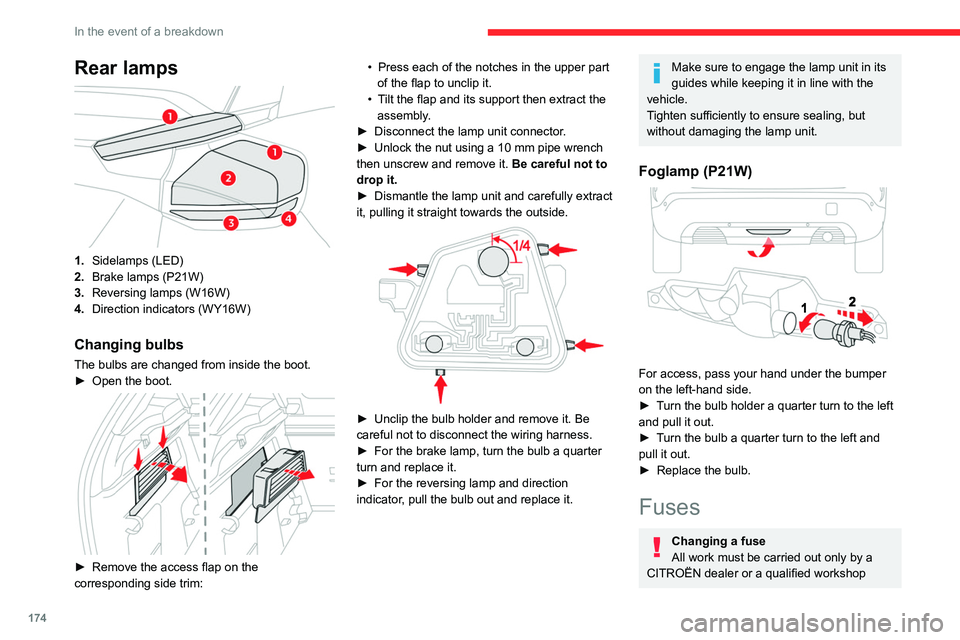
Rear lamps
1.Sidelamps (LED)
2. Brake lamps (P21W)
3. Reversing lamps (W16W)
4. Direction indicators (WY16W)
Changing bulbs
The bulbs are changed from inside the boot.
►
Open the boot.
► Remove the access flap on the
corresponding side trim: •
Press each of the notches in the upper part
of the flap to unclip it.
•
T
ilt the flap and its support then extract the
assembly.
►
Disconnect the lamp unit connector
.
►
Unlock the nut using a 10 mm pipe wrench
then unscrew and remove it. Be careful not to
drop it.
►
Dismantle the lamp unit and carefully extract
it, pulling it straight towards the outside.
► Unclip the bulb holder and remove it. Be
careful not to disconnect the wiring harness.
►
For the brake lamp, turn the bulb a quarter
turn and replace it.
►
For the reversing lamp and direction
indicator
, pull the bulb out and replace it.
Make sure to engage the lamp unit in its
guides while keeping it in line with the
vehicle.
Tighten sufficiently to ensure sealing, but
without damaging the lamp unit.
Foglamp (P21W)
For access, pass your hand under the bumper
on the left-hand side.
►
T
urn the bulb holder a quarter turn to the left
and pull it out.
►
T
urn the bulb a quarter turn to the left and
pull it out.
►
Replace the bulb.
Fuses
Changing a fuse
All work must be carried out only by a
CITROËN dealer or a qualified workshop
Page 180 of 260

178
In the event of a breakdown
Reconnecting the (+) terminal
► Raise lever A fully.
► Refit open clamp B on the (+) terminal.
►
Push clamp
B fully down.
►
Lower lever
A
to lock clamp B.
►
Depending on equipment, lower the plastic
cover on the
(+) terminal.
Do not force the lever when pressing on
it, as if the clamp is not positioned
correctly, locking will then not be possible.
Start the procedure again.
Following reconnection
After reconnecting the battery, turn on the
ignition and wait 1 minute before starting the
engine, to enable the electronic systems to
initialise.
If minor problems nevertheless persist following
this operation, contact a CITROËN dealer or a
qualified workshop.
Referring to the relevant section, reinitialise
certain equipment:
–
Remote control key or electronic key
(depending on version).
–
Sunroof.
–
Electric windows.
–
Date and time.
–
Preset radio stations.
The Stop & Start system may not be operational during the trip following the
first engine start.
In this case, the system will only be available
again after a continuous period with the
vehicle immobilised, the duration of which
depends on the exterior temperature and the
state of charge of the battery (up to about 8
hours).
Towing the vehicle
General recommendations
Observe the legislation in force in the
country where you are driving.
Ensure that the weight of the towing vehicle is
higher than that of the towed vehicle.
The driver must remain at the wheel of the
towed vehicle and must have a valid driving
licence.
When towing a vehicle with all four wheels on
the ground, always use an approved towing
arm; rope and straps are prohibited.
The towing vehicle must move off gently.
When the vehicle is towed with its engine
off, there is no longer braking and steering
assistance.
A professional towing service must be
called if:
–
Broken down on a motorway or main road.
–
Not possible to put
the gearbox into neutral,
unlock the steering, or release the parking
brake.
–
Not possible to tow a vehicle with an
automatic gearbox, with the engine running.
–
T
owing with only two wheels on the ground.
–
Four-wheel drive vehicle.
–
No approved towbar available.
Before towing the vehicle, it is essential
to put the vehicle in free-wheeling mode.
For more information on Free-wheeling, refer
to the corresponding section.
Electric motor
An electric vehicle cannot under any
circumstances be used to tow another
vehicle.
However, it may be used, for example, to exit
a rut.
Page 181 of 260

179
In the event of a breakdown
8Towing constraints
Type of vehicle
(engine/gearbox) Front wheels on the
ground Rear wheels on the
ground Flatbed
4 wheels on the ground
with towbar
Internal combustion/Manual
Internal combustion/Automatic
Electric
In case of battery or electric parking brake failure, it is essential to call a p
rofessional using flatbed recovery vehicles (excluding manual gearbox).
Accessing the tools
The towing eye is stored with the tool kit in the
boot.
For more information on accessing the Tool kit,
refer to the corresponding section.
Towing your vehicle
To access the front screw thread:
► Unclip the cover by pressing on its left-hand
section.
►
Release the cover downwards.
T
o be towed:
► Screw the towing eye in fully .
► Install the towbar .
►
Put the gearbox into neutral.
Failure to observe this instruction could
result in damage to certain components
(braking, transmission, etc.) and to the
absence of braking assistance the next time
the engine is started.
Automatic gearbox
Never tow the vehicle with the driving
wheels on the ground and the engine off.
►
Unlock the steering and release the parking
brake.
Page 184 of 260

182
Technical data
Engines and towed loads - Petrol
EnginesPureTech 100 S&S PureTech 130 S&S PureTech 130 S&S PureTech 155 S&S
Gearboxes BVM6
(Manual 6-speed) BVM6
(Manual 6-speed) EAT8
(Automatic 8-speed) EAT8
(Automatic 8-speed)
Codes EB2ADTD_B MB6
STTd EB2ADTS MB6
STTd EB2ADTS ATN8
STTd EB2ADTX ATN8
STTd
Model codes BAHNEABAHNSABAHNSBBAHNNB
Cubic capacity (cc) 1,1991,1991,1991,199
Max. power: EC standard (kW) 75969611 4
Fuel UnleadedUnleadedUnleadedUnleaded
Braked trailer (within the GTW limit) (kg)
on a 10% or 12% gradient 1,000
1,2001,2001,200
Unbraked trailer (kg) 640660680670
Maximum authorised nose weight (kg) 61616161
Page 185 of 260

183
Technical data
9Engines and towed loads - Diesel
EnginesBlueHDi 110BlueHDi 130
Gearboxes BVM6
(Manual 6-speed) EAT8
(Automatic 8-speed)
Codes DV5RCe MB6 STTdDV5RC ATN8 STTd
Model codes BBYHSABBYHZB
Cubic capacity (cc) 1,4991,499
Max. power: EC standard (kW) 8196
Fuel DieselDiesel
Braked trailer (within the GTW limit) (kg)
on a 10% or 12% gradient 1,200
1,200
Unbraked trailer (kg) 660690
Maximum authorised nose weight (kg) 6161
Page 186 of 260

184
Technical data
Electric motor
Model codes:BCZKXC
Braked trailer (within the GTW limit) (kg)
on a 10% or 12% gradient 0
Unbraked trailer (kg) 0
Maximum authorised nose weight (kg) 0
Electric motor
TechnologySynchronous with permanent magnets
Max. power : EC standard (kW)/(hp) 100/136
Traction battery
Technology Lithium-Ion
Installed capacity (kWh) 50
Domestic charging Mode 2
Alternating current (AC) voltage
Rating (A) 230 (single-phase)
8 or 16
Accelerated charging Mode 3
Alternating current (AC) voltage
Rating (A) 230 (single-phase or three-phase)
16 or 32
Superfast charging Mode 4
Direct current (DC) voltage 400
Page 236 of 260

234
Event data recorders
Recording event data
Electronic control units are installed in your
vehicle. These control units process data
received from the vehicle's sensors, for example,
or data they generate themselves or exchange
with each other. Some of these control units are
required for the correct operation of your vehicle,
some others assist you while driving (driving or
manoeuvring aids), while others provide comfort
or infotainment functions.
The following contains general information about
how data is processed within the vehicle.
You will find additional information about the
specific data which is downloaded, stored
and transmitted to third parties and what it is
used for in your vehicle under the keyword
"Data protection". This information is directly
associated with the references for the functions
in question contained in the corresponding
vehicle handbook, or in the general terms and
conditions of sale.
This information is also available online.
Vehicle operating data
The control units process the data used for the
operation of the vehicle.
This data includes, for example:
–
Information about the state of the vehicle
(e.g.
speed, travel time, lateral acceleration,
wheel rotation rate, fastened seat belts display).
–
Environmental conditions (e.g.
temperature,
rain sensor, distance sensor). As a general rule, this data is temporary, is
not stored for longer than one operating cycle
and is only used within the vehicle itself. The
control units often record this data (including the
vehicle's key). This function allows either the
temporary or permanent storage of information
about the state of the vehicle, stresses on
components, servicing requirements, as well as
events and technical errors.
Depending on the vehicle's equipment level, the
data stored is as follows:
–
Operating state of system components
(e.g.
filling level, tyre pressures, battery charge
status).
–
Faults and malfunctions in important system
components (e.g.
lamps, brakes).
–
System reactions in specific driving situations
(e.g.
deployment of an airbag, triggering of
stability control and braking systems).
–
Information about events which have
damaged the vehicle.
–
For electric and rechargeable hybrid vehicles,
the traction battery charge level and the
estimated driving range.
In particular circumstances (e.g.
if the vehicle
has detected a malfunction), it may be necessary
to record data which would otherwise simply not
be stored.
When taking your vehicle in for servicing
(e.g.
repairs, maintenance), the stored operating
data may be read along with the vehicle's
identification number and used if necessary.
The personnel working for the servicing network (e.g.
garages, manufacturers) or third parties
(e.g. roadside assistance agents) may read
the vehicle's data. This also applies to work
carried out under warranty and quality assurance
measures.
This data is generally read via the OBD
(On-Board Diagnostics) port fitted by law to
the vehicle. It is used to report on the technical
state of the vehicle or its components and
facilitates the diagnosis of malfunctions, in
compliance with warranty obligations and for
quality improvement. This data, in particular the
information relating to stress on components,
technical events, operator errors and other
malfunctions, is sent to the Manufacturer, if
necessary, along with the vehicle's identification
number. The Manufacturer's liability may also be
engaged. The Manufacturer may also use the
operating data taken from the vehicle for product
recalls. This data may also be used to check the
customer's warranty and any claims made under
warranty.
Any malfunctions stored in the vehicle may be
reset by an after-sales service company during
servicing or repair work, or at your request.
Comfort and infotainment
functions
Comfort settings and personalised settings
may be saved in the vehicle and modified or
reinitialised at any time.
Page 239 of 260

237
Alphabetical index
180° rear vision 131
360 Vision
130
A
ABS 69
Accelerated charging unit (Wallbox)
141
Accessories
66
Active Safety Brake
122–124
AdBlue®
20, 160
AdBlue® tank
161
Additive, Diesel
158
Adjusting headlamps
59
Adjusting head restraints
40
Adjusting seat
40–41
Adjusting the air distribution
49–50
Adjusting the air flow
49–50
Adjusting the date
206, 229
Adjusting the height and reach
of the steering wheel
42
Adjusting the lumbar support
41
Adjusting the seat angle
41
Adjusting the temperature
48, 50
Adjusting the time
206, 230
Advice on care and maintenance
139, 162
Advice on driving
7, 84–85
Airbags
73, 75, 77
Airbags, curtain
74–75
Airbags, front
74–75, 77
Airbags, lateral
74–75
Air conditioning
46–47, 49
Air conditioning, automatic 50
Air conditioning, dual-zone automatic
47, 50
Air conditioning, manual
47, 50
Air intake
50
Air vents
45
Alarm
35–36
Amplifier, audio
54
Android Auto connection
204, 221
Anti-lock braking system (ABS)
69
Antitheft / Immobiliser
29
Apple CarPlay connection
203, 220
Applications
221
Assistance call
67–68
Assistance, emergency braking
70, 124
Audible warning
67
Audio streaming (Bluetooth)
200, 225
B
Battery, 12 V 153, 158, 175–177
Battery, ancillaries
175
Battery, charging
175–176
Battery, remote control
33–34
Blind
38–39
Blind spot sensors
121
BlueHDi
20, 158, 165
Bluetooth (hands-free)
201–202, 226
Bluetooth (telephone)
201–202, 226–227
Bluetooth touch screen audio system
24
Bodywork
163
Bonnet
154–155
Boot 35, 56
Brake discs
159
Brake lamps
174
Brakes
159
Braking
95
Braking assistance system
69–70
Braking, automatic emergency
122–124
Braking, dynamic emergency
90–92
Brightness
205
Bulbs
173
Bulbs (changing)
171–172, 174
C
Cable, audio 224
Cable, Jack
224
Capacity, fuel tank
137
Cap, fuel filler
137
Care of the bodywork
163
Central locking
31–32
Changing a bulb
171–172, 174
Changing a fuse
174
Changing a wheel
169
Changing a wiper blade
64
Changing the remote control battery
33
Changing to free-wheeling
178
Charge level indicator (Electric)
21
Charger, induction
53
Charger, wireless
53
Charging cable
142
Charging cable (Electric)
141
Page 240 of 260

238
Alphabetical index
Charging connector (Electric) 140, 145,
147–148
Charging flap (Electric)
140, 145, 147–148
Charging system (Electric)
5, 8, 26, 138, 156
Charging the traction battery
(Electric)
21, 138, 142, 145, 147–148
CHECK
22
Checking the engine oil level
19
Checking the levels
156–157
Checking tyre pressures
(using the kit)
166, 168
Checks
155, 158–160
Checks, routine
158–159
Child lock
83
Children
72, 78–80
Children (safety)
83
Child seats
72, 75–78
Child seats, conventional
78, 81–82
Child seats, i-Size
80–82
Child seats, ISOFIX
78–79, 81–82
Cleaning (advice)
139, 162–163
Closing the boot
31, 35
Closing the doors
31, 35
Collision Risk Alert
122–123
Configuration, vehicle
25–26
Connected applications
221
ConnectedCAM Citroën™
100
Connection, Bluetooth
201–202,
221–222, 226–227
Connection, Wi-Fi network
222
Connectivity
220
Consumption figures
26Container, AdBlue® 160–161
Control, emergency boot release
35
Control, emergency door
32–33
Control, heated seats
42, 45
Controls, steering mounted
93–94
Control stalk, lighting
57–58
Control stalk, wipers
62–63
Control unit
141–142
Courtesy lamps
55
Cruise control
104–105, 107–108
Cruise control, adaptive
104–105, 109
Cruise control by speed limit
recognition
104–105
D
DAB (Digital Audio Broadcasting) -
Digital radio
199–200, 224
Date (setting)
206, 229
Daytime running lamps
58, 173
Deactivating the passenger airbag
74, 77
Deadlocking
29, 31
Deferred charging
27
Deferred charging
(Electric)
26–27, 140, 145, 148
Defrosting
43, 50
Defrosting, front
50
Demisting
43, 50
Demisting, front
50
Demisting, rear
51
Demisting, rear screen
51
Dials and gauges 9–10
Digital instrument panel
10
Dimensions
185
Dipstick
19, 156
Direction indicators
58, 173–174
Display, head-up
11
Display screen, instrument panel
9
Domestic charging
(Electric)
142, 147–148, 184
Doors
35
Drive Assist Plus
109
Driver’s attention warning
125
Drive selector (Electric)
94
Driving
84–85
Driving aids camera (warnings)
101
Driving aids (recommendations)
101
Driving economically
7
Driving modes
95–96
Dynamic stability control (DSC)
70
E
EBFD 69
Eco-driving (advice)
7
ECO mode
96
Economy mode
153
Electric motor
5, 8, 22, 26, 138,
150, 156, 175, 178, 184
Electric windows
37
Electronic brake force distribution (EBFD)
69
Emergency braking assistance (EBA)
70