stop mode CITROEN C4 2023 User Guide
[x] Cancel search | Manufacturer: CITROEN, Model Year: 2023, Model line: C4, Model: CITROEN C4 2023Pages: 292, PDF Size: 7.79 MB
Page 48 of 292
46
Ease of use and comfort
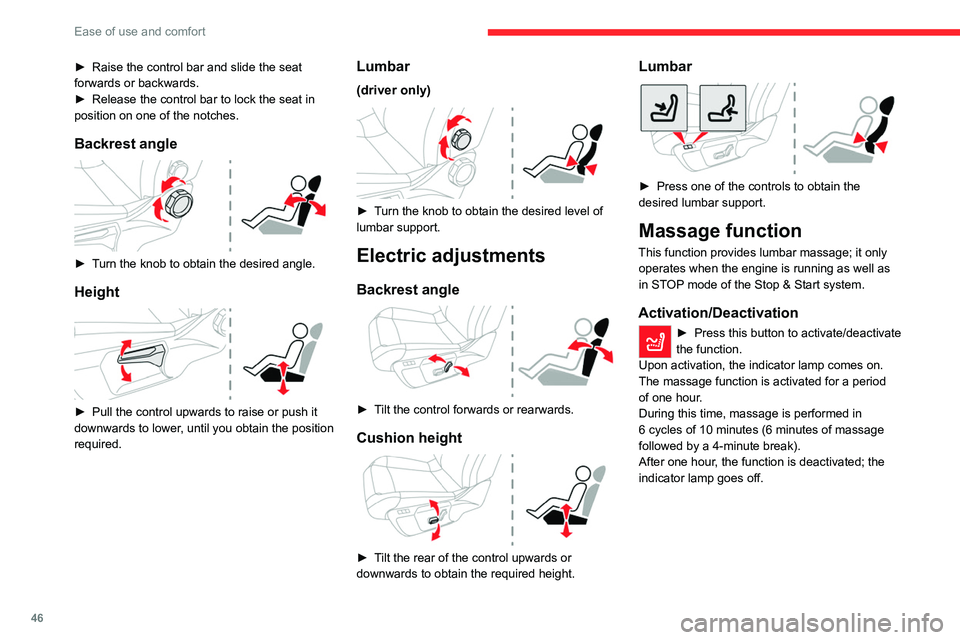
► Raise the control bar and slide the seat
forwards or backwards.
►
Release the control bar to lock the seat in
position on one of the notches.
Backrest angle
► Turn the knob to obtain the desired angle.
Height
► Pull the control upwards to raise or push it
downwards to lower , until you obtain the position
required.
Lumbar
(driver only)
► Turn the knob to obtain the desired level of
lumbar support.
Electric adjustments
Backrest angle
► Tilt the control forwards or rearwards.
Cushion height
► Tilt the rear of the control upwards or
downwards to obtain the required height.
Lumbar
► Press one of the controls to obtain the
desired lumbar support.
Massage function
This function provides lumbar massage; it only operates when the engine is running as well as
in STOP mode of the Stop & Start system.
Activation/Deactivation
► Press this button to activate/deactivate
the function.
Upon activation, the indicator lamp comes on.
The massage function is activated for a period
of one hour
.
During this time, massage is performed in
6
cycles of 10 minutes (6 minutes of massage
followed by a 4-minute break).
After one hour, the function is deactivated; the
indicator lamp goes off.
Page 54 of 292
52
Ease of use and comfort
Servicing the ventilation and air
conditioning system
►
Ensure that the passenger compartment
filter is in good condition and have the filter
elements replaced regularly
.
We recommend using a composite passenger
compartment filter. Its specific active additive
helps protect against polluting gases and bad
smells.
►
T
o ensure correct operation of the
air conditioning system, have it checked
according to the recommendations in the
Manufacturer’s service schedule.
Stop & Start
The heating and air conditioning systems
only operate when the engine is running.
Temporarily deactivate the Stop & Start
system to maintain a comfortable temperature
in the passenger compartment.
For more information on the Stop &
Start
system, refer to the corresponding
section.
ECO driving mode
Selecting this mode reduces electrical
energy consumption, but restricts the
performance of the heating and air
conditioning systems, although it does not
deactivate them.
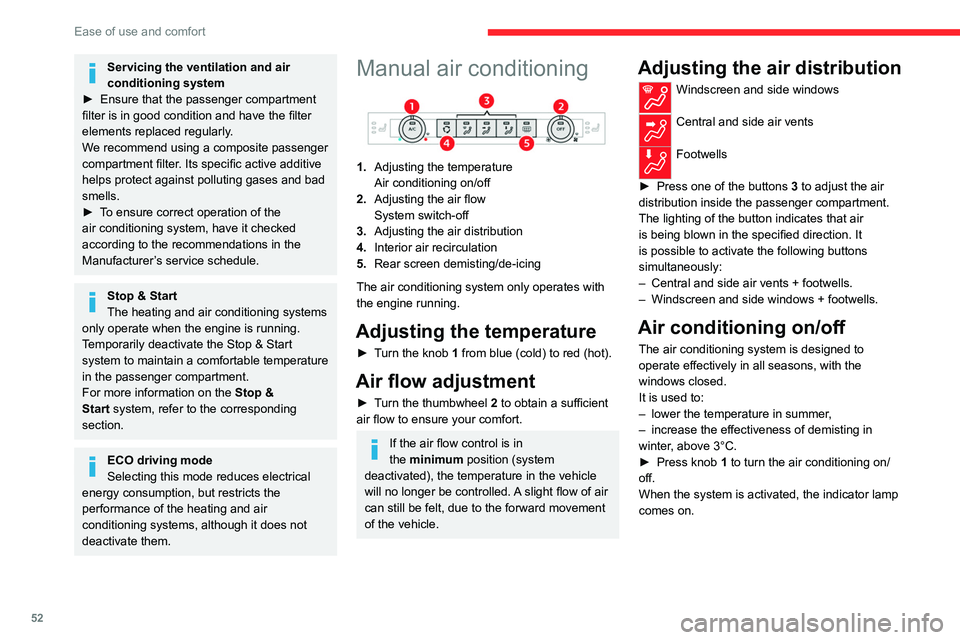
Manual air conditioning
1. Adjusting the temperature
Air conditioning on/off
2. Adjusting the air flow
System switch-off
3. Adjusting the air distribution
4. Interior air recirculation
5. Rear screen demisting/de-icing
The air conditioning system only operates with
the engine running.
Adjusting the temperature
► Turn the knob 1 from blue (cold) to red (hot).
Air flow adjustment
► Turn the thumbwheel 2 to obtain a sufficient
air flow to ensure your comfort.
If the air flow control is in
the minimum position (system
deactivated), the temperature in the vehicle
will no longer be controlled. A slight flow of air
can still be felt, due to the forward movement
of the vehicle.
Adjusting the air distribution
Windscreen and side windows
Central and side air vents
Footwells
►
Press one of the buttons
3 to adjust the air
distribution inside the passenger compartment.
The lighting of the button indicates that air
is being blown in the specified direction. It
is possible to activate the following buttons
simultaneously:
–
Central and side air vents + footwells.
–
Windscreen and side windows + footwells.
Air conditioning on/off
The air conditioning system is designed to
operate effectively in all seasons, with the
windows closed.
It is used to:
–
lower the temperature in summer
,
–
increase the effectiveness of demisting in
winter
, above 3°C.
►
Press knob
1 to turn the air conditioning on/
off.
When the system is activated, the indicator lamp
comes on.
Page 56 of 292
54
Ease of use and comfort
Automatic Comfort programme
This automatic mode ensures optimum
management of the passenger compartment
temperature, air flow and air distribution, based
on the selected comfort level.
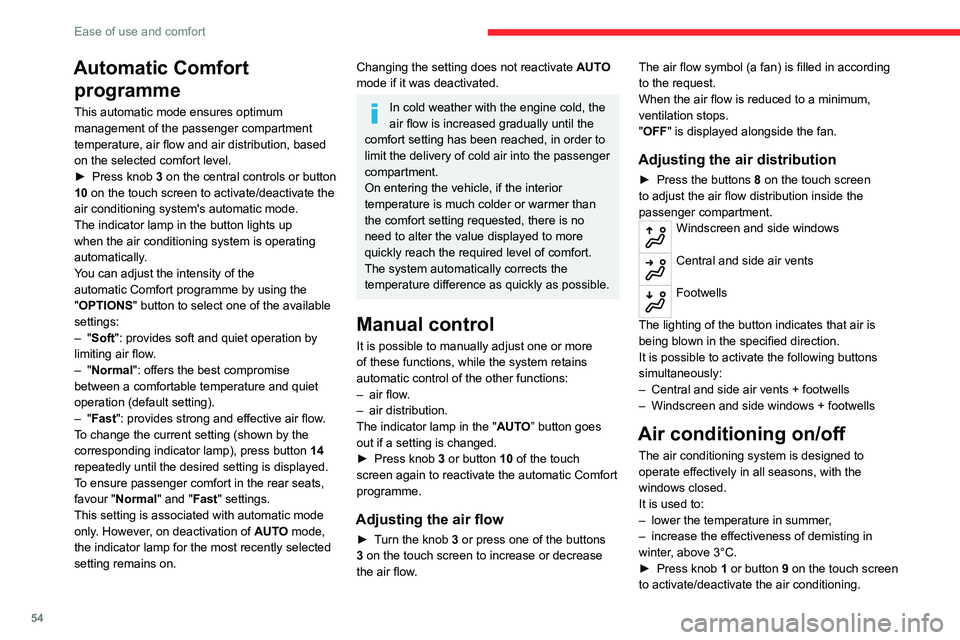
►
Press knob
3 on the central controls or button
10 on the touch screen to activate/deactivate the
air conditioning system's automatic mode.
The indicator lamp in the button lights up
when the air conditioning system is operating
automatically.
You can adjust the intensity of the
automatic Comfort programme by using the
"OPTIONS "
button to select one of the available
settings:
–
"Soft": provides soft and quiet operation by
limiting air flow.
–
"Normal": offers the best compromise
between a comfortable temperature and quiet
operation (default setting).
–
"Fast": provides strong and effective air flow.
To change the current setting (shown by the
corresponding indicator lamp), press button
14
repeatedly until the desired setting is displayed.
To ensure passenger comfort in the rear seats,
favour "Normal" and "Fast" settings.
This setting is associated with automatic mode
only. However, on deactivation of
AUTO mode,
the indicator lamp for the most recently selected
setting remains on.
Changing the setting does not reactivate AUTO
mode if it was deactivated.
In cold weather with the engine cold, the
air flow is increased gradually until the
comfort setting has been reached, in order to
limit the delivery of cold air into the passenger
compartment.
On entering the vehicle, if the interior
temperature is much colder or warmer than
the comfort setting requested, there is no
need to alter the value displayed to more
quickly reach the required level of comfort.
The system automatically corrects the
temperature difference as quickly as possible.
Manual control
It is possible to manually adjust one or more
of these functions, while the system retains
automatic control of the other functions:
–
air flow
.
–
air distribution.
The indicator lamp in the " AUT
O” button goes
out if a setting is changed.
►
Press knob
3 or button 10 of the touch
screen again to reactivate the automatic Comfort
programme.
Adjusting the air flow
► Turn the knob 3 or press one of the buttons
3 on the touch screen to increase or decrease
the air flow. The air flow symbol (a fan) is filled in according
to the request.
When the air flow is reduced to a minimum,
ventilation stops.
"OFF
" is displayed alongside the fan.
Adjusting the air distribution
► Press the buttons 8 on the touch screen
to adjust the air flow distribution inside the
passenger compartment.
Windscreen and side windows
Central and side air vents
Footwells
The lighting of the button indicates that air is
being blown in the specified direction.
It is possible to activate the following buttons
simultaneously:
–
Central and side air vents + footwells
–
Windscreen and side windows + footwells
Air conditioning on/off
The air conditioning system is designed to
operate effectively in all seasons, with the
windows closed.
It is used to:
–
lower the temperature in summer
,
–
increase the effectiveness of demisting in
winter
, above 3°C.
►
Press knob
1 or button 9 on the touch screen
to activate/deactivate the air conditioning.
Page 58 of 292
56
Ease of use and comfort
It is recommended that you avoid a difference of
more than 3°C in the settings for left and right.
Temperature
synchronisation
The driver side temperature setting is applied to
the passenger side.
►
Press button
10 to activate/deactivate the
function.
The function is automatically deactivated if the
passenger uses their temperature adjustment
buttons.
Automatic air conditioning
This automatic mode ensures optimum
management of the passenger compartment
temperature, air flow and air distribution, based
on the selected comfort level.
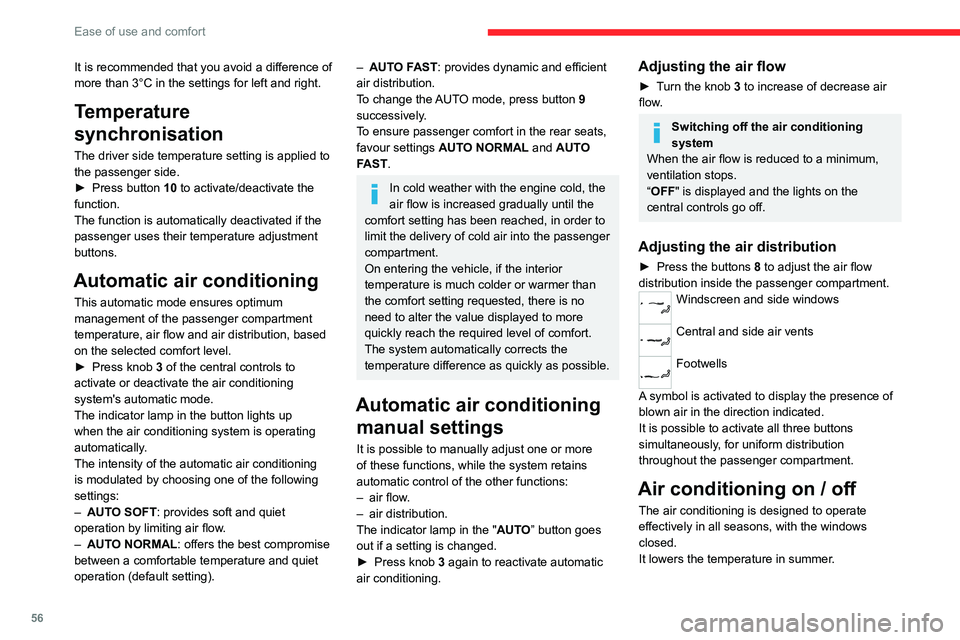
►
Press knob
3 of the central controls to
activate or deactivate the air conditioning
system's automatic mode.
The indicator lamp in the button lights up
when the air conditioning system is operating
automatically.
The intensity of the automatic air conditioning
is modulated by choosing one of the following
settings:
–
AUT
O SOFT : provides soft and quiet
operation by limiting air flow.
–
AUT
O NORMAL: offers the best compromise
between a comfortable temperature and quiet
operation (default setting).
– AUTO FAST: provides dynamic and efficient
air distribution.
To change the AUTO mode, press button 9
successively.
To ensure passenger comfort in the rear seats,
favour settings AUTO NORMAL and AUTO
FAST.
In cold weather with the engine cold, the
air flow is increased gradually until the
comfort setting has been reached, in order to
limit the delivery of cold air into the passenger
compartment.
On entering the vehicle, if the interior
temperature is much colder or warmer than
the comfort setting requested, there is no
need to alter the value displayed to more
quickly reach the required level of comfort.
The system automatically corrects the
temperature difference as quickly as possible.
Automatic air conditioning manual settings
It is possible to manually adjust one or more
of these functions, while the system retains
automatic control of the other functions:
–
air flow
.
–
air distribution.
The indicator lamp in the " AUT
O” button goes
out if a setting is changed.
►
Press knob
3 again to reactivate automatic
air conditioning.
Adjusting the air flow
► Turn the knob 3 to increase of decrease air
flow.
Switching off the air conditioning
system
When the air flow is reduced to a minimum,
ventilation stops.
“OFF" is displayed and the lights on the
central controls go off.
Adjusting the air distribution
► Press the buttons 8 to adjust the air flow
distribution inside the passenger compartment.
Windscreen and side windows
Central and side air vents
Footwells
A symbol is activated to display the presence of
blown air in the direction indicated.
It is possible to activate all three buttons
simultaneously, for uniform distribution
throughout the passenger compartment.
Air conditioning on / off
The air conditioning is designed to operate
effectively in all seasons, with the windows
closed.
It lowers the temperature in summer.
Page 59 of 292
57
Ease of use and comfort
3It increases the effectiveness of demisting in
winter, above 3°C.
►
Press knob
1 to switch the air conditioning
on/off.
When the system is activated, the indicator lamp
of the button comes on.
Air conditioning does not operate when the air flow is deactivated.
To obtain cool air more quickly, enable interior
air recirculation for a brief period. Then return
to the intake of exterior air.
Switching off air conditioning may result in
some discomfort (humidity, misting).
Maximum air conditioning
This function automatically adjusts the
temperature setting to the lowest possible, the
air distribution towards the central and side air
vents, the air flow to maximum and activates
interior air recirculation.
►
Press knob
2 to activate/deactivate the
function (confirmed by the indicator lamp coming
on/switching off).
Once the function is deactivated, the system
returns to the previous settings.
Interior air recirculation
The intake of exterior air prevents the formation
of mist on the windscreen and side windows.
Recirculating the interior air isolates the
passenger compartment from outside odours
and fumes and allows the desired passenger
compartment temperature to be achieved more
rapidly.
► Press this button to activate/deactivate
the function (confirmed by the
illumination/extinction of the indicator lamp).
This function is activated automatically when reverse gear is engaged.
Front demisting
- defrosting
With manual air
conditioning
► Adjust the temperature to maximum (red).
► Adjust the air flow to maximum.
► Press this button to activate the air
distribution to the "Windscreen" position;
its indicator lamp comes on.
►
Check that the recirculation of interior air is
deactivated; its indicator lamp must be off.
►
Switch on the air conditioning by pressing the
"
A/C" button; its indicator lamp comes on.
With automatic dual-zone
air conditioning
Automatic Visibility programme
This mode allows the windscreen and side
windows to be demisted or defrosted as quickly
as possible.
► Press this button to activate/deactivate
the mode (confirmed by the illumination/
extinction of the
indicator lamp).
The programme automatically manages the air
conditioning (depending on version), air flow
and air intake, and provides optimum distribution
towards the windscreen and side windows.
It is possible to manually change the air flow
without deactivating the automatic Visibility
programme.
With Stop & Start, when demisting has
been activated, STOP mode is not
available.
In wintry conditions, before moving off,
remove all snow or ice on the windscreen
near the camera.
Otherwise, the operation of the equipment
using the camera may be affected.
Page 62 of 292
60
Ease of use and comfort
Smart Pad Support Citroën
This allows you to place a mobile device, such
as a smartphone or touch screen tablet, into a
dedicated holder (sold separately).
►
Press the bracket to make it pop out.
►
Open the clamp on the back of the holder to
insert the mobile device.
Remove the mobile device before
stowing the bracket.
USB sockets
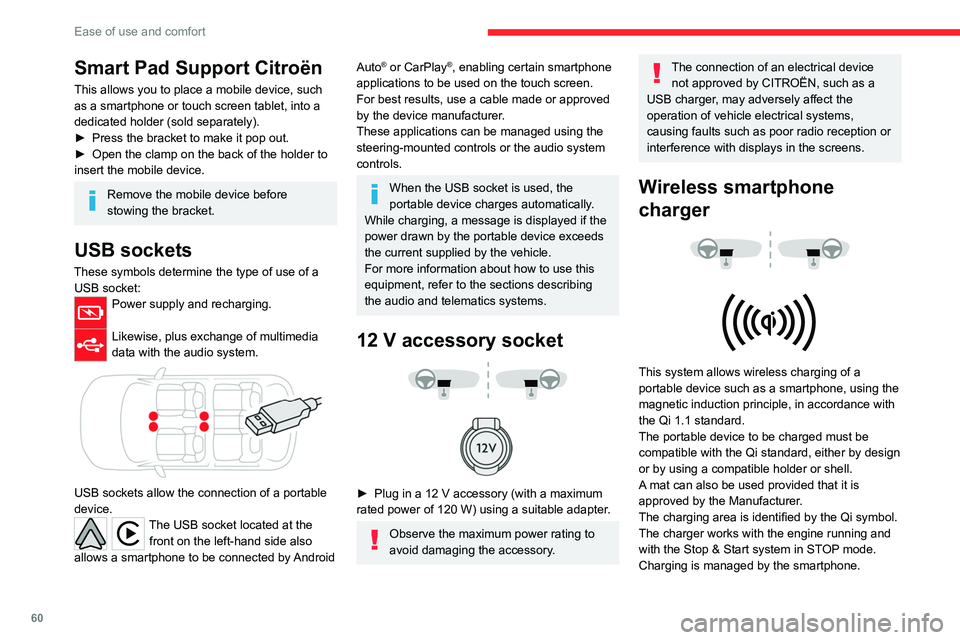
These symbols determine the type of use of a USB socket:
Power supply and recharging.
Likewise, plus exchange of multimedia
data with the audio system.
USB sockets allow the connection of a portable
device.
The USB socket located at the front on the left-hand side also
allows a smartphone to be connected by Android
Auto® or CarPlay®, enabling certain smartphone
applications to be used on the touch screen.
For best results, use a cable made or approved
by the device manufacturer.
These applications can be managed using the
steering-mounted controls or the audio system
controls.
When the USB socket is used, the
portable device charges automatically.
While charging, a message is displayed if the
power drawn by the portable device exceeds
the current supplied by the vehicle.
For more information about how to use this
equipment, refer to the sections describing
the audio and telematics systems.
12 V accessory socket
► Plug in a 12 V accessory (with a maximum
rated power of 120 W) using a suitable adapter.
Observe the maximum power rating to
avoid damaging the accessory.
The connection of an electrical device not approved by CITROËN, such as a
USB charger, may adversely affect the
operation of vehicle electrical systems,
causing faults such as poor radio reception or
interference with displays in the screens.
Wireless smartphone
charger
This system allows wireless charging of a
portable device such as a smartphone, using the
magnetic induction principle, in accordance with
the Qi 1.1 standard.
The portable device to be charged must be
compatible with the Qi standard, either by design
or by using a compatible holder or shell.
A mat can also be used provided that it is
approved by the Manufacturer.
The charging area is identified by the Qi symbol.
The charger works with the engine running and
with the Stop & Start system in STOP mode.
Charging is managed by the smartphone.
Page 65 of 292
63
Ease of use and comfort
3– With the ignition off, approximately 10 minutes.
– In energy saving mode, approximately 30
seconds.
–
With the engine running, unlimited.
When the front courtesy lamp is in the
"Permanent lighting" position, the rear
courtesy lamp also comes on, unless it is in
the "Permanently off" position.
To switch off the rear courtesy lamp, put it in
the "Permanently off" position.
Reading lamps
► With the ignition on, operate the
corresponding switch.
Do not place anything against the
courtesy lamps.
Interior ambient lighting
The interior ambient lighting casts soft lighting in
the passenger compartment, both day and night.
With Touch screen BLUETOOTH audio
system or MyCitroën Play
Activation/deactivation and adjustment of the brightness are set via the Driving
touch screen menu.
With MyCitroën Drive
Activation/deactivation and adjustment of the brightness are set via the Vehicle
touch screen menu.
With MyCitroën Drive Plus
Activation/deactivation and adjustment of the brightness are set via the Settings >
Brightness touch screen application.
Boot fittings
C4
C4 X
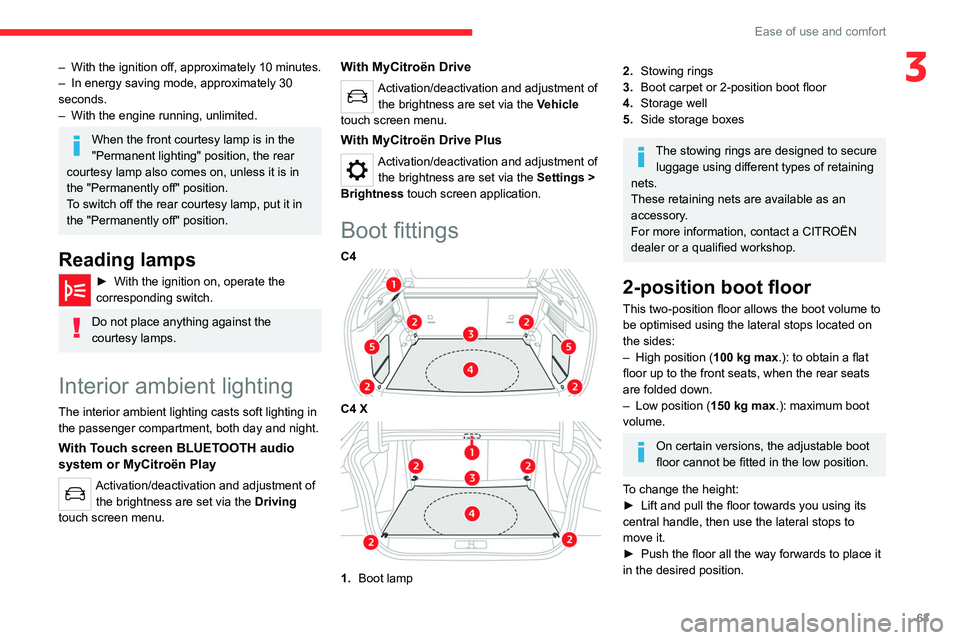
1. Boot lamp
2.Stowing rings
3. Boot carpet or 2-position boot floor
4. Storage well
5. Side storage boxes
The stowing rings are designed to secure
luggage using different types of retaining
nets.
These retaining nets are available as an
accessory.
For more information, contact a CITROËN
dealer or a qualified workshop.
2-position boot floor
This two-position floor allows the boot volume to
be optimised using the lateral stops located on
the sides:
–
High position ( 100
kg max.): to obtain a flat
floor up to the front seats, when the rear seats
are folded down.
–
Low position ( 150
kg max.): maximum boot
volume.
On certain versions, the adjustable boot
floor cannot be fitted in the low position.
To change the height:
►
Lift and pull the floor towards you using its
central handle, then use the lateral stops to
move it.
►
Push the floor all the way forwards to place it
in the desired position.
Page 66 of 292
64
Ease of use and comfort
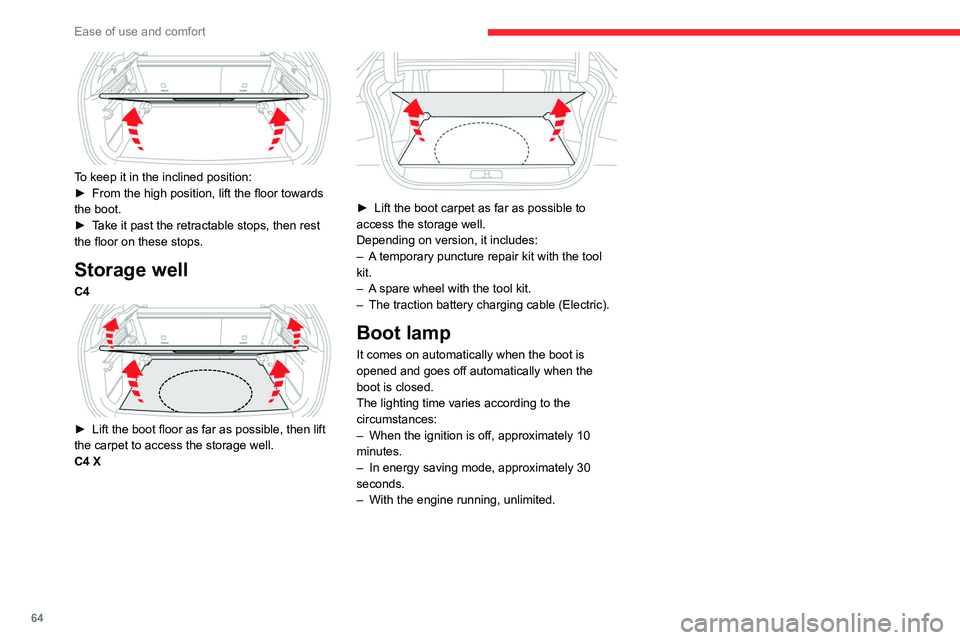
To keep it in the inclined position:
► From the high position, lift the floor towards
the boot.
►
T
ake it past the retractable stops, then rest
the floor on these stops.
Storage well
C4
► Lift the boot floor as far as possible, then lift
the carpet to access the storage well.
C4 X
► Lift the boot carpet as far as possible to
access the storage well.
Depending on version, it includes:
–
A
temporary puncture repair kit with the tool
kit.
–
A
spare wheel with the tool kit.
–
The traction battery charging cable (Electric).
Boot lamp
It comes on automatically when the boot is
opened and goes off automatically when the
boot is closed.
The lighting time varies according to the
circumstances:
–
When the ignition is off, approximately 10
minutes.
–
In energy saving mode, approximately 30
seconds.
–
With the engine running, unlimited.
Page 80 of 292
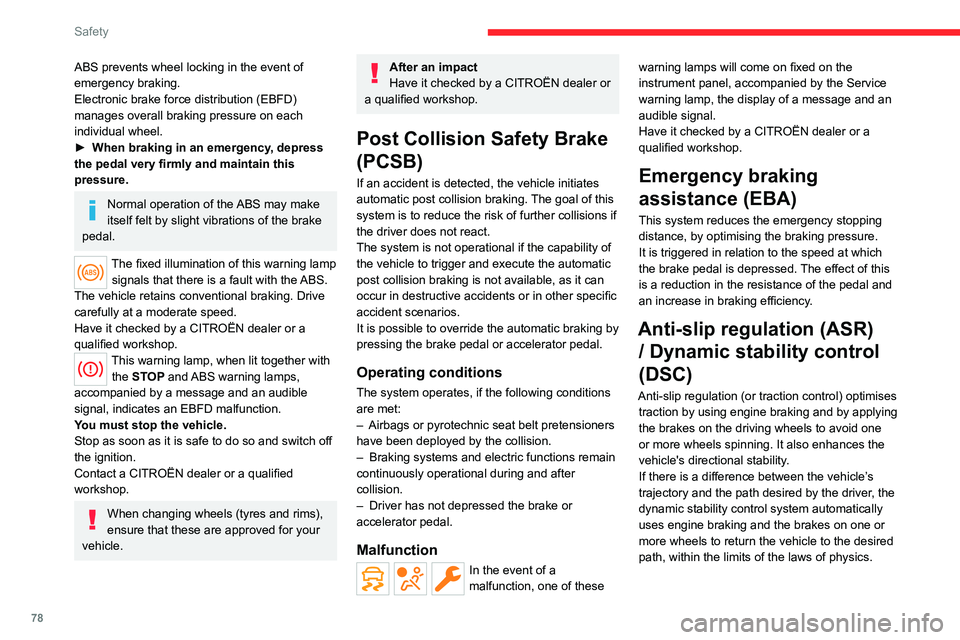
78
Safety
ABS prevents wheel locking in the event of
emergency braking.
Electronic brake force distribution (EBFD)
manages overall braking pressure on each
individual wheel.
►
When braking in an emergency
, depress
the pedal very firmly and maintain this
pressure.
Normal operation of the ABS may make
itself felt by slight vibrations of the brake
pedal.
The fixed illumination of this warning lamp signals that there is a fault with the ABS.
The vehicle retains conventional braking. Drive
carefully at a moderate speed.
Have it checked by a CITROËN dealer or a
qualified workshop.
This warning lamp, when lit together with the STOP and ABS warning lamps,
accompanied by a message and an audible
signal, indicates an EBFD malfunction.
You must stop the vehicle.
Stop as soon as it is safe to do so and switch off
the ignition.
Contact a CITROËN dealer or a qualified
workshop.
When changing wheels (tyres and rims),
ensure that these are approved for your
vehicle.
After an impact
Have it checked by a CITROËN dealer or
a qualified workshop.
Post Collision Safety Brake
(PCSB)
If an accident is detected, the vehicle initiates
automatic post collision braking. The goal of this
system is to reduce the risk of further collisions if
the driver does not react.
The system is not operational if the capability of
the vehicle to trigger and execute the automatic
post collision braking is not available, as it can
occur in destructive accidents or in other specific
accident scenarios.
It is possible to override the automatic braking by
pressing the brake pedal or accelerator pedal.
Operating conditions
The system operates, if the following conditions
are met:
–
Airbags or pyrotechnic seat belt pretensioners
have been deployed by the collision.
–
Braking systems and electric functions remain
continuously operational during and after
collision.
–
Driver has not depressed the brake or
accelerator pedal.
Malfunction
In the event of a
malfunction, one of these warning lamps will come on fixed on the
instrument panel, accompanied by the Service
warning lamp, the display of a message and an
audible signal.
Have it checked by a CITROËN dealer or a
qualified workshop.
Emergency braking
assistance (EBA)
This system reduces the emergency stopping
distance, by optimising the braking pressure.
It is triggered in relation to the speed at which
the brake pedal is depressed. The effect of this
is a reduction in the resistance of the pedal and
an increase in braking efficiency.
Anti-slip regulation (ASR)
/ Dynamic stability control
(DSC)
Anti-slip regulation (or traction control) optimises
traction by using engine braking and by applying
the brakes on the driving wheels to avoid one
or more wheels spinning. It also enhances the
vehicle's directional stability.
If there is a difference between the vehicle’s
trajectory and the path desired by the driver, the
dynamic stability control system automatically
uses engine braking and the brakes on one or
more wheels to return the vehicle to the desired
path, within the limits of the laws of physics.
Page 97 of 292

95
Driving
6Anti-theft protection
Electronic immobiliser
The keys contain a code, which must be
recognised by the vehicle before starting is
possible.
If the system malfunctions, indicated by the
display of a message, the engine will not start.
Contact a CITROËN dealer.
Starting / Switching off the
engine with the key
Key ignition switch
It has 3 positions:
– 1. Stop: inserting and removing the key ,
steering column locked.
–
2. Ignition : steering column unlocked, ignition
on, Diesel preheating, engine running.
–
3. Starting
.
Avoid attaching heavy objects to the key or the remote control. It would weigh
down on its shaft in the ignition switch and
could cause a malfunction.
Ignition on position
It allows the use of the vehicle's electric
equipment or the charging of accessories.
Once the state of charge of the battery drops to
the reserve level, the system switches to energy
economy mode: the power supply is cut off
automatically to preserve the remaining battery
charge.
Starting the engine
With the parking brake applied:
► With a manual gearbox, place the gear lever
in neutral then fully depress the clutch pedal.
►
With an
automatic gearbox, place the gear
selector in mode N or P then depress the brake
pedal.
►
Insert the key into the ignition switch; the
system recognises the code.
►
Unlock
the steering column by simultaneously
turning the steering wheel and the key.
In certain cases, you may need to apply
significant force to move the steering
wheel (e.g.
wheels turned to full lock).
►
With a
petrol engine , operate the starter
motor by turning the key to position 3 without
pressing the accelerator pedal, until the engine
starts. Once the engine has started, release the
key and allow it to return to position 2.
Petrol engines
After a cold start, preheating the catalytic
converter can cause noticeable engine
vibrations, for anything up to 2 minutes
(accelerated idle speed).
►
With a
Diesel engine, turn the key to position
2, to
activate the engine preheating system.
Wait until this warning lamp goes off on
the instrument panel, then turn the key to
position 3 without pressing the accelerator pedal,
to operate the starter motor. Once the engine
has started, release the key and allow it to return
to position 2.
In wintry conditions, the warning lamp
may stay on for a longer period. When
the engine is hot, the warning lamp does not
come on.
In mild conditions, do not leave the engine
to warm up while stationary, but move off
straight away and drive at moderate speed.
If the engine does not start straight away,
switch off the ignition. Wait a few
seconds before operating the starter motor
again. If the engine does not start after a few
attempts, do not keep trying - risk of
damaging the starter motor and the engine!
Contact a CITROËN dealer or a qualified
workshop.