instrument panel CITROEN C4 2023 Manual Online
[x] Cancel search | Manufacturer: CITROEN, Model Year: 2023, Model line: C4, Model: CITROEN C4 2023Pages: 292, PDF Size: 7.79 MB
Page 249 of 292

247
MyCitroën Drive
12The "Position" settings (All passengers,
Driver and Front only) are common to all
sources.
Activate or deactivate "Touch tones ",
"Volume linked to speed " and "Auxiliary
input ".
Onboard audio: Arkamys Sound Staging©
optimises the sound distribution inside
the passenger compartment.
Configuring profiles
Press Settings to display the main page.
Press the "OPTIONS " button to access the
secondary page.
Select "Setting of the profiles".
Select "Profile 1", "Profile 2", "Profile 3” or
"Common profile ".
Press this button to enter a name for the
profile using the virtual keypad.
Press "OK" to confirm.
Press this button to add a photograph to
the profile.
Insert a USB memory stick containing the
photograph in the USB port.
Select the photograph.
Press "OK" to accept the transfer of the
photograph.
Press "OK" again to save the settings.
The location for the photograph is square; the system reshapes the original
photograph if in another format.
Press this button to reset the selected
profile.
Resetting the selected profile activates
the English language by default.
Select a "Profile" (1 or 2 or 3) to link "Audio
settings" with it.
Select "Audio settings".
Then select "Ambience", "Position"; "Sound ",
"Voice" or "Ringtone ".
Press "OK" to save the selected profile’s
settings.
Modifying system settings
Press Settings to display the main page.
Press the "OPTIONS " button to access the
secondary page.
Select "Screen configuration".
Select "Animation".
Activate or deactivate:Automatic scrolling
Select "Brightness".
Move the slider to adjust the brightness of
the screen and/or the instrument panel.
Press Settings to display the main page.
Press the "OPTIONS " button to access the
secondary page.
Select "System settings".
Select "Units" to change the units of distance,
fuel consumption and temperature.
Select "Factory settings" to restore the initial
settings.
Resetting the system to "Factory
settings" activates English and degrees
Fahrenheit and deactivates summer time.
Select "System info" to display the versions of
the various modules installed in the system.
Selecting the language
Press Settings to display the main page.
Press the "OPTIONS " button to access the
secondary page.
Select "Languages" to change the
language.
Setting the date
Press Settings to display the main page.
Press the "OPTIONS " button to access the
secondary page.
Page 254 of 292

252
MyCitroën Drive Plus
MyCitroën Drive Plus
GPS navigation -
Applications - Multimedia
audio system - Bluetooth
®
telephone
The functions and settings described
vary according to the version and
configuration of the vehicle, and according to
the country of sale.
For safety reasons and because they
require continued attention on the part of
the driver, the following operations must be
carried out with the vehicle stationary and
the ignition on:
–
Pairing the smartphone with the system via
Bluetooth®.
–
Using the smartphone.
–
Connecting to Mirror Screen
(Apple®CarPlay® or Android Auto).
–
Changing the system settings and
configuration.
The message Energy economy mode is displayed when the system is about to go
into standby.
For more information on Energy economy
mode, refer to the "Practical information"
section.
The AM radio selection mode is not available on electric vehicles.
Warning
Navigation is a driving aid. It cannot
replace the driver. All guidance instructions
should be carefully checked by the user.
By using the navigation, you accept the
following terms and conditions:
https://www.tomtom.com/en_gb/legal/
eula-automotive/?388448
First steps
The system starts when the ignition is switched on.
Short press, ignition off: system on/off.
Short press, ignition on: mute/restore sound.
Long press, ignition on: start standby mode
(mute sound, screens and clock display off).
Rotation: volume adjustment.
Information
This system gives access to the following
elements:
–
Audio equipment and telephone controls with
display of associated information.
–
Connected services and display of associated
information.
–
Navigation system controls and display
of associated information (depending on
equipment). –
V
oice recognition (depending on equipment).
–
T
ime and outside temperature.
–
Heating/air conditioning system controls and
reminders of settings.
–
Settings for driving aid functions, comfort
and safety functions, extended head-up display
(depending on equipment and version), audio
equipment and digital instrument panel.
–
Settings for functions specific to electric
vehicles.
–
Display of visual manoeuvring aid functions.
–
Interactive handbook.
–
V
ideo tutorials (e.g. screen management,
driving aids, voice recognition).
Upper banner
Certain information is displayed permanently in
the upper banner of the touch screen:
–
Outside temperature from the vehicle's
sensors (associated with a blue symbol if there is
a risk of ice).
–
T
emperature setting reminder for the air
conditioning on the driver's and passenger sides.
–
Charge level of the connected smartphone.
–
System connection status (Bluetooth®, Wi-Fi,
mobile telephone network).
–
Time.
–
Quick access to the Mirror Screen® functions
(associated with a connected smartphone).
Swipe down from the upper edge of the touch
screen to access the notifications centre and
display a list of quick settings :Guest, Privacy
Page 258 of 292

256
MyCitroën Drive Plus
Adding a page
To add a page, press "Page" on the left of the screen.
Press the back arrow to return to the
previous page.
Deleting a Widget
To move a Widget to the bin, press and hold it, then drag it to the bin.
Personalising the
instrument panel
Press the pencil in the "Customize
Driver Information" part.
The modification of the organisation of the
different Widget is displayed on the instrument
panel in real time.
A Widget is a reduced window of an application or service.
Adding a Widget
To add a Widget, press "Widget" on the left of the screen.
Or
Press one of these buttons on the screen.
Select the desired Widget.
Press the back arrow to return to the
previous page.
Deleting a Widget
To move a Widget to the bin, press and hold it, then drag it to the bin.
Personalising My shortcuts
(depending on equipment)
From the left or right edge of the screen, swipe
right or left to display the shortcuts.
A representation of six shortcuts appears.
These shortcuts can be used to access an application (e.g. Media, Climate) or to
launch an action (e.g.
set the temperature to
21°, call a contact selected in their directory).
Briefly press a shortcut to be replaced, a panel is
displayed with all eligible shortcuts. A notification
also informs you of the next step to be applied.
Select the desired new shortcut. It will be
duplicated in the My shortcuts page and will
replace the originally selected one. A notification
also informs you of this.
To exit this function at any time, press this button or press the HOME main button.
Steering-mounted
controls
Voice control:
Short press, system voice commands
(depending on equipment).
Long press, voice commands of
the
smartphone connected using Bluetooth
® or
Mirror Screen® (Apple®CarPlay®/Android Auto)
via the system.
Increase volume.
Decrease volume.
Mute the sound: long press on the
decrease volume button.
Restore the sound by pressing one of the two
volume buttons.
Incoming call (short press): accept the
call.
Call in progress (short press): hang up.
Incoming call (long press): refuse the incoming
call.
Out of call (short press): access the call log of
the telephone connected via
Bluetooth
®.
Mirror Screen® connected (short press): access
the projected view of the telephone application of
your Mirror Screen
® equipment.Radio: automatic search for the
previous/next station (in the list of
radio stations sorted by name or by frequencies).
Media: previous/next track, movement in the
lists.
Phone: browse the telephone's call log.
Page 259 of 292
257
MyCitroën Drive Plus
13Short press: validate a selection. Out of
selection, display the lists.
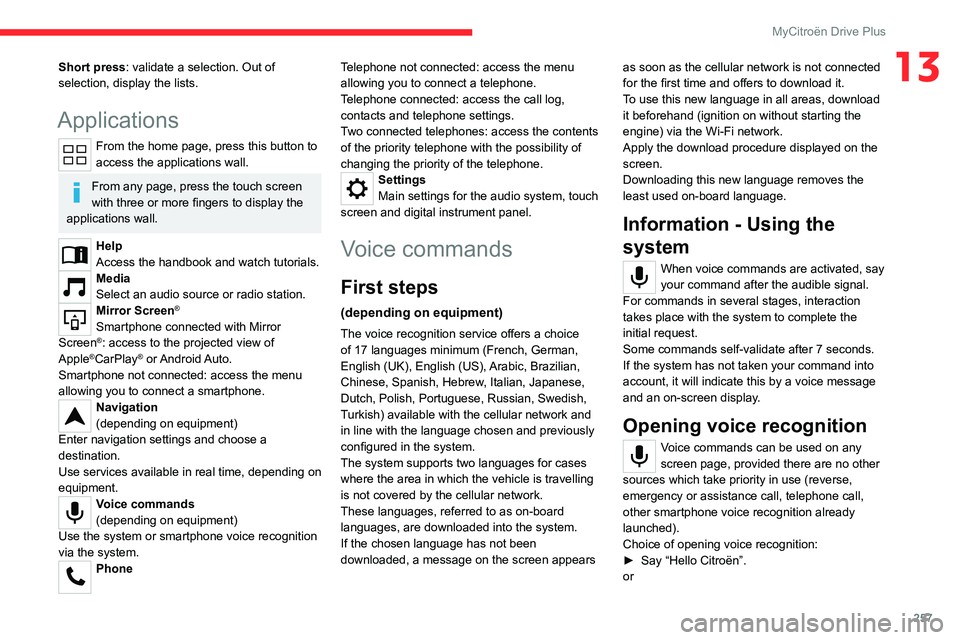
Applications
From the home page, press this button to
access the applications wall.
From any page, press the touch screen
with three or more fingers to display the
applications wall.
Help
Access the handbook and watch tutorials.
Media
Select an audio source or radio station.
Mirror Screen®
Smartphone connected with Mirror
Screen®: access to the projected view of
Apple®CarPlay® or Android Auto.
Smartphone not connected: access the menu
allowing you to connect a smartphone.
Navigation
(depending on equipment)
Enter navigation settings and choose a
destination.
Use services available in real time, depending on
equipment.
Voice commands
(depending on equipment)
Use the system or smartphone voice recognition
via the system.
Phone Telephone not connected: access the menu
allowing you to connect a telephone.
Telephone connected: access the call log,
contacts and telephone settings.
Two connected telephones: access the contents
of the priority telephone with the possibility of
changing the priority of the telephone.
Settings
Main settings for the audio system, touch
screen and digital instrument panel.
Voice commands
First steps
(depending on equipment)
The voice recognition service offers a choice
of 17 languages minimum (French, German,
English (UK), English (US),
Arabic, Brazilian,
Chinese, Spanish, Hebrew, Italian, Japanese,
Dutch, Polish, Portuguese, Russian, Swedish,
Turkish) available with the cellular network and
in line with the language chosen and previously
configured in the system.
The system supports two languages
for cases
where the area in which the vehicle is travelling
is not covered by the cellular network.
These languages, referred to as on-board
languages,
are downloaded into the system.
If the chosen language has not been
downloaded, a message on the screen appears as soon as the cellular network is not connected
for the first time and offers to download it.
T
o use this new language in all areas, download
it beforehand (ignition on without starting the
engine) via the Wi-Fi network.
Apply the download procedure displayed on the
screen.
Downloading this new language removes the
least used on-board language.
Information - Using the
system
When voice commands are activated, say
your command after the audible signal.
For
commands in several stages, interaction
takes place with the system to complete the
initial request.
Some commands self-validate after 7 seconds.
If the system has not taken your command into
account, it will indicate this by a voice message
and an on-screen display.
Opening voice recognition
Voice commands can be used on any
screen page, provided there are no other
sources which take priority in use (reverse,
emergency or assistance call, telephone call,
other smartphone voice recognition already
launched).
Choice of opening voice recognition:
►
Say “Hello Citroën”.
or
Page 268 of 292
266
MyCitroën Drive Plus
Configuring the system
Press the "Settings" application.
In the list, select the "System” tab.
It is possible to configure:
–
the language.
–
the date & time.
–
the unit of distance and consumption
(kWh/100 miles - miles, mi/kWh - miles, km/kWh
- km).
–
the temperature unit (Fahrenheit, Celsius).
It is also possible to reset the system
configuration.
Selecting the language
Select "Language" to change the
language.
Press the desired language.
Press the back arrow to return to the
previous page.
Setting the date and time
Select “Date and Time” to modify the date and
time.
“Automatic Date and Time” is activated
by default, so that the setting is made
automatically according to your geolocation.
To adjust manually, deactivate “Automatic Date
and Time”.
Press the “Select Time Zone” field then define
a time zone.
Press the back arrow to return to the
previous page.
Press the “Time Settings” line then set the time.
Press "OK" to confirm.
Press the “Date” line then set the date.
Press "OK" to confirm.
Select the Time Format (12h/24h).
Select the Date Format.
The system does not automatically change between winter and summer time
(depending on the country of sale).
Help
Press the "Help" application.
In the list, select the “User Manual” tab to
consult the vehicle’s handbook.
or
In the list, select the “Tutorials” tab to watch
explanatory videos for a quick start on screen
management, certain driving aids and voice
recognition.
User Manual
Select the display language.
The handbook home page is displayed. It presents the different possibilities for accessing
the information sought:
Visual search
Access to subjects via pictures
representing the exterior and interior of the
vehicle.
Indicator lamps
Access to the descriptions/operation of
the instrument panel warning/indicator lamps.
System
Access to sections dedicated to the
various audio equipment and telematics
systems.
Contents
Access to subjects via the main sections
of the handbook.
Visual search
Press Visual search.
Press one of the pictures located at the bottom
of the screen.
Press one of the bullet points in the
enlarged view.
There are two cases:
–
Direct display of the subject, if only one
subject is associated with the bullet point.
–
Display of a list of subjects, if several subjects
are associated with the bullet point.
Indicator lamps
Press Indicator lamps.
Page 274 of 292
272
Alphabetical index
Charger, wireless 60
Charging cable
157
Charging cable (Electric)
156
Charging connector (Electric)
155, 160,
162–163
Charging flap (Electric)
155, 160, 162–163
Charging system (Electric)
5, 9, 28, 153, 171
Charging the traction battery
(Electric)
23, 153, 157, 160, 162–163
CHECK
24
Checking the engine oil level
20
Checking the levels
171–172
Checking tyre pressures
(using the kit)
181, 183
Checks
170, 173–175
Checks, routine
173–174
Child lock
92
Children
81, 87–89
Children (safety)
92
Child seats
81, 84–87
Child seats, conventional
87, 90–91
Child seats, i-Size
89–91
Child seats, ISOFIX
87–91
Cleaning (advice)
154, 177–179
Closing the boot
36, 40
Closing the doors
35–36, 39
Collision Risk Alert
132–134
Configuration, vehicle
11, 28–29
Connected applications
239
Connection, Android Auto
221, 239
Connection, Apple CarPlay
221, 238Connection, Bluetooth 208–209, 218–219,
239–240, 244–245, 260–261
Connection, Wi-Fi network
240
Connectivity
238, 265
Consumptions
29–30
Container, AdBlue®
176
Control, emergency boot release
40
Control, emergency door
37
Control, heated seats
47, 50–51
Controls, steering mounted
102–103
Control stalk, lighting
65–66
Control stalk, wipers
70–72
Control unit
156–157
Courtesy lamps
62–63
Cruise control
113–114, 116–118
Cruise control, adaptive
113–114, 118–119
Cruise control by speed limit
recognition
113–114
D
DAB (Digital Audio Broadcasting) -
Digital radio
207, 217, 242
Date (setting)
224, 247, 266
Daytime running lamps
66, 188
Deactivating the passenger airbag
83, 86
Deadlocking
33, 36
Deferred charging
30
Deferred charging (Electric)
28, 30,
155, 160, 163
Deferred charging (Rechargeable hybrid)
30
Defrosting 48, 57
Defrosting, front
57
Defrosting, rear screen
58
Demisting
48, 57
Demisting, front
57
Demisting, rear
58
Diagnosis, vehicle
24
Dials and gauges
10
Digital instrument panel
11
Dimensions
202
Dipstick
20, 171
Direction indicators (turn signals)
66, 188–189
Display, head-up
12
Display screen, instrument panel
10
Domestic charging
(Electric)
157, 162–163, 201
Doors
39
Drive, electric
5, 9, 23, 28, 30,
153, 164, 171, 192, 195, 201
Driver’s attention warning
136–137
Drive selector (Electric)
103, 174
Driving
93–94
Driving aids camera (warnings)
11 0
Driving aid shortcuts
111
Driving aids (recommendations)
109
Driving economically
8
Driving modes
104–105
Dynamic stability control (DSC)
78
Page 276 of 292

274
Alphabetical index
Immobiliser, electronic 95
Indicator, AdBlue® range
21
Indicator, coolant temperature
21
Indicator, engine oil level
20
Indicators, direction
66, 188
Indicator, service
19
Inflating tyres
174, 203
Inflating tyres and accessories
(using the kit)
181, 183
Information, vehicle
10, 268
Infrared camera
11 0
Instrument panel
10, 26, 111
Instrument panel, LCD
10
Internet browser
236, 239
ISOFIX mountings
87, 90–91
J
Jack 181, 184, 242
Jump starting
192
K
Key 32, 34, 37
Key, electronic
35–36
Keyless Entry and Starting
32, 34–36, 96–97
Key not recognised
97–98
Key with remote control
32, 95
Kit, hands-free
208–209, 218–219, 244, 260
Kit, puncture repair
181
Kit, temporary puncture repair 180–183
Klaxon
75
L
Labels, identification 202
Lamps, parking
66
Lamps, rear
189–190
Lamps with Full LED technology
70
Lane assist
118, 123–125
Lane keeping assist
128
Leather (care)
179
LEDs - Light-emitting diodes
66, 188–189
Level, AdBlue®
173
Level, brake fluid
172
Level, Diesel additive
173
Level, engine coolant
21, 172
Level, engine oil
20, 171
Levels and checks
170–172
Level, screenwash fluid
71, 172
Light-emitting diodes - LEDs
66, 188–189
Lighting, boot
64
Lighting, cornering
70
Lighting dimmer
25
Lighting, exterior
65, 68
Lighting, guide-me home
33, 67–68
Lighting, interior
62–63
Lighting, mood
63
Lighting, welcome
67–68
Loading
167–168
Load reduction mode
169
Locking 33–35
Locking from the inside
36
Locking the doors
36–37
Log, alerts
24
Lumbar
46
M
Mains socket (domestic network) 156
Maintenance (advice)
154, 177
Maintenance, routine
110, 173, 175
Manoeuvring aids (recommendations)
109
Map reading lamps
62
Markings, identification
202
Massage function
46
Mat
62, 110
Menu, main
28
Menus (audio)
205, 214–215, 228–229
Menu, shortcuts
28–29
Messages
246
Messages, quick
246
Minimum traction battery charge level
(Electric)
23
Mirror, rear view
48
Mirrors, door
48, 58, 131
Mirror, vanity
59
Misfuel prevention
153
Mobile application
30, 58, 163
Motor, electric
98, 171, 201
Mountings, ISOFIX
87, 90–91
Multimedia support
60