buttons CITROEN C4 2023 Owners Manual
[x] Cancel search | Manufacturer: CITROEN, Model Year: 2023, Model line: C4, Model: CITROEN C4 2023Pages: 292, PDF Size: 7.79 MB
Page 6 of 292
4
Overview
Presentation
These illustrations and descriptions are intended
as a guide. The presence and location of certain
elements may vary depending on the version or
trim level.
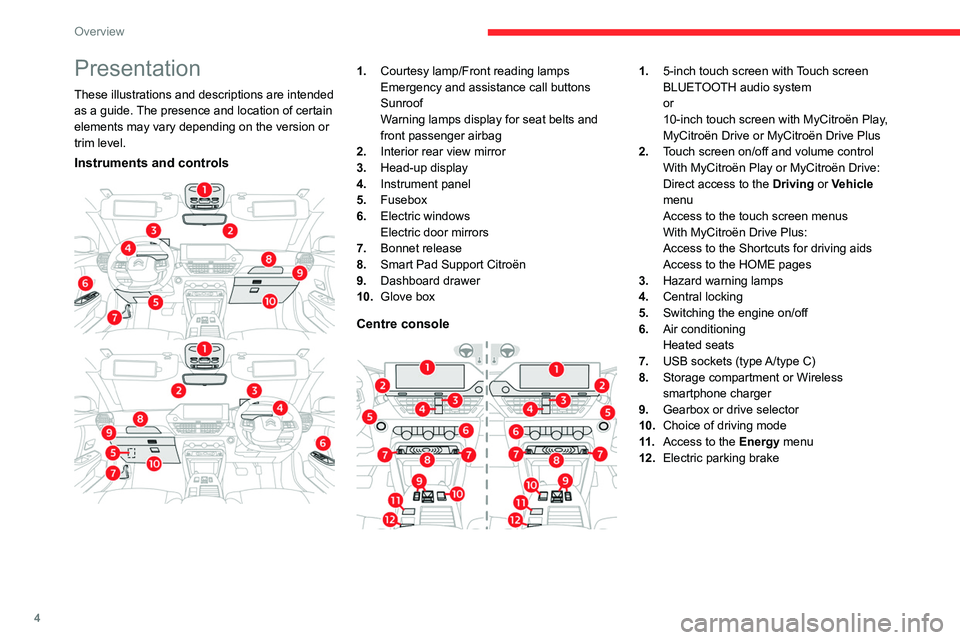
Instruments and controls
1.Courtesy lamp/Front reading lamps
Emergency and assistance call buttons
Sunroof
Warning lamps display for seat belts and
front passenger airbag
2. Interior rear view mirror
3. Head-up display
4. Instrument panel
5. Fusebox
6. Electric windows
Electric door mirrors
7. Bonnet release
8. Smart Pad Support Citroën
9. Dashboard drawer
10. Glove box
Centre console
1.5-inch touch screen with Touch screen
BLUETOOTH audio system
or
10-inch touch screen with MyCitroën Play,
MyCitroën Drive or MyCitroën Drive Plus
2. Touch screen on/off and volume control
With MyCitroën Play or MyCitroën Drive:
Direct access to the Driving or Vehicle
menu
Access to the touch screen menus
With MyCitroën Drive Plus:
Access to the Shortcuts for driving aids
Access to the HOME pages
3. Hazard warning lamps
4. Central locking
5. Switching the engine on/off
6. Air conditioning
Heated seats
7. USB sockets (type A/type C)
8. Storage compartment or Wireless
smartphone charger
9. Gearbox or drive selector
10. Choice of driving mode
11 . Access to the Energy menu
12. Electric parking brake
Page 14 of 292
12
Dashboard instruments
– With 2 widgets, reduced display in side
position.
The colour for each driving mode may be
personalised.
A default setting is suggested.
The setting also matches the interior ambient
lighting (depending on availability).
The settings are changed via the Settings > Customization touch screen
application.
For further information on Personalisation -
Instrument Panel, refer to the corresponding
section in the audio equipment and telematics
systems.
Head-up display
System which projects various information onto
a transparent blade placed in the driver's field
of vision to avoid the driver having to take their
eyes off the road.
Display in operation
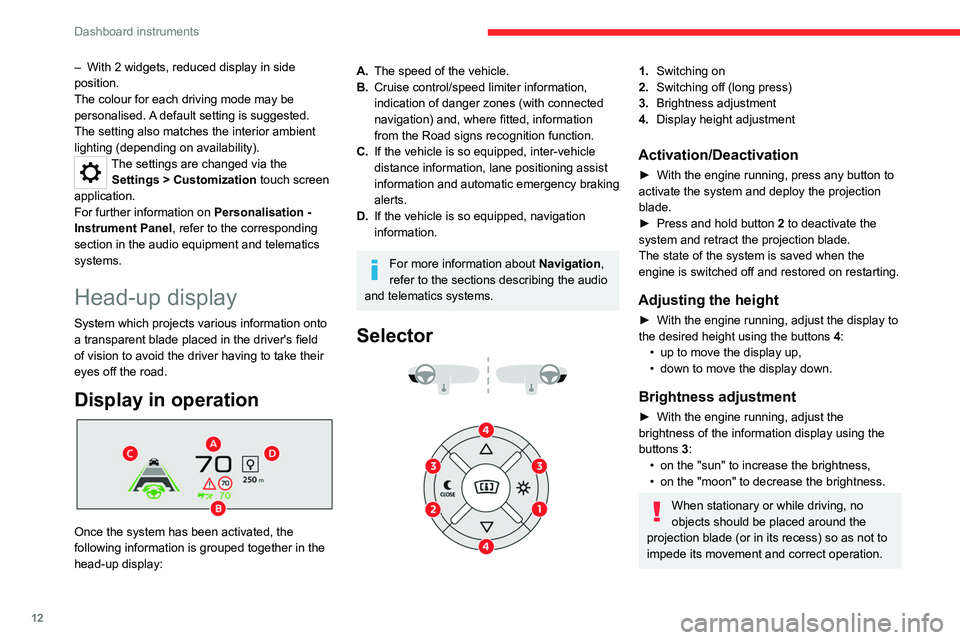
Once the system has been activated, the
following information is grouped together in the
head-up display:
A. The speed of the vehicle.
B. Cruise control/speed limiter information,
indication of danger zones (with connected
navigation) and, where fitted, information
from the Road signs recognition function.
C. If the vehicle is so equipped, inter-vehicle
distance information, lane positioning assist
information and automatic emergency braking
alerts.
D. If the vehicle is so equipped, navigation
information.
For more information about Navigation,
refer to the sections describing the audio
and telematics systems.
Selector
1. Switching on
2. Switching off (long press)
3. Brightness adjustment
4. Display height adjustment
Activation/Deactivation
► With the engine running, press any button to
activate the system and deploy the projection
blade.
►
Press and hold button 2
to deactivate the
system and retract the projection blade.
The state of the system is saved when the
engine is switched off and restored on restarting.
Adjusting the height
► With the engine running, adjust the display to
the desired height using the buttons 4
:
•
up to move the display up,
•
down to move the display down.
Brightness adjustment
► With the engine running, adjust the
brightness of the information display using the
buttons
3:
•
on the "sun" to increase the brightness,
•
on the "moon" to decrease the brightness.
When stationary or while driving, no
objects should be placed around the
projection blade (or in its recess) so as not to
impede its movement and correct operation.
Page 27 of 292
25
Dashboard instruments
1Total distance recorder
The total distance recorder measures the total
distance travelled by the vehicle since its initial
registration.
With the ignition on, the total distance is
displayed at all times. It remains displayed for
30 seconds after switching off the ignition. It is
displayed when the driver's door is opened, and
when the vehicle is locked or unlocked.
When travelling abroad, you may have to
change the distance units (km or miles):
the road speed must be displayed in the local
country’s official unit (km/h or mph).
The unit is changed via the screen
configuration menu, with the vehicle
stationary.
Lighting dimmer
This system allows the brightness of the
instruments and controls to be adjusted manually
to suit the ambient light level.
With Touch screen
BLUETOOTH audio system
► Press on the Settings menu.
► Select "Display".
► Adjust the brightness by
pressing the buttons. You can also switch off the screen:
► Select "
Turn off screen".
The screen goes off completely.
►
Press the screen again (anywhere on its
surface) to activate it.
With MyCitroën Play
/ ► Press Settings from the
status bar or from the menus
buttons.
/ ► Select " Brightness" or
"Screen configuration ",
depending on equipment.
► Adjust the instrument panel and
screen brightness by using the arrows or
moving the slider
.
/ ► Press this button to save and
exit, depending on equipment.
Y
ou can also switch off the screen:
/ ► Press Settings from the
status bar or from the menus
buttons.
► Select " Turn off screen" or "Dark",
depending on equipment.
The screen goes off completely.
►
Press the screen again (anywhere on its
surface) to turn it on.
With MyCitroën Drive
With the lamps switched on:► Press this button to select the
Settings menu. ►
Select "
OPTIONS".
► Select "
Screen configuration".
►
Select the "
Brightness” tab.
► Adjust the instrument panel and
screen brightness by using the arrows or
moving the slider
.
► Press this button to save and exit.
You can also switch off the screen:
► Press this button to select the
Settings menu.
► Select " Turn off screen".
The screen goes off completely.
►
Press the screen again (anywhere on its
surface) to turn it on.
With MyCitroën Drive Plus
It is configured in the Settings >
Brightness touch screen application.
►
In the "
Cockpit" category, press or move the
slider to the desired setting.
Trip computer
Displays information related to the current trip
(range, fuel consumption, average speed, etc.).
Page 30 of 292
28
Dashboard instruments
Recommendations
This screen is of the capacitive type.
– Do not use pointed objects on the touch
screen.
–
Do not touch the touch screen with wet hands.
–
Use a soft, clean cloth to clean the touch
screen.
With MyCitroën Play or
MyCitroën Drive
Principles
Use this button to access the menus, then
press the buttons that appear on the
touch screen.
Use this button for direct access to the
Driving/Vehicle menu.
Some menus may display across two pages:
press the "OPTIONS" button to access the
second page.
After a few moments with no action on the second page, the first page is
displayed automatically.
To deactivate/activate a function, select " OFF"
or "ON".
Configuring a function
Access to additional information on the function
Confirm
Return to the previous page or confirm
Audio system on/off
Volume adjustment/mute
Menus
Press the touch screen with three fingers
to show all of the menu buttons.
For more information about the menus,
refer to the sections describing the audio
and telematics systems.
Radio/Media
Climate
Settings for temperature, air flow, etc.
For more information on Manual air
conditioning and Dual-zone automatic air
conditioning , refer to the corresponding
sections.
Navigation (Depending on equipment)
Driving or Vehicle (Depending on
equipment)
Activation, deactivation and settings for certain
functions.
The functions are organised in 2 tabs: " Driving
functions" and "Vehicle settings".
Telephone
Applications Access to certain configurable equipment.
Settings
Main settings for the audio system, touch
screen and digital instrument panel.
Energy menu (Electric)
It can be accessed directly by pressing
the button located on the centre console.
The pages available vary depending on the
audio equipment.
Flow
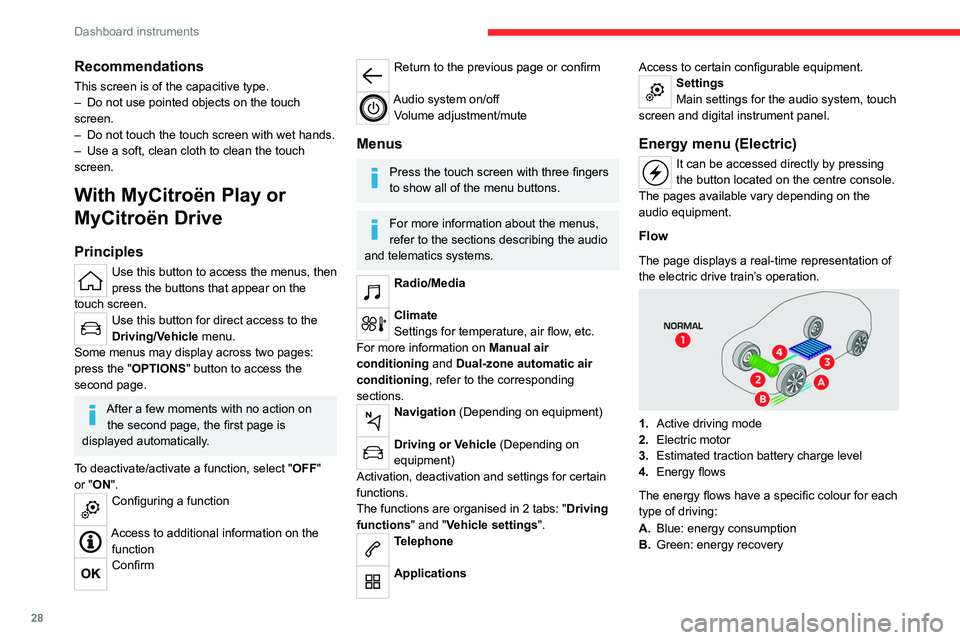
The page displays a real-time representation of
the electric drive train’s operation.
1. Active driving mode
2. Electric motor
3. Estimated traction battery charge level
4. Energy flows
The energy flows have a specific colour for each
type of driving:
A. Blue: energy consumption
B. Green: energy recovery
Page 31 of 292
29
Dashboard instruments
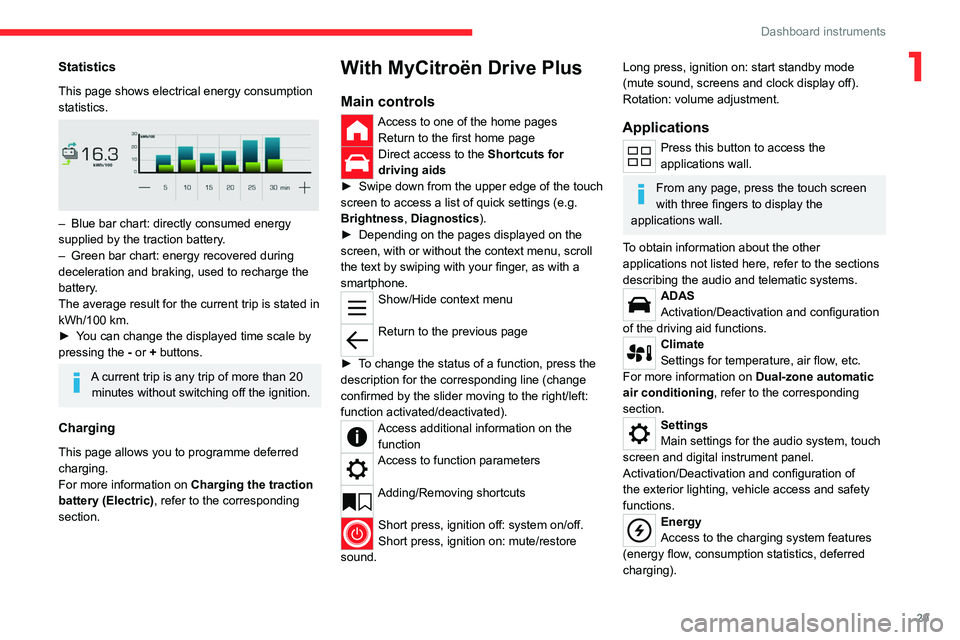
1Statistics
This page shows electrical energy consumption
statistics.
– Blue bar chart: directly consumed energy
supplied by the traction battery .
–
Green bar chart: energy recovered during
deceleration and braking, used to recharge the
battery
.
The average result for the current trip is stated in
kWh/100
km.
►
Y
ou can change the displayed time scale by
pressing the
-
or + buttons.
A current trip is any trip of more than 20 minutes without switching off the ignition.
Charging
This page allows you to programme deferred
charging.
For more information on Charging the traction
battery (Electric) , refer to the corresponding
section.
With MyCitroën Drive Plus
Main controls
Access to one of the home pages Return to the first home page
Direct access to the Shortcuts for
driving aids
►
Swipe down from the upper edge of the touch
screen to access a list of quick settings (e.g.
Brightness
, Diagnostics).
►
Depending on the pages displayed on the
screen, with or without the context menu, scroll
the text by swiping with your finger
, as with a
smartphone.
Show/Hide context menu
Return to the previous page
►
T
o change the status of a function, press the
description for the corresponding line (change
confirmed by the slider moving to the right/left:
function activated/deactivated).
Access additional information on the function
Access to function parameters
Adding/Removing shortcuts
Short press, ignition off: system on/off.
Short press, ignition on: mute/restore
sound.
Long press, ignition on: start standby mode
(mute sound, screens and clock display off).
Rotation: volume adjustment.
Applications
Press this button to access the
applications wall.
From any page, press the touch screen
with three fingers to display the
applications wall.
To obtain information about the other
applications not listed here, refer to the sections
describing the audio and telematic systems.
ADAS
Activation/Deactivation and configuration
of the driving aid functions.
Climate
Settings for temperature, air flow, etc.
For more information on Dual-zone automatic
air conditioning , refer to the corresponding
section.
Settings
Main settings for the audio system, touch
screen and digital instrument panel.
Activation/Deactivation and configuration of
the exterior lighting, vehicle access and safety
functions.
Energy
Access to the charging system features
(energy flow, consumption statistics, deferred
charging).
Page 36 of 292
34
Access
► Press this button. The sidelamps,
dipped beam headlamps, number plate
lamps and door mirror spotlamps come on for 30
seconds.
Pressing again before the end of the timed
period switches off the lamps immediately.
Advice
Remote control
The remote control is a sensitive, high-
frequency device; avoid handling it in your
pocket, due to the risk of unintentionally
unlocking the vehicle.
Avoid pressing the remote control buttons
while out of range of the vehicle, due to
the risk of rendering the remote control
inoperative. It would then be necessary to
reset it.
The remote control does not work
when the
key is in the ignition switch, even when the
ignition is switched off.
Anti-theft protection
Do not modify the electronic vehicle
immobiliser, as this might result in
malfunctions.
For vehicles with a key ignition switch,
remember to remove the key and turn the
steering wheel to engage the steering lock.
Locking the vehicle
Driving with the doors locked could make
it more difficult for the emergency services
to enter the passenger compartment in an
emergency.
As a safety precaution, remove the key from
the ignition or take the electronic key with you
when leaving the vehicle, even for a short
time.
Purchasing a second-hand vehicle
Have the key codes memorised by a
CITROËN dealer, to ensure that the keys in
your possession are the only ones able to
start the vehicle.
Proximity Keyless Entry
and Start
This is a Keyless Entry and Start system.
It enables automatic vehicle locking/unlocking
simply by detecting the electronic key.
As long as the driver has the electronic key
on their person, the vehicle unlocks as they
approach and locks when they walk away.
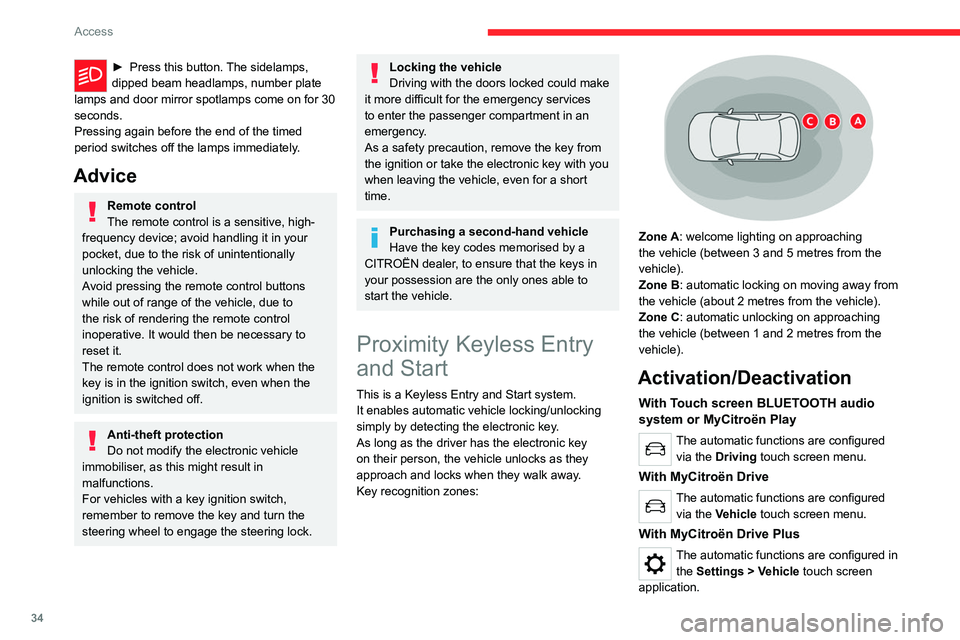
Key recognition zones:
Zone A: welcome lighting on approaching
the vehicle (between 3 and 5 metres from the
vehicle).
Zone B: automatic locking on moving away from
the vehicle (about 2
metres from the vehicle).
Zone C: automatic unlocking on approaching
the vehicle (between 1 and 2
metres from the
vehicle).
Activation/Deactivation
With Touch screen BLUETOOTH audio
system or MyCitroën Play
The automatic functions are configured via the Driving touch screen menu.
With MyCitroën Drive
The automatic functions are configured via the Vehicle touch screen menu.
With MyCitroën Drive Plus
The automatic functions are configured in the Settings > Vehicle touch screen
application.
Page 43 of 292
41
Access
2The alarm is triggered if anyone breaks a
window, enters the passenger compartment or
moves inside the vehicle.
Self-protection function
The system checks whether any of its
components are out of service.
The alarm is triggered if the battery, the central
control or the siren wiring is put out of service or
damaged.
Work on the alarm system
Contact a CITROËN dealer or a qualified
workshop.
Locking the vehicle with full
alarm system
Activation
► Switch off the ignition and exit the vehicle.
► Lock or deadlock the vehicle using the
remote control or by pressing on the driver's
door handle.
When the monitoring system is active, the red
indicator lamp in the button flashes once per
second and the direction indicators come on for
about 2 seconds.
The exterior perimeter monitoring is activated
after 5 seconds and the interior volumetric
monitoring after 45 seconds.
The alarm does not activate when locking automatically from a distance.
If an opening (door, boot or bonnet) is not
properly closed, the vehicle is not locked,
but the exterior perimeter monitoring will be
activated after 45 seconds, at the same time
as the interior volumetric monitoring.
Deactivation
► Press one of the remote control unlocking
buttons:
Short press.
Long press.
or
►
Unlock the vehicle by pressing the driver
’s
door handle.
The monitoring system is deactivated: the
indicator lamp in the button goes off and the
direction indicators flash for about 2 seconds.
After unlocking using the remote
control
If the vehicle automatically locks itself again
(as happens if a door or the boot is not
opened within 30 seconds of unlocking), the
monitoring system is automatically activated.
Locking the vehicle
with exterior perimeter
monitoring only
Deactivate the interior volumetric monitoring to
avoid the unwanted triggering of the alarm, in
certain cases such as:
–
Slightly open window
.
–
W
ashing the vehicle.
–
Changing a wheel.
–
T
owing the vehicle.
–
T
ransport on a ship or ferry.
Deactivating interior volumetric
monitoring
► Switch off the ignition and within 10 seconds
press the alarm button until the indicator lamp is
on fixed.
►
Exit the vehicle.
►
Immediately lock the vehicle using the remote
control or by pressing on the driver's door
handle.
Only exterior perimeter monitoring is activated;
the red indicator lamp in the button flashes every
second.
T
o take effect, this deactivation must be
performed whenever the ignition is switched
off.
Page 54 of 292
52
Ease of use and comfort
Servicing the ventilation and air
conditioning system
►
Ensure that the passenger compartment
filter is in good condition and have the filter
elements replaced regularly
.
We recommend using a composite passenger
compartment filter. Its specific active additive
helps protect against polluting gases and bad
smells.
►
T
o ensure correct operation of the
air conditioning system, have it checked
according to the recommendations in the
Manufacturer’s service schedule.
Stop & Start
The heating and air conditioning systems
only operate when the engine is running.
Temporarily deactivate the Stop & Start
system to maintain a comfortable temperature
in the passenger compartment.
For more information on the Stop &
Start
system, refer to the corresponding
section.
ECO driving mode
Selecting this mode reduces electrical
energy consumption, but restricts the
performance of the heating and air
conditioning systems, although it does not
deactivate them.
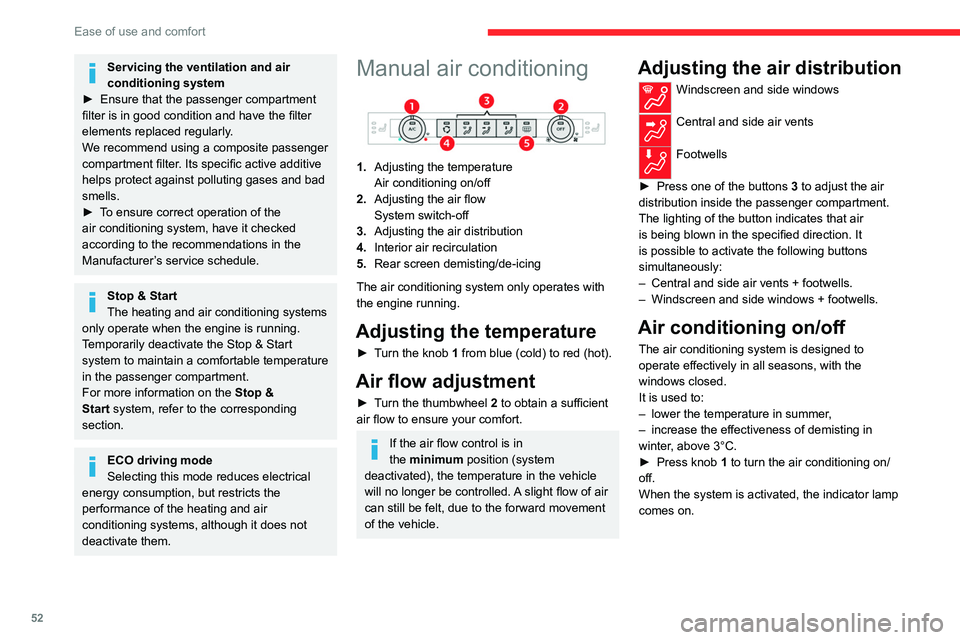
Manual air conditioning
1. Adjusting the temperature
Air conditioning on/off
2. Adjusting the air flow
System switch-off
3. Adjusting the air distribution
4. Interior air recirculation
5. Rear screen demisting/de-icing
The air conditioning system only operates with
the engine running.
Adjusting the temperature
► Turn the knob 1 from blue (cold) to red (hot).
Air flow adjustment
► Turn the thumbwheel 2 to obtain a sufficient
air flow to ensure your comfort.
If the air flow control is in
the minimum position (system
deactivated), the temperature in the vehicle
will no longer be controlled. A slight flow of air
can still be felt, due to the forward movement
of the vehicle.
Adjusting the air distribution
Windscreen and side windows
Central and side air vents
Footwells
►
Press one of the buttons
3 to adjust the air
distribution inside the passenger compartment.
The lighting of the button indicates that air
is being blown in the specified direction. It
is possible to activate the following buttons
simultaneously:
–
Central and side air vents + footwells.
–
Windscreen and side windows + footwells.
Air conditioning on/off
The air conditioning system is designed to
operate effectively in all seasons, with the
windows closed.
It is used to:
–
lower the temperature in summer
,
–
increase the effectiveness of demisting in
winter
, above 3°C.
►
Press knob
1 to turn the air conditioning on/
off.
When the system is activated, the indicator lamp
comes on.
Page 55 of 292
53
Ease of use and comfort
3Air conditioning does not operate when the air flow is disabled.
To obtain cool air more quickly, enable interior
air recirculation for a brief period. Then return
to the intake of exterior air.
Switching off the air conditioning may result in
some discomfort (humidity or misting).
Switching the system off
► Press knob 2; all the indicator lamps of the
system go out.
This action deactivates all of the functions of the
air conditioning system.
The temperature is no longer regulated. A slight
flow of air can still be felt, due to the forward
movement of the vehicle.
Dual-zone automatic air
conditioning
With MyCitroën Play or MyCitroën Drive
This system automatically controls the activation
of the air conditioning system, regulating the
temperature, air flow and air distribution inside
the passenger compartment.
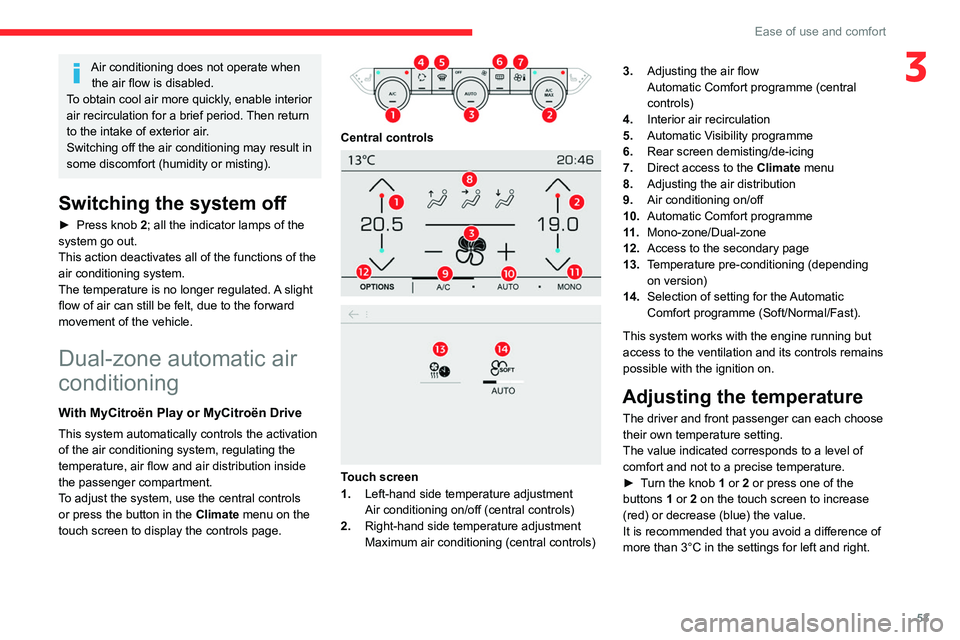
To adjust the system, use the central controls
or press the button in the Climate menu on the
touch screen to display the controls page.
Central controls
Touch screen
1. Left-hand side temperature adjustment
Air conditioning on/off (central controls)
2. Right-hand side temperature adjustment
Maximum air conditioning (central controls) 3.
Adjusting the air flow
Automatic Comfort programme (central
controls)
4. Interior air recirculation
5. Automatic Visibility programme
6. Rear screen demisting/de-icing
7. Direct access to the Climate menu
8. Adjusting the air distribution
9. Air conditioning on/off
10. Automatic Comfort programme
11 . Mono-zone/Dual-zone
12. Access to the secondary page
13. Temperature pre-conditioning (depending
on version)
14. Selection of setting for the Automatic
Comfort programme (Soft/Normal/Fast).
This system works with the engine running but
access to the ventilation and its controls remains
possible with the ignition on.
Adjusting the temperature
The driver and front passenger can each choose
their own temperature setting.
The value indicated corresponds to a level of
comfort and not to a precise temperature.
►
T
urn the knob 1 or 2 or press one of the
buttons 1 or 2 on the touch screen to increase
(red) or decrease (blue) the value.
It is recommended that you avoid a difference of
more than 3°C in the settings for left and right.
Page 56 of 292
54
Ease of use and comfort
Automatic Comfort programme
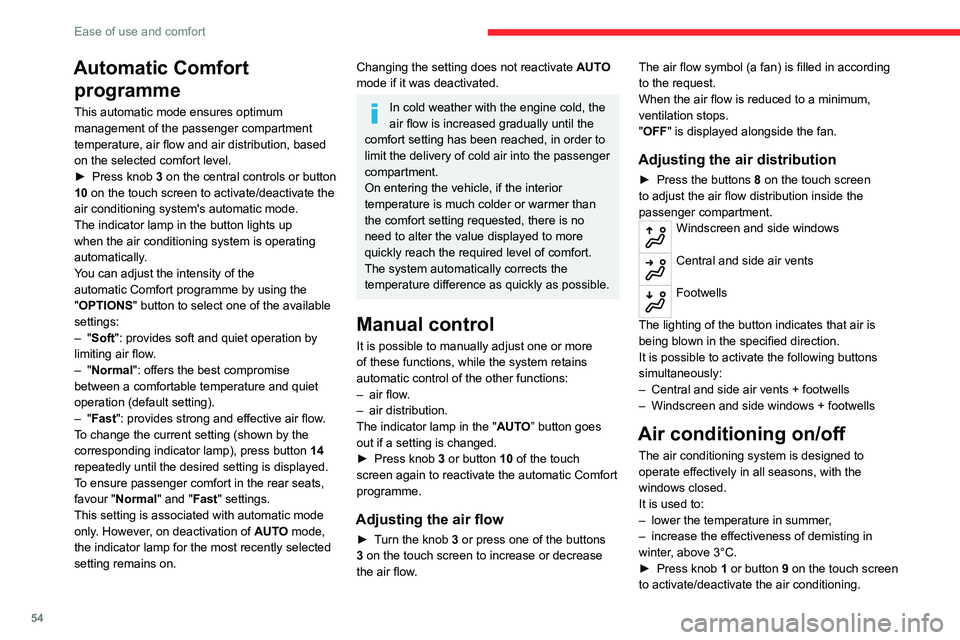
This automatic mode ensures optimum
management of the passenger compartment
temperature, air flow and air distribution, based
on the selected comfort level.
►
Press knob
3 on the central controls or button
10 on the touch screen to activate/deactivate the
air conditioning system's automatic mode.
The indicator lamp in the button lights up
when the air conditioning system is operating
automatically.
You can adjust the intensity of the
automatic Comfort programme by using the
"OPTIONS "
button to select one of the available
settings:
–
"Soft": provides soft and quiet operation by
limiting air flow.
–
"Normal": offers the best compromise
between a comfortable temperature and quiet
operation (default setting).
–
"Fast": provides strong and effective air flow.
To change the current setting (shown by the
corresponding indicator lamp), press button
14
repeatedly until the desired setting is displayed.
To ensure passenger comfort in the rear seats,
favour "Normal" and "Fast" settings.
This setting is associated with automatic mode
only. However, on deactivation of
AUTO mode,
the indicator lamp for the most recently selected
setting remains on.
Changing the setting does not reactivate AUTO
mode if it was deactivated.
In cold weather with the engine cold, the
air flow is increased gradually until the
comfort setting has been reached, in order to
limit the delivery of cold air into the passenger
compartment.
On entering the vehicle, if the interior
temperature is much colder or warmer than
the comfort setting requested, there is no
need to alter the value displayed to more
quickly reach the required level of comfort.
The system automatically corrects the
temperature difference as quickly as possible.
Manual control
It is possible to manually adjust one or more
of these functions, while the system retains
automatic control of the other functions:
–
air flow
.
–
air distribution.
The indicator lamp in the " AUT
O” button goes
out if a setting is changed.
►
Press knob
3 or button 10 of the touch
screen again to reactivate the automatic Comfort
programme.
Adjusting the air flow
► Turn the knob 3 or press one of the buttons
3 on the touch screen to increase or decrease
the air flow. The air flow symbol (a fan) is filled in according
to the request.
When the air flow is reduced to a minimum,
ventilation stops.
"OFF
" is displayed alongside the fan.
Adjusting the air distribution
► Press the buttons 8 on the touch screen
to adjust the air flow distribution inside the
passenger compartment.
Windscreen and side windows
Central and side air vents
Footwells
The lighting of the button indicates that air is
being blown in the specified direction.
It is possible to activate the following buttons
simultaneously:
–
Central and side air vents + footwells
–
Windscreen and side windows + footwells
Air conditioning on/off
The air conditioning system is designed to
operate effectively in all seasons, with the
windows closed.
It is used to:
–
lower the temperature in summer
,
–
increase the effectiveness of demisting in
winter
, above 3°C.
►
Press knob
1 or button 9 on the touch screen
to activate/deactivate the air conditioning.