ignition CITROEN C4 AIRCROSS 2011 Owner's Manual
[x] Cancel search | Manufacturer: CITROEN, Model Year: 2011, Model line: C4 AIRCROSS, Model: CITROEN C4 AIRCROSS 2011Pages: 332, PDF Size: 9.07 MB
Page 61 of 332
1
59
Monitoring
Lighting dimmer
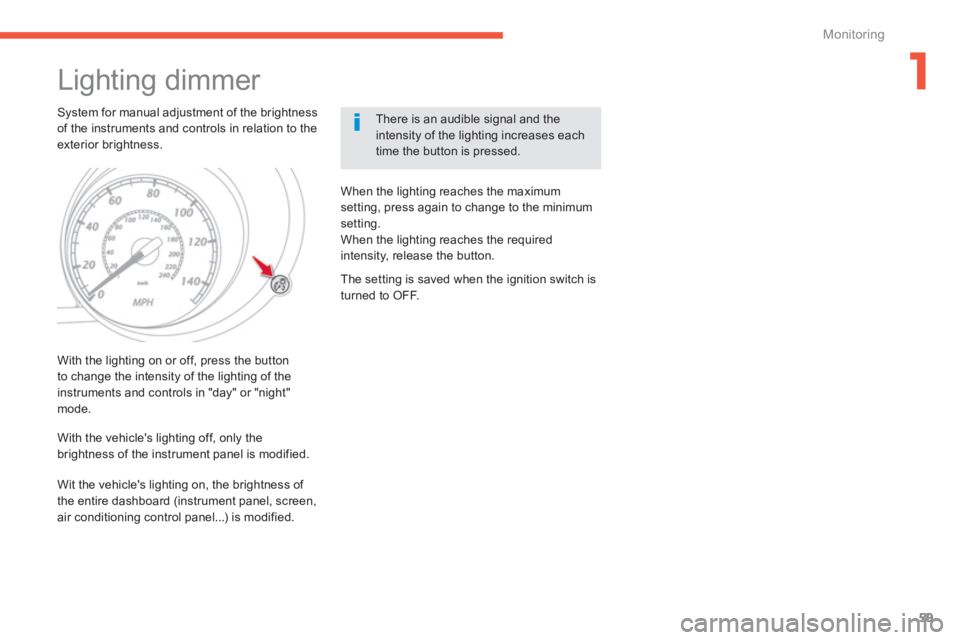
System for manual adjustment of the brightness of the instruments and controls in relation to theexterior brightness.
There is an audible signal and the intensity of the lighting increases eachtime the button is pressed.
With the li
ghting on or off, press the button
to change the intensity of the lighting of the instruments and controls in "day" or "night"mode.
When the lighting reaches the maximum
setting, press again to change to the minimum
settin
g.
When the lighting reaches the required intensity, release the button.
With the vehicle's li
ghting off, only the
brightness of the instrument panel is modified.
The setting is saved when the ignition switch is
turned to OFF.
Wit the vehicle's li
ghting on, the brightness of
the entire dashboard (instrument panel, screen,
air conditioning control panel...) is modified.
Page 68 of 332
66
Access
Switching on the lighting
remotely
This only operates with the ignition offand theflighting control in the "OFF" or "AUTO
" position.
Remote operation of the li
ghting will be switched off:
- on switching on the ignition,
- if the lighting control is not in the " OFF " or
"AUTO
" position,
- when activating manual guide-me-home
lighting.
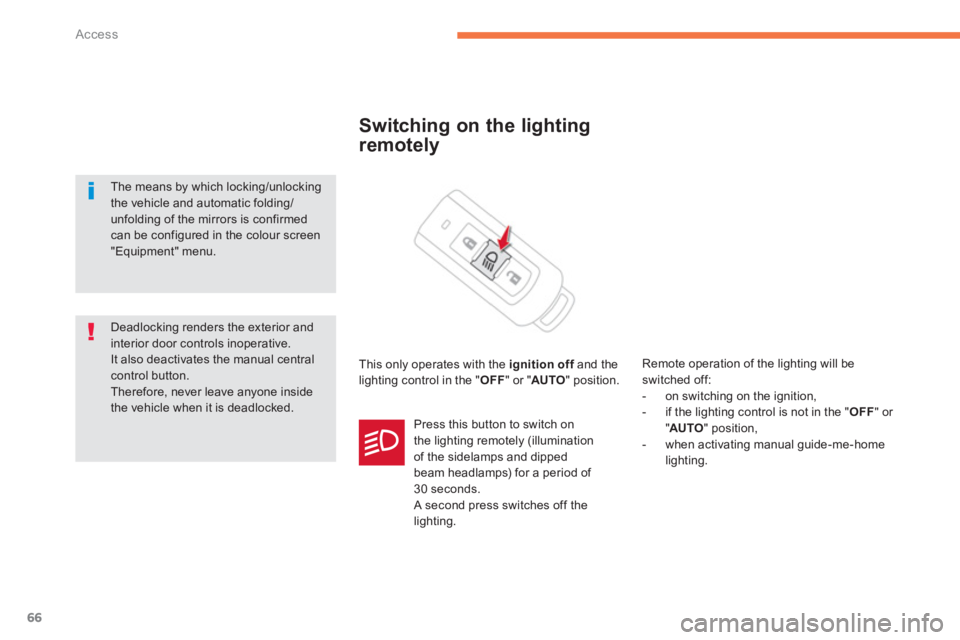
Pr
ess this button to switch on
the lighting remotely (illumination
of the sidelamps and dipped
beam headlamps) for a period of 30 seconds.
A second press switches off the lighting.
Deadlocking renders the exterior and interior door controls inoperative.
It also deactivates the manual central control button.
Therefore, never leave anyone insidethe vehicle when it is deadlocked.
The means by which locking/unlocking the vehicle and automatic folding/unfolding of the mirrors is confirmed
can be configured in the colour screen "Equipment" menu.
Page 71 of 332
69
2
Access
Visit a CITROËN dealer with the vehicle's registration document and your personal identification documents and if possible the key code label.
The CITROËN dealer will be able to retrieve the key code and the transponder code required to order a new key.
Electronic key
The electronic key is a sensitive system; do not operate it while it is in your pocket as there is a possibility that it may unlock the vehicle, without you being aware of it.Do not repeatedly press the buttons of your electronic key out of range and out of sight of your vehicle. You run the risk of stopping it from working and the remote control would have to be reinitialised.The electronic key cannot operate as a remote control when it is in the reader or even when the ignition is switched on.
Locking the vehicle
Driving with the doors locked may make access to the passenger compar tment by the emergency ser vices more difficult in an emergency.
As a safety precaution (with children on board), take the Keyless Entry and Star ting electronic key when you leave the vehicle, even for a shor ttime.
Electrical interference
The Keyless Entry and Starting electronic key may not operate if close to certain electronic devices: telephone, laptop computer, strong magnetic fields, ...
Anti-theft protection
Do not make any modifications to the electronic engine immobiliser system; this could cause malfunctions.Don't forget to turn the steering to engage the steering lock.
When purchasing a second-hand vehicle
Have all of the keys in your possession paired by a CITROËN dealer, to ensure that only your keys allow your vehicle to be unlocked and star ted.
Page 75 of 332

73
2
Access
For all work on the alarm system, contact a CITROËN dealer or aqualified workshop.
Alarm * System which protects and provides a deterrent against theft and break-ins. It provides the following types of monitoring:
- perimeter
The system checks for any opening of the vehicle.
The alarm is triggered if anyone tries to open adoor, the boot, the bonnet....
- volumetric
The system checks for any variation in the
volume in the passenger compartment.
The alarm is triggered if anyone breaks a
window, enters the passenger compar tment or moves inside the vehicle.
- tilt
The system checks for any change in theattitude of the vehicle.
The alarm is triggered if the vehicle is lifted,moved or knocked.
Self-protection function
The system checks for the putting out of service of its components.
The alarm is triggered if the battery, the centralcontrol or the siren wiring are put out of service
or damaged.
Locking the vehicle with full
alarm system
Activation
)
Switch off the ignition (OFF mode if your
vehicle has the Keyless Entry and Star ting system).) Remove the key from the ignition switch,
if your vehicle does not have the "Keyless
Entry and Starting" system.) Leave the vehicle, and close all the doorsand the bonnet. )
Press the locking button on the remote control or one of the door or boot buttons
if your vehicle has the "Keyless Entry and Starting" system.
Deactivation
Do one of the the following to deactivate thealarm:)
Press the unlocking button on the remotecontrol or one of the door or boot buttonsif your vehicle has the "Keyless Entry andStarting" system.
)
Switch on the ignition (ON mode if your
vehicle has the "Keyless Entry andStarting" system). ) Open a door or the boot while the system is being activated.
The alarm system is deactivated: the indicator
lamp A
goes off.
The alarm is bein
g activated: the indicator
lamp A flashes rapidly accompanied byan intermittent audible signal for about
20 seconds.
Once the 20 seconds have expired, the
system is active . The audible signal stops and
the indicator lamp in the button flashes slowly.
*
According to equipment.
Page 76 of 332
74
Access
Locking the vehicle with
perimeter monitoring only
Deactivate the interior volumetric and tiltmonitoring to avoid unwanted triggering of thealarm in cer tain cases, such as:
- an animal left in the vehicle,
- a window left par tly open,
- washing your vehicle.
Deactivation of the interior volumetric and tilt monitoring
Raise and hold the wiper control stalk in the
" MIST " position for about three seconds to
activate them again, the audible signal sounds
twice.
) Switch off the ignition and remove thekey from the ignition switch (OFF mode if your vehicle has the "Keyless Entry andStarting" system). )
Raise and hold the wiper control stalk in
the "MIST"
position for about 3 seconds. )
The audible signal sounds once
and the
interior volumetric and tilt monitoring are
deactivated.
Page 77 of 332

75
2
Access
Tr iggering of the alarm
This is indicated by sounding of the siren andflashing of the direction indicators for thirtyseconds.
A message then appears in the instrument
panel screen while the siren is operating.
When the ignition is next switched on (ONmode if your vehicle has the "Keyless Entry and Starting" system), an audible signal sounds four
times to inform you that the alarm was triggeredduring your absence.
Complete deactivation of
the alarm
)
Switch off the ignition (OFF mode if your vehicle has the "Keyless Entry andStarting" system). )
Remove the key from the ignition switch,
if your vehicle does not have the "Keyless
Entry and Star ting" system.) Open the driver's door. )
Place the lighting control stalk in the "OFF"position. )
Pull the wiper control stalk towards you and
hold.
After about ten seconds there is an audible signal.) When the audible signal stops, continue to
hold the wiper stalk pulled towards you and
press the remote control locking button.
You can completely deactivate the alarm
system. To do this, proceed as follows:
) The state of the system is then signalled to you by the number of beeps:
One beep: the alarm system is completely deactivated.
Two beeps: the alarm system is activated.
Each new press of the remote control
lockin
g button changes the state of thesystem.
It is possible to adjust the sensitivity
of the alarm sensor and to deactivatethe function via the colour screen"Equipment" menu.
Page 78 of 332
76
Access
Electric windows
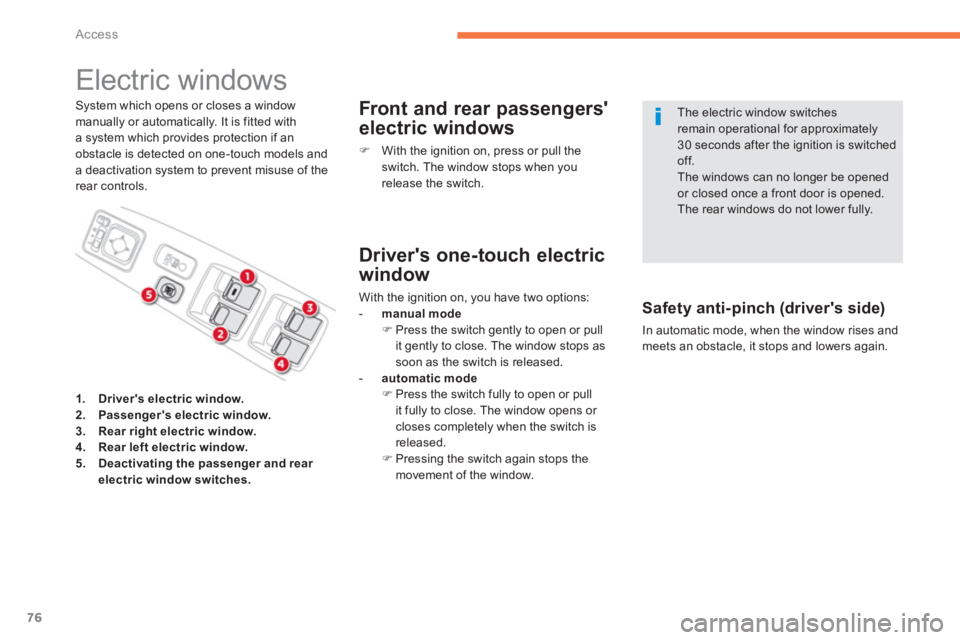
System which opens or closes a windowmanually or automatically. It is fitted witha system which provides protection if anobstacle is detected on one-touch models and
a deactivation system to prevent misuse of therear controls.
Front and rear passengers'
electric windows
)
With the ignition on, press or pull the switch. The window stops when you
release the switch.
Safety anti-pinch (driver's side)
In automatic mode, when the window rises and meets an obstacle, it stops and lowers again.
The electric window switchesremain operational for approximately30 seconds after the ignition is switchedoff. The windows can no longer be openedor closed once a front door is opened.
The rear windows do not lower fully.
1.Driver's electric window.2.Passenger's electric window.3.Rear right electric window.4.Rear left electric window.5.Deactivating the passenger and rear
electric window switches.
Driver's one-touch electric
w
indow
With the ignition on, you have two options:
-
manual mode)
Press the switch gently to open or pull
it gently to close. The window stops assoon as the switch is released.
- automatic mode)
Press the switch fully to open or pull
it fully to close. The window opens or closes completely when the switch is
r
eleased. ) Pressing the switch again stops the
movement of the window.
Page 79 of 332
77
2
Access
Deactivating the passenger
and rear electric window
switches
Reinitialisin
g the electric
w
indows
When the button is pressed down, onlythe window in the driver's door operates.
Always remove the key from the ignitionwhen leaving the vehicle, even for ashort time. In the event of contact during operation of the windows, you must reverse themovement of the window. To do this, press the switch concerned.When the driver operates the passenger electric window switches, they must ensure that no one is preventing correctclosing of the windows. The driver must ensure that passengers use the electric windows correctly.Be aware of children when operating the windows.
)
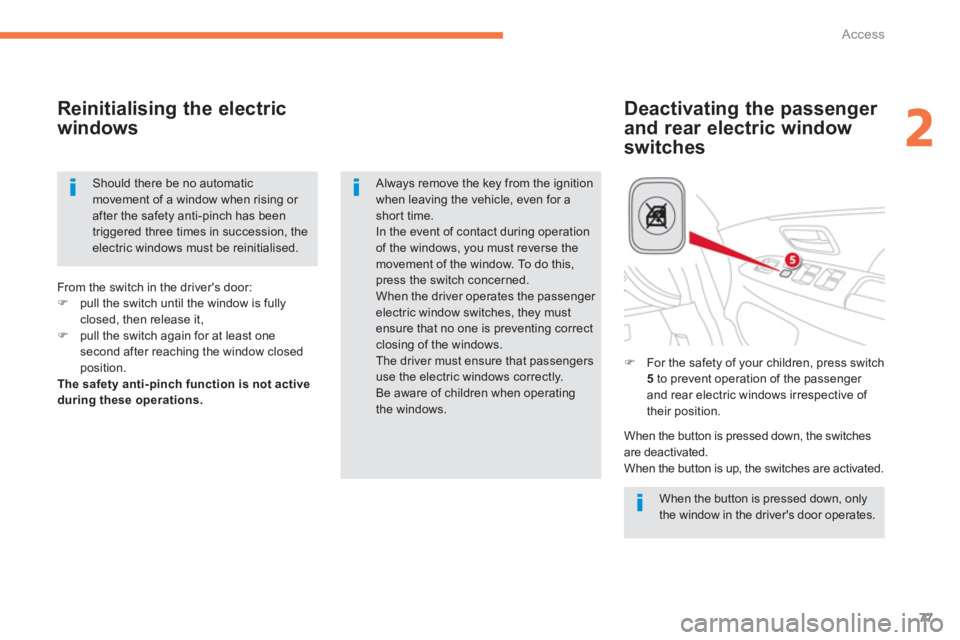
For the safety of your children, press switch5
to prevent operation of the passenger
and rear electric windows irrespective of
their position. Fr
om the switch in the driver's door:)pull the switch until the window is fully closed, then release it,)pull the switch again for at least one second after reaching the window closedposition.The safety anti-pinch function is not activeduring these operations.
When the button is pressed down, the switchesare deactivated.
When the button is up, the switches are activated.
Should there be no automatic movement of a window when rising or after the safety anti-pinch has been triggered three times in succession, the electric windows must be reinitialised.
Page 80 of 332
78
Access
Panoramic sunroof It has a motorised blind.
Motorised blind
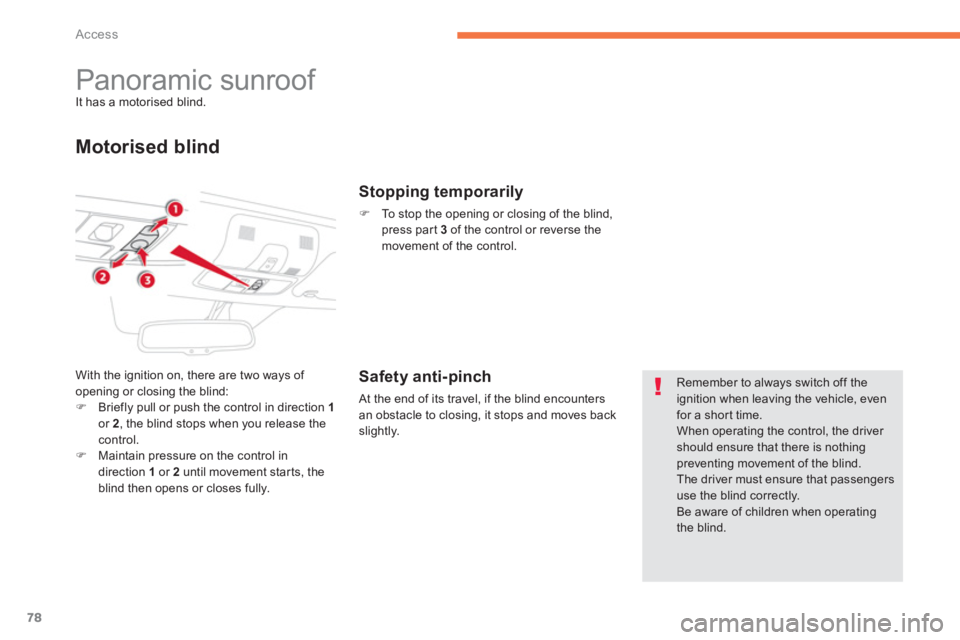
With the ignition on, there are two ways of
opening or closing the blind:
)Briefly pull or push the control in direction 1or 2 , the blind stops when you release thecontrol.)Maintain pressure on the control in direction 1or 2until movement starts, the
blind then opens or closes fully.
Stopping temporarily
)
To stop the opening or closing of the blind,
press par
t 3 of the control or reverse themovement of the control.
Safety anti-pinch
At the end of its travel, if the blind encounters
an obstacle to closing, it stops and moves back
slightly.
Remember to always switch off theignition when leaving the vehicle, even for a short time. When operating the control, the driver should ensure that there is nothing preventing movement of the blind.
The driver must ensure that passengersuse the blind correctly.
Be aware of children when operating the blind.
Page 87 of 332
85
3
Comfort
Mirrors
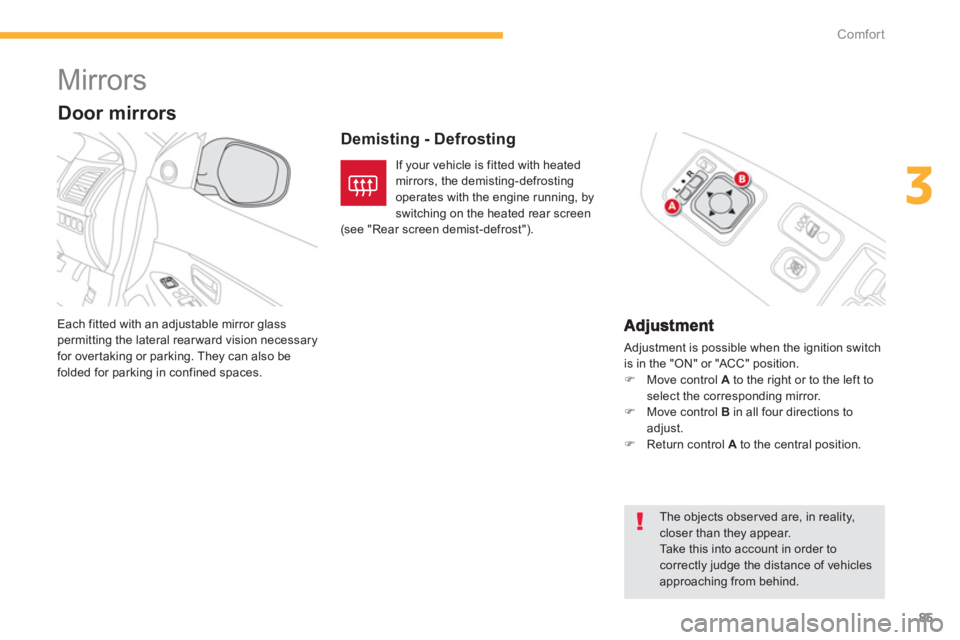
Adjustment is possible when the ignition switch
is in the "ON" or "ACC" position.) Move control Ato the right or to the left toselect the corresponding mirror.)
Move control Bin all four directions toadjust.
)
Return control A
to the central position. Each
fitted with an adjustable mirror glass permitting the lateral rearward vision necessary for overtaking or parking. They can also be folded for parking in confined spaces.
Demisting - Defrosting
Door mirrors
If your vehicle is fitted with heated
mirrors, the demisting-defrosting operates with the engine running, byswitching on the heated rear screen
(see "Rear screen demist-defrost").
The objects observed are, in reality,closer than they appear. Ta k e this into account in order tocorrectly judge the distance of vehiclesapproaching from behind.