USB port Citroen C4 AIRCROSS RHD 2014.5 1.G Owner's Manual
[x] Cancel search | Manufacturer: CITROEN, Model Year: 2014.5, Model line: C4 AIRCROSS RHD, Model: Citroen C4 AIRCROSS RHD 2014.5 1.GPages: 389, PDF Size: 15.51 MB
Page 7 of 389
5
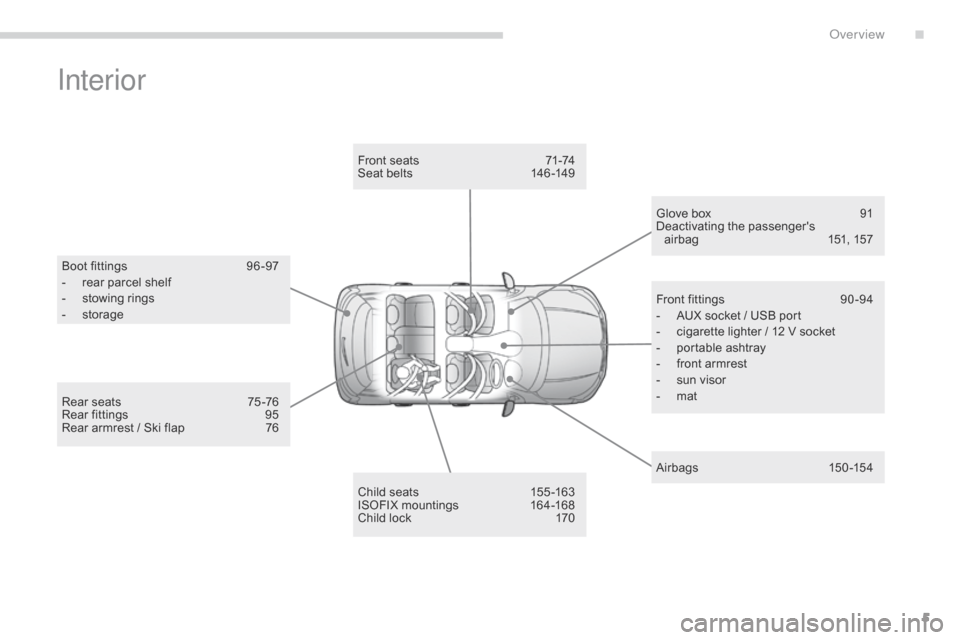
Interior
Boot fittings 96 -97
- r ear parcel shelf
-
s
towing rings
-
s
torage
Child seats
1
55 -163
ISOFIX mountings
1
64-168
Child lock
1
70
Front seats
7
1-74
Seat belts
1
46-149
Glove box
9
1
Deactivating the passenger's airbag
1
51, 157
A ir bags
15
0 -15 4
Front fittings
9
0 -94
-
A
UX socket / USB port
-
c
igarette lighter / 12 V socket
-
p
ortable ashtray
-
f
ront armrest
-
s
un visor
-
m
at
Rear seats
7
5 -76
Rear fittings
9
5
Rear armrest / Ski flap
7
6
.
over view
Page 96 of 389
94
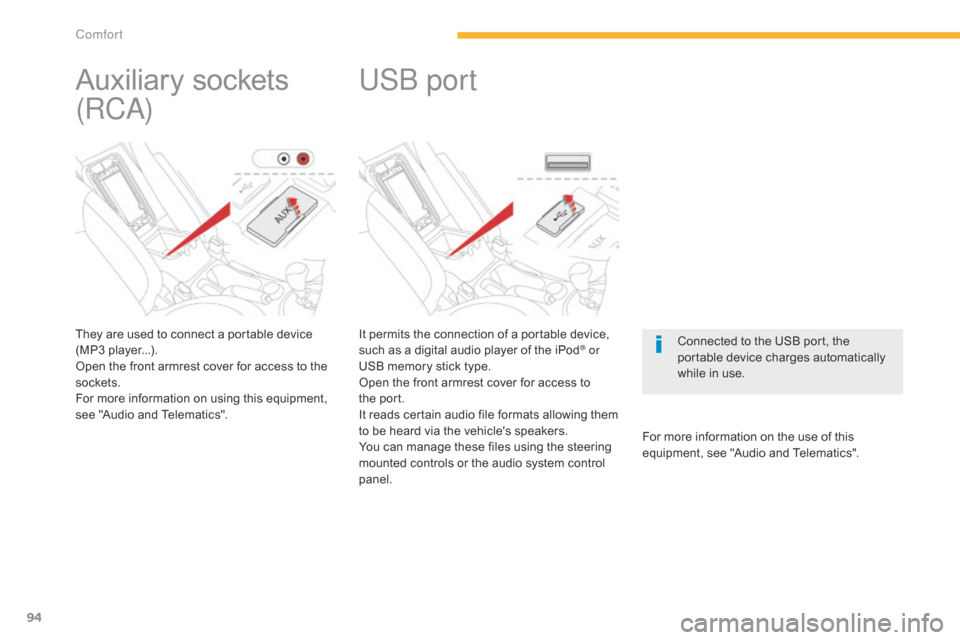
It permits the connection of a portable device,
such as a digital audio player of the iPod® or
USB memory stick type.
Open the front armrest cover for access to
the
po
rt.
It reads certain audio file formats allowing them
to be heard via the vehicle's speakers.
You can manage these files using the steering
mounted controls or the audio system control
panel. For more information on the use of this
equipment, see "Audio and Telematics".
USb port
Connected to the USB port, the
portable device charges automatically
while in use.
Auxiliary sockets
(RC
a
)
They are used to connect a portable device
(MP3 player...).
Open the front armrest cover for access to the
sockets.
For more information on using this equipment,
see "Audio and Telematics".
Comfort
Page 275 of 389
273
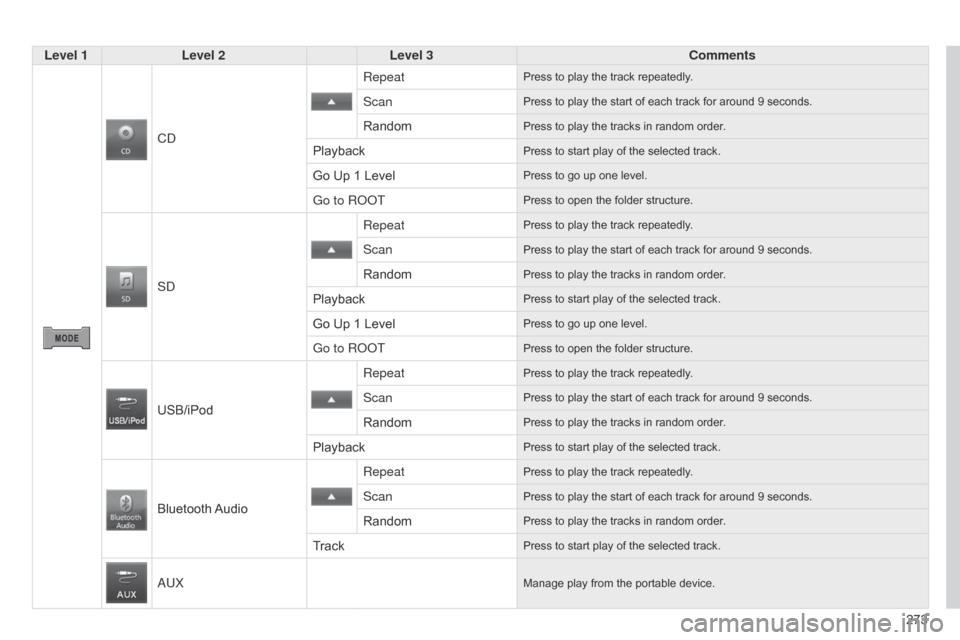
Level 1
Level 2 Level 3 Comments
C
d
RepeatPress to play the track repeatedly.
ScanPress to play the start of each track for around 9 seconds.
RandomPress to play the tracks in random order.
PlaybackPress to start play of the selected track.
Go Up 1 LevelPress to go up one level.
Go to RooTPress to open the folder structure.
Sd
RepeatPress to play the track repeatedly.
ScanPress to play the start of each track for around 9 seconds.
RandomPress to play the tracks in random order.
PlaybackPress to start play of the selected track.
Go Up 1 LevelPress to go up one level.
Go to RooTPress to open the folder structure.
USB/iPod
Repeat
Press to play the track repeatedly.
ScanPress to play the start of each track for around 9 seconds.
RandomPress to play the tracks in random order.
PlaybackPress to start play of the selected track.
Bluetooth AudioRepeat
Press to play the track repeatedly.
ScanPress to play the start of each track for around 9 seconds.
RandomPress to play the tracks in random order.
TrackPress to start play of the selected track.
aUXManage play from the portable device.
Page 280 of 389
05
278
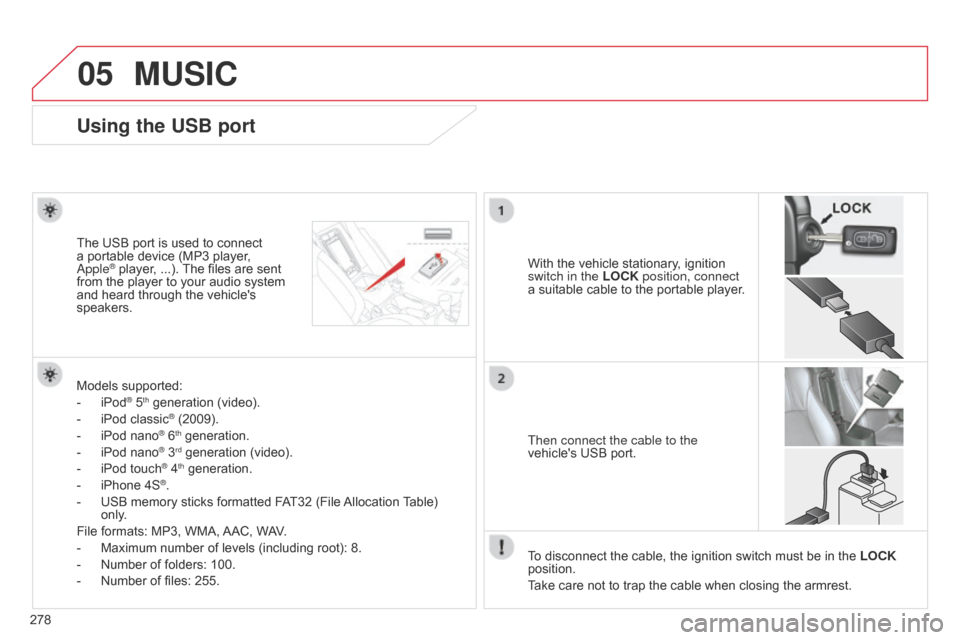
Using the USB port
With the vehicle stationary, ignition
switch in the LOCK position, connect
a suitable cable to the portable player.
The USB port is used to connect
a portable device (MP3 player, a
pple® player, ...). The files are sent
from the player to your audio system
and heard through the vehicle's
speakers.
Then connect the cable to the
vehicle's USB port.
Models supported:
-
iPod® 5th generation (video).
-
iPod classic® (2009).
-
iPod nano® 6th generation.
-
iPod nano® 3rd generation (video).
-
iPod touch® 4th generation.
-
iPhone 4S®.
-
USB memory sticks formatted F
AT32 (File Allocation Table)
only.
File formats: MP3, WMA, AAC, WAV.
-
Maximum number of levels (including root): 8.
-
Number of folders: 100.
-
Number of files: 255. T
o disconnect the cable, the ignition switch must be in the LOCK
position.
Take care not to trap the cable when closing the armrest.
MUSIC
Page 281 of 389
05
279
Connecting APPLE® players
Connect the apple® player to the USB port using a suitable cable
(not
supplied).
Play starts automatically.
Control is via the audio system.
The classifications available are those of the portable device
connected (artists / albums / genres / playlists / audiobooks /
podcasts).
The default classification used is by artist. To modify the classification
used, return to the first level of the menu then select the desired
classification (playlists for example) and confirm to go down through
the menu to the desired track.
The "Shuffle tracks" mode on an iPod
® corresponds to the "Random"
mode on the audio system.
The "Shuffle albums" mode on an iPod
® corresponds to the "Random
all" on the audio system.
"Shuffle tracks" is restored by default on each connection.
The version of software in the audio system may not be compatible
with the generation of your Apple
® player.
MUSIC
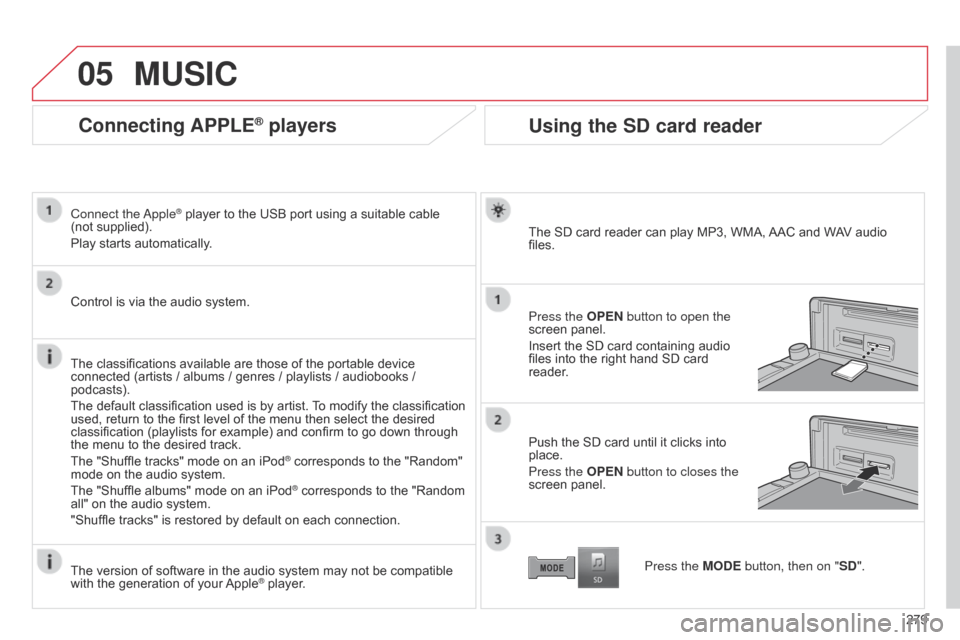
Using the SD card reader
The SD card reader can play MP3, WMA, AAC and WAV audio
files.
Press the OPEN button to open the
screen panel.
Insert the SD card containing audio
files into the right hand SD card
reader.
Push the SD card until it clicks into
place.
Press the OPEN button to closes the
screen panel.
Press the MODE button, then on "SD".
Page 295 of 389
03
293
GENERAL OPERATION
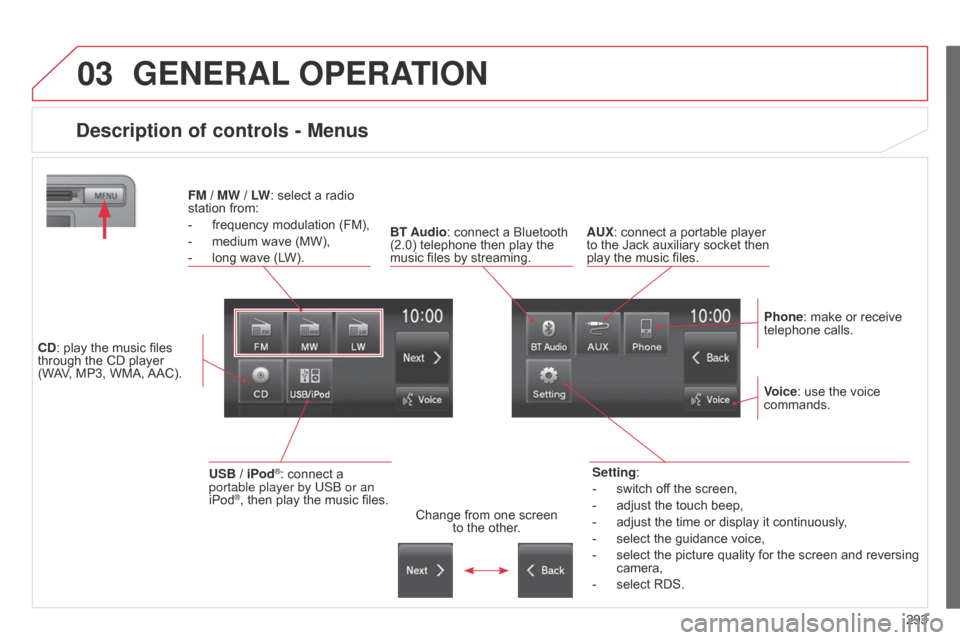
Description of controls - Menus
Setting:
-
switch of
f the screen,
-
adjust the touch beep,
-
adjust the time or display it continuously
,
-
select the guidance voice,
-
select the picture quality for the screen and reversing
camera,
-
select RDS.
FM
/
MW / LW: select a radio
station from:
-
frequency modulation (FM),
-
medium wave (MW),
-
long wave (L
W).
BT Audio: connect a Bluetooth
(2.0) telephone then play the
music files by streaming. AUX: connect a portable player
to the Jack auxiliary socket then
play the music files.
Phone: make or receive
telephone calls.
Change from one screen
to the other. Voice: use the voice
commands.
USB / iPod®: connect a
portable player by US b or an
iPod
®, then play the music files.
CD: play the music files
through the CD player
(WAV, MP3, WMA, AAC).
Page 306 of 389
05
304
MUSIC
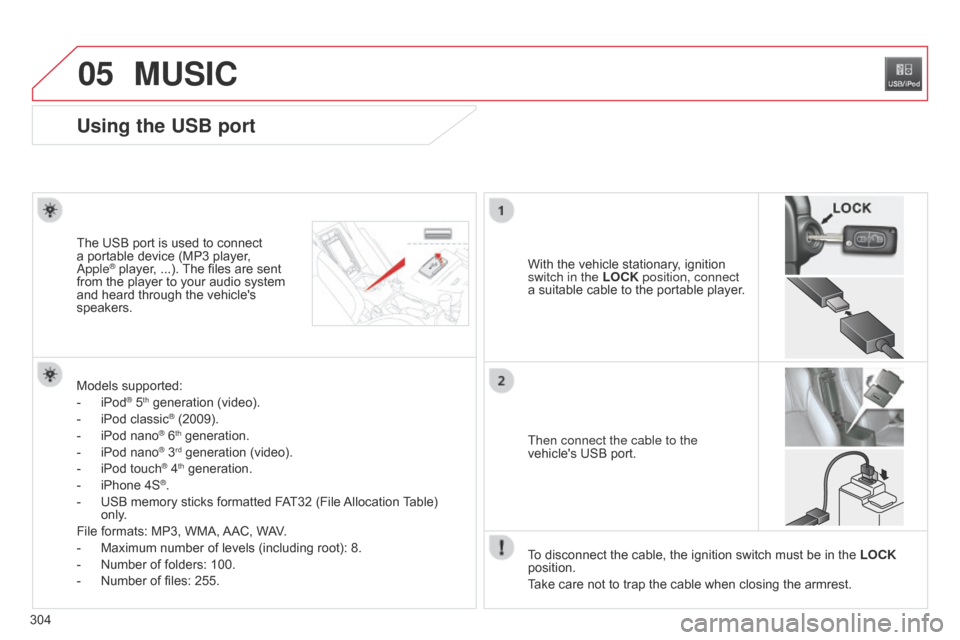
Using the USB port
With the vehicle stationary, ignition
switch in the LOCK position, connect
a suitable cable to the portable player.
The USB port is used to connect
a portable device (MP3 player, a
pple® player, ...). The files are sent
from the player to your audio system
and heard through the vehicle's
speakers.
Then connect the cable to the
vehicle's USB port.
Models supported:
-
iPod® 5th generation (video).
-
iPod classic® (2009).
-
iPod nano® 6th generation.
-
iPod nano® 3rd generation (video).
-
iPod touch® 4th generation.
-
iPhone 4S®.
-
USB memory sticks formatted F
AT32 (File Allocation Table)
only.
File formats: MP3, WMA, AAC, WAV.
-
Maximum number of levels (including root): 8.
-
Number of folders: 100.
-
Number of files: 255. T
o disconnect the cable, the ignition switch must be in the LOCK
position.
Take care not to trap the cable when closing the armrest.
Page 309 of 389
05
307
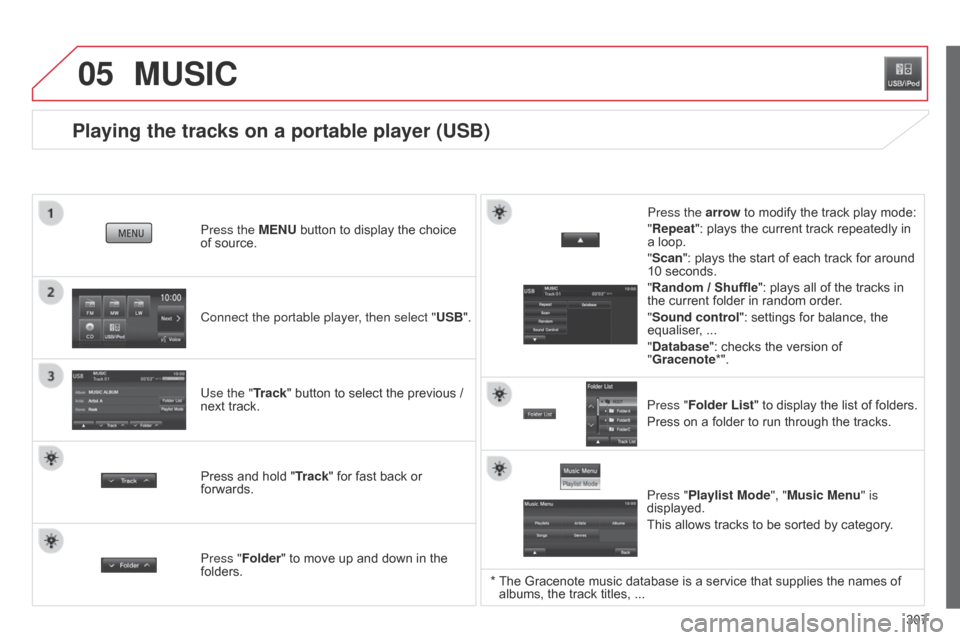
Playing the tracks on a portable player (USB)
Connect the portable player, then select "USB". Press the MENU button to display the choice
of source.
Use the "Track" button to select the previous /
next track.
MUSIC
Press and hold " Track" for fast back or
forwards. Press the arrow to modify the track play mode:
"Repeat": plays the current track repeatedly in
a loop.
"Scan": plays the start of each track for around
10 seconds.
"Random / Shuffle
": plays all of the tracks in
the current folder in random order.
"Sound control ": settings for balance, the
equaliser, ...
"Database ": checks the version of
"Gracenote*".
Press "Folder List " to display the list of folders.
Press on a folder to run through the tracks.
Press "Folder" to move up and down in the
folders. Press "Playlist Mode", "Music Menu" is
displayed.
This allows tracks to be sorted by category.
* The Gracenote music database is a service that supplies the names of
albums, the track titles, ...
Page 330 of 389

06
328
USB PLAYER
Using the USB port
With the vehicle stationary, ignition
switch in the LOCK position, connect
a suitable cable to the portable player.
The USB port is used to connect a
portable device (MP3 player, Apple®
player, ...). The files are sent from the
player to your audio system and heard
through the vehicle's speakers.
Then connect the cable to the
vehicle's USB port.
Models supported:
-
iPod® 5th generation (video).
-
iPod classic® (2009).
-
iPod nano® 6th generation.
-
iPod nano® 3rd generation (video).
-
iPod touch® 4th generation.
-
iPhone 4S®.
-
USB memory sticks formatted F
AT32 (File Allocation Table)
only.
File formats: MP3, WMA, AAC, WAV.
-
Maximum number of levels (including root): 8.
-
Number of folders: 100.
-
Number of files: 255. T
o disconnect the cable, the ignition switch must be in the
LOCK
position.
Take care not to trap the cable when closing the armrest.
Page 331 of 389
06
329
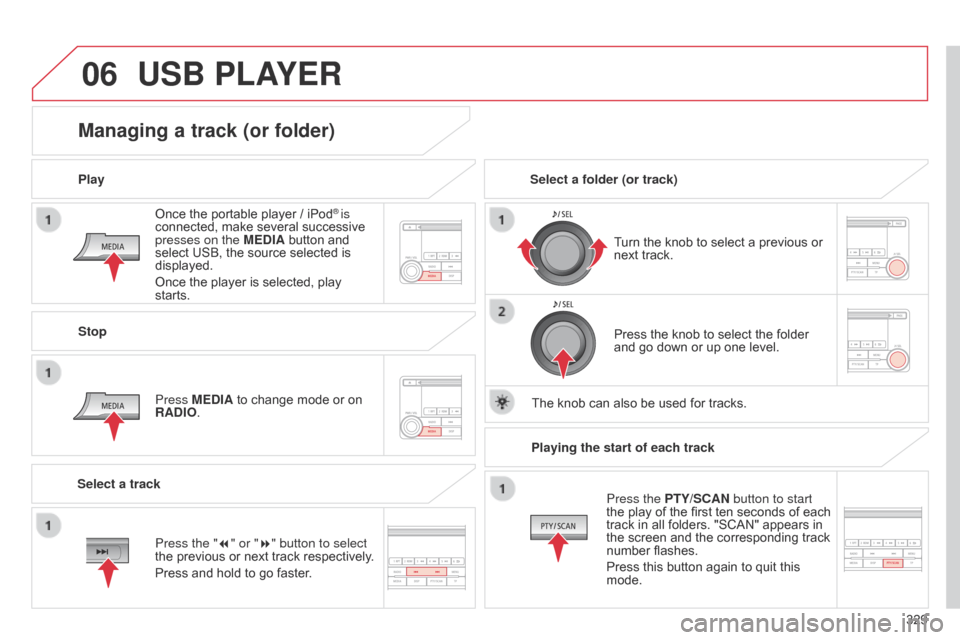
Once the portable player / iPod
® is
connected, make several successive
presses on the MEDIA button and
select USB, the source selected is
displayed.
Once the player is selected, play
starts.
Play
Managing a track (or folder)
Stop
Press MEDIA to change mode or on
RADIO. Turn the knob to select a previous or
next track.
Select a folder (or track)
Select a track Press the knob to select the folder
and go down or up one level.
The knob can also be used for tracks.
USB PLAYER
Press the "7" or "8" button to select
the previous or next track respectively.
Press and hold to go faster. Playing the start of each track
Press the PTY/SCAN button to start
the play of the first ten seconds of each
track in all folders. "SCAN" appears in
the screen and the corresponding track
number flashes.
Press this button again to quit this
mode.