display Citroen C4 CACTUS 2014 1.G Repair Manual
[x] Cancel search | Manufacturer: CITROEN, Model Year: 2014, Model line: C4 CACTUS, Model: Citroen C4 CACTUS 2014 1.GPages: 331, PDF Size: 9 MB
Page 256 of 331
04
254
E3_en_Chap12b_SMEGplus_ed01-2014
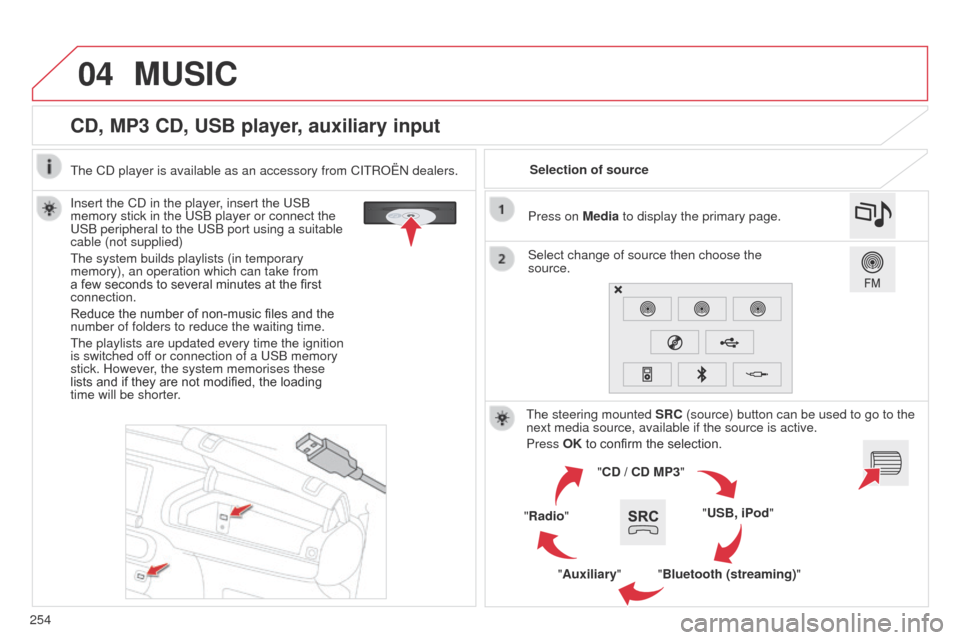
CD, MP3 CD, USB player, auxiliary input
Insert the CD in the player, insert the USB
memory stick in the USB player or connect the
USB peripheral to the USB port using a suitable
cable (not supplied)
The system builds playlists (in temporary
memory), an operation which can take from
a few seconds to several minutes at the first
connection.
Reduce the number of non-music files and the
number of folders to reduce the waiting time.
The playlists are updated every time the ignition
is switched off or connection of a USB memory
stick. However, the system memorises these
lists and if they are not modified, the loading
time will be shorter.Selection of source
The steering mounted SRC (source) button can be used to go to the
next media source, available if the source is active.
Press OK to confirm the selection.
"CD / CD MP3"
"USB, iPod"
"Bluetooth (streaming)"
"Auxiliary"
"Radio" Select change of source then choose the
source. Press on Media to display the primary page.
MUSIC
The CD player is available as an accessory from CITROËN dealers.
Page 257 of 331
04
255
E3_en_Chap12b_SMEGplus_ed01-2014
CD, MP3 CD / USB player
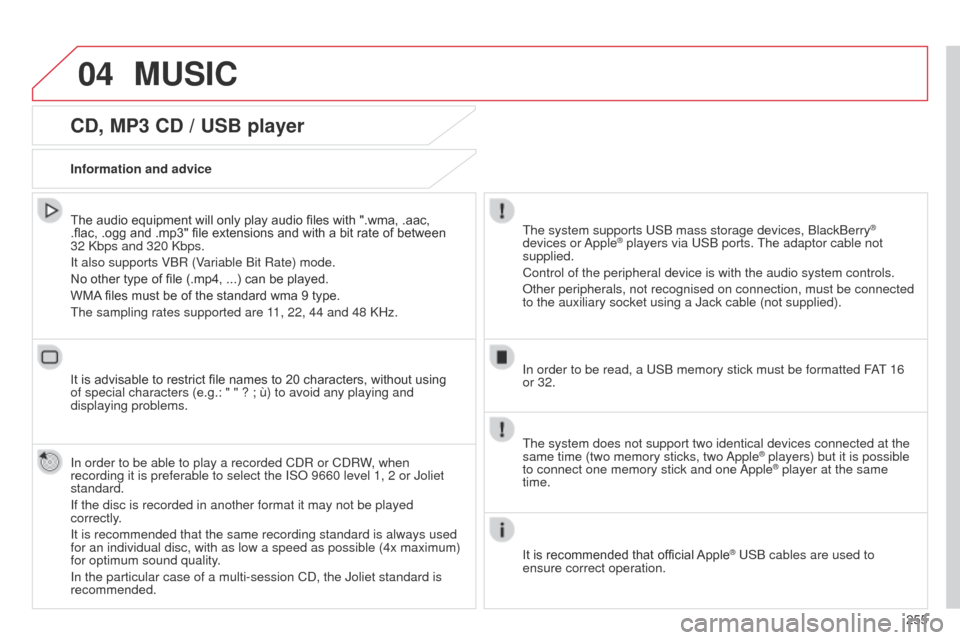
The audio equipment will only play audio files with ".wma, .aac,
.flac, .ogg and .mp3" file extensions and with a bit rate of between
32 Kbps and 320 Kbps.
It also supports VBR (Variable Bit Rate) mode.
No other type of file (.mp4,
...) can be played.
WMA files must be of the standard wma 9 type.
The sampling rates supported are 11, 22, 44 and 48 KHz.
It is advisable to restrict file names to 20 characters, without using
of special characters (e.g.: " " ? ; ù) to avoid any playing and
displaying problems.
In order to be able to play a recorded CDR or CDRW, when
recording it is preferable to select the ISO 9660 level 1, 2 or Joliet
standard.
If the disc is recorded in another format it may not be played
correctly.
It is recommended that the same recording standard is always used
for an individual disc, with as low a speed as possible (4x maximum)
for optimum sound quality.
In the particular case of a multi-session CD, the Joliet standard is
recommended. Information and advice
The system supports USB mass storage devices, BlackBerry®
devices or Apple® players via USB ports. The adaptor cable not
supplied.
Control of the peripheral device is with the audio system controls.
Other peripherals, not recognised on connection, must be connected
to the auxiliary socket using a Jack cable (not supplied).
In order to be read, a USB memory stick must be formatted FAT 16
or 32.
MUSIC
The system does not support two identical devices connected at the
same time (two memory sticks, two Apple® players) but it is possible
to connect one memory stick and one
Apple® player at the same
time.
It is recommended that official Apple
® USB cables are used to
ensure correct operation.
Page 260 of 331
04
E3_en_Chap12b_SMEGplus_ed01-2014
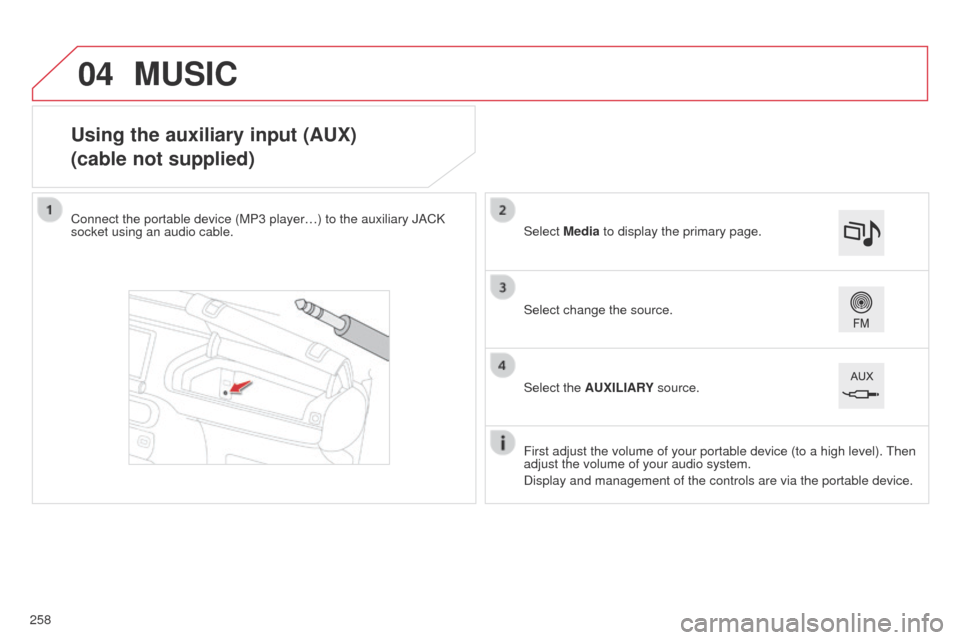
Using the auxiliary input (AUX)
(cable not supplied)
Connect the portable device (MP3 player…) to the auxiliary JACK
socket using an audio cable.First adjust the volume of your portable device (to a high level). Then
adjust the volume of your audio system.
Display and management of the controls are via the portable device. Select change the source. Select Media to display the primary page.
Select the AUXILIARY source.
MUSIC
258
Page 263 of 331
261
E3_en_Chap12b_SMEGplus_ed01-2014
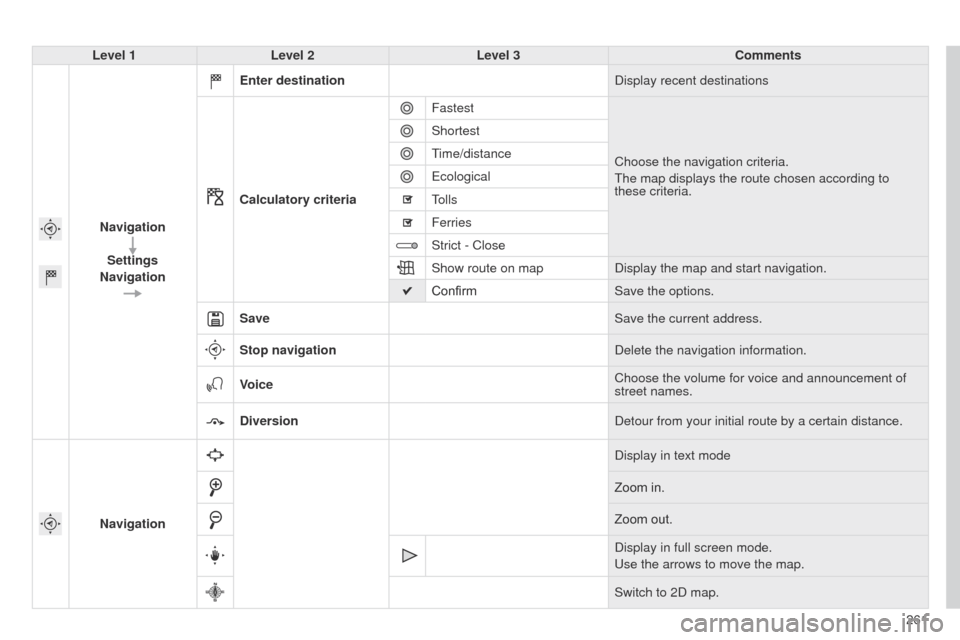
Level 1Level 2 Level 3 Comments
Navigation Settings
Navigation Enter destination
Display recent destinations
Calculatory criteria Fastest
Choose the navigation criteria.
The map displays the route chosen according to
these criteria.
Shortest
Time/distance
Ecological
Tolls
Ferries
Strict - Close
Show route on map
Display the map and start navigation.
Confirm Save the options.
Save Save the current address.
Stop navigation Delete the navigation information.
Voice Choose the volume for voice and announcement of
street names.
Diversion Detour from your initial route by a certain distance.
Navigation Display in text mode
Zoom in.
Zoom out.
Display in full screen mode.
Use the arrows to move the map.
Switch to 2D map.
Page 264 of 331
05
262
E3_en_Chap12b_SMEGplus_ed01-2014
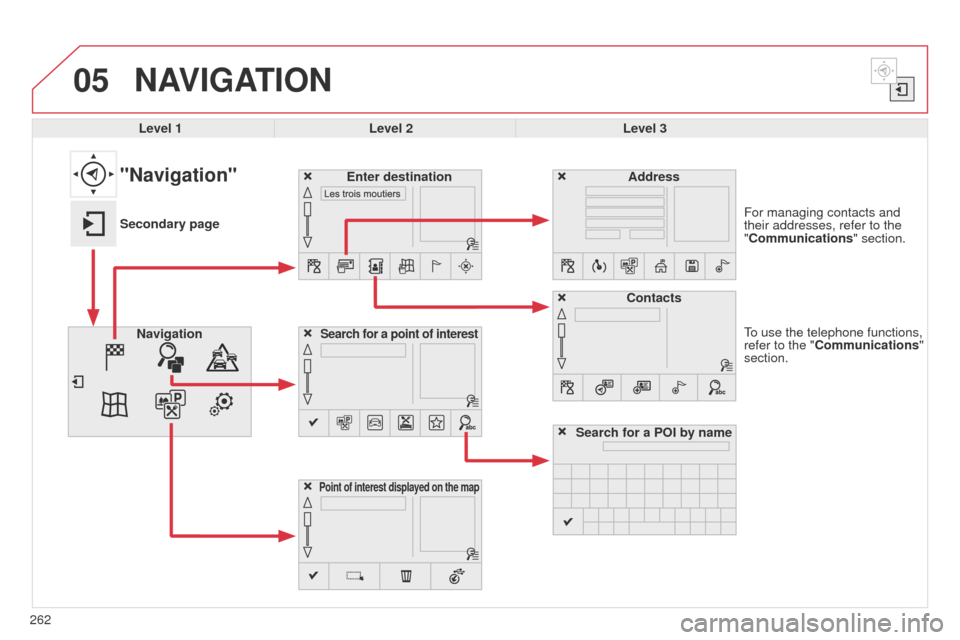
To use the telephone functions,
refer to the "Communications"
section. For managing contacts and
their addresses, refer to the
"Communications" section.
NAVIGATION
Search for a point of interestNavigationAddress
Enter destination
Contacts
Point of interest displayed on the map
Level 1Level 2 Level 3
"Navigation"
Secondary page
Search for a POI by name
Page 265 of 331
263
E3_en_Chap12b_SMEGplus_ed01-2014
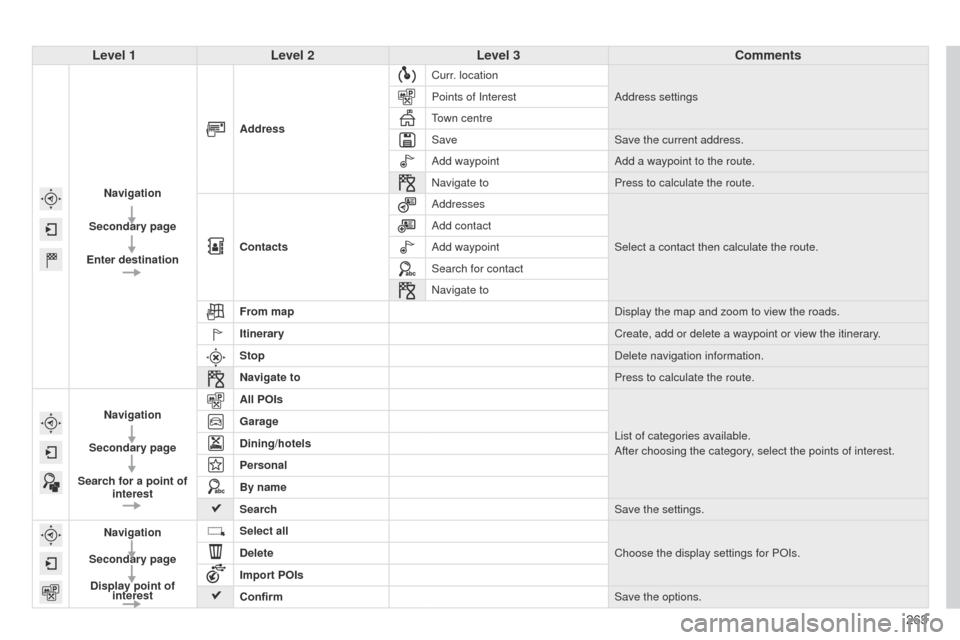
Level 1Level 2 Level 3 Comments
Navigation
Secondary page
Enter destination Address
Curr. location
Address settings
Points of Interest
Town centre
Save Save the current address.
Add waypoint Add a waypoint to the route.
Navigate to Press to calculate the route.
Contacts Addresses
Select a contact then calculate the route.
Add contact
Add waypoint
Search for contact
Navigate to
From map Display the map and zoom to view the roads.
Itinerary Create, add or delete a waypoint or view the itinerary.
Stop Delete navigation information.
Navigate to Press to calculate the route.
Navigation
Secondary page
Search for a point of interest All POIs
List of categories available.
After choosing the category, select the points of interest.
Garage
Dining/hotels
Personal
By name
Search
Save the settings.
Navigation
Secondary page Display point of interest Select all
Choose the display settings for POIs.
Delete
Import POIs
Confirm Save the options.
Page 267 of 331
265
E3_en_Chap12b_SMEGplus_ed01-2014
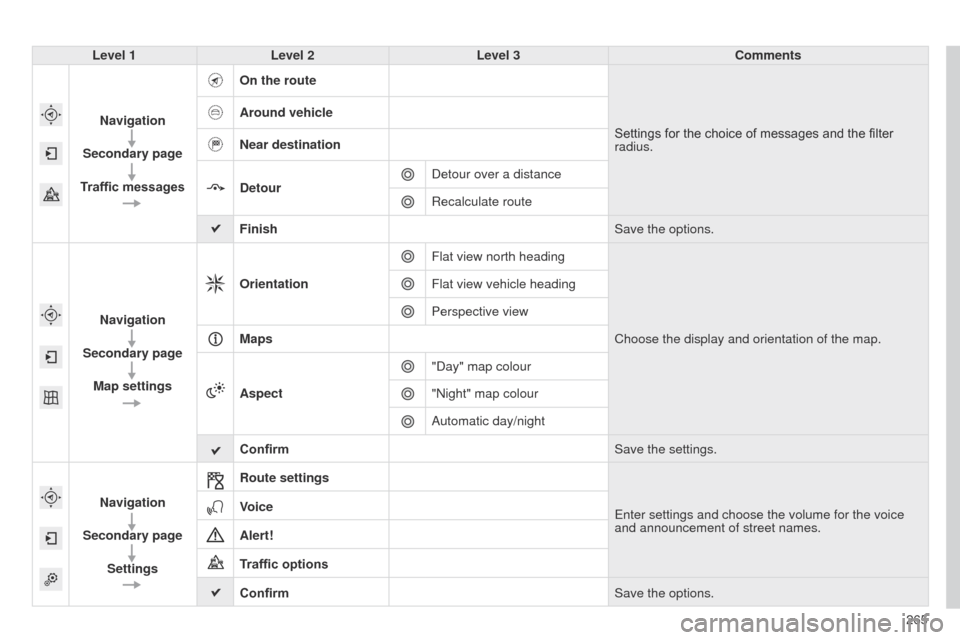
Level 1Level 2 Level 3 Comments
Navigation
Secondary page
Traffic messages On the route
Settings for the choice of messages and the filter
radius.
Around vehicle
Near destination
Detour
Detour over a distance
Recalculate route
Finish Save the options.
Navigation
Secondary page Map settings Orientation
Flat view north heading
Choose the display and orientation of the map.
Flat view vehicle heading
Perspective view
Maps
Aspect "Day" map colour
"Night" map colour
Automatic day/night
Confirm Save the settings.
Navigation
Secondary page Settings Route settings
Enter settings and choose the volume for the voice
and announcement of street names.
Voice
Alert!
Traffic options
Confirm
Save the options.
Page 268 of 331

05
266
E3_en_Chap12b_SMEGplus_ed01-2014
Towards a new destination
Choosing a new destination
Select "Enter destination".
Select "Save" to save the address entered as a
contact entry.
The system allows up to 200 entries.Select "Confirm" or press "Show route on
map" to start navigation guidance.
Select "Address".
Select the "Country:" from the list offered then
in the same way:
the "City:" or its post code, the "Road:", the
"N°:". Confirm each time. Select "Navigate to".
Choose the restriction criteria: "
Include
tollroads", "Include ferries", "Traffic", "Strict",
"Close". Choose the navigation criteria: " Fastest" or
"Shortest" or "Time/distance" or "Ecological ".
To delete navigation information, press on
"Settings" then "Stop navigation ".
To restore the navigation information press on
"Settings" then "Resume navigation".
Press on Navigation to display the primary
page then go to the secondary page.
NAVIGATION - GUIDANCE
Page 269 of 331

05
267
E3_en_Chap12b_SMEGplus_ed01-2014
Towards a recent destinationTowards a contact
Navigation towards a contact imported from a telephone is only
possible if the address entered is compatible with the system.
Select "Enter destination".
Select an address from the list offered. Select "Enter destination".
Select "Contacts".
Select a destination from the contacts in the list
offered.
Select "Navigate to".
Select the criteria then "Confirm" to start
guidance.
Select "Navigate to".
Select the criteria then "Confirm" or press
"Show route on map
" to start guidance.
Press on Navigation to display the primary
page then go to the secondary page.
Press on Navigation to display the primary
page then go to the secondary page.
NAVIGATION - GUIDANCE
Page 270 of 331
05
E3_en_Chap12b_SMEGplus_ed01-2014
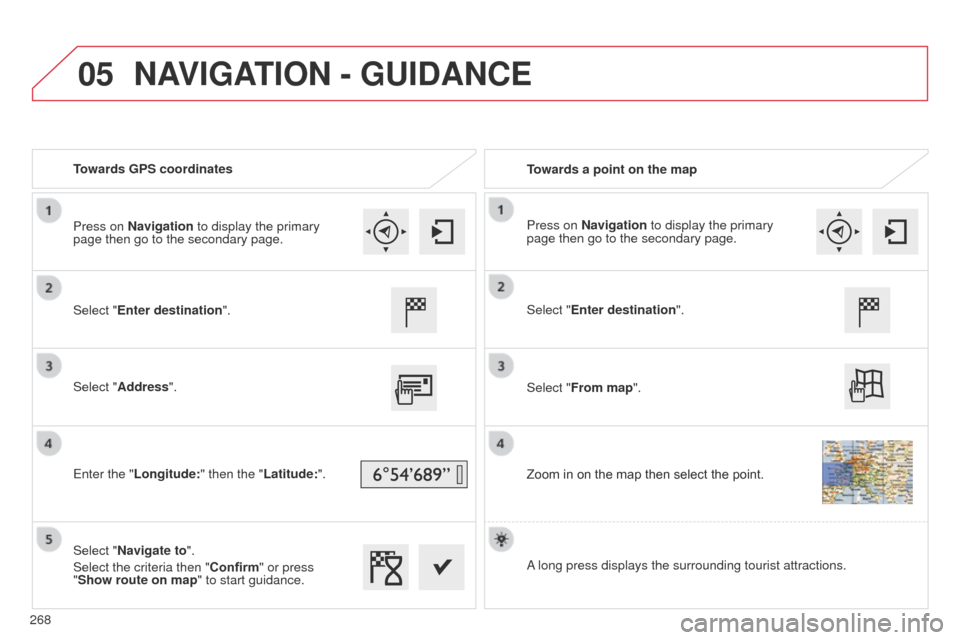
Towards GPS coordinatesTowards a point on the map
Select "Enter destination".
Select "Address".
Enter the "Longitude: " then the "Latitude:".
Select "Navigate to".
Select the criteria then "Confirm" or press
"Show route on map " to start guidance. Select "Enter destination".
Select "From map".
Zoom in on the map then select the point.
Press on Navigation to display the primary
page then go to the secondary page.
Press on Navigation to display the primary
page then go to the secondary page.
A long press displays the surrounding tourist attractions.
NAVIGATION - GUIDANCE
268