CD player Citroen C4 CACTUS 2014 1.G Owner's Manual
[x] Cancel search | Manufacturer: CITROEN, Model Year: 2014, Model line: C4 CACTUS, Model: Citroen C4 CACTUS 2014 1.GPages: 331, PDF Size: 9 MB
Page 9 of 331
7
E3_en_Chap00b_prise-en-main_ed01-2014
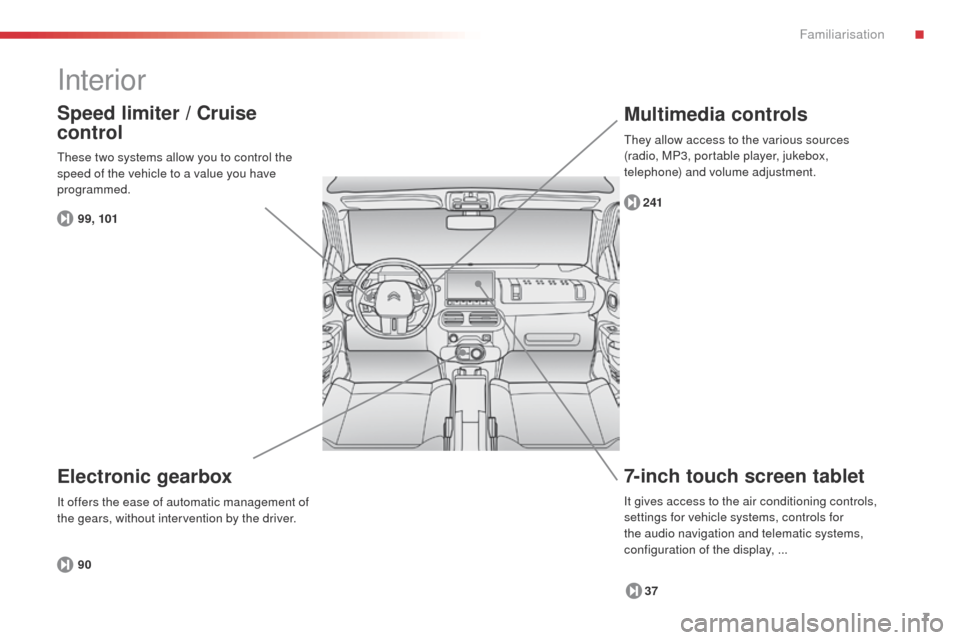
Interior
7-inch touch screen tablet
37
241
Multimedia controls
Electronic gearbox
90
Speed limiter / Cruise
control
99, 101
These two systems allow you to control the
speed of the vehicle to a value you have
programmed.
It offers the ease of automatic management of
the gears, without intervention by the driver.
It gives access to the air conditioning controls,
settings for vehicle systems, controls for
the audio navigation and telematic systems,
configuration of the display, ... They allow access to the various sources
(radio, MP3, portable player, jukebox,
telephone) and volume adjustment.
.
Familiarisation
Page 83 of 331

81
Coat hooks
They are located above each rear door.Electronic gearbox
The armrest can be inclined for wards to
benefit from its comfort or folded completely
backwards.
Front armrest
Manual gearbox
(depending on equipment)
These storage spaces can be used to
house portable devices (mobile phone,
MP3 player...) which can be connected
to the USB port / auxiliary socket or
charged from the 12 V socket in the
centre console.
F
F
or access to the closed storage box, lift
the lever to open the lid.
F
F
or access to the open storage box below
the armrest, lift the complete armrest
towards the rear.
4
Fittings
Page 220 of 331
218
E3_en_Chap09_info_pratiques_ed01-2014
The fitting of electrical equipment
or accessories which are not
recommended by CITROËN may result
in a failure of your vehicle's electronic
system and excessive electrical
consumption.
Please note this precaution. You
are advised to contact a CITROËN
representative to be shown the range
of recommended equipment and
accessories.
Installation of radio
communication
transmitters
Before installing any after-market radio
communication transmitter, you can
contact a CITROËN dealer for the
specification of transmitters which can
be fitted (frequency, maximum power,
aerial position, specific installation
requirements), in line with the Vehicle
Electromagnetic Compatibility
Directive (2004/104/EC).Depending on the legislation in force in
the country, certain safety equipment
may be compulsory: high visibility
safety vests, warning triangles,
breathalyzers, spare bulbs, spare fuses,
a fire extinguisher, a first aid kit, mud
flaps at the rear of the vehicle.
"Multimedia"
Bluetooth hands-free system, portable satellite
navigation system, driving assistance systems,
smartphone carrier, DVD player, CD player,
230 V socket, semi-integral satellite navigation
system, rear multimedia carrier, navigation
mapping updates, aftermarket digital radio...
By visiting a CITROËN
dealer you can also
obtain
cleaning and maintenance products
(interior and exterior) - including ecological
products in the "TECHNATURE" range,
products for topping up (screenwash...), paint
touch-up pens and aerosols for the exact
colour of your vehicle, refills (sealant cartridge
for the temporary puncture repair kit...), ...
Practical information
Page 242 of 331

02
240
E3_en_Chap12b_SMEGplus_ed01-2014
With the engine running, press to mute
the sound.
With the ignition off, press to switch the
system on.
Volume adjustment (each source
is independent, including Traffic
announcements (TA) and navigation
instructions).Selecting the audio source (depending on version):
-
"FM" / "AM" / "DAB"* stations.
-
"USB" memory stick.
-
CD player (located under the right hand front seat)**.
-
Jukebox*, after first copying audio files to the internal memory of the touch screen tablet.
-
T
elephone connected by Bluetooth* and audio streaming Bluetooth* (stream\
ing).
-
Media player connected to the auxiliary socket (jack, cable not supplie\
d).
The screen is of the "resistive" type, it is necessary to press firmly , particularly for "flick" gestures (scrolling through a list, moving the map...).
A
simple wipe will not be enough. pressing with more than one finger is not recognised.
The screen can be used when wearing gloves. This technology allows use at all temperatures.
FIRST STEPS
* Depending on equipment.
** The CD player is available as an accessory from CITROËN dealers. To clean the screen, use a soft non-abrasive cloth (spectacles cloth) w\
ithout any additional product.
Do not use pointed objects on the screen.
Do not touch the screen with wet hands. Following prolonged operation in
sunny conditions, the volume may
be limited to protect the system.
The return to normal takes place
when the temperature in the
passenger compartment drops.
Short-cuts: using the touch buttons in the
upper band of the touch screen tablet, it
is possible to go directly to the selection
of audio source, the list of stations (or
titles, depending on the source) or to the
temperature setting.
Page 256 of 331
04
254
E3_en_Chap12b_SMEGplus_ed01-2014
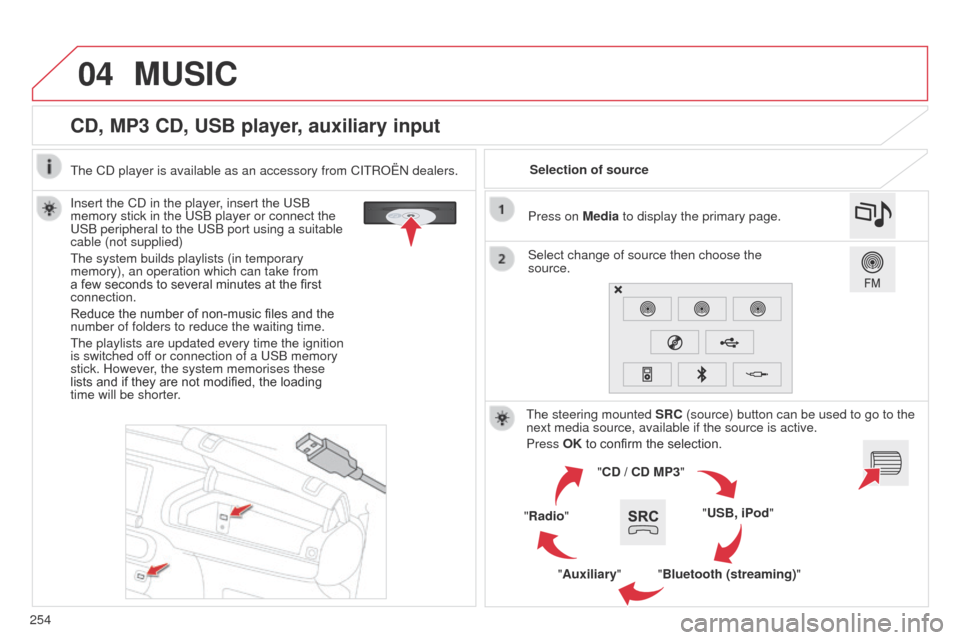
CD, MP3 CD, USB player, auxiliary input
Insert the CD in the player, insert the USB
memory stick in the USB player or connect the
USB peripheral to the USB port using a suitable
cable (not supplied)
The system builds playlists (in temporary
memory), an operation which can take from
a few seconds to several minutes at the first
connection.
Reduce the number of non-music files and the
number of folders to reduce the waiting time.
The playlists are updated every time the ignition
is switched off or connection of a USB memory
stick. However, the system memorises these
lists and if they are not modified, the loading
time will be shorter.Selection of source
The steering mounted SRC (source) button can be used to go to the
next media source, available if the source is active.
Press OK to confirm the selection.
"CD / CD MP3"
"USB, iPod"
"Bluetooth (streaming)"
"Auxiliary"
"Radio" Select change of source then choose the
source. Press on Media to display the primary page.
MUSIC
The CD player is available as an accessory from CITROËN dealers.
Page 257 of 331
04
255
E3_en_Chap12b_SMEGplus_ed01-2014
CD, MP3 CD / USB player
The audio equipment will only play audio files with ".wma, .aac,
.flac, .ogg and .mp3" file extensions and with a bit rate of between
32 Kbps and 320 Kbps.
It also supports VBR (Variable Bit Rate) mode.
No other type of file (.mp4,
...) can be played.
WMA files must be of the standard wma 9 type.
The sampling rates supported are 11, 22, 44 and 48 KHz.
It is advisable to restrict file names to 20 characters, without using
of special characters (e.g.: " " ? ; ù) to avoid any playing and
displaying problems.
In order to be able to play a recorded CDR or CDRW, when
recording it is preferable to select the ISO 9660 level 1, 2 or Joliet
standard.
If the disc is recorded in another format it may not be played
correctly.
It is recommended that the same recording standard is always used
for an individual disc, with as low a speed as possible (4x maximum)
for optimum sound quality.
In the particular case of a multi-session CD, the Joliet standard is
recommended. Information and advice
The system supports USB mass storage devices, BlackBerry®
devices or Apple® players via USB ports. The adaptor cable not
supplied.
Control of the peripheral device is with the audio system controls.
Other peripherals, not recognised on connection, must be connected
to the auxiliary socket using a Jack cable (not supplied).
In order to be read, a USB memory stick must be formatted FAT 16
or 32.
MUSIC
The system does not support two identical devices connected at the
same time (two memory sticks, two Apple® players) but it is possible
to connect one memory stick and one
Apple® player at the same
time.
It is recommended that official Apple
® USB cables are used to
ensure correct operation.
Page 259 of 331
04
257
E3_en_Chap12b_SMEGplus_ed01-2014
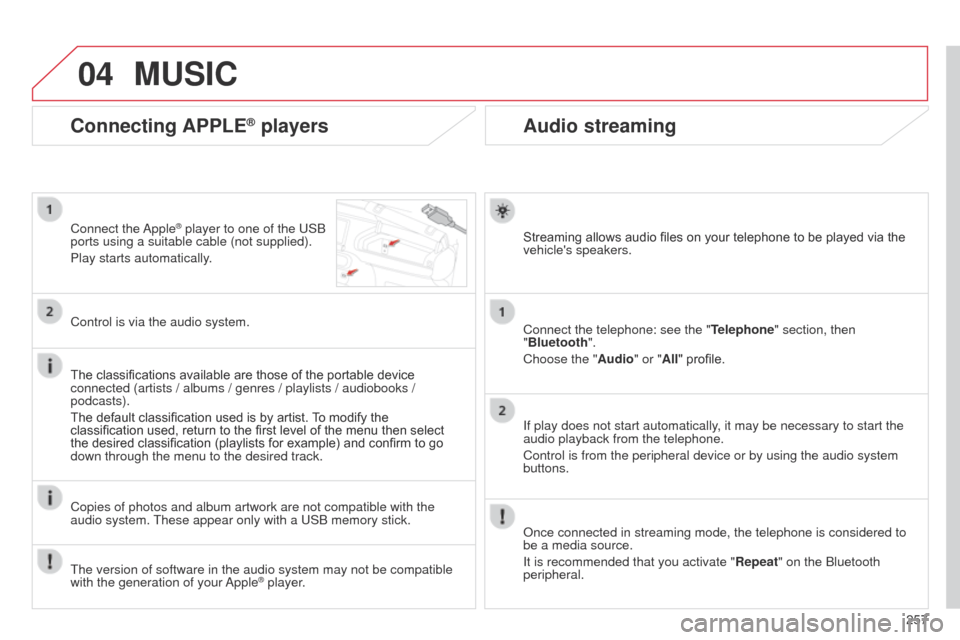
Audio streaming
Streaming allows audio files on your telephone to be played via the
vehicle's speakers.
Connect the telephone: see the "Telephone" section, then
"Bluetooth".
Choose the " Audio" or "All" profile.
If play does not start automatically, it may be necessary to start the
audio playback from the telephone.
Control is from the peripheral device or by using the audio system
buttons.
Once connected in streaming mode, the telephone is considered to
be a media source.
It is recommended that you activate "Repeat" on the Bluetooth
peripheral.
Connecting APPLE® players
Connect the Apple® player to one of the USB
ports using a suitable cable (not supplied).
Play starts automatically.
Control is via the audio system.
The classifications available are those of the portable device
connected (artists / albums / genres / playlists / audiobooks /
podcasts).
The default classification used is by artist. To modify the
classification used, return to the first level of the menu then select
the desired classification (playlists for example) and confirm to go
down through the menu to the desired track.
Copies of photos and album artwork are not compatible with the
audio system. These appear only with a USB memory stick.
MUSIC
The version of software in the audio system may not be compatible
with the generation of your Apple® player.
Page 260 of 331
04
E3_en_Chap12b_SMEGplus_ed01-2014
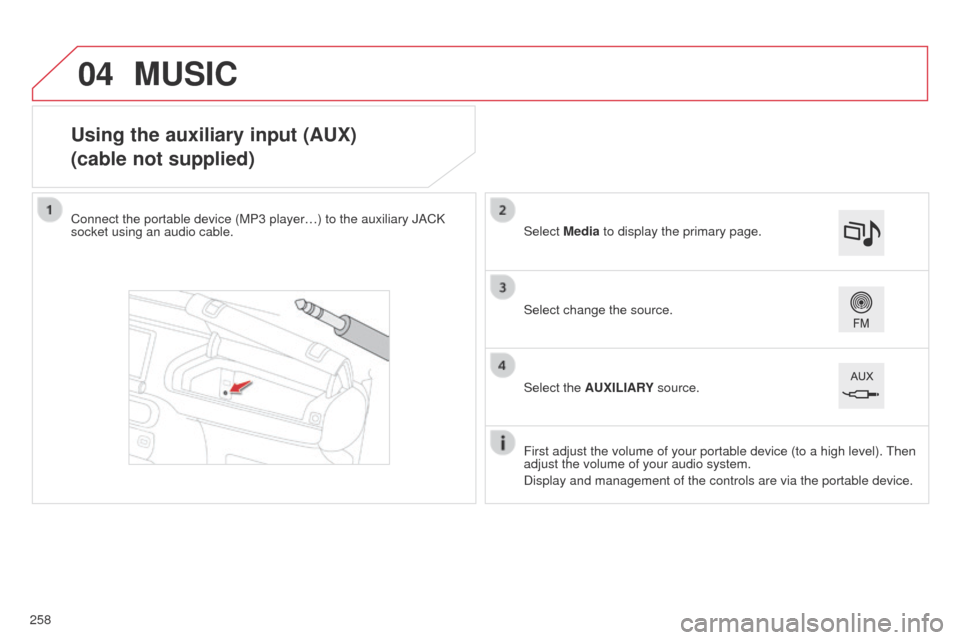
Using the auxiliary input (AUX)
(cable not supplied)
Connect the portable device (MP3 player…) to the auxiliary JACK
socket using an audio cable.First adjust the volume of your portable device (to a high level). Then
adjust the volume of your audio system.
Display and management of the controls are via the portable device. Select change the source. Select Media to display the primary page.
Select the AUXILIARY source.
MUSIC
258
Page 261 of 331
04
259
E3_en_Chap12b_SMEGplus_ed01-2014
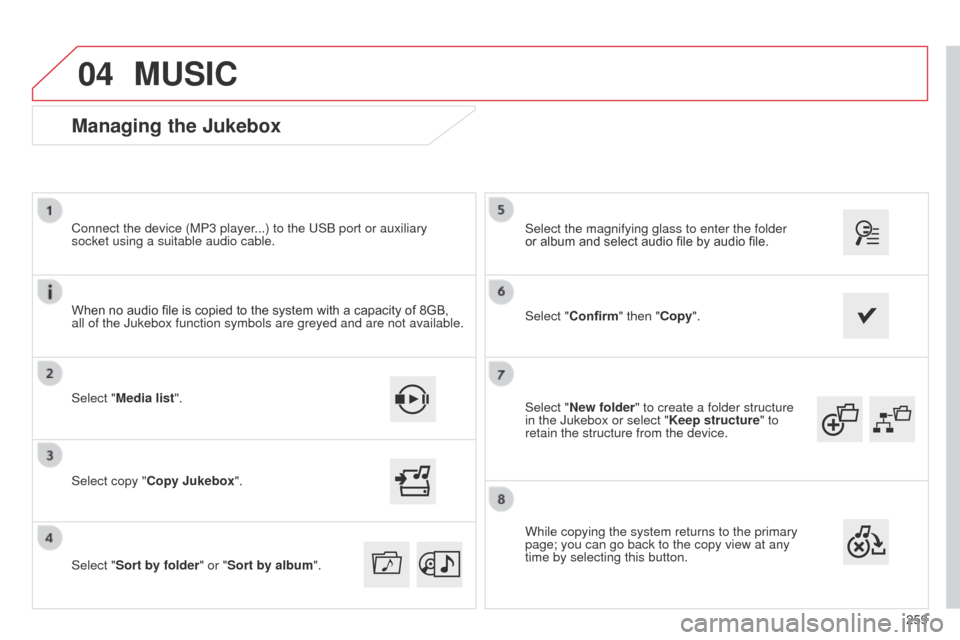
Select "New folder" to create a folder structure
in the Jukebox or select "Keep structure" to
retain the structure from the device. Select the magnifying glass to enter the folder
or album and select audio file by audio file.
Managing the Jukebox
Select "Media list". Connect the device (MP3 player...) to the USB port or auxiliary
socket using a suitable audio cable.
Select copy "Copy Jukebox".
MUSIC
When no audio file is copied to the system with a capacity of 8GB,
all of the Jukebox function symbols are greyed and are not available.
Select "Sort by folder" or "Sort by album ".Select "Confirm" then "Copy".
While copying the system returns to the primary
page; you can go back to the copy view at any
time by selecting this button.
Page 288 of 331
06
E3_en_Chap12b_SMEGplus_ed01-2014
286
CONFIGURATION
- "Ambience" (choice of 6 musical ambiences)
- "Bass "
-
"Treble"
-
"Loudness" (Activate/Deactivate)
-
"Balance", "Driver ", "All passengers", "Front only "
-
"Audio setting on touch screen "
-
"Volume linked to vehicle speed: " (Activate/Deactivate)
The audio settings ( Ambience, Bass, Treble and Loudness) are
different and independent for each sound source.
The settings for distribution and balance are common to all sources. The distribution (or spatialisation using the Arkamys
© system)
of sound is an audio process that allows the audio quality to be
adapted to the number of listeners in the vehicle.
Available only with the 6-speaker configuration. On-board audio: Arkamys
© Sound Staging.
With Sound Staging, the driver and passengers are immersed in an
"audio scene" recreating the natural atmosphere of an auditorium:
truly a part of the scene and its surroundings.
This new sensation is made possible by software in the audio
system which processes the digital signals from the media players
(radio, CD, MP3…) without changing the audio settings. This
processing takes account of the characteristics of the passenger
compartment to produce optimum results.
The Arkamys
© software installed in your audio system processes
the digital signal from the media players (radio, CD, MP3, ...) and
recreates a natural musical scene, with harmonious placement of
instruments and voices in the space in front of passengers, level with
the windscreen.
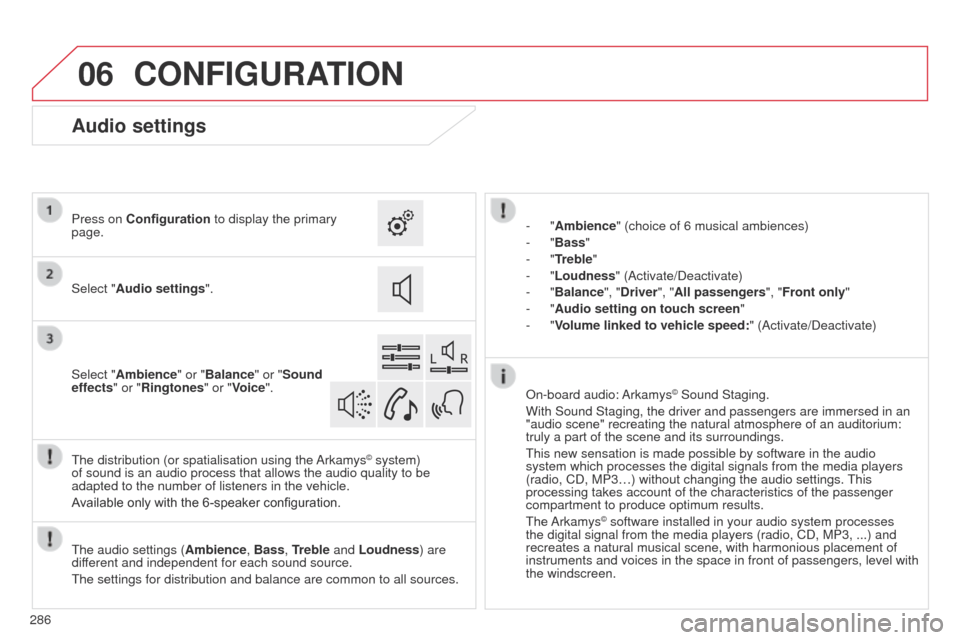
Audio settings
Select "Audio settings ".
Press on Configuration
to display the primary
page.
Select "Ambience" or "Balance" or "Sound
effects " or "Ringtones" or "Voice".