radio Citroen C4 CACTUS 2016 1.G User Guide
[x] Cancel search | Manufacturer: CITROEN, Model Year: 2016, Model line: C4 CACTUS, Model: Citroen C4 CACTUS 2016 1.GPages: 308, PDF Size: 7.96 MB
Page 244 of 308
242
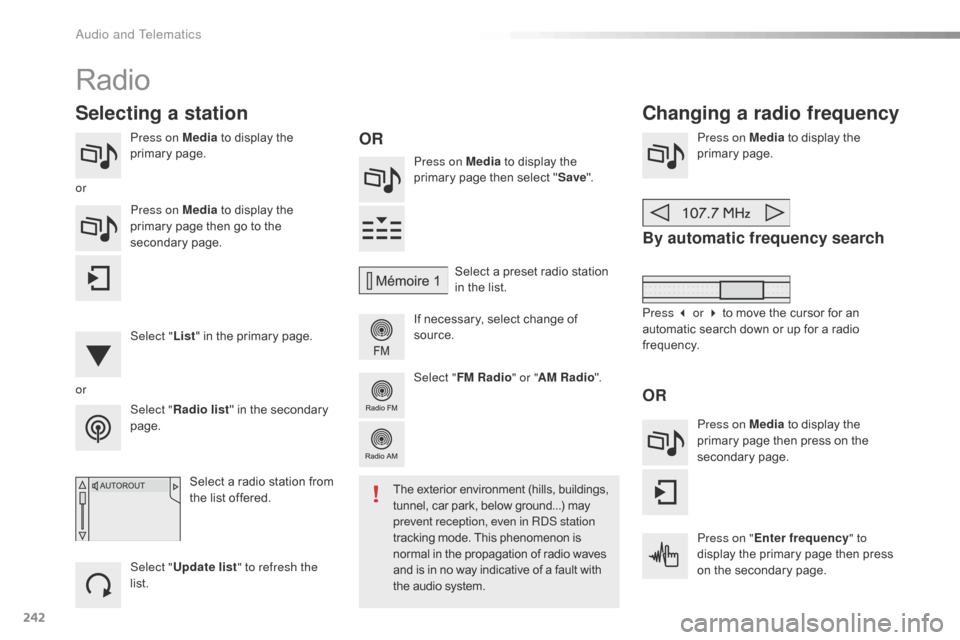
Press on Media to display the p
rimary pag e. Press on Media
to display the
p
rimary page then select "Save ".
If
necessary, select change of
s
ource.Press on Media
to display the p
rimary pag e.
By automatic frequency search
Select "Radio list " in the secondary pag
e. Select
a preset radio station
i
n the list.
Select " FM Radio " or "AM Radio ".
Select a radio station from
t
he list offered.
Select " Update list " to refresh the
list. Press on Media
to display the
p
rimary page then go to the
s
econdary
pag
e.
Select " List" in the primary page.
Radio
Changing a radio frequency
Selecting a station
OR
orOR
The exterior environment (hills, buildings, t
unnel, car park, below ground...) may p
revent reception, even in RDS station
tracking
mode. This phenomenon is
n
ormal in the propagation of radio waves
a
nd is in no way indicative of a fault with
t
he audio system.
or
Press 3 or 4 to move the cursor for an
a
utomatic search down or up for a radio
f
requency.
Press on Media
to display the
p
rimary page then press on the
s
econdary
pag
e.
Press on " Enter frequency " to
display
the primary page then press
o
n the secondary page.
Audio and Telematics
Page 245 of 308
243
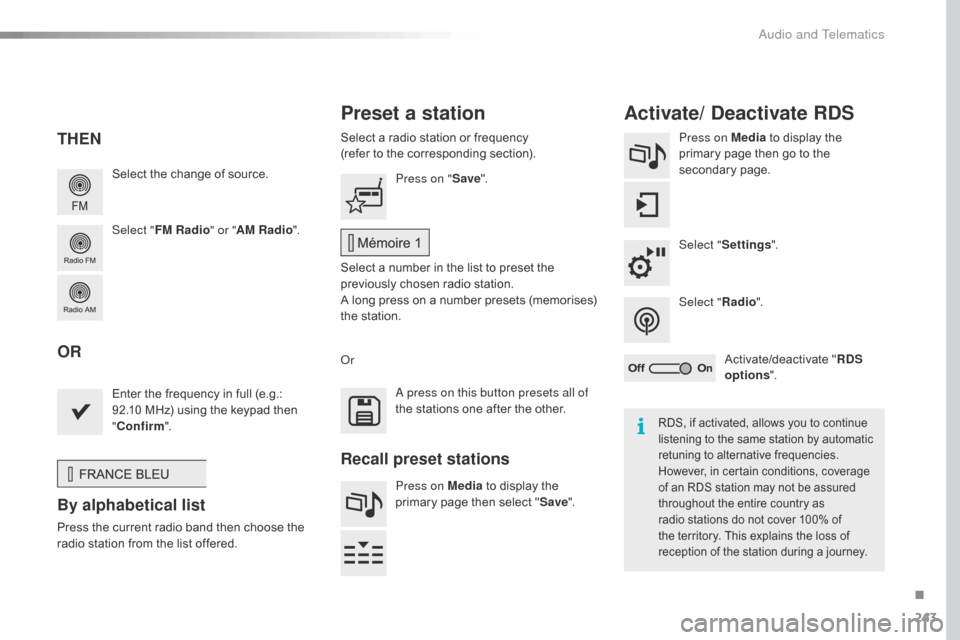
Select the change of source.
Sel ect " FM Radio " or "AM Radio ".Select
a radio station or frequency
(refer to the corresponding section).
Press on Media
to display the
p
rimary page then go to the s
econdary pag e.
Select " Settings ".
Select " Radio".
Activate/deactivate
" R
DS
options ".
Press on "
Save".
Select
a number in the list to preset the
p
reviously chosen radio station.
A
long press on a number presets (memorises)
t
he station.
Enter
the frequency in full (e.g.:
9
2.10 MHz) using the keypad then
"Co
nfirm ".
By alphabetical list
Press the current radio band then choose the r
adio station from the list offered. Or
Press on Media
to display the
p
rimary page then select "
Save ".
Preset a station Activate/ Deactivate RDS
THEN
OR
A press on this button presets all of
the
stations one after the other.
Recall preset stations
RDS, if activated, allows you to continue listening to the same station by automatic
r
etuning to alternative frequencies.
H
owever, in certain conditions, coverage
o
f an RDS station may not be assured
t
hroughout the entire country as
r
adio stations do not cover 100% of
t
he territory. This explains the loss of
r
eception of the station during a journey.
.
Audio and Telematics
Page 246 of 308
244
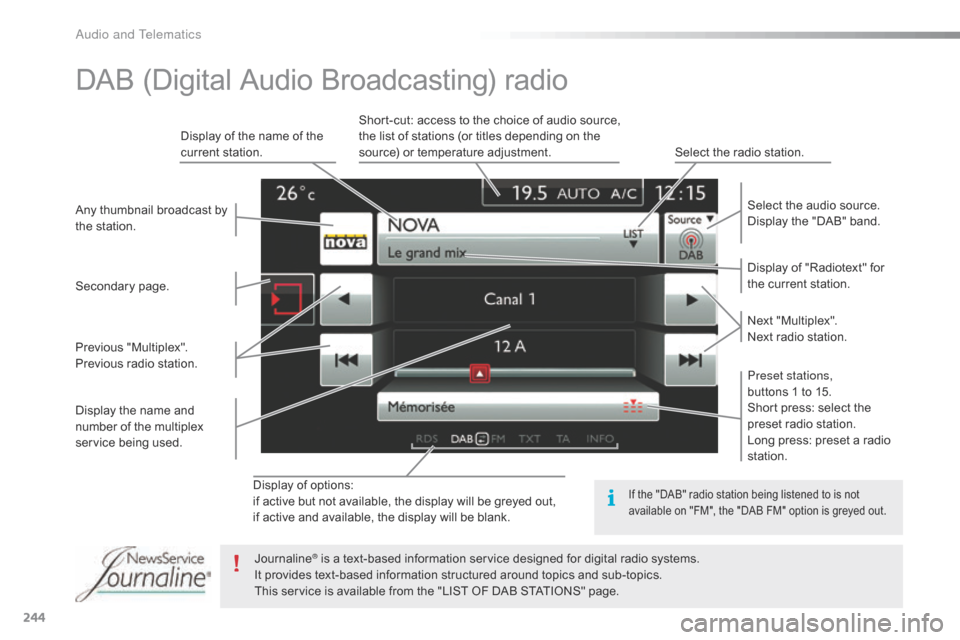
Display of options:
i f active but not available, the display will be greyed out,
if
active and available, the display will be blank. Display
of "Radiotext" for
t
he current station.
Select the audio source.
Display the "DAB" band.
Display
of
the name of the
c
urrent
station.
Short-cut: access to the choice of audio source,
t
he list of stations (or titles depending on the
s
ource) or temperature adjustment.
Select the radio station.
Any
thumbnail
broadcast
by
t
he
station.
Preset stations,
buttons 1 to 15.
Short press: select the
p
reset radio station.
Long press: preset a radio
s
tation.
Next
"
Multiplex".
Next radio station.
Secondary
p
age.
Display
the
name
and
n
umber
of
the
multiplex
ser
vice
b
eing
u
sed.
Previous
"
Multiplex".
Previous
radio
station.
DAB (Digital Audio Broadcasting) radio
If the "DAB" radio station being listened to is not a
vailable on "FM", the "DAB FM" option is greyed out.
Journaline® is a text-based information service designed for digital radio systems.
I
t
provides
text-based information structured around topics and sub-topics.
This
service is available from the "LIST OF DAB STATIONS" page.
Audio and Telematics
Page 247 of 308
245
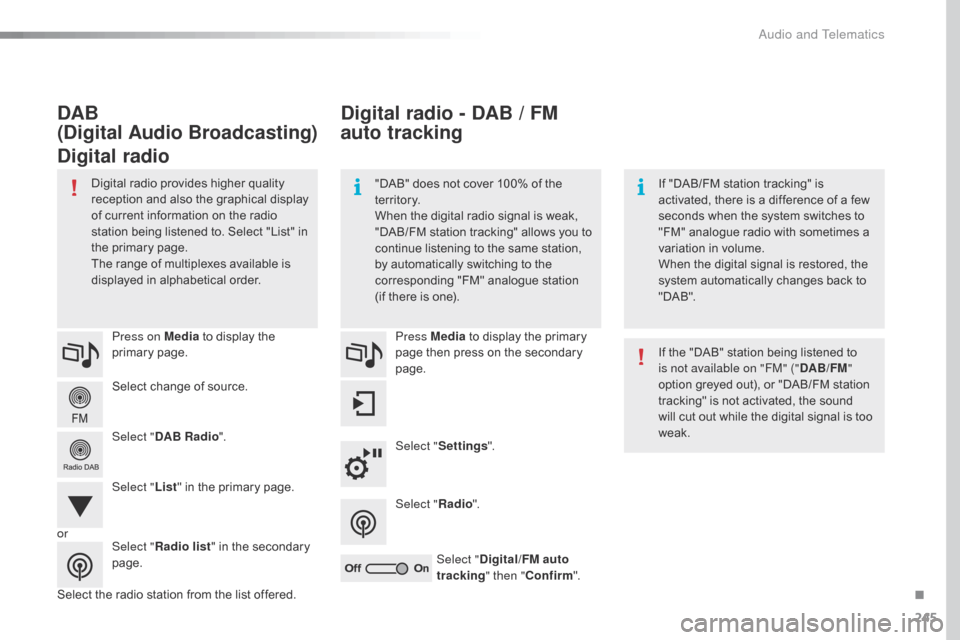
Select change of source.
P ress on Media
to display the
p
rimary
pag
e.
Select " DAB Radio ".
Select " List"
in the primary page.
Select
the radio station from the list offered.Press Media
to display the primary
p
age then press on the secondary
pag
e.
Select " Settings ".
Select " Radio".
Select " Digital/FM auto
tracking " then "Confirm ".
Digital radio - DAB / FM
auto tracking
DAB
(Digital Audio Broadcasting)
Digital radio
"DAB" does not cover 100% of the t
e r r i to r y.
When
the digital radio signal is weak,
"
DAB/FM
s
tation
t
racking"
a
llows
y
ou
t
o
c
ontinue listening to the same station,
b
y automatically switching to the
c
orresponding "FM" analogue station
(
if there is one). If
"DAB/FM station tracking" is a
ctivated, there is a difference of a few
s
econds when the system switches to
"
FM" analogue radio with sometimes a
v
ariation in volume.
When
the digital signal is restored, the
s
ystem automatically changes back to
"
DA B ".
Digital
radio
provides
higher
quality
r
eception
and
also
the
graphical
display o
f
current
information
on
the
radio
s
tation
being
listened
to.
Select
"List"
in
t
he
primary
page.
The
range
of
multiplexes
available
is
d
isplayed
in
alphabetical
order. If
the "DAB" station being listened to
i
s not available on "FM" ("DAB/FM"
option
greyed out), or "DAB/FM station
t
racking" is not activated, the sound
w
ill cut out while the digital signal is too
w
eak.
or Select "Radio list "
in
the
secondary
pag
e.
.
Audio and Telematics
Page 265 of 308
263
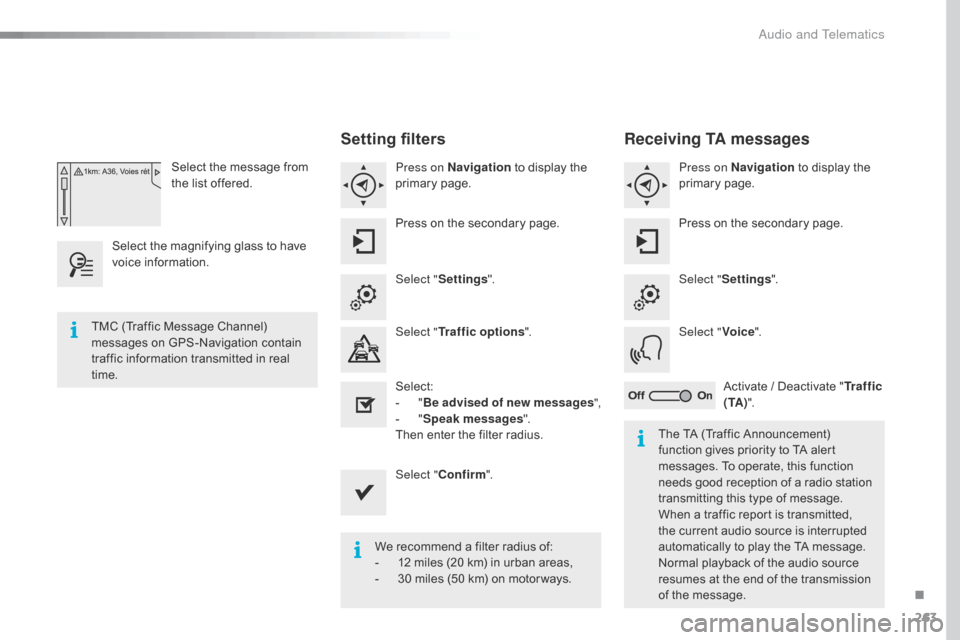
Select the message from the list offered.
Select
the
magnifying glass to have
v
oice
i
nformation.
Setting filters
Press on Navigation to display the p
rimary pag e.
Press
on the secondary page.
Select " Settings ".
Select " Traffic options ".
Select:
-
" B
e advised of new messages ",
-
" S
peak messages ".
Then
enter the filter radius.
Select " Confirm ".
We
recommend a filter radius of:
-
1
2 miles (20 km) in urban areas,
-
3
0 miles (50 km) on motor ways.
TMC
(Traffic
Message
Channel)
m
essages
on
GPS-Navigation
contain
t
raffic
information
transmitted
in
real
t
ime. The
TA (Traffic Announcement)
f
unction gives priority to TA alert
m
essages. To operate, this function
n
eeds good reception of a radio station
t
ransmitting this type of message.
W
hen a traffic report is transmitted,
t
he current audio source is interrupted
a
utomatically to play the TA message.
N
ormal playback of the audio source
r
esumes at the end of the transmission
o
f the message.
Receiving TA messages
Press on Navigation to display the p
rimary pag e.
Press
on the secondary page.
Select " Settings ".
Select " Voice".
Activate
/ Deactivate "Tr a f f i c
( TA ) ".
.
Audio and Telematics
Page 286 of 308
284
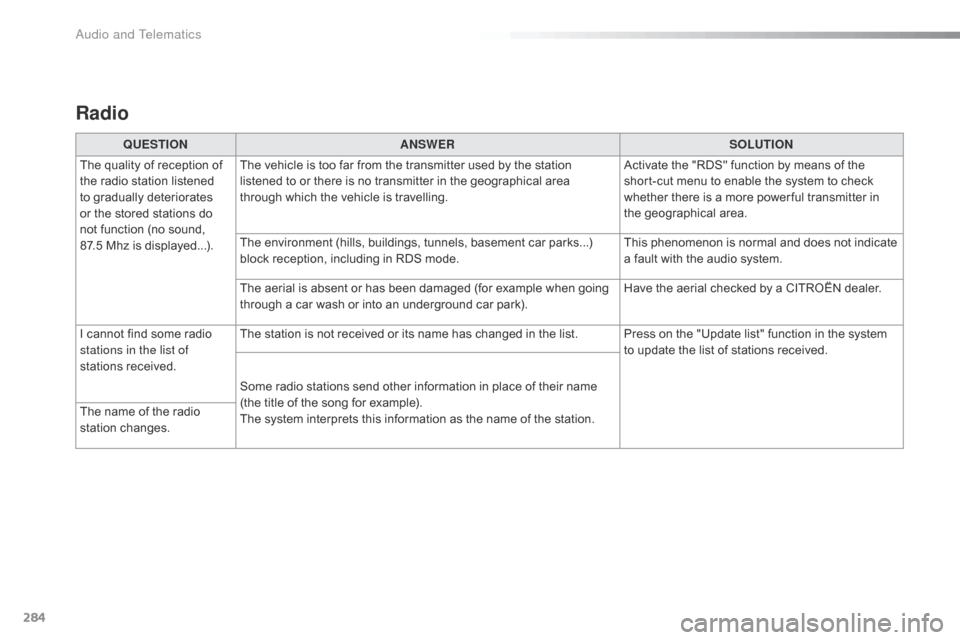
Radio
QUESTIONANSWER SOLUTION
The
quality of reception of
t
he
radio station listened
t
o
gradually deteriorates
o
r
the
stored stations do
n
ot
function (no sound,
87
.5 Mhz is displayed...). The
vehicle is too far from the transmitter used by the station
l
istened to or there is no transmitter in the geographical area
t
hrough which the vehicle is travelling.Activate
the "RDS" function by means of the
s
hort-cut menu to enable the system to check
w
hether there is a more power ful transmitter in
t
he geographical area.
The
environment (hills, buildings, tunnels, basement car parks...)
b
lock reception, including in RDS mode.This
phenomenon is normal and does not indicate
a
fault with the audio system.
The
aerial is absent or has been damaged (for example when going
t
hrough a car wash or into an underground car park).Have
the aerial checked by a CITROËN dealer.
I
cannot find some radio
s
tations in the list of
stations
r
eceived. The
station is not received or its name has changed in the list. Press on the "Update list" function in the system
t
o update the list of stations received.
Some
radio stations send other information in place of their name
(
the title of the song for example).
The
system interprets this information as the name of the station.
The
name of the radio
s
tation
c
hanges.
Audio and Telematics
Page 289 of 308
287
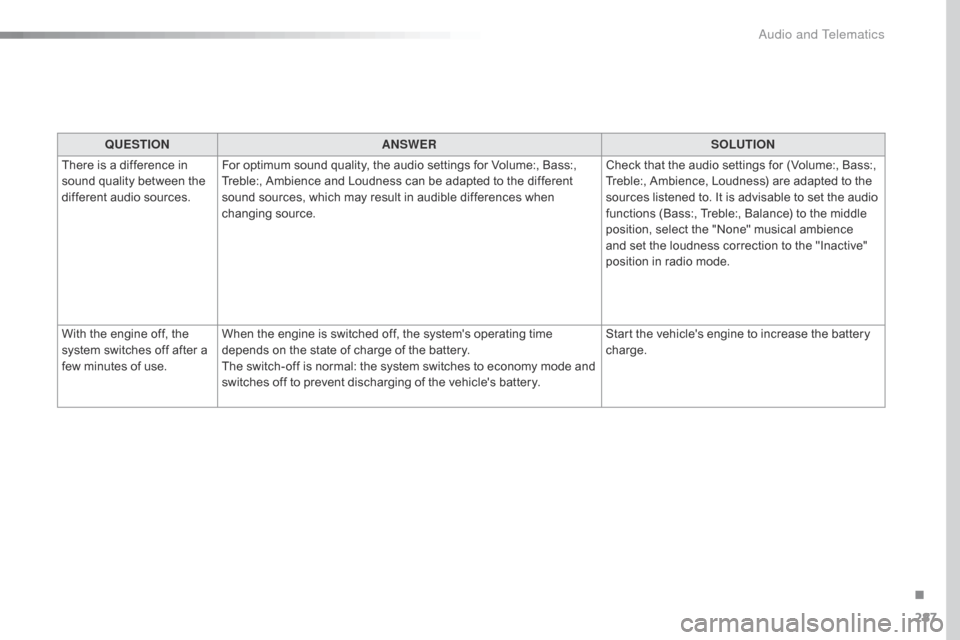
QUESTIONANSWER SOLUTION
There
is a difference in
s
ound
quality between the
d
ifferent audio sources. For
optimum sound quality, the audio settings for Volume:, Bass:,
T
reble:, Ambience and Loudness can be adapted to the different
s
ound sources, which may result in audible differences when
c
hanging
s
ource. Check
that the audio settings for (Volume:, Bass:,
T
reble:, Ambience, Loudness) are adapted to the
s
ources listened to. It is advisable to set the audio
f
unctions (Bass:, Treble:, Balance) to the middle
p
osition, select the "None" musical ambience
a
nd set the loudness correction to the "Inactive"
p
osition in radio mode.
With
the engine off, the
s
ystem
switches off after a
f
ew
minutes of use. When
the engine is switched off, the system's operating time
d
epends on the state of charge of the battery.
The
switch-off is normal: the system switches to economy mode and
s
witches off to prevent discharging of the vehicle's battery.Start
the vehicle's engine to increase the battery
c
harge.
.
Audio and Telematics
Page 292 of 308

290
Earth point, remote ............................... 169, 170
EBA ............................................................. ....92
Eco-driving
(
advice)
.......................................... 9
E
conomy mode
...............................
..............161
Electronic
brake force
distribution
(
EBFD)
....................................... 92
E
lectronic
g
earbox
...............................
.........131
Emergency
c
all
....................................... 9
1, 226
Emissions
control system, SCR
.....................20
E
nergy economy mode
.................................16
1
Engine
c
ompartment
............................ 1
69, 170 Hazard
w
arning
lam
ps
............................ 9
1, 185
Headlamps, automatic illumination
..........8
0, 83
Headlamps, dipped beam
.................7
9, 80, 199
Headlamps, main beam
........... 7
9, 80, 198, 200
Head restraints, front
......................................
51
H
ead restraints, rear
.......................................
53
H
eating
................
........................... 9, 58, 60, 62
Hill start assist
...............................................
13
2
Horn ................................................................. 91
Identification,
v
ehicle
....................................2
25
Ignition
................
..................................... 65, 124
F
H
I
Filling the fuel tank ........................154, 156, 157
Filter, air ............... ......................................... 174
Filter, oil
......................................................... 1
74
Filter, particle
........................................ 17
3 ,
17
4
Filter,
p
assenger
c
ompartment
.....................1
74
Fitting
roof bars
............................................. 16
5
Fittings,
boot
............................................. 7
6, 78
Fittings,
in
terior
......................................... 7
0 -75
Flap, fuel filler
...............................
.........15 4,
15
6
Foglamp,
r
ear
...............................
........... 81, 203
Foglamps,
f
ront
.........................8
1, 86, 198, 201
Frequency
(radio)
..................................2
42, 243
Fuel ................................................................ 157
Fuel
c
onsumption
.............................................. 9
F
uel tank........................................................ 15 4
Fuses
................
.................................... 206, 208
E
DG
DAB (Digital Audio Broadcasting) -
D igital r adio ......................................... 244, 245
Date
(setting)
...............................
....................38
Daytime
running lamps
.......................7
9, 80, 84
Daytime
running lamps, LED
................19
8,
19
9
Deactivating
t
he
p
assenger
a
irbag
.......10
1,
10
8
Deadlocking
...............................
...............42, 45
Defrosting
...............................
...................66, 67
Demisting
...............................
...................66, 67
Diesel
...............................
.............................157
Dimensions
..............................
.....................224
Dipstick
................
.................................... 27, 171
Direction
i
ndicators
.......... 8
2, 84, 198, 200, 203
Doors
..............................................................
.46
Driving
e
conomically ......................................... 9
Dynamic
stability control
(
DSC)
................................... 1
6, 18, 92, 94, 96Engine,
Diesel ......... 1 4, 157, 170, 219, 222, 223
Engine,
petrol ........................ 1 57, 169, 220, 221
Engines
..............................
..................220,
2
22
Environment
...............................
.................9, 43
ESC (electronic stability control)
....................16G
auge, fuel.............................................. 11, 155
Gearbox,
e
lectronic
.............. 9
, 23, 71, 74, 128, 133, 175
Gearbox,
m
anual
...............
. 9, 70, 74, 126, 132, 133, 175
Gear
efficiency indicator
...............................12
7
Gear
lever, manual gearbox
.........................12
6
Glove
box
..................................................7
0 -72
Grip control
.....................................................95
Alphabetical index
Page 294 of 308
292
Table of weights ....................................221, 223
Tables of engines ............................... ..220, 2
22
Tables of fuses
...................................... 2
08, 211
Tank,
AdBlue
® additive ......................... 1 76, 180
Tank,
fuel
............................... ........................ 15 4
Technical
da
ta
....................................... 2
20-223
Telephone
..................................................... 2
74
Third
brake
lamp
........................................... 20
4
Three
flashes
(direction indicators)
................82
T
Radio ............... .............................................. 242
Radio, digital
(Digital
Audio Broadcasting - DAB)
............24
4
RDS
................
............................................... 243
Rear
s
creen,
d
emisting/defrosting
.................67
R
echarging the battery
.........................21
3,
21
5
Recirculation, air
...............................
.. 59, 61, 65
Reduction
of electrical load
..........................16
1
Regeneration
of the particle filter
.................1
74
Reinitialisation
of the under-inflation
detection
system
......................................... 15
2
Reinitialising
the remote control
.....................43
R
eminder, lighting on
...................................... 8
2
Remote
control
................................................ 40
R
emoving a wheel
..............................
..........19 4
Removing
the mat
...............................
............75
Replacing
bu
lbs
..............................
..............198
Replacing
f
uses
..............................
..............206
Replacing
the air filter
...................................1
74
Replacing
the oil filter
................................... 1
74
Replacing
t
he
p
assenger
c
ompartment filter
...................................... 1
74Safety,
children ............... 1 01, 105 -108, 111-119
Screen,
cold climate
.....................................15
9
Screen, colour
................................ 2
9, 234, 235
Screen
menu map
............... 2
36, 238, 240, 250,
2
52, 256, 264, 274, 276
Screenwash, front
........................................... 88
S
creenwash, rear
...............................
.............88
SCR (Selective Catalytic Reduction)
.................................................. 17
6
Seat belts
........................................... 9
7- 9 9 ,
111
S
eat, rear bench
..............................
...............52
Seats, front
...............................
.......................50
Seats, rear
....................................................... 52
S
erial number, vehicle
..................................2
25
Service
i
ndicator
.............................................24
S
ervicing
...............................
..........................10
Settings,
e
quipment
........................................28
S
ettings
(
Menus)
...............................
............264
Settings,
system
...............................
.............271
Sidelamps
........................ 7
9, 84, 198, 199, 203
Side
r
epeater
..............................
..................202SR
Snow chains .................................................. 15 8
Socket, 12 V accessory ............................7
0 -72
Socket,
auxiliary
...............................
.............246
Socket,
JACK
...............................
...........73, 246
Sockets,
audio
........................................7
3, 246
Speed
l
imiter
...............................
.......... 136, 142
Stability control (ESC) ............................... 16,
92
Starting
the engine
............................... 12
2,
12
8
Starting
using another battery
......................2
14
Station,
ra
dio
.........................................2
42, 243
Stay, bonnet
...............................
...................168
Steering
wheel, adjustment
............................55
S
topping the vehicle
..................................... 12
2
Stop & Start
................................1
5, 36, 66, 133,
1
46, 154, 168, 174, 213, 216
Stop
(warning lamp)
........................................ 17
St
orage
................
...................................... 72, 74
Sun visor
................................................... 7
0 -72
Switching
off the engine
...............................12
2
Synchronising
the remote control
...................43
P
ressures, tyres ............................ 1
86,
191,
225
Pre-tensioning
seat
belts
................................ 99
P
riming
pu
mp
...............................
................. 219
Priming
the
fuel
system
................................ 2
19
Protecting
children
.......... 1
01,
105 -108,
111-119
Protectors
...................................................... 18
3
Puncture
................
........................................ 18 6Reservoir, screenwash .................................
17
3
Resetting
the
service
indicator
....................... 26
R
esetting
the
trip
recorder
.............................. 37
R
eversing
c
amera
...............................
.......... 145
Reversing
lam
p
............................................. 20
3
Risk
areas
(update)
....................................... 2
61
Roof bars
....................................................... 16
5
Running
out
of
fuel
(Diesel)
.......................... 2
19
Alphabetical index