CD player Citroen C4 CACTUS 2016 1.G Owner's Manual
[x] Cancel search | Manufacturer: CITROEN, Model Year: 2016, Model line: C4 CACTUS, Model: Citroen C4 CACTUS 2016 1.GPages: 308, PDF Size: 7.96 MB
Page 76 of 308
74
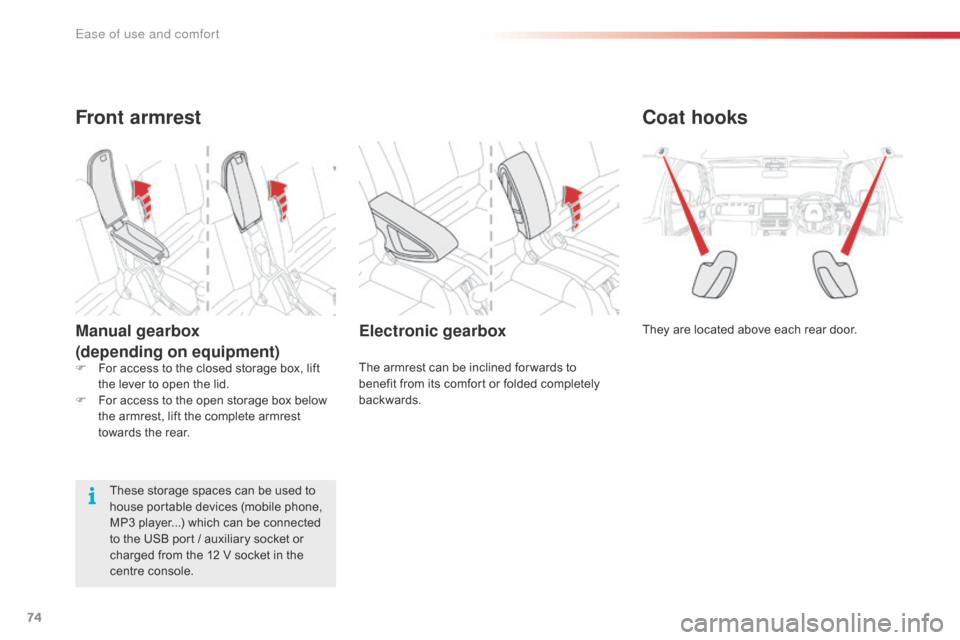
Coat hooks
They are located above each rear door.Electronic gearbox
The armrest can be inclined for wards to benefit from its comfort or folded completely
ba
ckwards.
Front armrest
Manual gearbox
(depending on equipment)
These storage spaces can be used to house portable devices (mobile phone,
M
P3 player...) which can be connected
t
o the USB port / auxiliary socket or
c
harged from the 12 V socket in the
c
entre console.
F
F
or access to the closed storage box, lift
t
he lever to open the lid.
F
F
or access to the open storage box below
t
he armrest, lift the complete armrest
t
owards the rear.
Ease of use and comfort
Page 164 of 308

162
Accessories
A wide range of accessories and genuine parts is available from the CITROËN dealer network.
T hese accessories and parts are all suitable for your vehicle and benefit from CITROËN's recommendation and warranty.
"Comfort"
Door deflectors, side sun blinds, insulated module, coat hanger fixed to head restraint,
m
obile reading lamp, front and rear parking
s
ensors, portable ashtray, scented air
f
reshener, blind for sunroof...
"Transport systems"
Boot carpet, boot liner, boot net, boot spacers,
transverse roof bars, ski carrier, roof box,
t
owbar,
t
owbar
w
iring
h
arnesses,
b
icycle
c
arrier
f
or mounting on the towbar and on the roof
b
ars, towbars with fixed and quickly detachable
t
owball...
"Styling"
Aluminium foot rest, alloy wheels, front spoiler, r ear diffuser, exterior expressive stickers...
"Security and safety":
Anti-intrusion alarm, vehicle tracking system, first aid kit, fire extinguisher, warning triangle,
h
igh visibility vest, wheel security bolts, snow
c
hains, non-slip covers, front foglamp kit, dog
g
uard, pet seat belt, seat belt cutter/glass
h
ammer...
"Protection"
Mats*, seat covers, mud flaps, vehicle cover...
I
f
a
towbar
and
wiring
harness
are
f
itted
outside
the
CITROËN
dealer
n
etwork,
the
installation
must
be
done
s
trictly
in
line
with
the
manufacturer's
r
ecommendations. *
T
o avoid any risk of jamming the pedals:
-
e
nsure that mats are correctly positioned
a
nd secured,
-
n
ever fit one mat on top of another.
"Multimedia"
Bluetooth hands-free kits, portable satellite navigation system, driving assistance systems,
s
martphone carriers, DVD player, CD player,
2
30 V socket, semi-integral satellite navigation
s
ystem, rear multimedia carrier, navigation
m
apping updates, aftermarket digital radio...
By
visiting a CITROËN dealer you can also
o
btain cleaning and maintenance products
(
interior and exterior) - including ecological
p
roducts in the "TECHNATURE" range,
p
roducts for topping up (screenwash...), paint
t
ouch-up pens and aerosols for the exact
c
olour of your vehicle, refills (sealant cartridge
f
or the temporary puncture repair kit...)...
Practical information
Page 233 of 308
231
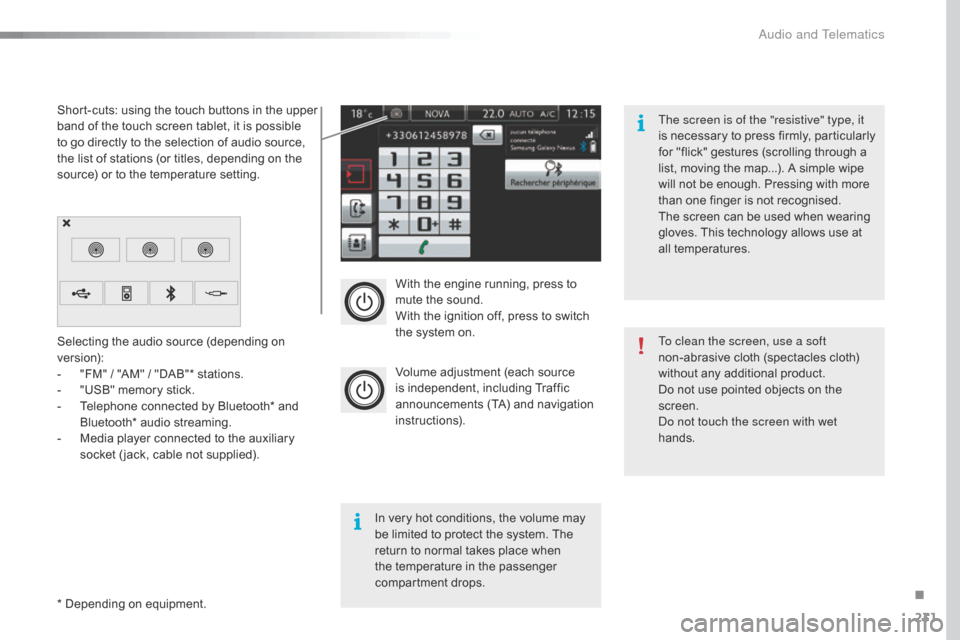
With the engine running, press to mute the sound.
With
the ignition off, press to switch
t
he system on.
Volume
adjustment (each source
i
s
i
ndependent,
i
ncluding
T
raffic
a
nnouncements (TA) and navigation
i
nstructions).
Selecting
the
audio
source
(depending
on
ve
rsion):
-
"
FM"
/
"AM"
/
"DAB"*
stations.
-
"
USB"
memory
stick.
-
T
elephone
connected
by
Bluetooth*
and
B
luetooth*
audio
streaming.
-
M
edia
player
connected
to
the
auxiliary
s
ocket
( jack,
cable
not
supplied).
*
Depending
on
equipment.
Short-cuts:
using
the
touch
buttons
in
the
upper
b
and
of
the
touch
screen
tablet,
it
is
possible
t
o
go
directly
to
the
selection
of
audio
source,
t
he
list
of
stations
(or
titles,
depending
on
the
s
ource)
or
to
the
temperature
setting.
The screen is of the "resistive" type, it
is
n
ecessary
t
o
p
ress
f
irmly,
p
articularly
f
or "flick" gestures (scrolling through a
l
ist, moving the map...). A simple wipe
w
ill not be enough. Pressing with more
t
han one finger is not recognised.
The screen can be used when wearing
g
loves. This technology allows use at
a
ll
t
emperatures.
In
very hot conditions, the volume may
b
e
limited to protect the system. The
r
eturn to normal takes place when
t
he
temperature in the passenger
c
ompartment drops. To clean the screen, use a soft
non-abrasive
cloth (spectacles cloth)
w
ithout any additional product.
Do
not use pointed objects on the
sc
reen.
Do not touch the screen with wet
hands.
.
Audio and Telematics
Page 248 of 308
246
Music
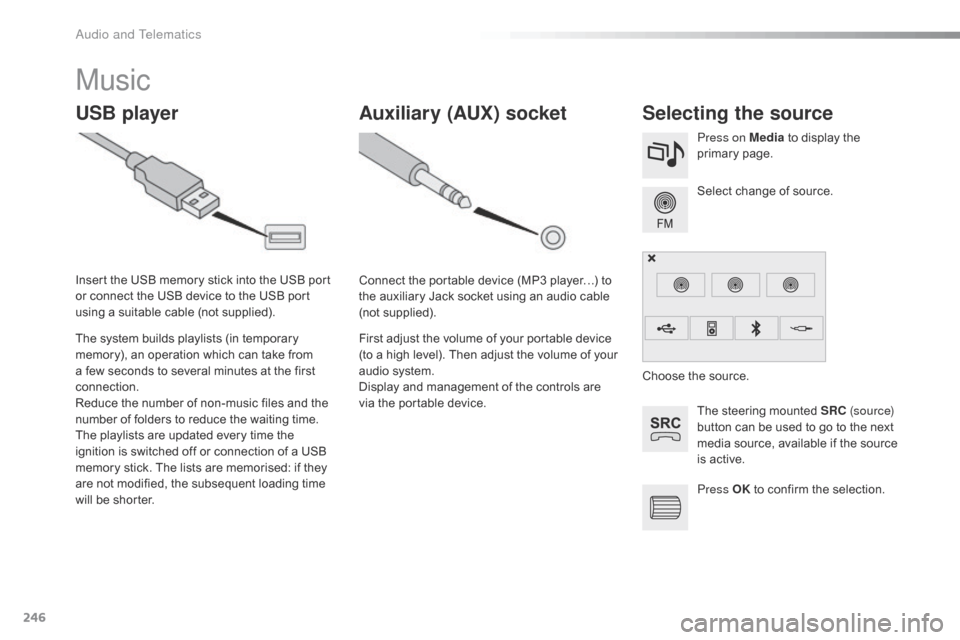
USB playerSelecting the source
The steering mounted SRC ( s o u r c e)
button can be used to go to the next
m
edia source, available if the source
i
s active.
Select
change of source.
Press on Media
to display the
p
rimary
pag
e.
The
system
builds
playlists
(in
temporary
m
emory),
an
operation
which
can
take
from
a
few
seconds
to
several
minutes
at
the
first
c
onnection.
Reduce
the
number
of
non-music
files
and
the
n
umber
of
folders
to
reduce
the
waiting
time.
The
playlists
are
updated
every
time
the
i
gnition
is
switched
off
or
connection
of
a
USB
m
emory
stick.
The
lists
are
memorised:
if
they
a
re
not
modified,
the
subsequent
loading
time
w
ill
be
shorter.
Insert
the
USB
memory
stick
into
the
USB
port
o
r
connect
the
USB
device
to
the
USB
port
u
sing
a
suitable
cable
(not
supplied).
Auxiliary (AUX) socket
Connect the portable device (MP3 player…) to t
he auxiliary Jack socket using an audio cable
(
not
sup
plied).
First
adjust the volume of your portable device
(
to a high level). Then adjust the volume of your
a
udio system.
Display
and management of the controls are
v
ia the portable device. Choose
the source.
Press OK
to confirm the selection.
Audio and Telematics
Page 249 of 308
247
The audio equipment will only play audio files with ".wma, .aac, .flac, .ogg and. mp3"
f
ile extensions and with a bit rate of between
3
2 Kbps and 320 Kbps.
It
also supports VBR (Variable Bit Rate) mode.
No
other type of file (.mp4, ...) can be played.
WMA
files must be of the standard wma 9 type.
The
sampling rates supported are 11, 32, 44
a
nd 48 KHz.
It
is advisable to restrict file names to
2
0 characters, without using of special
c
haracters (e.g.: " " ? ; ù) to avoid any playing
a
nd
d
isplaying
pro
blems.
Information and advice
Use only USB memory sticks formatted FAT 32 (28 -bit file allocation table).
The
system
supports
USB
mass
s
torage
devices,
BlackBerry
® devices o
r Apple® players via USB ports. The a
daptor
cable not supplied.
Control
of the peripheral device is with
t
he
audio
system controls.
Other
peripherals, not recognised on
c
onnection, must be connected to the
a
uxiliary
socket using a Jack cable (not
sup
plied). It
is recommended that the USB cable
f
or the portable device is used.
The
system does not support the
s
imultaneous connection of two
i
dentical devices (two memory sticks,
t
wo Apple
® players) but it is possible
t
o
connect
one memory stick and one
A
pple
® player at the same time.
.
Audio and Telematics
Page 250 of 308
248
Bluetooth® audio streaming
Streaming allows audio files on your telephone to be played through the vehicle's spx`eakers.
Connect
the telephone: see the "Telephone "
section, then " Bluetooth".
Choose the " Audio" or "All"
pro
file.
If
play does not start automatically, it may be
n
ecessary to start the audio playback from the
t
elephone.
Control
is from the peripheral device or by
u
sing the audio system buttons.
Once
connected in streaming mode,
t
he telephone is considered to be a
m
edia source.
It
is recommended that you activate
"R
epeat"
on the Bluetooth peripheral.
Connecting Apple® players
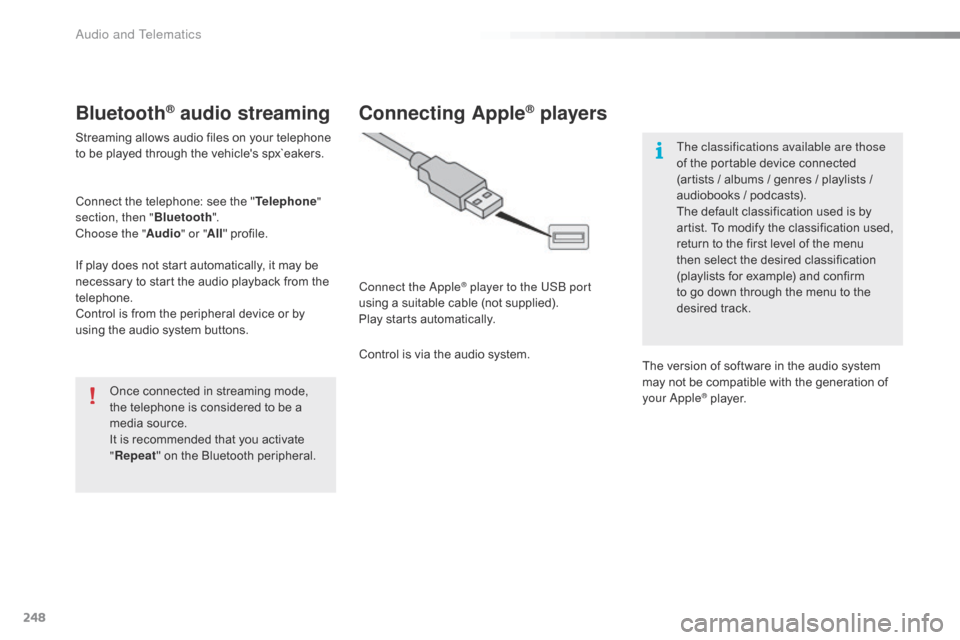
Connect the Apple® player to the USB port
using
a
suitable
cable (not supplied).
Play
starts
automatically.
Control
is
via
the
audio system. The classifications available are those
of
the portable device connected
(
artists / albums / genres / playlists /
a
udiobooks / podcasts).
The default classification used is by
a
rtist. To modify the classification used,
r
eturn to the first level of the menu
t
hen select the desired classification (
playlists for example) and confirm t
o go down through the menu to the
de
sired
t
rack.
The
version of software in the audio system
m
ay not be compatible with the generation of
y
our Apple
® player.
Audio and Telematics
Page 287 of 308
285
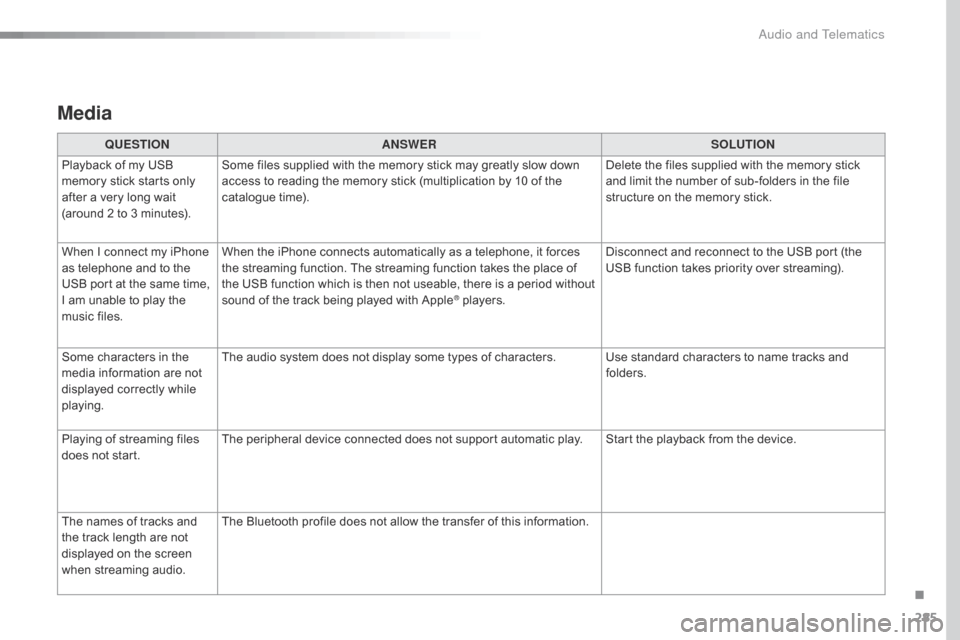
Media
QUESTIONANSWER SOLUTION
Playback of my USB
m
emory stick starts only
a
fter
a
very long wait
(
around
2 to 3 minutes). Some
files supplied with the memory stick may greatly slow down
a
ccess to reading the memory stick (multiplication by 10 of the
c
atalogue time). Delete
the files supplied with the memory stick
a
nd limit the number of sub-folders in the file
s
tructure on the memory stick.
When
I
connect my iPhone
a
s
telephone and to the
U
SB
port at the same time,
I
am
unable to play the
m
usic
files. When
the iPhone connects automatically as a telephone, it forces
t
he streaming function. The streaming function takes the place of
t
he USB function which is then not useable, there is a period without
s
ound of the track being played with Apple
® players.D isconnect and reconnect to the USB port (the
U
SB function takes priority over streaming).
Some
characters
in
the
m
edia
information
are
not
d
isplayed
correctly
while
p
laying. The
audio
system
does
not
display
some
types of characters. Use standard characters to name tracks and
f
olders.
Playing
of
streaming
files
d
oes
not
start. The
peripheral
device
connected
does
not
support automatic play. Start the playback from the device.
The
names
of
tracks
and
t
he
track
length
are
not
d
isplayed
on
the
screen
w
hen
s
treaming
a
udio. The
Bluetooth
profile
does
not
allow
the
transfer of this information.
.
Audio and Telematics
Page 293 of 308
291
Labels, identification .....................................2 25
Lamp, boot ............................... ...............69, 205
Lamps .............................................................. 80
Leather (care)
...............................
.................18 4
LEDs
- Light-emitting diodes
..................8
4, 205
Levels
and checks
..............................
...16 9 -173
Lighting,
c
ornering
...............................
...........86
Lighting
dimmer
..............................
................39
Lighting,
guide-me home
................................85
L
ighting,
i
nterior
.............................................. 68
Lo
ading
..............................
.............................10
Load
reduction mode
.................................... 16
1
Localised
A
ssistance/Emergency
C
all
.........2
26
Locating
your vehicle
...................................... 41
L
ocking from the inside
...................................45
L
ocking the doors
..............................
....... 45, 47
Low fuel level
..............................
..................15 4Oil
change
...............................
......................171
Oil
consumption
............................................17
1
Opening
the bonnet
......................................16
8
Opening
the boot
..............................
..............48
Opening
the doors
...............................
...........46
Paint
colour code
..........................................2
25
Panoramic
glass sunroof
................................69
P
arcel shelf, rear
....................................... 7
7, 78
Park
Assist
...............................
.....................146
Parking
brake
........................................ 1
25, 175
Parking
sensors, front
...................................14
4
Parking
sensors, rear....................................143
Plates,
id
entification...................................... 225
Player, Apple
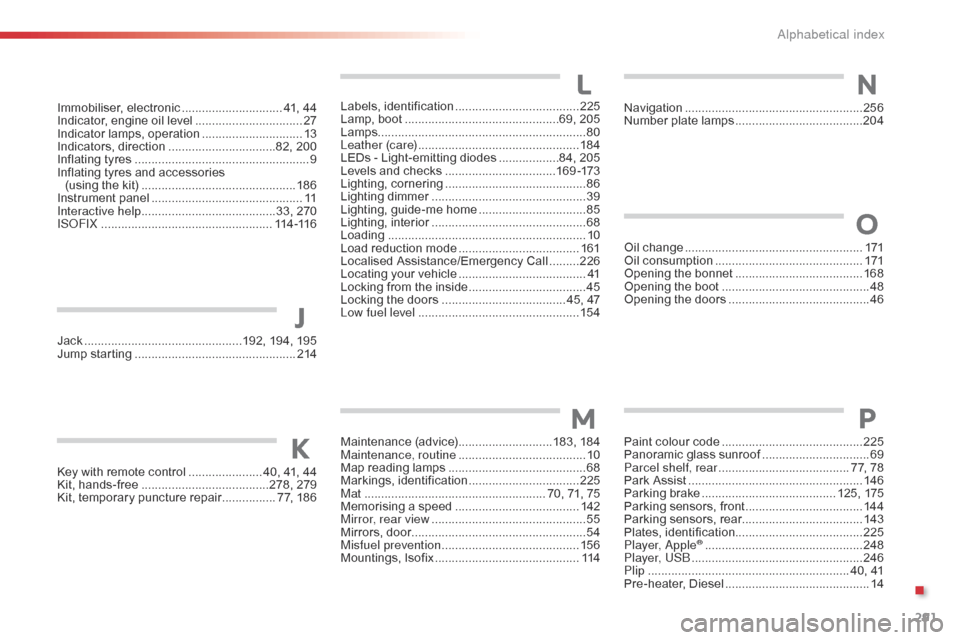
® .............................. .................248
Player, USB
................................................... 24
6
Plip
..............................
.............................. 40, 41
Pre-heater,
D
iesel
...............................
............14
LN
O
P
Key with remote control ...................... 4 0, 41, 44
Kit, han ds-free ......................................2 78, 279
Kit,
temporary puncture repair
................ 7
7, 186 Navigation
...............................
......................
256
Number plate lamps
......................................
20
4
K
Jack ...............................................192,
194, 195
Jump starting .............................. ..................214
Maintenance
(
advice)
............................18
3,
18
4
Maintenance, routine
...................................... 10
M
ap reading lamps
.........................................68
M
arkings,
id
entification
.................................2
25
Mat
.......
............................................... 70, 71, 75
Memorising
a speed
.....................................14
2
Mirror, rear view
..............................................55
M
irrors, door....................................................54
Misfuel prevention
...............................
..........15 6
Mountings,
I
sofix
...............................
............114
J
M
Immobiliser, e lectronic .............................. 4 1, 44
Indicator, engine oil level ................................2
7
Indicator
lamps, operation
..............................13
I
ndicators,
d
irection
................................8
2, 200
Inflating
tyres
..............................
...................... 9
Inflating
tyres and accessories
(using
the kit)
..............................
................18 6
Instrument
panel
...............................
..............11
Interactive help
........................................3
3, 270
ISOFIX
...............
.................................... 114 -11 6
.
Alphabetical index