change time CITROEN C4 CACTUS 2017 User Guide
[x] Cancel search | Manufacturer: CITROEN, Model Year: 2017, Model line: C4 CACTUS, Model: CITROEN C4 CACTUS 2017Pages: 256, PDF Size: 7.62 MB
Page 105 of 256
103
F Move the selector towards the + sign to change up a gear.
F
M
ove the selector towards the - sign to
change down a gear.
It is only possible to change from one gear to
another if the vehicle speed and engine speed
permit; otherwise, the gearbox will operate
temporarily in automatic mode.
D disappears, and the gears engaged appear
in succession on the instrument panel.
If the engine speed is too low or too high, the
selected gear flashes for a few seconds, then
the actual gear engaged is displayed.
It is possible to change from position D
(automatic) to position M (manual) at any time.
When the vehicle is stationary or moving
very slowly, the gearbox engages first gear
automatically.
The sport programme is inactive in manual
operation.
Invalid value during manual
operation
This symbol is displayed if a gear
is not engaged correctly (selector
between two positions).
Stopping the vehicle
Before switching off the engine, you can
engage position P or N to place the gearbox in
neutral.
In both cases, apply the parking brake to
immobilise the vehicle.
If the selector is not in position P , when the
driver's door is opened or approximately
45 seconds after the ignition is switched
off, a warning message appears in the
screen.
F
R
eturn the selector to position P ; the
message disappears.
When driving on flooded roads or when
crossing a ford, proceed at walking pace.
Malfunction
When the ignition is on, the lighting
of this warning lamp, associated
with an audible signal and an alert
message on the screen, indicates a
gearbox fault.
In this case, the gearbox switches to back-up
mode and is locked in 3
rd gear. You may feel a
substantial jolt when changing from P to R and
from N to R. This will not cause any damage to
the gearbox. There is a risk of damage to the gearbox:
-
i
f you press the accelerator and brake
pedals at the same time,
-
i
f you force the movement of the
selector from position P to another
position when the battery is flat.
To reduce fuel consumption when at
a prolonged standstill with the engine
running (traffic jam, etc.), put the
selector in position N and apply the
parking brake.
If your vehicle has an automatic gearbox,
never try to start the engine by pushing
the vehicle.
Do not exceed 62 mph (100 km/h), local speed
restrictions permitting.
Contact a CITROËN dealer or a qualified
workshop as soon as possible.
Electronic gearbox
(ETG 6)
Six-speed electronic gearbox offering
automatic gear control, without driver
intervention.
You can temporarily take control of gear
changes at any time, using the steering
mounted control paddles.
6
Driving
Page 107 of 256

105
F Release the parking brake.
F P rogressively release the brake pedal.
The vehicle moves off immediately.
Creep function
This function facilitates manoeuvring of the
vehicle at low speed (when parking, in traffic
jams, etc.).
After pressing control D or R , the vehicle
moves as soon as you take your foot off the
brake pedal , at low speed and with the engine
at idle.
Never leave children unattended in the
vehicle when the engine is running.
The creep function may be temporarily
unavailable if the clutch temperature is too
high or the slope too steep.
Forward drive
F Press control D .
The indicator lamp in the control comes on.
D and the gear engaged appear in the
instrument panel. The gearbox then operates in auto-active
mode, without any inter vention on the part
of the driver. It continuously selects the most
suitable gear according to the following
parameters:
-
f
uel consumption optimisation,
-
d
riving style,
-
r
oad conditions,
-
v
ehicle load.
For optimum acceleration, when
overtaking another vehicle for example,
fully depress the accelerator pedal,
beyond the point of resistance.
Never select neutral (position N ) when
moving.
Do not press the brake and accelerator
pedals at the same time: this could cause
very rapid wear of the clutch.
Temporary control of gear
changing
Reverse gear
You can temporarily take over control of gear
changes using the steering mounted + and -
control paddles: if the engine speed allows, the
gear change is carried out.
This function allows you to anticipate certain
situations, such as overtaking another vehicle
or approaching a bend in the road.
After a few moments with no action on the
control paddles, the gearbox returns to
automatic operation.
To engage reverse gear, the vehicle must be
stationary with your foot on the brake pedal.
F
P
ress control R .
The indicator lamp in the control comes on.
6
Driving
Page 109 of 256

107
The system adapts its gear change
recommendation according to the
driving conditions (slope, load, etc.)
and the demands of the driver (power,
acceleration, braking, etc.).
The system never suggests:
-
e
ngaging first gear,
-
enga
ging reverse gear.
-
enga
ging a lower gear.
On vehicle fitted with a manual gearbox,
the arrow may be accompanied by the
gear recommended.
Hill start assist
System which keeps your vehicle stationary
for a short time (approximately two seconds)
when starting on a gradient, the time it takes
to move your foot from the brake pedal to the
accelerator pedal.
It is only active when:
-
t
he vehicle is completely stationary, with
your foot on the brake pedal,
-
c
ertain conditions of gradient are met,
-
t
he driver's door is closed.
The hill start assist system cannot be
deactivated. Do not leave the vehicle while it is being
held temporarily in the hill start assist
phase.
If you need to leave the vehicle with the
engine running, apply the parking brake
manually then ensure that the parking
brake warning lamp is showing fixed on
the instrument panel.
Operating fault
On an ascending slope, with the vehicle
stationar y, the vehicle is held for a shor t
time when you release the brake pedal.
With a manual gearbox
, if you are in first gear
or in neutral.
With an automatic gearbox , if you are in D
or M .
With an electronic gearbox , if you are in D.On a descending slope, with the vehicle
stationary and reverse gear engaged, the
vehicle is held for a shor t time when you
release the brake pedal.
If a fault in the system occurs, this warning
lamp comes on accompanied by a message.
Contact a CITROËN dealer or a qualified
workshop to have the system checked.
Stop & Start
The Stop & Start system puts the engine
t emporarily into standby – STOP mode – during
stops in traffic (red lights, traffic jams, etc.). The
engine restarts automatically – START mode –
as soon as you want to move off.
The restart takes place instantly, quickly and
silently.
6
Driving
Page 111 of 256

109
- With an electronic gearbox:
• g ear selector in position D , when you
release the brake pedal,
•
o
r gear selector in position N and brake
pedal released, when you place the gear
selector in position D ,
•
o
r when you engage reverse gear.
Special cases: START activated
automatically
As a safety measure or to maintain comfort
levels in the vehicle, START mode is activated
automatically when:
-
y
ou open the driver's door,
-
t
he driver's seat belt is not fastened,
-
t
he speed of the vehicle exceeds 7 mph
(11 km/h) with an electronic gearbox,
-
s
ome special conditions (battery charge,
engine temperature, braking assistance,
exterior temperature, etc.) where the engine
is needed to control the system or the
vehicle.
Deactivation/Reactivation
In certain circumstances, such as the need
to maintain the temperature in the passenger
compartment, it may be useful to deactivate the
Stop & Start system.
The system can be deactivated at any time,
once the ignition is switched on.
If the engine is in STOP mode, it then restarts.
The Stop & Start system is reactivated
automatically every time the ignition is switched
on.
F
I
n the Driving/Vehicle menu
of the touch screen, select the
" Driving functions " tab, then
" Stop & Star t ".
Opening the bonnet
Before doing anything under the bonnet,
deactivate the Stop & Start system to
avoid any risk of injury resulting from an
automatic change to START mode. Driving on flooded roads
Before driving in a flooded area, it is
strongly recommended that you deactivate
the Stop & Start system.
For more information on Driving
recommendations
, particularly on
flooded roads, refer to the corresponding
section.
Operating fault
In the event of a fault with the
system, this warning lamp flashes in
the instrument panel.
Have it checked by a CITROËN dealer or a
qualified workshop.
In the event of a fault in STOP mode, the
vehicle may stall.
All of the instrument panel warning lamps come
on.
It is then necessary to switch off the ignition,
then restart the engine. Depending on the version, an alert
message may also be displayed, asking
you to change to neutral ( N) and to press
the brake pedal.
You must switch off the ignition, then start
the engine again.
In this case, this indicator lamp
flashes for a few seconds, then goes
of f.
This operation is perfectly normal.
6
Driving
Page 117 of 256
115
The cruise control system is a driving aid
that cannot, in any circumstances, replace
the need to obser ve speed limits, nor the
need for vigilance on the part of the driver.
As a safety measure, you are advised to
keep your feet near the pedals at all times.
Steering mounted controlsDisplays in the instrument
panel
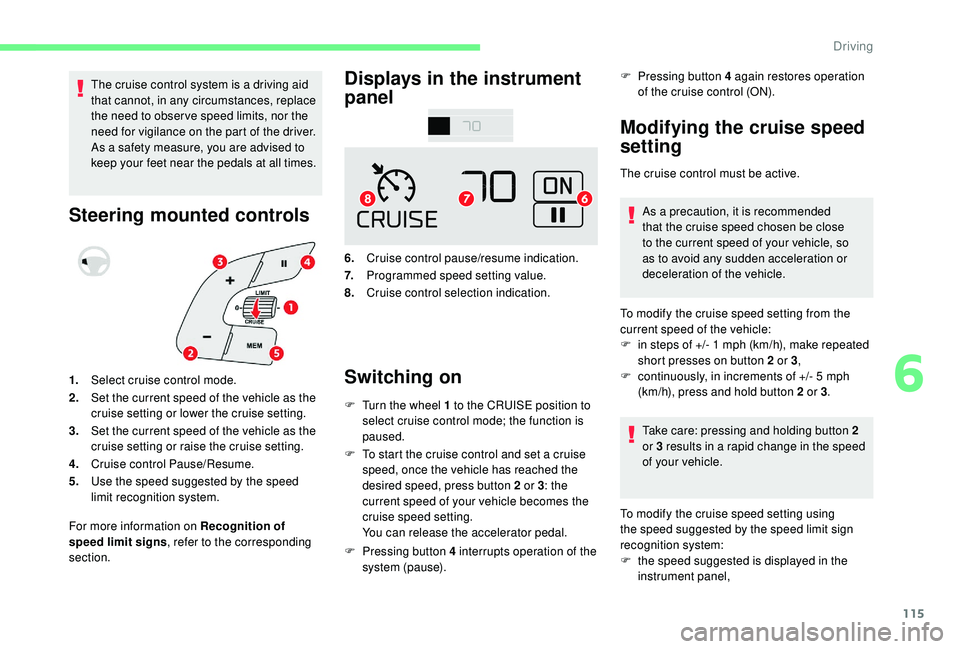
6.
Cruise control pause/resume indication.
7. Programmed speed setting value.
8. Cruise control selection indication.
Switching on
F Turn the wheel 1 to the CRUISE position to
select cruise control mode; the function is
paused.
F
T
o start the cruise control and set a cruise
speed, once the vehicle has reached the
desired speed, press button 2 or 3 : the
current speed of your vehicle becomes the
cruise speed setting.
You can release the accelerator pedal.
F
P
ressing button 4 interrupts operation of the
system (pause). F
P
ressing button 4 again restores operation
of the cruise control (ON).
Modifying the cruise speed
setting
The cruise control must be active.
As a precaution, it is recommended
that the cruise speed chosen be close
to the current speed of your vehicle, so
as to avoid any sudden acceleration or
deceleration of the vehicle.
1. Select cruise control mode.
2. Set the current speed of the vehicle as the
cruise setting or lower the cruise setting.
3. Set the current speed of the vehicle as the
cruise setting or raise the cruise setting.
4. Cruise control Pause/Resume.
5. Use the speed suggested by the speed
limit recognition system.
For more information on Recognition of
speed limit signs , refer to the corresponding
section. To modify the cruise speed setting from the
current speed of the vehicle:
F
i
n steps of +/- 1 mph (km/h), make repeated
short presses on button 2 or 3 ,
F
c
ontinuously, in increments of +/- 5 mph
(km/h), press and hold button 2 or 3 .
Take care: pressing and holding button 2
or 3
results in a rapid change in the speed
of your vehicle.
To modify the cruise speed setting using
the speed suggested by the speed limit sign
recognition system:
F
t
he speed suggested is displayed in the
instrument panel,
6
Driving
Page 125 of 256
123
Blind spot monitoring
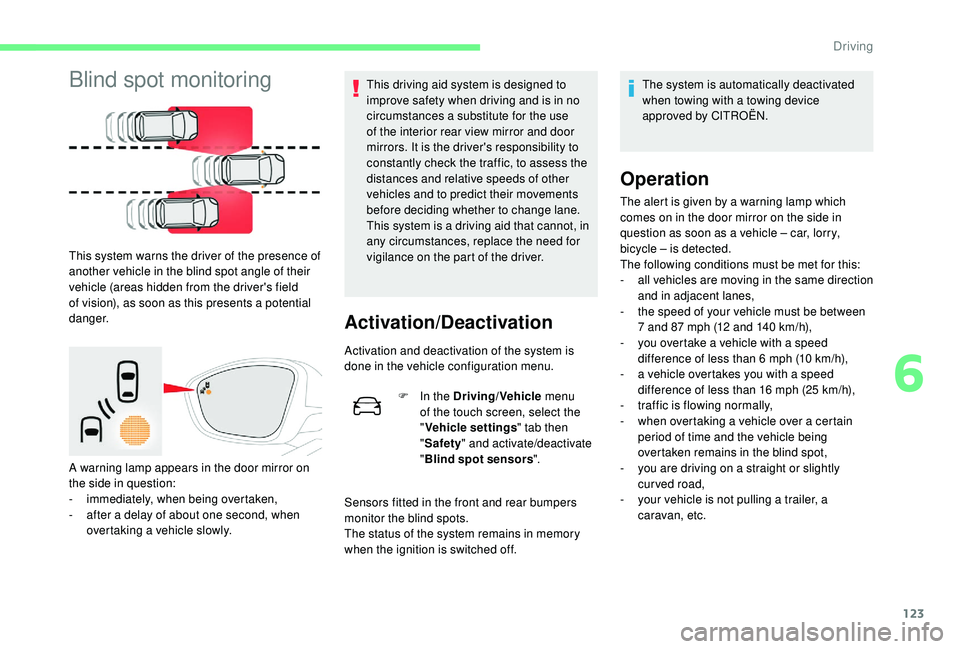
This system warns the driver of the presence of
another vehicle in the blind spot angle of their
vehicle (areas hidden from the driver's field
of vision), as soon as this presents a potential
danger.
A warning lamp appears in the door mirror on
the side in question:
-
i
mmediately, when being overtaken,
-
a
fter a delay of about one second, when
overtaking a vehicle slowly. This driving aid system is designed to
improve safety when driving and is in no
circumstances a substitute for the use
of the interior rear view mirror and door
mirrors. It is the driver's responsibility to
constantly check the traffic, to assess the
distances and relative speeds of other
vehicles and to predict their movements
before deciding whether to change lane.
This system is a driving aid that cannot, in
any circumstances, replace the need for
vigilance on the part of the driver.
Activation/Deactivation
Activation and deactivation of the system is
done in the vehicle configuration menu.
F
I
n the Driving/Vehicle menu
of the touch screen, select the
" Vehicle settings " tab then
" Safety " and activate/deactivate
" Blind spot sensors ".
Sensors fitted in the front and rear bumpers
monitor the blind spots.
The status of the system remains in memory
when the ignition is switched off. The system is automatically deactivated
when towing with a towing device
approved by CITROËN.
Operation
The alert is given by a warning lamp which
comes on in the door mirror on the side in
question as soon as a vehicle – car, lorry,
bicycle – is detected.
The following conditions must be met for this:
-
a
ll vehicles are moving in the same direction
and in adjacent lanes,
-
t
he speed of your vehicle must be between
7 and 87 mph (12 and 140 km/h),
-
y
ou overtake a vehicle with a speed
difference of less than 6 mph (10 km/h),
-
a v
ehicle overtakes you with a speed
difference of less than 16 mph (25 km/h),
-
t
raffic is flowing normally,
-
w
hen overtaking a vehicle over a certain
period of time and the vehicle being
overtaken remains in the blind spot,
-
y
ou are driving on a straight or slightly
curved road,
-
y
our vehicle is not pulling a trailer, a
caravan, etc.
6
Driving
Page 130 of 256
128
This system is a manoeuvring aid that
cannot under any circumstances replace
the vigilance of the driver.
The driver must remain in control of
their vehicle. They must always check
the surroundings of the vehicle before
undertaking a manoeuvre and ensure that
the space remains clear during the entire
manoeuvre.
The system per forms the measurements of
available parking spaces and calculations of
distances to obstacles using ultrasonic sensors
built in the front and rear bumpers of the
vehicle.
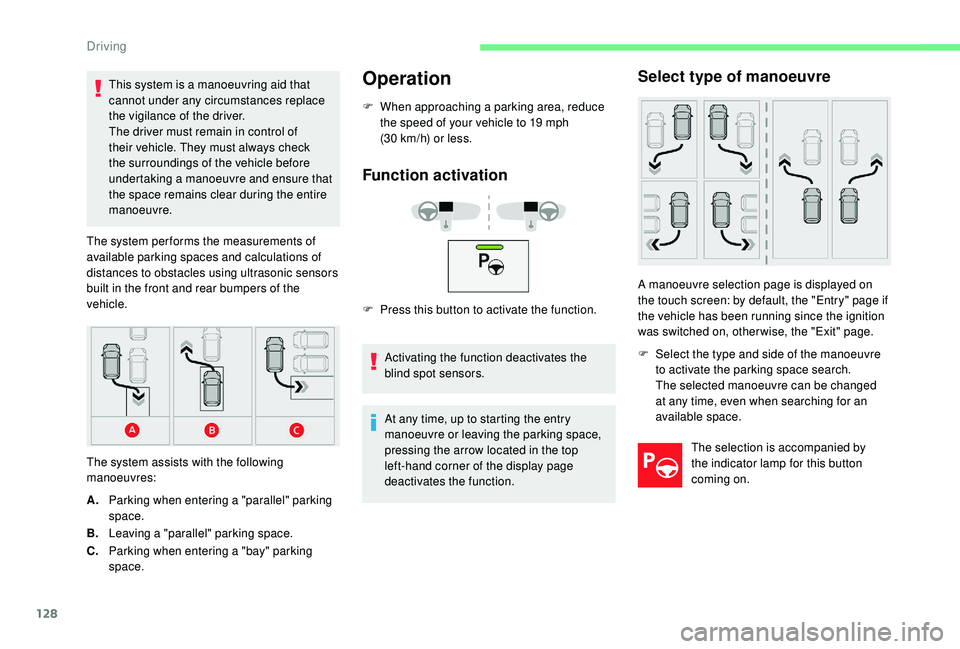
The system assists with the following
manoeuvres:Operation
F When approaching a parking area, reduce the speed of your vehicle to 19 mph
(30 km/h) or less.
Function activation
F Press this button to activate the function.
Activating the function deactivates the
blind spot sensors.
A. Parking when entering a "parallel" parking
space.
B. Leaving a "parallel" parking space.
C. Parking when entering a "bay" parking
space. At any time, up to starting the entry
manoeuvre or leaving the parking space,
pressing the arrow located in the top
left-hand corner of the display page
deactivates the function.
Select type of manoeuvre
A manoeuvre selection page is displayed on
the touch screen: by default, the "Entry" page if
the vehicle has been running since the ignition
was switched on, other wise, the "Exit" page.
F
S
elect the type and side of the manoeuvre
to activate the parking space search.
The selected manoeuvre can be changed
at any time, even when searching for an
available space.
The selection is accompanied by
the indicator lamp for this button
coming on.
Driving
Page 149 of 256

147
AdBlue level
An alert is triggered once the reser ve level is
reached.
To avoid the vehicle being immobilised as per
regulations, you must top up with AdBlue.
For more information on AdBlue and the SCR
system, and, in particular, topping it up, refer to
the corresponding section.
Checks
Unless otherwise indicated, check these
components in accordance with the
manufacturer's service schedule and according
to your engine.
Other wise, have them checked by a CITROËN
dealer or a qualified workshop.
12 V battery
The battery does not require any
maintenance.
However, check regularly that the
terminals are correctly tightened
(versions without quick release
terminals) and that the connections
are clean.
For more information on the precautions
to take before starting work on the
12 V batter y , refer to the corresponding
section. Versions equipped with Stop & Start are
fitted with a 12 V lead-acid battery of
specific technology and specification.
Its replacement should be carried out
only by a CITROËN dealer or a qualified
workshop.
Air filter
Depending on the environment
(e.g. dusty atmosphere) and the
use of the vehicle (e.g. city driving),
replace it twice as often, if
necessary
.
Passenger compartment
filter
Depending on the environment
(e.g. dusty atmosphere) and the
use of the vehicle (e.g. city driving),
replace it twice as often, if
necessary.
A clogged passenger compartment
filter may have an adverse effect on
the per formance of the air conditioning
system and generate undesirable odours.
Oil filter
Change the oil filter each time the
engine oil is changed.
Particle filter (Diesel)
The start of saturation of the particle
filter is indicated by the constant
illumination of this warning lamp
accompanied by an alert message.
7
Practical information
Page 164 of 256
162
Light-emitting diodes (LED)
For the replacement of this type of bulb,
you must contact a CITROËN dealer or a
qualified workshop.
In some weather conditions (e.g. low
temperature or humidity), the presence
of misting on the internal sur face of the
glass of the headlamps and rear lamps is
normal; it disappears after the lamps have
been on for a few minutes.
Front lamps
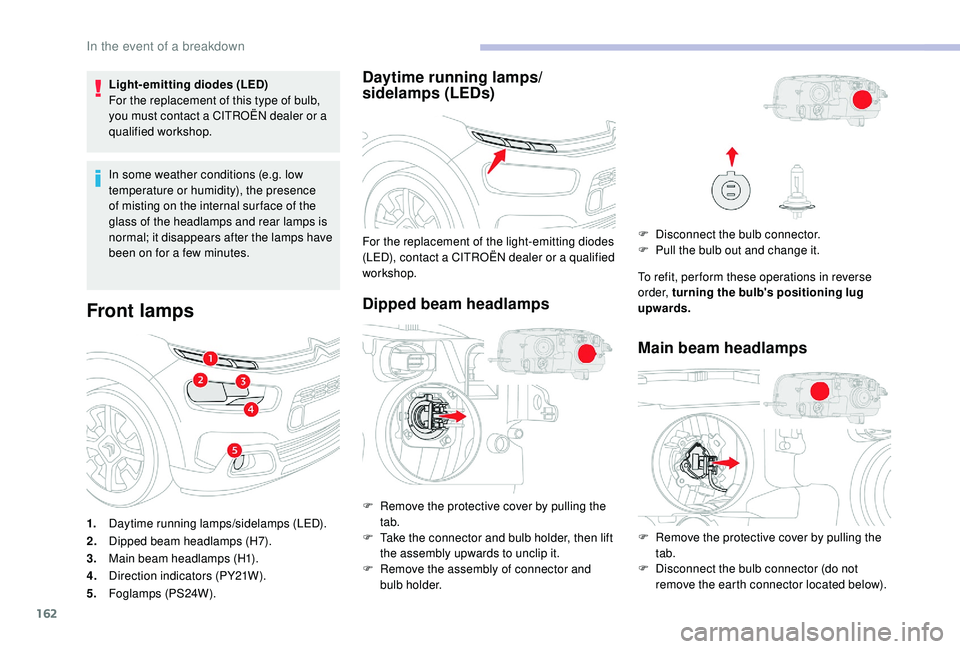
1.Daytime running lamps/sidelamps (LED).
2. Dipped beam headlamps (H7).
3. Main beam headlamps (H1).
4. Direction indicators (PY21W).
5. Foglamps (PS24W).
Daytime running lamps/
sidelamps (LEDs)
Dipped beam headlamps
For the replacement of the light-emitting diodes
(LED), contact a CITROËN dealer or a qualified
workshop.
F
R
emove the protective cover by pulling the
tab.
F
T
ake the connector and bulb holder, then lift
the assembly upwards to unclip it.
F
R
emove the assembly of connector and
bulb holder. F
D isconnect the bulb connector.
F P ull the bulb out and change it.
To refit, per form these operations in reverse
o r d e r, turning the bulb's positioning lug
upwards.
Main beam headlamps
F Remove the protective cover by pulling the tab.
F
D
isconnect the bulb connector (do not
remove the earth connector located below).
In the event of a breakdown
Page 183 of 256
1
CITROËN Connect Nav
GPS satellite navigation –
Applications – Multimedia
audio system – Bluetooth
®
telephone
Contents
First steps
2
S
teering mounted controls
3
M
enus
4
V
oice commands
5
N
avigation
1
3
Connected navigation
1
5
Applications
1
8
Radio
2
3
DAB radio (Digital Audio Broadcasting)
2
4
Media
25
T
elephone
2
7
Settings
3
1
Frequently asked questions
3
3The different functions and settings
described vary according to the version
and configuration of your vehicle.
As a safety measure and because it
requires sustained attention by the
driver, the pairing of a Bluetooth mobile
telephone with the Bluetooth hands-free
system of your audio system must be
done with the vehicle stationary
and the
ignition on.
The system is protected in such a way that
it will only operate in your vehicle.
The display of the message Energy
Economy Mode signals that a change to
standby is imminent.
The link below gives access to OSS (Open
Source Software) codes for the system.
https://www.groupe-psa.com/fr/oss/
https://www.groupe-psa.com/en/oss/
.
CITROËN Connect Nav