ad blue CITROEN C4 CACTUS 2017 Owner's Manual
[x] Cancel search | Manufacturer: CITROEN, Model Year: 2017, Model line: C4 CACTUS, Model: CITROEN C4 CACTUS 2017Pages: 256, PDF Size: 7.62 MB
Page 153 of 256

151
Important: in the event of a top-up after
a breakdown because of a lack of
AdBlue, you must wait around 5 minutes
before switching on the ignition, without
opening the driver's door, locking
the vehicle, introducing the key into
the ignition switch, or introducing
the key of the
K
eyless Entr y and
Star ting system into the passenger
compartment .
Switch on the ignition, then wait for 10
seconds before starting the engine.
Access to the AdBlue® tank
via the boot
Filling the AdBlue® tank is an operation
included in every routine ser vice on your
vehicle by a CITROËN dealer or a qualified
workshop.
Nevertheless, given the capacity of the tank, it
may be necessary to top up the fluid between
ser vices, as soon as an alert (warning lamps
and a message) indicates it.
You are recommended to go to a CITROËN
dealer or a qualified workshop.
If you intend to do the topping-up yourself,
read the following procedure carefully.
The supply in a non-drip bottle simplifies the
topping-up. F
S
witch off the ignition and remove the key.
Or
F
W
ith
K
eyless Entry and Starting, press the
" START/STOP " button to switch off the
engine.
F
F
rom the boot, lift the carpet and then,
depending on the equipment, lift out the
spare wheel and/or the storage box.
F
W
ithout pressing, turn the black cap a
quarter turn anti-clockwise and lift it off.
F
T
urn the blue cap anti-clockwise.
Access to the AdBlue® tank
via the fuel filler flap
A blue cap under the fuel filler flap indicates
access to the AdBlue® tank.
Read the following procedure carefully to
be able to top up properly.
F
S
witch off the ignition and remove the key.
Or
F
W
ith
K
eyless Entry and Starting, press the
" START/STOP " button to switch off the
engine.
F
T
ake non-drip bottles of AdBlue
®. After first
checking the use-by date, read carefully
the instructions on use on the label before
pouring the contents of the bottle into your
vehicle's AdBlue
® tank.
F
A
fter filling, per form the same operations in
reverse order.
7
Practical information
Page 154 of 256
152
F Obtain a container of AdBlue®. After first
checking the use-by date, read carefully
the instructions on use on the label before
pouring the contents of the container into
your vehicle's AdBlue
® tank.
Or
F
I
nsert the AdBlue
® pump nozzle and fill the
tank until the nozzle stops automatically.
Important:
To prevent the AdBlue
® tank from
ov
er flowing, it is recommended:
F
T
o top up between 10 and 13 litres
using AdBlue
® containers.
Or
F
I
f filling in a ser vice station, stop after
the third automatic shut-off of the
nozzle.
F
A
fter refilling, carry out these same
operations in reverse order.
F
W
ith the vehicle unlocked and the fuel filler
flap open, turn the AdBlue
® blue filler cap
anti-clockwise.Advice on care and
maintenance
Recommendations on the care and
maintenance of your vehicle are given in the
Maintenance and Warranty Guide.
Leather
Leather is a natural product. Appropriate
regular care and cleaning is essential for its
durability.
Refer to your vehicle's Maintenance and
Warranty Guide for information on all the
special precautions to observe.
Care of the stickers
These styling stickers are treated to give good
resistance to ageing and tearing.
They have been designed to allow you to
customise your vehicle's bodywork.
When using a high pressure jet wash, keep the
end of the lance at least 30 centimetres from
the stickers. For the care of the stickers in the rear door
windows, we recommend the following:
-
U
se a wide jet at a temperature of
between 25°C and 40°C.
-
W
here possible, direct the jet at right
angles to the stickers.
Practical information
Page 155 of 256
153
Running out of fuel
(Diesel)
On vehicles fitted with HDi engines, the fuel
system must be primed if you run out of fuel.If the engine does not start first time, do
not keep trying, but start the procedure
again from the beginning.
BlueHDi engines
F Fill the fuel tank with at least five litres of Diesel fuel.
F
S
witch on the ignition (without starting the
engine).
F
W
ait around 6 seconds and switch off the
ignition.
F
R
epeat the operation 10 times.
F
O
perate the starter to run the engine.
Warning triangle (storage)
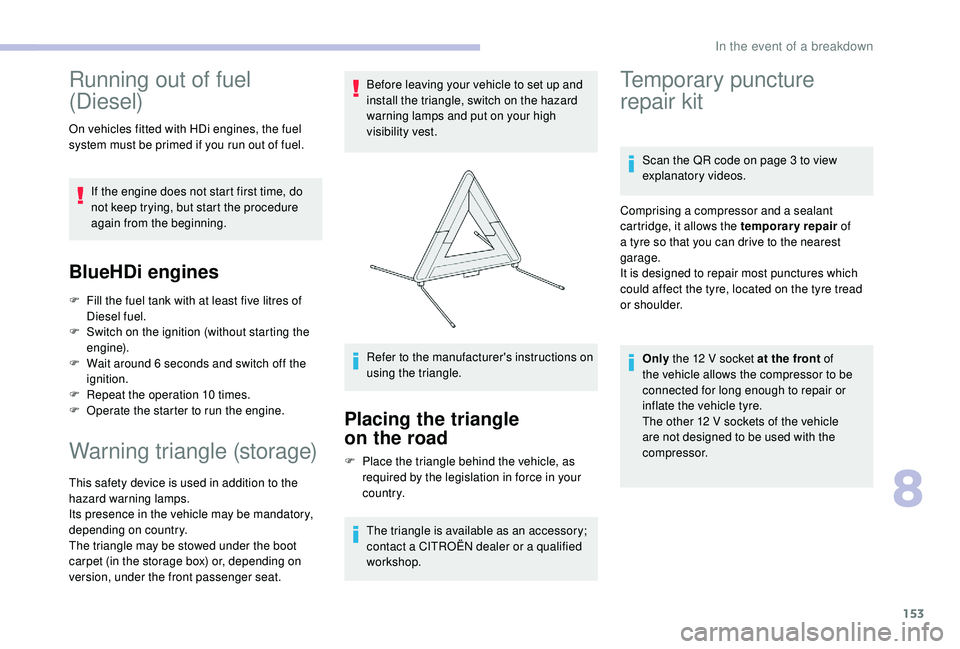
This safety device is used in addition to the
hazard warning lamps.
Its presence in the vehicle may be mandatory,
depending on country.
The triangle may be stowed under the boot
carpet (in the storage box) or, depending on
version, under the front passenger seat. Before leaving your vehicle to set up and
install the triangle, switch on the hazard
warning lamps and put on your high
visibility vest.
Refer to the manufacturer's instructions on
using the triangle.
Placing the triangle
on the road
F Place the triangle behind the vehicle, as
required by the legislation in force in your
c o u nt r y.
The triangle is available as an accessory;
contact a CITROËN dealer or a qualified
workshop.
Temporary puncture
repair kit
Scan the QR code on page 3 to view
explanatory videos.
Comprising a compressor and a sealant
cartridge, it allows the temporary repair of
a tyre so that you can drive to the nearest
garage.
It is designed to repair most punctures which
could affect the tyre, located on the tyre tread
or shoulder.
Only the 12 V socket at the front of
the vehicle allows the compressor to be
connected for long enough to repair or
inflate the vehicle tyre.
The other 12 V sockets of the vehicle
are not designed to be used with the
compressor.
8
In the event of a breakdown
Page 180 of 256
178
Engines and towed loads – Diesel
EngineBlueHDi 100BlueHDi 100 S&S
Gearbox 5-speed manual
(BVM5) 5-speed manual
(BVM5) 6-speed electronic
(ETG6)
Code DV6FD - BEDV6FD - BEDV6FD - MCP
Model codes 0BBHY0BBHY
Cubic capacity (cm
3) 1,5 6 0 1,5 6 0
Max power: EC standard (kW) 7373
Fuel DieselDiesel
Braked trailer (within the GTW limit) on a 10 or
12% slope (kg) 950
950950
Unbraked trailer (kg) 575575 615
Maximum authorised nose weight (kg) 555555
Technical data
Page 183 of 256
1
CITROËN Connect Nav
GPS satellite navigation –
Applications – Multimedia
audio system – Bluetooth
®
telephone
Contents
First steps
2
S
teering mounted controls
3
M
enus
4
V
oice commands
5
N
avigation
1
3
Connected navigation
1
5
Applications
1
8
Radio
2
3
DAB radio (Digital Audio Broadcasting)
2
4
Media
25
T
elephone
2
7
Settings
3
1
Frequently asked questions
3
3The different functions and settings
described vary according to the version
and configuration of your vehicle.
As a safety measure and because it
requires sustained attention by the
driver, the pairing of a Bluetooth mobile
telephone with the Bluetooth hands-free
system of your audio system must be
done with the vehicle stationary
and the
ignition on.
The system is protected in such a way that
it will only operate in your vehicle.
The display of the message Energy
Economy Mode signals that a change to
standby is imminent.
The link below gives access to OSS (Open
Source Software) codes for the system.
https://www.groupe-psa.com/fr/oss/
https://www.groupe-psa.com/en/oss/
.
CITROËN Connect Nav
Page 184 of 256
2
First steps
With the engine running, a press
mutes the sound.
With the ignition off, a press turns
the system on.
Increase or decrease the volume using
the wheel or the "plus" or "minus" buttons
(depending on the equipment).
Use the menu buttons on either side of or
below the touch screen for access to the
menus, then press the virtual buttons in the
touch screen.
Depending on the model, use the "Source"
or "Menu" buttons to access the menus, then
press the virtual buttons in the touch screen.
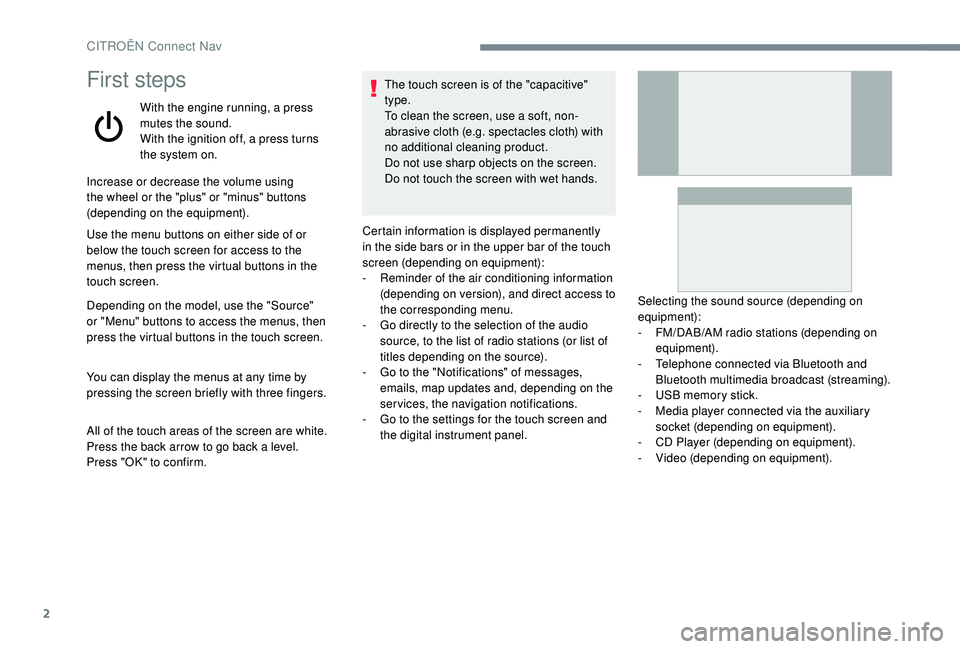
You can display the menus at any time by
pressing the screen briefly with three fingers.
All of the touch areas of the screen are white.
Press the back arrow to go back a level.
Press "OK" to confirm. The touch screen is of the "capacitive"
type.
To clean the screen, use a soft, non-
abrasive cloth (e.g. spectacles cloth) with
no additional cleaning product.
Do not use sharp objects on the screen.
Do not touch the screen with wet hands.
Certain information is displayed permanently
in the side bars or in the upper bar of the touch
screen (depending on equipment):
-
R
eminder of the air conditioning information
(depending on version), and direct access to
the corresponding menu.
-
G
o directly to the selection of the audio
source, to the list of radio stations (or list of
titles depending on the source).
-
G
o to the "Notifications" of messages,
emails, map updates and, depending on the
services, the navigation notifications.
-
G
o to the settings for the touch screen and
the digital instrument panel. Selecting the sound source (depending on
equipment):
-
F
M/DAB/AM radio stations (depending on
equipment).
-
T
elephone connected via Bluetooth and
Bluetooth multimedia broadcast (streaming).
-
U
SB memory stick.
-
M
edia player connected via the auxiliary
socket (depending on equipment).
-
C
D Player (depending on equipment).
-
V
ideo (depending on equipment).
CITROËN Connect Nav
Page 186 of 256

4
FM 87.5 MHz
Radio Media
Depending on equipment/Depending on
version.Select an audio source, a radio
station, display photographs.
Telephone
Depending on equipment/Depending on version.
Connect a telephone via Bluetooth
®,
read messages and emails and send
quick messages.
Settings
Depending on equipment/Depending on version.
Configure a personal profile and/
or configure the sound (balance,
ambience, etc.) and the display
(language, units, date, time, etc.).Applications
Depending on equipment/Depending on version.
Operate certain applications on
a smartphone connected via
CarPlay
®, MirrorLinkTM (available
depending on the country) or
Android Auto.
Check the state of the Bluetooth
®
and Wi-Fi connections.
Menus
Connected navigation
Depending on equipment/Depending on version.
Enter navigation settings and
choose a destination.
Use ser vices available in real time,
depending on equipment.
CITROËN Connect Nav
Page 192 of 256
10
Voice commandsHelp messages
Turn on source radio - Streaming
Bluetooth – … You can select an audio source by saying "turn on source" followed by the device name. For
example, "turn on source, Streaming Bluetooth", or "turn on source, radio". Use the command
"play" to specify the type of music you’d like to hear. You can choose between "song", "artist", or
"album". Just say something like "play artist, Madonna", "play song, Hey Jude", or "play album,
Thriller".
Tune to channel BBC Radio 2 You can pick a radio station by saying "tune to" and the station name or frequency. For example
"tune to channel Talksport" or "tune to 98.5 FM". To listen to a preset radio station, say for example
"tune to preset number five".
Tune to 98.5 FM
Tune to preset number five
What's playing?
To choose what you’d like to play, start by saying "play" and then the item. For example, say "play
song Hey Jude", "play line 3" or "select line 2". You can undo your last action and start over by
saying "undo", or say "cancel" to cancel the current action.
Play song Hey Jude I’m not sure what you’d like to play. Please say "play" and then a song title, an album title, or an
artist name. For example, say "play song Hey Jude", "play artist Madonna" or "play album Thriller".
To select a line number from the display, say "select line two". To move around a displayed list,
you can say "next page" or "previous page". You can undo your last action and start over by saying
"undo", or say "cancel" to cancel the current action.
Play ar tist Madonna
Play album Thriller
"Radio Media" voice
commands
These commands can be made from any screen page after pressing the " Voice commands" button located on the steering wheel, as long as there
is no telephone call in progress.
Media voice commands are available only for a USB connection.
CITROËN Connect Nav
Page 193 of 256
11
"Telephone" voice
commands
These commands can be made from any
screen page after pressing the " Voice
commands" button located on the steering
wheel, as long as there is no telephone
call in progress.
If there is no telephone connected by
Bluetooth, a voice message announces:
"Please first connect a telephone", and the
voice session will be closed.Voice commands
Help messages
Call David Miller'' To make a phone call, say "call" followed by
the contact name, for example: "Call David
Miller". You can also include the phone type,
for example: "Call David Miller at home". To
make a call by number, say "dial" followed by
the phone number, for example, "Dial 107776
835 417". You can check your voicemail by
saying "call voicemail". To send a text, say
"send quick message to", followed by the
contact, and then the name of the quick
message you’d like to send. For example,
"send quick message to David Miller, I’ll be
late". To display the list of calls, say "display
calls". For more information on SMS, you can
say "help with texting".
To choose a contact, say something like
"select line three". To move around the list
say "next page" or "previous page". You can
undo your last action and start over by saying
"undo", or say "cancel" to cancel the current
action.
Call voicemail*
Display calls*
*
T
his function is available only if the telephone connected to the system supports downloading
of contacts and recent calls and if the download has been done.
.
CITROËN Connect Nav
Page 194 of 256
12
"Text message" voice
commands
These commands can be made from any
screen page after pressing the " Voice
commands" button located on the steering
wheel, as long as there is no telephone
call in progress.
If there is no telephone connected by
Bluetooth, a voice message announces:
"Please first connect a telephone", and the
voice session will be closed.
The voice commands function "Text
messages" allows you to dictate and send
an SMS.
Dictate your text taking care to make a
short pause between each word.
At the end of the operation, the voice
recognition system will automatically
create an SMS.Voice commands
Help messages
Send quick message to Bill Car ter, I'll
be lateFrom the list of quick messages, say the
name of the one you’d like to send. To move
around the list you can say "go to start", "go to
end", "next page" or "previous page". You can
undo your last action and start over by saying
"undo", or say "cancel" to cancel the current
action.
Send SMS to John Miller, I'm just arriving Please say "call" or "send quick message to",
and then select a line from the list. To move
around a list shown on the display, you can
say "go to start", "go to end", "next page"
or "previous page". You can undo your last
action and start over by saying "undo", or say
"cancel" to cancel the current action.
Send SMS to David Miller at the office,
don't wait for me
Listen to most recent message*
To hear your last message, you can say
"listen to most recent message". When you
want to send a text, there’s a set of quick
messages ready for you to use. Just use the
quick message name and say something like
"send quick message to Bill Carter, I’ll be late".
Check the phone menu for the names of the
supported messages.
The system only sends pre-recorded
"Quick messages".
*
T
his function is available only if the
telephone connected to the system supports
downloading of contacts and recent calls
and if the download has been done.
CITROËN Connect Nav