ABS CITROEN C4 CACTUS 2017 Owners Manual
[x] Cancel search | Manufacturer: CITROEN, Model Year: 2017, Model line: C4 CACTUS, Model: CITROEN C4 CACTUS 2017Pages: 256, PDF Size: 7.62 MB
Page 11 of 256
9
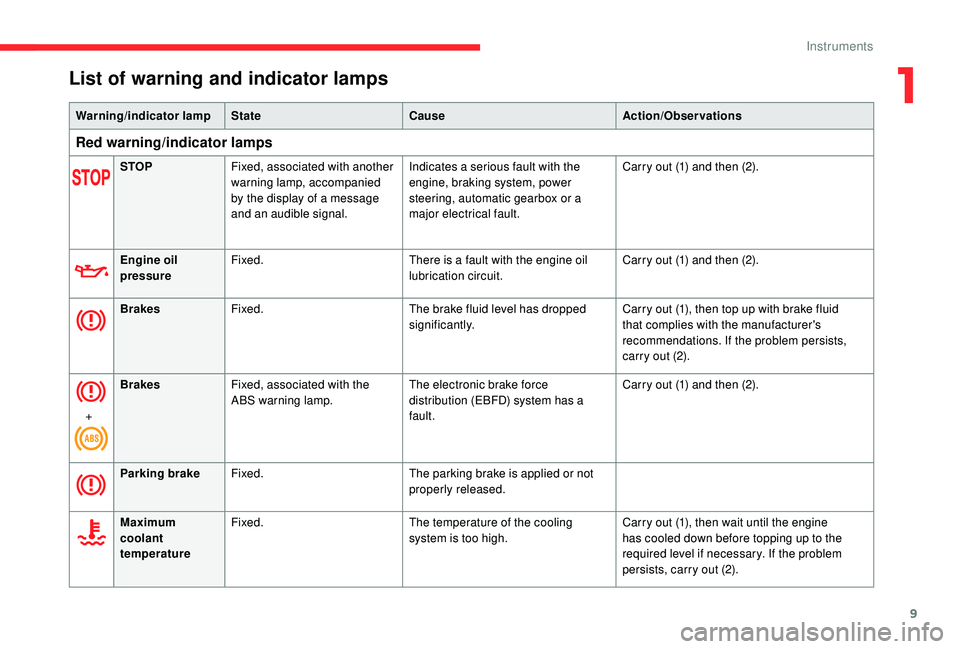
List of warning and indicator lamps
Warning/indicator lampState Cause Action/Observations
Red warning/indicator lamps
STOPFixed, associated with another
warning lamp, accompanied
by the display of a message
and an audible signal. Indicates a serious fault with the
engine, braking system, power
steering, automatic gearbox or a
major electrical fault. Carry out (1) and then (2).
Engine oil
pressure Fixed.
There is a fault with the engine oil
lubrication circuit. Carry out (1) and then (2).
Brakes Fixed. The brake fluid level has dropped
significantly. Carry out (1), then top up with brake fluid
that complies with the manufacturer's
recommendations. If the problem persists,
carry out (2).
+ Brakes
Fixed, associated with the
ABS warning lamp. The electronic brake force
distribution (EBFD) system has a
fault. Carry out (1) and then (2).
Parking brake Fixed. The parking brake is applied or not
properly released.
Maximum
coolant
temperature Fixed.
The temperature of the cooling
system is too high. Carry out (1), then wait until the engine
has cooled down before topping up to the
required level if necessary. If the problem
persists, carry out (2).
1
Instruments
Page 12 of 256

10
Warning/indicator lampState Cause Action/Observations
Battery charge Fixed. The battery charging circuit has a
fault (dirty or loose terminals, slack
or cut alternator belt, etc.). Clean and retighten the terminals. If the
warning lamp does not go off when the
engine is started, carry out (2).
Seat belt not
fastened/
unfastened Fixed or flashing,
accompanied by an audible
signal. A seat belt has not been fastened or
has been unfastened.
Orange warning/indicator lamps
Anti-lock
braking system
(ABS)Fixed.
The anti-lock braking system has a
fault. The vehicle retains conventional braking.
Drive carefully at reduced speed, then carry
out (3).
(1 ) : You must stop as soon as it is safe to do so and switch off the ignition.
(2): Contact a CITROËN dealer or a qualified workshop.
(3) : Go to a CITROËN dealer or a qualified workshop.
Instruments
Page 27 of 256
25
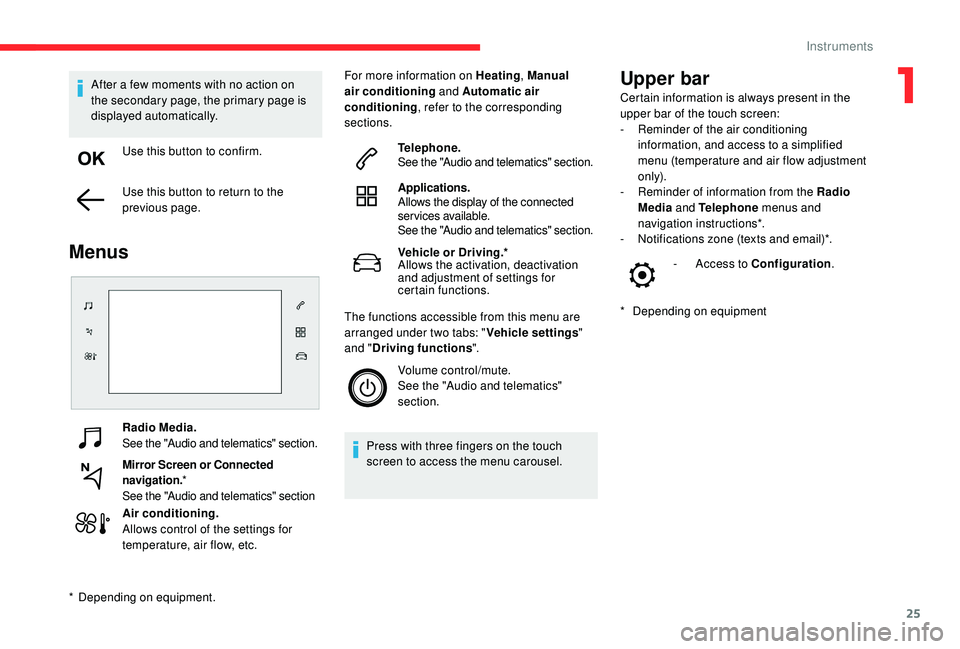
Radio Media.
See the "Audio and telematics" section.
Mirror Screen or Connected
navigation.*
See the "Audio and telematics" section
Air conditioning.
Allows control of the settings for
temperature, air flow, etc. For more information on Heating
, Manual
air conditioning and Automatic air
conditioning , refer to the corresponding
sections.
Telephone.
See the "Audio and telematics" section.
Applications.
Allows the display of the connected
services available.
See the "Audio and telematics" section.
Vehicle or Driving.*
Allows the activation, deactivation
and adjustment of settings for
certain functions.
The functions accessible from this menu are
arranged under two tabs: " Vehicle settings"
and " Driving functions ".
Volume control/mute.
See the "Audio and telematics"
section.
Press with three fingers on the touch
screen to access the menu carousel.
Upper bar
* Depending on equipment -
A
ccess to Configuration
.
After a few moments with no action on
the secondary page, the primary page is
displayed automatically.
Use this button to confirm.
Use this button to return to the
previous page.
Menus
* Depending on equipment. Certain information is always present in the
upper bar of the touch screen:
-
R
eminder of the air conditioning
information, and access to a simplified
menu (temperature and air flow adjustment
only).
-
R
eminder of information from the Radio
Media and Telephone menus and
navigation instructions*.
-
N
otifications zone (texts and email)*.
1
Instruments
Page 29 of 256

27
Configuration
The functions available via the upper
bar are detailed in the table below.
Some settings are accessible on a
secondary page.
Button Comments
Theme.
Audio settings.
Turn off screen.
System administration.
Languages.
Setting the date and time.
Adjustment of the display
parameters (text scrolling,
animations, etc.) and
brightness.
Choice and settings for three
user profiles.
CITROËN Connect Nav
ButtonComments
Switch off the screen.
Brightness adjustment.
Choice and settings for three
user profiles.
Choice of units:
-
t
emperature (°Celsius or
°Fahrenheit)
-
d
istances and fuel
consumption (l/100 km, mpg
or km/l).
Theme.
Languages.
Adjustment of the display
parameters (text scrolling,
animations, etc.) and
brightness.
Setting the date and time.
CITROËN Connect RadioTrip computer
Information displayed about the current journey
(range, fuel consumption, average speed, etc.).
The information is accessible via the touch
screen.
Display of information in
the touch screen
F In the " Applications " menu,
select the " Vehicle application "
tab, then " Trip computer ".
The trip computer information is displayed on
the page.
F
P
ress one of the buttons to display the
desired tab.
For a temporary display in a specific
window, press the end of the wiper control
stalk for access to the information and
scroll through the different tabs.
-
T
he current information tab with:
•
t
he remaining range,
•
t
he current fuel consumption,
•
t
he Stop & Start time counter.
1
Instruments
Page 43 of 256

41
When the vehicle automatically locks itself
again (as happens if a door or boot is not
opened within 30 seconds of unlocking),
the monitoring system is automatically
reactivated.
Triggering of the alarm
This is indicated by sounding of the siren
and flashing of the direction indicators for
30 seconds.
The monitoring functions remain active until
the alarm has been triggered eleven times
consecutively.
When the vehicle is unlocked using the remote
control or the
K
eyless Entry and Starting
system, rapid flashing of the locking button
indicator lamp informs you that the alarm
was triggered during your absence. When
the ignition is switched on, this flashing stops
immediately.
Locking the vehicle without
activating the alarm
F Lock or deadlock the vehicle using the key (integral to the remote control) in the driver's
door lock.
Failure of the remote
control
To deactivate the monitoring functions:
F u nlock the vehicle using the key (integral to
the remote control) in the driver's door lock,
F
O
pen the door; this sets off the alarm.
F
U
pon switching on the ignition, the alarm
stops. The button indicator lamp goes off.
The monitoring system is
deactivated: the indicator lamp in
the button goes off and the direction
indicators flash for about 2 seconds.
If a door, boot, etc. is not properly closed,
the vehicle is not locked but the exterior
perimeter monitoring will be activated after
45 seconds.
Deactivation
F Press the unlocking button on
the remote control.
or
F
U
nlock the vehicle with the
K
eyless Entry
and Starting system.
The exterior perimeter monitoring is activated
after five seconds.
Malfunction
When the ignition is switched on, and for
10 seconds after wards, the flashing of the
locking button indicator lamp indicates a
system fault.
Have the system checked by a CITROËN
dealer or a qualified workshop.
Front electric window
controls
1.
Front left.
2. Front right.
Manual operation
To open or close the window, press or pull the
switch gently, without exceeding the resistance
point. The window stops as soon as the switch
is released.
2
Access
Page 74 of 256

72
Electronic stability control
(ESC)
Electronic stability control integrating the
following systems:
-
a
nti-lock braking system (ABS) and
electronic brake force distribution (EBFD),
-
em
ergency braking assistance (EBA),
-
w
heel anti-slip regulation (ASR) or traction
control,
-
d
ynamic stability control (DSC).
Definitions
Anti-lock braking system (ABS)
and electronic brake force
distribution (EBFD)
This system improves the stability and
manoeuvrability of your vehicle when braking and
contributes towards improved control on corners, in
particular on poor or slippery road sur faces.
The ABS prevents wheel lock in the event of
emergency braking.
The electronic brake force distribution system (EBFD)
manages the braking pressure wheel by wheel.
Emergency braking assistance
(EBA)
In an emergency, this system permits the
optimum braking pressure to be reached
more quickly, therefore reducing the stopping
distance.
It is triggered in relation to the speed at which
the brake pedal is pressed. The effect of this is
a reduction in the resistance of the pedal and
an increase in braking efficiency.
Anti-slip regulation (ASR)
The ASR system (also known as Traction
Control) optimises traction in order to limit
wheel slip by acting on the brakes of the driving
wheels and on the engine. It also improves
the directional stability of the vehicle on
acceleration.
Dynamic stability control (DSC)
If there is a difference between the path
followed by the vehicle and that required by
the driver, the DSC monitors each wheel and
automatically acts on the brake of one or more
wheels and on the engine to return the vehicle
to the required path, within the limits of the laws
of physics.
If you benefit from the Citroën Connect
Box offer with the SOS and assistance
pack included, there are additional
ser vices available to you in your personal
space, via the website for your country.
Anti-lock braking system
(ABS) and electronic brake
force distribution (EBFD)
The fixed illumination of this warning
lamp indicates that there is a fault
with the ABS.
If this warning lamp comes on, in
conjunction with the STOP
and
ABS warning lamps, an audible
signal and a message, this indicates
that the electronic brake force
distribution (EBFD) is faulty.
You must stop as soon as it is
safe to do so.
In both cases, have the system
checked by a CITROËN dealer or
a qualified workshop as soon as
possible.
When changing wheels (tyres and rims),
ensure that these are approved for your
vehicle.
Normal operation of the ABS may make
itself felt by slight vibration of the brake
pedal.
If you need to brake in an emergency,
press the brake pedal ver y firmly and
keep the pressure applied.
Safety
Page 123 of 256
121
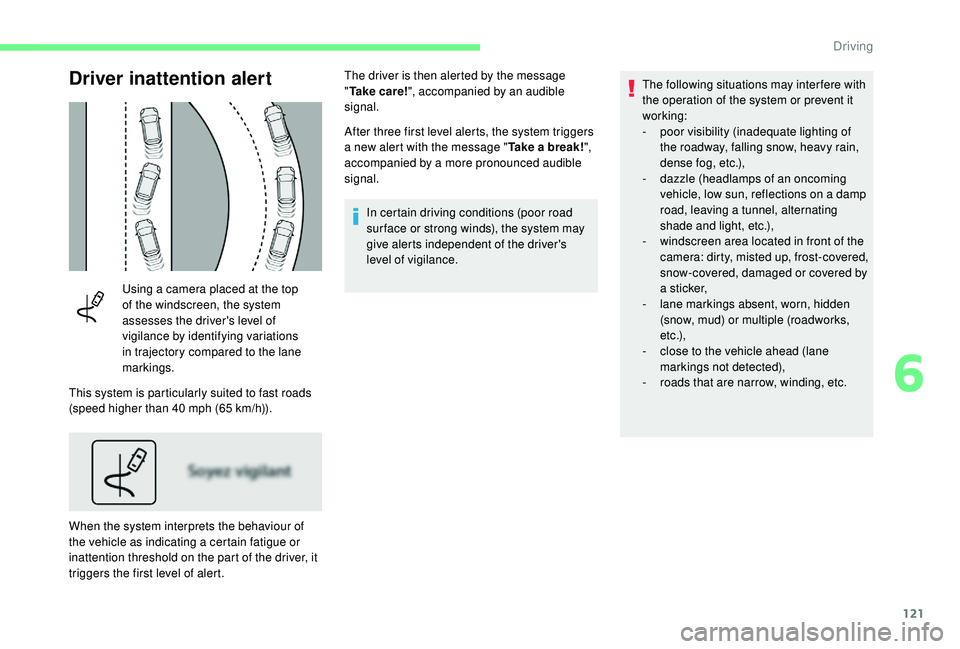
Driver inattention alert
Using a camera placed at the top
of the windscreen, the system
assesses the driver's level of
vigilance by identifying variations
in trajectory compared to the lane
markings.
This system is particularly suited to fast roads
(speed higher than 40 mph (65 km/h)).
When the system interprets the behaviour of
the vehicle as indicating a certain fatigue or
inattention threshold on the part of the driver, it
triggers the first level of alert. After three first level alerts, the system triggers
a new alert with the message "
Take a break!",
accompanied by a more pronounced audible
signal.
In certain driving conditions (poor road
sur face or strong winds), the system may
give alerts independent of the driver's
level of vigilance. The following situations may interfere with
the operation of the system or prevent it
working:
-
p
oor visibility (inadequate lighting of
the roadway, falling snow, heavy rain,
dense fog, etc.),
-
d
azzle (headlamps of an oncoming
vehicle, low sun, reflections on a damp
road, leaving a tunnel, alternating
shade and light, etc.),
-
w
indscreen area located in front of the
camera: dirty, misted up, frost-covered,
snow-covered, damaged or covered by
a s t i c ke r,
- l ane markings absent, worn, hidden
(snow, mud) or multiple (roadworks,
e t c .),
-
c
lose to the vehicle ahead (lane
markings not detected),
-
r
oads that are narrow, winding, etc.
The driver is then alerted by the message
"
Ta k e c a r e ! ", accompanied by an audible
signal.
6
Driving
Page 128 of 256
126
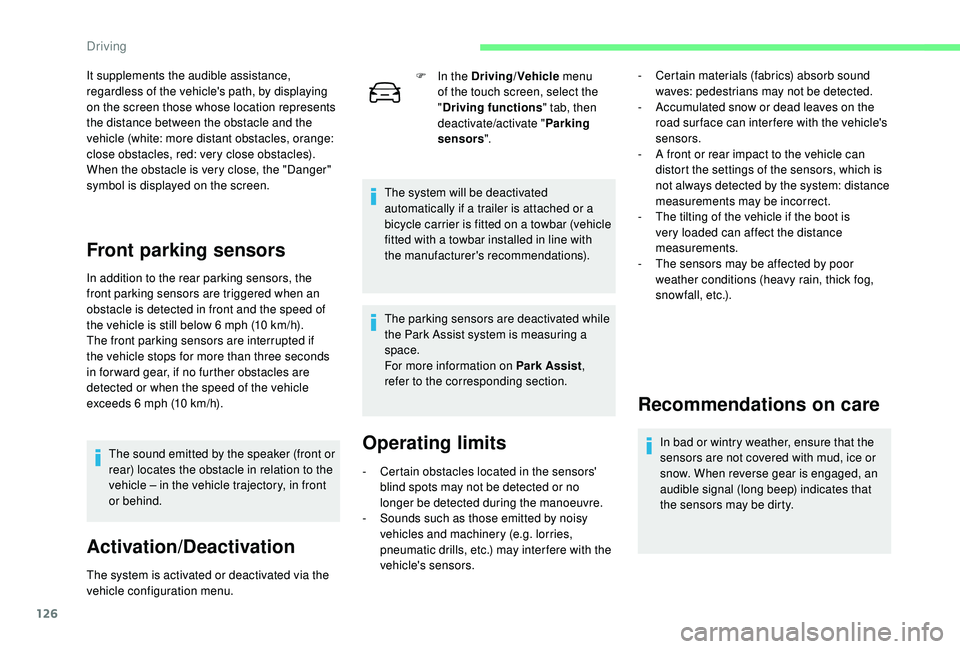
It supplements the audible assistance,
regardless of the vehicle's path, by displaying
on the screen those whose location represents
the distance between the obstacle and the
vehicle (white: more distant obstacles, orange:
close obstacles, red: very close obstacles).
When the obstacle is very close, the "Danger"
symbol is displayed on the screen.
Front parking sensors
In addition to the rear parking sensors, the
front parking sensors are triggered when an
obstacle is detected in front and the speed of
the vehicle is still below 6 mph (10 km/h).
The front parking sensors are interrupted if
the vehicle stops for more than three seconds
in for ward gear, if no further obstacles are
detected or when the speed of the vehicle
exceeds 6 mph (10 km/h).The sound emitted by the speaker (front or
rear) locates the obstacle in relation to the
vehicle – in the vehicle trajectory, in front
or behind.
Activation/Deactivation
The system is activated or deactivated via the
vehicle configuration menu. F
I
n the Driving/Vehicle
menu
of the touch screen, select the
" Driving functions " tab, then
deactivate/activate " Parking
sensors ".
The system will be deactivated
automatically if a trailer is attached or a
bicycle carrier is fitted on a towbar (vehicle
fitted with a towbar installed in line with
the manufacturer's recommendations).
The parking sensors are deactivated while
the Park Assist system is measuring a
space.
For more information on Park Assist ,
refer to the corresponding section.
Operating limits
- Certain obstacles located in the sensors' blind spots may not be detected or no
longer be detected during the manoeuvre.
-
S
ounds such as those emitted by noisy
vehicles and machinery (e.g. lorries,
pneumatic drills, etc.) may inter fere with the
vehicle's sensors. -
C
ertain materials (fabrics) absorb sound
waves: pedestrians may not be detected.
-
A
ccumulated snow or dead leaves on the
road sur face can inter fere with the vehicle's
sensors.
-
A f
ront or rear impact to the vehicle can
distort the settings of the sensors, which is
not always detected by the system: distance
measurements may be incorrect.
-
T
he tilting of the vehicle if the boot is
very loaded can affect the distance
measurements.
-
T
he sensors may be affected by poor
weather conditions (heavy rain, thick fog,
snowfall, etc.).
Recommendations on care
In bad or wintry weather, ensure that the
sensors are not covered with mud, ice or
snow. When reverse gear is engaged, an
audible signal (long beep) indicates that
the sensors may be dirty.
Driving
Page 133 of 256
131
The manoeuvring symbol is displayed in red,
accompanied by the "Manoeuvre cancelled "
message on the touch screen.
A message encourages the driver to take back
control of their vehicle.
The function is deactivated after a few seconds
and returns to the initial display.
End of the parking space entry or
exit manoeuvre
The vehicle stops as soon as the manoeuvre is
completed.
The manoeuvre symbol is displayed in red
accompanied by the message " Manoeuvre
completed " on the touch screen.
When deactivated, the indicator lamp in the
button goes off, accompanied by an audible
signal.
If entering a parking space, the driver may be
required to complete the manoeuvre.
Operating limits
- The system can suggest an inappropriate parking space (parking prohibited, work
in progress with damaged road sur face,
location alongside a ditch, etc.).
-
T
he system is not designed for per forming
the parking manoeuvre on a sharp curve. The vehicle's sensors and camera(s) may be
impaired by:
-
a
ccumulated snow or fallen leaves on the
road,
-
a
dverse weather conditions (heavy rain,
thick fog, falling snow),
-
nois
e interference from noisy vehicles and
machinery (lorries, pneumatic drills, etc.). Do not use the system:
-
A
longside a soft shoulder (ditch) or
quay or on a cliff edge.
-
W
hen carrying an object extending
beyond the vehicle size (ladder on the
roof bars, bike carrier on the tailgate,
e t c .) .
-
W
ith a non-approved tow ball in place.
-
W
ith snow chains fitted.
-
I
n the event of under-inflation of a tyre.
-
W
hen driving on a small-diameter or
"space-saver" type spare wheel.
-
W
hen the wheels fitted are different
from the original ones.
-
I
f one of the bumpers is damaged.
-
A
fter modifying one or both bumpers
(adding protection, etc.).
-
I
f a camera is faulty.
-
I
f the sensors have been repainted
outside the CITROËN dealer network.
-
W
ith sensors not approved for your
vehicle.
-
W
hen the road sur face is slippery (ice,
e t c .) .
-
T
he system does not detect spaces that are
much larger than the vehicle itself or that
are delimited by obstacles that are too low
(pavements, studs, etc.) or too thin (trees,
posts, wire fences, etc.).
-
C
ertain obstacles located in the sensors'
blind spots may not be detected or no
longer detected during the manoeuvre.
-
C
ertain materials (fabrics) absorb sound
waves: pedestrians may not be detected.
-
A f
ront or rear impact to the vehicle can
upset the sensor settings which is not
always detected by the system: distance
measurements may be falsified.
-
I
f the boot is heavily loaded, the tilt of the
vehicle towards the rear may inter fere with
the distance measurements.
6
Driving
Page 166 of 256
164
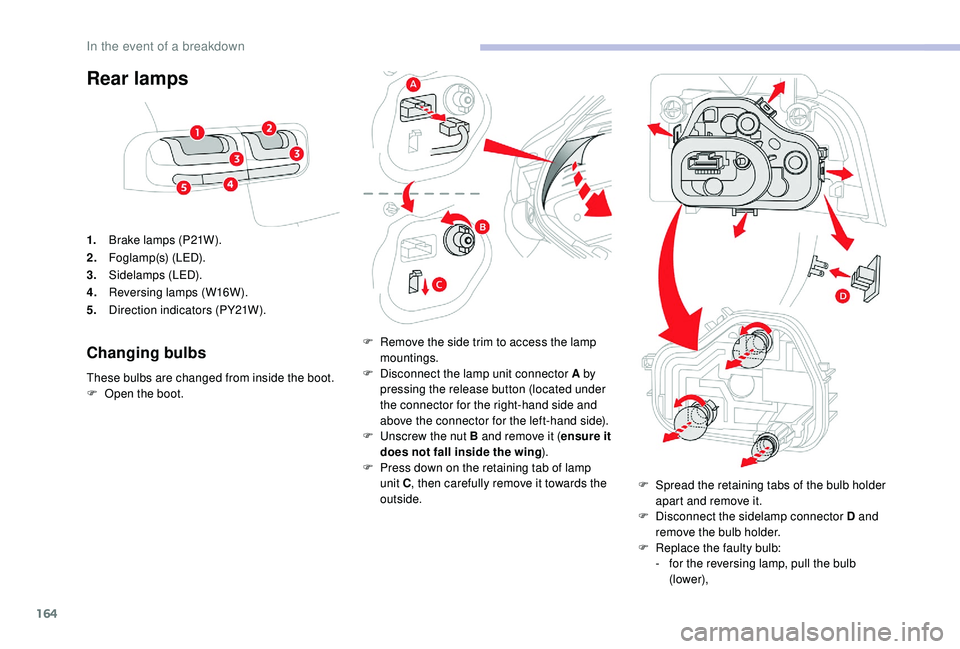
Rear lamps
1.Brake lamps (P21W).
2. Foglamp(s) (LED).
3. Sidelamps (LED).
4. Reversing lamps (W16W).
5. Direction indicators (PY21W).
Changing bulbs
These bulbs are changed from inside the boot.
F
O pen the boot. F
R
emove the side trim to access the lamp
mountings.
F D isconnect the lamp unit connector A by
pressing the release button (located under
the connector for the right-hand side and
above the connector for the left-hand side).
F
U
nscrew the nut B and remove it (ensure it
does not fall inside the wing ).
F
P
ress down on the retaining tab of lamp
unit C , then carefully remove it towards the
outside. F
S
pread the retaining tabs of the bulb holder
apart and remove it.
F
D
isconnect the sidelamp connector D and
remove the bulb holder.
F
R
eplace the faulty bulb:
-
f
or the reversing lamp, pull the bulb
(lower),
In the event of a breakdown