gps CITROEN C4 CACTUS 2017 Owners Manual
[x] Cancel search | Manufacturer: CITROEN, Model Year: 2017, Model line: C4 CACTUS, Model: CITROEN C4 CACTUS 2017Pages: 256, PDF Size: 7.62 MB
Page 31 of 256

29
When travelling abroad, you may have to
change the units of distance: the display
of road speed must be in the official units
(miles or km) for the country.
The change of units is done via the screen
configuration menu, with the vehicle
stationary.
Total distance recorder
It measures the total distance travelled by the
vehicle since its first registration.
Trip recorder
It measures the distance travelled since it was
reset to zero by the driver.
This function can be accessed by the touch
screen's trip computer. F
I
n the "
Applications "
menu, select the " Vehicle
Application " tab, then "Tr i p
Computer ".
F
S
elect the trip "
1" or trip " 2" tab.
F
T
o reset the trip recorder to zero, press
the " Reset " button or the end of the wiper
control stalk until zeros appear.
Setting the date and time
With CITROËN Connect
Radio
F Select the Settings menu.
F T hen "Configuration ".
F
Sel
ect " System configuration ".
F
Sel
ect "Date and time ".
F
Sel
ect " Date " or "Time ".
F
C
hoose the display formats.
F
C
hange the date and/or time using the
numeric keypad.
F
C
onfirm with " OK".
With CITROËN Connect
Nav
Setting of the time and date is only available if
synchronisation with the GPS is deactivated.
F
Sel
ect the Settings menu.
F
P
ress the " OPTIONS " button to go to the
secondary page.
F
Sel
ect "Setting the time- date".
F
Sel
ect the " Date" or "Time " tab.
F
S
et the date and/or time using the numeric
keypad.
F
C
onfirm with " OK".
Additional adjustments
You can choose:
-
T o change the display format of the date
and time (12h/24h).
-
T
o activate or deactivate the summer/winter
time management function.
-
T
o activate or deactivate the
synchronisation with the GPS (UTC).
1
Instruments
Page 183 of 256
1
CITROËN Connect Nav
GPS satellite navigation –
Applications – Multimedia
audio system – Bluetooth
®
telephone
Contents
First steps
2
S
teering mounted controls
3
M
enus
4
V
oice commands
5
N
avigation
1
3
Connected navigation
1
5
Applications
1
8
Radio
2
3
DAB radio (Digital Audio Broadcasting)
2
4
Media
25
T
elephone
2
7
Settings
3
1
Frequently asked questions
3
3The different functions and settings
described vary according to the version
and configuration of your vehicle.
As a safety measure and because it
requires sustained attention by the
driver, the pairing of a Bluetooth mobile
telephone with the Bluetooth hands-free
system of your audio system must be
done with the vehicle stationary
and the
ignition on.
The system is protected in such a way that
it will only operate in your vehicle.
The display of the message Energy
Economy Mode signals that a change to
standby is imminent.
The link below gives access to OSS (Open
Source Software) codes for the system.
https://www.groupe-psa.com/fr/oss/
https://www.groupe-psa.com/en/oss/
.
CITROËN Connect Nav
Page 196 of 256
14
Select "My destinations ".
Select the " Contact" tab.
Select a contact in the list to start navigation.
To points of interest (POI)
Points of Interest (POI) are listed in different
categories.
Press Navigation to display the
primary page.
Press the " MENU" button to go to the
secondary page.
Select "Points of interest ".
Select the " Tr a v e l", or "Leisure "
or " Commercial" or " Public" or
" Geographic " tab.
Or Select "Search" to enter the name
and address of a POI. Press "
OK" to start calculation of
the route.
To a point on the map
Press Navigation to display the
primary page.
Explore the map by sliding a finger on the
screen.
Select the destination by pressing on the map.
Tap the screen to place a marker
and display the sub-menu.
Press this button to start navigation.
Or Press this button to save the
address displayed.
A long press on an item opens a list of
POIs nearby.
To GPS coordinates
Press Navigation to display the
primary page. Explore the map by sliding a finger on the
screen.
Touch the screen with a finger to go to the next
image.
Press this button to display the world
map.
Using the grid, select by zoom the
desired country or region.
Press this button to display or enter
the GPS coordinates.
A marker is displayed in the middle
of the screen, with the " Latitude"
and " Longitude " coordinates.
Choose the type of coordinates:
DMS for: Degrees, Minutes, Seconds.
DD for: Degrees, Decimals. Press this button to start navigation.
Or Press this button to save the
address displayed.
OR Press this button to enter the value
for "Latitude " using the virtual
keypad.
CITROËN Connect Nav
Page 197 of 256
15
AndPress this button to enter the value
for "Longitude " using the virtual
keypad.
TMC (Traffic Message
Channel)
TMC (Traffic Message Channel)
messages are linked to a European
standard on the broadcasting of traffic
information via the RDS system on FM
radio, transmitting traffic information in
real time.
The TMC information is then displayed
on a GPS Navigation system map and
taken into account straight away during
navigation, so as to avoid accidents, traffic
jams and closed roads.
The display of danger zones depends on
the legislation in force and subscription to
the service.
Connected navigation
Depending on version
Depending on the equipment level of the
vehicle
Network connection provided by
the vehicle
OR
Network connection provided by
the user
For the list of eligible smartphones, go
to the brand's internet website in your
c o u nt r y.
Connected navigation
connection
As a safety measure and because it
requires sustained attention by the driver,
using a smartphone when driving is
prohibited.
All operations must be done with the
vehicle stationary . For access to connected navigation, you
can use the connection provided by the
vehicle via the "Emergency or assistance
call" ser vices or use your smartphone as
a modem.
Activate and enter settings for sharing
the smartphone connection.
Network connection provided by
the vehicle
The system is automatically
connected to the modem included
for the "Emergency or assistance
calls" ser vices and does not require
a connection provided by the user
via their smartphone.
Network connection provided by
the user
Connect a USB cable.
The smartphone charges when
connected by a USB cable.
USB connection
Activate the Bluetooth function on
the telephone and ensure that it is
visible to all (see the "Applications"
section).
Bluetooth connection
.
CITROËN Connect Nav
Page 215 of 256

33
Select "Date".
Press this button to define the date.
Press " OK" to confirm.
Select the display format of the date.
Adjustment of the time and date is only
available if "GPS synchronisation" is
deactivated.
Setting the time
Press Settings to display the
primary page.
Press the " OPTIONS" button to go to the
secondary page.
Select "Set time-date ".
Select " Time".
Press this button to adjust the time
using the virtual keypad.
Press " OK" to confirm. Press this button to define the time
zone.
Select the display format for the time
(12 h / 24 h).
Activate or deactivate summer time
(+1 h o ur).
Activate or deactivate
synchronisation with GPS (UTC).
Press "
OK" to confirm.
The system does not automatically manage
the change between winter and summer
time (depending on the country of sale).
Colour schemes
Depending on equipment/Depending on
version. As a safety measure, the procedure
for changing the colour scheme is only
possible when the vehicle is stationary .
Press Settings to display the
primary page. Select "
Colour schemes ".
Select a colour scheme in the list
then press " OK" to confirm.
Every time the colour scheme is changed,
the system restarts, temporarily displaying
a black screen.
Frequently asked
questions
The following information groups together the
answers to the most frequently asked questions
concerning your system.
.
CITROËN Connect Nav
Page 217 of 256

35
Radio
QUESTIONRESPONSESOLUTION
The reception quality of the tuned radio station
gradually deteriorates or the stored stations are
not working (no sound, 87.5 MHz is displayed,
e t c .) . The vehicle is too far from the transmitter of
the station or no transmitter is present in the
geographical area.
Activate the "RDS" function by means of the
short-cut menu to enable the system to check
whether there is a more power ful transmitter in
the geographical area.
The environment (hills, buildings, tunnels,
basement car parks, etc.) block reception,
including in RDS mode. This phenomenon is normal and does not
indicate a failure of the audio equipment.
The aerial is absent or has been damaged (for
example when going through a car wash or into
an underground car park). Have the aerial checked by a dealer.
The altitude is not displayed.
On starting, the initialisation of the GPS may
take up to 3 minutes to receive more than
4 satellites correctly.Wait until the system has started up completely
so that there is GPS coverage by at least
4
satellites.
Depending on the geographical environment
(tunnel, etc.) or the weather, the conditions of
reception of the GPS signal may vary. This behaviour is normal. The system is
dependent on the GPS signal reception
conditions.
My navigation is no longer connected. During start-up and in certain geographical
areas, the connection may be unavailable.Check that the connected ser vices are
activated (settings, contract).
.
CITROËN Connect Nav
Page 221 of 256

39
Settings
QUESTIONRESPONSESOLUTION
When changing the setting of treble and bass,
the equalizer setting is deselected.
When changing the equalizer setting, the treble
and bass settings are reset. The selection of an equalizer setting imposes
the settings for treble and bass and vice versa.
Modify the treble and bass or equalizer settings
to obtain the desired musical ambience.
When changing the balance setting,
distribution is deselected.
When changing the distribution setting, the
balance setting is deselected. The selection of a distribution setting imposes
the balance settings and vice versa.
Modify the balance setting or the distribution
setting to obtain the desired sound quality.
There is a difference in sound quality between
the different audio sources. To allow for optimal listening quality, the
audio settings can be tailored to different
sound sources, which can generate audible
differences when changing source.Check that the audio settings are adapted to
the sources listened to. It is recommended that
the audio settings (Bass:, Treble:, Balance)
be adjusted to the middle position, select the
"None" musical ambience and set the loudness
correction to the "Active" position in CD mode
or to the "Inactive" position in radio mode.
When the engine is off, the system switches off
after several minutes of use. When the engine is switched off, the system's
operating time depends on the state of charge of
the battery.
The switch-off is normal: the system automatically
goes into energy economy mode and switches off
to maintain an adequate charge in the battery.Start then vehicle's engine to increase the
charge of the battery.
The date and time cannot be set. Setting of the date and time is only available
if the synchronisation with the satellites is
deactivated.Settings menu/Options/Time-Date setting.
Select the "Time" tab and deactivate the "GPS
synchronisation" (UTC).
.
CITROËN Connect Nav
Page 239 of 256
17
Activate or deactivate:
- "No sharing (data, vehicle
position) ".
-
"Data sharing only "
-
"Sharing data and the vehicle
position "
Press the back arrow to confirm.
Press Settings to display the
primary page.
Press " Configuration " to go to the
secondary page.
Press " Screen configuration ".
Press " Brightness ".
Move the cursor to adjust the
brightness of the screen and/or of
the instrument panel (depending on
the version).
Press the back arrow to confirm.
Press " Animation ".
Activate or deactivate: " Automatic
scrolling ".
Select " Animated transitions ".Press the back arrow to confirm.
Select the language
Press Settings
to display the
primary page.
Press " Configuration " to go to the
secondary page.
Select " Language " to change the
language.
Press the back arrow to confirm.
Setting the time
Press Settings to display the
primary page.
Press " Configuration " to go to the
secondary page.
Press " Date and time ".
Select " Time". Press this button to adjust the time
using the virtual keypad.
Press "
OK" to save the time.
Press this button to define the time
zone.
Select the display format for the time
(12 h / 24 h).
Activate or deactivate summer time
(+1 h o ur).
Activate or deactivate
synchronisation with GPS (UTC).
Press the back arrow to save the
settings.
The system does not automatically manage
the change between winter and summer
time (depending on the country of sale).
Setting the date
Press Settings to display the
primary page.
.
CITROËN Connect Radio
Page 240 of 256
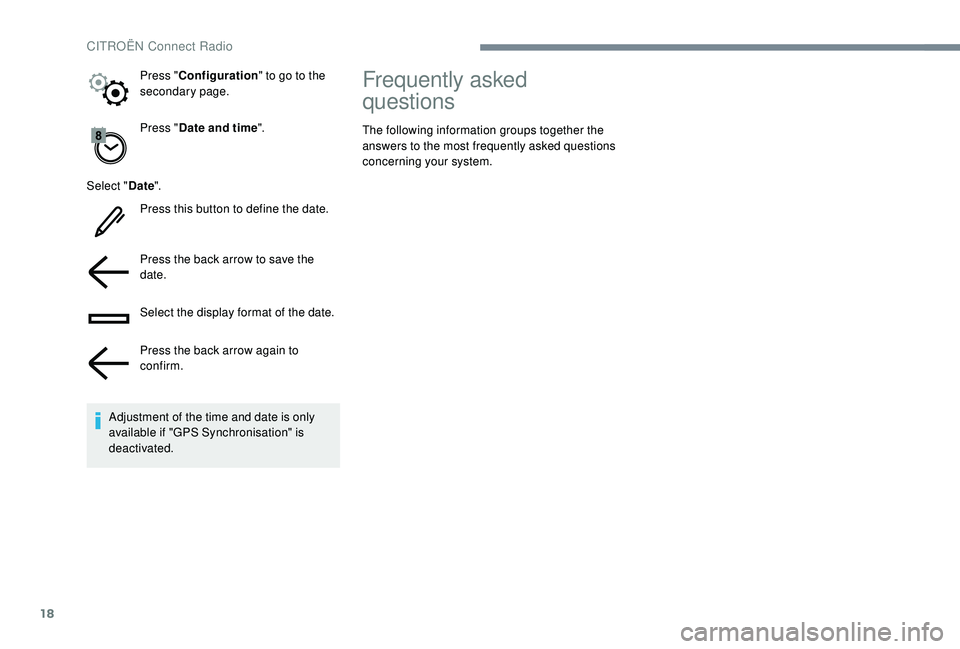
18
Press "Date and time ".
Select " Date".
Press this button to define the date.
Press the back arrow to save the
date.
Select the display format of the date.
Press the back arrow again to
confirm.
Adjustment of the time and date is only
available if "GPS Synchronisation" is
deactivated. Press "
Configuration " to go to the
secondary page.
Frequently asked
questions
The following information groups together the
answers to the most frequently asked questions
concerning your system.
CITROËN Connect Radio
Page 246 of 256

182
D
Control, emergency boot release ...................40
Control, emergency door .......................... 3
6 -37
Control, heated seats
................................44-45
Control stalk, lighting
................................61, 64
Control stalk, wipers
...........................65
-66, 68
Courtesy lamp
............................................... 165
Courtesy lamps
......................................... 54-55
Cover, load space
........................................... 60
Cruise control
.................................. 112, 114 -11 6
Cruise control by speed limit recognition
.....112
Cup holder
....................................................... 56Earth point, remote .......................................
14 4
Eco-driving (advice) ..........................................6
Economy mode
............................................. 14
0
Electronic brake force distribution (EBFD)
.....72
Emergency braking assistance (EBA)
............72
Emergency call
..........................................70 -71
Emergency switching off
.................................99
Emissions control system, SCR
...................149
Energy economy mode
................................. 14
0
Engine compartment
.................................... 14
4
Engine, Diesel
.........................16, 13 6 , 15 3 , 178
Engine, petrol
...............................
.13 6 , 14 4 , 17 7
Engines
..................................................176 -178
Environment
................................................6, 38
E
F
G
H
Fatigue detection ................................... 120 -121
Filling the AdBlue® tank ................................ 15 0
Filling the fuel tank .................................13 6 -13 8
Filter, air
........................................................ 147
Filter, Diesel fuel
........................................... 14 4
Filter, oil
................
......................................... 147
Filter, particle
......................................... 14 6 -147
Filter, passenger compartment
..................... 147
Fitting a wheel
........................................ 15 9 -161
Fitting roof bars
............................................. 142
Fittings, boot
............................................. 59-60
Fittings, interior
............................................... 5
6
Flap, fuel filler
......................................... 137-13 8
Foglamp, rear
.................................... 17, 62, 16 4
Foglamps, front
.................... 61- 62, 65, 162-163
Foglamps, rear
................................................ 61
F
requency (radio)
...................................... 23 -24Gauge, fuel
............................................. 137-13 8
Gearbox, automatic
....
6, 101-103 , 107-109, 148
Gearbox, electronic
..................
6, 103 -10 6 , 148
Gearbox, manual
................
6, 56 , 58 , 10 0 , 107-109 , 148
Gear lever
.........................................................
6
Gear lever, electronic gearbox
.....................
148
Gear lever, manual gearbox
.........................
10 0
Gear shift indicator ~ Gear efficiency indicator
.....................................
10 6
Glove box ........................................................
56
GPS. ................ ................................................
14
Grip control ................................................74 -75
Hazard warning lamps
............................70, 15 3
Hazard warning lamps, automatic operation
...................................... 70
H
eadlamps, automatic illumination
..........61, 63
Headlamps, dipped beam
.......................61, 162
Headlamps, main beam
....................18, 61 , 162
Head restraints, front
......................................44
Head restraints, rear
.......................................46
Heating
.................................................. 6,
5 0 - 51
Hill start assist
...............................................107
Hooks
..............................................................59
Horn ................................................................. 70
DAB (Digital Audio
Broadcasting) – Digital radio
....................
24, 8
Date (setting)
.......................................
29, 32 , 17
Daytime running lamps
.............................
61, 63
Daytime running lamps, LED
........................
162
Deactivating the passenger airbag 7
8 -79
, 82- 83
Deactivation of DSC (ESC)
.............................
73
Deadlocking
.............................................. 33, 35
Defrosting
........................................................ 54
Defrosting, front
.............................................. 54
Demisting
........................................................ 54
Demisting, front
............................................... 54
D
imensions
..............................
..................... 179
Dipstick
................
............................. 21, 14 4 -145
Direction indicators
................... 62, 64, 162-16 4
Display screen, instrument panel
................. 10 6
Distance alert ~ Collision Risk Alert
............. 117
Doors
............................................................... 39
Driver's attention warning
............................. 12
1
Driving economically ......................................... 6
Driving time warning
..................................... 120
Dynamic stability control (DSC)
........... 15, 72-75 Fuel
............................................................ 6 , 13 6
Fuel consumption
..............................................
6
Fuel tank ........................................................ 13 8
Fusebox, engine compartment
.....................
170
Fuses
....................................... 16
6 -167
, 16 9 -170
Alphabetical index