key battery CITROEN C4 CACTUS 2017 Owners Manual
[x] Cancel search | Manufacturer: CITROEN, Model Year: 2017, Model line: C4 CACTUS, Model: CITROEN C4 CACTUS 2017Pages: 256, PDF Size: 7.62 MB
Page 5 of 256
3
.
.
Driving recommendations 94
Anti-theft protection 9 5
Starting/Switching off the engine
with the key
9
6
Starting/Switching off the engine with
K
eyless Entry and Starting
9
7
Parking brake
1
00
5-speed manual gearbox
1
00
6-speed manual gearbox
1
00
Automatic gearbox (EAT6)
1
01
Electronic gearbox (ETG)
1
03
Gear ef ficiency indicator
1
06
Hill start assist
1
07
Stop & Start
1
07
Recognition of speed limit signs and
recommendation
110
Speed limiter
1
13
Cruise control
1
14
Collision Risk Alert and Active Safety Brake
1
17
Fatigue detection system
1
20
Lane Departure Warning System
1
22
Blind spot monitoring
1
23
Parking sensors
1
25
Reversing camera
1
27
Park Assist
1
27
Tyre under-inflation detection
1
32Compatibility of fuels 1
36
Fuel tank 1 37
Misfuel prevention (Diesel)
1
38
Snow chains
1
38
Very cold climate screens
1
39
Towing device
1
40
Load reduction mode
1
40
Energy economy mode
1
40
Changing a wiper blade
1
41
Roof bars
1
42
Bonnet
143
Engines
1
44
Checking levels
1
44
Checks
147
AdBlue
® (BlueHDi engines) 1 49
Advice on care and maintenance 1 52
Running out of fuel (Diesel)
1
53
Warning triangle (storage)
1
53
Temporary puncture repair kit
1
53
Spare wheel
1
57
Changing a bulb
1
61
Changing a fuse
1
66
12 V battery
1
71
To w i n g
174Engine technical data and towed loads
1
76
Engines and towed loads – Petrol
1
77
Engines and towed loads – Diesel
1
78
Dimensions
179
Identification markings
1
79
Driving
Practical information
In the event of a breakdown Technical data
Alphabetical index
bit.ly/helpPSA
Audio and telematics
CITROËN Connect Nav
CITROËN Connect Radio
.
Contents
Page 33 of 256

31
Remote control and key
The remote control can be used for the
following remote functions, depending on
version:
-
u
nlocking/locking/deadlocking the vehicle,
-
u
nlocking and partial opening of the boot,
-
o
pening the fuel tank cap (without
K
eyless
Entry and Starting),
-
l
ocking/unlocking the fuel filler flap (with
K
eyless Entry and Starting),
-
l
ocating the vehicle,
-
v
ehicle immobiliser.
The remote control includes a conventional key
that allows the central locking or unlocking of
the vehicle using the door lock, and starting
and switching off the engine.
Under normal operating conditions, it is
preferable to use the remote control.
Integral key
Ejecting the key
Version without K eyless Entr y and Star ting
F T o eject the key from the housing, press the
button.
F
P
ress the button before folding the key back
to avoid damaging the mechanism.
Version with
K
eyless Entr y and Star ting
F
T
o eject the key from the housing, pull and
hold the button.
F
P
ull and hold the button before returning the
key.
Emergency procedures allow the vehicle to
be locked or unlocked in the event of a failure
of the remote control, the central locking,
the battery, etc. For more information on
the Emergency procedures
, refer to the
corresponding section.
Remote control function
The key built into the remote control can be
used for the following functions, depending on
version:
-
u
nlocking/locking/deadlocking the vehicle,
-
t
urning the manual child lock on or off,
-
a
ctivating/deactivating the front passenger
airbag,
-
em
ergency door locking,
-
s
witching on the ignition and starting/
switching off the engine.
2
Access
Page 36 of 256

34
Accumulations (water, dust, grime, salt,
etc.) on the inner sur face of the door
handle may affect detection.
If cleaning the inner sur face of the door
handle using a cloth does not restore
detection, contact a CITROËN dealer or a
qualified workshop.
A sudden splash of water (stream of water,
high pressure jet washer, etc.) may be
identified by the system as the desire to
open the vehicle.
For safety and theft protection reasons,
do not leave your electronic key in the
vehicle, even when you are close to it.
It is recommended that you keep it with
you.If one of the doors or the boot is still open
or if the electronic key for the
K eyless
Entry and Starting system has been left
inside the vehicle, the central locking does
not take place.
If the vehicle is unlocked inadvertently
and there is then no action on the doors
or boot, the vehicle will automatically lock
itself again after about thirty seconds.
The folding and automatic unfolding of the
door mirrors can be deactivated by the
vehicle's configuration menu.
As a safety measure (children on board),
never leave the vehicle without taking the
electronic key for the
K
eyless Entry and
Starting system with you, even for a short
period.
Be aware of the risk of theft when the
electronic key for the
K
eyless Entry and
Starting system is in one of the defined
zones with the vehicle unlocked. In order to preser ve the battery in the
electronic key and the vehicle's battery,
the "hands-free" functions are put into
long-term standby after 21 days without
use. To restore these functions, press
one of the remote control buttons or start
the engine with the electronic key in the
reader.
For more information on Starting/
Switching off the engine with
K
eyless
Entr y and Star ting , refer to the
corresponding section.
Locking the vehicle
Normal locking
F With the electronic key in the recognition zone, press with your finger or thumb
on one of the front door handles (at the
markings) to lock the vehicle.
It is not possible to lock the vehicle if one of the
keys is left inside it.
Access
Page 38 of 256

36
Remote control
The high frequency remote control is a
sensitive system; do not handle it in your
pocket as it may unlock the vehicle without
you being aware of it.
Do not repeatedly press the buttons of your
remote control out of range and out of sight
of your vehicle. The remote control may stop
working and need to be reinitialised.
The remote control does not operate when
the key is in the ignition, even when the
ignition is switched off.Electrical interference
The
K eyless Entry and Starting electronic
key may not operate if close to certain
electronic devices: telephone, laptop
computer, strong magnetic fields, etc.
Locking the vehicle
Driving with the doors locked may make
access to the passenger compartment by
the emergency ser vices more difficult in an
emergency.
As a safety precaution (with children on
board), remove the key from the ignition or
take the electronic key when you leave the
vehicle, even for a short time. Anti-theft protection
Do not make any modifications to the
electronic vehicle immobiliser system as this
could cause malfunctions.
For vehicles with an ignition switch, do
not forget to remove the key and turn the
steering to engage the steering lock.Emergency procedures
Lost keys, remote control,
electronic key
Visit a CITROËN dealer with the vehicle's
registration certificate, your personal
identification documents and if possible, the
label bearing the key code.
The CITROËN dealer will be able to retrieve the
key code and the transponder code required to
order a new key.
Complete unlocking/locking
of the vehicle with the key
Use these procedures in the following cases:
-
r emote control cell battery flat,
-
r
emote control fault,
-
v
ehicle in an area subject to strong
electromagnetic interference.
In the first case, you can also replace the
remote control cell battery.
In the second case, you can also reinitialise the
remote control.
Refer to the corresponding sections.
Access
Page 39 of 256
37
Central locking not
functioning
Use these procedures in the following cases:
- c entral locking fault,
-
b
attery disconnected or discharged. In the event of a malfunction with the
central locking system, the battery must
be disconnected to lock the boot and thus
ensure that the vehicle is locked fully.
Driver's door
F Turn the key towards the rear of the vehicle
to lock it, or towards the front to unlock it.
Passenger doors
Unlocking
F P ull the interior door opening handle.
Locking
F
O
pen the door.
F
O
n the rear doors, check that the child lock
is not activated. Refer to the corresponding
section.
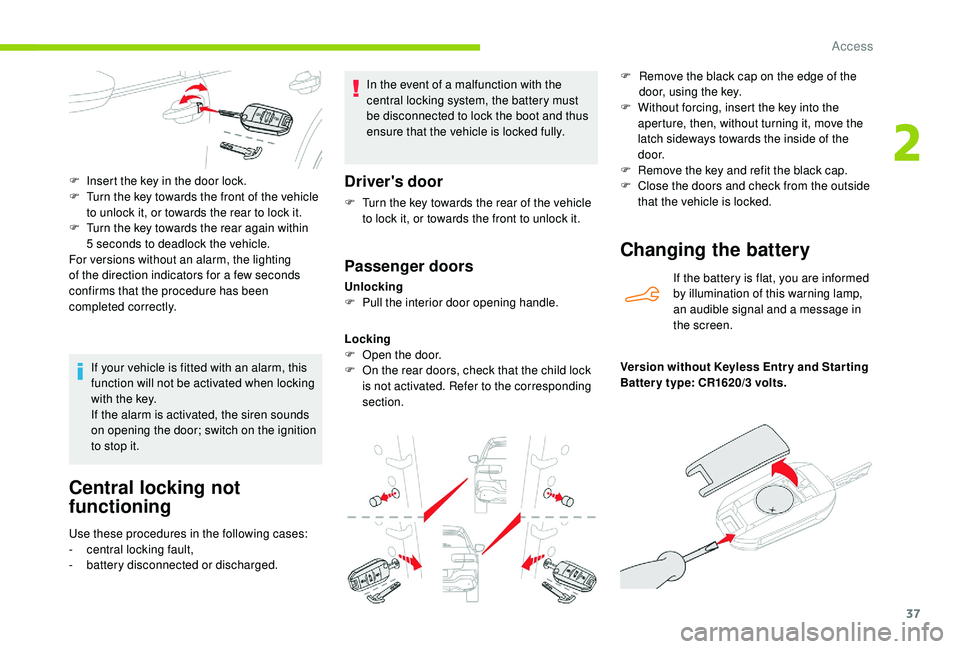
F
I
nsert the key in the door lock.
F
T
urn the key towards the front of the vehicle
to unlock it, or towards the rear to lock it.
F
T
urn the key towards the rear again within
5 seconds to deadlock the vehicle.
For versions without an alarm, the lighting
of the direction indicators for a few seconds
confirms that the procedure has been
completed correctly.
If your vehicle is fitted with an alarm, this
function will not be activated when locking
with the key.
If the alarm is activated, the siren sounds
on opening the door; switch on the ignition
to stop it.
Changing the battery
If the battery is flat, you are informed
by illumination of this warning lamp,
an audible signal and a message in
the screen.
Version without
K
eyless Entr y and Star ting
Batter y type: CR1620/3 volts. F
R
emove the black cap on the edge of the
door, using the key.
F
W
ithout forcing, insert the key into the
aperture, then, without turning it, move the
latch sideways towards the inside of the
d o o r.
F
R
emove the key and refit the black cap.
F
C
lose the doors and check from the outside
that the vehicle is locked.
2
Access
Page 40 of 256
38
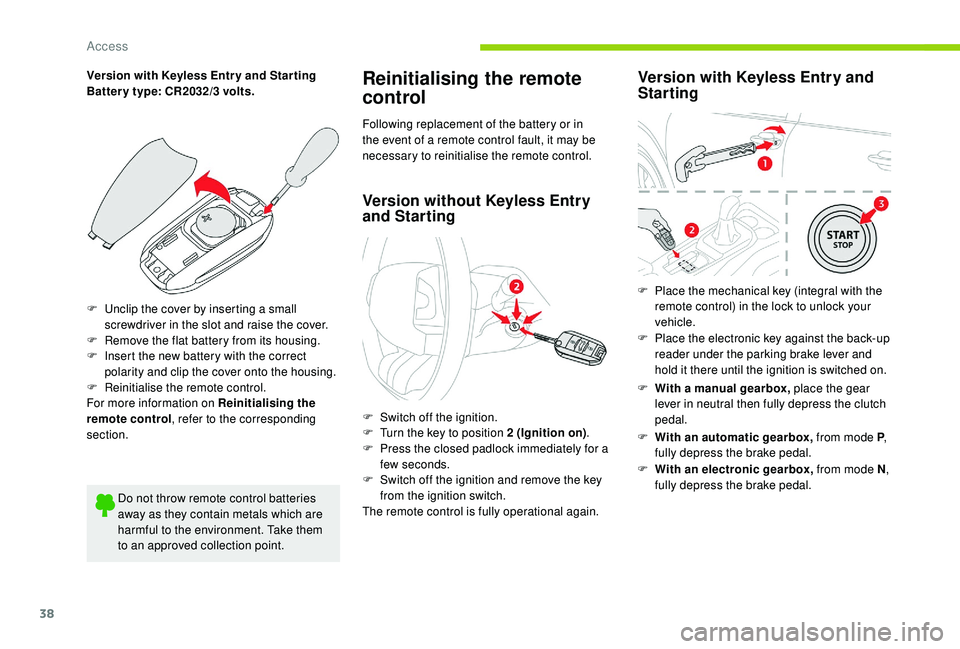
Version with Keyless Entr y and Star ting
Batter y type: CR2032/3 volts.
F
U
nclip the cover by inserting a small
screwdriver in the slot and raise the cover.
F
R
emove the flat battery from its housing.
F
I
nsert the new battery with the correct
polarity and clip the cover onto the housing.
F
R
einitialise the remote control.
For more information on Reinitialising the
remote control , refer to the corresponding
section.
Do not throw remote control batteries
away as they contain metals which are
harmful to the environment. Take them
to an approved collection point.Reinitialising the remote
control
Following replacement of the battery or in
the event of a remote control fault, it may be
necessary to reinitialise the remote control.
Version without K eyless Entry
and Starting
F Switch off the ignition.
F
T urn the key to position 2 (Ignition on) .
F
P
ress the closed padlock immediately for a
few seconds.
F
S
witch off the ignition and remove the key
from the ignition switch.
The remote control is fully operational again.
Version with K eyless Entry and
Starting
F With a manual gearbox, place the gear
lever in neutral then fully depress the clutch
pedal.
F
Wi
th an automatic gearbox, from mode P,
fully depress the brake pedal.
F
W
ith an electronic gearbox, from mode N ,
fully depress the brake pedal.
F
P
lace the mechanical key (integral with the
remote control) in the lock to unlock your
vehicle.
F
P
lace the electronic key against the back-up
reader under the parking brake lever and
hold it there until the ignition is switched on.
Access
Page 42 of 256
40
In case of malfunction or difficulties
moving the tailgate when opening or
closing it, have it checked as soon as
possible by a CITROËN dealer or a
qualified workshop to ensure that this
inconvenience does not get worse, making
the tailgate fall and causing serious
injuries.
Closing
If the tailgate is not fully closed:
- w ith the engine running or the vehicle
moving (speed below 6 mph (10 km/h)) , a
message appears in the screen.
-
w
ith the vehicle moving (speed above
6
mph (10 km/h)) , a message appears in the
screen, accompanied by an audible signal.
Emergency control
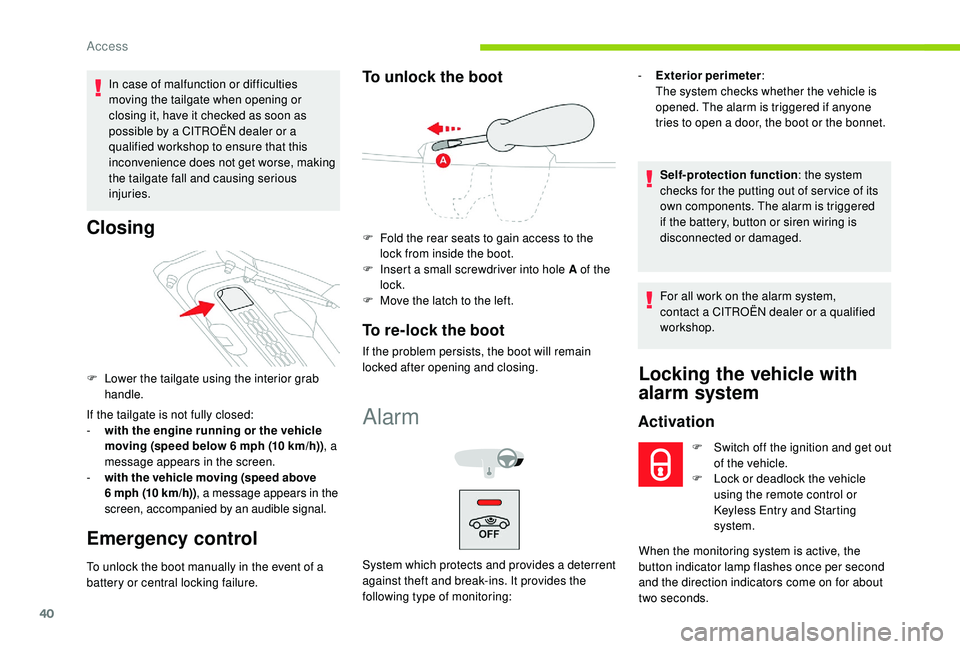
F Lower the tailgate using the interior grab handle.
To unlock the boot manually in the event of a
battery or central locking failure.
To unlock the boot
F Fold the rear seats to gain access to the lock from inside the boot.
F
I
nsert a small screwdriver into hole A of the
lock.
F
M
ove the latch to the left.
To re-lock the boot
If the problem persists, the boot will remain
locked after opening and closing.
Alarm
System which protects and provides a deterrent
against theft and break-ins. It provides the
following type of monitoring: -
E
xterior perimeter
:
The system checks whether the vehicle is
opened. The alarm is triggered if anyone
tries to open a door, the boot or the bonnet.
Self-protection function : the system
checks for the putting out of ser vice of its
own components. The alarm is triggered
if the battery, button or siren wiring is
disconnected or damaged.
For all work on the alarm system,
contact a CITROËN dealer or a qualified
workshop.
Locking the vehicle with
alarm system
Activation
F Switch off the ignition and get out of the vehicle.
F
L
ock or deadlock the vehicle
using the remote control or
Keyless Entry and Starting
system.
When the monitoring system is active, the
button indicator lamp flashes once per second
and the direction indicators come on for about
two seconds.
Access
Page 98 of 256
96
Starting/Switching off the
engine with the key
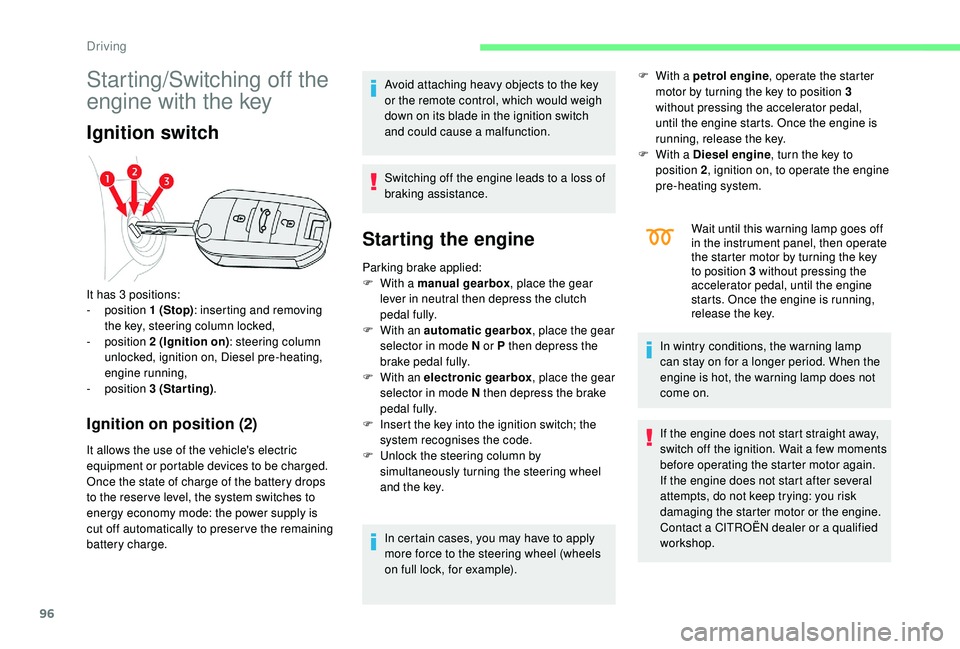
Ignition switch
Ignition on position (2)
It allows the use of the vehicle's electric
equipment or portable devices to be charged.
Once the state of charge of the battery drops
to the reser ve level, the system switches to
energy economy mode: the power supply is
cut off automatically to preser ve the remaining
battery charge.Avoid attaching heavy objects to the key
or the remote control, which would weigh
down on its blade in the ignition switch
and could cause a malfunction.
Switching off the engine leads to a loss of
braking assistance.
Starting the engine
Parking brake applied:
F
W ith a manual gearbox , place the gear
lever in neutral then depress the clutch
pedal fully.
F
W
ith an automatic gearbox , place the gear
selector in mode N or P then depress the
brake pedal fully.
F
W
ith an electronic gearbox , place the gear
selector in mode N then depress the brake
pedal fully.
F
I
nsert the key into the ignition switch; the
system recognises the code.
F
U
nlock the steering column by
simultaneously turning the steering wheel
and the key.
In certain cases, you may have to apply
more force to the steering wheel (wheels
on full lock, for example). F
W
ith a petrol engine
, operate the starter
motor by turning the key to position 3
without pressing the accelerator pedal,
until the engine starts. Once the engine is
running, release the key.
F
W
ith a Diesel engine
, turn the key to
position 2 , ignition on, to operate the engine
pre-heating system.
It has 3 positions:
-
position 1 (Stop): inserting and removing
the key, steering column locked,
-
position 2 (Ignition on) : steering column
unlocked, ignition on, Diesel pre-heating,
engine running,
-
position 3 (Starting) . Wait until this warning lamp goes off
in the instrument panel, then operate
the starter motor by turning the key
to position 3 without pressing the
accelerator pedal, until the engine
starts. Once the engine is running,
release the key.
In wintry conditions, the warning lamp
can stay on for a longer period. When the
engine is hot, the warning lamp does not
come on.
If the engine does not start straight away,
switch off the ignition. Wait a few moments
before operating the starter motor again.
If the engine does not start after several
attempts, do not keep trying: you risk
damaging the starter motor or the engine.
Contact a CITROËN dealer or a qualified
workshop.
Driving
Page 101 of 256

99
Switching the ignition on
(without starting)
F Press the "START/STOP" button, the
instrument panel comes on but the engine
does not start.
F
P
ress the button again to switch off the
ignition and allow the vehicle to be locked.
With the ignition on, the system
automatically goes into energy economy
mode to maintain an adequate state of
charge in the battery.
Key not detected
Back-up starting
A back-up reader is fitted underneath the
parking brake lever so that the engine can be
started if the system does not detect the key in
the recognition zone, or when the battery in the
electronic key is flat.
F
W
ith a manual gearbox, place the gear
lever in neutral, then fully depress the clutch
pedal.
F
W
ith an automatic gearbox , select
mode P, then fully depress the brake pedal.
F
W
ith an electronic gearbox , select
mode N, then fully depress the brake pedal.
F
P
ress the " START/STOP " button.
The engine starts.
Back-up switch-off
Emergency switch-off
With the Keyless Entry and Starting remote
control inside the vehicle, pressing the
" START/STOP " button, with no action on the
pedals , allows the ignition to be switched on.
This also allows the accessories to be used (for
example: audio system, lighting, etc.).
F
P
lace and hold the remote control against
the reader. When the electronic key is not detected or is
no longer in the recognition zone, a message
appears on the touch screen when closing a
door or trying to switch off the engine.
F
T
o confirm the instruction to switch off the
engine, press the " START/STOP" button for
about three seconds.
In the event of a fault with the electronic key,
contact a CITROËN dealer or a qualified
workshop.
In the event of an emergency only, the
engine can be switched off without
conditions (even when driving).
Press the " START/STOP " button for about
three seconds.
In this case, the steering column locks as
soon as the vehicle stops.
6
Driving
Page 176 of 256
174
You must reinitialise certain systems yourself,
by referring to the corresponding section, such
as:
-
t
he remote control or electronic key
(depending on version),
-
t
he electric windows,
-
t
he date and time,
-
t
he radio preset stations.The Stop & Start system may not be
operational during the trip following the
first engine start.
In this case, the system will only be
available again after a continuous
period of immobilisation of the vehicle,
a period which depends on the exterior
temperature and the state of charge of the
battery (up to about 8 hours).To w i n g
Procedure for having your vehicle towed or for
towing another vehicle using the towing eye.
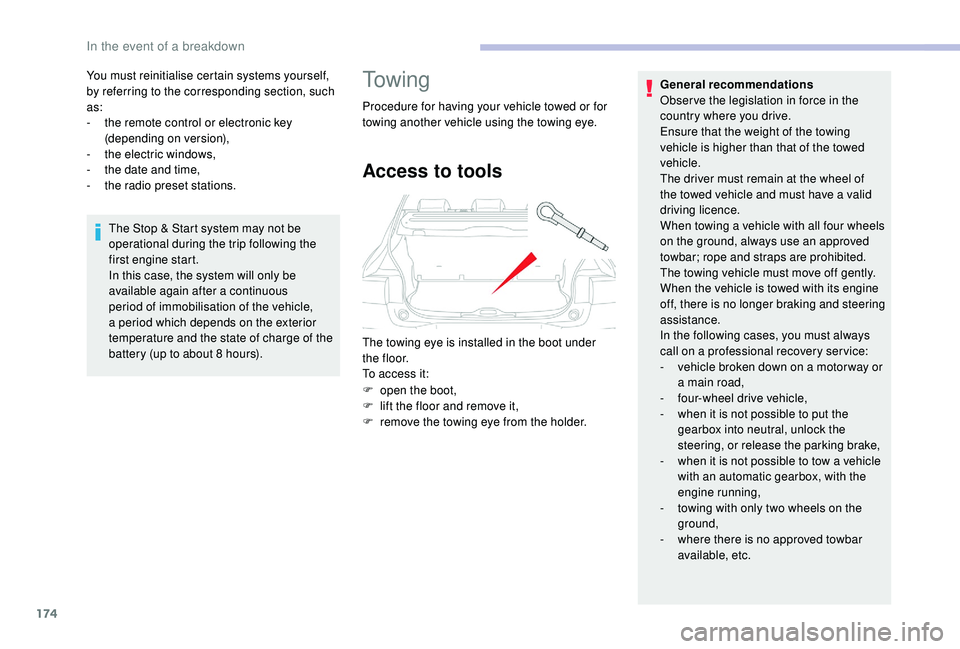
Access to tools
The towing eye is installed in the boot under
t h e f l o o r.
To access it:
F
o
pen the boot,
F
l
ift the floor and remove it,
F
r
emove the towing eye from the holder. General recommendations
Obser ve the legislation in force in the
country where you drive.
Ensure that the weight of the towing
vehicle is higher than that of the towed
vehicle.
The driver must remain at the wheel of
the towed vehicle and must have a valid
driving licence.
When towing a vehicle with all four wheels
on the ground, always use an approved
towbar; rope and straps are prohibited.
The towing vehicle must move off gently.
When the vehicle is towed with its engine
off, there is no longer braking and steering
assistance.
In the following cases, you must always
call on a professional recovery ser vice:
-
v
ehicle broken down on a motor way or
a main road,
-
f
our-wheel drive vehicle,
-
w
hen it is not possible to put the
gearbox into neutral, unlock the
steering, or release the parking brake,
-
w
hen it is not possible to tow a vehicle
with an automatic gearbox, with the
engine running,
-
t
owing with only two wheels on the
ground,
-
w
here there is no approved towbar
available, etc.
In the event of a breakdown