bonnet CITROEN C4 CACTUS 2023 User Guide
[x] Cancel search | Manufacturer: CITROEN, Model Year: 2023, Model line: C4 CACTUS, Model: CITROEN C4 CACTUS 2023Pages: 196, PDF Size: 6.12 MB
Page 117 of 196

11 5
In the event of a breakdown
8After changing a wheel
Store the punctured wheel in the boot or,
depending on version, remove the central cover
first to store it beneath the floor in place of the
spare wheel.
With a "space-saver" type spare wheel
Deactivate certain driving aid functions
(Active Safety Brake, etc.).
Do not exceed the maximum authorised
speed of 50 mph (80
km/h).
Driving with more than one “space-saver”
type spare wheel is prohibited.
Visit a CITROËN dealer or a qualified
workshop as soon as possible to have
the tightness of the bolts and the pressure of
the spare wheel checked.
Have the punctured tyre examined. After
inspection, the technician will advise you on
whether the tyre can be repaired or if it must
be replaced.
Changing a bulb
In some weather conditions (e.g. low
temperature or humidity), misting on the
internal surface of the glass of the headlamps
and rear lamps is normal, and will disappear
after the lamps have been on for a few
minutes.
The headlamps have polycarbonate lenses with a protective coating:
–
Do not clean them with a dry or abrasive
cloth, nor with detergent or solvent
products.
–
Use a sponge and soapy water or a pH
neutral product.
–
When using a high-pressure washer on
persistent marks, do not keep the lance
directed towards the headlamps, lamps or
their edges for too long, so as not to damage
their protective coating and seals.
Changing a bulb must only be done with
the ignition off and after the headlamp /
lamp has been switched off for several
minutes - risk of serious burns!
Do not touch the bulb directly with your
fingers; use a lint-free cloth.
It is essential only to use anti-ultraviolet
(UV) type bulbs, so as not to damage the
headlamp.
Always replace a failed bulb with a new bulb
of the same type and specification. To avoid
lighting imbalance, replace the bulbs in pairs.
Opening the bonnet / Accessing the
bulbs
With the engine warm, proceed with caution -
risk of burns!
Take care with objects or clothing that could
be caught in the blades of the cooling fan -
risk of strangulation!
Halogen bulbs (Hx)
To ensure good quality lighting, check
that the bulb is correctly positioned in its
housing.
After changing a bulb
To refit, carry out the fitting operations in
reverse order.
Close the protective cover very carefully to
guarantee the sealing of the lamps.
Light-emitting diode (LED)
headlamps and lamps
Depending on version, the affected types of
headlamps / lamps are:
Page 123 of 196
121
In the event of a breakdown
8Fuse N° Rating(Amps) Functions
F34 25Trailer interface
unit.
F35 20Trailer interface
unit.
F36 30Front one-
touch electric windows.
F37 30Front heated
seats.
Fuses in the engine
compartment
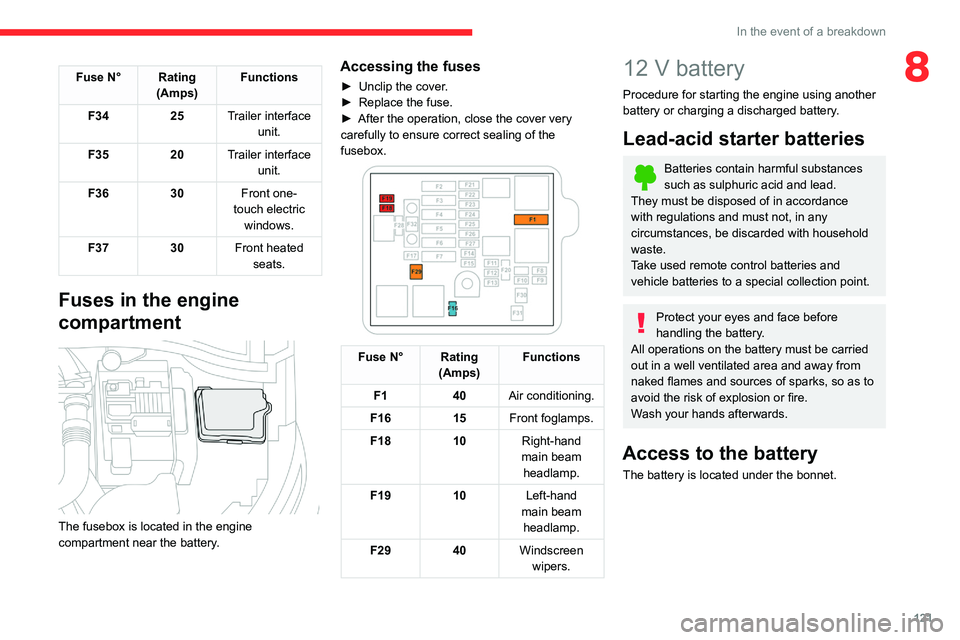
The fusebox is located in the engine
compartment near the battery.
Accessing the fuses
► Unclip the cover .
► Replace the fuse.
►
After the operation, close the cover very
carefully to ensure correct sealing of the
fusebox.
Fuse N° Rating (Amps) Functions
F1 40Air conditioning.
F16 15Front foglamps.
F18 10Right-hand
main beam headlamp.
F19 10Left-hand
main beam headlamp.
F29 40Windscreen
wipers.
12 V battery
Procedure for starting the engine using another
battery or charging a discharged battery.
Lead-acid starter batteries
Batteries contain harmful substances
such as sulphuric acid and lead.
They must be disposed of in accordance
with regulations and must not, in any
circumstances, be discarded with household
waste.
Take used remote control batteries and
vehicle batteries to a special collection point.
Protect your eyes and face before
handling the battery.
All operations on the battery must be carried
out in a well ventilated area and away from
naked flames and sources of sparks, so as to
avoid the risk of explosion or fire.
Wash your hands afterwards.
Access to the battery
The battery is located under the bonnet.
Page 124 of 196
122
In the event of a breakdown
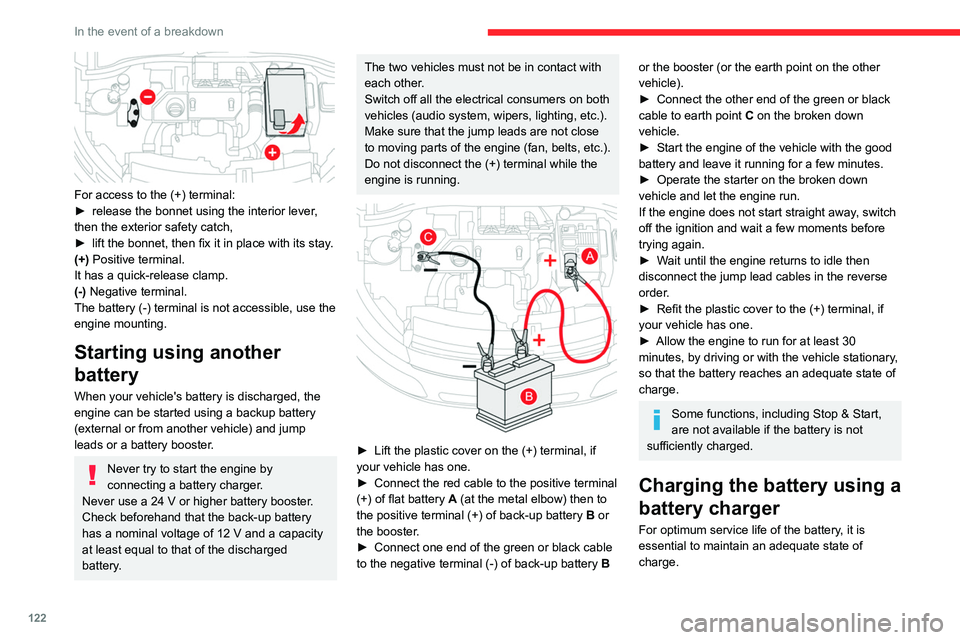
For access to the (+) terminal:
► release the bonnet using the interior lever ,
then the exterior safety catch,
►
lift the bonnet, then fix it in place with its stay
.
(+) Positive terminal.
It has a quick-release clamp.
(-) Negative terminal.
The battery (-) terminal is not accessible, use the
engine mounting.
Starting using another
battery
When your vehicle's battery is discharged, the
engine can be started using a backup battery
(external or from another vehicle) and jump
leads or a battery booster.
Never try to start the engine by
connecting a battery charger.
Never use a 24 V or higher battery booster.
Check beforehand that the back-up battery
has a nominal voltage of 12 V and a capacity
at least equal to that of the discharged
battery.
The two vehicles must not be in contact with
each other.
Switch off all the electrical consumers on both
vehicles (audio system, wipers, lighting, etc.).
Make sure that the jump leads are not close
to moving parts of the engine (fan, belts, etc.).
Do not disconnect the (+) terminal while the
engine is running.
► Lift the plastic cover on the (+) terminal, if
your vehicle has one.
►
Connect the red cable to the positive terminal
(+) of flat battery A
(at the metal elbow) then to
the positive terminal (+) of back-up battery B or
the booster.
►
Connect one end of the green or black cable
to the negative terminal (-) of back-up battery B
or the booster (or the earth point on the other
vehicle).
►
Connect the other end of the green or black
cable to earth point C
on the broken down
vehicle.
►
Start the engine of the vehicle with the good
battery and leave it running for a few minutes.
►
Operate the starter on the broken down
vehicle and let the engine run.
If the engine does not start straight away
, switch
off the ignition and wait a few moments before
trying again.
►
W
ait until the engine returns to idle then
disconnect the jump lead cables in the reverse
order.
►
Refit the plastic cover to the (+) terminal, if
your vehicle has one.
►
Allow the engine to run for at least 30
minutes, by driving or with the vehicle stationary
,
so that the battery reaches an adequate state of
charge.
Some functions, including Stop & Start,
are not available if the battery is not
sufficiently charged.
Charging the battery using a
battery charger
For optimum service life of the battery, it is
essential to maintain an adequate state of
charge.
Page 132 of 196

130
Technical data
– European whole vehicle type approval
number.
– Vehicle identification number (VIN).
– Gross vehicle weight (GVW).
– Gross train weight (GTW).
– Maximum weight on the front axle.
– Maximum weight on the rear axle.
D. Tyres / paint code label.
Fixed at the driver-side door.
Bears the following information about the tyres:
– tyre pressures, unladen and laden.
– tyre specification, made up of the dimensions
and type as well as the load and speed indices.
– spare tyre inflation pressure.
Also indicates the paint colour code.
The vehicle may be originally equipped with tyres with higher load and speed
indices than those indicated on the label,
without affecting tyre pressure (on cold tyres).
Dimensions (mmF
These dimensions have been measured on an unladen vehicle.
* Version with longitudinal barsK
Identification markings
Various visible markings for the identification and
research of your vehicle.
A. Vehicle identification number (VIN), under
the bonnet.
Stamped on the chassis, near the right-hand
front wheel arch.
B. Vehicle identification number (VIN), on the
dashboard.
On a label, visible through the windscreen.
C. Manufacturer's label.
Fixed on the centre pillar, left-hand side or right-
hand side.
Bears the following information:
–
Manufacturer
’s name.
Page 173 of 196
171
Alphabetical index
A
ABS 52
Accessories
49
Active Safety Brake
85–87
AdBlue®
12, 104
AdBlue® tank
105
Additive, Diesel
102–103
Adjusting headlamps
44
Adjusting head restraints
28
Adjusting seat
27
Adjusting the air distribution
33–34
Adjusting the air flow
33–34
Adjusting the date
143, 167
Adjusting the height of the steering wheel
29
Adjusting the lumbar support
27
Adjusting the seat angle
27
Adjusting the temperature
33–34
Adjusting the time
143, 167
Advice on care and maintenance
37, 106–107
Advice on driving
6, 67
Airbags
55, 57, 59
Airbags, curtain
56–57
Airbags, front
56–57, 60
Airbags, lateral
56–57
Air conditioning
32, 34
Air conditioning, automatic
33–34
Air conditioning, manual
32, 34
Air intake
33–34
Air vents
31
Alarm
24
Anti-lock braking system (ABS)
52
Antitheft / Immobiliser 18
Apple CarPlay connection
139, 157
Armrest, front
37, 39
Assistance call
50
Assistance, emergency braking
52, 87
Audible warning
50
Audio streaming (Bluetooth)
138, 161–162
B
Battery 97–98, 121–122
Battery, 12 V
102, 122–124
Battery, charging
122–123
Battery, remote control
21–22
Blanking screen (snow shield)
96
Blind spot sensors
89
BlueHDi
12, 102, 108
Bluetooth (hands-free)
140–141, 163
Bluetooth (telephone)
140–141, 163–164
Bodywork
106
Bonnet
99–100
Boot
23–24, 37, 40
Brake discs
103
Brake lamps
11 7
Brakes
103
Braking assistance system
52
Braking, automatic emergency
85–87
Brightness
142
Bulbs
11 5
Bulbs (changing)
115–117
C
Cable, audio 161
Cable, Jack
161
Capacity, fuel tank
94–95
Cap, fuel filler
94–95
Care of the bodywork
106
CD
138, 161
CD, MP3
138, 161
Central locking
18–20
Changing a bulb
115–118
Changing a fuse
119–121
Changing a wheel
109, 111–112
Changing a wiper blade
46–47
Changing the remote control battery
22
Checking the engine oil level
11–12
Checking the levels
100–102
Checking tyre pressures
(using the kit)
108–109, 111
Checks
100, 102–103
Checks, routine
102–103
Child lock
65–66
Children
54, 60, 63–64, 65
Children (safety)
65–66
Child seats
54, 57–60
Child seats, conventional
60
Child seats, i-Size
65
Child seats, ISOFIX
62–63, 65
Cleaning (advice)
106
Closing the boot
23–24
Closing the doors
19–20
Coat hanger
39
Page 176 of 196
174
Alphabetical index
M
Maintenance (advice) 106
Maintenance, routine
79, 102
Manoeuvring aids (recommendations)
78
Map reading lamps
36
Markings, identification
130
Mat
37, 39, 79
Menu
139
Menus (audio)
134–135, 148–149
Messages
165
Messages, quick
165
Mirror, rear view
30
Mirrors, door
29, 89
Misfuel prevention
95
Mountings, ISOFIX
62
N
Number plate lamps 11 8
O
Obstacle detection 91
Oil change
101
Oil consumption
101
OIl, engine
101
On-board tools
109
Opening the bonnet
99
Opening the boot
19, 23–24
Opening the doors 19, 23
P
Pads, brake 103
Paint
106, 130
Paint colour code
130
Panoramic glass sunroof
37
Parcel shelf, rear
40–41
Parking brake
72, 103
Parking sensors, audible and visual
91
Parking sensors, front
91
Parking sensors, rear
91
Plates, identification
130
Player, Apple®
138, 162
Player, MP3 CD
161
Player, USB
137, 161
Port, USB
37–38, 137, 161
Pressures, tyres
103, 111, 131
Pre-tensioning seat belts
54
Priming the fuel system
108
Profiles
142, 166
Protecting children
56–60, 63–64, 65
Puncture
108–109, 111
R
Radar (warnings) 78
Radio
135–136, 138, 159–161
Radio, digital (Digital Audio
Broadcasting - DAB)
137, 161
Range, AdBlue
12, 102
RDS
136, 160
Rear screen, demisting
36
Recharging the battery
122–123
Recirculation, air
33–34
Recovery
125
Reduction of electrical load
97
Regeneration of the particle filter
103
Reinitialisation of the under-inflation
detection system
76
Reinitialising the remote control
22
Reminder, key in ignition
69
Reminder, lighting on
43
Remote control
17–21
Removing a wheel
113–114
Removing the mat
39
Replacing bulbs
115–117
Replacing fuses
119–120
Replacing the air filter
103
Replacing the oil filter
103
Replacing the passenger compartment
filter
102
Reservoir, screenwash
102
Resetting the trip recorder
15–16
Reversing camera
79, 92
Reversing lamp
11 7
Reversing lamps
11 7
Roof bars
98–99
Running out of fuel (Diesel)
108
Page 177 of 196
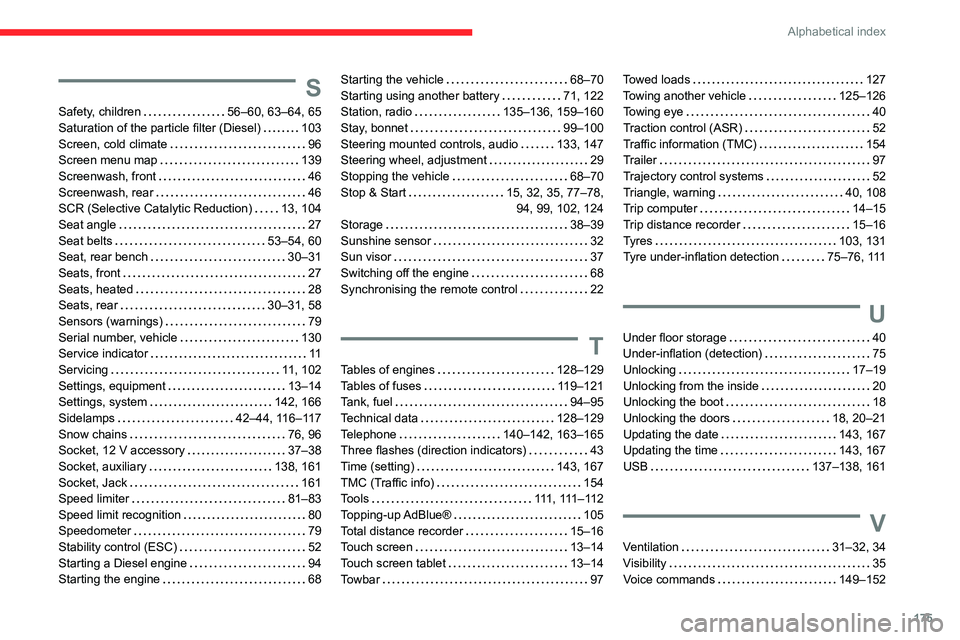
175
Alphabetical index
S
Safety, children 56–60, 63–64, 65
Saturation of the particle filter (Diesel)
103
Screen, cold climate
96
Screen menu map
139
Screenwash, front
46
Screenwash, rear
46
SCR (Selective Catalytic Reduction)
13, 104
Seat angle
27
Seat belts
53–54, 60
Seat, rear bench
30–31
Seats, front
27
Seats, heated
28
Seats, rear
30–31, 58
Sensors (warnings)
79
Serial number, vehicle
130
Service indicator
11
Servicing
11, 102
Settings, equipment
13–14
Settings, system
142, 166
Sidelamps
42–44, 116–117
Snow chains
76, 96
Socket, 12 V accessory
37–38
Socket, auxiliary
138, 161
Socket, Jack
161
Speed limiter
81–83
Speed limit recognition
80
Speedometer
79
Stability control (ESC)
52
Starting a Diesel engine
94
Starting the engine
68
Starting the vehicle 68–70
Starting using another battery
71, 122
Station, radio
135–136, 159–160
Stay, bonnet
99–100
Steering mounted controls, audio
133, 147
Steering wheel, adjustment
29
Stopping the vehicle
68–70
Stop & Start
15, 32, 35, 77–78, 94, 99, 102, 124
Storage
38–39
Sunshine sensor
32
Sun visor
37
Switching off the engine
68
Synchronising the remote control
22
T
Tables of engines 128–129
Tables of fuses
119–121
Tank, fuel
94–95
Technical data
128–129
Telephone
140–142, 163–165
Three flashes (direction indicators)
43
Time (setting)
143, 167
TMC (Traffic info)
154
Tools
111 , 111 – 11 2
Topping-up AdBlue®
105
Total distance recorder
15–16
Touch screen
13–14
Touch screen tablet
13–14
Towbar
97
Towed loads 127
Towing another vehicle
125–126
Towing eye
40
Traction control (ASR)
52
Traffic information (TMC)
154
Trailer
97
Trajectory control systems
52
Triangle, warning
40, 108
Trip computer
14–15
Trip distance recorder
15–16
Tyres
103, 131
Tyre under-inflation detection
75–76, 111
U
Under floor storage 40
Under-inflation (detection)
75
Unlocking
17–19
Unlocking from the inside
20
Unlocking the boot
18
Unlocking the doors
18, 20–21
Updating the date
143, 167
Updating the time
143, 167
USB
137–138, 161
V
Ventilation 31–32, 34
Visibility
35
Voice commands
149–152