alarm CITROEN C4 CACTUS 2023 Owners Manual
[x] Cancel search | Manufacturer: CITROEN, Model Year: 2023, Model line: C4 CACTUS, Model: CITROEN C4 CACTUS 2023Pages: 196, PDF Size: 6.12 MB
Page 4 of 196
2
Contents
■
Overview
Instruments and controls 4
■
Eco-driving
1Instruments
Instrument Panel 7
Warning and indicator lamps 7
Indicators
11
Touch screen 13
Trip computer 14
Distance recorders 15
Lighting dimmer 16
2Access
Electronic key with remote control
function and built-in key, 17
Keyless Entry and Starting 19
Central locking 20
Back-up procedures 21
Doors 23
Boot 23
Alarm 24
Electric windows 25
Rear door windows 26
3Ease of use and comfort
Front seats 27
Steering wheel adjustment 29
Mirrors 29
Rear seats 30
Heating and Ventilation 31
Heating / Manual air conditioning 32
Automatic air conditioning 33
Front demisting - defrosting 35
Rear screen demisting - defrosting 36
Courtesy lamps 36
Boot lighting 37
Panoramic glass sunroof 37
Interior fittings
37
Boot fittings 40
Rear shelf (van version) 41
4Lighting and visibility
Lighting control 42
Direction indicators 43
Automatic illumination of headlamps 43
Daytime running lamps/sidelamps (LEDs) 44
Headlamp beam height adjustment 44
Cornering lighting 45
Wiper control stalk 45
Changing a wiper blade 47
Automatic wiping 48
5Safety
General safety recommendations 49
Hazard warning lamps 49
Horn 50
Emergency or assistance call 50
Electronic stability control (ESC) 52
Seat belts 53
Airbags 55
Child seats 57
Deactivating the front passenger airbag 59
ISOFIX child seats 62
i-Size child seats 65
Child lock 65
6Driving
Driving recommendations 67
Starting / Switching off the engine with
the key
68
Starting / Switching off the engine with
Keyless Entry and Starting
70
Parking brake 72
6-speed manual gearbox 72
Automatic gearbox (EAT6) 72
Gear efficiency indicator 74
Hill start assist 75
Tyre under-inflation detection 75
Stop & Start 77
Driving and manoeuvring aids - General
recommendations
78
Speed Limit Recognition
and Recommendation
80
Speed limiter 82
Cruise control - particular recommendations 83
Cruise control 84
Active Safety Brake with Collision Risk
Alert and Intelligent emergency braking
assistance
85
Distraction detection 88
Lane Departure Warning System 89
Page 7 of 196
5
Overview
2.Electric door mirrors adjustment
3. Electric child lock
4. Alarm activation indicator lamp
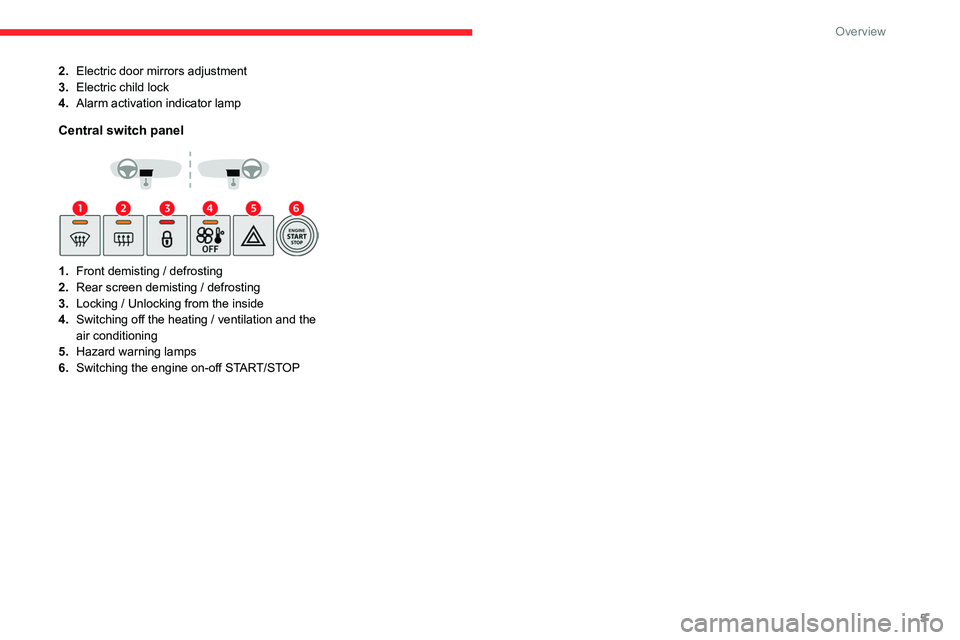
Central switch panel
1.Front demisting / defrosting
2. Rear screen demisting / defrosting
3. Locking / Unlocking from the inside
4. Switching off the heating / ventilation and the
air conditioning
5. Hazard warning lamps
6. Switching the engine on-off START/STOP
Page 19 of 196
17
Access
2Electronic key with
remote control function
and built-in key,
Remote control function
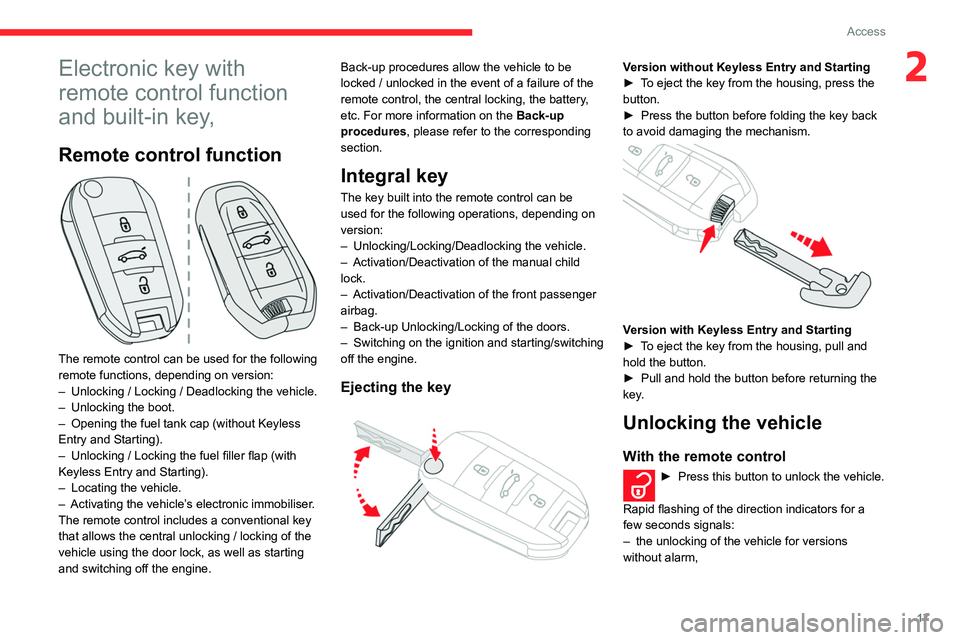
The remote control can be used for the following
remote functions, depending on version:
–
Unlocking / Locking / Deadlocking the vehicle.
–
Unlocking the boot.
–
Opening the fuel tank cap (without Keyless
Entry and Starting).
–
Unlocking / Locking the fuel filler flap (with
Keyless Entry and Starting).
–
Locating the vehicle.
–
Activating the vehicle’
s electronic immobiliser.
The remote control includes a conventional key
that allows the central unlocking / locking of the
vehicle using the door lock, as well as starting
and switching off the engine. Back-up procedures allow the vehicle to be
locked / unlocked in the event of a failure of the
remote control, the central locking, the battery,
etc. For more information on the Back-up
procedures, please refer to the corresponding
section.
Integral key
The key built into the remote control can be
used for the following operations, depending on
version:
–
Unlocking/Locking/Deadlocking the vehicle.
–
Activation/Deactivation of the manual child
lock.
–
Activation/Deactivation of the front passenger
airbag.
–
Back-up Unlocking/Locking of the doors.
–
Switching on the ignition and starting/switching
off the engine.
Ejecting the key
Version without Keyless Entry and Starting
► T o eject the key from the housing, press the
button.
►
Press the button before folding the key back
to avoid damaging the mechanism.
Version with Keyless Entry and Starting
► T o eject the key from the housing, pull and
hold the button.
►
Pull and hold the button before returning the
key
.
Unlocking the vehicle
With the remote control
► Press this button to unlock the vehicle.
Rapid flashing of the direction indicators for a
few seconds signals:
–
the unlocking of the vehicle for versions
without alarm,
Page 20 of 196
18
Access
– the deactivation of the alarm for other
versions.
Depending on version, the door mirrors unfold,
and the welcome lighting comes on.
With the key
► Turn the key in the driver's door lock towards
the front of the vehicle to unlock.
Selective unlocking of the boot
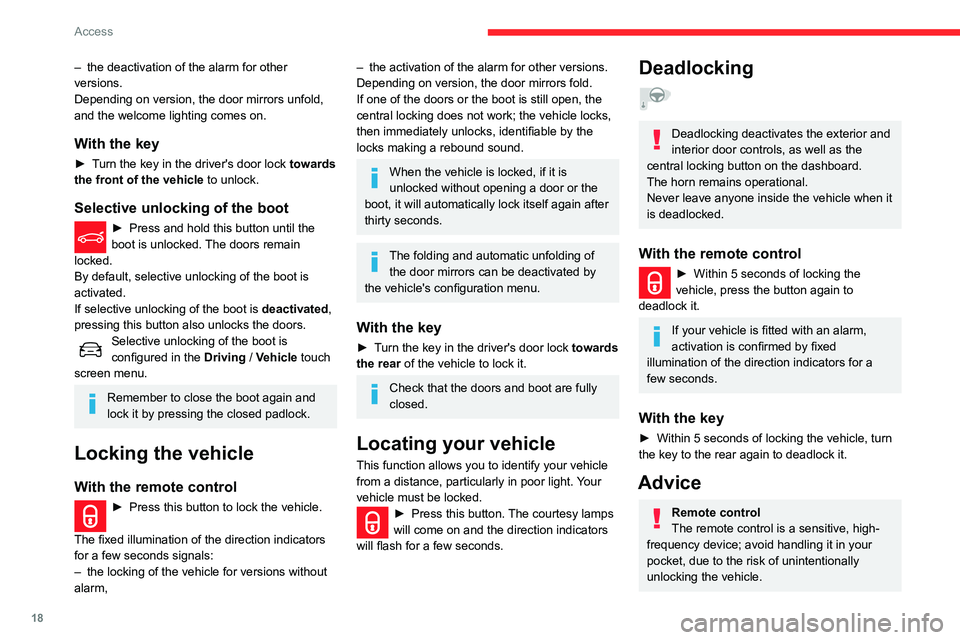
► Press and hold this button until the
boot is unlocked. The doors remain
locked.
By default, selective unlocking of the boot is
activated.
If selective unlocking of the boot is deactivated,
pressing this button also unlocks the doors.
Selective unlocking of the boot is
configured in the Driving / Vehicle touch
screen menu.
Remember to close the boot again and
lock it by pressing the closed padlock.
Locking the vehicle
With the remote control
► Press this button to lock the vehicle.
The fixed illumination of the direction indicators
for a few seconds signals:
–
the locking of the vehicle for versions without
alarm,
– the activation of the alarm for other versions.
Depending on version, the door mirrors fold.
If one of the doors or the boot is still open, the
central locking does not work; the vehicle locks,
then immediately unlocks, identifiable by the
locks making a rebound sound.
When the vehicle is locked, if it is
unlocked without opening a door or the
boot, it will automatically lock itself again after
thirty seconds.
The folding and automatic unfolding of the door mirrors can be deactivated by
the vehicle's configuration menu.
With the key
► Turn the key in the driver's door lock towards
the rear of the vehicle to lock it.
Check that the doors and boot are fully
closed.
Locating your vehicle
This function allows you to identify your vehicle
from a distance, particularly in poor light. Your
vehicle must be locked.
► Press this button. The courtesy lamps
will come on and the direction indicators
will flash for a few seconds.
Deadlocking
Deadlocking deactivates the exterior and
interior door controls, as well as the
central locking button on the dashboard.
The horn remains operational.
Never leave anyone inside the vehicle when it
is deadlocked.
With the remote control
► Within 5 seconds of locking the
vehicle, press the button again to
deadlock it.
If your vehicle is fitted with an alarm,
activation is confirmed by fixed
illumination of the direction indicators for a
few seconds.
With the key
► Within 5 seconds of locking the vehicle, turn
the key to the rear again to deadlock it.
Advice
Remote control
The remote control is a sensitive, high-
frequency device; avoid handling it in your
pocket, due to the risk of unintentionally
unlocking the vehicle.
Page 22 of 196
20
Access
When locking/deadlocking from the
outside
When the vehicle is locked or deadlocked
from the outside, the indicator lamp flashes
and the button is inoperative.
► After normal locking, pull one of the
interior door controls to unlock the vehicle.
► After deadlocking, it is necessary to use
the remote control, Keyless Entry and Starting
or the integral key to unlock the vehicle.
Automatic (anti-intrusion security)
The doors and boot lock automatically when
driving (speed above 6 mph (10 km/h)).
To deactivate/reactivate this function (activated
by default):
► Press the button until an audible signal is
heard and a message appears in the screen.
Transporting long or bulky objects
Press the central locking control to drive
with the boot open and the doors locked.
Otherwise, every time the speed of the
vehicle exceeds 6 mph (10 km/h), the locks
will rebound and an alert will appear.
Pressing the central locking button unlocks
the vehicle.
Above 6 mph (10 km/h), this unlocking is
temporary.
It is not possible to lock the vehicle if one of the
keys is left inside the vehicle.
Deadlocking
Deadlocking deactivates the exterior and
interior door controls, as well as the
central locking button on the dashboard.
The horn remains operational.
Never leave anyone inside the vehicle when it
is deadlocked.
►
With the electronic key in the recognition
zone, press one of the front door handles once
with your finger or thumb (at the markings) to
lock the vehicle.
►
Within 5 seconds, press the door handle
again to deadlock the vehicle.
If one of the doors or the boot is still open
or if the electronic key for the Keyless
Entry and Starting
system has been left inside
the vehicle, central locking will be disabled.
However
, if the vehicle is fitted with an alarm,
it will be activated after 45
seconds.
If the vehicle is unlocked but the doors or
boot are not subsequently opened, the
vehicle will automatically lock itself again after
about 30
seconds. If the vehicle is fitted with
an alarm, it will also be reactivated
automatically.
The automatic door mirror folding/ unfolding function is configured via the
touch screen’s vehicle configuration menu.
As a safety measure, never leave the vehicle, even for a short time, without
taking the Keyless Entry and Starting
system’s electronic key with you.
Be aware of the risk of theft of the vehicle if
the key is present in one of the defined areas
while the vehicle is unlocked.
Accumulations (water, dust, grime, salt, etc.) on the inner surface of the door
handle may affect detection.
If cleaning the inner surface of the door
handle using a cloth does not restore
detection, contact a CITROËN dealer or a
qualified workshop.
A sudden splash of water (stream of water,
high pressure jet washer, etc.) may be
identified by the system as the desire to open
the vehicle.
To preserve the battery charge in the electronic key and the vehicle's battery,
the "hands-free" functions are set to
hibernation mode after 21 days without use.
To restore these functions, press one of the
remote control buttons or start the engine with
the electronic key in the reader.
For more information on starting with the
Keyless Entry and Starting system, refer to
the corresponding section.
Electrical interference
The electronic key may not operate if
close to certain electronic devices: telephone
(switched on or on standby), laptop computer,
strong magnetic fields, etc.
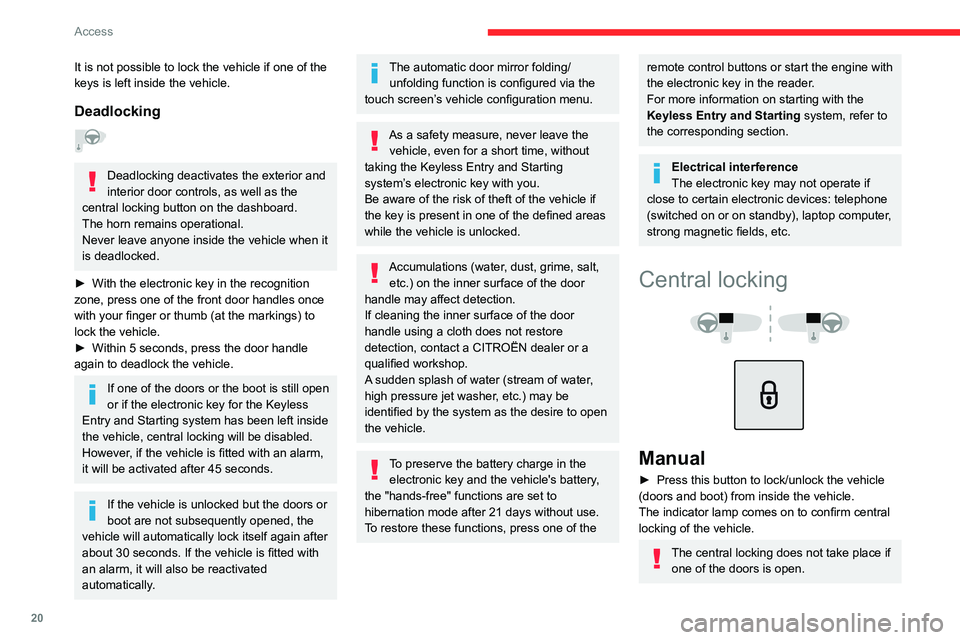
Central locking
Manual
► Press this button to lock/unlock the vehicle
(doors and boot) from inside the vehicle.
The indicator lamp comes on to confirm central
locking of the vehicle.
The central locking does not take place if one of the doors is open.
Page 23 of 196
21
Access
2When locking/deadlocking from the
outside
When the vehicle is locked or deadlocked
from the outside, the indicator lamp flashes
and the button is inoperative.
►
After normal locking, pull one of the
interior door controls to unlock the vehicle.
►
After deadlocking, it is necessary to use
the remote control, Keyless Entry and Starting
or the integral key to unlock the vehicle.
Automatic (anti-intrusion security)
The doors and boot lock automatically when
driving (speed above 6 mph (10
km/h)).
To deactivate/reactivate this function (activated
by default):
►
Press the button until an audible signal is
heard and a message appears in the screen.
Transporting long or bulky objects
Press the central locking control to drive
with the boot open and the doors locked.
Otherwise, every time the speed of the
vehicle exceeds 6 mph (10
km/h), the locks
will rebound and an alert will appear.
Pressing the central locking button unlocks
the vehicle.
Above 6 mph (10
km/h), this unlocking is
temporary.
Back-up procedures
Lost keys, remote control,
electronic key
Visit a CITROËN dealer with the vehicle's
registration certificate, your personal
identification documents and if possible, the label
bearing the key code.
The CITROËN dealer will be able to retrieve the
key code and the transponder code required to
order a new key
Total unlocking/locking of
the vehicle with the key
Use these procedures in the following cases:
– remote control cell battery flat,
–
remote control fault,
–
vehicle in an area subject to strong
electromagnetic interference.
In the first case, you can also replace the remote
control cell battery
.
In the second case, you can also reinitialise the
remote control.
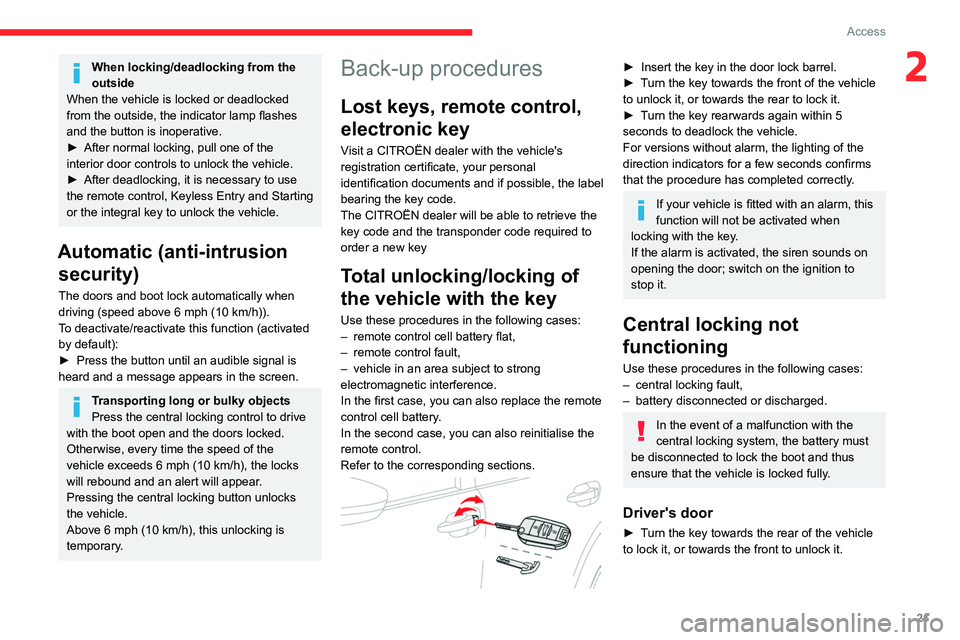
Refer to the corresponding sections.
► Insert the key in the door lock barrel.
► T urn the key towards the front of the vehicle
to unlock it, or towards the rear to lock it.
►
T
urn the key rearwards again within 5
seconds to deadlock the vehicle.
For versions without alarm, the lighting of the
direction indicators for a few seconds confirms
that the procedure has completed correctly.
If your vehicle is fitted with an alarm, this
function will not be activated when
locking with the key.
If the alarm is activated, the siren sounds on
opening the door; switch on the ignition to
stop it.
Central locking not
functioning
Use these procedures in the following cases:
– central locking fault,
–
battery disconnected or discharged.
In the event of a malfunction with the
central locking system, the battery must
be disconnected to lock the boot and thus
ensure that the vehicle is locked fully.
Driver's door
► Turn the key towards the rear of the vehicle
to lock it, or towards the front to unlock it.
Page 26 of 196
24
Access
If an opening (door or boot) is not
properly closed, the vehicle is not locked,
but the exterior perimeter monitoring will be
activated after 45 seconds.
Deactivation
► Press the remote control unlocking
button.
or
► Unlock the vehicle with the Keyless Entry and
Starting system.
The monitoring system is deactivated: the
indicator lamp in the button goes off and the
direction indicators flash for about 2 seconds.
If the vehicle automatically locks itself
again (as happens if a door or the boot is
not opened within 30 seconds of unlocking),
the monitoring system is automatically
reactivated.
Triggering of the alarm
This is indicated by sounding of the siren
and flashing of the direction indicators for 30
seconds.
Depending on the country of sale, certain
monitoring functions remain active until the alarm
has been triggered eleven times consecutively.
When the vehicle is unlocked using the remote
control or the Keyless Entry and Starting system,
rapid flashing of the red indicator lamp in the
button informs you that the alarm was triggered
Closing
► Lower the tailgate using the interior grab
handle.
If the tailgate is not fully closed:
–
with the engine running or the vehicle
moving (speed below 6 mph (10 km/h)) , a
message appears in the screen.
–
with the vehicle moving (speed above 6
mph (10 km/h))
, a message appears in the
screen, accompanied by an audible signal.
Back-up release
To manually unlock the boot in the event of a
battery or central locking failure.
Unlocking
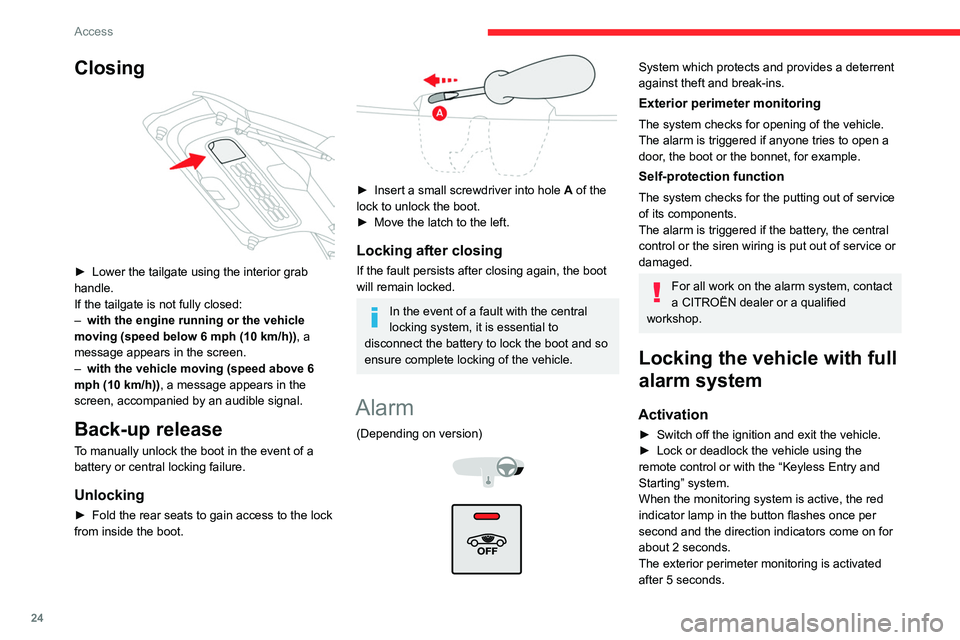
► Fold the rear seats to gain access to the lock
from inside the boot.
► Insert a small screwdriver into hole A of the
lock to unlock the boot.
►
Move the latch to the left.
Locking after closing
If the fault persists after closing again, the boot
will remain locked.
In the event of a fault with the central
locking system, it is essential to
disconnect the battery to lock the boot and so
ensure complete locking of the vehicle.
Alarm
(Depending on version)
System which protects and provides a deterrent
against theft and break-ins.
Exterior perimeter monitoring
The system checks for opening of the vehicle.
The alarm is triggered if anyone tries to open a
door, the boot or the bonnet, for example.
Self-protection function
The system checks for the putting out of service
of its components.
The alarm is triggered if the battery, the central
control or the siren wiring is put out of service or
damaged.
For all work on the alarm system, contact
a CITROËN dealer or a qualified
workshop.
Locking the vehicle with full
alarm system
Activation
► Switch off the ignition and exit the vehicle.
► Lock or deadlock the vehicle using the
remote control or with the “Keyless Entry and
Starting” system.
When the monitoring system is active, the red
indicator lamp in the button flashes once per
second and the direction indicators come on for
about 2 seconds.
The exterior perimeter monitoring is activated
after 5 seconds.
Page 27 of 196
25
Access
2If an opening (door or boot) is not
properly closed, the vehicle is not locked,
but the exterior perimeter monitoring will be
activated after 45
seconds.
Deactivation
► Press the remote control unlocking
button.
or
►
Unlock the vehicle with the Keyless Entry and
Starting system.
The monitoring system is deactivated: the
indicator lamp in the button goes off and the
direction indicators flash for about 2 seconds.
If the vehicle automatically locks itself
again (as happens if a door or the boot is
not opened within 30 seconds of unlocking),
the monitoring system is automatically
reactivated.
Triggering of the alarm
This is indicated by sounding of the siren
and flashing of the direction indicators for 30
seconds.
Depending on the country of sale, certain
monitoring functions remain active until the alarm
has been triggered eleven times consecutively.
When the vehicle is unlocked using the remote
control or the Keyless Entry and Starting system,
rapid flashing of the red indicator lamp in the
button informs you that the alarm was triggered during your absence. When the ignition is
switched on, this flashing stops.
Failure of the remote control
To deactivate the monitoring functions:
►
Unlock the vehicle using the key in the
driver's door lock.
►
Open the door; the alarm is triggered.
►
Switch on the ignition; this stops the alarm.
The indicator lamp in the button goes off.
Locking the vehicle without
activating the alarm
► Lock or deadlock the vehicle using the key
(integral to the remote control) in the driver's
door lock.
Malfunction
When the ignition is switched on, fixed
illumination of the red indicator lamp in the
button indicates a malfunction of the system.
Have it checked by a CITROËN dealer or a
qualified workshop.
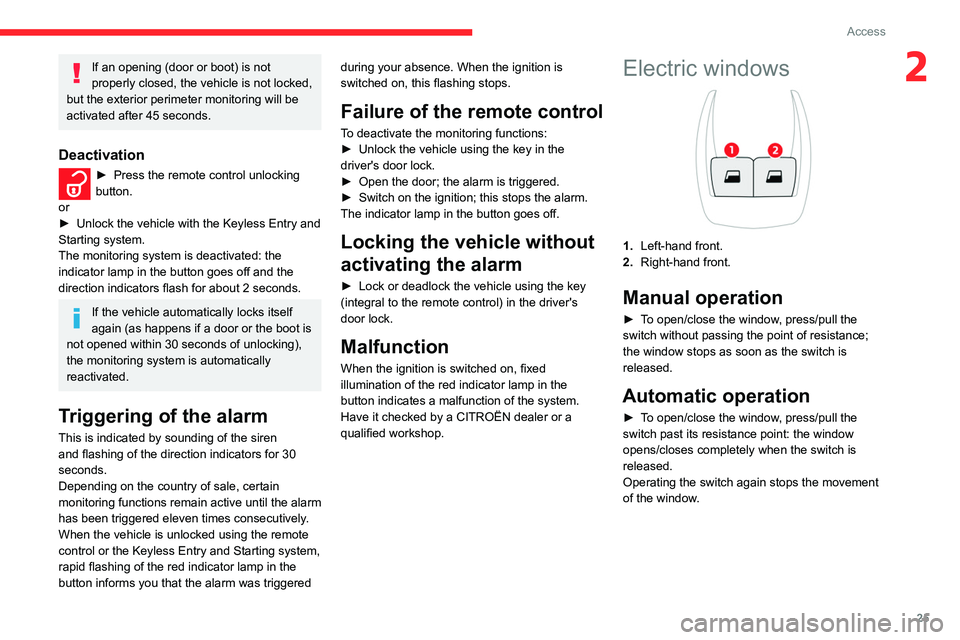
Electric windows
1. Left-hand front.
2. Right-hand front.
Manual operation
► To open/close the window, press/pull the
switch without passing the point of resistance;
the window stops as soon as the switch is
released.
Automatic operation
► To open/close the window, press/pull the
switch past its resistance point: the window
opens/closes completely when the switch is
released.
Operating the switch again stops the movement
of the window.
Page 122 of 196
120
In the event of a breakdown
Fuses in the dashboard
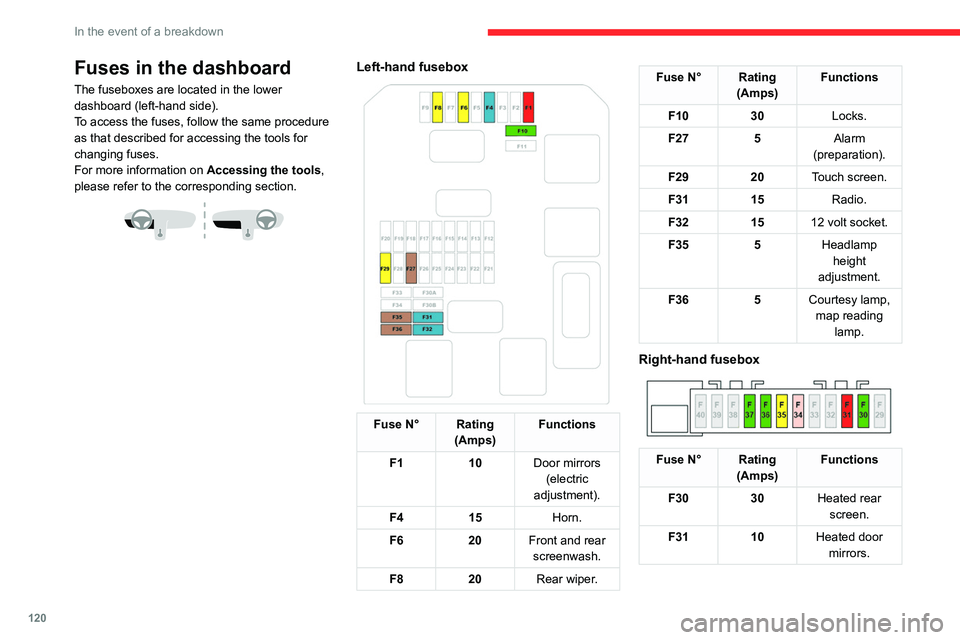
The fuseboxes are located in the lower
dashboard (left-hand side).
To access the fuses, follow the same procedure
as that described for accessing the tools for
changing fuses.
For more information on Accessing the tools,
please refer to the corresponding section.
Left-hand fusebox
Fuse N° Rating (Amps) Functions
F1 10Door mirrors
(electric
adjustment).
F4 15 Horn.
F6 20Front and rear
screenwash.
F8 20Rear wiper.
Fuse N° Rating
(Amps) Functions
F10 30Locks.
F27 5Alarm
(preparation).
F29 20Touch screen.
F31 15Radio.
F32 1512 volt socket.
F35 5Headlamp
height
adjustment.
F36 5Courtesy lamp,
map reading lamp.
Right-hand fusebox
Fuse N° Rating (Amps) Functions
F30 30Heated rear
screen.
F31 10Heated door
mirrors.
Fuse N° Rating (Amps) Functions
F34 25Trailer interface
unit.
F35 20Trailer interface
unit.
F36 30Front one-
touch electric windows.
F37 30Front heated
seats.
Fuses in the engine
compartment
The fusebox is located in the engine
compartment near the battery.
Page 173 of 196
171
Alphabetical index
A
ABS 52
Accessories
49
Active Safety Brake
85–87
AdBlue®
12, 104
AdBlue® tank
105
Additive, Diesel
102–103
Adjusting headlamps
44
Adjusting head restraints
28
Adjusting seat
27
Adjusting the air distribution
33–34
Adjusting the air flow
33–34
Adjusting the date
143, 167
Adjusting the height of the steering wheel
29
Adjusting the lumbar support
27
Adjusting the seat angle
27
Adjusting the temperature
33–34
Adjusting the time
143, 167
Advice on care and maintenance
37, 106–107
Advice on driving
6, 67
Airbags
55, 57, 59
Airbags, curtain
56–57
Airbags, front
56–57, 60
Airbags, lateral
56–57
Air conditioning
32, 34
Air conditioning, automatic
33–34
Air conditioning, manual
32, 34
Air intake
33–34
Air vents
31
Alarm
24
Anti-lock braking system (ABS)
52
Antitheft / Immobiliser 18
Apple CarPlay connection
139, 157
Armrest, front
37, 39
Assistance call
50
Assistance, emergency braking
52, 87
Audible warning
50
Audio streaming (Bluetooth)
138, 161–162
B
Battery 97–98, 121–122
Battery, 12 V
102, 122–124
Battery, charging
122–123
Battery, remote control
21–22
Blanking screen (snow shield)
96
Blind spot sensors
89
BlueHDi
12, 102, 108
Bluetooth (hands-free)
140–141, 163
Bluetooth (telephone)
140–141, 163–164
Bodywork
106
Bonnet
99–100
Boot
23–24, 37, 40
Brake discs
103
Brake lamps
11 7
Brakes
103
Braking assistance system
52
Braking, automatic emergency
85–87
Brightness
142
Bulbs
11 5
Bulbs (changing)
115–117
C
Cable, audio 161
Cable, Jack
161
Capacity, fuel tank
94–95
Cap, fuel filler
94–95
Care of the bodywork
106
CD
138, 161
CD, MP3
138, 161
Central locking
18–20
Changing a bulb
115–118
Changing a fuse
119–121
Changing a wheel
109, 111–112
Changing a wiper blade
46–47
Changing the remote control battery
22
Checking the engine oil level
11–12
Checking the levels
100–102
Checking tyre pressures
(using the kit)
108–109, 111
Checks
100, 102–103
Checks, routine
102–103
Child lock
65–66
Children
54, 60, 63–64, 65
Children (safety)
65–66
Child seats
54, 57–60
Child seats, conventional
60
Child seats, i-Size
65
Child seats, ISOFIX
62–63, 65
Cleaning (advice)
106
Closing the boot
23–24
Closing the doors
19–20
Coat hanger
39