fuel CITROEN C4 CACTUS 2023 Owners Manual
[x] Cancel search | Manufacturer: CITROEN, Model Year: 2023, Model line: C4 CACTUS, Model: CITROEN C4 CACTUS 2023Pages: 196, PDF Size: 6.12 MB
Page 5 of 196
3
Contents
bit.ly/helpPSA
Blind Spot Monitoring System 89
Parking sensors 91
Reversing Camera 92
7Practical information
Compatibility of fuels 94
Refuelling 94
Misfuel prevention (Diesel) 95
Snow chains 96
Very cold climate screens
96
Towing device 97
Energy economy mode 97
Roof bars 98
Bonnet 99
Engine compartment 100
Checking levels 100
Speed checks 102
AdBlue® (BlueHDi) 104
Advice on care and maintenance 106
8In the event of a breakdown
Running out of fuel (Diesel) 108
Temporary puncture repair kit 108
Spare wheel 111
Changing a bulb 11 5
Changing a fuse 11 9
12 V battery 121
Towing 125
9Technical data
Engine technical data and towed loads 127
Petrol engines 128
Diesel engines 129
Dimensions 130
Identification markings 130
10CITROËN Connect Radio
First steps 132
Steering mounted controls 133
Menus 134
Applications
135
Radio 135
DAB (Digital Audio Broadcasting) radio 137
Media 137
Telephone 139
Settings 142
Frequently asked questions 144
11CITROËN Connect Nav
First steps 146
Steering mounted controls 147
Menus 148
Voice commands 149
Navigation 153
Connected navigation 154
Applications 157
Radio 159
DAB (Digital Audio Broadcasting) radio 161
Media 161
Telephone 163
Settings 165
Frequently asked questions 167
■
Alphabetical index
Access to additional videos
Page 8 of 196
6
Eco-driving
Eco-driving
Eco-driving refers to a range of everyday
practices that allow the motorist to optimise their
fuel consumption and CO
2emissions.
Optimise your use of the gearbox
With a manual gearbox, move off gently and
change up promptly. While accelerating, change
up early.
With an automatic gearbox, favour automatic
mode and avoid pressing the accelerator pedal
heavily or suddenly.
The gear efficiency indicator prompts you to
engage the most suitable gear: whenever this
indication is displayed on the instrument panel,
follow it straight away.
With an automatic gearbox, this indicator
appears only in manual mode.
Drive smoothly
Maintain a safe distance between vehicles, use
engine braking rather than the brake pedal and
press the accelerator gradually. These attitudes
help to save fuel, reduce CO
2 emissions and
decrease general traffic noise.
If the vehicle has the steering-mounted
"CRUISE" control, use cruise control at speeds
above 25 mph (40
km/h) when the traffic is
flowing well.
Use electrical equipment wisely
Before moving off, if the passenger compartment
is too warm, ventilate it by opening the windows
and air vents before using the air conditioning.
At speeds above 31
mph (50 km/h), close the
windows and leave the air vents open.
Consider using equipment that can help keep
the temperature in the passenger compartment
down (sunroof blind and window blinds, etc.).
Unless automatically regulated, switch off the air
conditioning as soon as the desired temperature
has been reached.
Switch off the demisting and defrosting functions,
if they are not managed automatically.
Switch off the heated seat as soon as possible.
Switch off the headlamps and foglamps when
the visibility conditions do not require their use.
Avoid running the engine before moving off,
particularly in winter; your vehicle will warm up
much faster while driving.
As a passenger, avoid connecting your
multimedia devices (film, music, video game,
etc.) to help reduce consumption of electrical
energy, and hence fuel.
Disconnect all portable devices before leaving
the vehicle.
Limit the causes of excess consumption
Spread loads throughout the vehicle; place the
heaviest items in the boot, as close as possible
to the rear seats.
Limit the loads carried in the vehicle and
minimise wind resistance (roof bars, roof rack, bicycle carrier, trailer, etc.). Preferably, use a
roof box.
Remove roof bars and roof racks after use.
At the end of winter, remove snow tyres and refit
summer tyres.
Avoid using the SPORT mode for too long, in
order to limit your fuel consumption.
Comply with servicing instructions
Check tyre pressures regularly, with the tyres
cold, referring to the label in the door aperture on
the driver's side.
Carry out this check in particular:
–
before a long journey
.
–
at each change of season.
–
after a long period out of use.
Do not overlook the spare wheel and, where
applicable, the tyres on your trailer or caravan.
Have your vehicle serviced regularly (engine oil,
oil filter
, air filter, passenger compartment filter,
etc.) and observe the schedule of operations in
the manufacturer's service schedule.
With a BlueHDi Diesel engine, if the SCR system
is faulty, your vehicle will emit pollution. Visit
a CITROËN dealer or a qualified workshop
as soon as possible to restore your vehicle’s
nitrogen oxide emissions to regulatory
compliance.
When filling the fuel tank, do not continue after
the third nozzle cut-out, to avoid overflow.
You will only see the fuel consumption of your
new vehicle settle down to a consistent average
after the first 1,900 miles (3,000 kilometres).
Page 9 of 196
7
Instruments
1Instrument panel
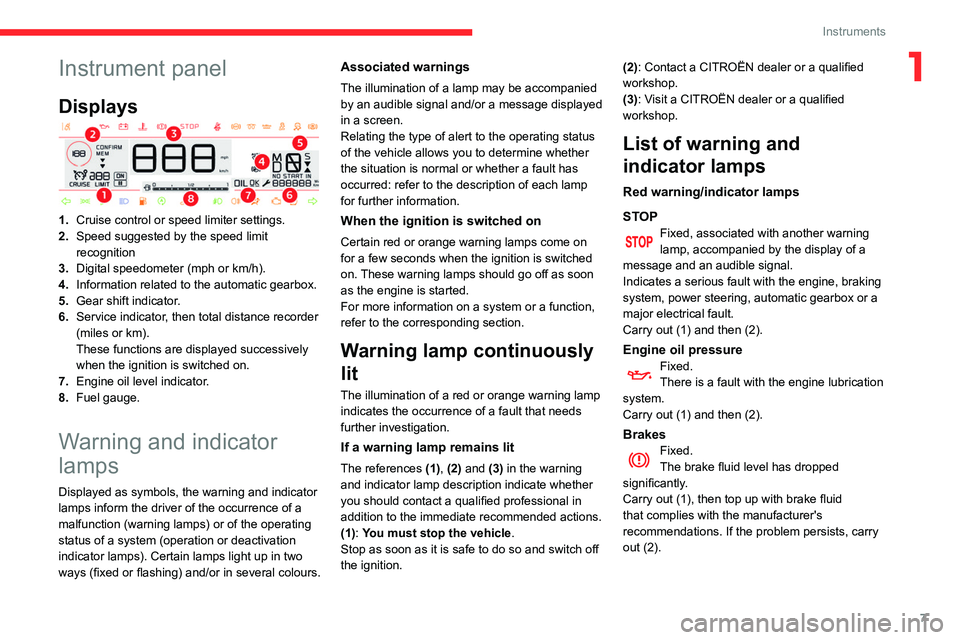
Displays
1.Cruise control or speed limiter settings.
2. Speed suggested by the speed limit
recognition
3. Digital speedometer (mph or km/h).
4. Information related to the automatic gearbox.
5. Gear shift indicator.
6. Service indicator, then total distance recorder
(miles or km).
These functions are displayed successively
when the ignition is switched on.
7. Engine oil level indicator.
8. Fuel gauge.
Warning and indicator
lamps
Displayed as symbols, the warning and indicator
lamps inform the driver of the occurrence of a
malfunction (warning lamps) or of the operating
status of a system (operation or deactivation
indicator lamps). Certain lamps light up in two
ways (fixed or flashing) and/or in several colours.
Associated warnings
The illumination of a lamp may be accompanied
by an audible signal and/or a message displayed
in a screen.
Relating the type of alert to the operating status
of the vehicle allows you to determine whether
the situation is normal or whether a fault has
occurred: refer to the description of each lamp
for further information.
When the ignition is switched on
Certain red or orange warning lamps come on
for a few seconds when the ignition is switched
on. These warning lamps should go off as soon
as the engine is started.
For more information on a system or a function,
refer to the corresponding section.
Warning lamp continuously
lit
The illumination of a red or orange warning lamp
indicates the occurrence of a fault that needs
further investigation.
If a warning lamp remains lit
The references (1), (2) and (3) in the warning
and indicator lamp description indicate whether
you should contact a qualified professional in
addition to the immediate recommended actions.
(1): You must stop the vehicle .
Stop as soon as it is safe to do so and switch off
the ignition. (2): Contact a CITROËN dealer or a qualified
workshop.
(3): Visit a CITROËN dealer or a qualified
workshop.
List of warning and
indicator lamps
Red warning/indicator lamps
STOP
Fixed, associated with another warning
lamp, accompanied by the display of a
message and an audible signal.
Indicates a serious fault with the engine, braking
system, power steering, automatic gearbox or a
major electrical fault.
Carry out (1) and then (2).
Engine oil pressureFixed.
There is a fault with the engine lubrication
system.
Carry out (1) and then (2).
BrakesFixed.
The brake fluid level has dropped
significantly.
Carry out (1), then top up with brake fluid
that complies with the manufacturer's
recommendations. If the problem persists, carry
out (2).
Page 12 of 196
10
Instruments
Indicators
Service indicator
The service indicator is displayed on the
instrument panel. Depending on the vehicle
version:
– the distance recorder display line indicates
the distance remaining before the next service
is due, or the distance travelled since it was due
preceded by the sign “-”.
– an alert message indicates the distance
remaining, as well as the period before the next
service is due or how long it is overdue.
Service spannerLights up temporarily when the ignition is
switched on.
Between 1,800 miles (3,000 km) and 600 miles
(1,000 km) remain before the next service is due.
Fixed, when the ignition is switched on.
The service is due in less than 600 miles
(1,000 km).
Have your vehicle serviced very soon.
Service spanner flashingFlashing then fixed, when the
ignition is switched on.
(With BlueHDi Diesel engines, combined with the
Service warning lamp.)
The servicing interval has been exceeded.
Have your vehicle serviced as soon as possible.
The distance indicated (in miles or kilometres) is calculated according to the
If the engine does not start, switch the ignition off
and then on, wait until the indicator lamp goes off
again, then start the engine.
Front passenger airbag (ON)Fixed.
The front passenger airbag is activated.
The control is in the "ON" position.
In this case, do NOT install a "rearward
facing" child seat on the front passenger seat
- Risk of serious injury!
Front passenger airbag(OFF)Fixed.
The front passenger airbag is deactivated.
The control is in the "OFF" position.
You can install a "rearward facing" child seat,
unless there is a fault with the airbags (airbag
warning lamp on).
AirbagsFixed.
One of the airbags or seat belt
pretensioners is faulty.
Carry out (3).
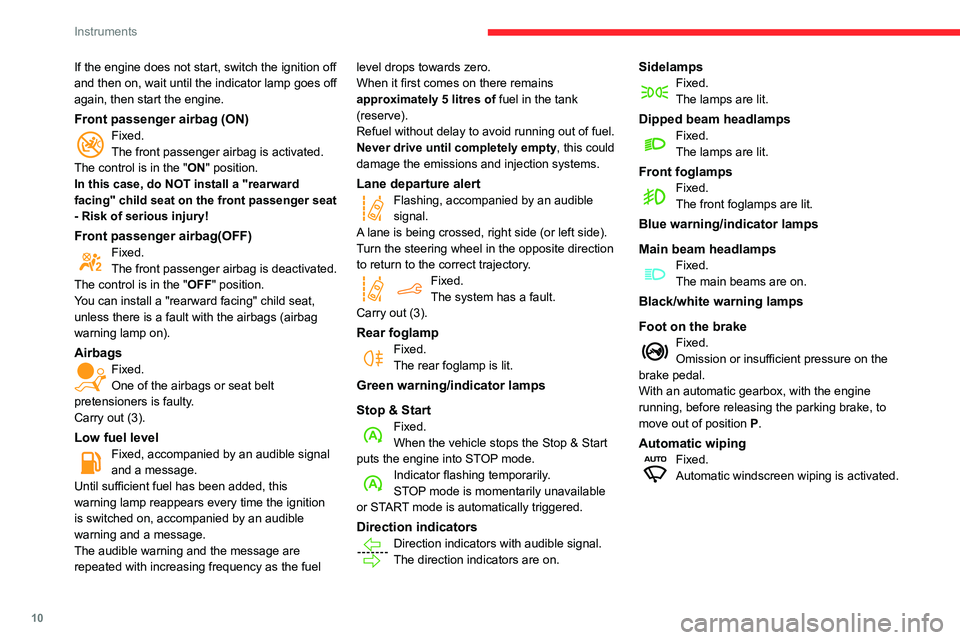
Low fuel levelFixed, accompanied by an audible signal
and a message.
Until sufficient fuel has been added, this
warning lamp reappears every time the ignition
is switched on, accompanied by an audible
warning and a message.
The audible warning and the message are
repeated with increasing frequency as the fuel level drops towards zero.
When it first comes on there remains
approximately 5 litres of fuel in the tank
(reserve).
Refuel without delay to avoid running out of fuel.
Never drive until completely empty, this could
damage the emissions and injection systems.
Lane departure alertFlashing, accompanied by an audible
signal.
A lane is being crossed, right side (or left side).
Turn the steering wheel in the opposite direction
to return to the correct trajectory.
Fixed.
The system has a fault.
Carry out (3).
Rear foglampFixed.
The rear foglamp is lit.
Green warning/indicator lamps
Stop & Start
Fixed.
When the vehicle stops the Stop & Start
puts the engine into STOP mode.
Indicator flashing temporarily.
STOP mode is momentarily unavailable
or START mode is automatically triggered.
Direction indicatorsDirection indicators with audible signal.
The direction indicators are on.
SidelampsFixed.
The lamps are lit.
Dipped beam headlampsFixed.
The lamps are lit.
Front foglampsFixed.
The front foglamps are lit.
Blue warning/indicator lamps
Main beam headlamps
Fixed.
The main beams are on.
Black/white warning lamps
Foot on the brake
Fixed.
Omission or insufficient pressure on the
brake pedal.
With an automatic gearbox, with the engine
running, before releasing the parking brake, to
move out of position P.
Automatic wipingFixed.
Automatic windscreen wiping is activated.
Page 16 of 196
14
Instruments
Display of information in the
touch screen
► In the “Applications ” menu, select the
"Vehicle application " tab, then "Trip
computer".
The trip computer information is displayed on
the page.
► Press one of the buttons to display the
desired tab.
For a temporary display in a specific
window, press the end of the wiper
control stalk for access to the information and
scroll through the different tabs.
– The current information tab with:
• the remaining range,
• current fuel consumption,
• time counter of the Stop & Start.
– The trip "1" tab with:
• the average speed,
• the average fuel consumption,
• the distance travelled, for the first trip.
– The trip "2" tab with:
• the average speed,
• the average fuel consumption,
• the distance travelled, for the second trip.
Trip reset
► When the desired trip is displayed, press the
Reset button or the end of the wiper control stalk
until zeros appear.
Trips “1“ and “2“ are independent.
Recommendations
This screen is of the capacitive type.
Use is possible in all temperatures.
Do not use pointed objects on the touch screen.
Do not touch the touch screen with wet hands.
Use a soft clean cloth to clean the touch screen.
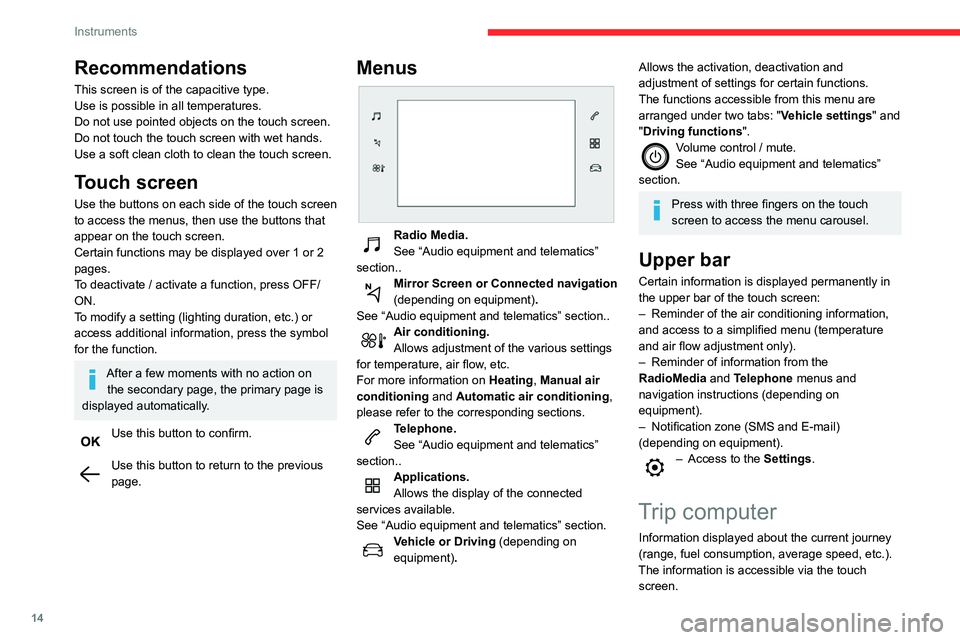
Touch screen
Use the buttons on each side of the touch screen
to access the menus, then use the buttons that
appear on the touch screen.
Certain functions may be displayed over 1 or 2
pages.
To deactivate / activate a function, press OFF/
ON.
To modify a setting (lighting duration, etc.) or
access additional information, press the symbol
for the function.
After a few moments with no action on the secondary page, the primary page is
displayed automatically.
Use this button to confirm.
Use this button to return to the previous
page.
Menus
Radio Media.
See “Audio equipment and telematics”
section..
Mirror Screen or Connected navigation
(depending on equipment) .
See “Audio equipment and telematics” section..
Air conditioning.
Allows adjustment of the various settings
for temperature, air flow, etc.
For more information on Heating, Manual air
conditioning and Automatic air conditioning ,
please refer to the corresponding sections.
Telephone.
See “Audio equipment and telematics”
section..
Applications.
Allows the display of the connected
services available.
See “Audio equipment and telematics” section.
Vehicle or Driving (depending on
equipment) .
Allows the activation, deactivation and
adjustment of settings for certain functions.
The functions accessible from this menu are
arranged under two tabs: " Vehicle settings" and
"Driving functions ".
Volume control / mute.
See “Audio equipment and telematics”
section.
Press with three fingers on the touch
screen to access the menu carousel.
Upper bar
Certain information is displayed permanently in
the upper bar of the touch screen:
–
Reminder of the air conditioning information,
and access to a simplified menu (temperature
and air flow adjustment only).
–
Reminder of information from the
RadioMedia
and Telephone menus and
navigation instructions (depending on
equipment).
–
Notification zone (SMS and E-mail)
(depending on equipment).
– Access to the Settings.
Trip computer
Information displayed about the current journey
(range, fuel consumption, average speed, etc.).
The information is accessible via the touch screen.
Page 17 of 196
15
Instruments
1Display of information in the
touch screen
► In the “Applications ” menu, select the
"Vehicle application " tab, then "Trip
computer".
The trip computer information is displayed on
the page.
►
Press one of the buttons to display the
desired tab.
For a temporary display in a specific
window, press the end of the wiper
control stalk for access to the information and
scroll through the different tabs.
–
The current information tab with:
•
the remaining range,
•
current fuel consumption,
•
time counter of the Stop & Start.
–
The trip "
1" tab with:
•
the average speed,
•
the average fuel consumption,
•
the distance travelled, for the first trip.
–
The trip "
2" tab with:
•
the average speed,
•
the average fuel consumption,
•
the distance travelled, for the second trip.
Trip reset
► When the desired trip is displayed, press the
Reset button or the end of the wiper control stalk
until zeros appear
.
Trips “1“ and “2“ are independent.
For example, trip “1“ can be used for daily
figures, and trip “2“ for monthly figures.
A few definitions…
Range
(miles or km)The distance which can still be travelled with the fuel remaining in the tank (related
to the average fuel consumption over the last
few miles (kilometres) travelled).
This value may fluctuate if a change of driving style or terrain results in a
significant change in the current fuel
consumption.
Dashes are displayed when the range falls below
20 miles (30km).
After filling with at least 5 litres of fuel, the range
is recalculated and is displayed if it exceeds 60
miles (100 km).
If dashes instead of figures continue to
be displayed when driving, contact a
CITROËN dealer or a qualified workshop.
Current fuel consumption
(mpg or km/l or l/100 km)Calculated over the last few seconds.
This function is only displayed from 19 mph (30 km/h).
Average fuel consumption
(mpg or km/l or l/100 km)Calculated since the last trip computer
reset.
Average speed
(mph or km/h)Calculated since the last trip computer
reset.
Distance travelled
(miles or km)Calculated since the last trip computer
reset.
Time counter in Stop & Start
(minutes / seconds or hours / minutes)
A time counter calculates the time spent in STOP
mode during a journey.
It resets to zero every time the ignition is
switched on.
Distance recorders
The total and trip distances are displayed for
thirty seconds when the ignition is switched off,
when the driver's door is opened and when the
vehicle is locked or unlocked.
When travelling abroad, you may have to
change the units of distance: the display
Page 19 of 196
17
Access
2Electronic key with
remote control function
and built-in key,
Remote control function
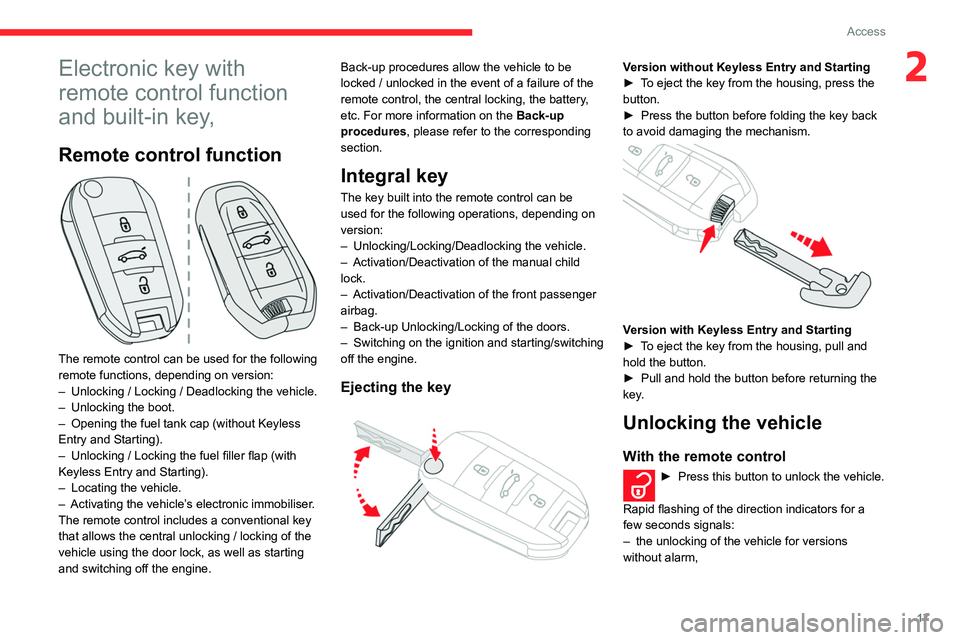
The remote control can be used for the following
remote functions, depending on version:
–
Unlocking / Locking / Deadlocking the vehicle.
–
Unlocking the boot.
–
Opening the fuel tank cap (without Keyless
Entry and Starting).
–
Unlocking / Locking the fuel filler flap (with
Keyless Entry and Starting).
–
Locating the vehicle.
–
Activating the vehicle’
s electronic immobiliser.
The remote control includes a conventional key
that allows the central unlocking / locking of the
vehicle using the door lock, as well as starting
and switching off the engine. Back-up procedures allow the vehicle to be
locked / unlocked in the event of a failure of the
remote control, the central locking, the battery,
etc. For more information on the Back-up
procedures, please refer to the corresponding
section.
Integral key
The key built into the remote control can be
used for the following operations, depending on
version:
–
Unlocking/Locking/Deadlocking the vehicle.
–
Activation/Deactivation of the manual child
lock.
–
Activation/Deactivation of the front passenger
airbag.
–
Back-up Unlocking/Locking of the doors.
–
Switching on the ignition and starting/switching
off the engine.
Ejecting the key
Version without Keyless Entry and Starting
► T o eject the key from the housing, press the
button.
►
Press the button before folding the key back
to avoid damaging the mechanism.
Version with Keyless Entry and Starting
► T o eject the key from the housing, pull and
hold the button.
►
Pull and hold the button before returning the
key
.
Unlocking the vehicle
With the remote control
► Press this button to unlock the vehicle.
Rapid flashing of the direction indicators for a
few seconds signals:
–
the unlocking of the vehicle for versions
without alarm,
Page 30 of 196
28
Ease of use and comfort
Steering wheel
adjustment
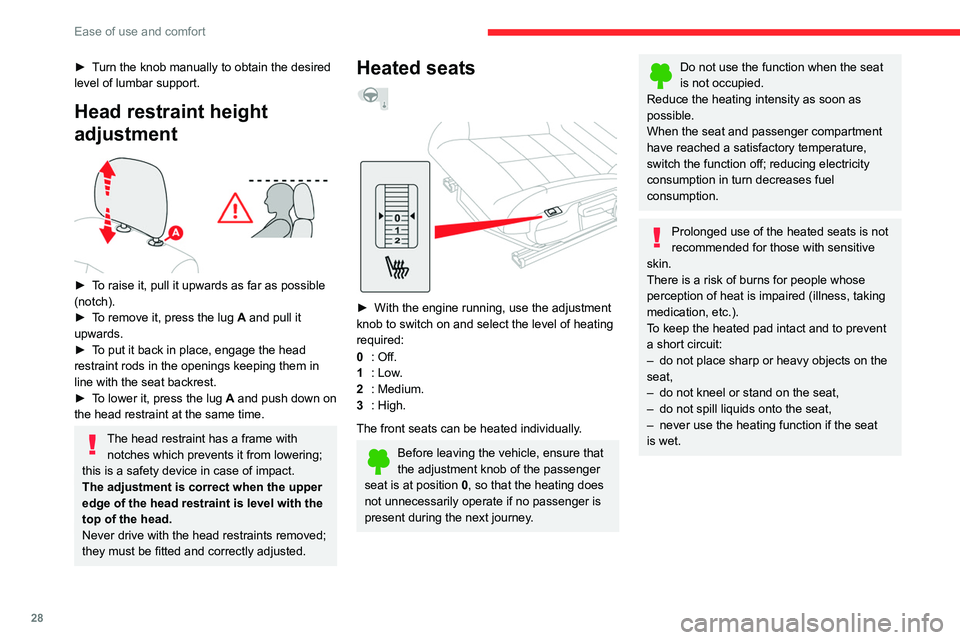
► When stationary, lower the control A to
release the steering wheel.
► Adjust the steering wheel height and reach to
suit your driving position.
► Raise the control A to lock the steering
wheel.
As a safety precaution, these operations should only be carried out while the
vehicle is stationary.
► Turn the knob manually to obtain the desired
level of lumbar support.
Head restraint height
adjustment
► To raise it, pull it upwards as far as possible
(notch).
►
T
o remove it, press the lug A and pull it
upwards.
►
T
o put it back in place, engage the head
restraint rods in the openings keeping them in
line with the seat backrest.
►
T
o lower it, press the lug A and push down on
the head restraint at the same time.
The head restraint has a frame with notches which prevents it from lowering;
this is a safety device in case of impact.
The adjustment is correct when the upper
edge of the head restraint is level with the
top of the head.
Never drive with the head restraints removed;
they must be fitted and correctly adjusted.
Heated seats
► With the engine running, use the adjustment
knob to switch on and select the level of heating
required:
0
: Off.
1
: Low.
2
: Medium.
3
: High.
The front seats can be heated individually.
Before leaving the vehicle, ensure that
the adjustment knob of the passenger
seat is at position
0, so that the heating does
not unnecessarily operate if no passenger is
present during the next journey.
Do not use the function when the seat
is not occupied.
Reduce the heating intensity as soon as
possible.
When the seat and passenger compartment
have reached a satisfactory temperature,
switch the function off; reducing electricity
consumption in turn decreases fuel
consumption.
Prolonged use of the heated seats is not
recommended for those with sensitive
skin.
There is a risk of burns for people whose
perception of heat is impaired (illness, taking
medication, etc.).
To keep the heated pad intact and to prevent
a short circuit:
–
do not place sharp or heavy objects on the
seat,
–
do not kneel or stand on the seat,
–
do not spill liquids onto the seat,
–
never use the heating function if the seat
is wet.
Page 38 of 196
36
Ease of use and comfort
Boot lighting
It comes on automatically when the boot is
opened.
There are different lighting times:
– when the ignition is off, approximately ten
minutes,
– in energy economy mode, approximately thirty
seconds,
– with the engine running, unlimited.
Panoramic glass sunroof
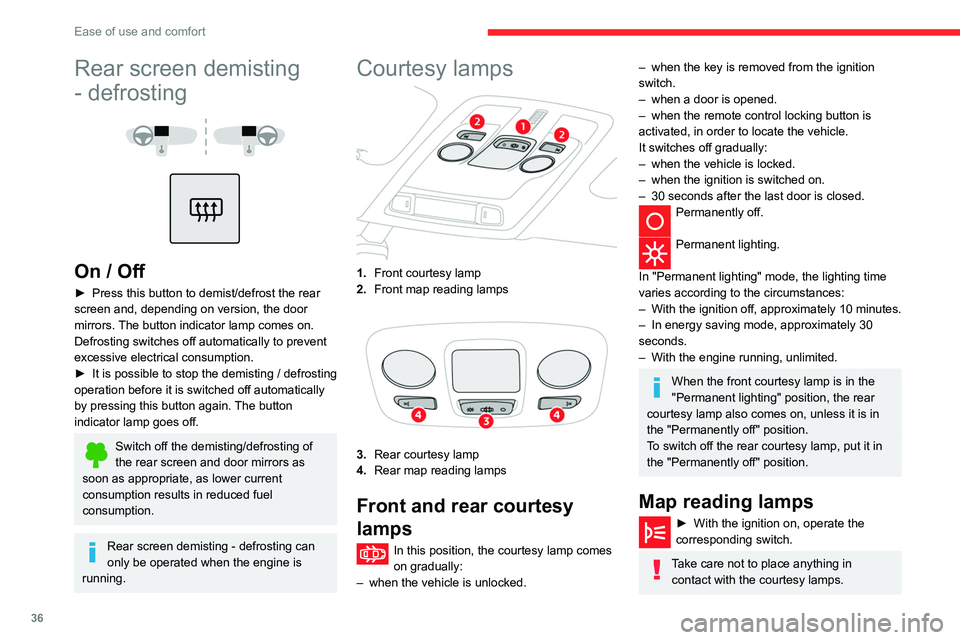
Rear screen demisting
- defrosting
On / Off
► Press this button to demist/defrost the rear
screen and, depending on version, the door
mirrors.
The button indicator lamp comes on.
Defrosting switches off automatically to prevent
excessive electrical consumption.
►
It is possible to stop the demisting / defrosting
operation before it is switched off automatically
by pressing this button again.
The button
indicator lamp goes off.
Switch off the demisting/defrosting of
the rear screen and door mirrors as
soon as appropriate, as lower current
consumption results in reduced fuel
consumption.
Rear screen demisting - defrosting can
only be operated when the engine is
running.
Courtesy lamps
1. Front courtesy lamp
2. Front map reading lamps
3.Rear courtesy lamp
4. Rear map reading lamps
Front and rear courtesy
lamps
In this position, the courtesy lamp comes
on gradually:
–
when the vehicle is unlocked.
– when the key is removed from the ignition
switch.
–
when a door is opened.
–
when the remote control locking button is
activated, in order to locate the vehicle.
It switches off gradually:
–
when the vehicle is locked.
–
when the ignition is switched on.
–
30 seconds after the last door is closed.
Permanently off.
Permanent lighting.
In "Permanent lighting" mode, the lighting time
varies according to the circumstances:
–
With
the ignition off, approximately 10 minutes.
–
In energy saving mode, approximately 30
seconds.
–
With the engine running, unlimited.
When the front courtesy lamp is in the
"Permanent lighting" position, the rear
courtesy lamp also comes on, unless it is in
the "Permanently off" position.
To switch off the rear courtesy lamp, put it in
the "Permanently off" position.
Map reading lamps
► With the ignition on, operate the
corresponding switch.
Take care not to place anything in contact with the courtesy lamps.
Page 53 of 196
51
Safety
5data relating to the vehicle: chassis number,
type (passenger vehicle or light commercial
vehicle), fuel type or power source, most
recent three locations and direction of travel,
and a timestamped log file recording the
automatic activation of the system.
The recipients of the processed data are the
emergency call handling centres designated
by the relevant national authorities in the
territory in which they are located, enabling
priority reception and handling of calls to the
“112” emergency number.
Data storage
Data contained in the system’s memory
is not accessible from outside the system until
a call is made. The system is not traceable
and is not continuously monitored in its
normal operating mode.
The data in the system's internal memory is
automatically and continuously erased. Only
the vehicle’s three most recent locations are
stored.
When an emergency call is triggered, the data
log is stored for no more than 13
hours.
* According to the geographic coverage of ‘Localised Emergency Call’, ‘Localised Assistance Call’ and the official national language chosen by the owner
of the vehicle.
The list of countries covered and telematic services provided is availab\
le from dealers or on the website for your country
.
Access to data
You have the right to access the data
and, if necessary, submit a request to
rectify, erase or restrict the processing of
any personal information not processed in
accordance with the provisions of Regulation
2016/679 (GDPR). Third parties to which data
has been communicated shall be notified of
any rectification, erasure or restriction carried
out in accordance with the aforementioned
Directive, unless doing so would be
impossible or require a disproportionate effort.
You also have the right to lodge a complaint
with the relevant data protection authority.
Localised Assistance Call
► If the vehicle breaks down, press button 2
for more than 2 seconds to request assistance
(confirmed by a voice message*).
►
Pressing again immediately cancels the
request.
Privacy mode allows you to manage the
level of sharing (data and/or position)
between your vehicle and the CITROËN
brand.
It can be configured in the Settings menu on
the touch screen.
By default, depending on equipment,
deactivate/reactivate geolocation by
simultaneously pressing the 2 buttons, then
press the "Localised Assistance Call" button
to confirm.
If you purchased your vehicle outside the
CITROËN dealer network, we invite you
to have a dealer check the configuration of
these services and, if desired, modify them to
suit your wishes. In a multilingual country,
configuration is possible in the official national
language of your choice.
For technical reasons, in particular to
improve the quality of telematic services
for customers, the Manufacturer reserves the
right to carry out updates to the vehicle's
on-board telematic system at any time.
If you benefit from the Citroën Connect
Box offer with the SOS and Assistance
Pack included, there are additional services
available to you in your personal space, via
the website for your country.
For information about the SOS and
Assistance Pack, please refer to the general
conditions for these services.