air conditioning Citroen C4 CACTUS RHD 2014 1.G User Guide
[x] Cancel search | Manufacturer: CITROEN, Model Year: 2014, Model line: C4 CACTUS RHD, Model: Citroen C4 CACTUS RHD 2014 1.GPages: 331, PDF Size: 8.56 MB
Page 72 of 331

70
Fresh air intake / Air
recirculation
The intake of fresh air avoids and eliminates
misting of the windscreen and side windows.
Recirculation of the interior air isolates the
passenger compartment from exterior odours
and fumes.F
P
ress this button to recirculate
the interior air. The air conditioning is designed to operate
effectively in all seasons, with the windows closed.
It enables you to:
Air conditioning On / Off
Switching on
Switching off
The air conditioning does not operate
when the air flow adjustment is set to
of f.
F
P
ress this button to switch on the
air conditioning.
Avoid the prolonged use of interior
air recirculation (risk of misting and
deterioration of air quality).
This function can also be used
temporarily to speed up the heating or
cooling of the passenger compartment.
-
l
ower the temperature, in summer,
-
i
ncrease the effectiveness of the demisting
in winter, above 3°C.
F
P
ress this button again to switch
off the air conditioning.
Air distribution adjustment
You can modulate the distribution of air in the
passenger compartment using these three
buttons.
Windscreen.
Each press on a button activates or deactivates
the function. Footwells. Central and side vents.
F
P
ress this button again to allow the intake
of exterior air.
For a uniform distribution of air in the
passenger compartment, the three
buttons can be activated simultaneously.
Comfort
Page 73 of 331
71
Automatic air conditioning
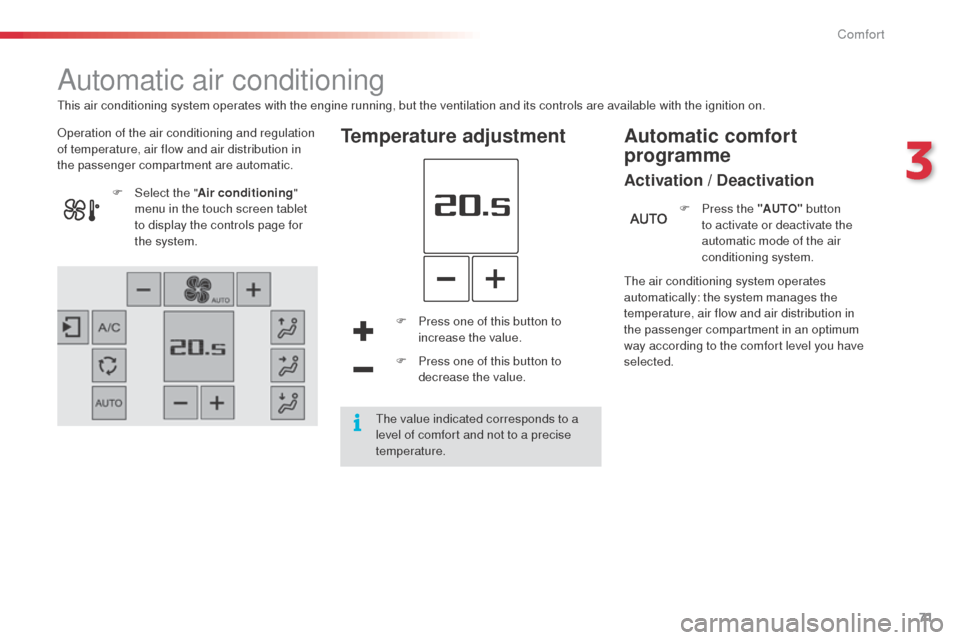
Operation of the air conditioning and regulation
of temperature, air flow and air distribution in
the passenger compartment are automatic.Temperature adjustment
F Press one of this button to increase the value.
F
P
ress one of this button to
decrease the value.
F
Sel
ect the "
Air conditioning "
menu in the touch screen tablet
to display the controls page for
the system.
The air conditioning system operates
automatically: the system manages the
temperature, air flow and air distribution in
the passenger compartment in an optimum
way according to the comfort level you have
selected.F
P
ress the "AUTO"
button
to activate or deactivate the
automatic mode of the air
conditioning system.
Automatic comfort
programme
Activation / Deactivation
This air conditioning system operates with the engine running, but the ventilation and its controls are available with the ignition on.
The value indicated corresponds to a
level of comfort and not to a precise
temperature.
3
Comfort
Page 76 of 331

74
Avoid the prolonged use of interior
air recirculation (risk of misting and
deterioration of air quality).
It allows you:
-
i
n summer, to lower the temperature,
-
i
n winter, above 3 °C, to improve demisting.
F
P
ress this button again to switch
off the air conditioning.
F
P
ress this button to switch on the
air conditioning.
Air conditioning On/Off
The air conditioning is designed to operate
efficiently in all seasons, with the windows
closed. The intake of exterior air avoids and eliminated
misting of the windscreen and side windows.
Air intake/Air recirculation
The recirculation of interior air prevents exterior
odours and smoke from entering the passenger
compartment.
F
P
ress this button to recirculate
the interior air.
F
P
ress this button again to allow
the intake of exterior air.
The air conditioning cannot operate
when the air flow is set to off. This function also allows faster heating
or cooling of the air in the passenger
compartment.
Ventilation with "ignition
on" function
With the ignition on, you can use the
ventilation system and have access to the "
Air
conditioning " menu to adjust the air flow and
air distribution in the passenger compartment.
This function is available for a few minutes,
depending on the state of charge of the battery
of your vehicle.
This function does not activate the air
conditioning.
You can make use of the residual heat in the
engine to warm the passenger compartment
using the temperature setting buttons.
Switching on
Switching off
Comfort
Page 77 of 331

75
Front Demist - Defrost
Switching onWith Stop & Start, when demisting has
been activated, the STOP mode is not
available.
F
P
ress this button to demist or
defrost the windscreen and side
windows as quickly as possible.
The indicator lamp in the button
comes on.
The system automatically manages the air
conditioning (depending on version), air
flow and air intake, and provides optimum
distribution towards the windscreen and side
windows.
Switching off
F To switch off demisting, press this button again, the indicator
lamp goes off.
3
Comfort
Page 200 of 331
198
Dashboard fuses
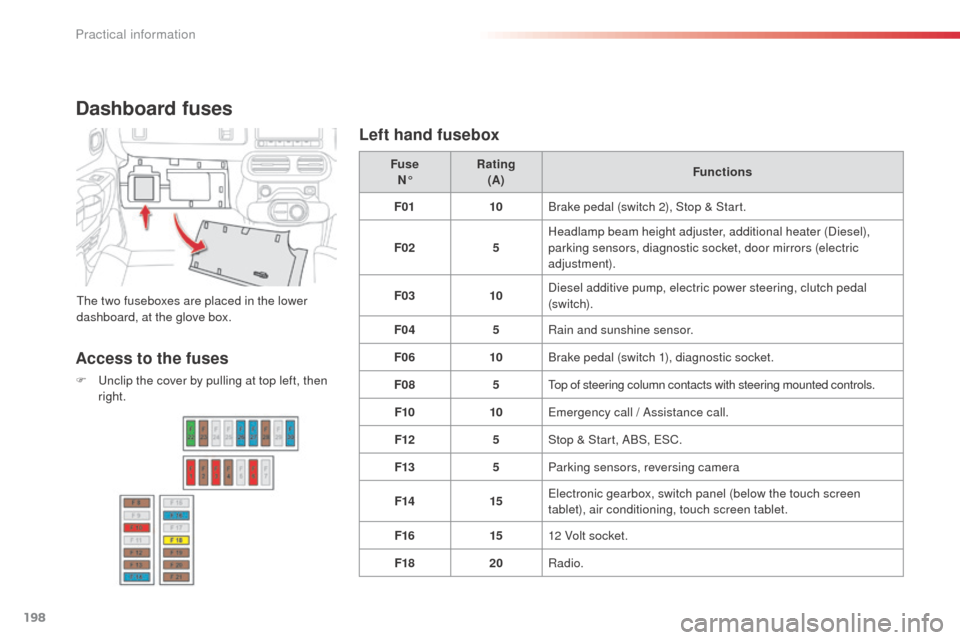
The two fuseboxes are placed in the lower
dashboard, at the glove box.Fuse
N° Rating
(A) Functions
F01 10Brake pedal (switch 2), Stop & Start.
F02 5Headlamp beam height adjuster, additional heater (Diesel),
parking sensors, diagnostic socket, door mirrors (electric
adjustment).
F03 10Diesel additive pump, electric power steering, clutch pedal
(sw i tc h).
F04 5Rain and sunshine sensor.
F06 10Brake pedal (switch 1), diagnostic socket.
F08 5Top of steering column contacts with steering mounted controls.
F10 10Emergency call / Assistance call.
F12 5Stop & Start, ABS, ESC.
F13 5Parking sensors, reversing camera
F14 15Electronic gearbox, switch panel (below the touch screen
tablet), air conditioning, touch screen tablet.
F16 1512 Volt socket.
F18 20Radio.
Access to the fuses
F Unclip the cover by pulling at top left, then
right.
Left hand fusebox
Practical information
Page 203 of 331
201
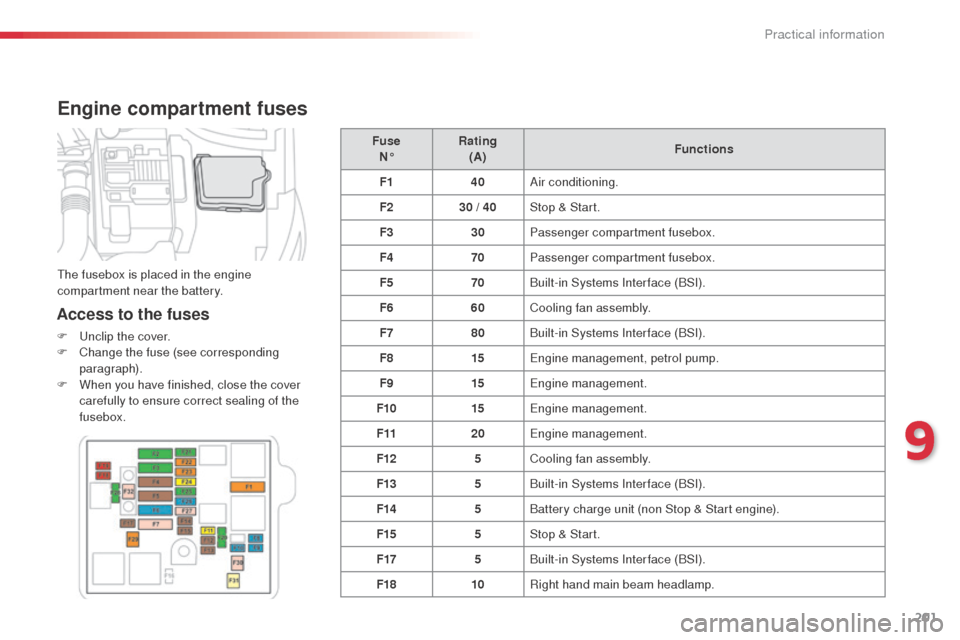
Engine compartment fuses
Access to the fuses
F Unclip the cover.
F C hange the fuse (see corresponding
paragraph).
F
W
hen you have finished, close the cover
carefully to ensure correct sealing of the
fusebox. Fuse
N° Rating
(A) Functions
F1 40Air conditioning.
F2 30 / 40Stop & Start.
F3 30Passenger compartment fusebox.
F4 70Passenger compartment fusebox.
F5 70Built-in Systems Interface (BSI).
F6 60Cooling fan assembly.
F7 80Built-in Systems Interface (BSI).
F8 15Engine management, petrol pump.
F9 15Engine management.
F10 15Engine management.
F11 20Engine management.
F12 5Cooling fan assembly.
F13 5Built-in Systems Interface (BSI).
F14 5Battery charge unit (non Stop & Start engine).
F15 5Stop & Start.
F17 5Built-in Systems Interface (BSI).
F18 10Right hand main beam headlamp.
The fusebox is placed in the engine
compartment near the battery.
9
Practical information
Page 209 of 331

207
Load reduction mode
System which manages the use of certain
functions according to the level of charge
remaining in the battery.
When the vehicle is being driven, the load
reduction function temporarily deactivates
certain functions, such as the air conditioning,
the heated rear screen...
The deactivated functions are reactivated
automatically as soon as conditions permit.System which manages the duration of use of
certain functions to conserve a sufficient level
of charge in the battery.
After the engine has stopped, you can still use
functions such as the audio and telematics
system,
windscreen wipers, dipped beam
headlamps,
courtesy lamps, etc. for a
maximum combined duration of about
forty minutes.
Energy economy mode
Switching to economy mode
A message then appears in the instrument
panel screen indicating that the vehicle has
switched to economy mode and the active
functions are put on standby.
If a telephone call is being made at this time,
it will be maintained for around 10 minutes
with the Bluetooth hands-free system of your
audio system.
Exiting economy mode
These functions are reactivated automatically
next time the vehicle is driven.
In order to restore the use of these functions
immediately, start the engine and let it run:
-
f
or less than ten minutes, to use the
equipment for approximately five minutes,
-
f
or more than ten minutes, to use the
equipment for up to approximately
thirty minutes.
Let the engine run for the duration specified to
ensure that the battery charge is sufficient.
Do not repeatedly and continuously restart the
engine in order to charge the battery.
A flat battery prevents the engine from starting
(refer to the "Battery" section).
9
Practical information
Page 228 of 331

226
Checks
12 V battery
The battery does not require any maintenance.
However, check that the terminals are clean
and correctly tightened, particularly in summer
and winter.Refer to the maintenance and
warranty guide for details of the
replacement intervals for these
components.
Air filter and passenger compartment filter
Replace the oil filter each time the
engine oil is changed.
Refer to the maintenance and
warranty guide for details of the
replacement interval for this
component.
Oil filterThe presence of this label, in particular with
the Stop & Start system, indicates the use of
a specific 12 V lead-acid battery with special
technology and specification. The involvement
of a CITROËN dealer or a qualified workshop
is essential when replacing or disconnecting
the battery.Unless other wise indicated, check these components in accordance with the maintenance and warranty guide and according to your engine.
Other wise, have them checked by a CITROËN dealer or a qualified workshop.
Depending on the environment (e.g. dusty
atmosphere) and the use of the vehicle
(e.g. city driving), replace them twice as often
if necessary .
A clogged passenger compartment filter may
have an adverse effect on the per formance
of the air conditioning system and generate
undesirable odours.
Particle filter (Diesel)
The start of saturation of the
particle filter is indicated by the
fixed illumination of this warning
lamp accompanied by a warning
message.
As soon as the traffic conditions permit,
regenerate the filter by driving at a
speed of at least 40 mph (60 km/h) until
the warning lamp goes off.
If the warning lamp stays on, this
indicates a low additive level.
On a new vehicle, the first particle
filter regeneration operations may be
accompanied by a "burning" smell,
which is per fectly normal.
Following prolonged operation of the
vehicle at very low speed or at idle,
you may, in exceptional circumstances,
notice the emission of water vapour at
the exhaust on acceleration. This does
not affect the behaviour of the vehicle
or the environment.
When carrying out work on the battery, refer
to the "12 V battery" section for details of the
precautions to be taken before disconnecting
the battery and following its reconnection.
Checks
Page 240 of 331

01
"Air conditioning"
allows control of the
settings for temperature
and air flow.
"Driving assistance"
allows access to the trip
computer and certain
vehicle functions to be
activated, deactivated
and adjusted.
"Media"
allows selection of a
radio station, the various
music sources and the
display of photographs. "Navigation"*
allows settings for
navigation and the choice
of a destination. "Configuration
"
allows sound settings
and the brightness of
instruments and controls
to be adjusted and gives
access to the interactive
help for the main vehicle
systems and warning
lamps.
"Connected services "*
allows connection to
an applications portal
to facilitate, make
safe and personalise
journeys by means of a
connection key available
on subscription from a
CITROËN dealer.
"Telephone"
allows the connection of
a mobile telephone via
Bluetooth.
GENERAL OPERATION
238 *
Depending on equipment.
Page 254 of 331
04
252
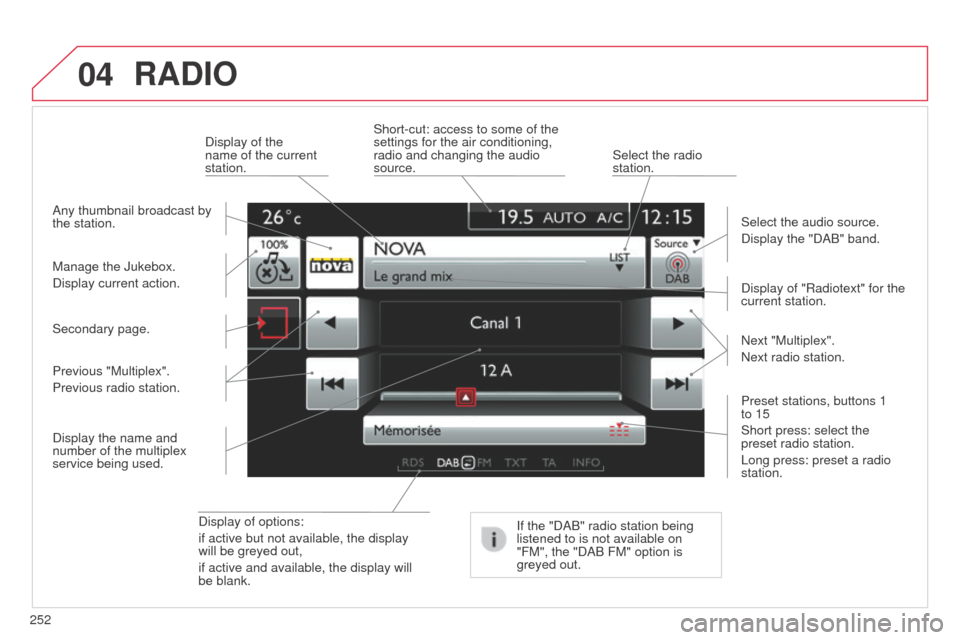
RADIO
Display of options:
if active but not available, the display
will be greyed out,
if active and available, the display will
be blank.Display of "Radiotext" for the
current station.
Manage the Jukebox.
Display current action. Select the audio source.
Display the "DAB" band.
Display of the
name of the current
station.
Short-cut: access to some of the
settings for the air conditioning,
radio and changing the audio
source.
Select the radio
station.
If the "DAB" radio station being
listened to is not available on
"FM", the "DAB FM" option is
greyed out.
Any thumbnail broadcast by
the station.
Preset stations, buttons 1
to 15
Short press: select the
preset radio station.
Long press: preset a radio
station. Next "Multiplex".
Next radio station.
Secondary page.
Display the name and
number of the multiplex
service being used. Previous "Multiplex".
Previous radio station.