display Citroen C4 DAG 2008 1.G User Guide
[x] Cancel search | Manufacturer: CITROEN, Model Year: 2008, Model line: C4 DAG, Model: Citroen C4 DAG 2008 1.GPages: 257, PDF Size: 8.06 MB
Page 33 of 257
34
II
M U L T I F U N C T I O N D I S P L A Y
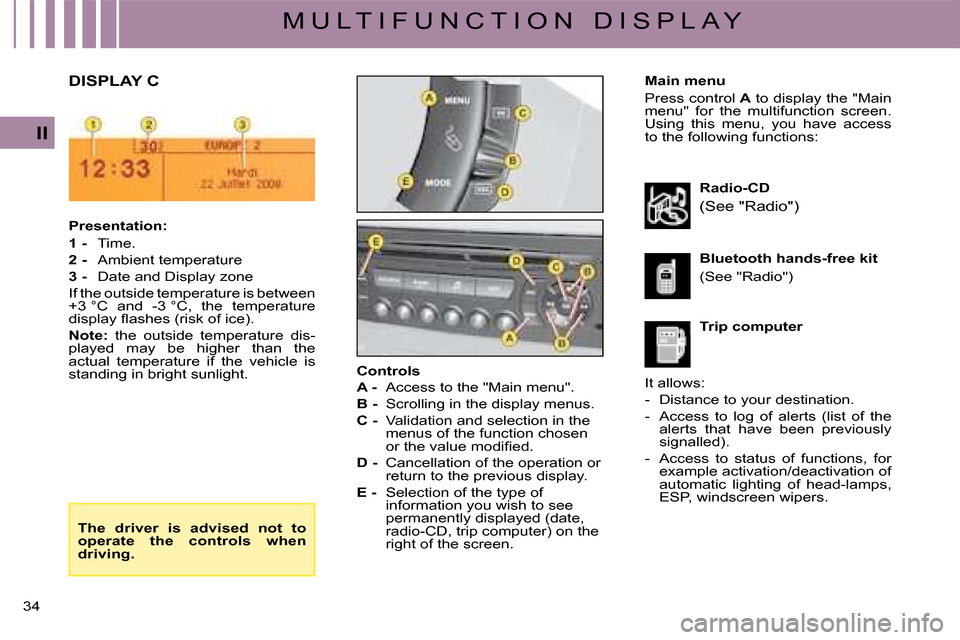
Main menu
Press control A to display the "Main menu" for the multifunction screen. Using this menu, you have access to the following functions:
Presentation:
1 - Time.
2 - Ambient temperature
3 - Date and Display zone
If the outside temperature is between +3 °C and -3 °C, the temperature display fl ashes (risk of ice).
Note: the outside temperature dis-played may be higher than the actual temperature if the vehicle is standing in bright sunlight.
Radio-CD
(See "Radio")
Trip computer
Bluetooth hands-free kit
(See "Radio")
Controls
A - Access to the "Main menu".
B - Scrolling in the display menus.
C - Validation and selection in the menus of the function chosen or the value modifi ed.
D - Cancellation of the operation or return to the previous display.
E - Selection of the type of information you wish to see permanently displayed (date, radio-CD, trip computer) on the right of the screen.
DISPLAY C
It allows:
- Distance to your destination.
- Access to log of alerts (list of the alerts that have been previously signalled).
- Access to status of functions, for example activation/deactivation of automatic lighting of head-lamps, ESP, windscreen wipers.
The driver is advised not to operate the controls when driving.
Page 34 of 257
35
II
M U L T I F U N C T I O N D I S P L A Y
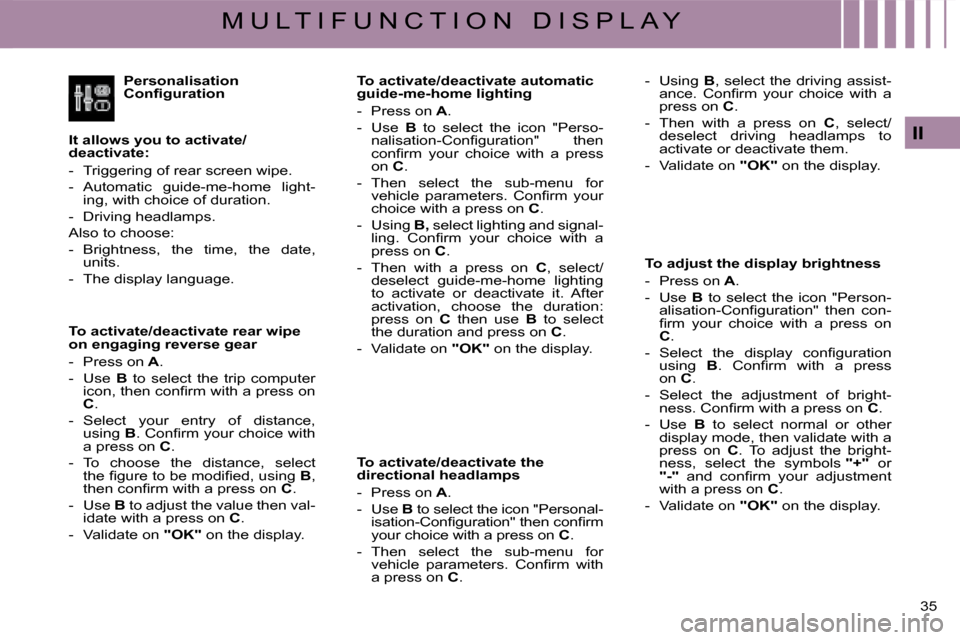
Personalisation Confi guration
It allows you to activate/deactivate:
- Triggering of rear screen wipe.
- Automatic guide-me-home light-ing, with choice of duration.
- Driving headlamps.
Also to choose:
- Brightness, the time, the date, units.
- The display language.
To activate/deactivate rear wipe on engaging reverse gear
- Press on A.
- Use B to select the trip computer icon, then confi rm with a press onC.
- Select your entry of distance, using B. Confi rm your choice with a press on C.
- To choose the distance, select the fi gure to be modifi ed, using B, then confi rm with a press on C.
- Use B to adjust the value then val-idate with a press on C.
- Validate on "OK" on the display.
To activate/deactivate automatic guide-me-home lighting
- Press on A.
- Use B to select the icon "Perso-nalisation-Confi guration" then confi rm your choice with a press on C.
- Then select the sub-menu for vehicle parameters. Confi rm your choice with a press on C.
- Using B, select lighting and signal-ling. Confi rm your choice with a press on C.
- Then with a press on C, select/deselect guide-me-home lighting to activate or deactivate it. After activation, choose the duration: press on C then use B to select the duration and press on C.
- Validate on "OK" on the display.
To activate/deactivate the directional headlamps
- Press on A.
- Use B to select the icon "Personal-isation-Confi guration" then confi rm your choice with a press on C.
- Then select the sub-menu for vehicle parameters. Confi rm with a press on C.
To adjust the display brightness
- Press on A.
- Use B to select the icon "Person-alisation-Confi guration" then con-fi rm your choice with a press onC.
- Select the display confi guration using B. Confi rm with a press on C.
- Select the adjustment of bright-ness. Confi rm with a press on C.
- Use B to select normal or other display mode, then validate with a press on C. To adjust the bright-ness, select the symbols "+" or "-" and confi rm your adjustment with a press on C.
- Validate on "OK" on the display.
- Using B, select the driving assist-ance. Confi rm your choice with a press on C.
- Then with a press on C, select/deselect driving headlamps to activate or deactivate them.
- Validate on "OK" on the display.
Page 35 of 257
36
II
M U L T I F U N C T I O N D I S P L A Y
To choose units
- Press on A.
- Use B to select the icon "Personal-isation-Confi guration" then confi rm your choice with a press on C.
- Select the display confi guration using B. Confi rm with a press on C.
- Then select the sub-menu for Units. Confi rm with a press on C.
- Using B, select the unit to be mod-ifi ed (Temperature or Consump-tion) then validate with a press onC.
- Validate on "OK" on the display.
Note: This choice concerns all the types of information (fuel consump-tion, speed, etc.) that appear on the displays.
To choose the language
- Press on A.
- Use B to select the icon "Persona-lisation-Confi guration" then confi rm your choice with a press on C.
- Select the choice of language, using B.
- Using B, select the desired lan-guage and validate your choice with a press on C.
- Validate on "OK" on the display.
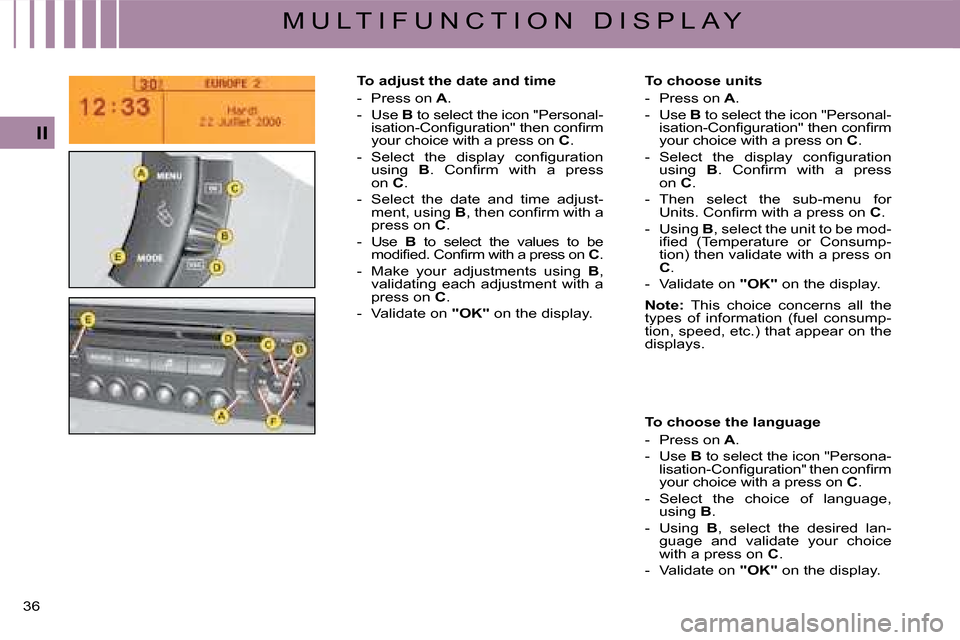
To adjust the date and time
- Press on A.
- Use B to select the icon "Personal-isation-Confi guration" then confi rm your choice with a press on C.
- Select the display confi guration using B. Confi rm with a press on C.
- Select the date and time adjust-ment, using B, then confi rm with a press on C.
- Use B to select the values to be modifi ed. Confi rm with a press on C.
- Make your adjustments using B, validating each adjustment with a press on C.
- Validate on "OK" on the display.
Page 36 of 257
37
II
M U L T I F U N C T I O N D I S P L A Y
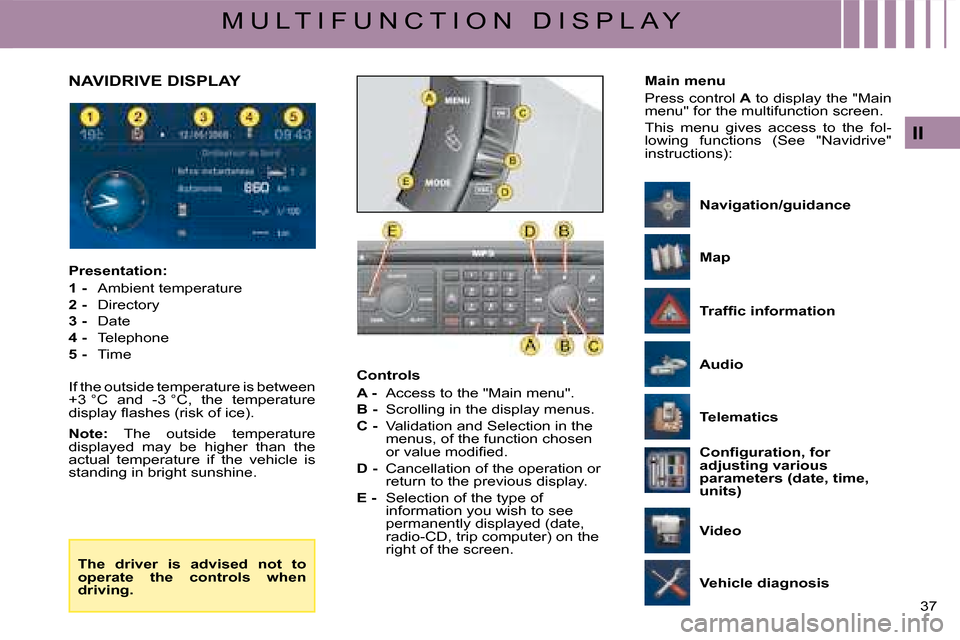
Controls
A - Access to the "Main menu".
B - Scrolling in the display menus.
C - Validation and Selection in the menus, of the function chosen or value modifi ed.
D - Cancellation of the operation or return to the previous display.
E - Selection of the type of information you wish to see permanently displayed (date, radio-CD, trip computer) on the right of the screen.
Presentation:
1 - Ambient temperature
2 - Directory
3 - Date
4 - Telephone
5 - Time
If the outside temperature is between +3 °C and -3 °C, the temperature display fl ashes (risk of ice).
Note: The outside temperature displayed may be higher than the actual temperature if the vehicle is standing in bright sunshine.
NAVIDRIVE DISPLAYMain menu
Press control A to display the "Main menu" for the multifunction screen.
This menu gives access to the fol-lowing functions (See "Navidrive" instructions):
The driver is advised not to operate the controls when driving.
Traffi c information
Vehicle diagnosis
Telematics
Confi guration, for adjusting various parameters (date, time, units)
Map
Video
Navigation/guidance
Audio
Page 37 of 257
38
II
M U L T I F U N C T I O N D I S P L A Y
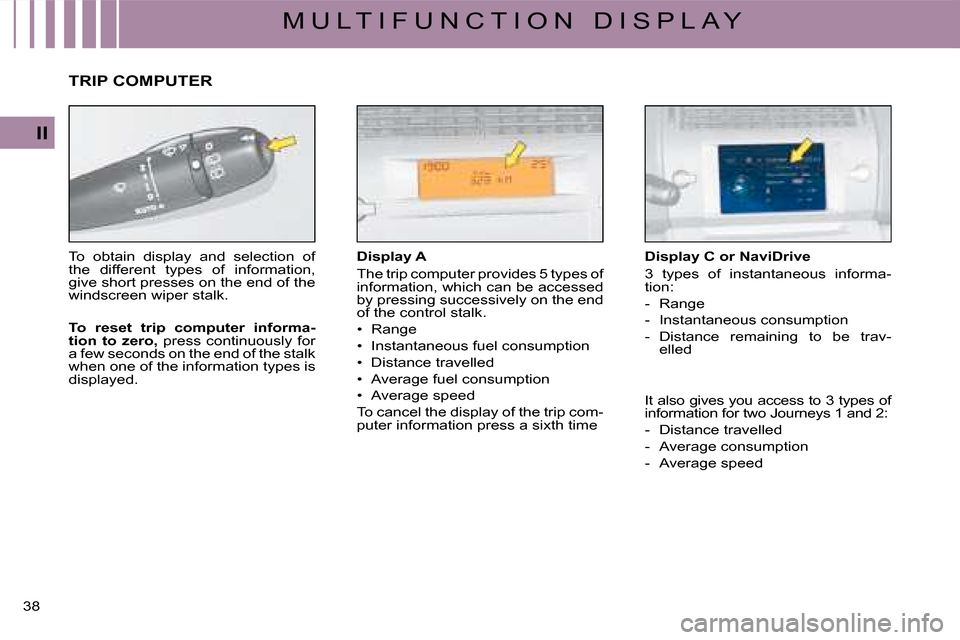
Display A
The trip computer provides 5 types of information, which can be accessed by pressing successively on the end of the control stalk.
Page 38 of 257
39
II
M U L T I F U N C T I O N D I S P L A Y
Display C or NaviDrive (continued)
The journeys
Journeys 1 and 2 are identical but independent of each other. For example, you can use Journey 1 for daily calculations and Journey 2 for monthly calculations.
To reset a journey to zero
When the desired journey is dis-played, give a long press on the end of the wiper stalk.
Permanent display
Pressing the "Mode" button causes the trip computer information to be displayed permanently.
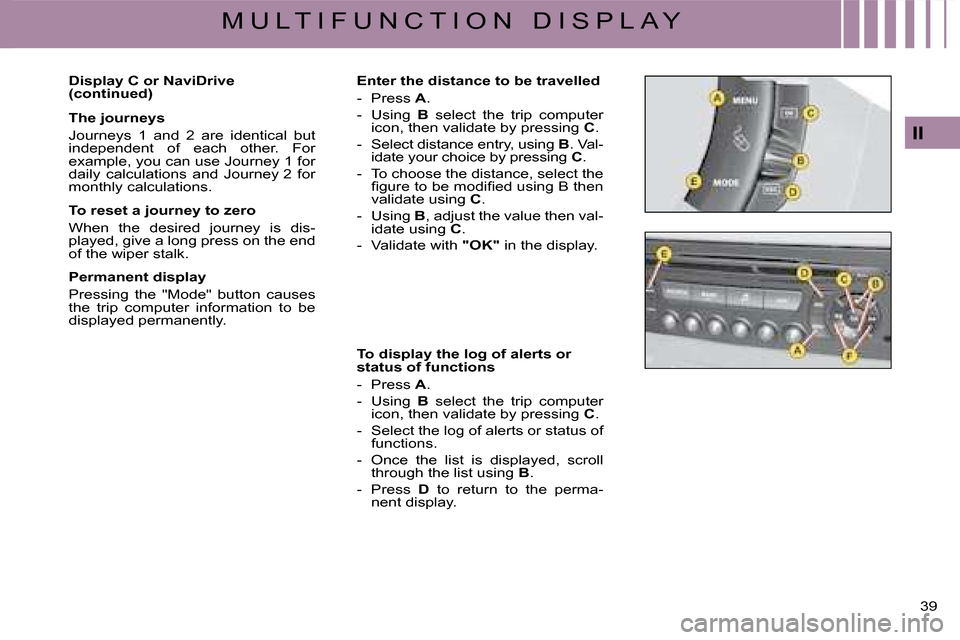
Enter the distance to be travelled
- Press A.
- Using B select the trip computer icon, then validate by pressing C.
- Select distance entry, using B. Val-idate your choice by pressing C.
- To choose the distance, select the fi gure to be modifi ed using B then validate using C.
- Using B, adjust the value then val-idate using C.
- Validate with "OK" in the display.
To display the log of alerts or status of functions
- Press A.
- Using B select the trip computer icon, then validate by pressing C.
- Select the log of alerts or status of functions.
- Once the list is displayed, scroll through the list using B.
- Press D to return to the perma-nent display.
Page 39 of 257
40
II
M U L T I F U N C T I O N D I S P L A Y
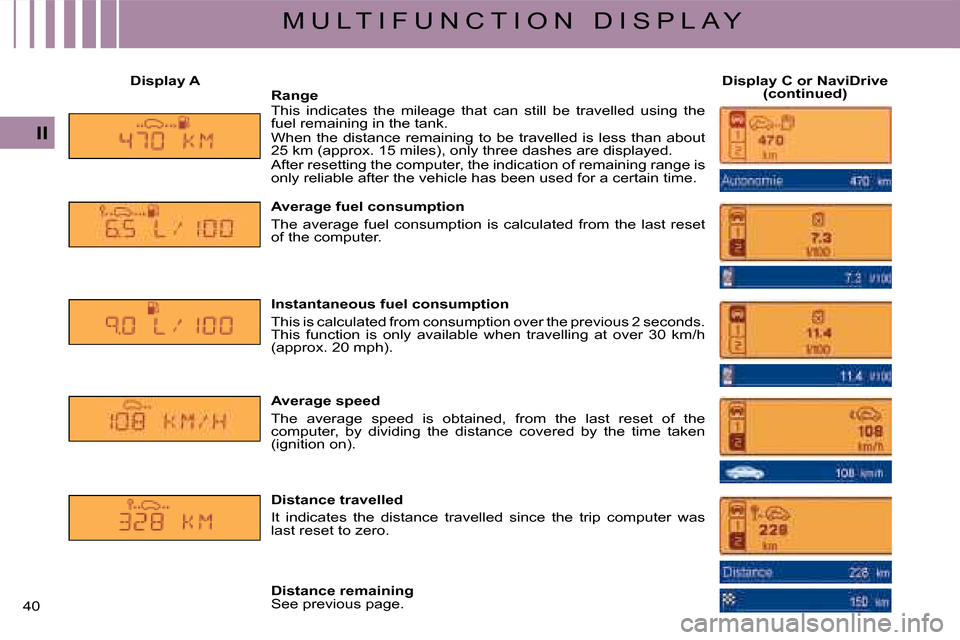
Display ADisplay C or NaviDrive (continued)RangeThis indicates the mileage that can still be travelled using the fuel remaining in the tank.When the distance remaining to be travelled is less than abo ut 25 km (approx. 15 miles), only three dashes are displayed.After resetting the computer, the indication of remaining range is only reliable after the vehicle has been used for a certain time.
Average fuel consumption
The average fuel consumption is calculated from the last reset of the computer.
Instantaneous fuel consumption
This is calculated from consumption over the previous 2 seconds. This function is only available when travelling at over 30 km/ h (approx. 20 mph).
Average speed
The average speed is obtained, from the last reset of the computer, by dividing the distance covered by the time taken (ignition on).
Distance travelled
It indicates the distance travelled since the trip computer was last reset to zero.
Distance remainingSee previous page.
Page 44 of 257
45
III
C O M F O R T
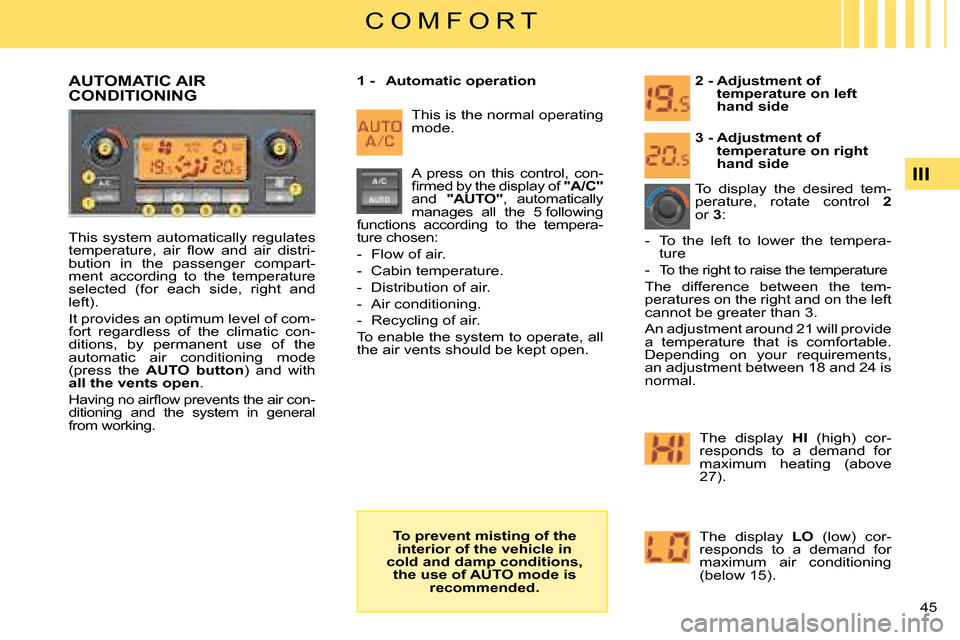
This system automatically regulates temperature, air fl ow and air distri-bution in the passenger compart-ment according to the temperature selected (for each side, right and left).
It provides an optimum level of com-fort regardless of the climatic con-ditions, by permanent use of the automatic air conditioning mode (press the AUTO button) and with all the vents open.
Having no airfl ow prevents the air con-ditioning and the system in general from working.
2 - Adjustment of temperature on left hand side
1 - Automatic operation
To display the desired tem-perature, rotate control 2or 3:
AUTOMATIC AIR CONDITIONING
The display HI (high) cor-responds to a demand for maximum heating (above 27).
The display LO (low) cor-responds to a demand for maximum air conditioning (below 15).
A press on this control, con-fi rmed by the display of "A/C"and "AUTO", automatically manages all the 5 following functions according to the tempera-ture chosen:
- Flow of air.
- Cabin temperature.
- Distribution of air.
- Air conditioning.
- Recycling of air.
To enable the system to operate, all the air vents should be kept open.
3 - Adjustment of temperature on right hand side
- To the left to lower the tempera-ture
- To the right to raise the temperature
The difference between the tem-peratures on the right and on the left cannot be greater than 3.
An adjustment around 21 will provide a temperature that is comfortable. Depending on your requirements, an adjustment between 18 and 24 is normal.
This is the normal operating mode.
To prevent misting of the interior of the vehicle in cold and damp conditions, the use of AUTO mode is recommended.
Page 45 of 257
46 III
C O M F O R T
Notes:
- When you enter the vehicle, the temperature inside the vehicle may be much colder (or warmer) than a comfortable temperature. It is no use modifying the dis-played temperature to try to attain the desired level of comfort. The system automatically strives to compensate this temperature dis-crepancy as rapidly as possible.
- When starting the engine from cold, in order to avoid distributing too much cold air, the blower will attain its optimum level gradually.
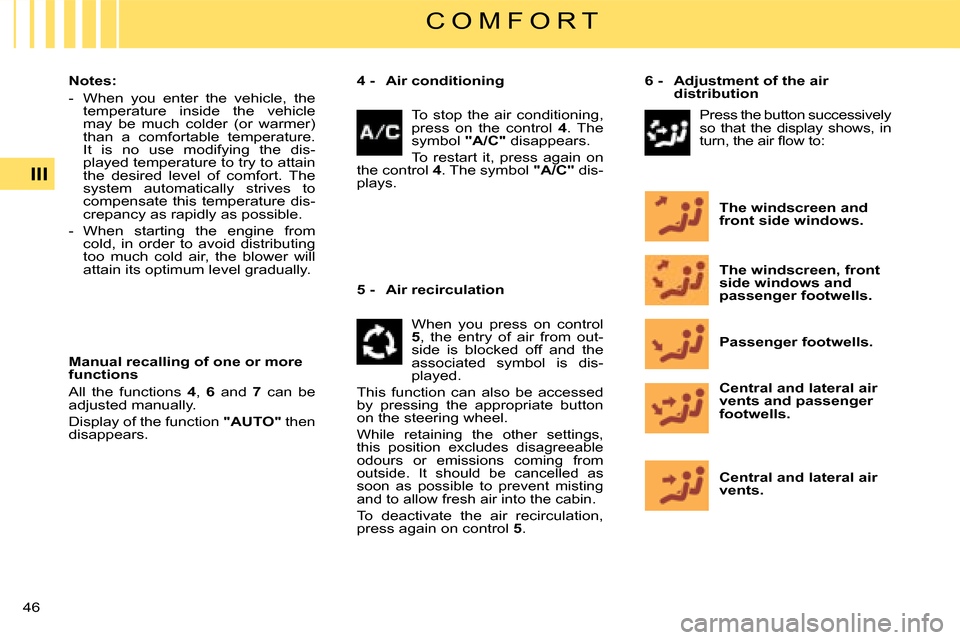
Manual recalling of one or more functions
All the functions 4, 6 and 7 can be adjusted manually.
Display of the function "AUTO" then disappears.
Central and lateral air vents.
Central and lateral air vents and passenger footwells.
Passenger footwells.
The windscreen, front side windows and passenger footwells.
The windscreen and front side windows.
4 - Air conditioning6 - Adjustment of the air distribution
5 - Air recirculation
To stop the air conditioning, press on the control 4. The symbol "A/C" disappears.
To restart it, press again on the control 4. The symbol "A/C" dis-plays.
When you press on control 5, the entry of air from out-side is blocked off and the associated symbol is dis-played.
This function can also be accessed by pressing the appropriate button on the steering wheel.
While retaining the other settings, this position excludes disagreeable odours or emissions coming from outside. It should be cancelled as soon as possible to prevent misting and to allow fresh air into the cabin.
To deactivate the air recirculation, press again on control 5.
Press the button successively so that the display shows, in turn, the air fl ow to:
Page 46 of 257
47
III
C O M F O R T
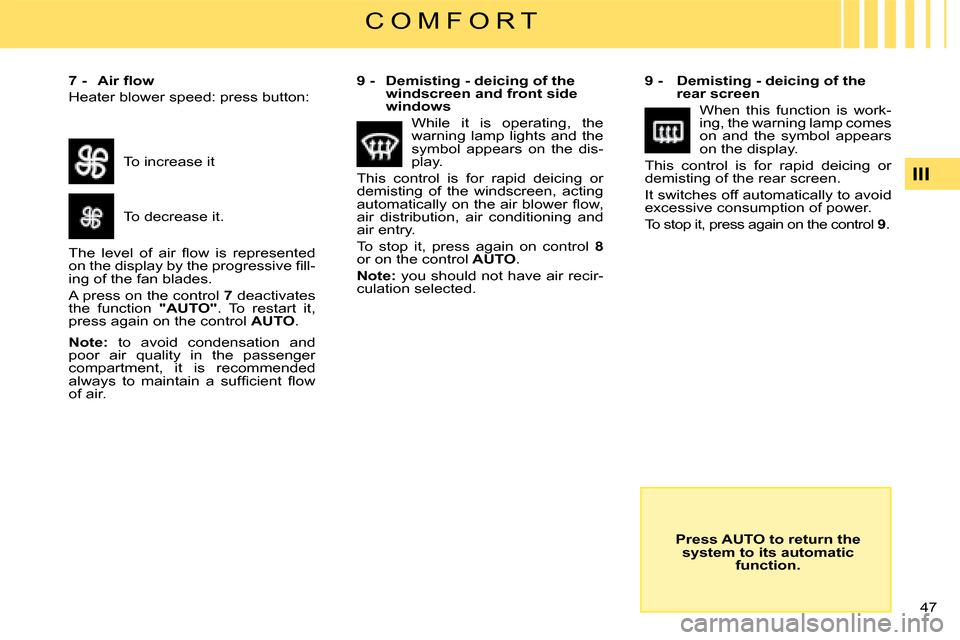
7 - Air fl ow
Heater blower speed: press button:
9 - Demisting - deicing of the rear screen
When this function is work-ing, the warning lamp comes on and the symbol appears on the display.
This control is for rapid deicing or demisting of the rear screen.
It switches off automatically to avoid excessive consumption of power.
To stop it, press again on the control 9.
Press AUTO to return the system to its automatic function.
To increase it
To decrease it.
The level of air fl ow is represented on the display by the progressive fi ll-ing of the fan blades.
A press on the control 7 deactivates the function "AUTO". To restart it, press again on the control AUTO.
Note: to avoid condensation and poor air quality in the passenger compartment, it is recommended always to maintain a suffi cient fl ow of air.
9 - Demisting - deicing of the windscreen and front side windows
While it is operating, the warning lamp lights and the symbol appears on the dis-play.
This control is for rapid deicing or demisting of the windscreen, acting automatically on the air blower fl ow, air distribution, air conditioning and air entry.
To stop it, press again on control 8or on the control AUTO.
Note: you should not have air recir-culation selected.