instrument panel Citroen C4 DAG 2011 2.G User Guide
[x] Cancel search | Manufacturer: CITROEN, Model Year: 2011, Model line: C4 DAG, Model: Citroen C4 DAG 2011 2.GPages: 324, PDF Size: 10.08 MB
Page 30 of 324
1
28
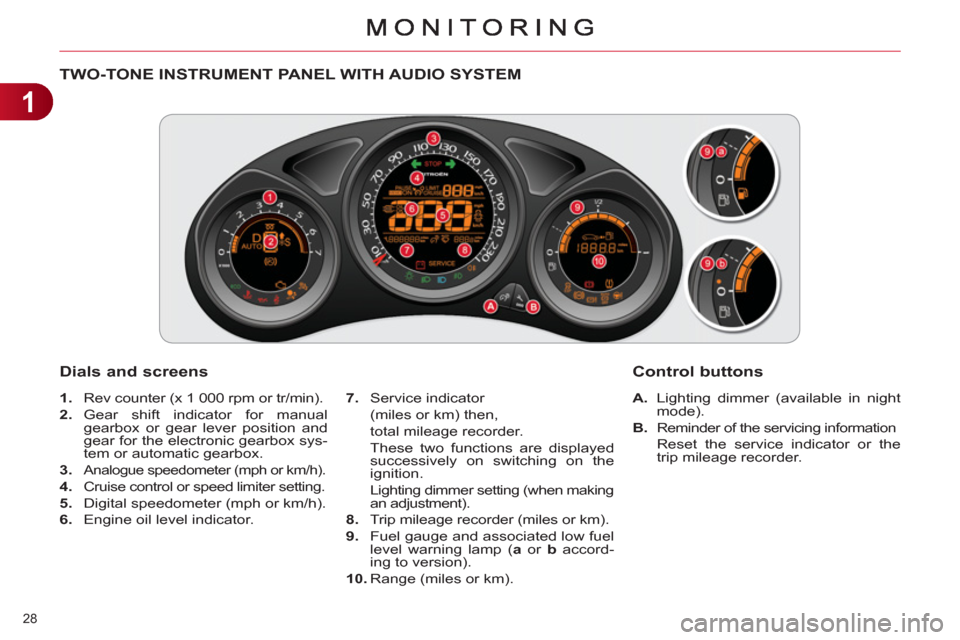
TWO-TONE INSTRUMENT PANEL WITH AUDIO SYSTEM
Dials and screens
A.
Lighting dimmer (available in night
mode).
B.
Reminder of the servicing information
Reset the service indicator or the
trip mileage recorder.
7.
Service indicator
(miles or km) then,
total mileage recorder.
These two functions are displayed
successively on switching on the
ignition.
Lighting dimmer setting (when making
an adjustment).
8.
Trip mileage recorder (miles or km).
9.
Fuel gauge and associated low fuel
level warning lamp ( a
or b
accord-
ing to version).
10.
Range (miles or km).
Control buttons
1.
Rev counter (x 1 000 rpm or tr/min).
2.
Gear shift indicator for manual
gearbox or gear lever position and
gear for the electronic gearbox sys-
tem or automatic gearbox.
3.
Analogue speedometer (mph or km/h).
4.
Cruise control or speed limiter setting.
5.
Digital speedometer (mph or km/h).
6.
Engine oil level indicator.
Page 31 of 324
1
29
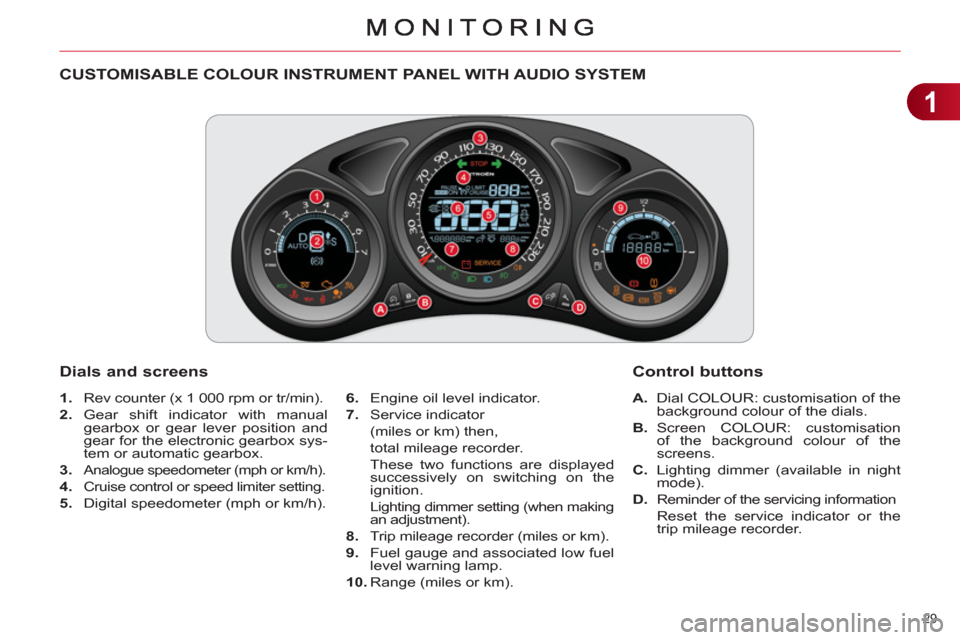
CUSTOMISABLE COLOUR INSTRUMENT PANEL WITH AUDIO SYSTEM
1.
Rev counter (x 1 000 rpm or tr/min).
2.
Gear shift indicator with manual
gearbox or gear lever position and
gear for the electronic gearbox sys-
tem or automatic gearbox.
3.
Analogue speedometer (mph or km/h).
4.
Cruise control or speed limiter setting.
5.
Digital speedometer (mph or km/h).
A.
Dial COLOUR: customisation of the
background colour of the dials.
B.
Screen COLOUR: customisation
of the background colour of the
screens.
C.
Lighting dimmer (available in night
mode).
D.
Reminder of the servicing information
Reset the service indicator or the
trip mileage recorder.
Dials and screens
6.
Engine oil level indicator.
7.
Service indicator
(miles or km) then,
total mileage recorder.
These two functions are displayed
successively on switching on the
ignition.
Lighting dimmer setting (when making an adjustment).
8.
Trip mileage recorder (miles or km).
9.
Fuel gauge and associated low fuel
level warning lamp.
10.
Range (miles or km).
Control buttons
Page 32 of 324
1
30
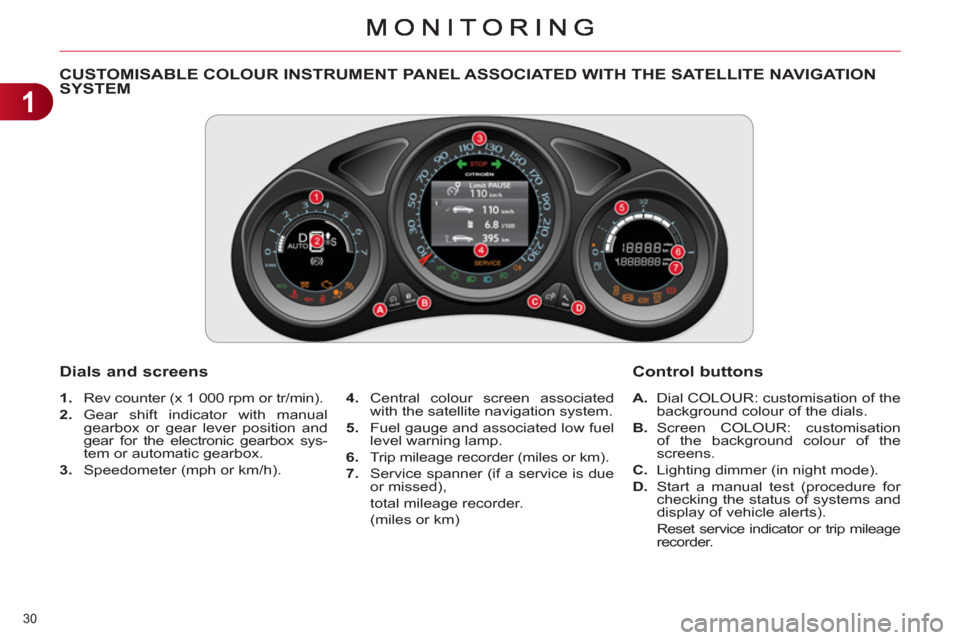
CUSTOMISABLE COLOUR INSTRUMENT PANEL ASSOCIATED WITH THE SATELLITE NAVIGATION SYSTEM
1.
Rev counter (x 1 000 rpm or tr/min).
2.
Gear shift indicator with manual
gearbox or gear lever position and
gear for the electronic gearbox sys-
tem or automatic gearbox.
3.
Speedometer (mph or km/h).
Dials and screens
4.
Central colour screen associated
with the satellite navigation system.
5.
Fuel gauge and associated low fuel
level warning lamp.
6.
Trip mileage recorder (miles or km).
7.
Service spanner (if a service is due
or missed),
total mileage recorder.
(miles or km)
A.
Dial COLOUR: customisation of the
background colour of the dials.
B.
Screen COLOUR: customisation
of the background colour of the
screens.
C.
Lighting dimmer (in night mode).
D.
Start a manual test (procedure for
checking the status of systems and
display of vehicle alerts).
Reset service indicator or trip mileage
recorder.
Control buttons
Page 34 of 324
1
MONITORING
32
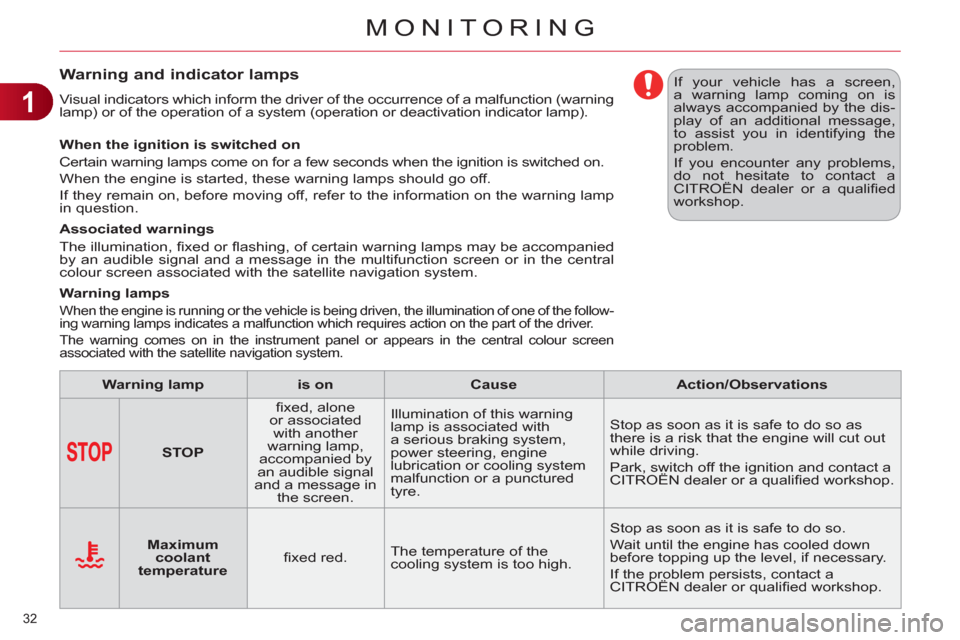
Warning and indicator lamps
Visual indicators which inform the driver of the occurrence of a malfunction (warning
lamp) or of the operation of a system (operation or deactivation indicator lamp).
When the ignition is switched on
Certain warning lamps come on for a few seconds when the ignition is switched on.
When the engine is started, these warning lamps should go off.
If they remain on, before moving off, refer to the information on the warning lamp
in question.
Associated warnings
The illumination, fi xed or fl ashing, of certain warning lamps may be accompanied
by an audible signal and a message in the multifunction screen or in the central
colour screen associated with the satellite navigation system.
Warning lamps
When the engine is running or the vehicle is being driven, the illumination of one of the follow-
ing warning lamps indicates a malfunction which requires action on the part of the driver.
The warning comes on in the instrument panel or appears in the central colour screen
associated with the satellite navigation system.
If your vehicle has a screen,
a warning lamp coming on is
always accompanied by the dis-
play of an additional message,
to assist you in identifying the
problem.
If you encounter any problems,
do not hesitate to contact a
CITROËN dealer or a qualifi ed
workshop.
Warning lamp
is on
Cause
Action/Observations
STOP
fi xed, alone
or associated
with another
warning lamp,
accompanied by
an audible signal
and a message in
the screen. Illumination of this warning
lamp is associated with
a serious braking system,
power steering, engine
lubrication or cooling system
malfunction or a punctured
tyre. Stop as soon as it is safe to do so as
there is a risk that the engine will cut out
while driving.
Park, switch off the ignition and contact a
CITROËN dealer or a qualifi ed workshop.
Maximum
coolant
temperature
fi xed red. The temperature of the
cooling system is too high. Stop as soon as it is safe to do so.
Wait until the engine has cooled down
before topping up the level, if necessary.
If the problem persists, contact a
CITROËN dealer or qualifi ed workshop.
Page 39 of 324
1
MONITORING
37
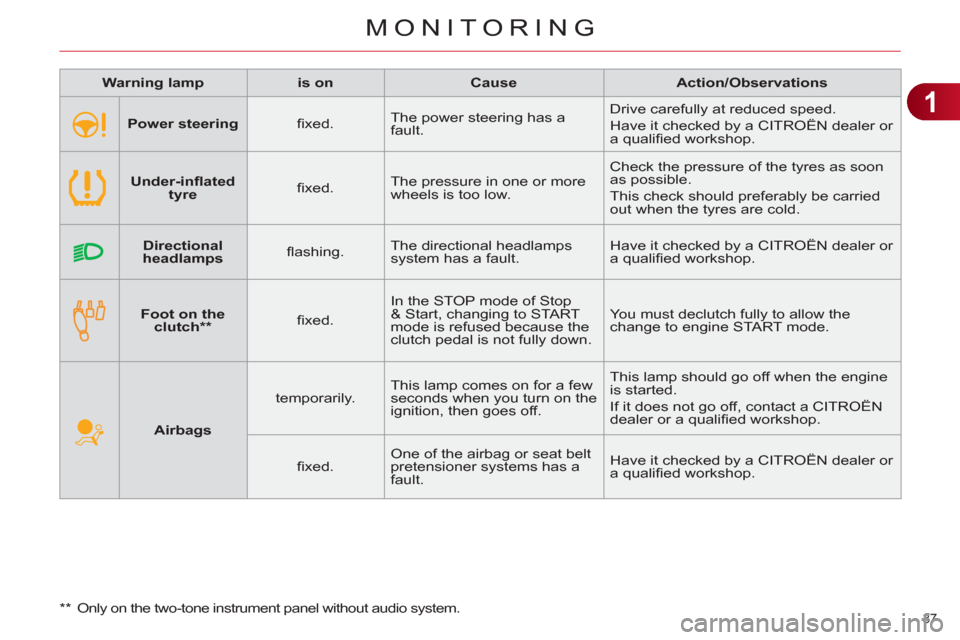
Warning lamp
is on
Cause
Action/Observations
Airbags
temporarily. This lamp comes on for a few
seconds when you turn on the
ignition, then goes off. This lamp should go off when the engine
is started.
If it does not go off, contact a CITROËN
dealer or a qualifi ed workshop.
fi xed. One of the airbag or seat belt
pretensioner systems has a
fault. Have it checked by a CITROËN dealer or
a qualifi ed workshop.
Foot on the
clutch **
fi xed. In the STOP mode of Stop
& Start, changing to START
mode is refused because the
clutch pedal is not fully down. You must declutch fully to allow the
change to engine START mode.
**
Only on the two-tone instrument panel without audio system.
Power steering
fi xed. The power steering has a
fault. Drive carefully at reduced speed.
Have it checked by a CITROËN dealer or
a qualifi ed workshop.
Under-infl ated
tyre
fi xed. The pressure in one or more
wheels is too low. Check the pressure of the tyres as soon
as possible.
This check should preferably be carried
out when the tyres are cold.
Directional
headlamps
fl ashing. The directional headlamps
system has a fault. Have it checked by a CITROËN dealer or
a qualifi ed workshop.
Page 44 of 324
1
MONITORING
42
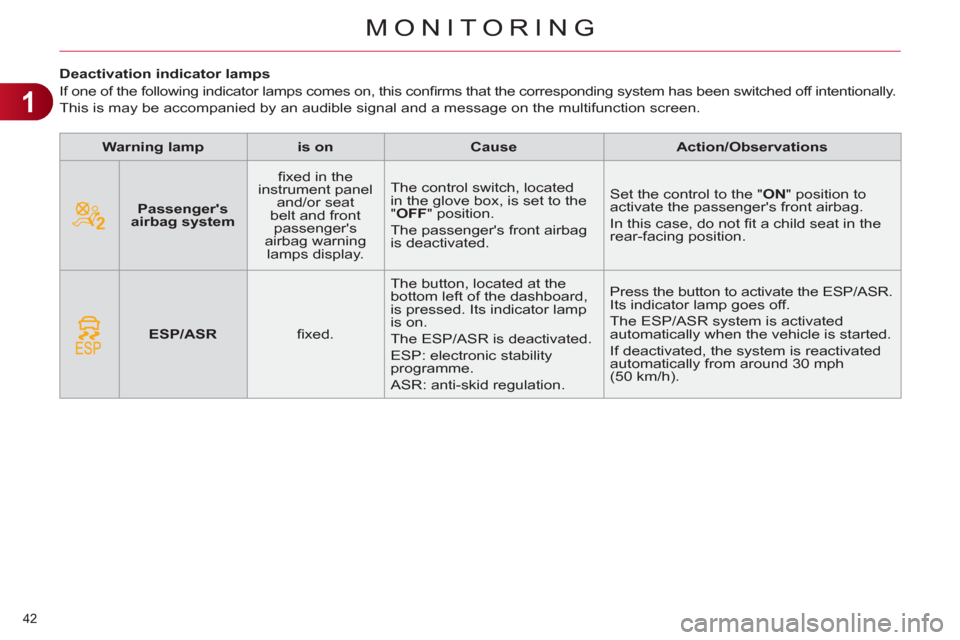
Deactivation indicator lamps
If one of the following indicator lamps comes on, this confi rms that the corresponding system has been switched off intentionally.
This is may be accompanied by an audible signal and a message on the multifunction screen.
Warning lamp
is on
Cause
Action/Observations
Passenger's
airbag system
fi xed in the
instrument panel
and/or seat
belt and front
passenger's
airbag warning
lamps display. The control switch, located
in the glove box, is set to the
"OFF" position.
The passenger's front airbag
is deactivated. Set the control to the "ON" position to
activate the passenger's front airbag.
In this case, do not fi t a child seat in the
rear-facing position.
ESP/ASR
fi xed. The button, located at the
bottom left of the dashboard,
is pressed. Its indicator lamp
is on.
The ESP/ASR is deactivated.
ESP: electronic stability
programme.
ASR: anti-skid regulation. Press the button to activate the ESP/ASR.
Its indicator lamp goes off.
The ESP/ASR system is activated
automatically when the vehicle is started.
If deactivated, the system is reactivated
automatically from around 30 mph
(50 km/h).
Page 45 of 324
1
43
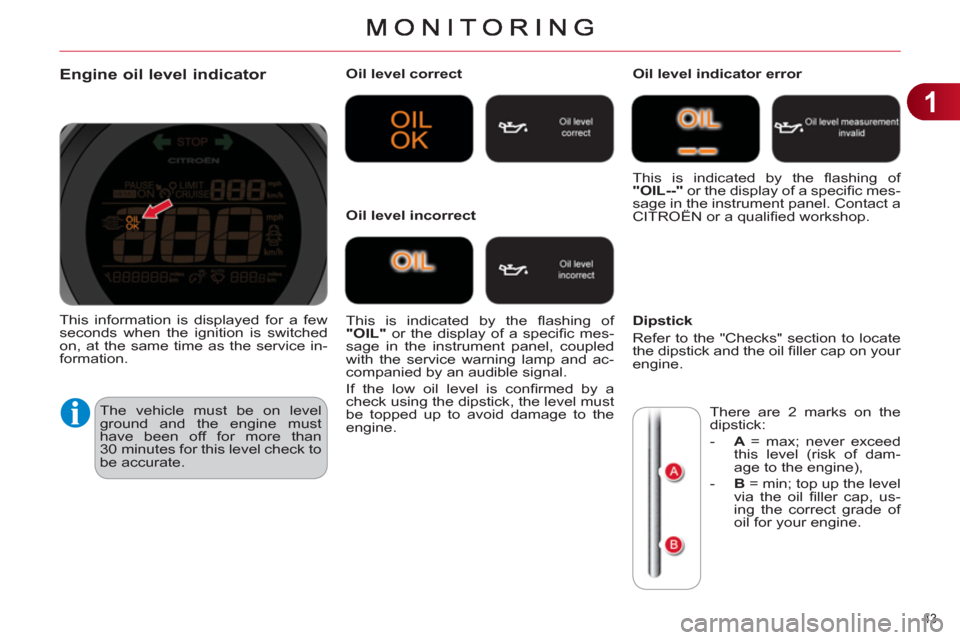
Engine oil level indicator
The vehicle must be on level
ground and the engine must
have been off for more than
30 minutes for this level check to
be accurate.
Oil level correct
This is indicated by the fl ashing of
"OIL"
or the display of a specifi c mes-
sage in the instrument panel, coupled
with the service warning lamp and ac-
companied by an audible signal.
If the low oil level is confi rmed by a
check using the dipstick, the level must
be topped up to avoid damage to the
engine.
Oil level indicator error
Dipstick
Refer to the "Checks" section to locate
the dipstick and the oil fi ller cap on your
engine.
Oil level incorrect This is indicated by the fl ashing of
"OIL--"
or the display of a specifi c mes-
sage in the instrument panel. Contact a
CITROËN or a qualifi ed workshop.
There are 2 marks on the
dipstick:
- A
= max; never exceed
this level (risk of dam-
age to the engine),
- B
= min; top up the level
via the oil fi ller cap, us-
ing the correct grade of
oil for your engine.
This information is displayed for a few
seconds when the ignition is switched
on, at the same time as the service in-
formation.
Page 46 of 324
1
MONITORING
44
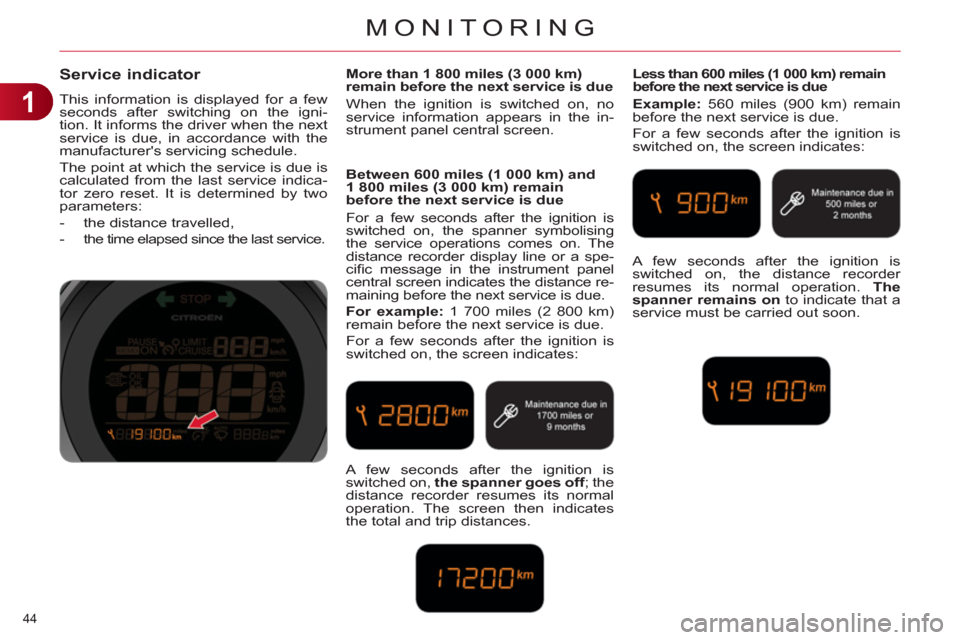
Service indicator
This information is displayed for a few
seconds after switching on the igni-
tion. It informs the driver when the next
service is due, in accordance with the
manufacturer's servicing schedule.
The point at which the service is due is
calculated from the last service indica-
tor zero reset. It is determined by two
parameters:
- the distance travelled,
- the time elapsed since the last service.
More than 1 800 miles (3 000 km)
remain before the next service is due
When the ignition is switched on, no
service information appears in the in-
strument panel central screen.
Between 600 miles (1 000 km) and
1 800 miles (3 000 km) remain
before the next service is due
For a few seconds after the ignition is
switched on, the spanner symbolising
the service operations comes on. The
distance recorder display line or a spe-
cifi c message in the instrument panel
central screen indicates the distance re-
maining before the next service is due.
For example:
1 700 miles (2 800 km)
remain before the next service is due.
For a few seconds after the ignition is
switched on, the screen indicates:
Less than 600 miles (1 000 km) remain
before the next service is due
Example:
560 miles (900 km) remain
before the next service is due.
For a few seconds after the ignition is
switched on, the screen indicates:
A few seconds after the ignition is
switched on, the spanner goes off
; the
distance recorder resumes its normal
operation. The screen then indicates
the total and trip distances. A few seconds after the ignition is
switched on, the distance recorder
resumes its normal operation. The
spanner remains on
to indicate that a
service must be carried out soon.
Page 48 of 324
1
MONITORING
46
Manual test in the central colour screen associated with
the satellite navigation system
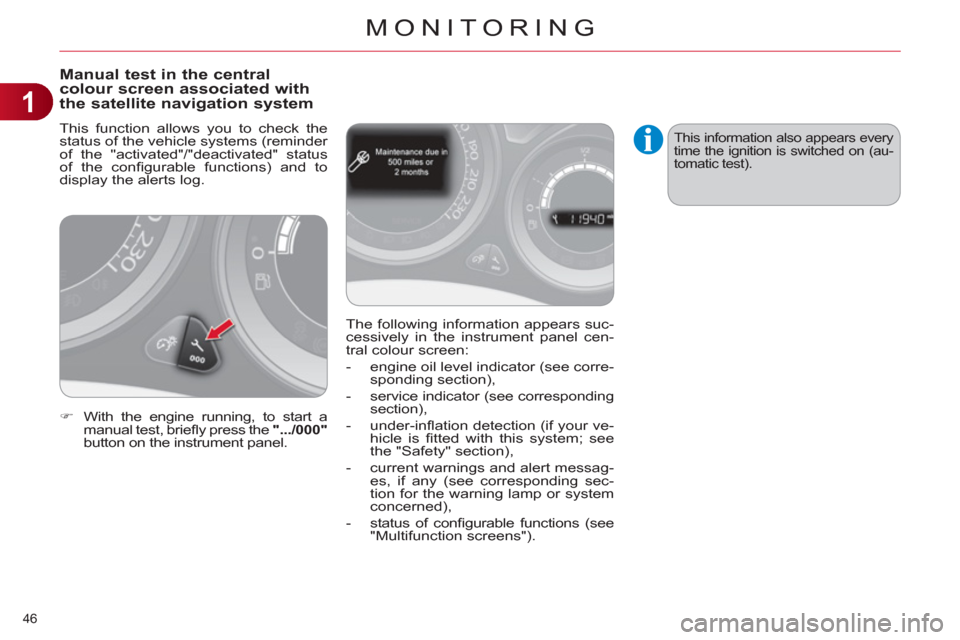
This function allows you to check the
status of the vehicle systems (reminder
of the "activated"/"deactivated" status
of the confi gurable functions) and to
display the alerts log.
)
With the engine running, to start a
manual test, briefl y press the ".../000"
button on the instrument panel. The following information appears suc-
cessively in the instrument panel cen-
tral colour screen:
- engine oil level indicator (see corre-
sponding section),
- service indicator (see corresponding
section),
- under-infl ation detection (if your ve-
hicle is fi tted with this system; see
the "Safety" section),
- current warnings and alert messag-
es, if any (see corresponding sec-
tion for the warning lamp or system
concerned),
- status of confi gurable functions (see
"Multifunction screens").
This information also appears every
time the ignition is switched on (au-
tomatic test).
Page 49 of 324
1
MONITORING
47
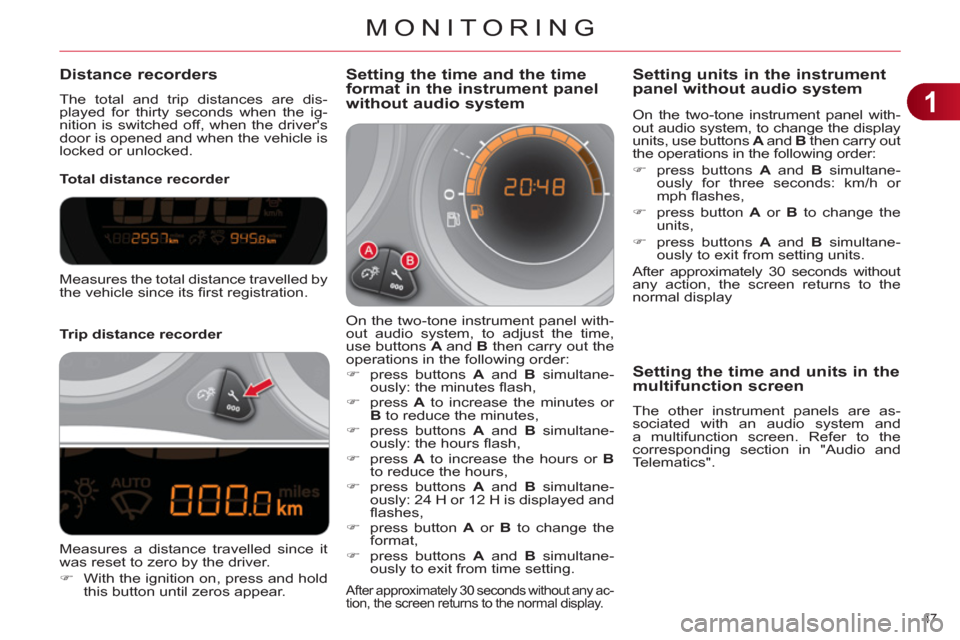
Distance recorders
The total and trip distances are dis-
played for thirty seconds when the ig-
nition is switched off, when the driver's
door is opened and when the vehicle is
locked or unlocked.
Trip distance recorder
Total distance recorder
Setting the time and the time
format in the instrument panel
without audio system
On the two-tone instrument panel with-
out audio system, to adjust the time,
use buttons A
and B
then carry out the
operations in the following order:
)
press buttons A
and B
simultane-
ously: the minutes fl ash,
)
press A
to increase the minutes or
B
to reduce the minutes,
)
press buttons A
and B
simultane-
ously: the hours fl ash,
)
press A
to increase the hours or B
to reduce the hours,
)
press buttons A
and B
simultane-
ously: 24 H or 12 H is displayed and
fl ashes,
)
press button A
or B
to change the
format,
)
press buttons A
and B
simultane-
ously to exit from time setting.
After approximately 30 seconds without any ac-
tion, the screen returns to the normal display.
Measures the total distance travelled by
the vehicle since its fi rst registration.
Measures a distance travelled since it
was reset to zero by the driver.
)
With the ignition on, press and hold
this button until zeros appear.
On the two-tone instrument panel with-
out audio system, to change the display
units, use buttons A
and B
then carry out
the operations in the following order:
)
press buttons A
and B
simultane-
ously for three seconds: km/h or
mph fl ashes,
)
press button A
or B
to change the
units,
)
press buttons A
and B
simultane-
ously to exit from setting units.
After approximately 30 seconds without
any action, the screen returns to the
normal display
Setting units in the instrument
panel without audio system
Settin
g the time and units in themultifunction screen
The other instrument panels are as-
sociated with an audio system and
a multifunction screen. Refer to the
corresponding section in "Audio and
Telematics".