AUX CITROEN C4 DAG 2013 User Guide
[x] Cancel search | Manufacturer: CITROEN, Model Year: 2013, Model line: C4 DAG, Model: CITROEN C4 DAG 2013Pages: 340, PDF Size: 28.95 MB
Page 283 of 340
11
281
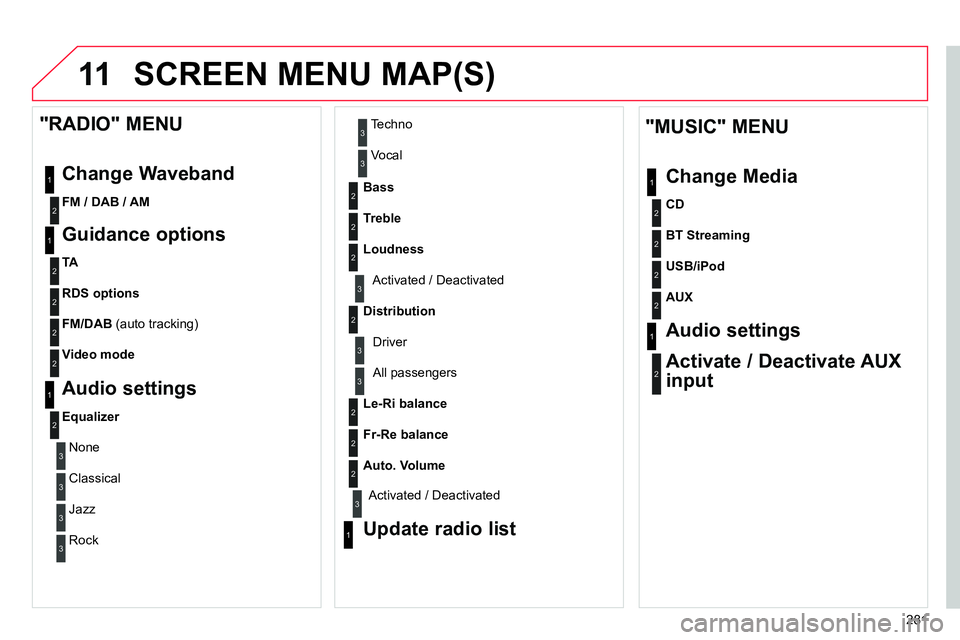
SCREEN MENU MAP(S)
1
1
2
2
2
2
2
3
3
2
2
2
1
"MUSIC" MENU
Change Media
Audio settings
Activate / Deactivate AUX
input
All passengers
Le-Ri balance
Fr-Re balance
Auto. Volume
Update radio list
Bass
Treble
Loudness
Distribution
Driver 1
2
2
1
1
3
3
3
3
3
3
2
Equalizer
"RADIO" MENU
Change Waveband
Guidance options
TA
RDS options
Audio settings
None
Classical
Jazz
Rock
Techno
Vocal
2
2
2
2
USB/iPod
AUX
CD
BT Streaming
2
FM / DAB / AM
3
Activated / Deactivated
3
Activated / Deactivated
2
2
FM/DAB
(auto tracking)
Video mode
Page 292 of 340
01
290
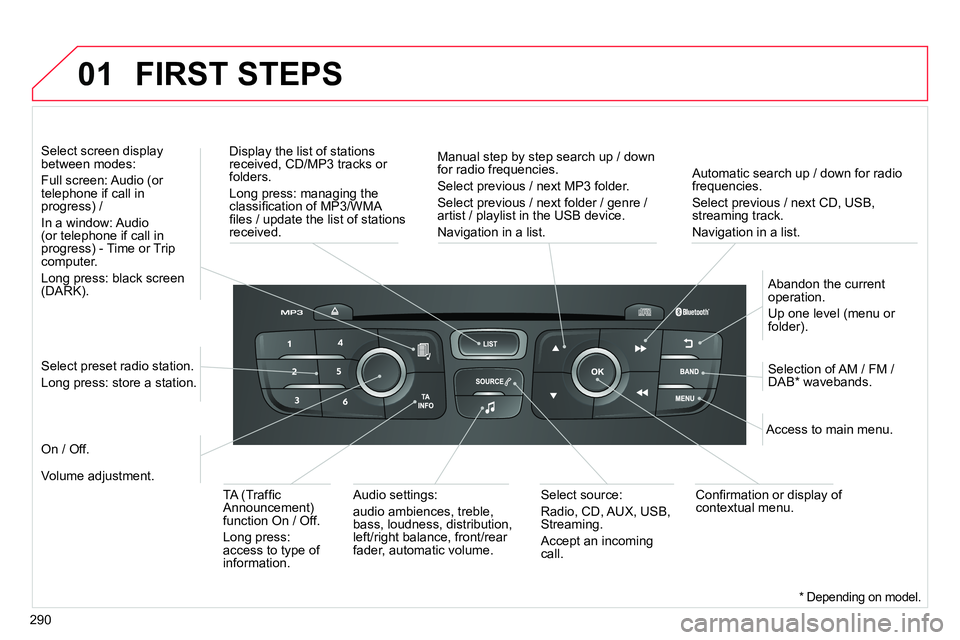
Automatic search up / down for radio
frequencies.
Select previous / next CD, USB,
streaming track.
Navigation in a list.
Display the list of stations
received, CD/MP3 tracks or
folders.
Long press: managing the
classifi cation of MP3/WMA
fi les / update the list of stations
received.
Abandon the current
operation.
Up one level (menu or
folder).
On / Off.
Selection of AM / FM /
DAB * wavebands.
Select preset radio station.
Long press: store a station.
Select screen display
between modes:
Full screen: Audio (or
telephone if call in
progress) /
In a window: Audio
(or telephone if call in
progress) - Time or Trip
computer.
Long press: black screen
(DARK).
Audio settings:
audio ambiences, treble,
bass, loudness, distribution,
left/right balance, front/rear
fader, automatic volume.
Access to main menu.
TA (Traffi c
Announcement)
function On / Off.
Long press:
access to type of
information.
Select source:
Radio, CD, AUX, USB,
Streaming.
Accept an incoming
call.
Confi rmation or display of
contextual menu.
Manual step by step search up / down
for radio frequencies.
Select previous / next MP3 folder.
Select previous / next folder / genre /
artist / playlist in the USB device.
Navigation in a list.
Volume adjustment.
FIRST STEPS
* Depending on model.
Page 303 of 340
04
301
AUDIO
APPLE ®
players or portable player
Management of the device is via the audio system controls.
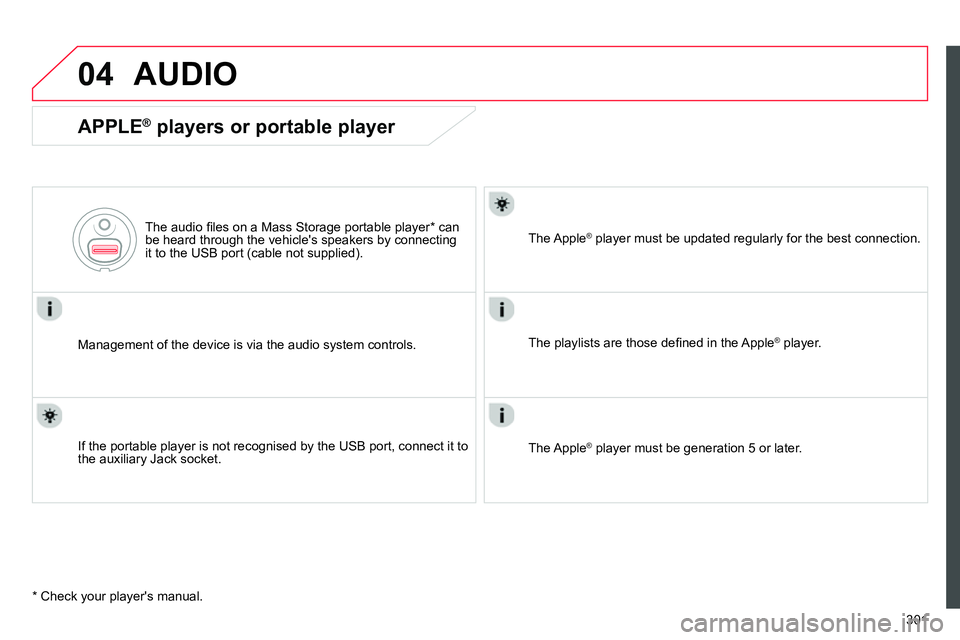
The audio fi les on a Mass Storage portable player * can
be heard through the vehicle's speakers by connecting
it to the USB port (cable not supplied).
If the portable player is not recognised by the USB port, connect it to
the auxiliary Jack socket.
The Apple
®
player must be updated regularly for the best connection.
The playlists are those defi ned in the Apple
®
player.
The Apple
®
player must be generation 5 or later.
* Check your player's manual.
Page 304 of 340
04
302
AUDIO
Auxiliary socket (AUX)
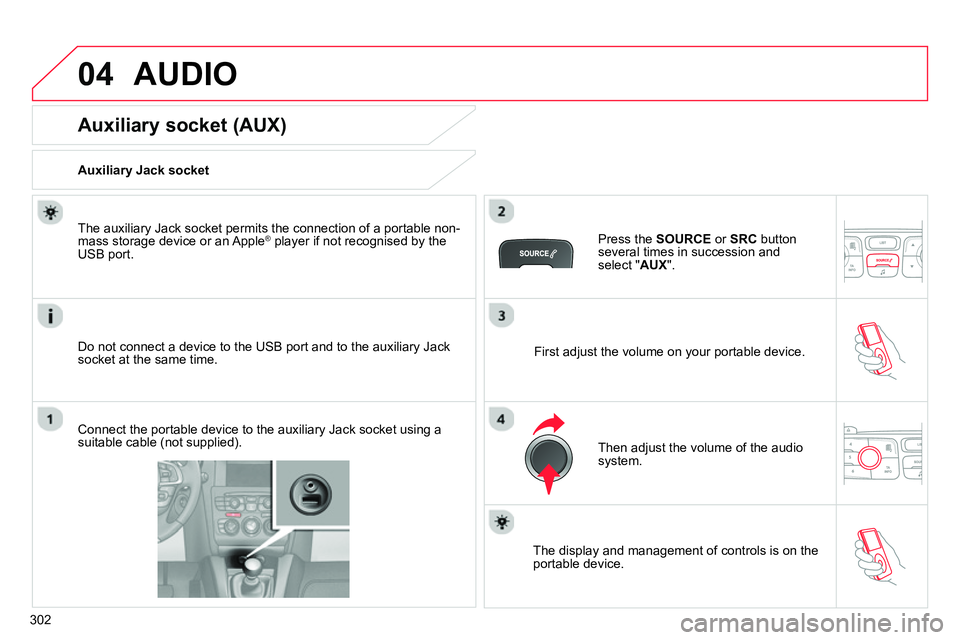
Auxiliary Jack socket
Do not connect a device to the USB port and to the auxiliary Jack
socket at the same time.
The auxiliary Jack socket permits the connection of a portable non-
mass storage device or an Apple
® player if not recognised by the
USB port.
Connect the portable device to the auxiliary Jack socket using a
suitable cable (not supplied).
Press the SOURCE
or SRC
button
several times in succession and
select " AUX
".
First adjust the volume on your portable device.
Then adjust the volume of the audio
system.
The display and management of controls is on the
portable device.
Page 322 of 340
320
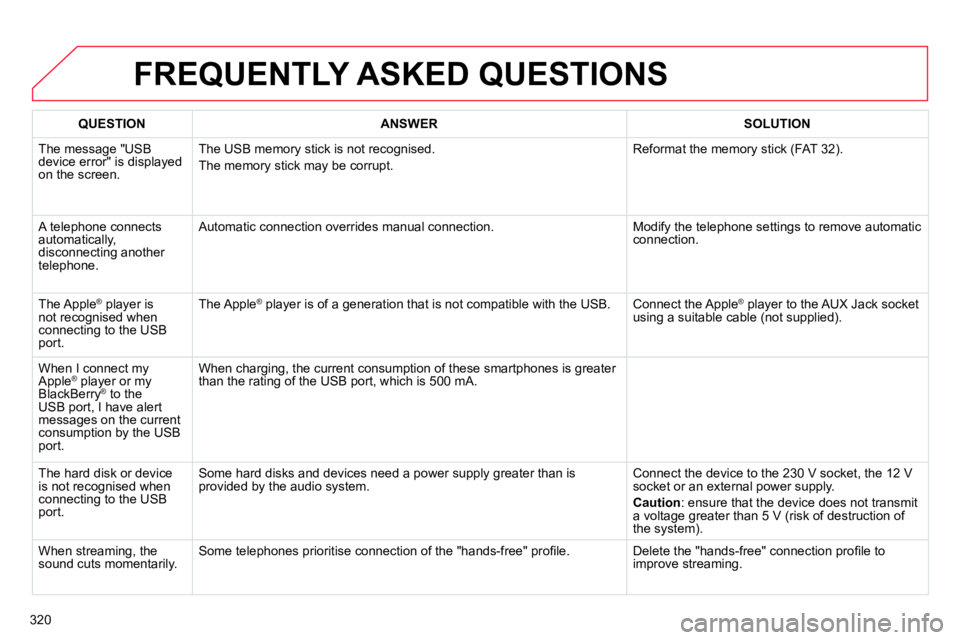
FREQUENTLY ASKED QUESTIONS
QUESTION
ANSWER
SOLUTION
The message "USB
device error" is displayed
on the screen. The USB memory stick is not recognised.
The memory stick may be corrupt. Reformat the memory stick (FAT 32).
A telephone connects
automatically,
disconnecting another
telephone. Automatic connection overrides manual connection. Modify the telephone settings to remove automatic
connection.
The Apple
®
player is
not recognised when
connecting to the USB
port. The Apple ®
player is of a generation that is not compatible with the USB. Connect the Apple ®
player to the AUX Jack socket
using a suitable cable (not supplied).
When I connect my
Apple
® player or my
BlackBerry ® to the
USB port, I have alert
messages on the current
consumption by the USB
port. When charging, the current consumption of these smartphones is greater
than the rating of the USB port, which is 500 mA.
The hard disk or device
is not recognised when
connecting to the USB
port. Some hard disks and devices need a power supply greater than is
provided by the audio system. Connect the device to the 230 V socket, the 12 V
socket or an external power supply.
Caution
: ensure that the device does not transmit
a voltage greater than 5 V (risk of destruction of
the system).
When streaming, the
sound cuts momentarily. Some telephones prioritise connection of the "hands-free" profi le. Delete the "hands-free" connection profi le to
improve streaming.
Page 326 of 340
324
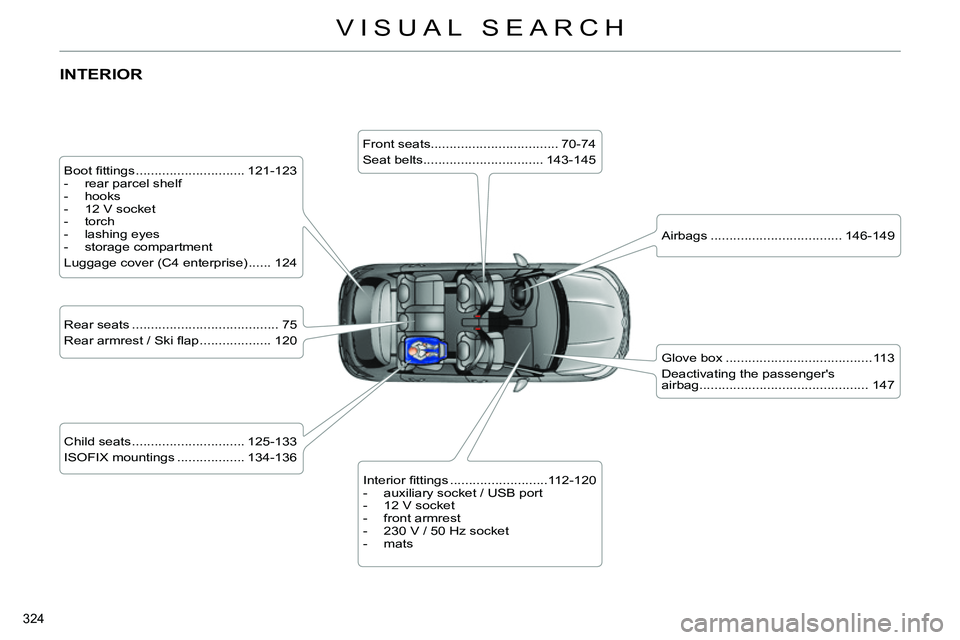
VISUAL SEARCH
INTERIOR
Boot fi ttings ............................. 121-123
- rear parcel shelf
- hooks
- 12 V socket
- torch
- lashing eyes
- storage compartment
Luggage cover (C4 enterprise) ...... 124
Rear seats ....................................... 75
Rear armrest / Ski fl ap ................... 120
Child seats .............................. 125-133
ISOFIX mountings .................. 134-136
Front seats.................................. 70-74
Seat belts................................ 143-145
Airbags ................................... 146-149
Interior fi ttings ..........................112-120
- auxiliary socket / USB port
- 12 V socket
- front armrest
- 230 V / 50 Hz socket
- mats
Glove box ....................................... 113
Deactivating the passenger's
airbag............................................. 147
Page 329 of 340
327
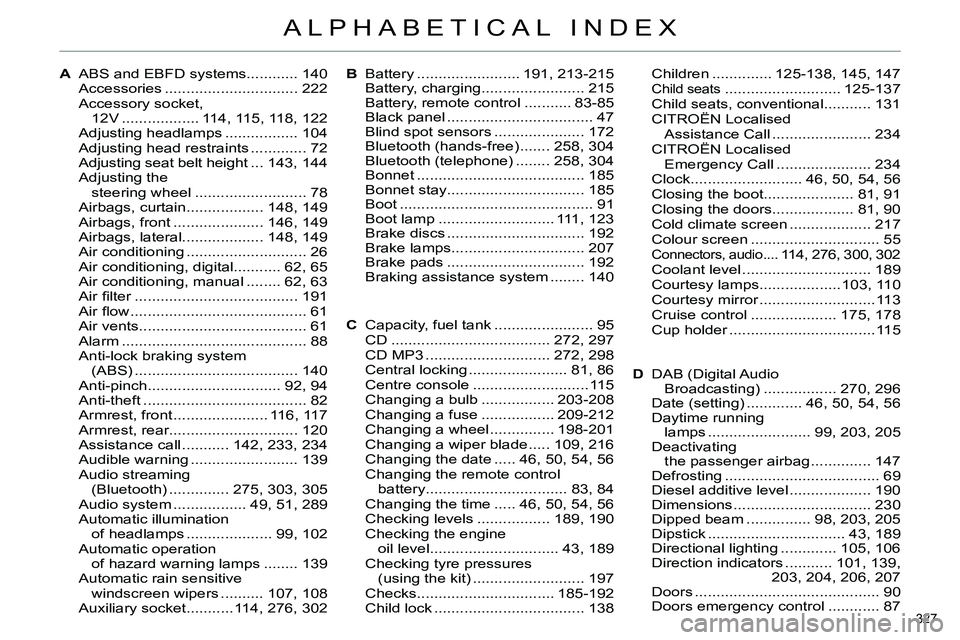
ALPHABETICAL INDEX
AABS and EBFD systems............ 140
Accessories ............................... 222
Accessory socket,
12V .................. 114, 115, 118, 122
Adjusting headlamps ................. 104
Adjusting head restraints ............. 72
Adjusting seat belt height ... 143, 144
Adjusting the
steering wheel .......................... 78
Airbags, curtain.................. 148, 149
Airbags, front ..................... 146, 149
Airbags, lateral................... 148, 149
Air conditioning ............................ 26
Air conditioning, digital........... 62, 65
Air conditioning, manual ........ 62, 63
Air fi lter ...................................... 191
Air fl ow ......................................... 61
Air vents....................................... 61
Alarm ........................................... 88
Anti-lock braking system
(ABS) ...................................... 140
Anti-pinch............................... 92, 94
Anti-theft ...................................... 82
Armrest, front ...................... 116, 117
Armrest, rear .............................. 120
Assistance call ........... 142, 233, 234
Audible warning ......................... 139
Audio streaming
(Bluetooth) .............. 275, 303, 305
Audio system ................. 49, 51, 289
Automatic illumination
of headlamps .................... 99, 102
Automatic operation
of hazard warning lamps ........ 139
Automatic rain sensitive
windscreen wipers .......... 107, 108
Auxiliary socket...........114, 276, 302Children .............. 125-138, 145, 147Child seats ........................... 125-137
Child seats, conventional........... 131
CITROËN Localised
Assistance Call ....................... 234
CITROËN Localised
Emergency Call ...................... 234
Clock.......................... 46, 50, 54, 56
Closing the boot..................... 81, 91
Closing the doors................... 81, 90
Cold climate screen ................... 217
Colour screen .............................. 55
Connectors, audio .... 114, 276, 300, 302
Coolant level .............................. 189
Courtesy lamps...................103, 110
Courtesy mirror ........................... 113
Cruise control .................... 175, 178
Cup holder .................................. 115
DAB (Digital Audio
Broadcasting) ................. 270, 296
Date (setting) ............. 46, 50, 54, 56
Daytime running
lamps ........................ 99, 203, 205
Deactivating
the passenger airbag .............. 147
Defrosting .................................... 69
Diesel additive level ................... 190
Dimensions ................................ 230
Dipped beam ............... 98, 203, 205
Dipstick ................................ 43, 189
Directional lighting ............. 105, 106
Direction indicators ........... 101, 139,
203, 204, 206, 207
Doors ........................................... 90
Doors emergency control ............ 87 Capacity, fuel tank ....................... 95
CD ..................................... 272, 297
CD MP3 ............................. 272, 298
Central locking ....................... 81, 86
Centre console ........................... 115
Changing a bulb ................. 203-208
Changing a fuse ................. 209-212
Changing a wheel ............... 198-201
Changing a wiper blade ..... 109, 216
Changing the date ..... 46, 50, 54, 56
Changing the remote control
battery................................. 83, 84
Changing the time ..... 46, 50, 54, 56
Checking levels ................. 189, 190
Checking the engine
oil level.............................. 43, 189
Checking tyre pressures
(using the kit) .......................... 197
Checks................................ 185-192
Child lock ................................... 138 Battery ........................ 191, 213-215
Battery, charging ........................ 215
Battery, remote control ........... 83-85
Black panel .................................. 47
Blind spot sensors ..................... 172
Bluetooth (hands-free) ....... 258, 304
Bluetooth (telephone) ........ 258, 304
Bonnet ....................................... 185
Bonnet stay................................ 185
Boot ............................................. 91
Boot lamp ........................... 111, 123
Brake discs ................................ 192
Brake lamps............................... 207
Brake pads ................................ 192
Braking assistance system ........ 140 B
D C