audio CITROEN C4 DAG 2013 User Guide
[x] Cancel search | Manufacturer: CITROEN, Model Year: 2013, Model line: C4 DAG, Model: CITROEN C4 DAG 2013Pages: 340, PDF Size: 28.95 MB
Page 48 of 340
1
MONITORING
46
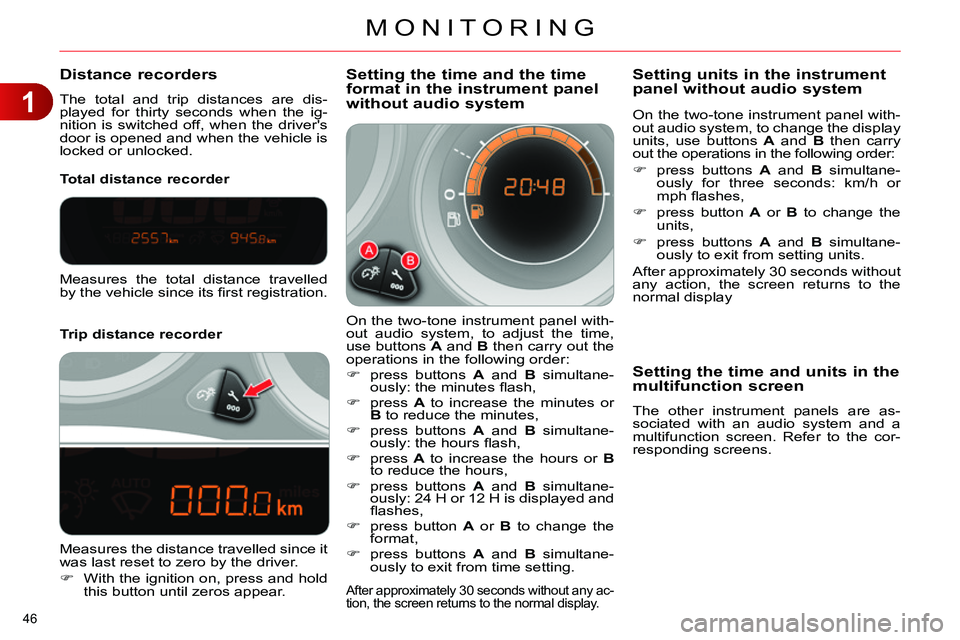
Distance recorders
The total and trip distances are dis-
played for thirty seconds when the ig-
nition is switched off, when the driver's
door is opened and when the vehicle is
locked or unlocked.
Trip distance recorder
Total distance recorder
Setting the time and the time
format in the instrument panel
without audio system
On the two-tone instrument panel with-
out audio system, to adjust the time,
use buttons A
and B
then carry out the
operations in the following order:
press buttons A
and B
simultane-
ously: the minutes fl ash,
press A
to increase the minutes or
B
to reduce the minutes,
press buttons A
and B
simultane-
ously: the hours fl ash,
press A
to increase the hours or B
to reduce the hours,
press buttons A
and B
simultane-
ously: 24 H or 12 H is displayed and
fl ashes,
press button A
or B
to change the
format,
press buttons A
and B
simultane-
ously to exit from time setting.
After approximately 30 seconds without any ac-
tion, the screen returns to the normal display.
Measures the total distance travelled
by the vehicle since its fi rst registration.
Measures the distance travelled since it
was last reset to zero by the driver.
With the ignition on, press and hold
this button until zeros appear.
On the two-tone instrument panel with-
out audio system, to change the display
units, use buttons A
and B
then carry
out the operations in the following order:
press buttons A
and B
simultane-
ously for three seconds: km/h or
mph fl ashes,
press button A
or B
to change the
units,
press buttons A
and B
simultane-
ously to exit from setting units.
After approximately 30 seconds without
any action, the screen returns to the
normal display
Setting units in the instrument
panel without audio system
Setting the time and units in the
multifunction screen
The other instrument panels are as-
sociated with an audio system and a
multifunction screen. Refer to the cor-
responding screens.
Page 50 of 340
1
MONITORING
48
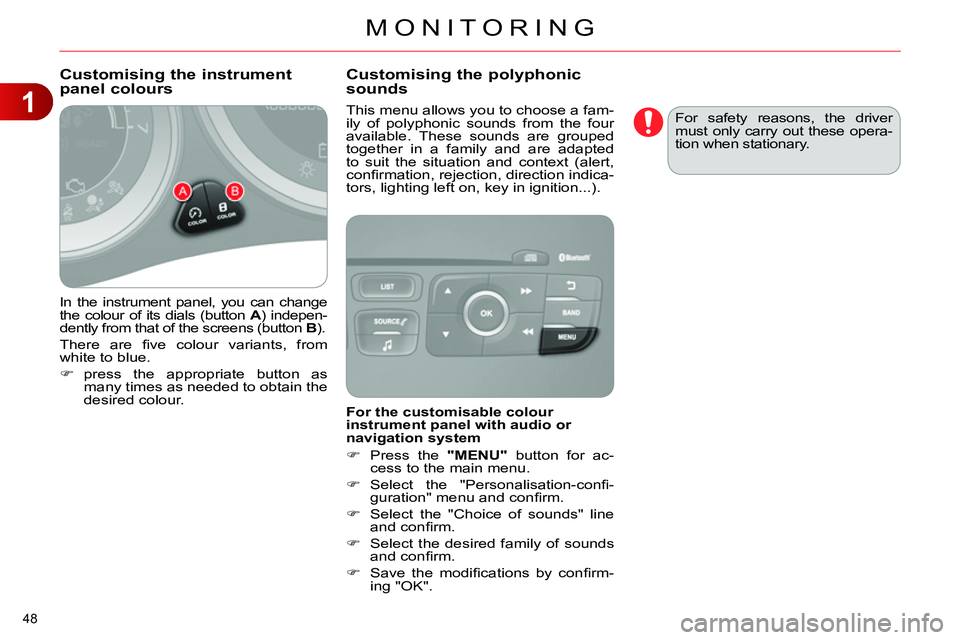
In the instrument panel, you can change
the colour of its dials (button A
) indepen-
dently from that of the screens (button B
).
There are fi ve colour variants, from
white to blue.
press the appropriate button as
many times as needed to obtain the
desired colour.
This menu allows you to choose a fam-
ily of polyphonic sounds from the four
available. These sounds are grouped
together in a family and are adapted
to suit the situation and context (alert,
confi rmation, rejection, direction indica-
tors, lighting left on, key in ignition...).
Customising the instrument
panel colours
Customising the polyphonic
sounds
For the customisable colour
instrument panel with audio or
navigation system
Press the "MENU"
button for ac-
cess to the main menu.
Select the "Personalisation-confi -
guration" menu and confi rm.
Select the "Choice of sounds" line
and confi rm.
Select the desired family of sounds
and confi rm.
Save the modifi cations by confi rm-
ing "OK". For safety reasons, the driver
must only carry out these opera-
tion when stationary.
Page 51 of 340
2
MULTIFUNCTION SCREENS
49
MONOCHROME SCREEN A
Displays in the screen
This displays the following information:
- time,
- date,
- ambient temperature (this fl ashes if
there is a risk of ice),
- current audio source,
- trip computer (refer to the end of the
section),
- alert messages,
- settings menus for the screen and
the vehicle equipment.
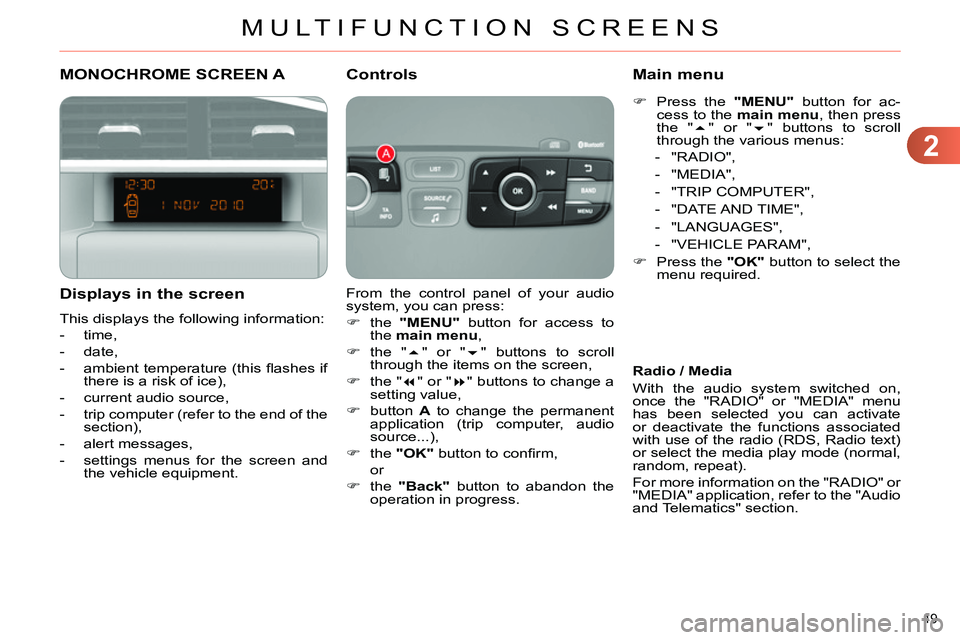
From the control panel of your audio
system, you can press:
the "MENU"
button for access to
the main menu
,
the "
" or "
" buttons to scroll
through the items on the screen,
the "
" or "
" buttons to change a
setting value,
button A
to change the permanent
application (trip computer, audio
source...),
the "OK"
button to confi rm,
or
the "Back"
button to abandon the
operation in progress.
Controls
Press the "MENU"
button for ac-
cess to the main menu
, then press
the "
" or "
" buttons to scroll
through the various menus:
- "RADIO",
- "MEDIA",
- "TRIP COMPUTER",
- "DATE AND TIME",
- "LANGUAGES",
- "VEHICLE PARAM",
Press the "OK"
button to select the
menu required.
Main menu
Radio / Media
With the audio system switched on,
once the "RADIO" or "MEDIA" menu
has been selected you can activate
or deactivate the functions associated
with use of the radio (RDS, Radio text)
or select the media play mode (normal,
random, repeat).
For more information on the "RADIO" or
"MEDIA" application, refer to the "Audio
and Telematics" section.
Page 53 of 340
2
MULTIFUNCTION SCREENS
51
MONOCHROME SCREEN C
Displays in the screen
This displays the following information:
- time,
- date,
- ambient temperature (this fl ashes if
there is a risk of ice),
- parking sensor information,
- parking space measurement,
- current audio source,
- telephone or Bluetooth system in-
formation,
- trip computer (refer to the end of the
section),
- alert messages,
- settings menus for the screen and
the vehicle equipment.
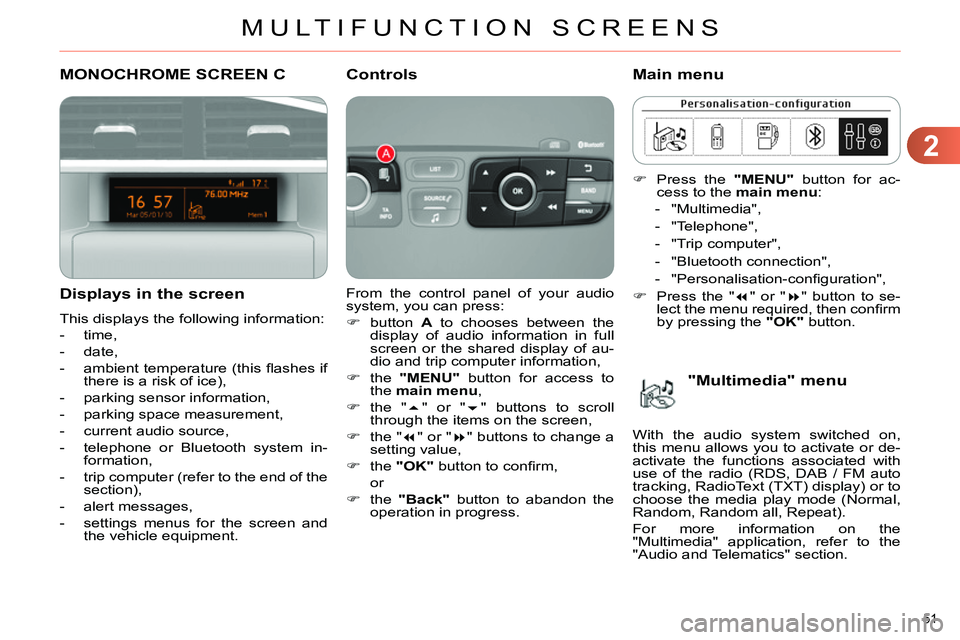
From the control panel of your audio
system, you can press:
button A
to chooses between the
display of audio information in full
screen or the shared display of au-
dio and trip computer information,
the "MENU"
button for access to
the main menu
,
the "
" or "
" buttons to scroll
through the items on the screen,
the "
" or "
" buttons to change a
setting value,
the "OK"
button to confi rm,
or
the "Back"
button to abandon the
operation in progress.
Controls
Press the "MENU"
button for ac-
cess to the main menu
:
- "Multimedia",
- "Telephone",
- "Trip computer",
- "Bluetooth connection",
- "Personalisation-confi guration",
Press the "
" or "
" button to se-
lect the menu required, then confi rm
by pressing the "OK"
button.
Main menu
"Multimedia" menu
With the audio system switched on,
this menu allows you to activate or de-
activate the functions associated with
use of the radio (RDS, DAB / FM auto
tracking, RadioText (TXT) display) or to
choose the media play mode (Normal,
Random, Random all, Repeat).
For more information on the
"Multimedia" application, refer to the
"Audio and Telematics" section.
Page 54 of 340
2
MULTIFUNCTION SCREENS
52
Defi ne the vehicle parameters
This menu allows you to activate or de-
activate the following equipment, clas-
sifi ed in different categories:
- "Access to the vehicle" (see the
"Access" section):
●
"Plip action" (Selective unlocking
of the driver's door),
●
"Unlocking boot only" (Selective
unlocking of the boot).
"Telephone" menu
With the audio system switched on, this
menu allows you to make a call or view
the various telephone directories.
For more information on the "Telephone"
application, refer to the "Audio and
Telematics" section. This menu allows you to view informa-
tion on the status of the vehicle.
Warning log
This summarises the status and warn-
ing messages for systems (active, not
active or faulty), displaying them in suc-
cession in the multifunction screen.
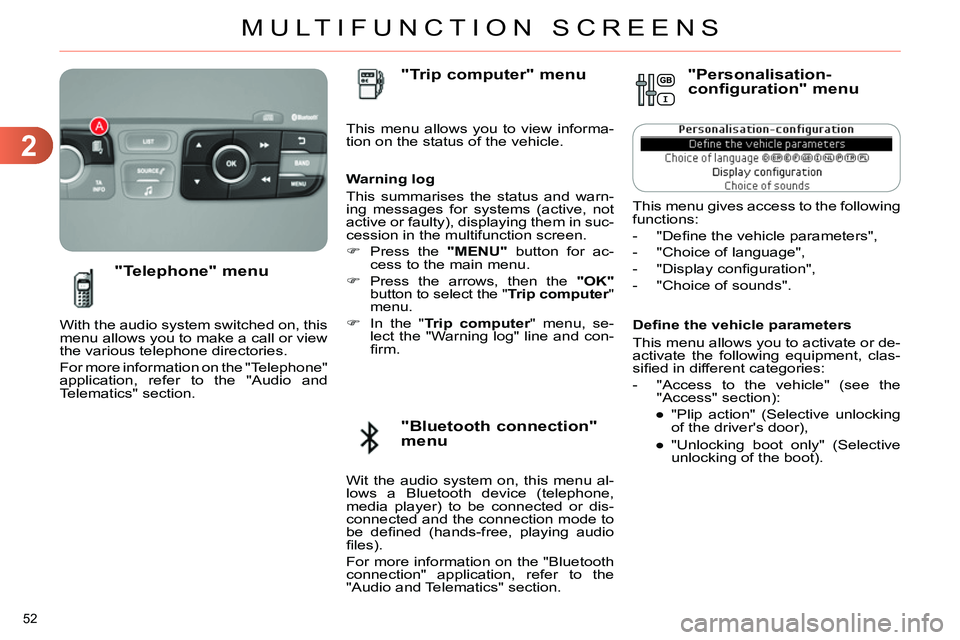
Press the "MENU"
button for ac-
cess to the main menu.
Press the arrows, then the "OK"
button to select the " Trip computer
"
menu.
In the " Trip computer
" menu, se-
lect the "Warning log" line and con-
fi rm.
"Bluetooth connection"
menu
"Trip computer" menu
Wit the audio system on, this menu al-
lows a Bluetooth device (telephone,
media player) to be connected or dis-
connected and the connection mode to
be defi ned (hands-free, playing audio
fi les).
For more information on the "Bluetooth
connection" application, refer to the
"Audio and Telematics" section.
"Personalisation-
configuration" menu
This menu gives access to the following
functions:
- "Defi ne the vehicle parameters",
- "Choice of language",
- "Display confi guration",
- "Choice of sounds".
Page 57 of 340
2
MULTIFUNCTION SCREENS
55
COLOUR SCREEN
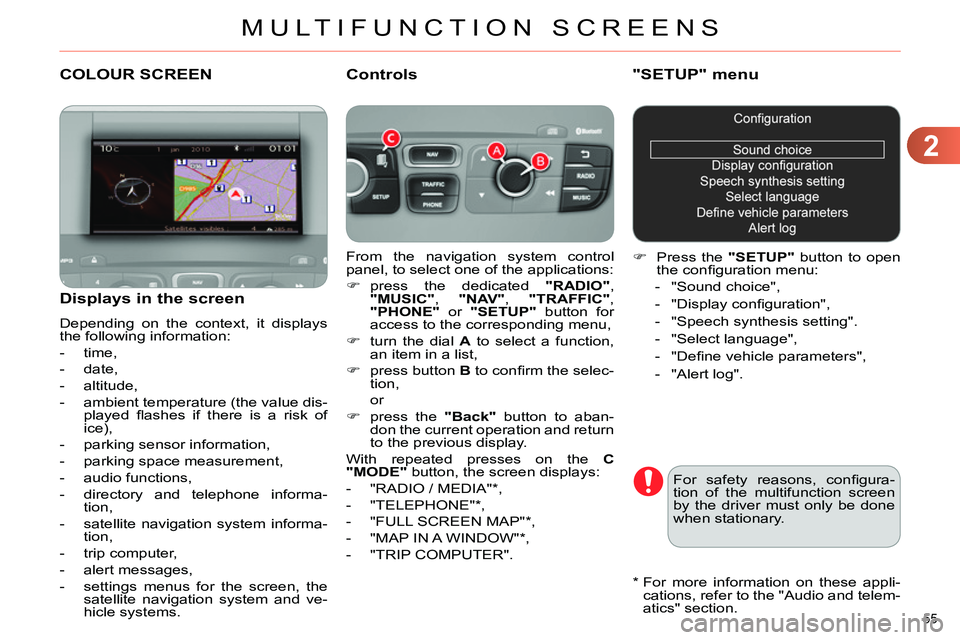
From the navigation system control
panel, to select one of the applications:
press the dedicated "RADIO"
,
"MUSIC"
, "NAV"
, "TRAFFIC"
,
"PHONE"
or "SETUP"
button for
access to the corresponding menu,
turn the dial A
to select a function,
an item in a list,
press button B
to confi rm the selec-
tion,
or
press the "Back"
button to aban-
don the current operation and return
to the previous display.
With repeated presses on the C
"MODE"
button, the screen displays:
- "RADIO / MEDIA" * ,
- "TELEPHONE" * ,
- "FULL SCREEN MAP" * ,
- "MAP IN A WINDOW" * ,
- "TRIP COMPUTER".
Controls
"SETUP" menu
Press the "SETUP"
button to open
the confi guration menu:
- "Sound choice",
- "Display confi guration",
- "Speech synthesis setting".
- "Select language",
- "Defi ne vehicle parameters",
- "Alert log".
For safety reasons, confi gura-
tion of the multifunction screen
by the driver must only be done
when stationary.
Displays in the screen
Depending on the context, it displays
the following information:
- time,
- date,
- altitude,
- ambient temperature (the value dis-
played fl ashes if there is a risk of
ice),
- parking sensor information,
- parking space measurement,
- audio functions,
- directory and telephone informa-
tion,
- satellite navigation system informa-
tion,
- trip computer,
- alert messages,
- settings menus for the screen, the
satellite navigation system and ve-
hicle systems.
*
For more information on these appli-
cations, refer to the "Audio and telem-
atics" section.
Page 60 of 340
2
MULTIFUNCTION SCREENS
58
Monochrome screen C
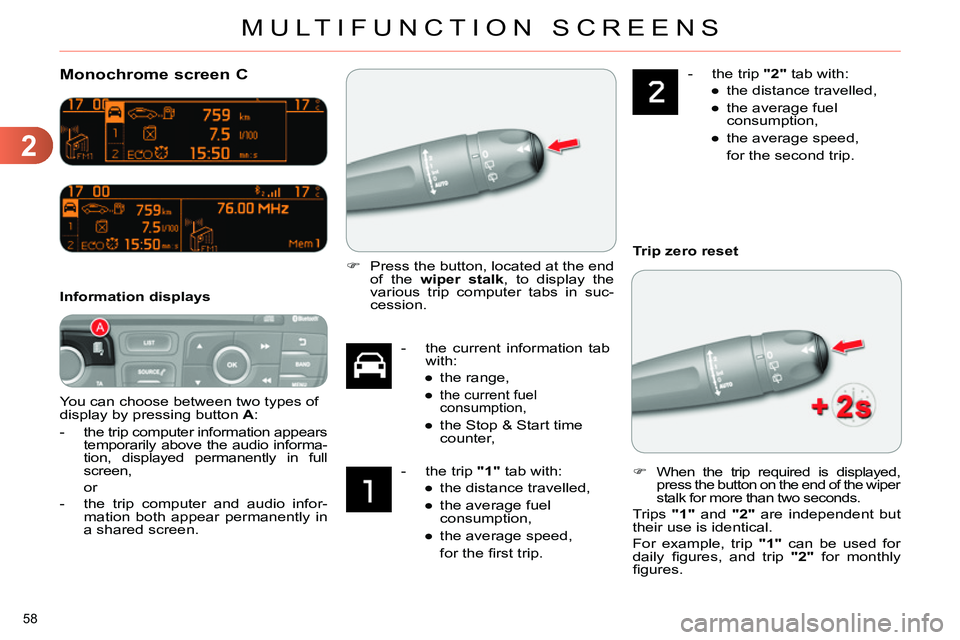
You can choose between two types of
display by pressing button A
:
-
the trip computer information appears
temporarily above the audio informa-
tion, displayed permanently in full
screen,
or
- the trip computer and audio infor-
mation both appear permanently in
a shared screen.
Information displays
- the current information tab
with:
●
the range,
●
the current fuel
consumption,
●
the Stop & Start time
counter,
- the trip "1"
tab with:
●
the distance travelled,
●
the average fuel
consumption,
●
the average speed,
for the fi rst trip.
- the trip "2"
tab with:
●
the distance travelled,
●
the average fuel
consumption,
●
the average speed,
for the second trip.
Press the button, located at the end
of the wiper stalk
, to display the
various trip computer tabs in suc-
cession.
When the trip required is displayed,
press the button on the end of the wiper
stalk for more than two seconds.
Trips "1"
and "2"
are independent but
their use is identical.
For example, trip "1"
can be used for
daily fi gures, and trip "2"
for monthly
fi gures.
Trip zero reset
Page 114 of 340
6
FITTINGS
112
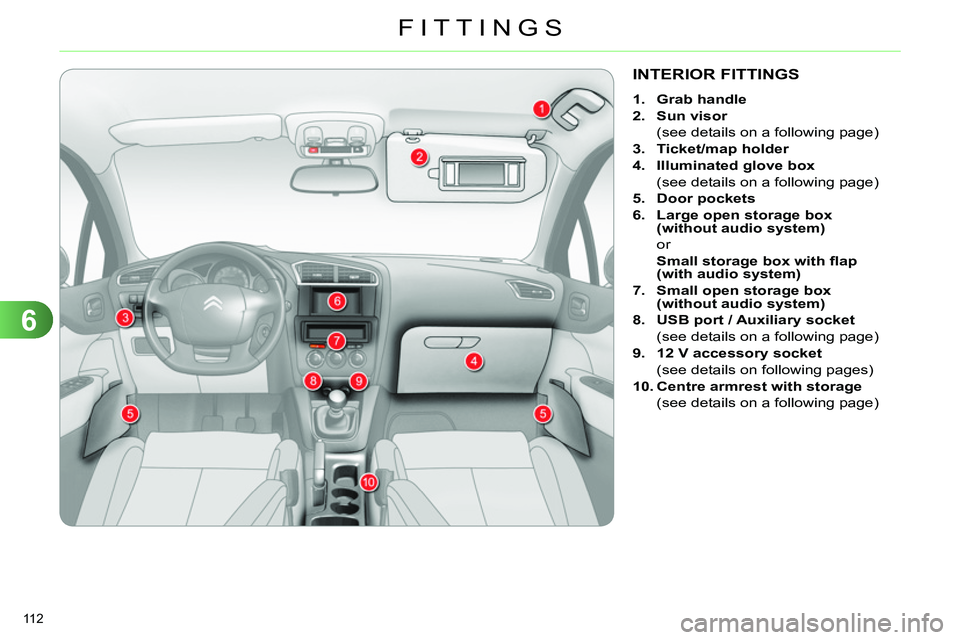
INTERIOR FITTINGS
1.
Grab handle
2.
Sun visor
(see details on a following page)
3.
Ticket/map holder
4.
Illuminated
glove box
(see details on a following page)
5.
Door pocket
s
6.
Large open storage box
(without audio system)
or
Small storage box with fl ap
(with audio system)
7.
Small open storage box
(without audio system)
8.
USB port / Auxiliary socket
(see details on a following page)
9.
12 V accessory socket
(see details on following pages)
10.
Centre armrest with storage
(see details on a following page)
Page 116 of 340
6
FITTINGS
114
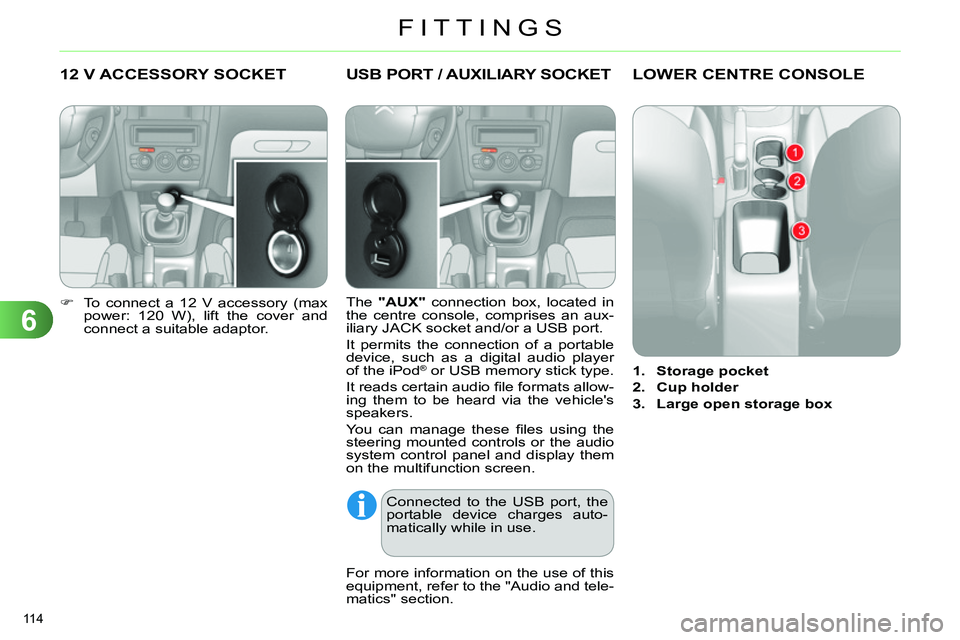
12 V ACCESSORY SOCKET
To connect a 12 V accessory (max
power: 120 W), lift the cover and
connect a suitable adaptor.
USB PORT / AUXILIARY SOCKET
The "AUX"
connection box, located in
the centre console, comprises an aux-
iliary JACK socket and/or a USB port.
It permits the connection of a portable
device, such as a digital audio player
of the iPod
® or USB memory stick type.
It reads certain audio fi le formats allow-
ing them to be heard via the vehicle's
speakers.
You can manage these fi les using the
steering mounted controls or the audio
system control panel and display them
on the multifunction screen.
For more information on the use of this
equipment, refer to the "Audio and tele-
matics" section.
Connected to the USB port, the
portable device charges auto-
matically while in use.
LOWER CENTRE CONSOLE
1.
Storage pocket
2.
Cup holder
3.
Large open storage box
Page 144 of 340
8
SAFETY
142
The trajectory control systems
offer increased safety in normal
driving, but this should not en-
courage the driver to take extra
risks or drive at high speed.
The correct functioning of these
systems is assured provided
that manufacturer's recommen-
dations are observed on:
- wheels (tyres and rims),
- braking components,
- electronic components,
- assembly and repair proce-
dures.
After an impact, have these sys-
tems checked by a CITROËN
dealer or a qualifi ed workshop.
Reactivation
These systems are reactivated au-
tomatically each time the ignition is
switched back on or from 30 mph
(50 km/h).
Press the "ESP OFF"
button again
to reactivate them manually.
If this warning lamp in the instru-
ment panel and the " ESP OFF
"
indicator lamp in the button come
on, accompanied by an audible
signal and a message in the screen, this
indicates a fault with these systems.
Have it checked by a CITROËN dealer
or a qualifi ed workshop.
Operating fault
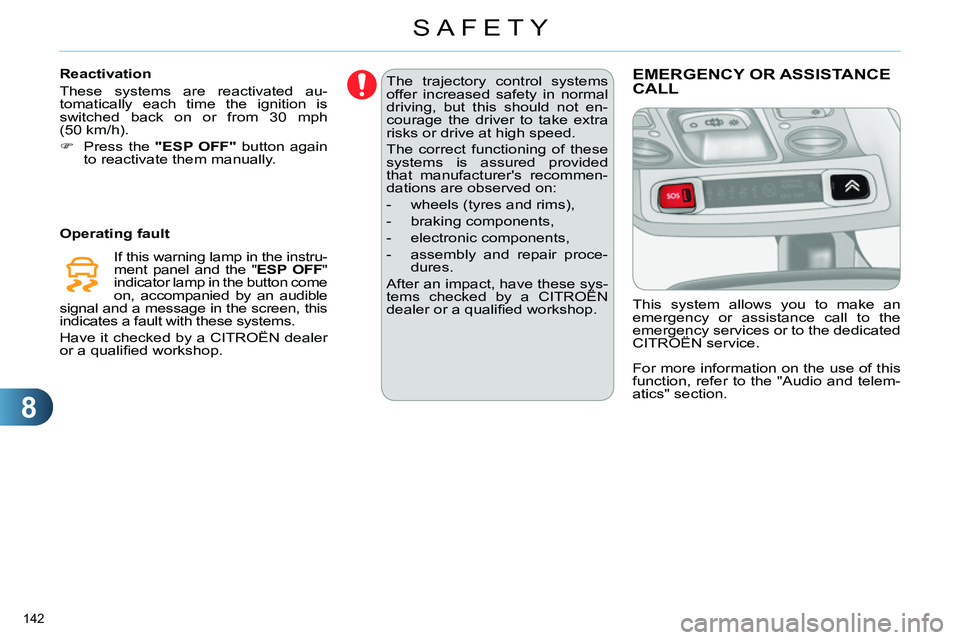
EMERGENCY OR ASSISTANCE
CALL
This system allows you to make an
emergency or assistance call to the
emergency services or to the dedicated
CITROËN service.
For more information on the use of this
function, refer to the "Audio and telem-
atics" section.