brake CITROEN C4 DAG 2013 User Guide
[x] Cancel search | Manufacturer: CITROEN, Model Year: 2013, Model line: C4 DAG, Model: CITROEN C4 DAG 2013Pages: 340, PDF Size: 28.95 MB
Page 36 of 340
1
MONITORING
34
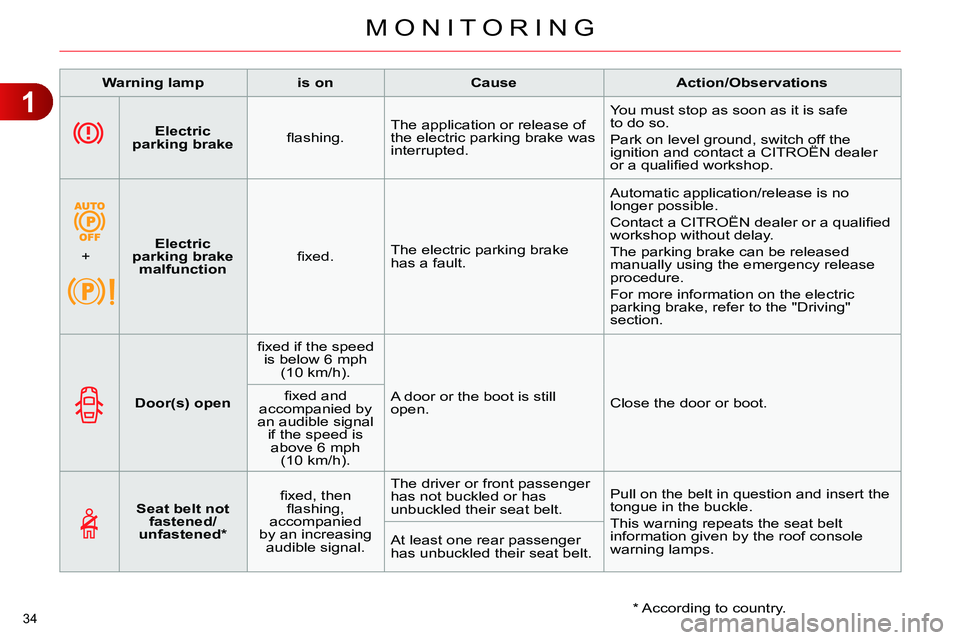
Electric
parking brake
fl ashing. The application or release of
the electric parking brake was
interrupted. You must stop as soon as it is safe
to do so.
Park on level ground, switch off the
ignition and contact a CITROËN dealer
or a qualifi ed workshop.
+
Electric
parking brake
malfunction
fi xed. The electric parking brake
has a fault. Automatic application/release is no
longer possible.
Contact a CITROËN dealer or a qualifi ed
workshop without delay.
The parking brake can be released
manually using the emergency release
procedure.
For more information on the electric
parking brake, refer to the "Driving"
section.
Warning lamp
is on
Cause
Action/Observations
Door(s) open
fi xed if the speed
is below 6 mph
(10 km/h).
A door or the boot is still
open. Close the door or boot.
fi xed and
accompanied by
an audible signal
if the speed is
above 6 mph
(10 km/h).
Seat belt not
fastened/
unfastened *
fi xed, then
fl ashing,
accompanied
by an increasing
audible signal. The driver or front passenger
has not buckled or has
unbuckled their seat belt. Pull on the belt in question and insert the
tongue in the buckle.
This warning repeats the seat belt
information given by the roof console
warning lamps. At least one rear passenger
has unbuckled their seat belt.
* According to country.
Page 37 of 340
1
MONITORING
35
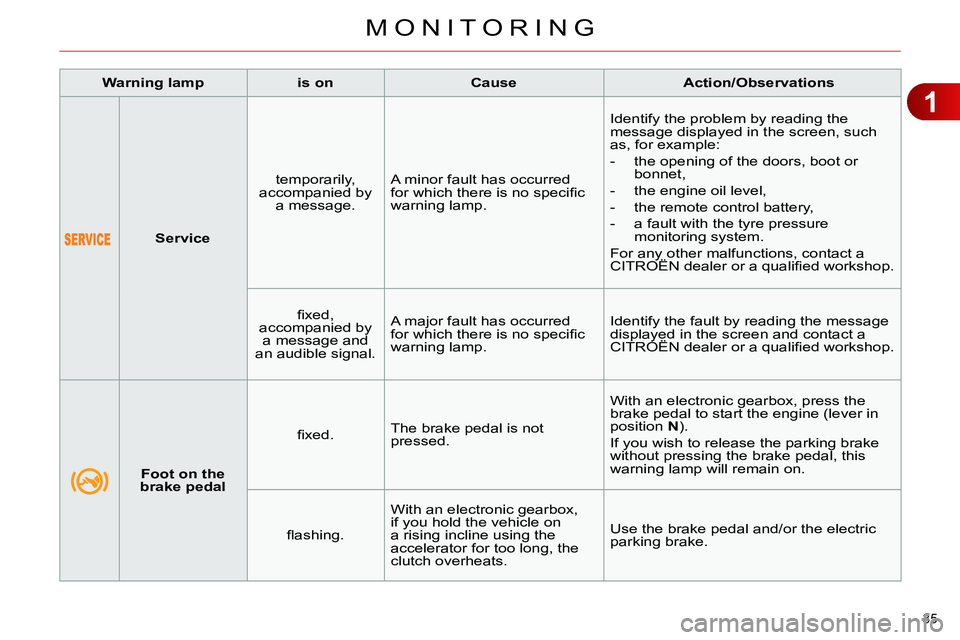
Service
temporarily,
accompanied by
a message. A minor fault has occurred
for which there is no specifi c
warning lamp. Identify the problem by reading the
message displayed in the screen, such
as, for example:
- the opening of the doors, boot or
bonnet,
- the engine oil level,
- the remote control battery,
- a fault with the tyre pressure
monitoring system.
For any other malfunctions, contact a
CITROËN dealer or a qualifi ed workshop.
fi xed,
accompanied by
a message and
an audible signal. A major fault has occurred
for which there is no specifi c
warning lamp. Identify the fault by reading the message
displayed in the screen and contact a
CITROËN dealer or a qualifi ed workshop.
Warning lamp
is on
Cause
Action/Observations
Foot on the
brake pedal
fi xed. The brake pedal is not
pressed. With an electronic gearbox, press the
brake pedal to start the engine (lever in
position N
).
If you wish to release the parking brake
without pressing the brake pedal, this
warning lamp will remain on.
fl ashing. With an electronic gearbox,
if you hold the vehicle on
a rising incline using the
accelerator for too long, the
clutch overheats. Use the brake pedal and/or the electric
parking brake.
Page 42 of 340
1
MONITORING
40
Warning lamp
is on
Cause
Action/Observations
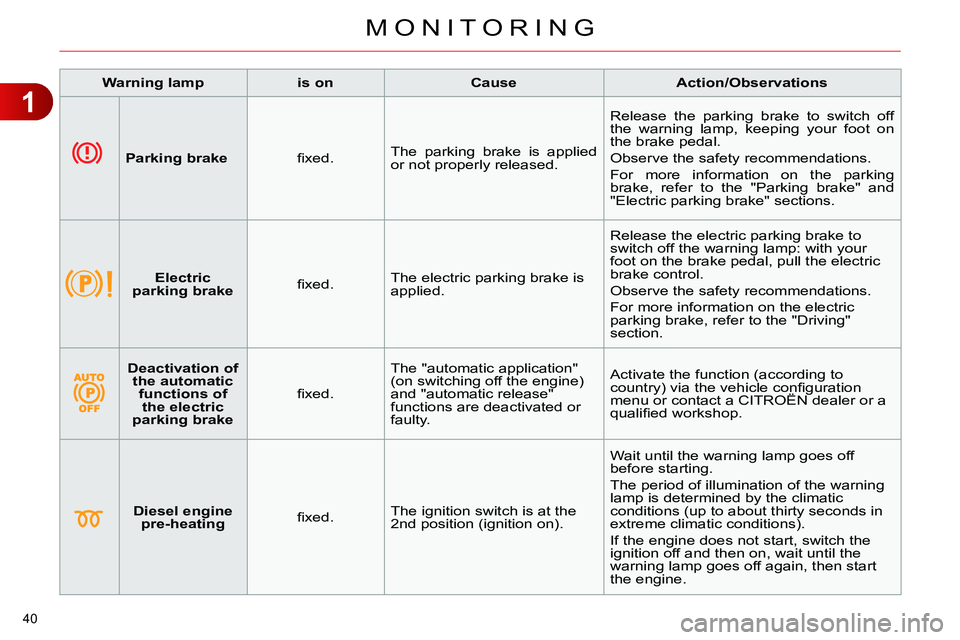
Parking brake
fi xed. The parking brake is applied
or not properly released. Release the parking brake to switch off
the warning lamp, keeping your foot on
the brake pedal.
Observe the safety recommendations.
For more information on the parking
brake, refer to the "Parking brake" and
"Electric parking brake" sections.
Electric
parking brake
fi xed. The electric parking brake is
applied. Release the electric parking brake to
switch off the warning lamp: with your
foot on the brake pedal, pull the electric
brake control.
Observe the safety recommendations.
For more information on the electric
parking brake, refer to the "Driving"
section.
Deactivation of
the automatic
functions of
the electric
parking brake
fi xed. The "automatic application"
(on switching off the engine)
and "automatic release"
functions are deactivated or
faulty. Activate the function (according to
country) via the vehicle confi guration
menu or contact a CITROËN dealer or a
qualifi ed workshop.
Diesel engine
pre-heating
fi xed. The ignition switch is at the
2nd position (ignition on). Wait until the warning lamp goes off
before starting.
The period of illumination of the warning
lamp is determined by the climatic
conditions (up to about thirty seconds in
extreme climatic conditions).
If the engine does not start, switch the
ignition off and then on, wait until the
warning lamp goes off again, then start
the engine.
Page 52 of 340
2
MULTIFUNCTION SCREENS
50
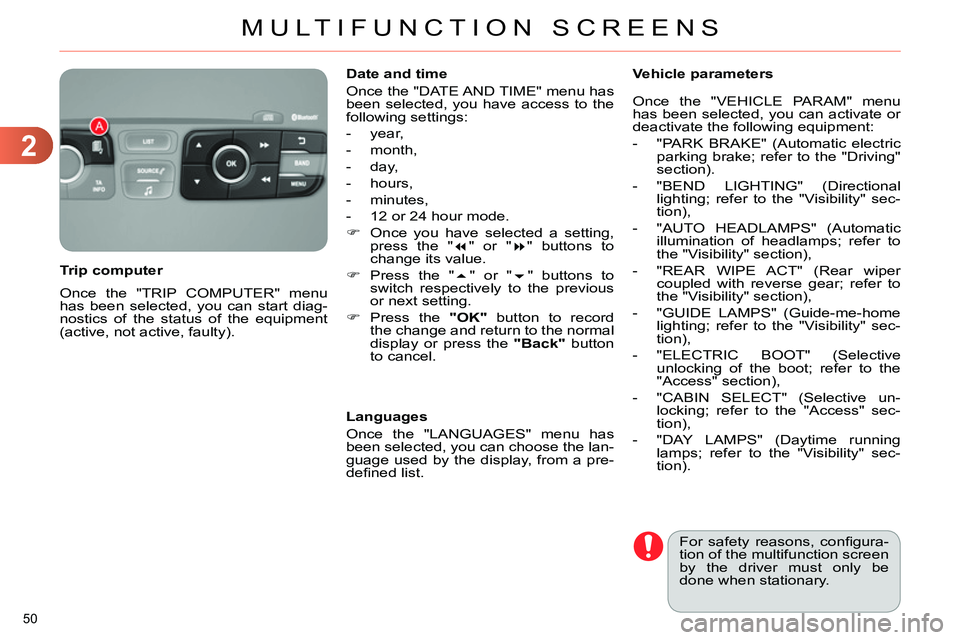
Once the "TRIP COMPUTER" menu
has been selected, you can start diag-
nostics of the status of the equipment
(active, not active, faulty).
Trip computer
Date and time
Once the "DATE AND TIME" menu has
been selected, you have access to the
following settings:
- year,
- month,
- day,
- hours,
- minutes,
- 12 or 24 hour mode.
Once you have selected a setting,
press the "
" or "
" buttons to
change its value.
Press the "
" or "
" buttons to
switch respectively to the previous
or next setting.
Press the "OK"
button to record
the change and return to the normal
display or press the "Back"
button
to cancel.
Languages
Once the "LANGUAGES" menu has
been selected, you can choose the lan-
guage used by the display, from a pre-
defi ned list.
For safety reasons, confi gura-
tion of the multifunction screen
by the driver must only be
done when stationary.
Vehicle parameters
Once the "VEHICLE PARAM" menu
has been selected, you can activate or
deactivate the following equipment:
- "PARK BRAKE" (Automatic electric
parking brake; refer to the "Driving"
section).
- "BEND LIGHTING" (Directional
lighting; refer to the "Visibility" sec-
tion),
- "AUTO HEADLAMPS" (Automatic
illumination of headlamps; refer to
the "Visibility" section),
- "REAR WIPE ACT" (Rear wiper
coupled with reverse gear; refer to
the "Visibility" section),
- "GUIDE LAMPS" (Guide-me-home
lighting; refer to the "Visibility" sec-
tion),
- "ELECTRIC BOOT" (Selective
unlocking of the boot; refer to the
"Access" section),
- "CABIN SELECT" (Selective un-
locking; refer to the "Access" sec-
tion),
- "DAY LAMPS" (Daytime running
lamps; refer to the "Visibility" sec-
tion).
Page 55 of 340
2
MULTIFUNCTION SCREENS
53
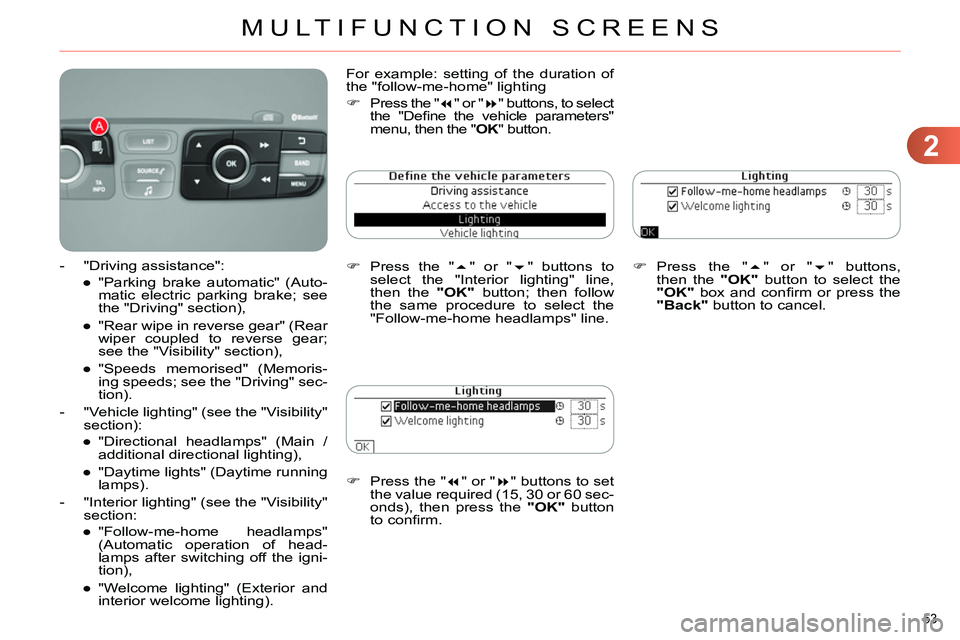
Press the "
" or "
" buttons to set
the value required (15, 30 or 60 sec-
onds), then press the "OK"
button
to confi rm.
Press the "
" or "
" buttons,
then the "OK"
button to select the
"OK"
box and confi rm or press the
"Back"
button to cancel.
For example: setting of the duration of
the "follow-me-home" lighting
Press the "
" or "
" buttons, to select
the "Defi ne the vehicle parameters"
menu, then the " OK
" button.
Press the "
" or "
" buttons to
select the "Interior lighting" line,
then the "OK"
button; then follow
the same procedure to select the
"Follow-me-home headlamps" line.
- "Driving assistance":
●
"Parking brake automatic" (Auto-
matic electric parking brake; see
the "Driving" section),
●
"Rear wipe in reverse gear" (Rear
wiper coupled to reverse gear;
see the "Visibility" section),
●
"Speeds memorised" (Memoris-
ing speeds; see the "Driving" sec-
tion).
- "Vehicle lighting" (see the "Visibility"
section):
●
"Directional headlamps" (Main /
additional directional lighting),
●
"Daytime lights" (Daytime running
lamps).
- "Interior lighting" (see the "Visibility"
section:
●
"Follow-me-home headlamps"
(Automatic operation of head-
lamps after switching off the igni-
tion),
●
"Welcome lighting" (Exterior and
interior welcome lighting).
Page 58 of 340
2
MULTIFUNCTION SCREENS
56
Choice of sounds
This menu allows you to choose a
family of polyphonic sounds from four
available. These sounds are grouped
together in a family and are adapted
to suit the situation and context (alert,
confi rmation, rejection, direction indica-
tors, lighting left on, key in ignition...).
Display confi guration
This menu is used to select the col-
our scheme for the screen, adjust the
brightness, set the date and time and
to choose the units for distance (km
or miles), fuel consumption (l/100 km,
mpg or km/l) and temperature (°Celsius
or °Fahrenheit).
Adjusting the voice synthesiser
This menu is used to adjust the volume
setting for navigation instructions and
to choose the type of voice (male or fe-
male).
Adjusting the date and time
- Press on SETUP
.
- Select "Display confi guration" and
confi rm.
- Select "Set date and time and con-
fi rm.
Select "Minute adjustment via GPS" so
that the minutes are adjusted automati-
cally by satellite reception.
- Select the setting to modify. Confi rm
by pressing on OK
, then modify the
setting and confi rm again to save
the modifi cation.
- Adjust the settings one by one.
- Select " OK
" in the screen then con-
fi rm to save the setting.
Choice of language
This menu is used to choose the lan-
guage used by the screen from a de-
fi ned list.
Vehicle parameters
This menu is used to activate or deac-
tivate certain driving and comfort sys-
tems, classifi ed by category:
- "Driver aid":
●
"Electric brake * " (Automatic electric
parking brake; see "Driving" sec-
tion),
●
"Rear wiper" (Rear wiper coupled
to reverse gear; see "Visibility"
section),
●
"Speed limits" (Memorising speed
settings for the cruise control and
speed limiter; see "Driving" sec-
tion).
Alert log
This lists the active alerts by displaying
in turn the different messages associ-
ated with them.
- "Vehicle access" (see "Access" sec-
tion):
●
"Driver doors selectivity" (Se-
lective unlocking of the driver's
door),
●
"Rear doors selectivity" (Selective
unlocking of the boot using the
centre button on the remote con-
trol; see "Access section).
- "Driving lights" (see "Visibility" sec-
tion):
●
"Day lights * " (Daytime running
lamps),
●
"Directional headlights" (Main /
additional directional lighting).
- "Comfort lighting" (see "Visibility"
section):
●
"Welcome lights" (Interior welcome
lighting),
●
"Running lights" (Automatic timed
operation of headlamps).
*
Depending on country.
Page 142 of 340
8
SAFETY
140
BRAKING ASSISTANCE
SYSTEMS
Group of supplementary systems which
help you to obtain optimum braking in
complete safety in emergency situa-
tions:
- anti-lock braking system (ABS),
- electronic brake force distribution
(EBFD),
- emergency braking assistance (EBA).
When braking in an emergency,
press very fi rmly without releas-
ing the pressure.
When replacing wheels (tyres
and rims), ensure that they con-
form to the manufacturer's rec-
ommendations.
When braking in an emergency,
press fi rmly without releasing
the pressure.
Anti-lock braking system
and electronic brake force
distribution
Linked systems which improve the sta-
bility and manoeuvrability of your vehi-
cle when braking, in particular on poor
or slippery surfaces.
Activation
The anti-lock braking system comes
into operation automatically when there
is a risk of wheel lock.
Normal operation of the ABS may make
itself felt by slight vibration of the brake
pedal.
Operating fault
If this warning lamp comes on,
accompanied by an audible
signal and a message in the
screen, it indicates a malfunc-
tion of the anti-lock braking system
which could result in loss of control of
the vehicle when braking.
If this warning lamp comes on,
together with the STOP
and
ABS
warning lamps, accompa-
nied by an audible signal and
a message in the screen, it indicates a
malfunction of the electronic brake force
distribution which could result in loss of
control of the vehicle when braking.
You must stop as soon as it is safe
to do so.
Emergency braking assistance
System which, in an emergency, en-
ables you to obtain the optimum braking
pressure more quickly, thus reducing
the stopping distance.
Activation
It is triggered by the speed at which the
brake pedal is pressed.
The effect of this is a reduction in the
resistance of the pedal and an increase
in braking effi ciency.
In either case, contact a CITROËN
dealer or a qualifi ed workshop.
Page 143 of 340
8
SAFETY
141
TRAJECTORY CONTROL
SYSTEMS (ESP)
Anti-slip regulation (ASR) and
electronic stability control (ESC)
The anti-slip regulation (also known as
traction control) optimises traction to pre-
vent skidding of the wheels, by acting on
the brakes of the driving wheels and on
the engine.
The electronic stability control acts on
the brake of one or more wheels and
on the engine to keep the vehicle on the
trajectory required by the driver, within
the limits of the laws of physics.
Activation
These systems are activated automati-
cally each time the vehicle is started.
They come into operation in the event
of a grip or trajectory problem.
This is indicated by fl ashing of
this warning lamp in the instru-
ment panel.
Intelligent traction control
system ("Snow motion")
Your vehicle has a system to help driving
on snow: intelligent traction control.
This system detects situations of diffi -
cult surface adhesion that could make it
diffi cult to move off or make progress on
deep fresh snow or compacted snow.
In these situations, the intelligent trac-
tion control
limits the amount of wheel
slip to provide the best traction and tra-
jectory control for your vehicle.
In extremely severe conditions (deep
snow, mud, ...), when it proves impos-
sible to move off, it may be useful to
temporarily deactivate the ESP/ASR
systems to allow the wheels to spin
freely and so allow movement of the
vehicle.
Deactivation
In exceptional conditions (starting a
vehicle which is bogged down, stuck in
snow, on soft ground...), if you are un-
able to make progress, it may be ad-
visable to temporarily deactivate these
systems, so that the wheels can spin
freely and allow the vehicle to move.
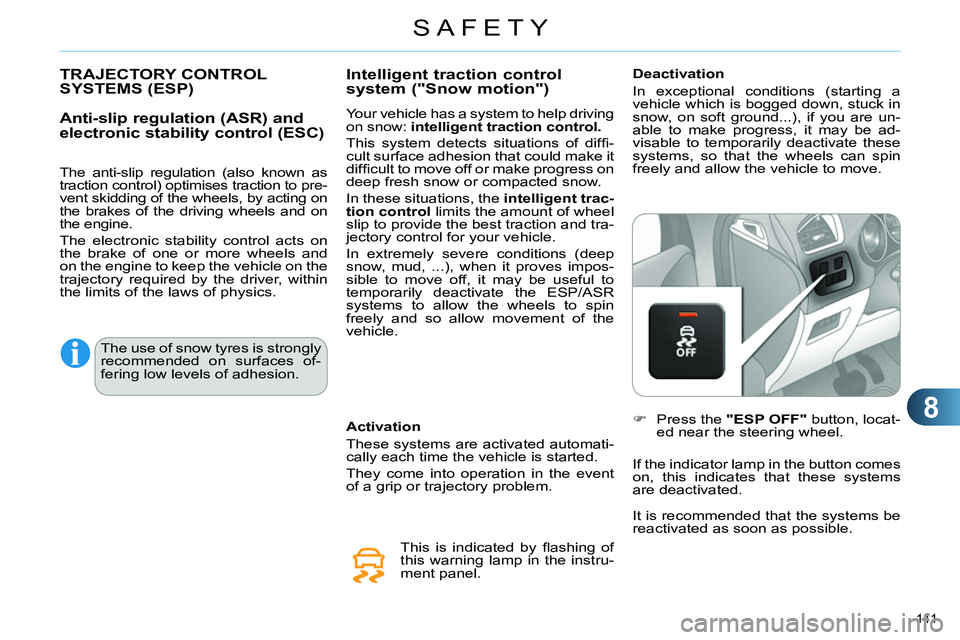
Press the "ESP OFF"
button, locat-
ed near the steering wheel.
If the indicator lamp in the button comes
on, this indicates that these systems
are deactivated.
The use of snow tyres is strongly
recommended on surfaces of-
fering low levels of adhesion.
It is recommended that the systems be
reactivated as soon as possible.
Page 152 of 340
9
DRIVING
150
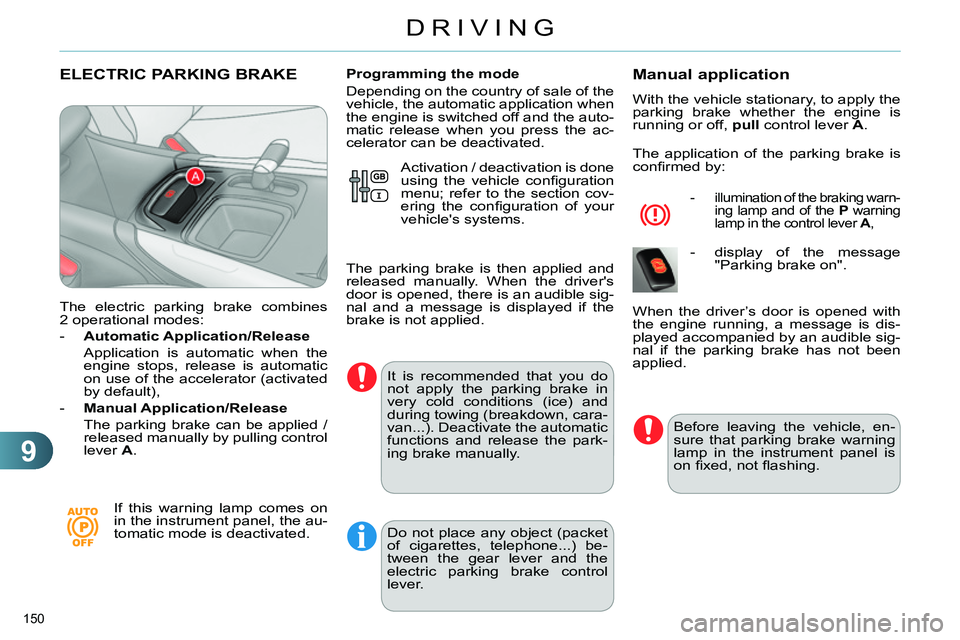
ELECTRIC PARKING BRAKE
The electric parking brake combines
2 operational modes:
- Automatic Application/Release
Application is automatic when the
engine stops, release is automatic
on use of the accelerator (activated
by default),
- Manual Application/Release
The parking brake can be applied /
released manually by pulling control
lever A
.
If this warning lamp comes on
in the instrument panel, the au-
tomatic mode is deactivated.
Programming the mode
Depending on the country of sale of the
vehicle, the automatic application when
the engine is switched off and the auto-
matic release when you press the ac-
celerator can be deactivated.
It is recommended that you do
not apply the parking brake in
very cold conditions (ice) and
during towing (breakdown, cara-
van...). Deactivate the automatic
functions and release the park-
ing brake manually.
Manual application
With the vehicle stationary, to apply the
parking brake whether the engine is
running or off, pull
control lever A
.
The application of the parking brake is
confi rmed by:
- illumination of the braking warn-
ing lamp and of the P
warning
lamp in the control lever A
,
- display of the message
"Parking brake on".
Before leaving the vehicle, en-
sure that parking brake warning
lamp in the instrument panel is
on fi xed, not fl ashing.
When the driver’s door is opened with
the engine running, a message is dis-
played accompanied by an audible sig-
nal if the parking brake has not been
applied. Activation / deactivation is done
using the vehicle confi guration
menu; refer to the section cov-
ering the confi guration of your
vehicle's systems.
The parking brake is then applied and
released manually. When the driver's
door is opened, there is an audible sig-
nal and a message is displayed if the
brake is not applied.
Do not place any object (packet
of cigarettes, telephone...) be-
tween the gear lever and the
electric parking brake control
lever.
Page 153 of 340
9
DRIVING
151
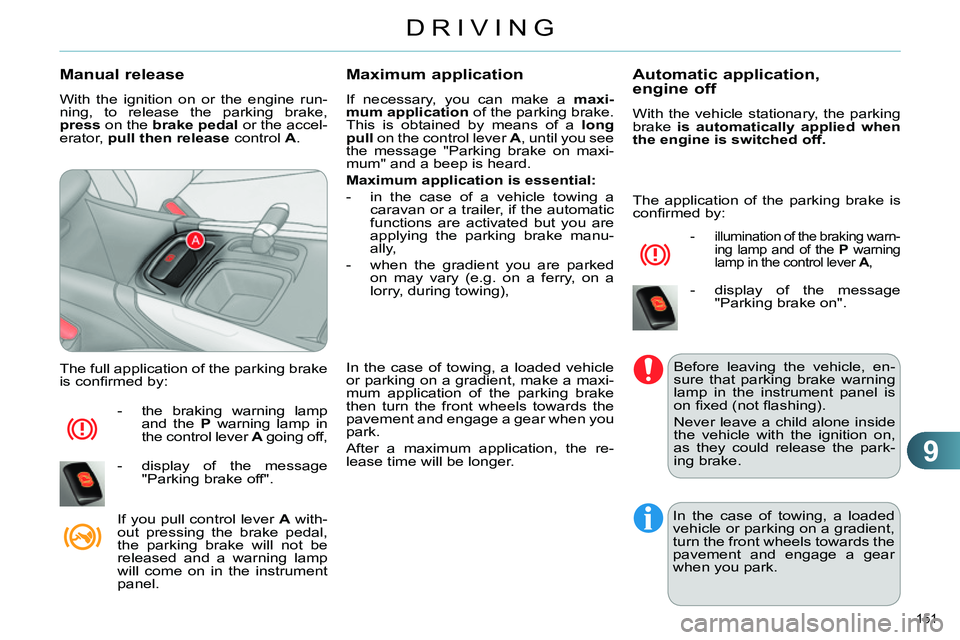
Manual release
With the ignition on or the engine run-
ning, to release the parking brake,
press
on the brake
pedal
or the accel-
erator, pull then release
control A
.
The full application of the parking brake
is confi rmed by:
- the braking warning lamp
and the P
warning lamp in
the control lever A
going off,
- display of the message
"Parking brake off".
If you pull control lever A
with-
out pressing the brake pedal,
the parking brake will not be
released and a warning lamp
will come on in the instrument
panel.
Maximum application
If necessary, you can make a maxi-
mum application
of the parking brake.
This is obtained by means of a long
pull
on the control lever A
, until you see
the message "Parking brake on maxi-
mum" and a beep is heard.
Maximum application is essential:
- in the case of a vehicle towing a
caravan or a trailer, if the automatic
functions are activated but you are
applying the parking brake manu-
ally,
- when the gradient you are parked
on may vary (e.g. on a ferry, on a
lorry, during towing),
In the case of towing, a loaded vehicle
or parking on a gradient, make a maxi-
mum application of the parking brake
then turn the front wheels towards the
pavement and engage a gear when you
park.
After a maximum application, the re-
lease time will be longer.
Automatic application,
engine off
With the vehicle stationary, the parking
brake is automatically applied when
the engine is switched off.
- illumination of the braking warn-
ing lamp and of the P
warning
lamp in the control lever A
,
- display of the message
"Parking brake on".
Before leaving the vehicle, en-
sure that parking brake warning
lamp in the instrument panel is
on fi xed (not fl ashing).
Never leave a child alone inside
the vehicle with the ignition on,
as they could release the park-
ing brake.
In the case of towing, a loaded
vehicle or parking on a gradient,
turn the front wheels towards the
pavement and engage a gear
when you park.
The application of the parking brake is
confi rmed by: