mirror CITROEN C4 DAG 2013 User Guide
[x] Cancel search | Manufacturer: CITROEN, Model Year: 2013, Model line: C4 DAG, Model: CITROEN C4 DAG 2013Pages: 340, PDF Size: 28.95 MB
Page 80 of 340
3
COMFORT
78
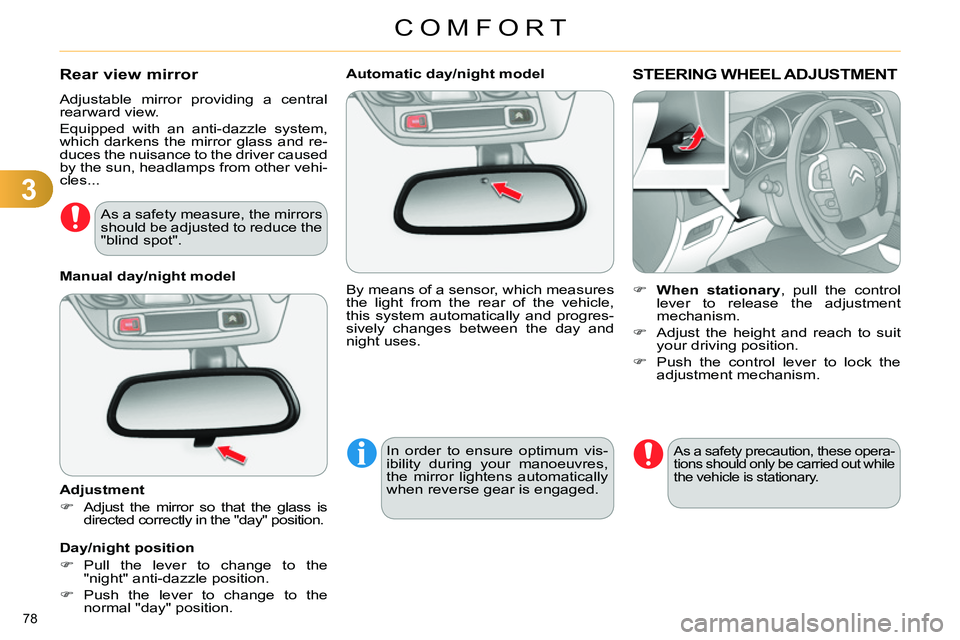
Automatic day/night model
By means of a sensor, which measures
the light from the rear of the vehicle,
this system automatically and progres-
sively changes between the day and
night uses.
In order to ensure optimum vis-
ibility during your manoeuvres,
the mirror lightens automatically
when reverse gear is engaged.
STEERING WHEEL ADJUSTMENT
When stationary
, pull the control
lever to release the adjustment
mechanism.
Adjust the height and reach to suit
your driving position.
Push the control lever to lock the
adjustment mechanism.
As a safety precaution, these opera-
tions should only be carried out while
the vehicle is stationary.
Rear view mirror
Adjustable mirror providing a central
rearward view.
Equipped with an anti-dazzle system,
which darkens the mirror glass and re-
duces the nuisance to the driver caused
by the sun, headlamps from other vehi-
cles...
Manual day/night model
Adjustment
Adjust the mirror so that the glass is
directed correctly in the "day" position.
Day/night position
Pull the lever to change to the
"night" anti-dazzle position.
Push the lever to change to the
normal "day" position.
As a safety measure, the mirrors
should be adjusted to reduce the
"blind spot".
Page 81 of 340
4
ACCESS
79
REMOTE CONTROL KEY
System which permits central unlocking
or locking of the vehicle using the door
lock or from a distance. It is also used
to locate and start the vehicle, as well
as providing protection against theft.
Press the open padlock
once to unlock the driver's
door only.
Selective unlocking using the
remote control
Turn the key towards the front in
the driver's door lock to unlock the
vehicle completely.
Complete unlocking using the
remote control
Press the open padlock
to unlock the vehicle com-
pletely.
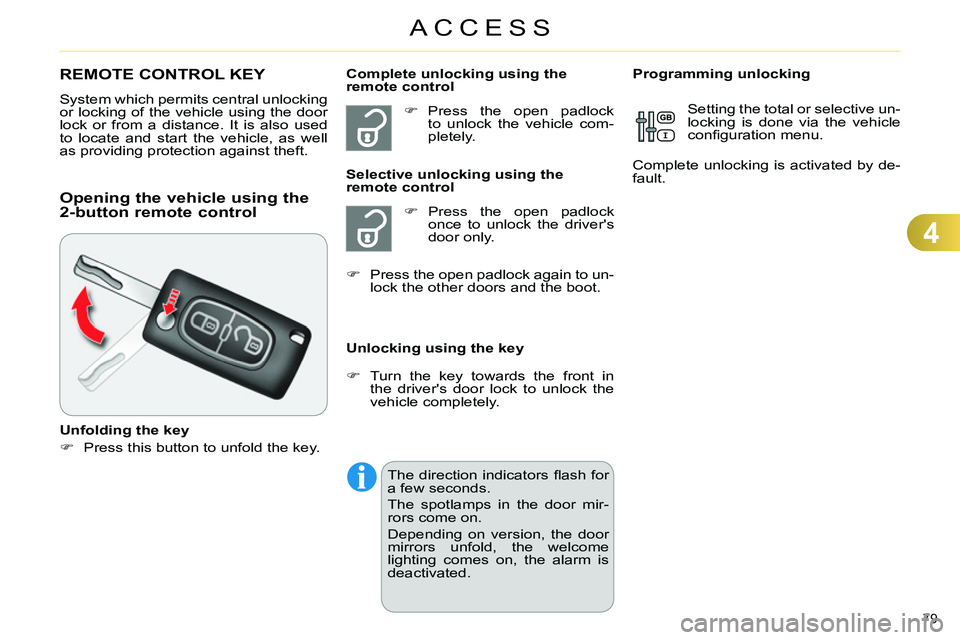
Opening the vehicle using the
2-button remote control
Unfolding the key
Press this button to unfold the key.
Unlocking using the key
Programming unlocking
Setting the total or selective un-
locking is done via the vehicle
confi guration menu.
Complete unlocking is activated by de-
fault.
Press the open padlock again to un-
lock the other doors and the boot.
The direction indicators fl ash for
a few seconds.
The spotlamps in the door mir-
rors come on.
Depending on version, the door
mirrors unfold, the welcome
lighting comes on, the alarm is
deactivated.
Page 82 of 340
4
ACCESS
80
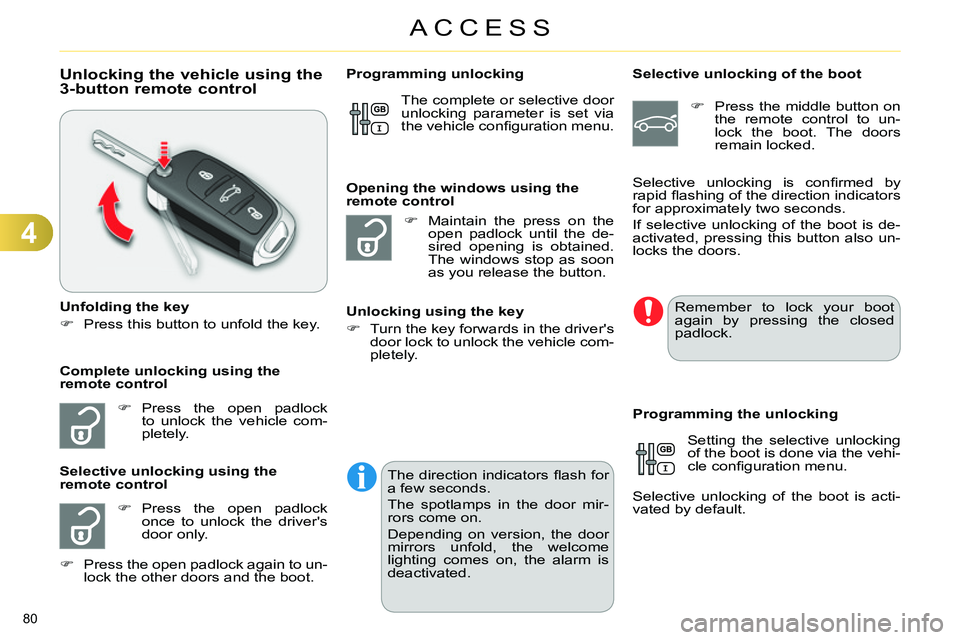
Unlocking the vehicle using the
3-button remote control
Unfolding the key
Press this button to unfold the key.
Press the open padlock
to unlock the vehicle com-
pletely.
Press the open padlock
once to unlock the driver's
door only.
Selective unlocking using the
remote control
Maintain the press on the
open padlock until the de-
sired opening is obtained.
The windows stop as soon
as you release the button.
Opening the windows using the
remote control
Unlocking using the key
Turn the key forwards in the driver's
door lock to unlock the vehicle com-
pletely.
Programming unlocking
Selective unlocking of the boot
Press the middle button on
the remote control to un-
lock the boot. The doors
remain locked.
Setting the selective unlocking
of the boot is done via the vehi-
cle confi guration menu.
Selective unlocking of the boot is acti-
vated by default.
Programming the unlocking
Complete unlocking using the
remote control Selective unlocking is confi rmed by
rapid fl ashing of the direction indicators
for approximately two seconds.
If selective unlocking of the boot is de-
activated, pressing this button also un-
locks the doors. The complete or selective door
unlocking parameter is set via
the vehicle confi guration menu.
Remember to lock your boot
again by pressing the closed
padlock.
Press the open padlock again to un-
lock the other doors and the boot.
The direction indicators fl ash for
a few seconds.
The spotlamps in the door mir-
rors come on.
Depending on version, the door
mirrors unfold, the welcome
lighting comes on, the alarm is
deactivated.
Page 83 of 340
4
ACCESS
81
Locking the vehicle
Press the closed padlock to
lock the vehicle.
Normal locking using the remote
control
Normal locking using the key
Turn the key towards the rear in the
driver's door lock to lock the vehicle.
Locating your vehicle
This function allows you to identify your
vehicle from a distance, particularly in
poor light. Your vehicle must be locked.
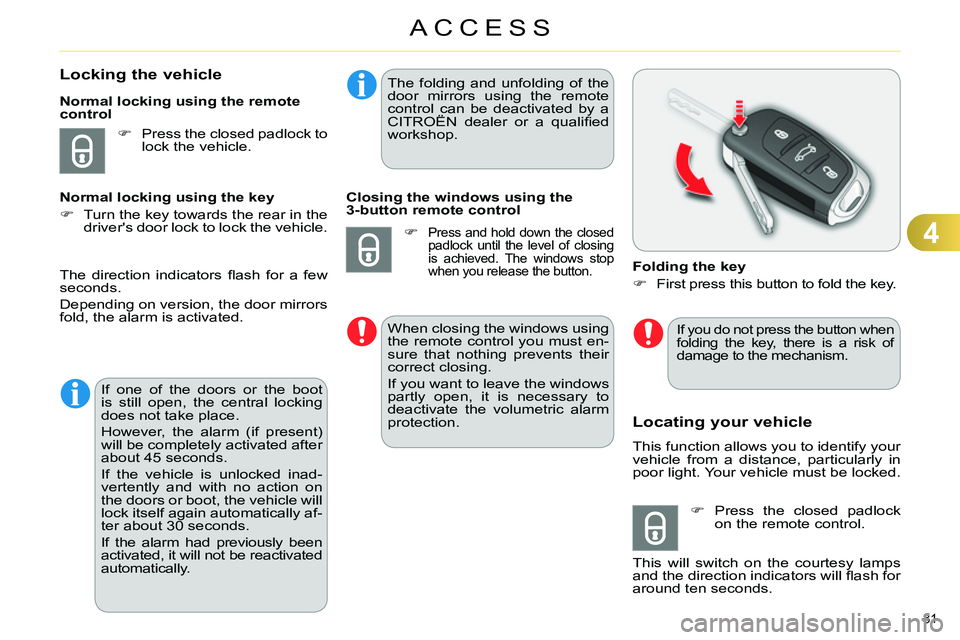
Folding the key
First press this button to fold the key.
Press the closed padlock
on the remote control.
This will switch on the courtesy lamps
and the direction indicators will fl ash for
around ten seconds.
The direction indicators fl ash for a few
seconds.
Depending on version, the door mirrors
fold, the alarm is activated.
If one of the doors or the boot
is still open, the central locking
does not take place.
However, the alarm (if present)
will be completely activated after
about 45 seconds.
If the vehicle is unlocked inad-
vertently and with no action on
the doors or boot, the vehicle will
lock itself again automatically af-
ter about 30 seconds.
If the alarm had previously been
activated, it will not be reactivated
automatically.
The folding and unfolding of the
door mirrors using the remote
control can be deactivated by a
CITROËN dealer or a qualifi ed
workshop.
Closing the windows using the
3-button remote control
Press and hold down the closed
padlock until the level of closing
is achieved. The windows stop
when you release the button.
When closing the windows using
the remote control you must en-
sure that nothing prevents their
correct closing.
If you want to leave the windows
partly open, it is necessary to
deactivate the volumetric alarm
protection.
If you do not press the button when
folding the key, there is a risk of
damage to the mechanism.
Page 104 of 340
5
VISIBILITY
102
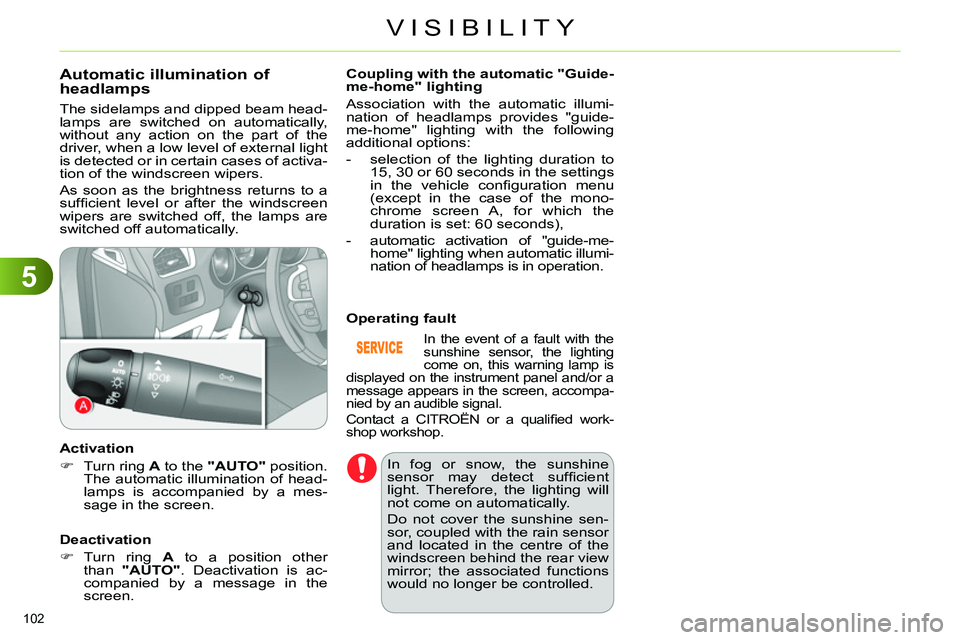
Automatic illumination of
headlamps
The sidelamps and dipped beam head-
lamps are switched on automatically,
without any action on the part of the
driver, when a low level of external light
is detected or in certain cases of activa-
tion of the windscreen wipers.
As soon as the brightness returns to a
suffi cient level or after the windscreen
wipers are switched off, the lamps are
switched off automatically.
Activation
Turn ring A
to the "AUTO"
position.
The automatic illumination of head-
lamps is accompanied by a mes-
sage in the screen.
Deactivation
Turn ring A
to a position other
than "AUTO"
. Deactivation is ac-
companied by a message in the
screen.
Coupling with the automatic "Guide-
me-home" lighting
Association with the automatic illumi-
nation of headlamps provides "guide-
me-home" lighting with the following
additional options:
- selection of the lighting duration to
15, 30 or 60 seconds in the settings
in the vehicle confi guration menu
(except in the case of the mono-
chrome screen A, for which the
duration is set: 60 seconds),
- automatic activation of "guide-me-
home" lighting when automatic illumi-
nation of headlamps is in operation.
In the event of a fault with the
sunshine sensor, the lighting
come on, this warning lamp is
displayed on the instrument panel and/or a
message appears in the screen, accompa-
nied by an audible signal.
Contact a CITROËN or a qualifi ed work-
shop workshop.
Operating fault
In fog or snow, the sunshine
sensor may detect suffi cient
light. Therefore, the lighting will
not come on automatically.
Do not cover the sunshine sen-
sor, coupled with the rain sensor
and located in the centre of the
windscreen behind the rear view
mirror; the associated functions
would no longer be controlled.
Page 105 of 340
5
VISIBILITY
103
Switching off
On the outside, the welcome lighting
switches off automatically after a set
time, when the ignition is switched on
or on locking the vehicle.
On the inside, the welcome lighting
switches off automatically after a pre-
determined time or on opening one of
the doors. On the inside, the footwell and courtesy
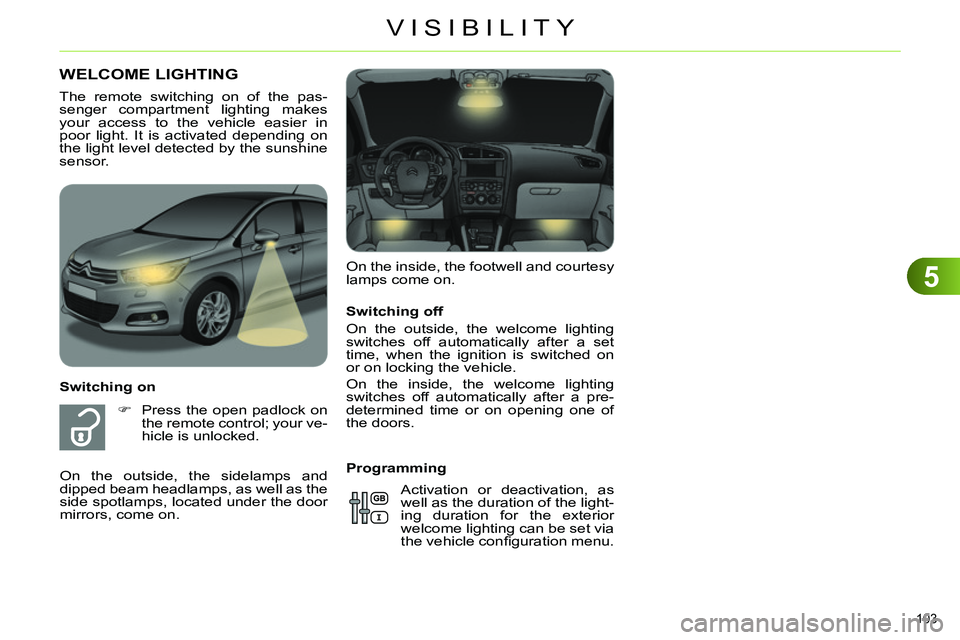
lamps come on.
WELCOME LIGHTING
Switching on
Press the open padlock on
the remote control; your ve-
hicle is unlocked. The remote switching on of the pas-
senger compartment lighting makes
your access to the vehicle easier in
poor light. It is activated depending on
the light level detected by the sunshine
sensor.
On the outside, the sidelamps and
dipped beam headlamps, as well as the
side spotlamps, located under the door
mirrors, come on.
Programming
Activation or deactivation, as
well as the duration of the light-
ing duration for the exterior
welcome lighting can be set via
the vehicle confi guration menu.
Page 110 of 340
5
VISIBILITY
108
Automatic rain sensitive
windscreen wipers
The windscreen wipers operate automat-
ically, without any action on the part of
the driver, if rain is detected (sensor be-
hind the rear view mirror), adapting their
speed to the intensity of the rainfall.
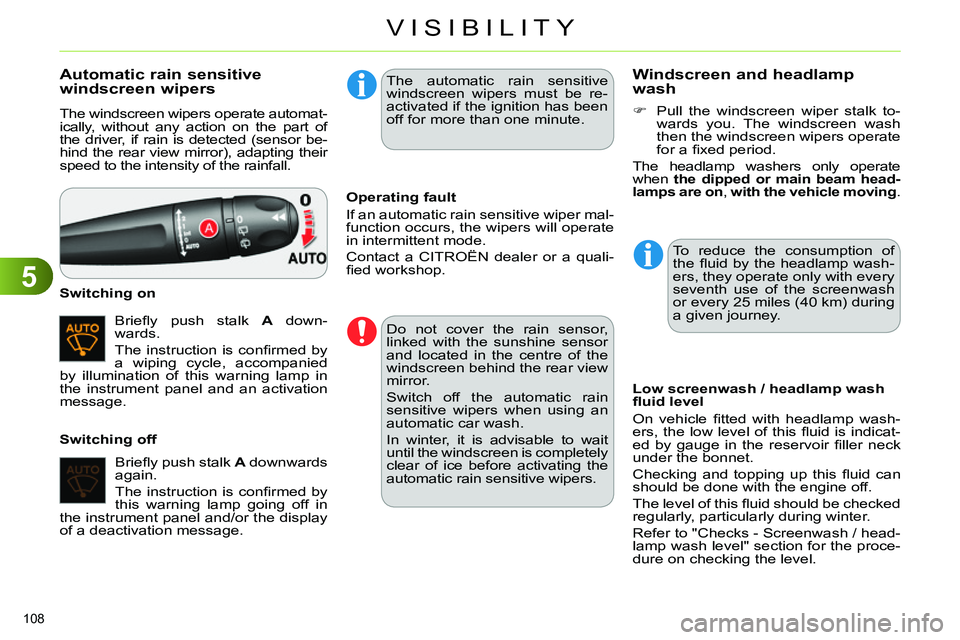
Briefl y push stalk A
down-
wards.
The instruction is confi rmed by
a wiping cycle, accompanied
by illumination of this warning lamp in
the instrument panel and an activation
message.
Switching on
Switching off
Operating fault
If an automatic rain sensitive wiper mal-
function occurs, the wipers will operate
in intermittent mode.
Contact a CITROËN dealer or a quali-
fi ed workshop.
Do not cover the rain sensor,
linked with the sunshine sensor
and located in the centre of the
windscreen behind the rear view
mirror.
Switch off the automatic rain
sensitive wipers when using an
automatic car wash.
In winter, it is advisable to wait
until the windscreen is completely
clear of ice before activating the
automatic rain sensitive wipers.
The automatic rain sensitive
windscreen wipers must be re-
activated if the ignition has been
off for more than one minute.
Briefl y push stalk A
downwards
again.
The instruction is confi rmed by
this warning lamp going off in
the instrument panel and/or the display
of a deactivation message.
Windscreen and headlamp
wash
Low screenwash / headlamp wash
fl uid level
On vehicle fi tted with headlamp wash-
ers, the low level of this fl uid is indicat-
ed by gauge in the reservoir fi ller neck
under the bonnet.
Checking and topping up this fl uid can
should be done with the engine off.
The level of this fl uid should be checked
regularly, particularly during winter.
Refer to "Checks - Screenwash / head-
lamp wash level" section for the proce-
dure on checking the level.
Pull the windscreen wiper stalk to-
wards you. The windscreen wash
then the windscreen wipers operate
for a fi xed period.
The headlamp washers only operate
when the dipped or main beam head-
lamps are on
, with the vehicle moving
.
To reduce the consumption of
the fl uid by the headlamp wash-
ers, they operate only with every
seventh use of the screenwash
or every 25 miles (40 km) during
a given journey.
Page 115 of 340
6
FITTINGS
113
Component which protects against sunlight
from the front or the side, also equipped with
an illuminated courtesy mirror.
With the ignition on, raise the con-
cealing fl ap; the mirror is lit auto-
matically.
This sun visor is also equipped with a
ticket holder.
SUN VISOR
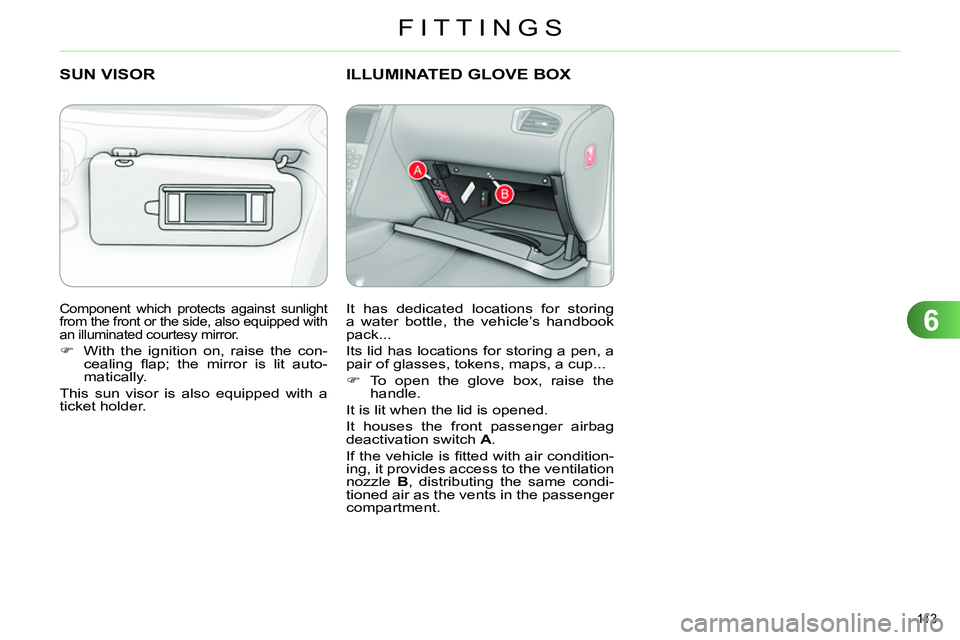
ILLUMINATED GLOVE BOX
It has dedicated locations for storing
a water bottle, the vehicle’s handbook
pack...
Its lid has locations for storing a pen, a
pair of glasses, tokens, maps, a cup...
To open the glove box, raise the
handle.
It is lit when the lid is opened.
It houses the front passenger airbag
deactivation switch A
.
If the vehicle is fi tted with air condition-
ing, it provides access to the ventilation
nozzle B
, distributing the same condi-
tioned air as the vents in the passenger
compartment.
Page 174 of 340
9
DRIVING
172
BLIND SPOT SENSORS
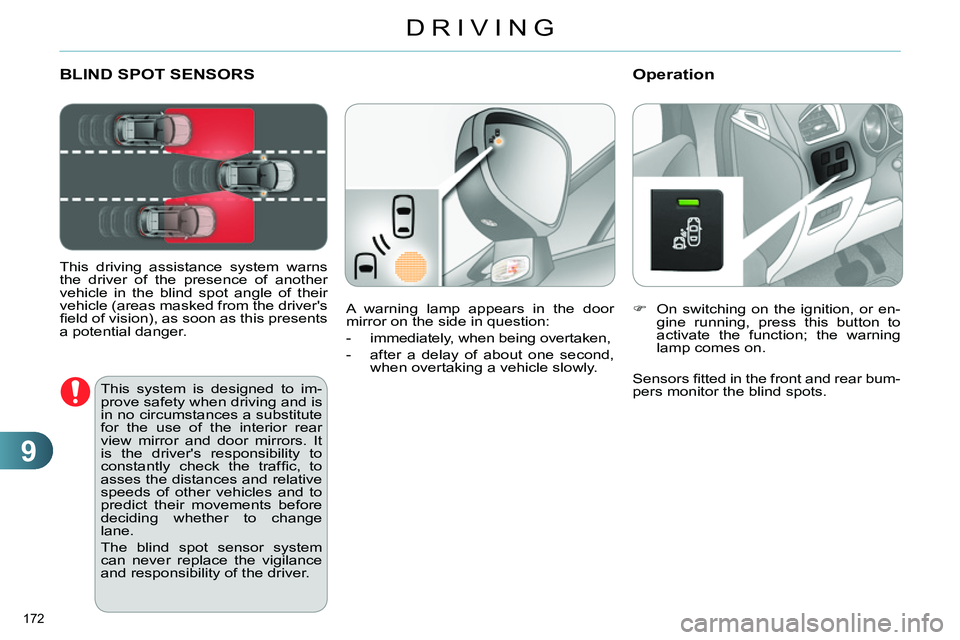
This driving assistance system warns
the driver of the presence of another
vehicle in the blind spot angle of their
vehicle (areas masked from the driver's
fi eld of vision), as soon as this presents
a potential danger.
Operation
On switching on the ignition, or en-
gine running, press this button to
activate the function; the warning
lamp comes on.
This system is designed to im-
prove safety when driving and is
in no circumstances a substitute
for the use of the interior rear
view mirror and door mirrors. It
is the driver's responsibility to
constantly check the traffi c, to
asses the distances and relative
speeds of other vehicles and to
predict their movements before
deciding whether to change
lane.
The blind spot sensor system
can never replace the vigilance
and responsibility of the driver.
Sensors fi tted in the front and rear bum-
pers monitor the blind spots. A warning lamp appears in the door
mirror on the side in question:
- immediately, when being overtaken,
- after a delay of about one second,
when overtaking a vehicle slowly.
Page 175 of 340
9
DRIVING
173
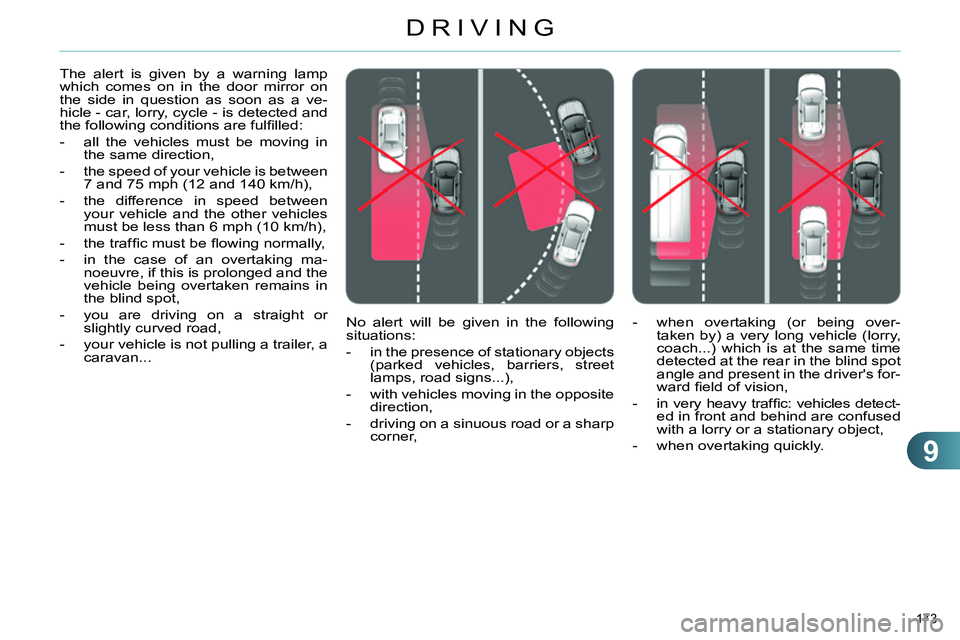
No alert will be given in the following
situations:
- in the presence of stationary objects
(parked vehicles, barriers, street
lamps, road signs...),
- with vehicles moving in the opposite
direction,
- driving on a sinuous road or a sharp
corner, The alert is given by a warning lamp
which comes on in the door mirror on
the side in question as soon as a ve-
hicle - car, lorry, cycle - is detected and
the following conditions are fulfi lled:
- all the vehicles must be moving in
the same direction,
- the speed of your vehicle is between
7 and 75 mph (12 and 140 km/h),
- the difference in speed between
your vehicle and the other vehicles
must be less than 6 mph (10 km/h),
- the traffi c must be fl owing normally,
- in the case of an overtaking ma-
noeuvre, if this is prolonged and the
vehicle being overtaken remains in
the blind spot,
- you are driving on a straight or
slightly curved road,
- your vehicle is not pulling a trailer, a
caravan...
- when overtaking (or being over-
taken by) a very long vehicle (lorry,
coach...) which is at the same time
detected at the rear in the blind spot
angle and present in the driver's for-
ward fi eld of vision,
- in very heavy traffi c: vehicles detect-
ed in front and behind are confused
with a lorry or a stationary object,
- when overtaking quickly.