ignition CITROEN C4 DAG 2013 Workshop Manual
[x] Cancel search | Manufacturer: CITROEN, Model Year: 2013, Model line: C4 DAG, Model: CITROEN C4 DAG 2013Pages: 340, PDF Size: 28.95 MB
Page 153 of 340
9
DRIVING
151
Manual release
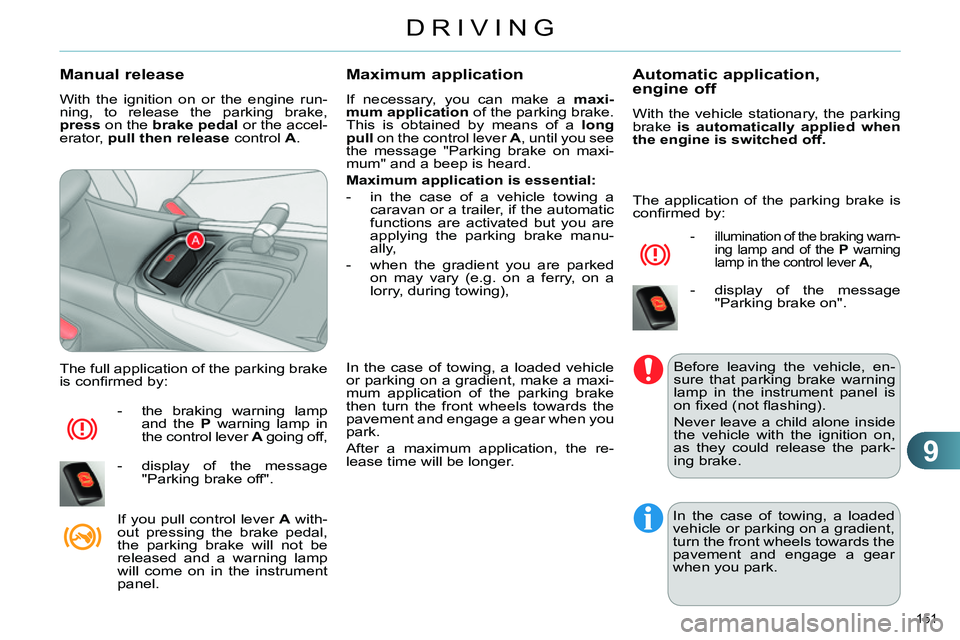
With the ignition on or the engine run-
ning, to release the parking brake,
press
on the brake
pedal
or the accel-
erator, pull then release
control A
.
The full application of the parking brake
is confi rmed by:
- the braking warning lamp
and the P
warning lamp in
the control lever A
going off,
- display of the message
"Parking brake off".
If you pull control lever A
with-
out pressing the brake pedal,
the parking brake will not be
released and a warning lamp
will come on in the instrument
panel.
Maximum application
If necessary, you can make a maxi-
mum application
of the parking brake.
This is obtained by means of a long
pull
on the control lever A
, until you see
the message "Parking brake on maxi-
mum" and a beep is heard.
Maximum application is essential:
- in the case of a vehicle towing a
caravan or a trailer, if the automatic
functions are activated but you are
applying the parking brake manu-
ally,
- when the gradient you are parked
on may vary (e.g. on a ferry, on a
lorry, during towing),
In the case of towing, a loaded vehicle
or parking on a gradient, make a maxi-
mum application of the parking brake
then turn the front wheels towards the
pavement and engage a gear when you
park.
After a maximum application, the re-
lease time will be longer.
Automatic application,
engine off
With the vehicle stationary, the parking
brake is automatically applied when
the engine is switched off.
- illumination of the braking warn-
ing lamp and of the P
warning
lamp in the control lever A
,
- display of the message
"Parking brake on".
Before leaving the vehicle, en-
sure that parking brake warning
lamp in the instrument panel is
on fi xed (not fl ashing).
Never leave a child alone inside
the vehicle with the ignition on,
as they could release the park-
ing brake.
In the case of towing, a loaded
vehicle or parking on a gradient,
turn the front wheels towards the
pavement and engage a gear
when you park.
The application of the parking brake is
confi rmed by:
Page 154 of 340
9
DRIVING
152
Automatic release
The electric parking brake releases auto-
matically and progressively
when you
press the accelerator:
Manual gearbox:
press down fully
on the clutch pedal, engage fi rst
gear or reverse, press on the accel-
erator pedal and move off.
Electronic gearbox
: select position A
,
M
or R
then press on the accelerator
pedal.
Full release of the parking brake is con-
fi rmed by:
- the braking warning lamp
and the P
warning lamp in
the control lever A
going off,
- display of the message
"Parking brake off".
When stationary, with the engine
running, do not press the ac-
celerator pedal unnecessarily,
as you may release the parking
brake.
Immobilising the vehicle,
engine running
With the engine running and the vehi-
cle stationary, in order to immobilise the
vehicle it is essential to manually
ap-
ply the parking brake by pulling
control
lever A
.
- illumination of the braking
warning lamp and the P
warn-
ing lamp in the control lever A
,
- display of the message
"Parking brake on".
Before leaving the vehicle, en-
sure that parking brake warning
lamp in the instrument panel is
on fi xed, not fl ashing.
Particular situations
In certain situations (e.g. starting the
engine), the parking brake can auto-
matically alter its force. This is normal
operation.
To advance your vehicle a few centime-
tres without starting the engine, but with
the ignition on, press on the brake pedal
and release the parking brake by pull-
ing
then releasing
the control lever A
.
The full release of the parking brake is
confi rmed by the warning lamps in the
control lever A
and in the instrument
panel going off and display of the mes-
sage "Parking brake off".
If the parking brake develops a fault
while applied
or if the battery runs fl at,
an emergency release is always pos-
sible.
When the driver’s door is opened, a
message is displayed accompanied by
an audible signal, if the parking brake
has not been applied. The application of the parking brake is
confi rmed by:
Page 156 of 340
9
DRIVING
154
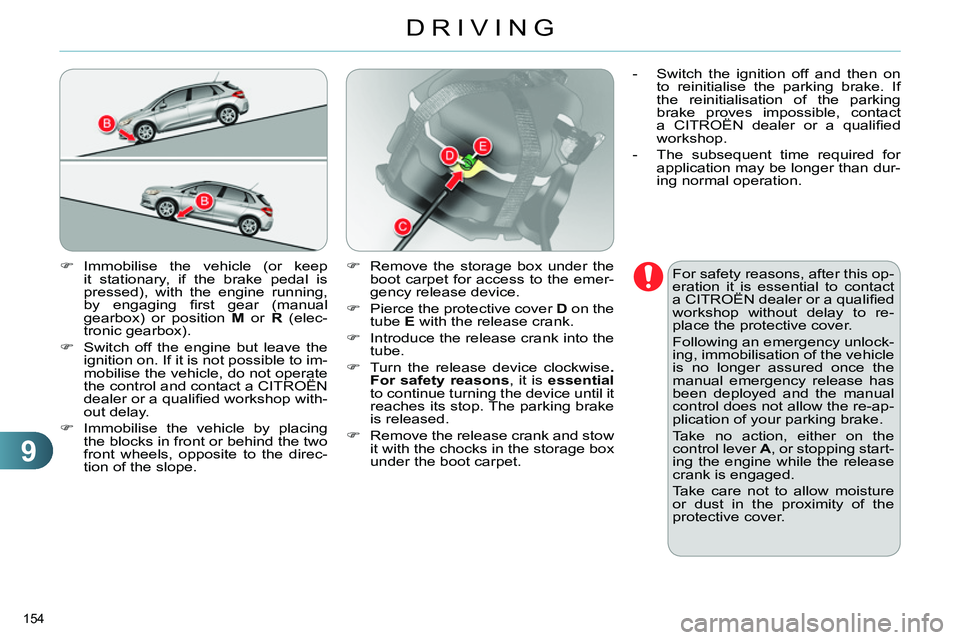
Immobilise the vehicle (or keep
it stationary, if the brake pedal is
pressed), with the engine running,
by engaging fi rst gear (manual
gearbox) or position M
or R
(elec-
tronic gearbox).
Switch off the engine but leave the
ignition on. If it is not possible to im-
mobilise the vehicle, do not operate
the control and contact a CITROËN
dealer or a qualifi ed workshop with-
out delay.
Immobilise the vehicle by placing
the blocks in front or behind the two
front wheels, opposite to the direc-
tion of the slope.
For safety reasons, after this op-
eration it is essential to contact
a CITROËN dealer or a qualifi ed
workshop without delay to re-
place the protective cover.
Following an emergency unlock-
ing, immobilisation of the vehicle
is no longer assured once the
manual emergency release has
been deployed and the manual
control does not allow the re-ap-
plication of your parking brake.
Take no action, either on the
control lever A
, or stopping start-
ing the engine while the release
crank is engaged.
Take care not to allow moisture
or dust in the proximity of the
protective cover.
Remove the storage box under the
boot carpet for access to the emer-
gency release device.
Pierce the protective cover D
on the
tube E
with the release crank.
Introduce the release crank into the
tube.
Turn the release device clockwise .
For safety reasons
, it is essential
to continue turning the device until it
reaches its stop. The parking brake
is released.
Remove the release crank and stow
it with the chocks in the storage box
under the boot carpet.
- Switch the ignition off and then on
to reinitialise the parking brake. If
the reinitialisation of the parking
brake proves impossible, contact
a CITROËN dealer or a qualifi ed
workshop.
- The subsequent time required for
application may be longer than dur-
ing normal operation.
Page 158 of 340
9
DRIVING
156
Situations
Consequences
To apply the electric parking brake:
immobilise the vehicle and switch off the ignition.
pull the control for at least 5 seconds or until application
is complete.
switch on the ignition and check the switching on of the
electric parking brake warning lamps.
The application is slower than during normal operation.
To release the electric parking brake:
switch on the ignition.
pull the control and hold it for approximately 3 seconds
then release it.
If the braking warning lamp is fl ashing or if the warning
lamps do not come on with the ignition on, these procedures
will not work. Place the vehicle on level ground and have it
checked by a CITROËN dealer or a qualifi ed workshop. and possibly
fl ashing
Display of the message " Parking brake fault
" and of the
following warning lamps:
- Only the automatic application on switching off the en-
gine and automatic release on acceleration functions are
available.
- The manual application/release of the electric parking
brake and the emergency braking are not available.
and possibly
fl ashing
Battery fault:
- If the battery warning lamp comes on you must stop imme-
diately as soon as the traffi c allows. Stop and immobilise
your vehicle (if necessary, place the two chocks under the
wheels).
- Apply the electric parking brake before switching off the
engine.
Page 159 of 340
9
DRIVING
157
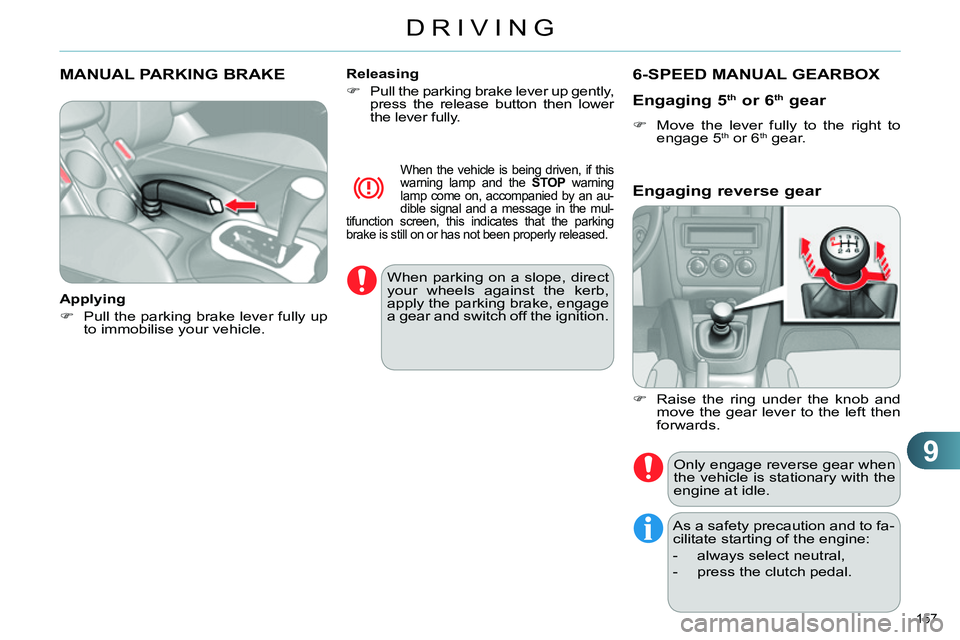
MANUAL PARKING BRAKE
Applying
Pull the parking brake lever fully up
to immobilise your vehicle.
Releasing
Pull the parking brake lever up gently,
press the release button then lower
the lever fully.
When the vehicle is being driven, if this
warning lamp and the STOP
warning
lamp come on, accompanied by an au-
dible signal and a message in the mul-
tifunction screen, this indicates that the parking
brake is still on or has not been properly released.
When parking on a slope, direct
your wheels against the kerb,
apply the parking brake, engage
a gear and switch off the ignition.
6-SPEED MANUAL GEARBOX
Engaging 5
th
or 6 th
gear
Move the lever fully to the right to
engage 5 th or 6 th
gear.
Only engage reverse gear when
the vehicle is stationary with the
engine at idle.
As a safety precaution and to fa-
cilitate starting of the engine:
- always select neutral,
- press the clutch pedal.
Engaging reverse gear
Raise the ring under the knob and
move the gear lever to the left then
forwards.
Page 162 of 340
9
DRIVING
160
You can change mode at any
time by moving the gear lever
from A
to M
or the other way
round.
At low high speed, if reverse gear is
requested, the N
indicator fl ashes and
the gearbox goes into neutral automati-
cally. To engage reverse, put the gear
lever in position N
, then position R
.
When immobilising the vehicle,
with the engine running, you
must place the gear lever in neu-
tral N
.
Before carrying out any work in
the engine compartment, ensure
that the gear lever is in neutral N
and that the parking brake is ap-
plied.
Whatever the circumstances,
you must manually apply the
parking brake when parking,
unless the parking brake is pro-
grammed in automatic mode.
Reverse
To engage reverse gear R
, the vehicle
must be immobilised with your foot on
the brake pedal.
Select position R
.
Operating fault
With the ignition on, the fl ashing of
AUTO
, accompanied by an audible sig-
nal and a message in the screen, indi-
cates a malfunction of the gearbox.
Have it checked by a CITROËN dealer
or a qualifi ed workshop.
Manual mode
Select position M
.
The gears engaged appear in
succession in the instrument
panel screen.
The gear change requests are only act-
ed on if the engine speed permits.
It is not necessary to release the accel-
erator during gear changes.
When braking or slowing down, the
gearbox changes down automatically
to allow the vehicle to accelerate in the
correct gear.
On sharp acceleration, the gearbox will
not change up unless the driver acts on
the gear lever or the steering mounted
paddles.
Temporary control of gear changing
You can temporarily take over control
of gear changing using the "+"
and "-"
steering mounted paddles: if the engine
speed allows, the request to change
gear is acted on.
This function allows you to anticipate
certain situations such as overtaking a
vehicle or the approach to a corner.
After a few moments without any action
on the control paddles, the gearbox re-
sumes automatic control of the gears.
Never select neutral N
while the
vehicle is moving.
Stopping the vehicle
Before switching off the engine, you
can:
- move to position N
to engage neutral,
or
- leave the gear engaged; in this
case, it will not be possible to move
the vehicle.
In both cases, you must apply the
parking brake
to immobilise the vehicle.
Page 165 of 340
9
DRIVING
163
Manual operation
Select position M
for sequential
changing of the six gears.
Push the lever towards the +
sign to
change up a gear.
Pull the lever towards the -
sign to
change down a gear.
It is only possible to change from one
gear to another if the vehicle speed and
engine speed permit; otherwise, the
gearbox will operate temporarily in au-
tomatic mode.
D
disappears and the gears
engaged appear in succes-
sion in the instrument panel.
If the engine speed is too low
or too high, the gear selected
fl ashes for a few seconds, then the ac-
tual gear engaged is displayed.
It is possible to change from position D
(automatic) to position M
(manual) at
any time.
When the vehicle is stationary or mov-
ing very slowly, the gearbox selects
gear M1
automatically.
The sport and snow programmes do
not operate in manual mode.
Invalid value during manual
operation
This symbol is displayed if a
gear is not engaged correctly
(selector between two posi-
tions).
Stopping the vehicle
Before switching off the engine, you
can engage position P
or N
to place the
gearbox in neutral.
In both cases, apply the parking brake
to immobilise the vehicle, unless it is
programmed to automatic mode.
If the lever is not in position P
,
when the driver's door is opened
or approximately 45 seconds
after the ignition is switched off,
there is an audible signal and a
message appears.
Return the lever to position P
;
the audible signal stops and
the message disappears.
You risk damaging the gearbox:
- if you press the accelera-
tor and brake pedals at the
same time,
- if you force the lever from
position P
to another position
when the battery is fl at. When the ignition is on,
the lighting of this warning
lamp, accompanied by an
audible signal and a message in the
multifunction screen, indicates a gear-
box malfunction.
In this case, the gearbox switches to
back-up mode and is locked in 3rd gear.
You may feel a substantial knock when
changing from P
to R
and from N
to R
.
This will not cause any damage to the
gearbox.
Do not exceed 60 mph (100 km/h), lo-
cal speed restrictions permitting.
Have it checked by a CITROËN dealer
or a qualifi ed workshop.
This warning lamp may also come on if
a door is opened.
Operating fault
To reduce fuel consumption
when stationary for long periods
with the engine running (traffi c
jam...), position the gear lever
at N
and apply the parking brake,
unless it is programmed in auto-
matic mode.
Page 170 of 340
9
DRIVING
168
STOP & START
The Stop & Start system puts the en-
gine temporarily into standby - STOP
mode - during stops in the traffi c (red
lights, traffi c jams, or other...). The en-
gine restarts automatically - START
mode - as soon as you want to move
off. The restart takes place instantly,
quickly and silently.
Perfect for urban use, the Stop & Start
system reduces fuel consumption and
exhaust emissions as well as the noise
level when stationary.
Operation
Going into engine STOP mode
The "ECO"
warning lamp comes on
in the instrument panel and the en-
gine goes into standby automatically:
- with a manual gearbox
, at speeds
below 12 mph (20 km/h), when you
put the gear lever into neutral and
release the clutch pedal, If your vehicle is fi tted with
the system, a time coun-
ter calculates the sum of
the periods in STOP mode
d uring a journey. It resets itself to zero
every time the ignition is switched on
with the key.
- with an electronic gearbox
, at a
speed below 5 mph (8 km/h), when
you press the brake pedal or put the
gear lever into position N
. With an electronic gearbox, for
your comfort during parking
maoeuvres, STOP mode is not
available for a few seconds after
coming out of reverse gear.
STOP mode does not affect the
functionality of the vehicle, such
as braking, power steering, for
example.
Special cases: STOP mode
unavailable
STOP mode is not invoked when:
- the driver's door is open,
- the driver's seat belt is not fastened,
- the vehicle has not exceeded 6 mph
(10 km/h) since the last engine start
using the key,
- the electric parking brake is applied
or being applied,
- the engine is needed to maintain a
comfortable temperature in the pas-
senger compartment,
- demisting is active,
- some special conditions (battery
charge, engine temperature, brak-
ing assistance, ambient tempera-
ture...) where the engine is needed
to assure control of a system.
In this case, the "ECO"
warn-
ing lamp fl ashes for a few sec-
onds, then goes off. Never refuel with the engine in
STOP mode; you must switch off
the ignition with the key.
This operation is perfectly normal.
Page 172 of 340
9
DRIVING
170
Maintenance
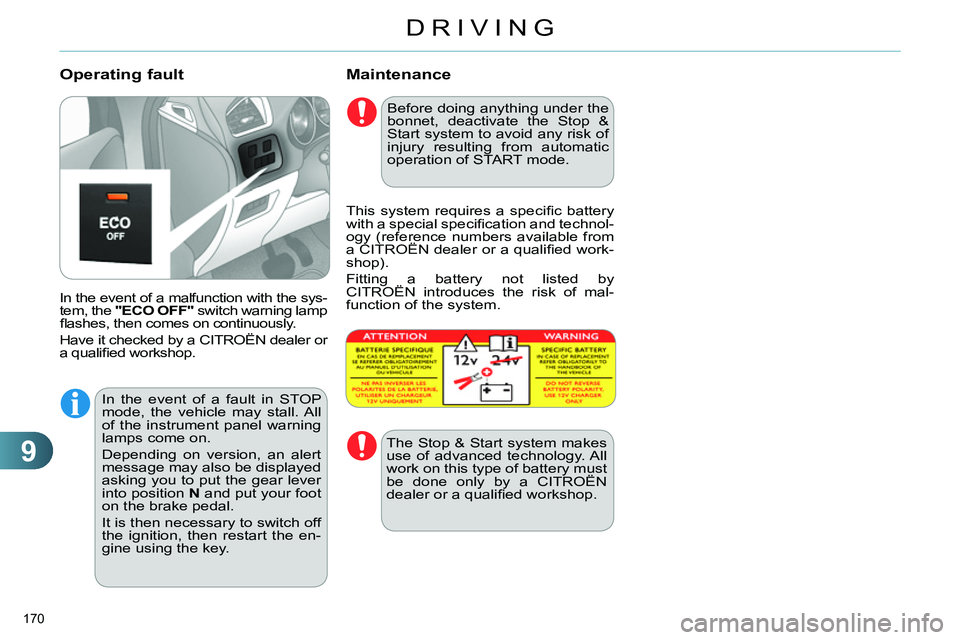
In the event of a malfunction with the sys-
tem, the "ECO OFF"
switch warning lamp
fl ashes, then comes on continuously.
Have it checked by a CITROËN dealer or
a qualifi ed workshop.
Operating fault
Before doing anything under the
bonnet, deactivate the Stop &
Start system to avoid any risk of
injury resulting from automatic
operation of START mode.
This system requires a specifi c battery
with a special specifi cation and technol-
ogy (reference numbers available from
a CITROËN dealer or a qualifi ed work-
shop).
Fitting a battery not listed by
CITROËN introduces the risk of mal-
function of the system.
The Stop & Start system makes
use of advanced technology. All
work on this type of battery must
be done only by a CITROËN
dealer or a qualifi ed workshop.
In the event of a fault in STOP
mode, the vehicle may stall. All
of the instrument panel warning
lamps come on.
Depending on version, an alert
message may also be displayed
asking you to put the gear lever
into position N
and put your foot
on the brake pedal.
It is then necessary to switch off
the ignition, then restart the en-
gine using the key.
Page 173 of 340
9
DRIVING
171
LANE DEPARTURE WARNING
SYSTEM
The lane departure warning sys-
tem cannot, in any circumstances,
replace the need for vigilance and
responsibility on the part of the
driver.
Activation
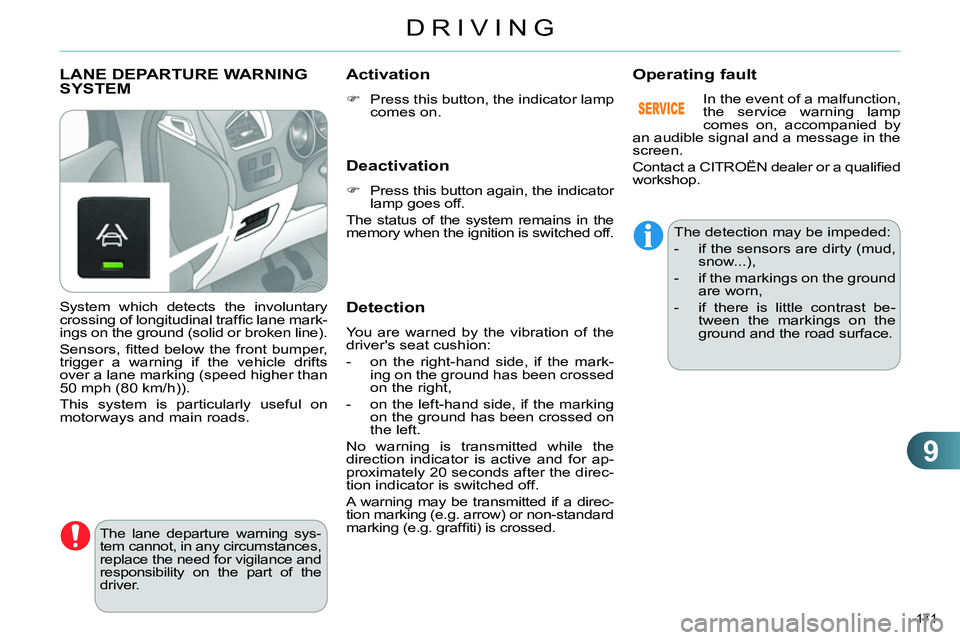
Press this button, the indicator lamp
comes on.
Deactivation
Press this button again, the indicator
lamp goes off.
The status of the system remains in the
memory when the ignition is switched off.
Detection
You are warned by the vibration of the
driver's seat cushion:
- on the right-hand side, if the mark-
ing on the ground has been crossed
on the right,
- on the left-hand side, if the marking
on the ground has been crossed on
the left.
No warning is transmitted while the
direction indicator is active and for ap-
proximately 20 seconds after the direc-
tion indicator is switched off.
A warning may be transmitted if a direc-
tion marking (e.g. arrow) or non-standard
marking (e.g. graffi ti) is crossed.
Operating fault
The detection may be impeded:
- if the sensors are dirty (mud,
snow...),
- if the markings on the ground
are worn,
- if there is little contrast be-
tween the markings on the
ground and the road surface.
System which detects the involuntary
crossing of longitudinal traffi c lane mark-
ings on the ground (solid or broken line).
Sensors, fi tted below the front bumper,
trigger a warning if the vehicle drifts
over a lane marking (speed higher than
50 mph (80 km/h)).
This system is particularly useful on
motorways and main roads. In the event of a malfunction,
the service warning lamp
comes on, accompanied by
an audible signal and a message in the
screen.
Contact a CITROËN dealer or a qualifi ed
workshop.