change time CITROEN C4 PICASSO 2011 User Guide
[x] Cancel search | Manufacturer: CITROEN, Model Year: 2011, Model line: C4 PICASSO, Model: CITROEN C4 PICASSO 2011Pages: 352, PDF Size: 10.66 MB
Page 161 of 352

Downloaded from www.Manualslib.com manuals search engine IX
159
DRIVING
Manual operation
Position of the gear lever for manual
gear changing.
)
Move the gear lever to
position M
.
)
Pull the " +
" paddle to change up
a gear.
)
Pull the " -
" paddle to change
down a gear.
- If the vehicle stops or reduces
speed (for example when ap-
proaching a stop sign), the gear-
box changes down automatically
to fi rst gear.
- In manual mode, it is not neces-
sary to release the accelerator
during gear changes.
- A request to change gear is ac-
cepted only if the engine speed
permits it.
- For safety reasons, depending
on the engine speed, a change
up or down may be performed
automatically.
- It is possible at any time to
change mode, by moving the
gear lever from position D
to po-
sition M
or vice versa.
Flashing of the indicator for
the position requested sig-
nals that this position is not
yet obtained.
If the indicator is on fi xed, the posi-
tion is confi rmed.
Display of a dash in the rev counter
indicates a malfunction. Contact
a CITROËN dealer or a qualifi ed
workshop.
Illumination of the service warning
lamp accompanied by a message
and an audible signal indicates an
operating fault. In this case:
- a marked snatching may be felt
when selecting R
for reverse
gear,
- the gearbox is locked in one
gear,
- do not exceed a speed of 60 mph
(approximately 100 km/h).
Have it checked by a CITROËN
dealer or a qualifi ed workshop.
Page 183 of 352

Downloaded from www.Manualslib.com manuals search engine X
181
CHECKS
CHECKS
12 V battery
The battery does not re-
quire any maintenance.
However, check that the
terminals are clean and
correctly tightened, partic-
ularly in summer and winter.
When carrying out work on the bat-
tery, refer to the "Practical information"
section for details of the precautions
to be taken before disconnecting the
battery and following its reconnection.
Particle filter system (Diesel)
Complementary to the catalytic
converter, this fi lter makes an ac-
tive contribution to the preservation
of air quality by the retaining of the
unburnt pollutant particles. Black
exhaust fumes are thus no longer
emitted.
After prolonged idling or driving
at very low speeds, you may oc-
casionally notice water vapour be-
ing emitted from the exhaust when
accelerating. This is of no conse-
quence to the running of the vehicle
or to the environment.
If there is risk of clogging, a mes-
sage appears on the multifunction
screen, accompanied by an audible
signal and lighting of the service
warning lamp.
This alert tells you that the particle
fi lter is starting to fi ll up (in condi-
tions of urban driving of excep-
tionally long duration: low speeds,
traffi c jams etc.)
To regenerate the fi lter, it is advised
to drive as soon as possible, when
traffi c conditions permit, at a speed
of 40 mph (around 60 km/h) or
more for at least fi ve minutes (until
the alert message disappears).
If this alert persists, consult a
CITROËN dealer or a qualifi ed
workshop.
The presence of this label, in par-
ticular with the Stop & Start system,
indicates the use of a specifi c 12 V
lead-acid battery with special tech-
nology and specifi cation, for which
the involvement of a CITROËN
dealer or a qualifi ed workshop is
required when replacing or discon-
necting the battery. Failure to observe this recommen-
dation may shorten the life of the
battery.
Unless otherwise indicated, check
these components in accordance
with the servicing booklet and ac-
cording to your engine.
Otherwise, have them checked by
a CITROËN dealer or a qualifi ed
workshop.
Air filter and passenger
compartment filter
Refer to the servicing
booklet for details of the
replacement intervals for
these components.
Depending on the environ-
ment (e.g. dusty atmosphere) and
the use of the vehicle (e.g. city driv-
ing), replace them twice as often
if necessary
(refer to the "Engines"
section).
A clogged passenger compartment
fi lter may have an adverse effect on
the performance of the air condition-
ing system and generate undesir-
able odours.
Oil filter
Replace the oil fi lter each
time the engine oil is
changed.
Refer to the servicing
booklet for details of the
replacement interval for this compo-
nent.
Page 193 of 352

Downloaded from www.Manualslib.com manuals search engine XI
191
PRACTICAL INFORMATION
Main beam headlamps
)
Remove the rubber cover.
)
Detach the clips by lowering
them on each side of the bulb.
)
Pull on the bulb-holder to remove it.
)
Replace the faulty bulb.
)
Push the bulb-holder back into
its housing.
)
Reattach the clips.
)
Refi t the rubber cover.
Dual-function Xenon headlamps
(dipped/main beam)
Additional main beam headlamps
)
Remove the rubber cover.
)
Rotate the bulb-holder a quarter
turn anti-clockwise and remove it
from its housing.
)
Replace the faulty bulb.
)
Reposition the bulb-holder by
pushing it in, tightening it by a
quarter turn clockwise.
)
Refi t the rubber cover.
If the headlamp bears this
symbol, any operation to
change the Xenon dual-
function directional head-
lamp (D1S-35 W) must be carried
out by professionals (risk of elec-
trocution).
Contact a CITROËN dealer or a
qualifi ed workshop.
It is recommended to change both
bulbs at the same time if one of
them is faulty.
Dipped beam headlamps
)
Remove the rubber cover.
)
Rotate the bulb-holder a quarter
turn anti-clockwise and remove it
from its housing.
)
Replace the faulty bulb.
)
Reposition the bulb-holder by
pushing it in, tightening it by a
quarter turn clockwise.
)
Refi t the rubber cover.
Page 195 of 352

Downloaded from www.Manualslib.com manuals search engine XI
193
PRACTICAL INFORMATION
Front foglamps (H11-55 W)
)
Insert the key in the notch A
, tilting
the bulb-holder cover, located un-
derneath the bumper, then insert
the key in the notch B
to remove it.
)
Undo the lamp.
)
Tilt the bulb-holder.
)
Change the faulty bulb.
)
Reposition the bulb-holder.
)
Do up the lamp and refi t the bulb-
holder cover fi rmly in place.
Rear foglamp (P21 W)
)
Pass your hand underneath the
bumper to reach the bulb-holder.
)
Rotate the bulb-holder a quarter
turn.
)
Pull on the bulb-holder.
)
Rotate the bulb a quarter turn to
remove it.
)
Replace the faulty bulb.
)
Fit the bulb.
)
Reposition the bulb-holder by
rotating it a quarter turn.
For the replacement of this type
of LED lamp, contact a CITROËN
dealer or a qualifi ed workshop.
Changing daytime running
lamps/sidelamps (LEDs)
Page 247 of 352

Downloaded from www.Manualslib.com manuals search engine 245
04
2
3
4
5
6
7
8
NAVIGATION - GUIDANCE
GUIDANCE OPTIONS
Turn the dial and select the "Navigation guidance" function. Press the MEN
U button.
Turn the dial and select the "
Guidance
options" function. Pr
ess the dial to confi rm the selection.
T
urn the dial and select the "Defi ne calculation criteria" function.
Pr
ess the dial to confi rm the selection.
Turn the dial and select,
for example,
the "Distance/time" function.
Pr
ess the dial to confi rm the selection. The route presented depends directl
y on the guidance options.
Chan
ging these options may completely change the route.
Guidance options
Defi ne calculation criteria
Distance/time
Page 271 of 352

Downloaded from www.Manualslib.com manuals search engine 269
09
automatic mode
manual mode
5
5
length of calls n
etworks available
3
4
reset 4
manage PIN code3
activate/deactivate
save PIN code 4
4
modify PIN code 4
call options3
confi gure calls
display my number
automatic repl
y after x ring(s)
5
5
4
ring options
for voice calls
for text messa
ges (SMS)
5
5
4
calls diversion to mailbox n°
text message ring 6
3
delete calls log3
activation mode3
BLUETOOTH FUNCTIONS2
deactivated
activated and visible
activated and not visible
4
4
4
list of matched peripheral equipment3
change the name of the audio/telephone3
authentication code3
phone book synchronisation mode3
no synchronisation
view telephone phone book
view
SIM card phone book
4
4
4
view all phone books 4
CONFIGURATION
choose colour
DISPLAY CONFIGURATION
1
2
3
adjust luminosity3
set date and time3
select units3
voice commands setting
SOUND2
3
speech synthesis setting3
guidance instructions volume
ot
her message volume
4
4
select female/male voice 4
activate/deactivate auxiliary source3
SELECT LANGUAGE2
DEFINE VEHICLE PARAMETERS *
2
SCREEN MENU MAP
*
The parameters vary according to vehicle.
Page 297 of 352
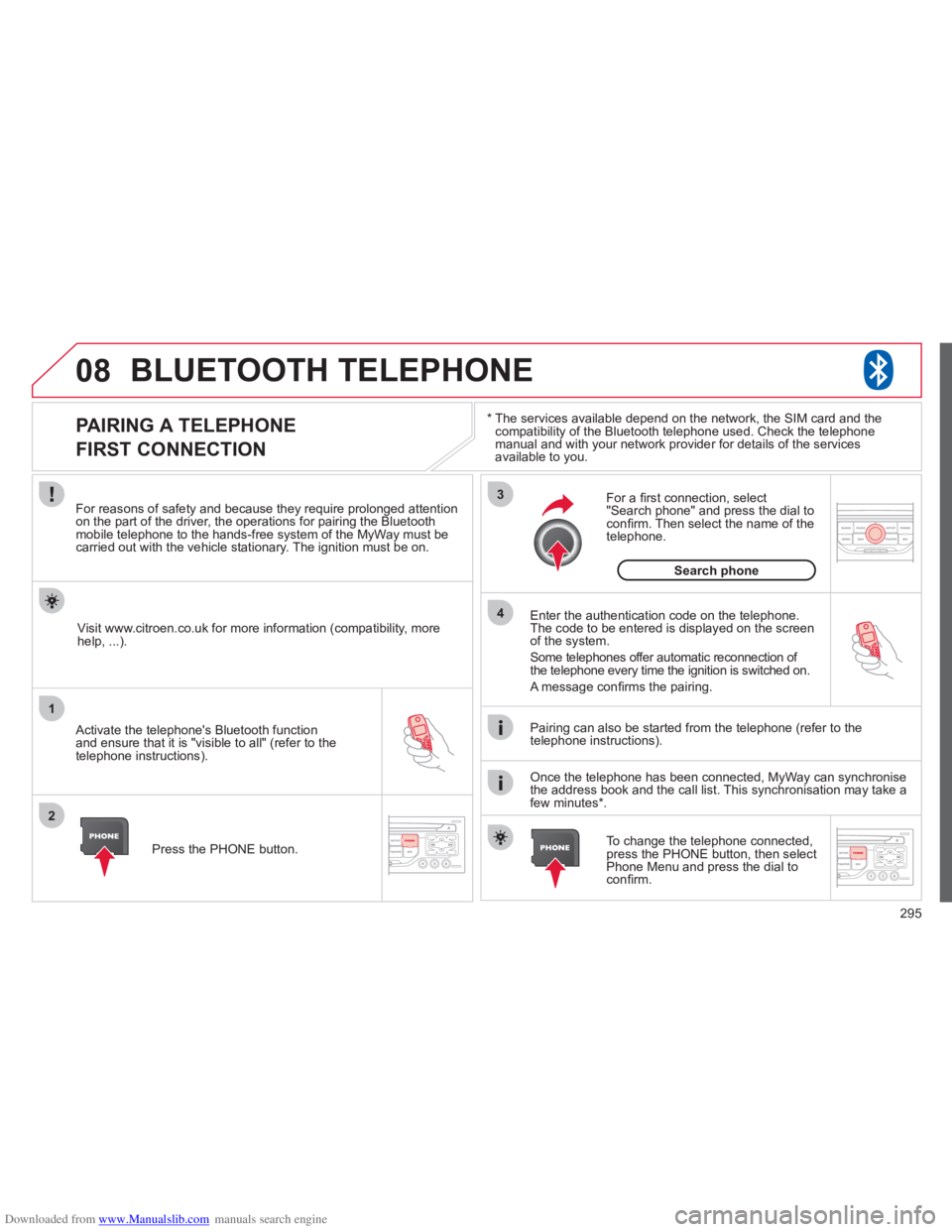
Downloaded from www.Manualslib.com manuals search engine 295
08
1
2
3
4
BLUETOOTH TELEPHONE
*
The services available depend on the network, the SIM card and thecompatibility of the Bluetooth telephone used. Check the telephone
manual and with your network provider for details of the servicesavailable to you.
PAIRING A TELEPHONE
FIRST CONNECTION
For reasons of safety and because they require prolonged attentionon the part of the driver, the operations for pairing the Bluetooth mobile telephone to the hands-free system of the MyWay must be carried out with the vehicle stationary. The ignition must be on.
Activate the telephone's Bluetooth
function
and ensure that it is "visible to all" (refer to the
telephone instructions). Enter the authentication code on the tele
phone.
The code to be entered is displayed on the screen
of the system.
Some telephones offer automatic reconnection o
f
the telephone every time the ignition is switched on.
A messa
ge confi rms the pairing.
To change the telephone connected, press the PHONE button, then select Phone Menu and press the dial toconfi rm.
Once the telephone has been connected, MyWay can synchronise
the address book and the call list. This synchronisation may take a few minutes * . Pairin
g can also be started from the telephone (refer to the
telephone instructions). Visit www.citroen.co.uk
for more information (compatibility, more
help, ...).
Press the PH
ONE button.
For a
fi rst connection, select"Search phone" and press the dial to confi rm. Then select the name of thetelephone.
Search
phone
Page 313 of 352

Downloaded from www.Manualslib.com manuals search engine 311
04
1
2
3
4
1
2
3
4
SOURCE
BANDAST
LISTREFRESH
MENU
AUDIO
Press the SOURCE button several
times in succession and select theradio.
Press the BAND A
ST button to select
a waveband: FM1, FM2, FMast, AM.
Briefl
y press one of the buttons tocarry out an automatic search of theradio stations.
Press one o
f the buttons to carry out
a manual search up/down for radiofrequencies.
Press the LI
ST REFRESH button to
display the list of stations received
locally (30 stations maximum).
To update this list, press for more
t
han two seconds.
The external environment
(hills, buildings, tunnels, basement car parks, ...)may block reception, including in RDS mode. This is a normal effect of the
way in which radio waves are transmitted and does not indicate any failure of the audio system.
RDS
RADIO
SELECTING A STATION
Press the MENU button.
Select AUDIO FUNCTIONS thenpress OK.
Select the FM WAVEBAND
PREFERENCES function then press OK.
Select ACTIVATE RDS then press OK.
RDS appears on the screen.
In radio mode, press
OK directly to activate/deactivate RDSmode.
The RDS, if displayed, enables you to continue listening to the samestation by automatic retuning to alternative frequencies. However, in certainconditions, coverage of an RDS station may not be assured throughout thecountry as radio stations do not cover 100 % of the territory. Under conditions
of very weak reception, the system may change to a regional station.