ECU CITROEN C4 PICASSO 2011 Owner's Manual
[x] Cancel search | Manufacturer: CITROEN, Model Year: 2011, Model line: C4 PICASSO, Model: CITROEN C4 PICASSO 2011Pages: 352, PDF Size: 10.66 MB
Page 213 of 352

Downloaded from www.Manualslib.com manuals search engine XI
211
PRACTICAL INFORMATION
*
To avoid any risk of jamming of
the pedals:
- ensure that the mat is posi-
tioned and secured correctly,
- never fi t one mat on top of an-
other.
ACCESSORIES
A wide range of accessories and
genuine parts is available from the
CITROËN dealer network.
These accessories and parts have
been tested and approved for reli-
ability and safety.
They are all adapted to your vehicle
and benefi t from CITROËN's recom-
mendation and warranty.
"Transport solutions":
towbar har-
ness, boot carpet, boot liner, boot
spacers, transverse roof bars, bi-
cycle carrier, ski carrier, roof boxes,
towbars...
"Comfort":
front and rear parking
sensors, isotherm module, recharge-
able torch, sun blinds, air defl ector,
fragrance cartridges...
"Style":
Alloy wheels, wheel embel-
lishers...
"Protection":
anti-theft alarm,
wheel security devices, stolen ve-
hicle tracking system, breathalyser,
fi rst aid kit, warning triangle, high vis-
ibility vest, dog guard, snow chains,
anti-skid covers, foglamps kit, tem-
porary puncture repair kit, booster
cushions and child seats...
"Protection"
: mats * , seat covers,
mud fl aps, sill protectors, bumper
protectors, vehicle covers...
Page 230 of 352
Downloaded from www.Manualslib.com manuals search engine 228
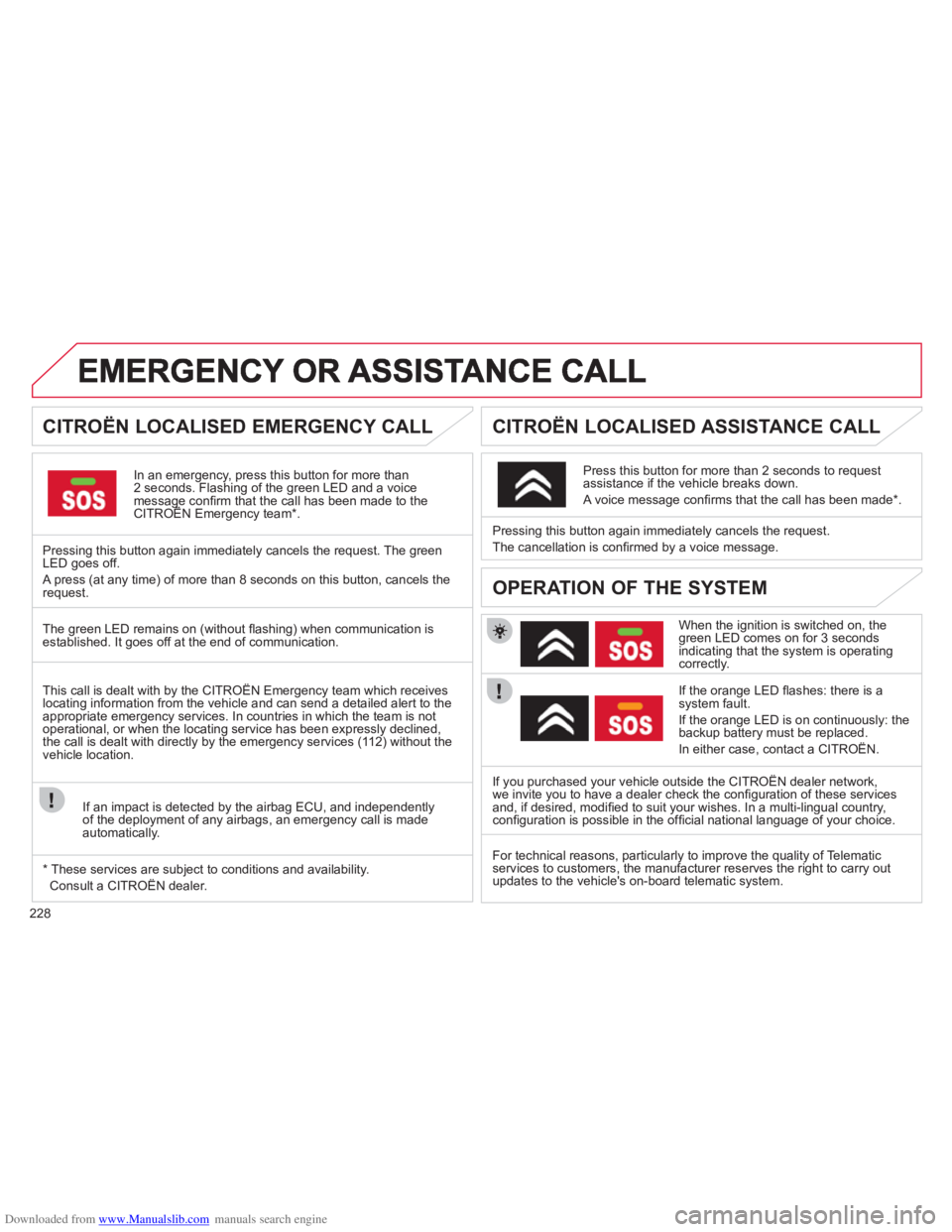
CITROËN LOCALISED EMERGENCY CALL
In an emergency, press this button for more than2 seconds. Flashing of the green LED and a voice message confi rm that the call has been made to the CITROËN Emergency team * .gg
Pressing this button again immediately cancels the request. The green LED goes off.
A press
(at any time) of more than 8 seconds on this button, cancels the
request.
CITROËN LOCALISED ASSISTANCE CALL
When the ignition is switched on, thegreen LED comes on for 3 seconds indicating that the system is operating correctly.
I
f the orange LED fl ashes: there is asystem fault.
If the oran
ge LED is on continuously: the
backup battery must be replaced.
In either case, contact a CITRO
ÀN. Pressin
g this button again immediately cancels the request.
The cancellation is con
fi rmed by a voice message.
Press this button
for more than 2 seconds to requestassistance if the vehicle breaks down.
A voice message confi rms that the call has been made * .
OPERATION OF THE SYSTEM
The green LED remains on (without fl ashing) when communication is established. It goes off at the end of communication.
If
you purchased your vehicle outside the CITROËN dealer network,
we invite you to have a dealer check the confi guration of these servicesand, if desired, modifi ed to suit your wishes. In a multi-lingual country, confi guration is possible in the offi cial national language of your choice. This call is dealt with b
y the CITROÀN Emergency team which receiveslocating information from the vehicle and can send a detailed alert to theappropriate emergency services. In countries in which the team is not
operational, or when the locating service has been expressly declined,
the call is dealt with directly by the emergency services (11 2) without the
vehicle location.
I
f an impact is detected by the airbag ECU, and independentlyof the deployment of any airbags, an emergency call is made
automatically.
*
These services are subject to conditions and availability.
Consult a CITRO
ÀN dealer. For technical reasons, particularl
y to improve the quality of Telematic
services to customers, the manufacturer reserves the right to carry out updates to the vehicle's on-board telematic system.
Page 326 of 352

Downloaded from www.Manualslib.com manuals search engine 324
08SCREEN MENU MAP
Press the OK dial for access to short-cut menus according to the displayon the screen:
MONOCHROME C
activate/deactivate RDS
activate/deactivate REG mode
activate/deactivate radiotext
RADIO
activate/deactivate Intro
CD/MP3 CD
activate/deactivate track repeat (the entire current CD for CD, the entire current folder for MP3 CD)
activate/deactivate random play (the entire current CD for CD, the entire current folder for MP3 CD)
activate/deactivate track repeat (of the current folder/artist/genre/playlist)
USB
activate/deactivate random play(of thecurrent folder/artist/genre/playlist)
1
1
1
1
1
1
1
1
Page 347 of 352
Downloaded from www.Manualslib.com manuals search engine 345
ALPHABETICAL INDEX
Port,
USB .....108,253,254, 314,316Priming the fuel system ......... 175Protectingchildren......... 117, 120,122-124Puncture........................ 183,186
Reversing lamp ..............194, 195Rigid panel ...............................72Risk areas (update).......244, 288Roof bars...............................210Routine checks..............181, 182Running out of fuel (Diesel)....175
Short-cut menus ............ 279,280Sidelamps ...94, 96,190,192-195Side repeater.........................r192Spare wheel ........................... 186Speed limiter..........................r162Speedometer.....................r31, 32Spotlamps, side.......................98Stability control (ESP)............ 129Starting the vehicle ..................81Steering lock............................81Steering mounted controls ................233, 277,309Steering wheel,fixed centred controls.......... 160Stopping the vehicle ................81Stop & Start......................55,63,92,153,174, 181,203Storage .................................. 109Storage compartments .......... 106Storing driving positions ...........69Sun visor................................r105Sun visor flap ......................... 105Synchronising
the remote control..................82Synthesiser, voice .................. 242System, navigation................ 281Systems, ASR and ESP......... 129
PRS
Radio............................. 291,311Reading lamps, rear......r104,109Rear foglamp.........................193Rear screen, opening..............90Recharging the battery ..........203Regeneration of the particleemissions filter.....................r181Reinitialising the electric
windows.................................86Reinitialising
the remote control..................82Remote control ....78, 79,83,331Removable screen (snow shield).......................210Removing a wheel.................188Removing the mat .................. 108Repair kit, puncture ................183Replacing bulbs.....190, 194,195Replacing fuses.....................197Replacing the air filter............r181Replacing the oil filter............r181Replacing the passenger compartment filter................r181Replacing wiper blades ..........102Resetting
the service indicator...............43Resetting the trip recorder.......r44Rev counter.......................r31,32
RSafety for children............86, 125Scented air freshener..............r65Screen, colour 16/9...........50, 52,236, 265,278, 299Screen,monochrome........310,322, 324Screen, monochrome A...........A45Screen, monochrome C ...........47Screen,multifunction........45, 47, 50,52Screen, rear video.........333, 334Screen-wash reservoir...........r180Screen menumap......265, 299, 322,324, 335Screenwash, front..................101Screenwash fluid level ...........180Seat adjustment ...........67, 68,70Seat belts.......................131, 134Seat configurations..................75Seats, rear...................r70, 72,74Security bolts.........................188Serial number, vehicle...........226Service indicator................r42, 43Servicing......................29, 42, 43Settings (Menus) ....................332Setting
the clock ......264, 298,320, 321Shelf.........................................f70
S
Table of weights.....213, 215,221
Tables of engines...........213,215
Tables of fuses.......................197
Technical
data..............213,215, 221,223
Telephone ..............229,260-262,
295,296
T