key Citroen C4 PICASSO 2015 2.G Owner's Manual
[x] Cancel search | Manufacturer: CITROEN, Model Year: 2015, Model line: C4 PICASSO, Model: Citroen C4 PICASSO 2015 2.GPages: 420, PDF Size: 10.72 MB
Page 3 of 420
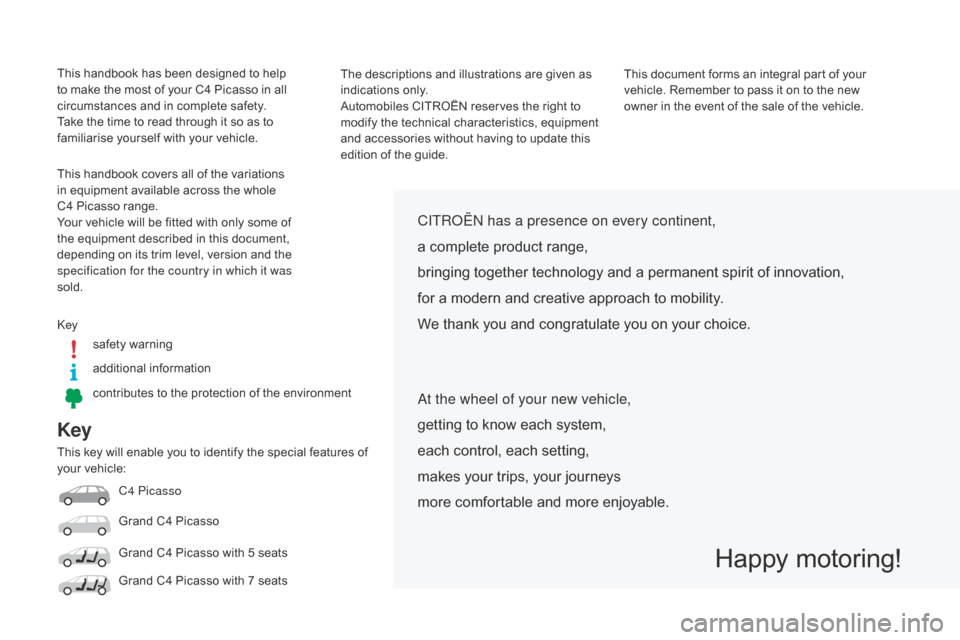
Key
This key will enable you to identify the special features of your vehicle:
C4 Picasso
Grand
C4 Picasso
Grand
C4 Picasso with 5 seats
Grand
C4 Picasso with 7 seats
CITRoËn has a presence on every continent,
a complete product range,
bringing
together technology and a permanent spirit of innovation,
for
a modern and creative approach to mobility.
We
thank you and congratulate you on your choice.
Happy motoring!
at the wheel of your new vehicle,
getting to know each system,
each
control, each setting,
makes
your trips, your journeys
more
comfortable and more enjoyable.
This handbook has been designed to help to make the most of your C4 Picasso in all
c
ircumstances and in complete safety.
Take
the time to read through it so as to
f
amiliarise yourself with your vehicle.
This
handbook covers all of the variations
i
n equipment available across the whole
C
4 Picasso range.
Your
vehicle will be fitted with only some of
t
he equipment described in this document,
d
epending on its trim level, version and the
s
pecification for the country in which it was
sold. The
descriptions and illustrations are given as
i
ndications only.
Automobiles
CITROËN reserves the right to
m
odify the technical characteristics, equipment
a
nd accessories without having to update this
e
dition of the guide.This
document forms an integral part of your
v
ehicle. Remember to pass it on to the new
o
wner in the event of the sale of the vehicle.
keys
afety warning
additional
in
formation
contributes
to the protection of the environment
Page 4 of 420
7-inch touch screen tablet 11
Instrument panels
2
0
Indicator
and warning lamps
2
5
Adjustment
buttons
4
4
Setting
the date and time
4
7
Trip
computer
4
8
Monitoring
ove
r view
Electronic key - remote control 5
1
Keyless Entry and Starting
5
4
Central
locking
6
1
Doors
6
2
Boot
6
4
Motorised
tailgate
6
5
Alarm
6
8
Electric
windows
7
1
access
Front seats 73
Rear seats
8
0
Seat
modularity
87
M
irrors
8
9
Steering
wheel adjustment
9
1
Ventilation
9
2
Heating
9
4
Dual-zone
m
anual
a
ir
c
onditioning
9
5
Dual-zone
automatic air conditioning
9
7
Front
demist - defrost
1
02
Rear
screen demist -
d
efrost
10
3
Scented
air freshener
1
04
Interior
fittings
1
06
Comfort
Driving recommendations 1 21
Starting-switching off the engine with
t
he electronic key
1
22
Starting-switching
off the engine with
t
he "Keyless Entry and Starting" system
1
24
Electric
parking brake
1
28
Hill
start assist
1
35
5 -speed
manual gearbox
1
36
6 -speed
manual gearbox
1
36
Electronic
gearbox (ETG6)
1
37
Automatic
gearbox
1
41
Gear
ef ficiency indicator
1
46
Stop
& Start
1
47
Display
of inter-vehicle time
1
50
Memorising
speeds
1
54
Speed
limiter
1
55
Cruise
control
1
58
Active
cruise control
1
61
Collision
risk alert
1
69
Lane
departure warning
system
1
72
Blind
spot sensors
1
73
Parking
sensors
1
76
Reversing
camera
1
78
360
Vision
1
79
Park
Assist
1
81
Driving
Eco-driving
Contents
Page 6 of 420
4
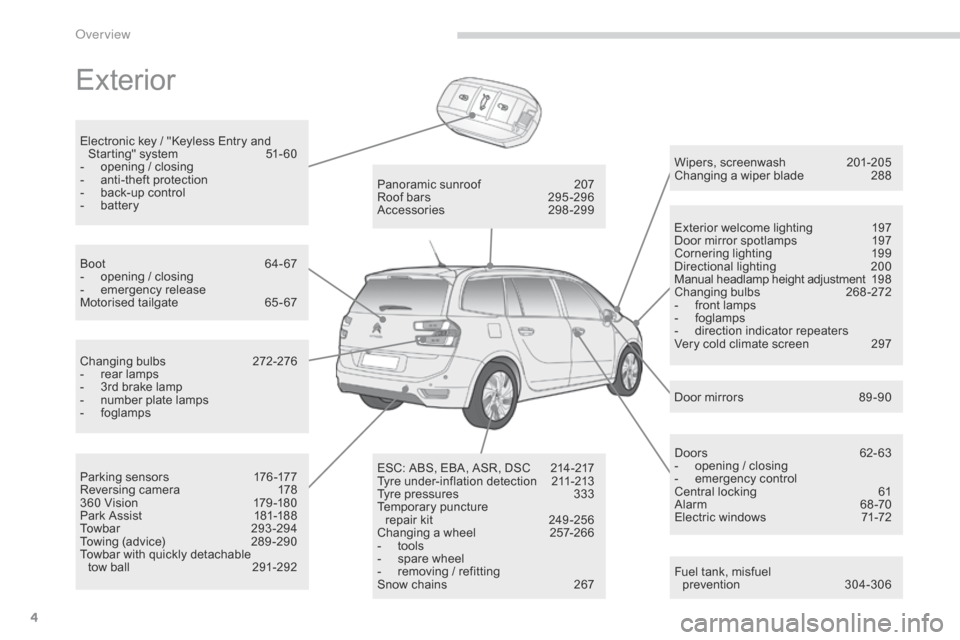
Exterior
Fuel tank, misfuel
p revention 3 04-306
Wipers,
screenwash
2
01-205
Changing a wiper blade
2
88
Exterior welcome lighting
1
97
Door mirror spotlamps
1
97
Cornering lighting
1
99
Directional
l
ighting
2
00
Manual headlamp height adjustment
19
8
Changing
bu
lbs
2
68-272
-
f
ront lamps
-
fo
glamps
-
d
irection indicator repeaters
Very cold climate screen
2
97
Door mirrors
8
9 -90
Panoramic
sunroof
2
07
Roof
bars
2
95 -296
Accessories
2
98-299
ESC:
ABS,
EBA,
ASR,
DSC
2
14-217
Tyre
under-inflation
detection
2
11-213
Tyre
pressures
3
33
Temporary
pu
ncture
r
epair
kit
2
49 -256
Changing
a
wheel
2
57-266
-
t
ools
-
s
pare
wheel
-
r
emoving
/
refitting
Snow
chains
2
67
Changing
bu
lbs
2
72-276
-
r
ear
lamps
-
3
rd
brake
lamp
-
n
umber
plate
lamps
-
fo
glamps
Parking
sensors
1
76 -177
Reversing
camera
1
78
360
Vision
1
79 -180
Park
Assist
1
81-188
Towbar
29
3-294
Towing
(advice)
2
89 -290
Towbar
with
quickly
detachable
tow
ball
2
91-292
Boot
6
4-67
-
o
pening
/
closing
-
em
ergency
r
elease
Motorised
tailgate
6
5 - 67
Electronic
key
/
"Keyless
Entry
and
S
tarting"
system
5
1- 60
-
o
pening
/
closing
-
a
nti-theft
protection
-
b
ack-up
control
-
b
attery
Doors
6
2- 63
-
o
pening / closing
-
em
ergency
c
ontrol
Central locking
6
1
Alarm
6
8-70
Electric windows
7
1-72
over view
Page 53 of 420
51
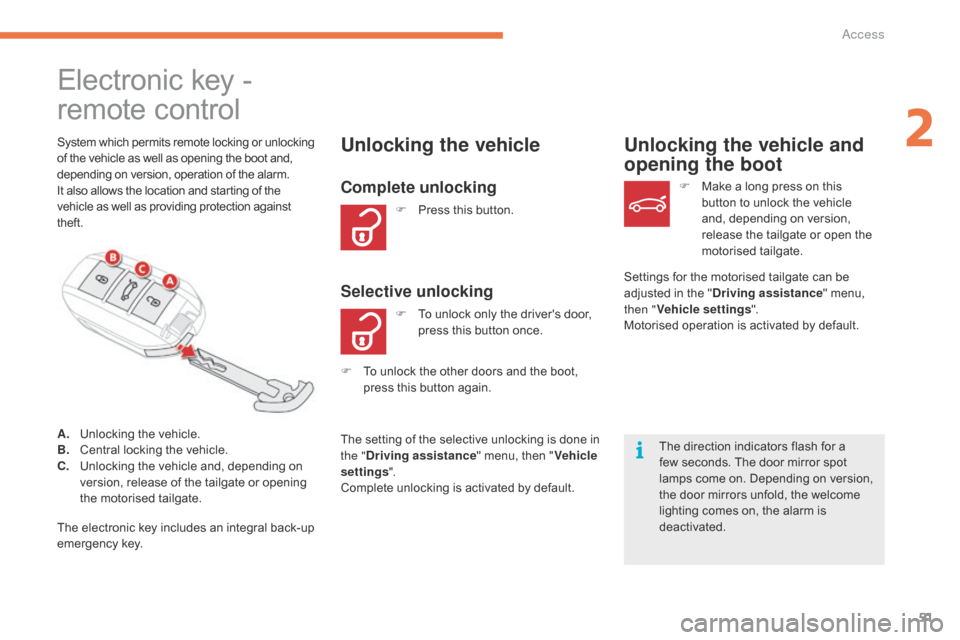
remote control Electronic key -
System which permits remote locking or unlocking o
f the vehicle as well as opening the boot and, d
epending on version, operation of the alarm.
It
also allows the location and starting of the
v
ehicle as well as providing protection against
t
heft.Unlocking the vehicle
F Press this button.
Unlocking the vehicle and
opening the boot
The direction indicators flash for a f
ew seconds. The door mirror spot
l
amps come on. Depending on version,
t
he door mirrors unfold, the welcome
l
ighting comes on, the alarm is
d
eactivated. F
M
ake a long press on this
b
utton to unlock the vehicle
a
nd, depending on version,
r
elease the tailgate or open the
m
otorised
t
ailgate.
F
T
o
unlock
the
other
doors
and
the
boot,
p
ress
this
button
again.
The
setting
of
the
selective
unlocking
is
done
in
t
he " Driving assistance "
menu,
then
" Vehicle
settings ".
Complete
unlocking
is
activated
by
default.
Complete unlocking
F To unlock only the driver's door, p
ress this button once.
Selective unlockingSettings for the motorised tailgate can be adjusted in the "Driving assistance "
menu,
t
hen " Vehicle settings ".
Motorised
operation is activated by default.
A.
U
nlocking
the
vehicle.
B.
C
entral
locking
the
vehicle.
C.
U
nlocking
the
vehicle
and,
depending
on
v
ersion,
release
of
the
tailgate
or
opening
t
he
motorised
tailgate.
The
electronic
key
includes
an
integral
back-up
em
ergency
k
ey.
2
Access
Page 56 of 420
54
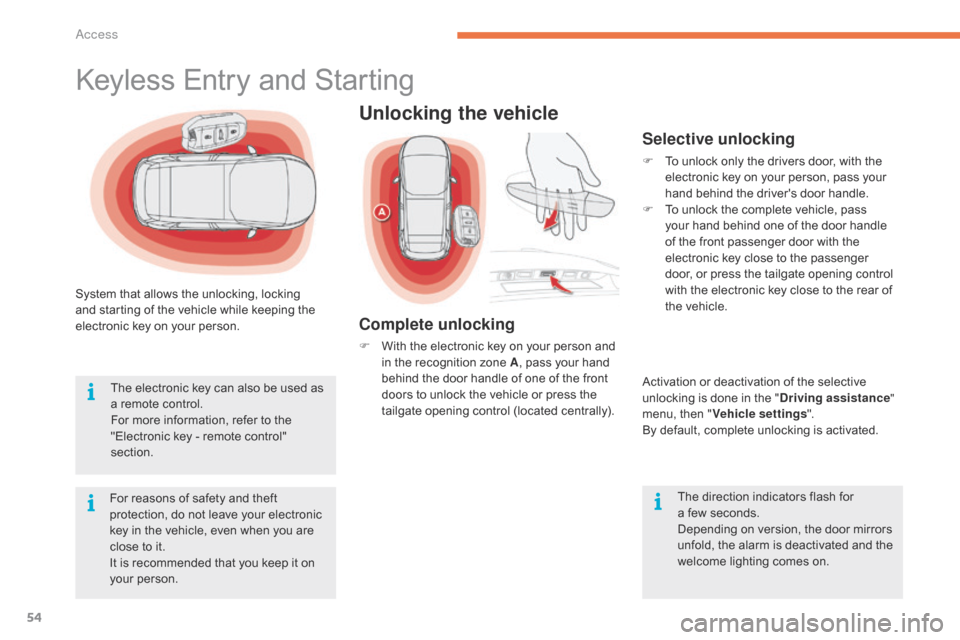
System that allows the unlocking, locking and starting of the vehicle while keeping the
e
lectronic key on your person.
For
reasons of safety and theft
p
rotection, do not leave your electronic
k
ey in the vehicle, even when you are
c
lose to it.
It
is recommended that you keep it on
y
our person.
The
electronic key can also be used as
a
remote control.
For
more information, refer to the
"
Electronic key - remote control"
s
ection.
Keyless Entry and Starting
Unlocking the vehicle
Complete unlocking
F With the electronic key on your person and i
n the recognition zone A,
pass your hand
b
ehind the door handle of one of the front
d
oors to unlock the vehicle or press the
t
ailgate opening control (located centrally).
Selective unlocking
F To unlock only the drivers door, with the e
lectronic key on your person, pass your
h
and behind the driver's door handle.
F
T
o unlock the complete vehicle, pass
y
our hand behind one of the door handle
o
f the front passenger door with the
e
lectronic key close to the passenger
d
oor, or press the tailgate opening control
w
ith the electronic key close to the rear of
t
he vehicle.
Activation
or deactivation of the selective
u
nlocking is done in the "Driving assistance "
menu,
then "Vehicle settings ".
By
default, complete unlocking is activated.
The
direction indicators flash for
a f
ew seconds.
Depending
on version, the door mirrors
u
nfold, the alarm is deactivated and the
w
elcome lighting comes on.
Access
Page 57 of 420
55
Ensure that nothing could prevent the correct operation of the windows.
Be
aware of children when operating
t
he
w
indows.
Locking the vehicle
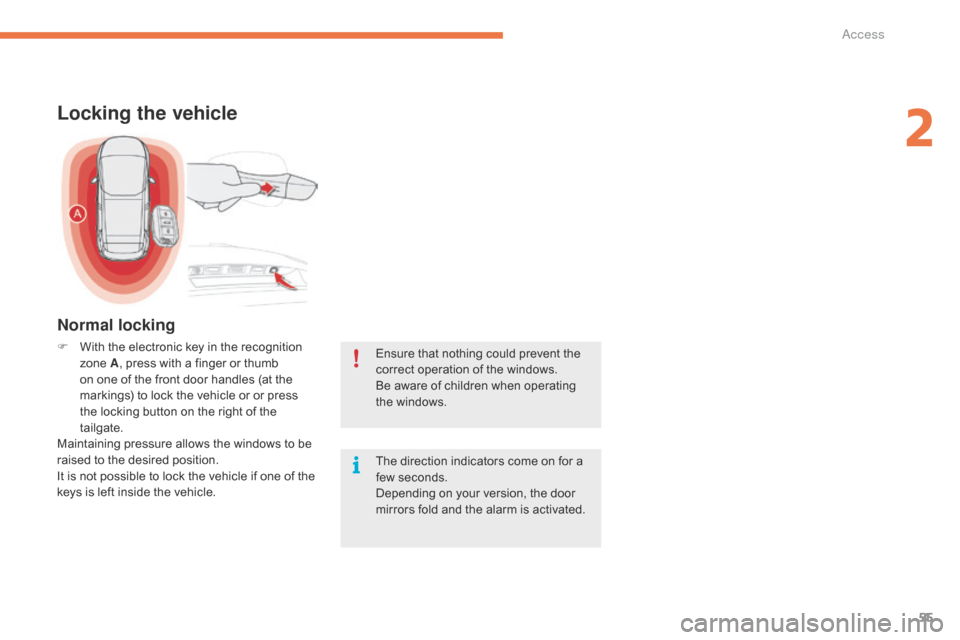
F With the electronic key in the recognition z
one A,
press with a finger or thumb
o
n one of the front door handles (at the
m
arkings) to lock the vehicle or or press
t
he locking button on the right of the
t
ailgate.
Maintaining
pressure allows the windows to be
r
aised to the desired position.
It
is not possible to lock the vehicle if one of the
k
eys is left inside the vehicle. The
direction indicators come on for a
f
ew seconds.
Depending
on your version, the door
m
irrors fold and the alarm is activated.
Normal locking
2
Access
Page 58 of 420
56
Deadlocking
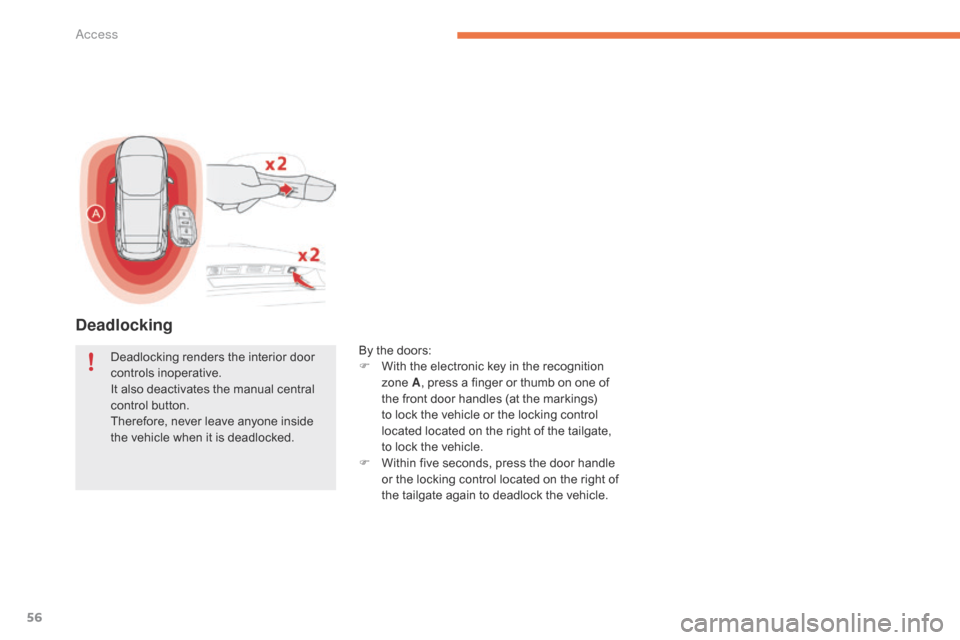
By the doors:
F W ith the electronic key in the recognition
z
one A,
press a finger or thumb on one of
t
he front door handles (at the markings)
t
o lock the vehicle or the locking control
l
ocated located on the right of the tailgate,
t
o lock the vehicle.
F
W
ithin five seconds, press the door handle
o
r the locking control located on the right of
t
he tailgate again to deadlock the vehicle.
Deadlocking
renders
the
interior
door
c
ontrols
i
noperative.
It
also
deactivates
the
manual
central
c
ontrol
button.
Therefore,
never
leave
anyone
inside
t
he
vehicle
when
it
is
deadlocked.
Access
Page 59 of 420
57
As a safety measure (children on board), never leave the vehicle without
t
aking the key for the Keyless Entry and
S
tarting
system,
even
for
a
short
period.
Be
aware of the risk of theft when the
k
ey for the Keyless Entry and Starting
s
ystem is in one of the defined zones
w
ith the vehicle unlocked.
If
one
of
the
doors
or
the
boot
is
still
o
pen
or
if
the
electronic
key
for
the
K
eyless
Entry
and
Starting
system
has
b
een
left
inside
the
vehicle,
the
central
l
ocking
does
not
take
place.
However,
the
alarm
(if
present)
will
be
f
ully
activated
after
about
45
seconds. In
order to preserve the battery in the
e
lectronic key and the vehicle's battery,
t
he "Hands-free" functions are put into
l
ong-term standby after 21 days without
u
se. To restore these functions, press
o
ne of the remote control buttons or
s
tart the engine with the electronic key
i
n the reader (see the "Starting with
t
he Keyless Entry and Starting system"
s
ection).
If
the
vehicle
is
unlocked
by
mistake
a
nd
with
no
action
on
the
doors
or
boot,
t
he
vehicle
will
lock
again
automatically
a
fter
about
thirty
seconds.
If
the
alarm
had
been
activated
p
reviously,
it
will
not
be
reactivated
au
tomatically.
The
automatic
folding
and
unfolding
o
f
the
door
mirrors
can
be
deactivated
b
y
a
CITROËN
dealer
or
a
qualified
w
orkshop. Accumulations
(water, dust, grime,
s
alt...) on the inner sur face if the door
h
andle may affect detection.
If
cleaning the inner sur face of the door
h
andle using a cloth does not restore
d
etection, contact a CITROËN dealer or
a
qualified workshop.
A
sudden splash of water (stream of
w
ater, high pressure jet washer, …)
m
ay be identified by the system as the
d
esire to open the vehicle.
2
Ac
Page 60 of 420
58
Normal locking
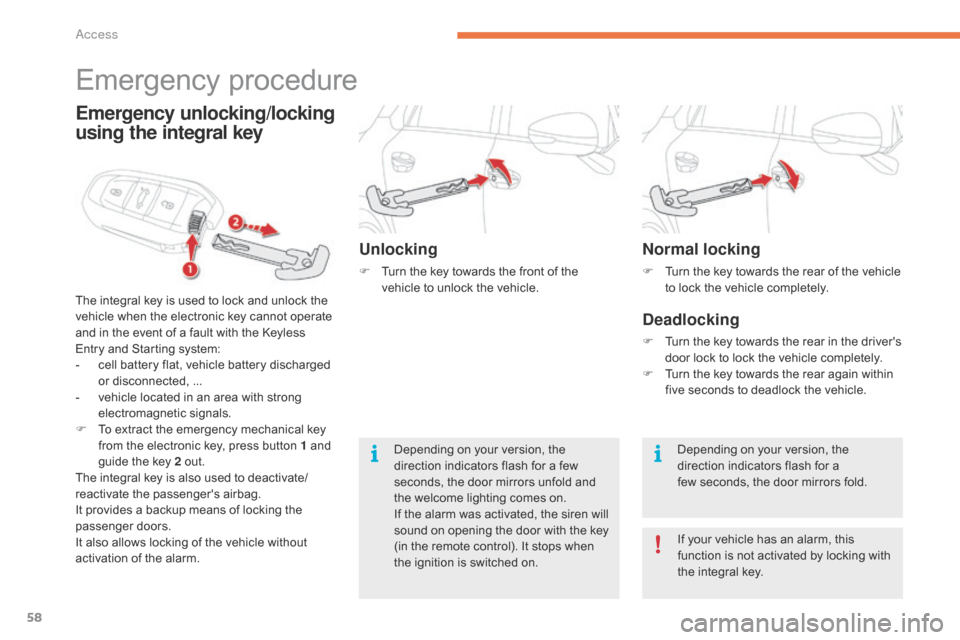
F Turn the key towards the rear of the vehicle t
o lock the vehicle completely.
Deadlocking
F Turn the key towards the rear in the driver's d
oor lock to lock the vehicle completely.
F
T
urn the key towards the rear again within
f
ive seconds to deadlock the vehicle.
Depending
on your version, the
d
irection indicators flash for a
few
seconds, the door mirrors fold.
If
your vehicle has an alarm, this
f
unction is not activated by locking with
t
he integral key.
Emergency procedure
The integral key is used to lock and unlock the v
ehicle when the electronic key cannot operate
a
nd in the event of a fault with the Keyless
E
ntry and Starting system:
-
c
ell battery flat, vehicle battery discharged
o
r disconnected, ...
-
v
ehicle located in an area with strong
e
lectromagnetic
si
gnals.
F
T
o extract the emergency mechanical key
f
rom the electronic key, press button 1 and
g
uide the key 2 out.
The
integral key is also used to deactivate/
reactivate
t
he
p
assenger's
a
irbag.
It
provides a backup means of locking the
p
assenger
do
ors.
It
also allows locking of the vehicle without
a
ctivation of the alarm.
Emergency unlocking/locking
using the integral key
Unlocking
F Turn the key towards the front of the v
ehicle to unlock the vehicle.
Depending
on your version, the
d
irection indicators flash for a few
s
econds, the door mirrors unfold and
t
he welcome lighting comes on.
If
the alarm was activated, the siren will
s
ound on opening the door with the key
(
in the remote control). It stops when
t
he ignition is switched on.
Access
Page 61 of 420
59
Remote control problem -
reinitialisationChanging the battery
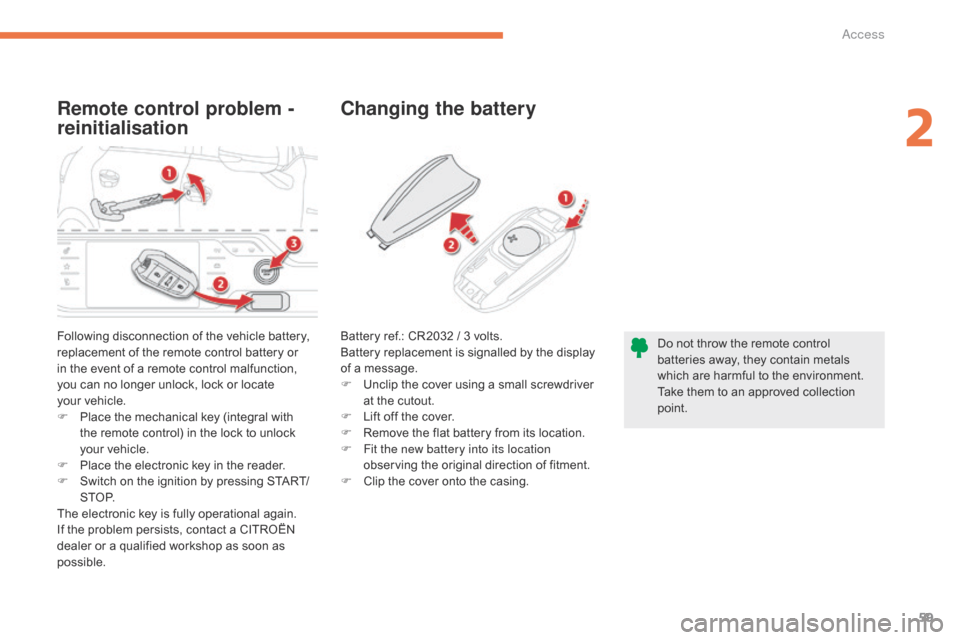
Following disconnection of the vehicle battery, r
eplacement of the remote control battery or
i
n the event of a remote control malfunction,
y
ou can no longer unlock, lock or locate
y
our vehicle.
F
P
lace the mechanical key (integral with
t
he remote control) in the lock to unlock
y
our vehicle.
F
P
lace the electronic key in the reader.
F
S
witch on the ignition by pressing START/
S T O P.
The
electronic key is fully operational again.
If
the problem persists, contact a CITROËN
d
ealer or a qualified workshop as soon as
p
ossible. Do
not throw the remote control
b
atteries away, they contain metals
w
hich are harmful to the environment.
Take
them to an approved collection
po
int.
Battery
ref.: CR2032 / 3 volts.
Battery replacement is signalled by the display
o
f a message.
F
U
nclip the cover using a small screwdriver
a
t the cutout.
F
L
ift off the cover.
F
R
emove the flat battery from its location.
F
F
it the new battery into its location
observing
the original direction of fitment.
F
C
lip the cover onto the casing.
2
Access