key battery Citroen C4 PICASSO 2015 2.G Owner's Manual
[x] Cancel search | Manufacturer: CITROEN, Model Year: 2015, Model line: C4 PICASSO, Model: Citroen C4 PICASSO 2015 2.GPages: 420, PDF Size: 10.72 MB
Page 59 of 420
57
As a safety measure (children on board), never leave the vehicle without
t
aking the key for the Keyless Entry and
S
tarting
system,
even
for
a
short
period.
Be
aware of the risk of theft when the
k
ey for the Keyless Entry and Starting
s
ystem is in one of the defined zones
w
ith the vehicle unlocked.
If
one
of
the
doors
or
the
boot
is
still
o
pen
or
if
the
electronic
key
for
the
K
eyless
Entry
and
Starting
system
has
b
een
left
inside
the
vehicle,
the
central
l
ocking
does
not
take
place.
However,
the
alarm
(if
present)
will
be
f
ully
activated
after
about
45
seconds. In
order to preserve the battery in the
e
lectronic key and the vehicle's battery,
t
he "Hands-free" functions are put into
l
ong-term standby after 21 days without
u
se. To restore these functions, press
o
ne of the remote control buttons or
s
tart the engine with the electronic key
i
n the reader (see the "Starting with
t
he Keyless Entry and Starting system"
s
ection).
If
the
vehicle
is
unlocked
by
mistake
a
nd
with
no
action
on
the
doors
or
boot,
t
he
vehicle
will
lock
again
automatically
a
fter
about
thirty
seconds.
If
the
alarm
had
been
activated
p
reviously,
it
will
not
be
reactivated
au
tomatically.
The
automatic
folding
and
unfolding
o
f
the
door
mirrors
can
be
deactivated
b
y
a
CITROËN
dealer
or
a
qualified
w
orkshop. Accumulations
(water, dust, grime,
s
alt...) on the inner sur face if the door
h
andle may affect detection.
If
cleaning the inner sur face of the door
h
andle using a cloth does not restore
d
etection, contact a CITROËN dealer or
a
qualified workshop.
A
sudden splash of water (stream of
w
ater, high pressure jet washer, …)
m
ay be identified by the system as the
d
esire to open the vehicle.
2
Ac
Page 60 of 420
58
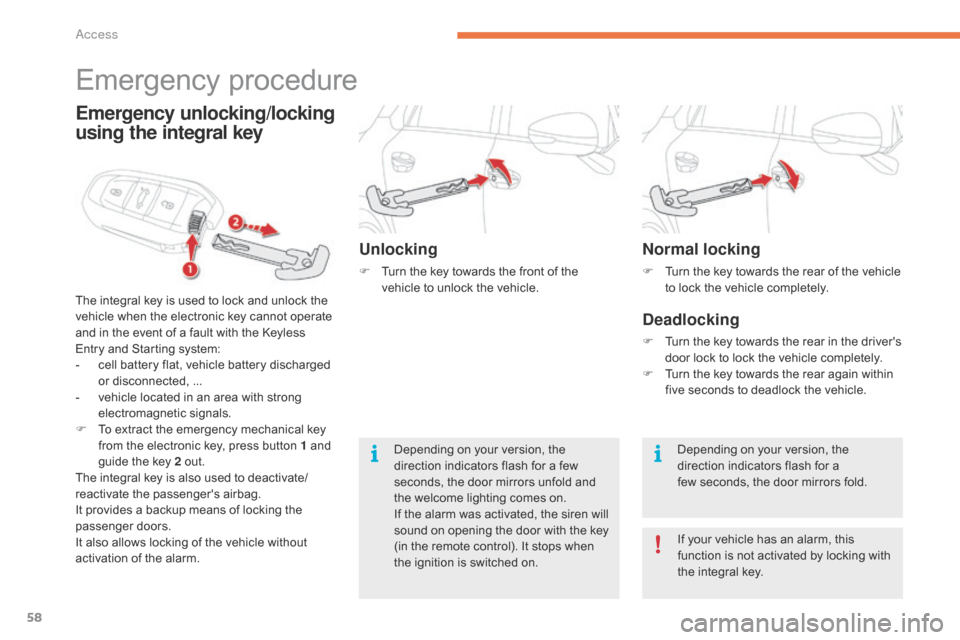
Normal locking
F Turn the key towards the rear of the vehicle t
o lock the vehicle completely.
Deadlocking
F Turn the key towards the rear in the driver's d
oor lock to lock the vehicle completely.
F
T
urn the key towards the rear again within
f
ive seconds to deadlock the vehicle.
Depending
on your version, the
d
irection indicators flash for a
few
seconds, the door mirrors fold.
If
your vehicle has an alarm, this
f
unction is not activated by locking with
t
he integral key.
Emergency procedure
The integral key is used to lock and unlock the v
ehicle when the electronic key cannot operate
a
nd in the event of a fault with the Keyless
E
ntry and Starting system:
-
c
ell battery flat, vehicle battery discharged
o
r disconnected, ...
-
v
ehicle located in an area with strong
e
lectromagnetic
si
gnals.
F
T
o extract the emergency mechanical key
f
rom the electronic key, press button 1 and
g
uide the key 2 out.
The
integral key is also used to deactivate/
reactivate
t
he
p
assenger's
a
irbag.
It
provides a backup means of locking the
p
assenger
do
ors.
It
also allows locking of the vehicle without
a
ctivation of the alarm.
Emergency unlocking/locking
using the integral key
Unlocking
F Turn the key towards the front of the v
ehicle to unlock the vehicle.
Depending
on your version, the
d
irection indicators flash for a few
s
econds, the door mirrors unfold and
t
he welcome lighting comes on.
If
the alarm was activated, the siren will
s
ound on opening the door with the key
(
in the remote control). It stops when
t
he ignition is switched on.
Access
Page 61 of 420
59
Remote control problem -
reinitialisationChanging the battery
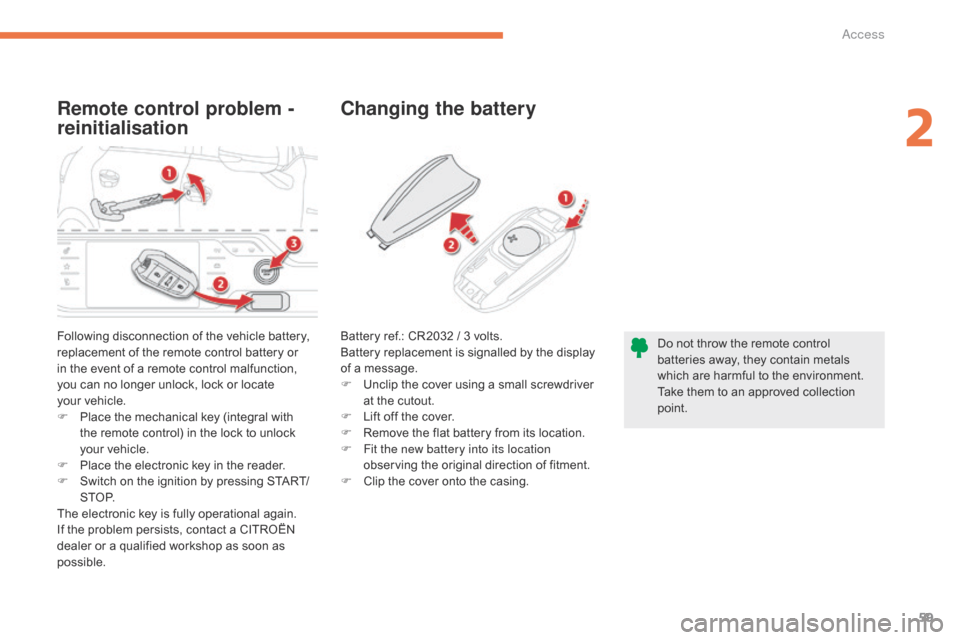
Following disconnection of the vehicle battery, r
eplacement of the remote control battery or
i
n the event of a remote control malfunction,
y
ou can no longer unlock, lock or locate
y
our vehicle.
F
P
lace the mechanical key (integral with
t
he remote control) in the lock to unlock
y
our vehicle.
F
P
lace the electronic key in the reader.
F
S
witch on the ignition by pressing START/
S T O P.
The
electronic key is fully operational again.
If
the problem persists, contact a CITROËN
d
ealer or a qualified workshop as soon as
p
ossible. Do
not throw the remote control
b
atteries away, they contain metals
w
hich are harmful to the environment.
Take
them to an approved collection
po
int.
Battery
ref.: CR2032 / 3 volts.
Battery replacement is signalled by the display
o
f a message.
F
U
nclip the cover using a small screwdriver
a
t the cutout.
F
L
ift off the cover.
F
R
emove the flat battery from its location.
F
F
it the new battery into its location
observing
the original direction of fitment.
F
C
lip the cover onto the casing.
2
Access
Page 65 of 420
63
Back-up control
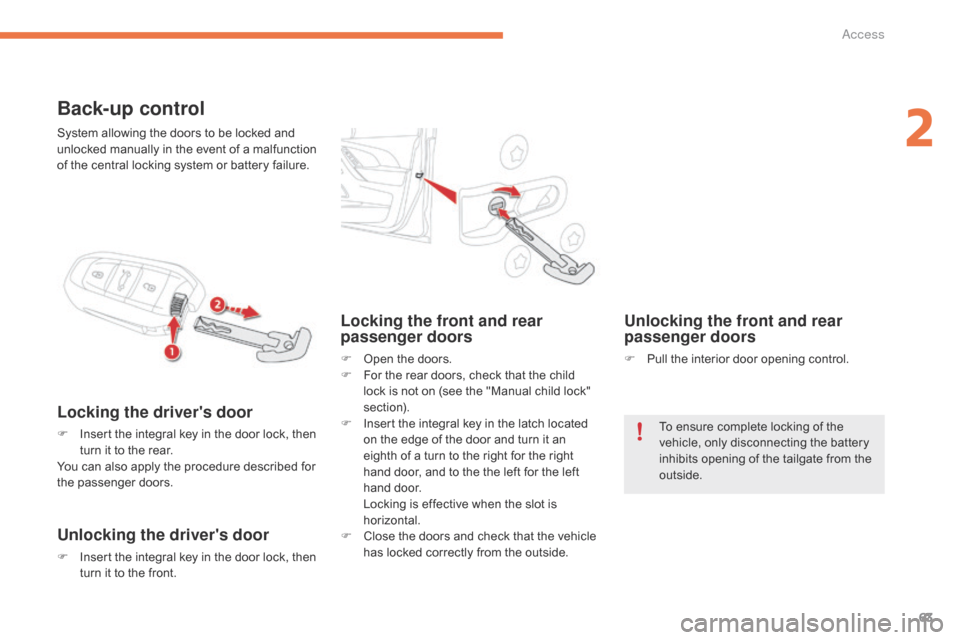
Locking the driver's door
F Insert the integral key in the door lock, then t
urn it to the rear.
You
can also apply the procedure described for
t
he
p
assenger
do
ors.
Unlocking the driver's door
F Insert the integral key in the door lock, then t
urn it to the front.
Locking the front and rear
passenger doors
F Open the doors.
F F or the rear doors, check that the child
l
ock is not on (see the "Manual child lock"
s
ection).
F
I
nsert the integral key in the latch located
o
n the edge of the door and turn it an
e
ighth of a turn to the right for the right
h
and door, and to the the left for the left
h
and door.
L
ocking is effective when the slot is
h
orizontal.
F
C
lose the doors and check that the vehicle
h
as locked correctly from the outside.
Unlocking the front and rear
passenger doors
F Pull the interior door opening control.
System
allowing
the
doors
to
be
locked
and
u
nlocked
manually
in
the
event
of
a
malfunction
o
f
the
central
locking
system
or
battery
failure.
To ensure complete locking of the
v
ehicle, only disconnecting the battery
i
nhibits opening of the tailgate from the
o
utside.
2
Access
Page 70 of 420
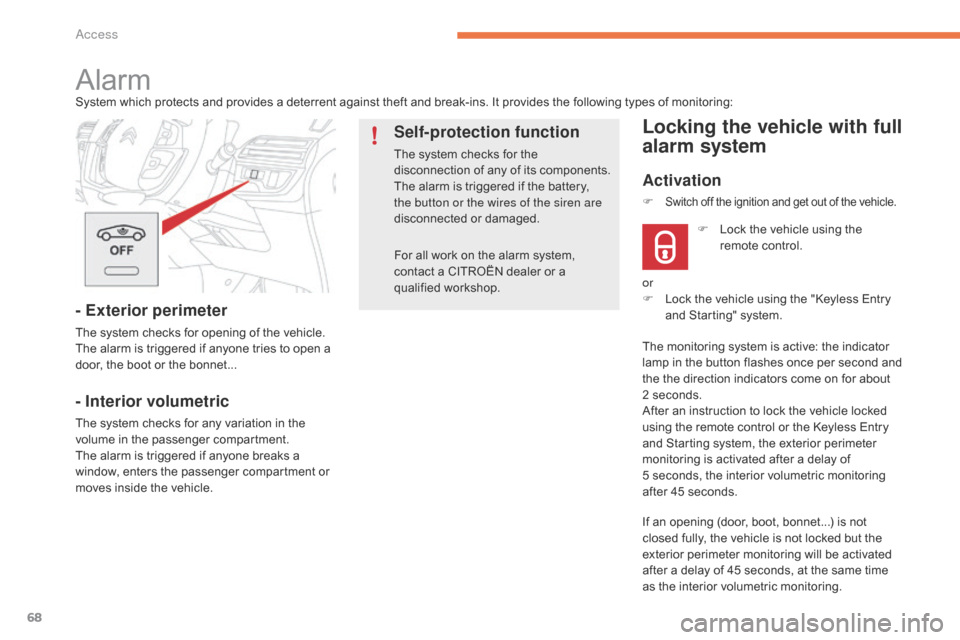
68
For all work on the alarm system, contact a CITROËN dealer or a
q
ualified
w
orkshop.
AlarmSystem which protects and provides a deterrent against theft and break-ins. It provides the following types of monitoring:
- Exterior perimeter
The system checks for opening of the vehicle.
T he alarm is triggered if anyone tries to open a
d
oor, the boot or the bonnet...
- Interior volumetric
The system checks for any variation in the volume in the passenger compartment.
The
alarm is triggered if anyone breaks a
w
indow, enters the passenger compartment or
m
oves inside the vehicle.
Self-protection function
The system checks for the disconnection of any of its components.
The
alarm is triggered if the battery,
t
he button or the wires of the siren are
disconnected
o
r
d
amaged.
Locking the vehicle with full
alarm system
Activation
If an opening (door, boot, bonnet...) is not closed fully, the vehicle is not locked but the
e
xterior perimeter monitoring will be activated
a
fter a delay of 45 seconds, at the same time
a
s the interior volumetric monitoring.
F
L
ock the vehicle using the
r
emote control.
F
Switch off the ignition and get out of the vehicle.
or
F
L ock the vehicle using the "Keyless Entry
a
nd Starting" system.
The
monitoring system is active: the indicator
l
amp in the button flashes once per second and
t
he the direction indicators come on for about
2
seconds.
After
an instruction to lock the vehicle locked
u
sing the remote control or the Keyless Entry
a
nd Starting system, the exterior perimeter
m
onitoring is activated after a delay of
5 s
econds, the interior volumetric monitoring
a
fter 45 seconds.
Access
Page 74 of 420
72
Reinitialising the electric
windows
Deactivating the rear controls for
the rear windowsIn the event of contact during operation of the windows, you must reverse the
m
ovement of the window. To do this,
p
ress the switch concerned.
When
operating the passenger electric
w
indow switches, the driver must
e
nsure that nothing is preventing
c
orrect closing of the windows.
The
driver must ensure that the
p
assengers use the electric windows
c
o r r e c t l y.
Be
particularly aware of children when
o
perating
t
he
w
indows.
Be
aware of passengers or other
p
ersons present when closing the
w
indows using the the electronic key
o
r the "Keyless Entry and Starting"
s
ystem.
Following
reconnection
of
the
battery,
the
s
afety
anti-pinch
function
must
be
reinitialised.
The
safety
anti-pinch
function
is
not
active
d
uring
these
operations.
For
the
safety
of
your
children,
press
s
witch 5 to prevent operation of the
rear
windows
irrespective
of
their
p
ositions.
The
indicator
lamp
in
the
button
comes
on,
a
ccompanied
by
a
message
confirming
a
ctivation.
It
remains
on,
as
long
as
the
child
l
ock
is
deactivated.
Use
of
the
rear
electric
windows
from
the
d
river's
controls
remains
possible. For
each
window:
-
l
ower
the
window
completely,
then
raise
it,
i
t
will
rise
in
steps
of
a
few
centimetres
with
e
ach
action.
Repeat
the
operation
until
the
w
indow
closes
completely,
-
c
ontinue
to
pull
the
switch
for
at
least
one
s
econd
after
reaching
this
position,
window
c
losed.
Access
Page 129 of 420

127
Switching the ignition on
( without
s
tarting)
With the ignition on, the system goes i
nto energy economy mode when
n
ecessary to maintain the state of
c
harge of the battery.
With
the electronic key in the reader or the
K
eyless Entry and Starting key inside the
v
ehicle, pressing the "START/STOP" button,
w
ith no action on the pedals
, allows the
ignition to be switched on.
F
P
ress the "START/STOP" button,
t
he instrument panel comes on
b
ut the engine does not start.
F
P
ress the button again to switch off the
i
gnition and so allow the vehicle to be
lo
cked.
Anti-theft protection
Electronic engine immobiliser
The keys contain an electronic chip which has a
secret code. When the ignition is switched
o
n, this code must be recognised in order for
s
tarting to be possible.
This
electronic engine immobiliser locks the
e
ngine management system a few minutes
a
fter the ignition is switched off and prevents
s
tarting of the engine by anyone who does not
h
ave the key.
In
the event of a malfunction, you are informed
b
y a message in the instrument panel screen.
In
t
his
c
ase,
y
our
v
ehicle
d
oes
n
ot
s
tart;
c
ontact
a
CITROËN dealer as soon as possible.
4
Driving
Page 287 of 420

285
Before disconnecting the battery
Wait 2 minutes after switching off the ignition before disconnecting the battery.
Close
the windows and the doors before
d
isconnecting the battery.
Following reconnection
of the battery
Following reconnection of the battery, switch on t
he ignition and wait 1 minute before starting to
p
ermit initialisation of the electronic systems.
H
owever, if problems remain following this
o
peration, contact a CITROËN dealer or a
q
ualified
w
orkshop.
Referring
to the corresponding section, you
m
ust
y
ourself
r
einitialise
(
depending
o
n
ve
rsion):
-
t
he remote control key,
-
t
he electric blind(s),
-
...
F
R
emove
the
plastic
cover
from
the
(+)
terminal,
if
your
vehicle
has
one.
F
C
onnect
the
red
cable
to
the
positive
t
erminal
(+)
of
the
flat
battery
A
, then to the
positive
terminal
(+)
of
the
slave
battery
B.
F
C
onnect
one
end
of
the
green
or
black
c
able
to
the
negative
terminal
(-)
of
the
s
lave battery B
(or
earth
point
on
the
other
v
ehicle).
F
C
onnect
t
he
o
ther
e
nd
o
f
t
he
g
reen
o
r
b
lack
c
able to the earth point C
on
the
broken
d
own
vehicle
(or
on
the
engine
mounting).
F
S
tart
the
engine
of
the
vehicle
with
the
g
ood
battery
and
leave
it
running
for
a
few
m
inutes.
F
O
perate
the
starter
on
the
broken
down
v
ehicle
and
let
the
engine
run.
I
f
the
engine
does
not
start
straight
away,
s
witch
off
the
ignition
and
wait
a
few
m
oments
before
trying
again.
Some
functions
are
not
available
if
the
b
attery
is
not
sufficiently
charged. F
W
ait
until
the
engine
returns
to
idle
then
d
isconnect
the
jump
lead
cables
in
the
r
everse
o
rder.
F
R
efit
the
plastic
cover
to
the
(+)
terminal,
if
y
our
vehicle
has
one.
7
Practical information