battery CITROEN C4 PICASSO 2017 User Guide
[x] Cancel search | Manufacturer: CITROEN, Model Year: 2017, Model line: C4 PICASSO, Model: CITROEN C4 PICASSO 2017Pages: 316, PDF Size: 10.36 MB
Page 57 of 316
55
Electric windows
Manual operation
To open or close the window, press or pull the
switch gently. The window stops as soon as the
control is released.
Automatic operation
To open or close the window, press or pull
switch fully: the window opens or closes
completely when the switch is released.
Pressing the switch again stops the movement
of the window.
Safety anti-pinch
When the window rises and meets an obstacle,
it stops and immediately partially lowers again.
In the event of unwanted opening of the
window on closing, press the switch until the
window opens completely, then pull the switch
immediately until the window closes. Continue
to hold the switch for approximately one second
after the window has closed.
The anti-pinch safety function is not active
during this system activation operation.
Deactivating the rear
controls for the rear
windows
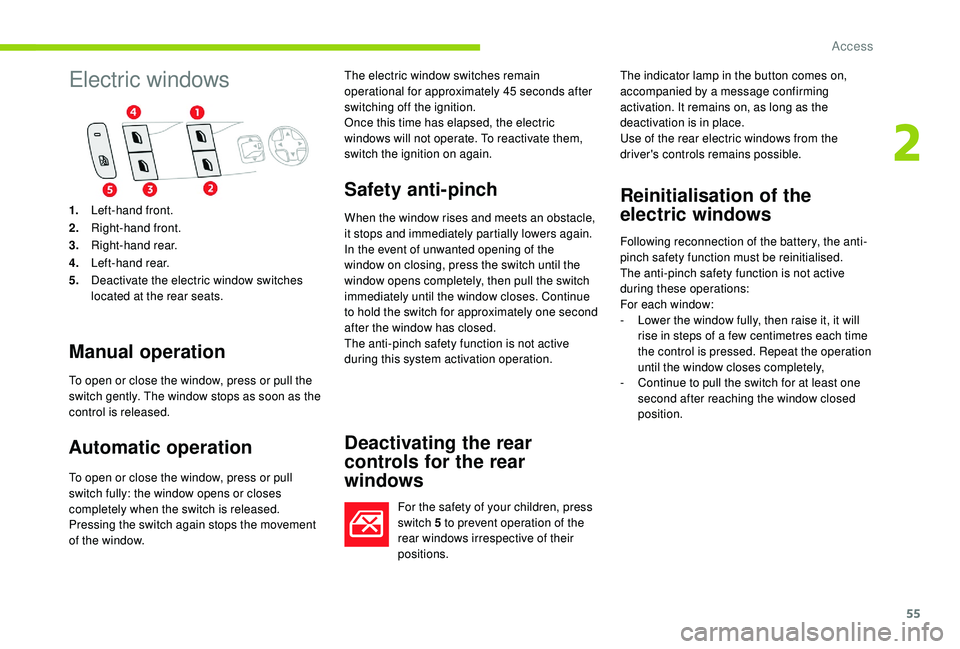
For the safety of your children, press
switch 5 to prevent operation of the
rear windows irrespective of their
positions. The indicator lamp in the button comes on,
accompanied by a
message confirming
activation. It remains on, as long as the
deactivation is in place.
Use of the rear electric windows from the
driver's controls remains possible.
Reinitialisation of the
electric windows
Following reconnection of the battery, the anti-
pinch safety function must be reinitialised.
The anti-pinch safety function is not active
during these operations:
For each window:
-
L
ower the window fully, then raise it, it will
rise in steps of a
few centimetres each time
the control is pressed. Repeat the operation
until the window closes completely,
-
C
ontinue to pull the switch for at least one
second after reaching the window closed
position.
1.
Left-hand front.
2. Right-hand front.
3. Right-hand rear.
4. Left-hand rear.
5. Deactivate the electric window switches
located at the rear seats. The electric window switches remain
operational for approximately 45
seconds after
switching off the ignition.
Once this time has elapsed, the electric
windows will not operate. To reactivate them,
switch the ignition on again.
2
Access
Page 60 of 316
58
Passenger seat backrest angle
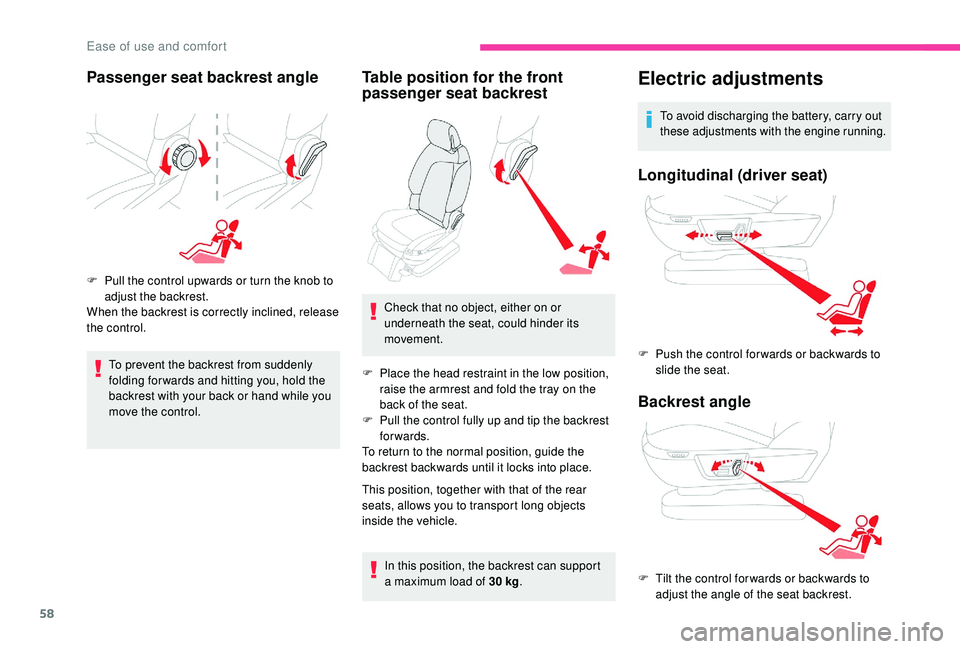
F Pull the control upwards or turn the knob to adjust the backrest.
When the backrest is correctly inclined, release
the control.
To prevent the backrest from suddenly
folding for wards and hitting you, hold the
backrest with your back or hand while you
move the control.
Table position for the front
passenger seat backrest
Check that no object, either on or
underneath the seat, could hinder its
movement.
F
P
lace the head restraint in the low position,
raise the armrest and fold the tray on the
back of the seat.
F
P
ull the control fully up and tip the backrest
forwards.
To return to the normal position, guide the
backrest backwards until it locks into place.
This position, together with that of the rear
seats, allows you to transport long objects
inside the vehicle.
In this position, the backrest can support
a
maximum load of 30 kg.
Electric adjustments
To avoid discharging the battery, carry out
these adjustments with the engine running.
Longitudinal (driver seat)
F Push the control for wards or backwards to
slide the seat.
Backrest angle
F Tilt the control for wards or backwards to adjust the angle of the seat backrest.
Ease of use and comfort
Page 78 of 316

76
Settings for passengers in the
2nd rowSettings for passengers in the
third row
Ventilation with ignition on
function
F Turn the top dial to open or close the rear
vent.
F
T
urn the lower dial to decrease (to the left)
or increase (to the right) the air flow. F
P
ress on the vent's shutter.
F
A
djust the air flow of both vents using the
dial with four positions (off, low, medium,
h i g h).
F
D
irect the vent by turning the shutter.
With the ignition on, you can use the ventilation
system and access the Air conditioning menu
to control the air flow and air distribution in the
passenger compartment.
This function is available for a
few minutes,
depending on the state of charge of the battery
of your vehicle. This function does not activate the air
conditioning.
You can make use of the residual heat in the
engine to warm the passenger compartment
using the temperature setting buttons.
Recirculation of interior air
The intake of exterior air helps avoid and
eliminate misting of the windscreen and side
windows.
Recirculation of the interior air isolates the
passenger compartment from exterior odours
and fumes.
When required, this function can also be
used to speed up the heating or cooling of
the passenger compartment.
F
P
ress button 4 to recirculate the interior air
or to permit the intake of outside air.
When the indicator lamp is on, the air
recirculation function is activated, the intake of
exterior air is inhibited.
Avoid the prolonged use of interior
air recirculation – Risk of misting and
deterioration of air quality!
Ease of use and comfort
Page 91 of 316
89
Panoramic glass sunroof
It has an electrically-controlled blind.
Opening/closing the roof
blind
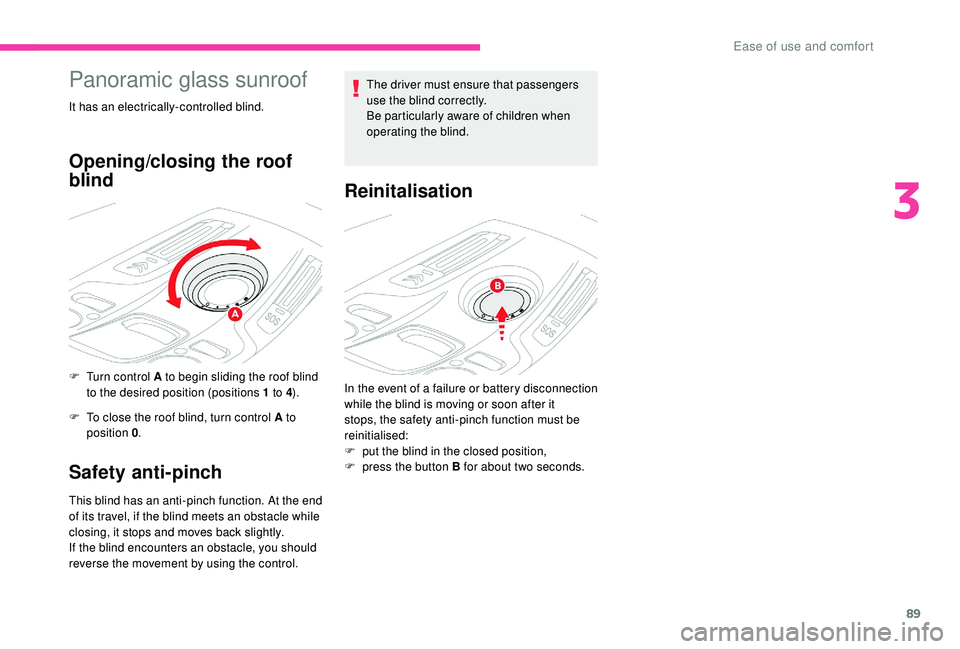
F Turn control A to begin sliding the roof blind to the desired position (positions 1 to 4).
F
T
o close the roof blind, turn control A to
position 0 .
Safety anti-pinch
This blind has an anti-pinch function. At the end
of its travel, if the blind meets an obstacle while
closing, it stops and moves back slightly.
If the blind encounters an obstacle, you should
reverse the movement by using the control. The driver must ensure that passengers
use the blind correctly.
Be particularly aware of children when
operating the blind.
Reinitalisation
In the event of a failure or battery disconnection
w hile the blind is moving or soon after it
stops, the safety anti-pinch function must be
reinitialised:
F
p
ut the blind in the closed position,
F
p
ress the button B for about two seconds.
3
Ease of use and comfort
Page 94 of 316

92
In good or rainy weather, by both day
and night, the front foglamps and the
rear foglamps are prohibited. In these
situations, the power of their beams may
dazzle other drivers. They should only be
used in fog or falling snow.
In these weather conditions, it is your
responsibility to switch on the foglamps
and dipped headlamps manually as the
sunshine sensor may detect sufficient
light.
Switch off the front and rear foglamps
when they are no longer necessary.
Switching off of the lighting when the
ignition is switched off
On switching off the ignition, all of the
lighting turns off immediately, except for
dipped beam headlamps if automatic
guide-me-home lighting is activated.Switching on the lighting after the
ignition is switched off
To reactivate the lighting control stalk,
rotate ring A to the 0
position – lamps off,
then to the desired position.
On opening the driver's door a
temporary
audible signal warns the driver that the
lighting is on.
It will go off automatically after a
period of
time that depends on the state of charge
in battery (entering energy economy
m o d e).
Direction indicators (flashers)
F Left: lower the lighting control stalk passing the point of resistance.
F
R
ight: raise the lighting control stalk passing
the point of resistance.
Three flashes
F Press briefly upwards or downwards, without going beyond the point of
resistance; the direction indicators will flash
3
times.
Parking lamps
Vehicle side marking by illumination of the
sidelamps on the traffic side only.
F
D
epending on version, within one minute
of switching off the ignition, operate the
lighting control stalk up or down depending
on the traffic side (for example, when
parking on the right, push the lighting
control stalk downwards; the left-hand
sidelamps come on).
This is confirmed by an audible signal and
illumination of the corresponding direction
indicator lamp in the instrument panel.
Lighting and visibility
Page 105 of 316

103
The system's fault does not prevent the
vehicle from being driven.
Localised Assistance Call
** According to the geographic coverage of "Localised Emergency Call", "Localised
Assistance Call" and the official national
language chosen by the owner of the
vehicle. Press this button for more
than 2
seconds to request
assistance if the vehicle breaks
down.
A voice message confirms that the call has
been made**.
Immediately pressing this button again cancels
the request.
The cancellation is confirmed by a voice
message.
Geolocation
To reactivate geolocation, simultaneously press
the "Localised Emergency Call" and "Localised
Assistance Call" buttons again, followed by
a
press on "Localised Assistance Call" to
confirm.
If you purchased your vehicle outside the
CITROËN dealer network, we invite you to
have a
dealer check the configuration of
these ser vices and, if desired, modify it to
suit your wishes. In a
multilingual country,
configuration is possible in the official
national language of your choice. For technical reasons and, in particular, to
improve the quality of Telematic ser vices
to customers, the manufacturer reserves
the right to carry out updates to the
vehicle's on-board telematic system.
If the indicator lamp lights up continuously red:
there is a
system fault.
If the indicator lamp flashes red: replace the
back-up battery.
In either case, emergency and assistance calls
may not function.
Contact a
qualified repairer as soon as
possible. The list of countries covered and of Telematic
ser vices is available from dealers or on the
website for your country.
You can deactivate geolocation by
simultaneously pressing the "Localised
Emergency Call" and "Localised Assistance
Call" buttons, followed by pressing "Localised
Assistance Call" to confirm. If you benefit from the Citroën Connect
Box offer with the SOS and assistance
pack included, there are additional
ser vices available to you in your personal
space, via the website for your country.Electronic stability control
(ESC)
Electronic stability control integrating the
following systems:
-
a
nti-lock braking system (ABS) and
electronic brake force distribution (EBFD),
-
em
ergency braking assistance (EBA),
-
w
heel anti-slip regulation (ASR) or traction
control,
-
d
ynamic stability control (DSC).
5
Safety
Page 133 of 316

131
Switching the ignition on
(without starting)
With the electronic key in the reader or the
Keyless Entry and Starting key inside the
vehicle, pressing the "START/STOP" button,
with no action on the pedals, allows the
ignition to be switched on.
F
P
ress the "START/STOP" button, the
instrument panel comes on but the engine
does not start.
F
P
ress the button again to switch off the
ignition and allow the vehicle to be locked.
With the ignition on, the system
automatically changes to energy economy
mode when required to maintain an
adequate state of charge of the battery.
On certain versions with the automatic gearbox
(EAT6/EAT8), the steering column does not
lock.
Electric parking brake
The technology adopted for the electric
parking brake does not allow the fitment of
15-inch wheels.
Indicator lamp
This indicator lamp comes on in the
instrument panel and in the control
lever to confirm the application of
the parking brake. It goes off to confirm the release of the parking
brake.
The indicator lamp in the control lever flashes
during manual application or release.
After applying the parking brake, the
simultaneous flashing of the indicator lamps
in the instrument panel and in the control lever
warns you to secure the immobilisation of the
vehicle by engaging a
gear (with a manual
gearbox or by placing the selector at position
P with an automatic gearbox or by placing
a chock against one of the wheels (e.g. parking
on a very steep slope or a steep slope with
a weak battery).
In the event of a battery failure, the
electric parking brake no longer works.
As a safety measure, if the parking brake
is not applied, immobilise the vehicle by
engaging a
gear (with a
manual gearbox)
or placing a chock against one of the
wheels.
Call a CITROËN dealer or a qualified
workshop.
The system provides, in automatic operation,
the application of the parking brake on
switching off the engine and release as the
vehicle moves off.
The driver can take over at any time to apply
or release the parking brake, by operating the
control lever:
-
b
y briefly pulling
the control lever to apply
the brake,
-
b
y briefly pushing
the control lever, while
pressing the brake pedal, to release it.
Automatic mode is activated by default.
6
Driving
Page 138 of 316

136
Only engage reverse gear when the
vehicle is stationary with the engine at idle.
As a safety precaution and to facilitate
s tarting the engine:
-
a
lways select neutral,
-
p
ress the clutch pedal.
Automatic gearbox
Six or eight-speed automatic gearbox with
steering wheel-mounted selector. It also offers
a manual mode with gear changes via steering
mounted paddles located behind the steering
wheel.
Gear selector
P. Park.
-
I mmobilisation of the vehicle, parking
brake applied or released.
-
S
tarting the engine.
R. Reverse.
-
R
eversing manoeuvres, vehicle
stationary, engine at idle.
N. Neutral.
-
I
mmobilisation of the vehicle, parking
brake applied.
-
S
tarting the engine.
D. Automatic operation.
M. Manual operation with sequential
changing of the gears.
To come out of position P , shift the
selector to the right to the required
position, while pressing the brake pedal to
t h e f l o o r.
Steering mounted controls
To select position P , move the selector to
the uppermost position (towards R ), then
push it for wards, then to the left.
Only engage it when the vehicle is
completely stationary. In this position, the
front wheels are locked. Ensure that the
selector is positioned correctly. To move the selector, switch on the
ignition or start the engine.
When the battery charge is too low, it will
not be possible to move the selector.
+. Control paddle to change up, to the right
of the steering wheel.
F
P
ull the "
+" control paddle towards you to
change up.
-. Control paddle to change down, to the left
of the steering wheel.
F
P
ull the "-" control paddle towards you to
change down.
The steering mounted paddles do not
allow neutral to be selected, nor reverse
gear to be engaged or disengaged.
Driving
Page 140 of 316
138
Never select position N while the vehicle
is moving. If position N is selected by
mistake while driving, allow the engine
to return to idle, then select position D to
accelerate.
Never select position P or R unless the
vehicle is completely stationary.
If you wish to engage reverse gear,
to prevent jolting, do not accelerate
immediately after selecting R.
Selection of position R is accompanied by
the sound of a
beep.
In the event of a
battery failure, you
must place the chocks supplied with the
vehicle tools against one of the wheels to
immobilise the vehicle.
If your vehicle has an automatic gearbox,
never try to start the engine by pushing
the vehicle.Automatic mode
F Select position D .
D and the gear engaged appear in the
instrument panel.
The gearbox operates in auto-adaptive mode,
without any action by the driver. It continuously
selects the gear best suited to the following
parameters:
-
o
ptimisation of fuel consumption,
-
s
tyle of driving,
-
r
oad conditions,
-
v
ehicle load.
For maximum acceleration without touching
the selector, press the accelerator fully down
(kick-down). The gearbox changes down
automatically or holds the gear selected until
the maximum engine speed is reached.
When braking, the gearbox changes down
automatically to provide effective engine
braking.
If you release the accelerator sharply, the
gearbox will not change to a
higher gear for
safety reasons.
Temporary control of gear
changing
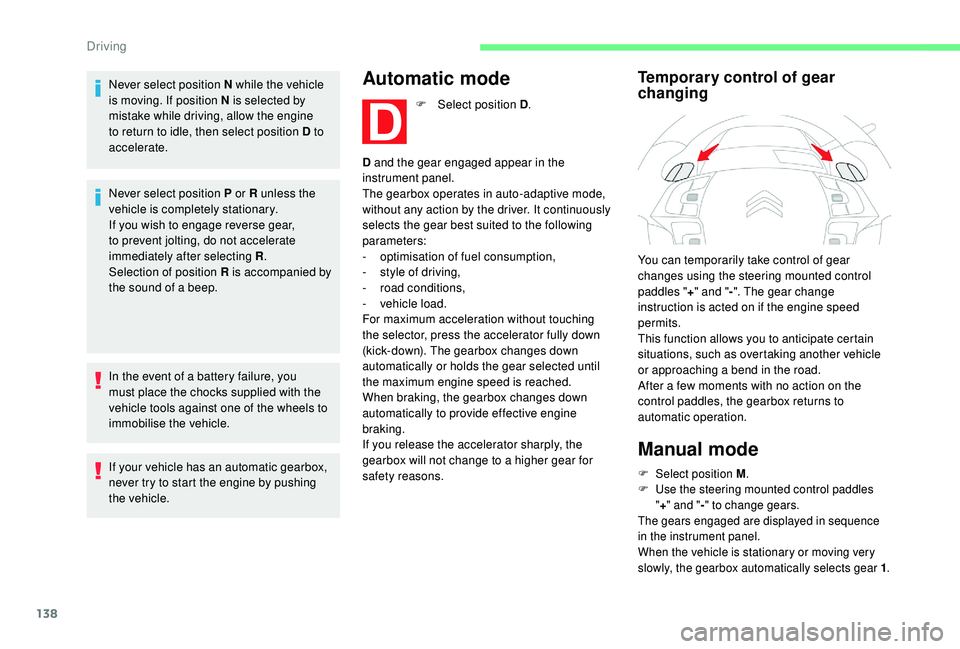
You can temporarily take control of gear
changes using the steering mounted control
paddles " +" and " -". The gear change
instruction is acted on if the engine speed
permits.
This function allows you to anticipate certain
situations, such as overtaking another vehicle
or approaching a
bend in the road.
After a
few moments with no action on the
control paddles, the gearbox returns to
automatic operation.
Manual mode
F Select position M .
F U se the steering mounted control paddles
" + " and " -" to change gears.
The gears engaged are displayed in sequence
in the instrument panel.
When the vehicle is stationary or moving very
slowly, the gearbox automatically selects gear 1 .
Driving
Page 141 of 316
139
In sequential mode, it is not necessary to
release the accelerator pedal when changing
g e a r.
Changing from one gear to another only
occurs if the vehicle speed and engine speed
conditions allow; other wise the gearbox will
operate temporarily in automatic mode.
If the engine speed is too low or too high, the
gear selected flashes for a few seconds, then
the gear actually engaged is displayed.
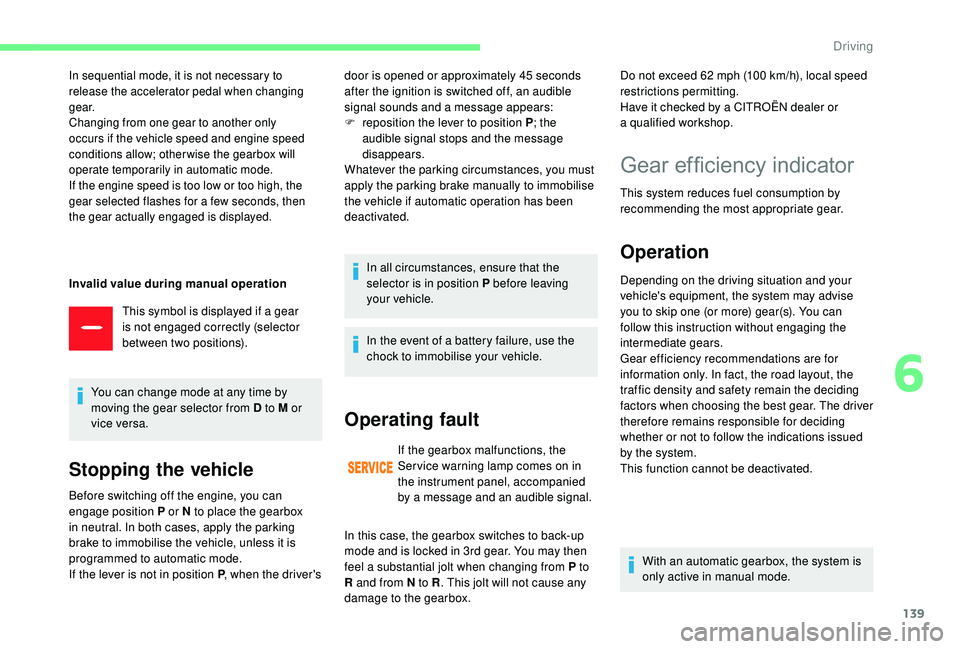
Invalid value during manual operation
This symbol is displayed if a gear
is not engaged correctly (selector
between two positions).
You can change mode at any time by
moving the gear selector from D to M or
vice versa.
Stopping the vehicle
door is opened or approximately 45 seconds
a fter the ignition is switched off, an audible
signal sounds and a
message appears:
F
r
eposition the lever to position P ; the
audible signal stops and the message
disappears.
Whatever the parking circumstances, you must
apply the parking brake manually to immobilise
the vehicle if automatic operation has been
deactivated.
In all circumstances, ensure that the
selector is in position P before leaving
your vehicle.
Before switching off the engine, you can
engage position P or N to place the gearbox
in neutral. In both cases, apply the parking
brake to immobilise the vehicle, unless it is
programmed to automatic mode.
If the lever is not in position P , when the driver's In the event of a
battery failure, use the
chock to immobilise your vehicle.
Operating fault
If the gearbox malfunctions, the
Ser vice warning lamp comes on in
the instrument panel, accompanied
by a
message and an audible signal. Do not exceed 62
mph (100 km/h), local speed
restrictions permitting.
Have it checked by a CITROËN dealer or
a
qualified workshop.
In this case, the gearbox switches to back-up
mode and is locked in 3rd gear. You may then
feel a
substantial jolt when changing from P to
R and from N to R . This jolt will not cause any
damage to the gearbox.
Gear efficiency indicator
This system reduces fuel consumption by
recommending the most appropriate gear.
Operation
Depending on the driving situation and your
vehicle's equipment, the system may advise
you to skip one (or more) gear(s). You can
follow this instruction without engaging the
intermediate gears.
Gear efficiency recommendations are for
information only. In fact, the road layout, the
traffic density and safety remain the deciding
factors when choosing the best gear. The driver
therefore remains responsible for deciding
whether or not to follow the indications issued
by the system.
This function cannot be deactivated.
With an automatic gearbox, the system is
only active in manual mode.
6
Driving