clutch CITROEN C4 PICASSO 2017 User Guide
[x] Cancel search | Manufacturer: CITROEN, Model Year: 2017, Model line: C4 PICASSO, Model: CITROEN C4 PICASSO 2017Pages: 316, PDF Size: 10.36 MB
Page 161 of 316

159
10.Indication that vehicle is held stationary
(versions fitted with an automatic
gearbox).
11. Speed suggested by the Speed Limit
recognition and recommendation.
Switching on
To switch on the cruise control
F
W ith the engine running, turn the wheel
1
to the " CRUISE " position. The system is
paused (grey display). With a
manual gearbox
With the speed of the vehicle between 19 and
99 mph (30 and 160 km/h):
F
W
hen the vehicle is moving, press one of
the buttons 2 or 3
: the current speed of your
vehicle becomes the cruise speed setting.
The cruise control starts operating (displayed
in green).
With an automatic gearbox
Mode D or M must be selected.
With the speed of the vehicle between 19 and
112 mph (30 and 180 km/h):
Remembering the settings
Switching off the ignition cancels any speed
setting value chosen by the driver.
By default, the inter-vehicle distance is set
at " Normal " (2 dashes). Other wise, the last
setting made will be used when switching on
the system.Pause
• When changing from mode D to N with an automatic gearbox.
-
o
r automatically:
•
I
f the ESC system is activated, for safety
reasons.
•
W
hen the speed of the vehicle falls below
19
mph (30 km/h) with a manual gearbox.
When the cruise control is paused, it
can only be reactivated when all of the
safety conditions are met. The message
"Activation not possible, conditions
unsuitable" is displayed while reactivation
is not possible.
As soon as a
vehicle is detected, the symbol
7
is filled with the colour associated with the
cruise control mode. By default, the symbol 7
is
e m pt y.
When the cruise control is in operation, the
symbols 7
and 8
are displayed in green. By
default, they are displayed in grey.
Reactivating the function
Versions fitted with a manual gearbox
To reactivate the function, the driver must
accelerate to reach at least 19
mph (30 km/h),
then press one of the buttons 2 , 3
or 4.
Versions fitted with an automatic gearbox
Following braking of the vehicle bringing it to
a
complete stop, the system holds the vehicle
stationary; the cruise control is paused.
12 .
Inter-vehicle distance setting.
13. Position of vehicle detected by the radar.
This information is visible in the instrument
panel in "DRIVING" display mode. F
W
hen the vehicle is moving, press one of
the buttons 2
or 3
: the current speed of your
vehicle becomes the cruise speed setting.
The cruise control can be paused manually by:
-
a
ction by the driver:
•
O
n the button 4 (Pause).
•
O
n the brake pedal.
•
O
n the electric parking brake control.
•
O
n the clutch pedal, by pressing and
holding for more than 5
seconds.
6
Driving
Page 183 of 316
181
Operation
Function activation
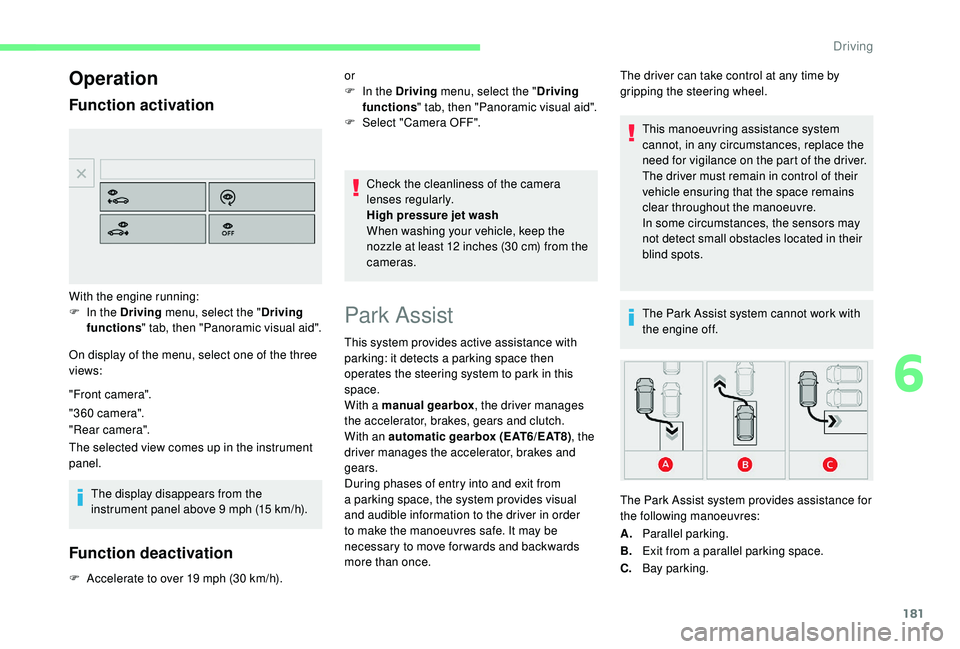
On display of the menu, select one of the three
views:
"Front camera".
"360 camera".
"Rear camera".
The selected view comes up in the instrument
panel.The display disappears from the
instrument panel above 9
mph (15 km/h).
Function deactivation
F Accelerate to over 19 mph (30 km/h). Check the cleanliness of the camera
lenses regularly.
High pressure jet wash
When washing your vehicle, keep the
nozzle at least 12
inches (30 cm) from the
cameras.
With the engine running:
F
I
n the Driving menu, select the "
Driving
functions " tab, then "Panoramic visual aid". or
F
I
n the Driving menu, select the "
Driving
functions " tab, then "Panoramic visual aid".
F
Sel
ect "Camera OFF".
Park Assist
This system provides active assistance with
parking: it detects a
parking space then
operates the steering system to park in this
space.
With a
manual gearbox , the driver manages
the accelerator, brakes, gears and clutch.
With an automatic gearbox (EAT6/EAT8) , the
driver manages the accelerator, brakes and
gears.
During phases of entry into and exit from
a
parking space, the system provides visual
and audible information to the driver in order
to make the manoeuvres safe. It may be
necessary to move for wards and backwards
more than once. The driver can take control at any time by
gripping the steering wheel.
This manoeuvring assistance system
cannot, in any circumstances, replace the
need for vigilance on the part of the driver.
The driver must remain in control of their
vehicle ensuring that the space remains
clear throughout the manoeuvre.
In some circumstances, the sensors may
not detect small obstacles located in their
blind spots.
The Park Assist system cannot work with
the engine off.
A. Parallel parking.
B. Exit from a
parallel parking space.
C. Bay parking.
The Park Assist system provides assistance for
the following manoeuvres:
6
Driving