deactivate CITROEN C4 PICASSO 2020 Owners Manual
[x] Cancel search | Manufacturer: CITROEN, Model Year: 2020, Model line: C4 PICASSO, Model: CITROEN C4 PICASSO 2020Pages: 316, PDF Size: 10.36 MB
Page 13 of 316

11
Tw o b u t t o n s
Touch screen
F In the Settings menu, select "Brightness".
F A djust the brightness by pressing the
arrows or moving the slider.
Black panel (comfortable
night driving display)
When driving at night, this function allows
certain instrument panel displays to be
switched off so as to reduce visual fatigue for
the driver.
The essential driving information, such as the
vehicle speed, warning and indicator lamps,
the cruise control or speed limiter, remains
displayed in the instrument panel.
Using the steering mounted
control
Black panel (touch screen)
F In the Settings menu, select "Dark". The
screen goes off.
F
P
ress the screen again (anywhere on its
sur face) to switch it on again.
Only works when the vehicle lamps are on,
except daytime running lamps.
With the exterior lighting on, press button A to
increase the brightness of the instruments and
controls and the ambience of the vehicle or
button B to reduce it.
As soon as the lighting reaches the required
level of brightness, release the button.
F
W
ith the exterior lighting on, press this
button to activate the black panel.
F
P
ress the button once again to deactivate it.
Warning and indicator
lamps
Displayed as symbols, the warning and
indicator lamps inform the driver of the
occurrence of a malfunction (warning lamps) or
of the operating status of a
system (operation
or deactivation indicator lamps). Certain lamps
light up in two ways (fixed or flashing) and/or in
several colours.
Associated warnings
The illumination of a lamp can be accompanied
b y an audible signal and/or a message
displayed in a
screen.
Relating the type of alert to the operating status
of the vehicle allows you to determine whether
the situation is normal or a
fault has occurred:
refer to the description of each lamp for further
information.
1
Instruments
Page 18 of 316

16
Warning/indicator lampStateCause Actions/Observations
+
+ Operating fault
(with electric
parking brake)
Fixed, accompanied
by the message
"Parking brake fault". The parking brake is faulty: manual
and automatic functions may not be
working. When stationary, to immobilise your vehicle:
F
P
ull and hold the control lever for approximately
7
to 15 seconds, until the warning lamp comes on
in the instrument panel.
If this procedure does not work, make your vehicle
safe:
F
P
ark on a level sur face.
F
I
f you have a manual gearbox, engage a gear.
F
W
ith an automatic gearbox, select P, then put the
supplied chocks against one of the wheels.
Then carry out (2).
Deactivation of
the automatic
functions (with
electric parking
brake) Fixed.
The "automatic application" (on
switching off the engine) and
"automatic release" (on acceleration)
functions are deactivated.
In the event of a
fault, illumination of
this warning lamp is accompanied by
a
message.Carry out (3) if automatic application/release is no
longer possible.
The brake can be applied or released manually.
+ Automatic
application
(with electric
parking brake) Fixed, accompanied
by the message
"Parking brake fault".
The automatic application is not
available, the parking brake can only
be used manually. Use the electric parking brake control lever.
If automatic release is also not available, use manual
release.
Anti-lock Braking
System (ABS)Fixed.
The anti-lock braking system has
a
fault. The vehicle retains conventional braking.
Drive carefully at reduced speed, then carry out (3).
Instruments
Page 23 of 316

21
Warning/indicator lampStateCause Actions/Observations
Engine
diagnostic
system Flashing.
The engine management system has
a
fault.
There is a risk that the catalytic converter will be destroyed.
C arry out (2) without fail .
Fixed. The emissions control system has
a
fault.The warning lamp should go off when the engine is started.
Carry out (3) quickly.
Collision Risk
Alert/Active
Safety BrakeFixed, accompanied
by the display of
a
message. The system has been deactivated,
via the vehicle configuration menu.
Flashing. The system is operating. The vehicle brakes briefly so as to reduce the speed
of collision with the vehicle ahead.
Fixed, accompanied
by a
message and an
audible signal. The system has a
fault.Carry out (3).
Dynamic
stability control
(DSC)/Anti- slip
regulation (ASR) Flashing.
The DSC/ASR regulation is activated
if there is a
loss of grip or trajectory.
Fixed. The DSC/ASR system has a
fault. Carry out (3).
+ Emergency
brake anomaly
(with electric
parking brake) Fixed, accompanied
by the message
"Parking brake fault".
Emergency braking does not have
f u l l p o w e r.
If automatic release is not available, use manual
release.
1
Instruments
Page 25 of 316
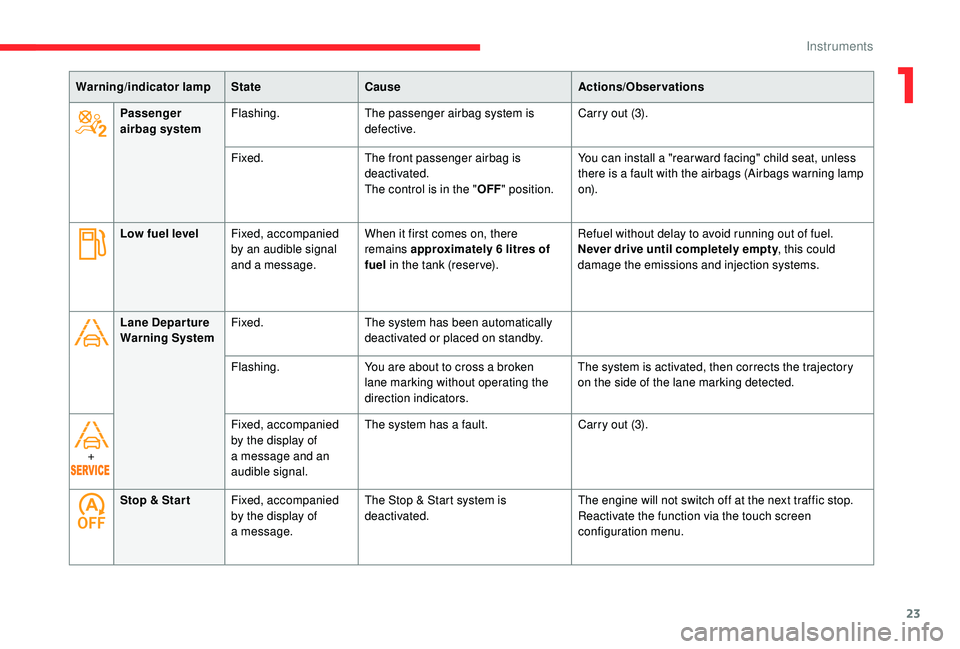
23
Low fuel levelFixed, accompanied
by an audible signal
and a
message.When it first comes on, there
remains approximately 6
litres of
fuel in the tank (reser ve). Refuel without delay to avoid running out of fuel.
Never drive until completely empty
, this could
damage the emissions and injection systems.
Lane Depar ture
Warning System Fixed.
The system has been automatically
deactivated or placed on standby.
Flashing. You are about to cross a
broken
lane marking without operating the
direction indicators. The system is activated, then corrects the trajectory
on the side of the lane marking detected.
+ Fixed, accompanied
by the display of
a
message and an
audible signal. The system has a
fault.Carry out (3).
Stop & Star t Fixed, accompanied
by the display of
a
message. The Stop & Start system is
deactivated.
The engine will not switch off at the next traffic stop.
Reactivate the function via the touch screen
configuration menu.
Warning/indicator lamp
StateCause Actions/Observations
Passenger
airbag system Flashing.
The passenger airbag system is
defective. Carry out (3).
Fixed. The front passenger airbag is
deactivated.
The control is in the "OFF" position. You can install a "rear ward facing" child seat, unless
there is a fault with the airbags (Airbags warning lamp
o n).
1
Instruments
Page 33 of 316

31
Total distance recorder
It measures the total distance travelled by the
vehicle since its first registration.
Trip recorder
It measures the distance travelled since it was
reset by the driver.
F
W
ith the ignition on, press the button until
zeros appear.
Touch screen
The touch screen gives access to:
- t he heating/air conditioning controls,
-
m
enus for adjusting settings for vehicle
functions and systems,
-
a
udio system and telephone controls and
the display of associated information,
and, depending on equipment, allows:
-
t
he display of alert messages and the visual
parking sensors information,
-
t
he permanent display of the time and the
exterior temperature (a blue warning lamp
appears when there is a
risk of ice),
-
a
ccess to the internet ser vices and
navigation system controls and the display
of associated information.
As a
safety measure, the driver should
only carry out operations that require
close attention with the vehicle
stationary.
Some functions are not accessible when
driving.
General operation
Recommendations
Use is possible in all temperatures.
Principles
Use the buttons on each side of the touch
screen to access the menus, then use the
buttons that appear on the touch screen.
Certain functions may be displayed over 1
or
2
pages.
To deactivate/activate a
function, press OFF/
ON.
To modify a
setting (lighting duration, etc.) or
find additional information, press the symbol for
the function.
After a
few moments with no action on
the secondary page, the primary page is
displayed automatically.
Use this button to confirm.
Do not use pointed objects on the touch
screen.
Do not touch the touch screen with wet hands.
Use a
soft clean cloth to clean the touch
screen.
Use this button to return to the
previous page.
1
Instruments
Page 41 of 316

39
(mph or km/h)
Calculated since the last time the
trip was reset.
Distance travelled
(miles or km)
Calculated since the last time the
trip was reset.
Stop & Star t time counter
(minutes/seconds or hours/minutes)
A time counter calculates the total of the
periods in STOP mode during a
journey.
It resets to zero every time the ignition is
switched on.
Average speed
Setting the date and time
With CITROËN Connect
Radio
F Select the Settings menu.
F
Sel
ect " System configuration ".
F
Sel
ect "Date and time ". F
Sel
ect "
Date " or "Time ".
F
C
hoose the display formats.
F
C
hange the date and/or time using the
numeric keypad.
F
Pr
ess this button to confirm.
With CITROËN Connect Nav
Adjustment of the time and date is only
available if synchronisation with GPS is
deactivated.
F
Sel
ect the Settings menu.
F
P
ress the " OPTIONS " button to go to the
secondary page.
F
Sel
ect "Setting the time- date".
F
Sel
ect the " Date" or "Time " tab.
F
A
djust the date and/or time using the
numeric keypad.
F
Pr
ess this button to confirm.F
Pr
ess this button to confirm.
Additional adjustments
You can choose:
- T o change the display format of the date
and time (12h/24h).
-
T
o change the time zone.
-
T
o activate or deactivate synchronisation
with the GPS (UTC).
The system does not automatically
manage the change between winter and
summer time (depending on country).
The change between winter and summer
time is done by changing the time zone.
1
Instruments
Page 42 of 316

40
Electronic key – Remote
control
System that enables the activation of the
unlocking and locking of the vehicle, the
opening of the boot and, depending on the
version, the alarm from a distance.
It also locates and starts the vehicle, as well as
protecting against theft.
A. Unlocking the vehicle.
B. Central locking system of the vehicle.
C. Locking the vehicle, and depending on the
version, releasing the tailgate or opening
the motorised tailgate.
The electronic key includes an integral back-up
key.
Unlocking the vehicle
Complete unlocking
F Press the button.
Selective unlocking
It is set via the Driving menu.
Complete unlocking is activated by default.
F
T
o unlock the driver's door only, press the
unlocking button once.
F
T
o unlock the other doors and the boot,
press the button again.
Unlocking the vehicle and
opening the boot
F Press and hold this button to unlock the vehicle and,
depending on version, release
the tailgate or open the
motorised tailgate.
The setting for the motorised tailgate
is in the Driving menu.
By default, motorised operation is activated. The direction indicators flash for
a
few seconds. The spotlamps in the
door mirrors come on. Depending on
version, the door mirrors unfold, the
welcome lighting comes on, the alarm is
deactivated.
Locking the vehicle
Normal locking
F Press the button.
Maintaining pressure allows the windows to be
raised to the desired position.
Ensure that nothing could prevent the
correct operation of the windows.
Be aware of children when operating the
windows.
The direction indicators come on for a
few
seconds.
Depending on your version, the door
mirrors fold, the alarm is activated.
Access
Page 43 of 316

41
This function allows you to identify your vehicle
from a distance, particularly in poor light. Your
vehicle must be locked.
If one of the openings (doors or boot) is
still open, the locking does not take place.
However, the alarm (if fitted) will be fully
activated after about 45
seconds.
If the vehicle is unlocked inadvertently and
with no action on the doors or boot, the
vehicle will lock itself again automatically
after about 30
seconds.
If fitted to your vehicle, the alarm will also
be reactivated automatically.
The automatic folding and unfolding
of the door mirrors can be deactivated
by a
CITROËN dealer or a
qualified
workshop.
Deadlocking
Deadlocking deactivates the interior door
controls and it also deactivates the manual
central control button.
Therefore, never leave anyone inside the
vehicle when it is deadlocked.
F
W
ith the vehicle unlocked, press the locking
button.
Locating your vehicle
F Within five seconds, press the button again to deadlock the vehicle.
F
P
ress this button.
The direction indicators will flash for around
10 seconds and the courtesy lamps will switch on.
Keyless Entry and
Starting
The electronic key is also used as
a remote control. For more information
on the Remote Control , refer to the
corresponding section.
For reasons of safety and theft protection,
do not leave your electronic key in the
vehicle, even when you are close to it.
It is recommended that you keep it on your
person.
Unlocking the vehicle
Complete unlocking
F With the electronic key on your person and in recognition zone A , pass your hand behind
the door handle of one of the front doors
to unlock the vehicle or press the tailgate
opening control (situated in the centre).
This system allows the unlocking, locking
and starting of the vehicle, while carrying the
electronic key in the recognition zone " A".
2
Access
Page 44 of 316

42
Selective unlocking
Activation or deactivation of selective
locking of the tailgate is done in the
Driving menu.
Complete unlocking is activated by default.
F
T
o unlock only the driver's door, with the
electronic key on your person, pass your
hand behind the driver's door handle.
F
T
o unlock the complete vehicle, pass your
hand behind the front passenger door
handle with the electronic key close to
the passenger door, or press the tailgate
opening control with the electronic key close
to the rear of the vehicle.
The direction indicators flash for a
few
seconds.
Depending on your version, the door
mirrors fold, the alarm is deactivated and
the welcome lighting comes on.
Locking the vehicle
Normal locking
Ensure that nothing could prevent the
proper closure of the windows.
Be aware of children when operating the
windows.
The direction indicators come on for a
few
seconds.
Depending on version, the door mirrors
fold and the alarm is activated.
Deadlocking
Deadlocking deactivates the interior door
controls and it also deactivates the manual
central control button.
Therefore, never leave anyone inside the
vehicle when it is deadlocked.
F
W
ith the key in recognition zone A , press
on one of the front door handles (at the
markings) to lock the vehicle or on the
locking control located on the tailgate (on
the right) for versions that are not equipped
with the "Hands-Free Tailgate Access"
function.
Maintaining pressure allows the windows to be
raised to the desired position.
It is not possible to lock the vehicle if one of the
keys is left inside the vehicle. By the doors or tailgate:
F
W
ith the electronic key in recognition zone
A , press the door handle of one of the
front doors (at the markings), or the locking
control located on the tailgate (on the right)
for versions that are not equipped with the
"Hands-Free Tailgate Access" function, to
lock the vehicle.
F
W
ithin 5 seconds, press the door handle
again, or the locking control on the tailgate
(on the right) for versions that are not
equipped with the "Hands-Free Tailgate
Access" function, to deadlock the vehicle.
Access
Page 45 of 316

43
If one of the doors or the boot is still open
or if the electronic key for the K eyless
Entry and Starting system has been left
inside the vehicle, the central locking does
not take place.
However, the alarm (if fitted) will be fully
activated after about 45
seconds.
If the vehicle is unlocked inadvertently and
no action is taken at the doors or boot, the
vehicle will automatically lock itself again
after about 30
seconds.
If fitted to your vehicle, the alarm will also
be reactivated automatically.
The automatic folding and unfolding
of the door mirrors can be deactivated
by a
CITROËN dealer or a qualified
workshop. As a
safety measure (children on board),
never leave the vehicle without taking the
electronic key for the
K
eyless Entry and
Starting system with you, even for a
short
period.
Be aware of the risk of theft when the
electronic key for the
K
eyless Entry and
Starting system is in one of the defined
zones with the vehicle unlocked.
In order to preser ve the battery in the
electronic key and the vehicle's battery,
the "hands-free" functions are put into
long-term standby after 21
days without
use. To restore these functions, press
one of the remote control buttons or start
the engine with the electronic key in the
reader.
For more information on starting with
K
eyless Entr y and Star ting, refer to the
corresponding section. Accumulations (water, dust, grime, salt,
etc.) on the inner sur face of the door
handle may affect detection.
If cleaning the inner sur face of the door
handle using a
cloth does not restore
detection, contact a
CITROËN dealer or
a
qualified workshop.
A sudden splash of water (stream of water,
high pressure jet washer, etc.) may be
identified by the system as the desire to
open the vehicle.
Central locking
Manual
F Press this button to operate the central locking of the vehicle (doors and boot) from
inside the vehicle. The indicator lamp in the
button comes on.
F
P
ressing the button again unlocks the
vehicle completely. The indicator lamp in
the button goes off.
2
Access