park assist Citroen C4 PICASSO RHD 2014.5 1.G User Guide
[x] Cancel search | Manufacturer: CITROEN, Model Year: 2014.5, Model line: C4 PICASSO RHD, Model: Citroen C4 PICASSO RHD 2014.5 1.GPages: 428, PDF Size: 10.03 MB
Page 183 of 428

181
Front parking sensors
The sound emitted by the speaker (front or rear) indicates whether the obstacle
i
s in front or behind. The
system will be deactivated
a
utomatically if a trailer is being
t
owed or a bicycle carrier is fitted on
a
towbar (vehicle fitted with a towbar
i
nstalled in line with the manufacturer's
r
ecommendations).In
bad weather or in winter, ensure
t
hat the sensors are not covered with m
ud, ice or snow. When reverse gear is e
ngaged, an audible signal (long beep)
i
ndicates that the sensors may be dirty.
Certain
sound sources (motorcycle,
l
orry, pneumatic drill, etc.) may trigger
t
he audible signals of the parking
s
ensor system.
In
addition to the rear parking sensors, the
f
ront
parking sensors are triggered when an
o
bstacle is detected in front and the speed of
t
he
vehicle is still below 6 mph (10 km/h).
The
front parking sensors are interrupted if
t
he
vehicle stops for more than three seconds
i
n
for ward gear, if no further obstacles are
d
etected or when the speed of the vehicle
e
xceeds 6 mph (10 km/h).
Deactivation / Activation of the
front and rear parking sensors
The parking sensors can be deactivated in the t
ouch screen tablet.
F
Sel
ect the " Driving assistance "
menu.
Operating fault
In the event of a malfunction of the system, when reverse gear is e
ngaged the symbol for the button
c
hanges to alert mode and the
w
arning lamp flashes for a few
m
oments then stays on continuously.
A
message
appears, accompanied by an
a
udible
signal (short beep).
Contact
a
CITROËN dealer or a qualified
w
orkshop.
F
P
ress on " Parking sensors ".
T
he
indicator
lamp
in
the
button
c
omes
on.
High pressure jet wash
When
washing your vehicle, do not
d
irect the lance within 30 cm of the
sen
sors.
The
parking
sensors
are
deactivated
w
hile
the
Park
Assist
system
is
m
easuring
a
space.
See
the
"Park
Assist"
section.
Pressing
this
button
again
reactivates
the
s
ystem.
The
indicator
lamp
goes
off.
4
Driving
Page 187 of 428

185
Park Assist
This system provides active assistance with parking, detecting a parking space then
c
ontrolling the steering to park in the space.
It
controls the steering while the driver
m
anages the accelerator, brakes, gears and
c
lutch (manual gearbox). During phases of
e
ntry into and exit from a parking space, the
s
ystem provides visual and audible information
t
o the driver in order to make the manoeuvres
s
afe. It may be necessary to move for wards
a
nd backwards more than once. During
a manoeuvre the steering wheel
t
urns quickly: do not hold the steering
w
heel, do not place your hand between
t
he spokes of the steering wheel and
t
ake care with loose and bulky clothing,
s
carves, handbags... There is a risk of
in
jury.
When
Park Assist is activated, it
p
revents a change to STOP mode of
S
top & Start. In STOP mode, activation
o
f Park Assist restarts the engine.
The
Park Assist system cannot in any
c
ircumstances replace the need for
v
igilance on the part of the driver.
The
driver must remain in control
o
f their vehicle ensuring that the
s
pace remains clear throughout the
m
anoeuvre.
In
some circumstances, the sensors
m
ay not detect small obstacles located
i
n their blind spots.
The
driver can take control at any time by
g
ripping the steering wheel. The
Park Assist system provides assistance for t
he following manoeuvres:
-
e
ntry into a parallel parking space
-
e
xit from a parallel parking space
-
b
ay parkingThe
Park Assist system takes control
o
f the power steering for a maximum
o
f 4 manoeuvre cycles. The function
i
s deactivated after these 4 cycles.
I
f you think that your vehicle is not
p
ositioned correctly, you should then
t
ake control of the steering to carry out
t
he manoeuvre.
The
Park Assist system cannot work
w
ith the engine off.
4
D
Page 188 of 428

186
The sequence of manoeuvres and the driving instructions are displayed in the
in
strument
pan
el. You
should always check the s
urroundings of your vehicle before
s
tarting a manoeuvre.
The assistance is
deactivated:
the display of
t
his symbol indicates that
t
he steering manoeuvres
a
re no longer controlled by
t
he system: you must take
c
ontrol of the steering.
The assistance is
activated:
the display of this
s
ymbol and a speed limit
i
ndicate that the steering
m
anoeuvres are controlled
b
y the system: do not touch
t
he steering wheel. The
park sensors function is not
a
vailable
d
uring
par
king
spa
ce
m
easurement. It intervenes later when
m
anoeuvring to warn you that your
v
ehicle is approaching an obstacle: the
a
udible signal becomes continuous
w
hen the obstacle is less than
thirty centimetres
away.
If
you have deactivated the parking
s
ensors, they are automatically
r
eactivated during assisted parking
m
anoeuvres.
Activation
of Park Assist inhibits the
b
lind spot monitoring function.
driving
Page 189 of 428

187
Operation
Assistance with parallel parking
manoeuvres
F Press this control.
F
Sel
ect "Park Assist " in the
" Driving assistance "
menu
o
f the touch screen tablet to
activate
the function. To
enter a parking space, the system
d
oes not identify spaces that are clearly
s
maller or larger than the vehicle.
or
This
indicator lamp comes on in the
i
nstrument panel to confirm activation
o
f the function. F
L
imit the speed of the vehicle to
a
maximum of 12 mph (20 km/h) a
nd select "
Enter parking slot "
in the touch screen tablet.F
O
perate the direction indicator on the
p
arking side chosen to activate the
m
easurement function. You should drive
a
t a distance of between 0.5 m and 1.5 m
f
rom the row of parked vehicles.
F
D
rive slowly following the instructions until
t
he system finds a free space.
F
W
hen you have identified a parking space.
4
Driving
Page 190 of 428

188
F Move for wards slowly until a message is d
isplayed, accompanied by an audible
s
ignal, asking you to engage reverse gear.
F
S
elect reverse, release the steering wheel
a
nd start moving without exceeding 5 mph
(
8 km/h). F
T he assisted parking manoeuvre is in p
rogress.
W
ithout exceeding 5 mph (8 km/h), move
f
or wards and backwards, aided by the
w
arnings from the "Parking sensors"
s
ystem, until the indication of the end of
t
he manoeuvre.F
A t the end of the manoeuvre, the operating
i
ndicator lamp goes out in the instrument
p
anel, accompanied by a message and an
a
udible
s
ignal.
T
he assistance is deactivated: you can
t
ake over control.
D
Page 191 of 428

189
Assistance in exiting from a
parallel parking space
F With the vehicle stationary, press this control.
F
P
ress on " Exit parking slot " in
the
touch screen tablet.F
O
perate the direction indicator for the exit
s
ide chosen.
F
E
ngage reverse or for ward gear and
r
elease the steering wheel.
F
T
he assisted parking manoeuvre is in
p
rogress. Without exceeding 3 mph
(
5 km/h), move for wards and backwards,
a
ided by the warnings from the "Parking
s
ensors" system, until the indication of the
e
nd of the manoeuvre.The
manoeuvre is complete when the vehicle's
f
ront wheels are clear of the parking space.
At the end of the manoeuvre, the indicator lamp
i
n the instrument panel goes off, accompanied
b
y a message and an audible signal.
The assistance is deactivated: you can take ov
er control.
F
W
hen you want to leave a parallel parking
s
pace, start the engine.
or F
Sel
ect "Park Assist " in the
" Driving assistance "
menu
o
f the touch screen tablet to
activate
the function.
This
indicator lamp comes on in
t
he instrument panel to confirm
a
ctivation of the function.
4
Driving
Page 192 of 428

190
F Once you have identified a p
arking zone, press this control
a
t the steering wheel,
Assistance with bay parking
manoeuvres
F Select "Park Assist " in the
" Driving assistance "
menu
o
f the touch screen tablet to
activate
the function.
This
indicator lamp comes on in the
i
nstrument panel to confirm activation
o
f the function. F
O
perate the direction indicator on the
p
arking side chosen to activate the
m
easurement function. You should drive
a
t a distance of between 0.5 m and 1.5 m
f
rom the row of parked vehicles.
F
D
rive slowly following the instructions until
t
he system finds a free space.F
M
ove for wards slowly until a message is
d
isplayed, accompanied by an audible
s
ignal, asking you to engage reverse gear.
or
F
L
imit the speed of the vehicle to
a
maximum of 12 mph (20 km/h)
a
nd select "Star t parking in a
bay "
on the touch screen tablet. When several successive bays are
found,
the vehicle will be directed
t
owards the last one.
Driving
Page 193 of 428

191
During a bay parking manoeuvre, the Park Assist system is automatically
d
eactivated once the rear of the vehicle
i
s within 50 cm of an obstacle.
F
S
elect
reverse,
release
the
steering
wheel
a
nd
start
moving
without
exceeding
5
mph
(
8
km/h).
F
T
he
assisted
parking
manoeuvre
is
in
p
rogress.
W
ithout
exceeding
5
mph
(8
km/h),
follow
t
he
instructions
displayed
in
the
instrument
p
anel,
aided
by
the
warnings
from
the
"
Parking
sensors"
system,
until
the
i
ndication
of
the
end
of
the
manoeuvre. At
the
end
of
the
manoeuvre,
the
operating
i
ndicator
lamp
goes
out
in
the
instrument
panel,
a
ccompanied
by
a
message
and
an
audible
s
ignal.
The
assistance
is
deactivated:
you
can
take
ov
er
control. During
parking and exit from
p
arking manoeuvres, the reversing
c
amera function may come into
o
peration. It facilitates monitoring
o
f the surroundings of the vehicle,
b
y
d
isplaying
a
dditional
in
formation
i
n the instrument panel (see the
c
orresponding
s
ection).
4
D
Page 194 of 428

192
The system is deactivated by pressing the control.
The
system is deactivated automatically:
-
o
n switching off the ignition,
-
i
f the engine stalls,
-
i
f no manoeuvre is started within 5 minutes
o
f selection of the type of manoeuvre,
-
a
fter a prolonged stop of the vehicle during
a
manoeuvre,
-
i
f the road wheel anti-slip regulation (ASR)
i
s
t
riggered,
-
i
f the speed of the vehicle exceeds the
s
tated limit,
-
w
hen the driver interrupts movement of the
s
teering
w
heel,
-
a
fter 4 manoeuvre cycles,
-
o
n opening the driver's door,
-
i
f one of the front wheels encounters an
o
bstacle.
The
operation indicator lamp goes off in the
i
nstrument panel and a message is displayed
a
ccompanied by an audible signal.
The
driver should then take back control of the
v
ehicle's
s
teering.
Deactivation
The system is switched off automatically:
- w hen towing a trailer,
-
i
f the driver's door is opened,
-
i
f the speed of the vehicle is above 42 mph
(
70 km/h).
To
switch the system of for a prolonged period,
c
ontact a CITROËN dealer or a qualified
w
orkshop.
In the event of a fault with the system, this warning lamp is displayed in the i
nstrument panel and a message appears,
a
ccompanied by an audible signal.
Operating faults
In the event of a fault, the symbol for the button changes to alert
m
ode and the warning lamp flashes
f
or a few moments then goes off.
Contact
a
CITROËN dealer or a qualified
w
orkshop.
Switching off
If the lateral distance between your vehicle a nd the space is too great, the system may n
ot be able to measure the space.
Anything
projecting beyond the envelope
o
f the vehicle (long or wide load) is not
t
aken into account by the Park Assist
s
ystem during a manoeuvre.
In
bad weather or in winter, ensure that
t
he sensors are not covered by road
d
irt, ice or snow.
In
the event of a fault, have the system
c
hecked by a CITROËN dealer or a
q
ualified
w
orkshop.
If
the
system
is
deactivated
during
a
m
anoeuvre,
the
drive
should
reactivate
i
t
to
repeat
the
measurement. The
indicator
lamp
for
the
function
f
lashes
for
a
few
seconds.
If
the
fault
occurs
during
the
use
of
t
he
system,
the
indicator
lamp
goes
o
f f.
Driving
Page 208 of 428
206
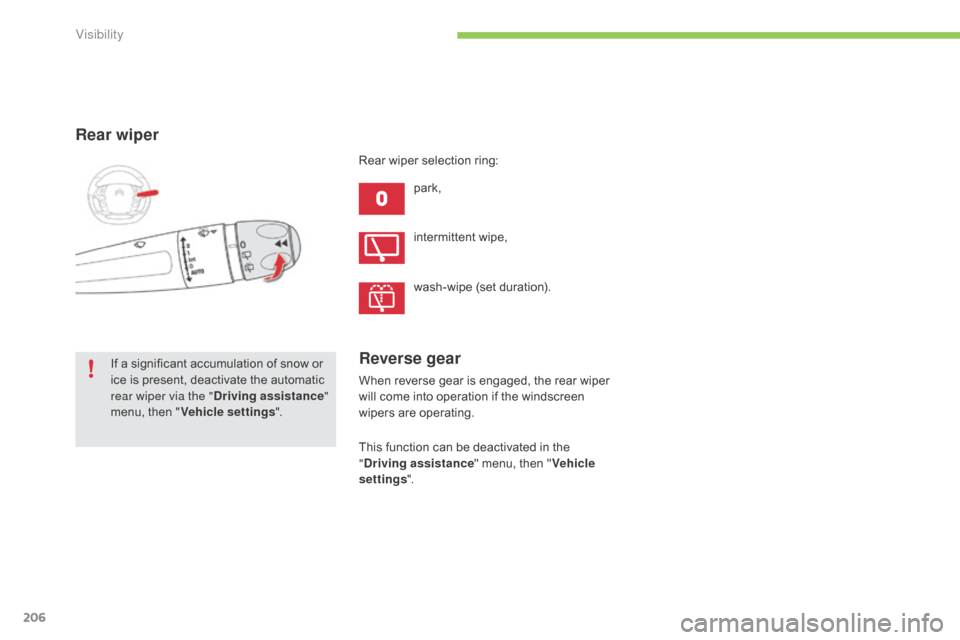
Rear wiper
park,
If
a
significant
accumulation
of
snow
or
i
ce
is
present,
deactivate
the
automatic
r
ear wiper via the " Driving assistance "
menu,
then
" Vehicle settings ". intermittent
w
ipe,
wash-wipe
(set duration).
Rear
wiper selection ring:
Reverse gear
When reverse gear is engaged, the rear wiper w
ill come into operation if the windscreen
w
ipers are operating.
This
function can be deactivated in the
"D
riving assistance "
menu, then "Vehicle
settings ".
Visibility