wheel Citroen C4 PICASSO RHD 2015 1.G Owner's Guide
[x] Cancel search | Manufacturer: CITROEN, Model Year: 2015, Model line: C4 PICASSO RHD, Model: Citroen C4 PICASSO RHD 2015 1.GPages: 428, PDF Size: 10.09 MB
Page 134 of 428
132
Electric parking brake
In the event of a battery failure, the
electric parking brake no longer works.
As
a safety measure, if the parking
b
rake is not applied, immobilise the
v
ehicle by engaging a gear or placing a
c
hock at one of the wheels.
Contact
a CITROËN dealer or a
q
ualified
w
orkshop.
Indicator lamp
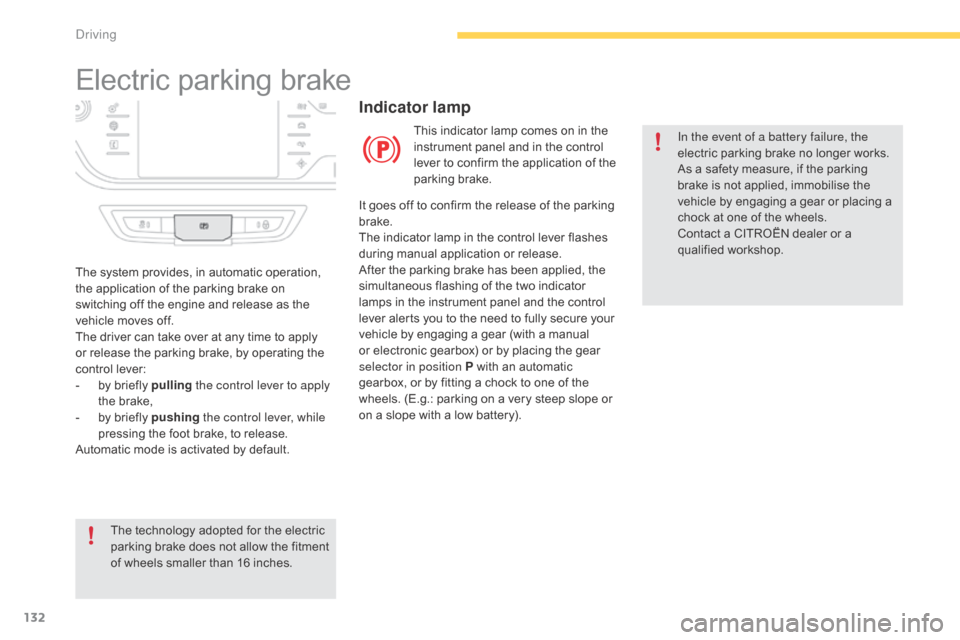
This indicator lamp comes on in the instrument panel and in the control
l
ever to confirm the application of the
par
king
b
rake.
The
system
provides,
in
automatic
operation,
t
he
application
of
the
parking
brake
on
s
witching
off
the
engine
and
release
as
the
v
ehicle
moves
off.
The
driver
can
take
over
at
any
time
to
apply
o
r
release
the
parking
brake,
by
operating
the
c
ontrol
lever:
-
b
y
briefly
pulling the control lever to apply
the
brake,
-
b
y
briefly
pushing the control lever, while
pressing
the
foot
brake,
to
release.
Automatic
mode
is
activated
by
default.
The
technology
adopted
for
the
electric
p
arking
brake
does
not
allow
the
fitment
o
f
wheels
smaller
than
16
inches. It
goes
off
to confirm the release of the parking
b
rake.
The
indicator lamp in the control lever flashes
d
uring
manual application or release.
After
the
parking brake has been applied, the
s
imultaneous flashing of the two indicator
l
amps
in
the instrument panel and the control
l
ever
alerts you to the need to fully secure your
v
ehicle
by
engaging a gear (with a manual
o
r
electronic gearbox) or by placing the gear
s
elector in position P with an automatic
g
earbox,
or by fitting a chock to one of the
w
heels.
(E.g.: parking on a very steep slope or
o
n
a
slope with a low battery).
driving
Page 135 of 428
133
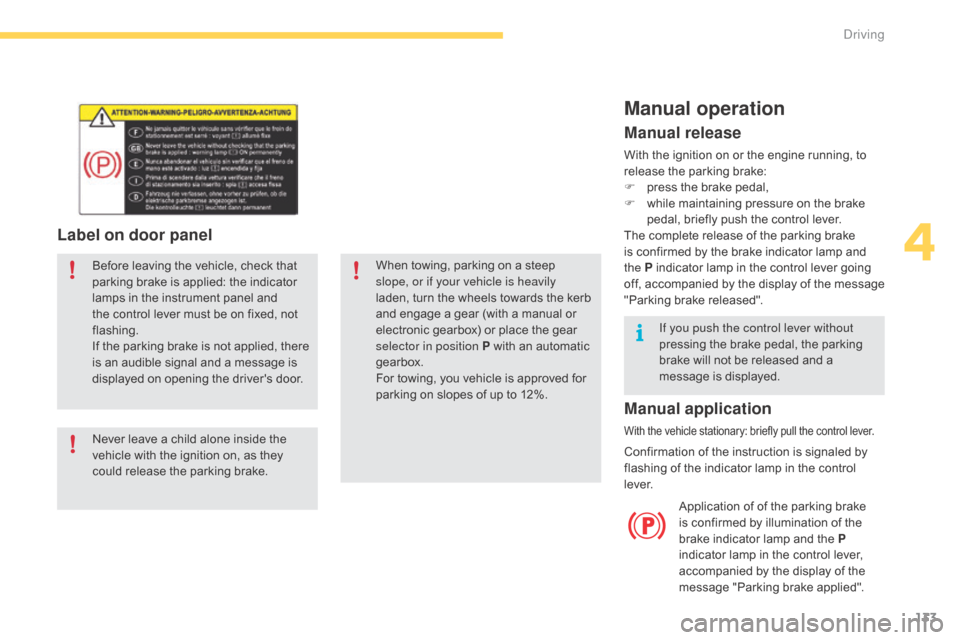
Label on door panel
Before leaving the vehicle, check that parking brake is applied: the indicator
l
amps in the instrument panel and
t
he control lever must be on fixed, not
f
lashing.
If
the parking brake is not applied, there
i
s an audible signal and a message is
d
isplayed on opening the driver's door.
Never
leave a child alone inside the
v
ehicle with the ignition on, as they
c
ould release the parking brake.When
towing, parking on a steep s
lope, or if your vehicle is heavily
laden,
turn the wheels towards the kerb
a
nd engage a gear (with a manual or
e
lectronic gearbox) or place the gear
s
elector in position P with an automatic
g
earbox.
For
towing, you vehicle is approved for
p
arking on slopes of up to 12%.
Manual operation
Application of of the parking brake is confirmed by illumination of the
b
rake indicator lamp and the P
indicator
lamp in the control lever,
a
ccompanied by the display of the
m
essage "Parking brake applied".
Manual release
With the ignition on or the engine running, to release the parking brake:
F
p
ress the brake pedal,
F
w
hile maintaining pressure on the brake
p
edal, briefly push the control lever.
The
complete release of the parking brake
i
s confirmed by the brake indicator lamp and
t
he P indicator lamp in the control lever going
o
ff,
a
ccompanied
b
y
t
he
d
isplay
o
f
t
he
m
essage
"
Parking brake released".
If you push the control lever without
pressing
the brake pedal, the parking
b
rake will not be released and a
m
essage is displayed.
Manual application
With the vehicle stationary: briefly pull the control lever.
Confirmation of the instruction is signaled by flashing of the indicator lamp in the control
l
eve r.
4
Driving
Page 137 of 428
135
Special cases
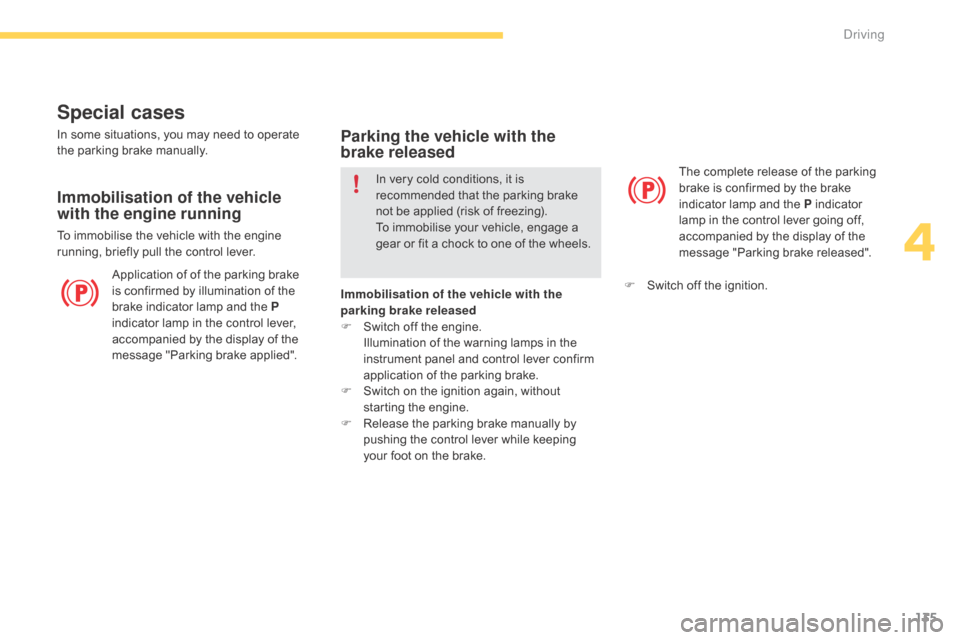
Application of of the parking brake is confirmed by illumination of the
b
rake indicator lamp and the P
indicator
lamp in the control lever,
a
ccompanied by the display of the
m
essage "Parking brake applied". The
complete release of the parking
b
rake is confirmed by the brake
i
ndicator lamp and the P indicator
l
amp in the control lever going off,
a
ccompanied by the display of the
m
essage "Parking brake released".
In
some
situations, you may need to operate
t
he
parking brake manually.
Immobilisation of the vehicle
with the engine running
To immobilise the vehicle with the engine r
unning, briefly pull the control lever.
Parking the vehicle with the
brake released
In very cold conditions, it is recommended that the parking brake
n
ot be applied (risk of freezing).
To
immobilise your vehicle, engage a
g
ear or fit a chock to one of the wheels.
Immobilisation of the vehicle with the
parking brake released
F
S
witch off the engine.
I
llumination of the warning lamps in the
i
nstrument panel and control lever confirm
a
pplication of the parking brake.
F
S
witch on the ignition again, without
s
tarting the engine.
F
R
elease the parking brake manually by
p
ushing the control lever while keeping
y
our foot on the brake. F
S
witch off the ignition.
4
Driving
Page 140 of 428
138
SituationsConsequences
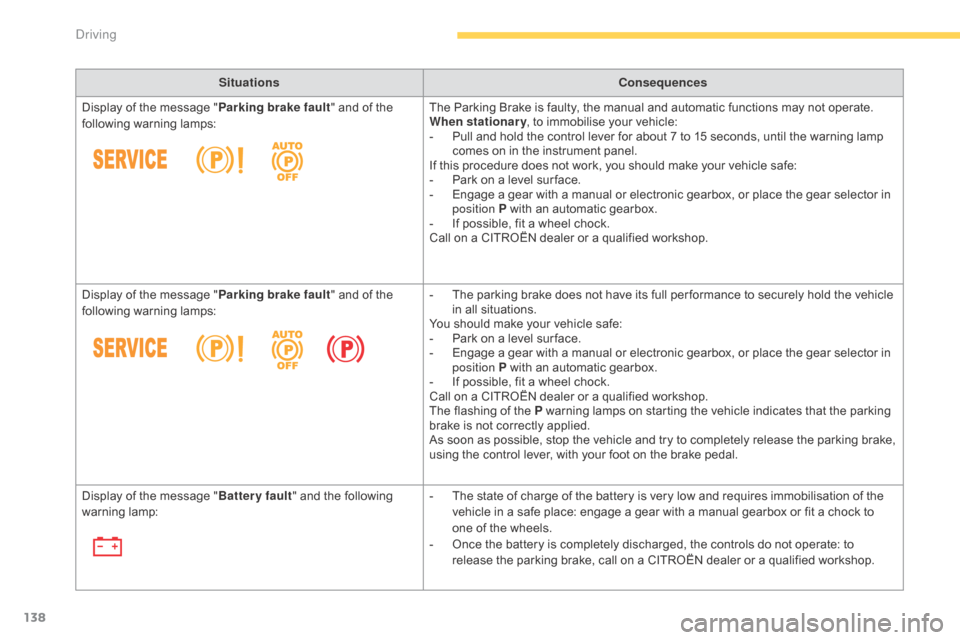
Display
of
the
message
" Parking brake fault "
and of the
fo
llowing
w
arning
lam
ps: The
Parking Brake is faulty, the manual and automatic functions may not operate.
When stationary ,
to immobilise your vehicle:
-
P
ull and hold the control lever for about 7 to 15 seconds, until the warning lamp
c
omes on in the instrument panel.
If
this procedure does not work, you should make your vehicle safe:
-
P
ark on a level sur face.
-
E
ngage a gear with a manual or electronic gearbox, or place the gear selector in
p
osition P with an automatic gearbox.
-
I
f possible, fit a wheel chock.
Call
on a CITROËN dealer or a qualified workshop.
Display
of
the
message
" Parking brake fault "
and of the
fo
llowing
w
arning
lam
ps: -
T
he parking brake does not have its full per formance to securely hold the vehicle
i
n all situations.
You
should make your vehicle safe:
-
P
ark on a level sur face.
-
E
ngage a gear with a manual or electronic gearbox, or place the gear selector in
p
osition P with an automatic gearbox.
-
I
f possible, fit a wheel chock.
Call
on a CITROËN dealer or a qualified workshop.
The
flashing of the P warning lamps on starting the vehicle indicates that the parking
b
rake is not correctly applied.
As
soon as possible, stop the vehicle and try to completely release the parking brake,
u
sing the control lever, with your foot on the brake pedal.
Display
of
the
message
" Battery fault "
and the following
w
arning
lam
p: -
T
he state of charge of the battery is very low and requires immobilisation of the
v
ehicle in a safe place: engage a gear with a manual gearbox or fit a chock to
o
ne of the wheels.
-
O
nce the battery is completely discharged, the controls do not operate: to
r
elease the parking brake, call on a CITROËN dealer or a qualified workshop.
Driving
Page 148 of 428
146
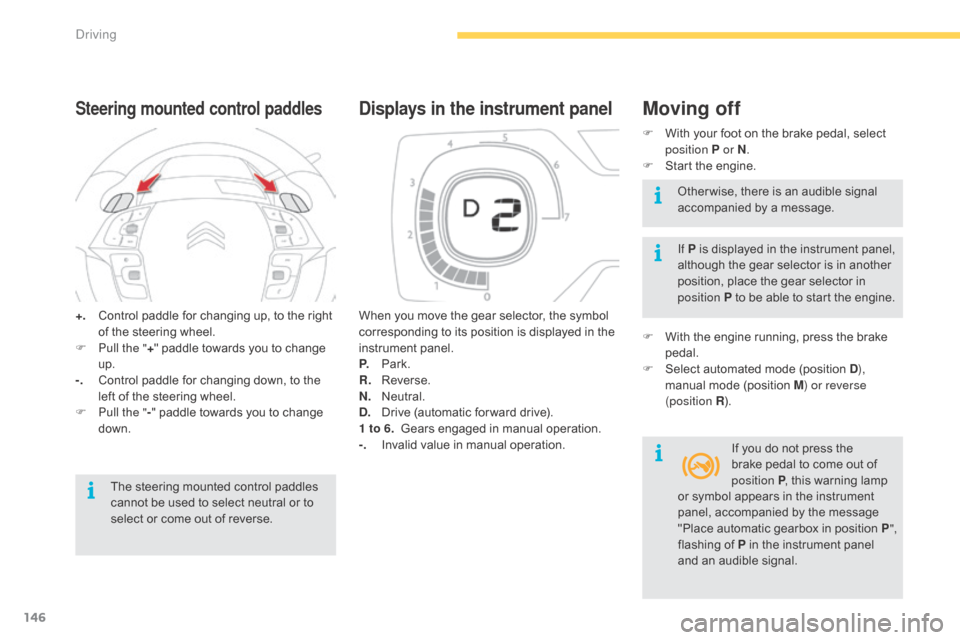
+. Control paddle for changing up, to the right o
f the steering wheel.
F
P
ull the " +"
paddle towards you to change
u
p.
-.
C
ontrol paddle for changing down, to the
l
eft of the steering wheel.
F
P
ull the " -"
paddle towards you to change
d
own.
Steering mounted control paddles
The steering mounted control paddles cannot be used to select neutral or to
s
elect or come out of reverse. When
you move the gear selector, the symbol
c
orresponding to its position is displayed in the
in
strument
pan
el.
P.
Pa
rk.
R.
R
everse.
N.
N
eutral.
D.
D
rive (automatic for ward drive).
1 to 6.
G
ears engaged in manual operation.
-.
I
nvalid value in manual operation.
Displays in the instrument panelMoving off
F With
your foot on the brake pedal, select p
osition P or N .
F
S
tart the engine.
If P
is displayed in the instrument panel,
a
lthough the gear selector is in another
p
osition, place the gear selector in
p
osition P to be able to start the engine.
F
W
ith the engine running, press the brake
ped
al.
F
S
elect automated mode (position D),
manual
mode (position M) or reverse
(position R ).
If
you do not press the
b
rake pedal to come out of
p
osition P,
this warning lamp
O
ther wise, there is an audible signal
a
ccompanied by a message.
or
symbol appears in the instrument
p
anel, accompanied by the message
"
Place automatic gearbox in position P",
flashing
of P in the instrument panel
a
nd an audible signal.
Driving
Page 161 of 428
159
Steering mounted controls
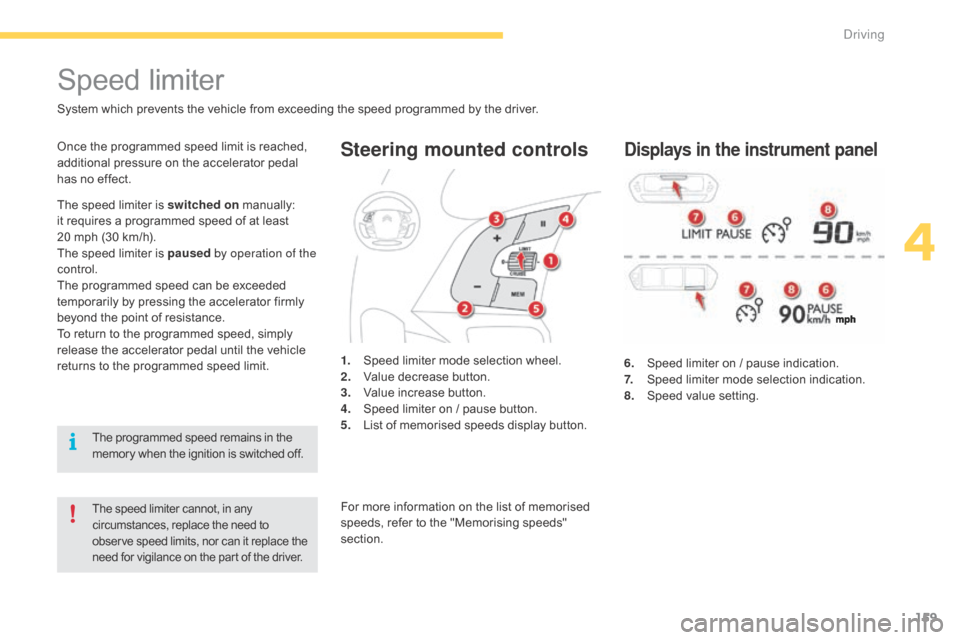
6. Speed limiter on / pause indication.
7. S peed limiter mode selection indication.
8.
S
peed value setting.
Speed limiter
System which prevents the vehicle from exceeding the speed programmed by the driver.
The speed limiter cannot, in any circumstances, replace the need to o
bserve speed limits, nor can it replace the
n
eed for vigilance on the part of the driver.
Once the programmed speed limit is reached, additional pressure on the accelerator pedal
h
as no effect.
1.
S
peed limiter mode selection wheel.
2.
V
alue decrease button.
3.
V
alue increase button.
4.
S
peed limiter on / pause button.
5.
L
ist of memorised speeds display button.Displays in the instrument panel
The speed limiter is switched on manually: i
t requires a programmed speed of at least
2
0 mph (30 km/h).
The
speed limiter is paused by operation of the
control.
The
programmed speed can be exceeded
t
emporarily by pressing the accelerator firmly
b
eyond the point of resistance.
To
return to the programmed speed, simply
r
elease the accelerator pedal until the vehicle
r
eturns to the programmed speed limit.
The
programmed speed remains in the
m
emory when the ignition is switched off.For
more information on the list of memorised
s
peeds, refer to the "Memorising speeds"
s
ection.
4
Driving
Page 162 of 428
160
Switching on / Pause
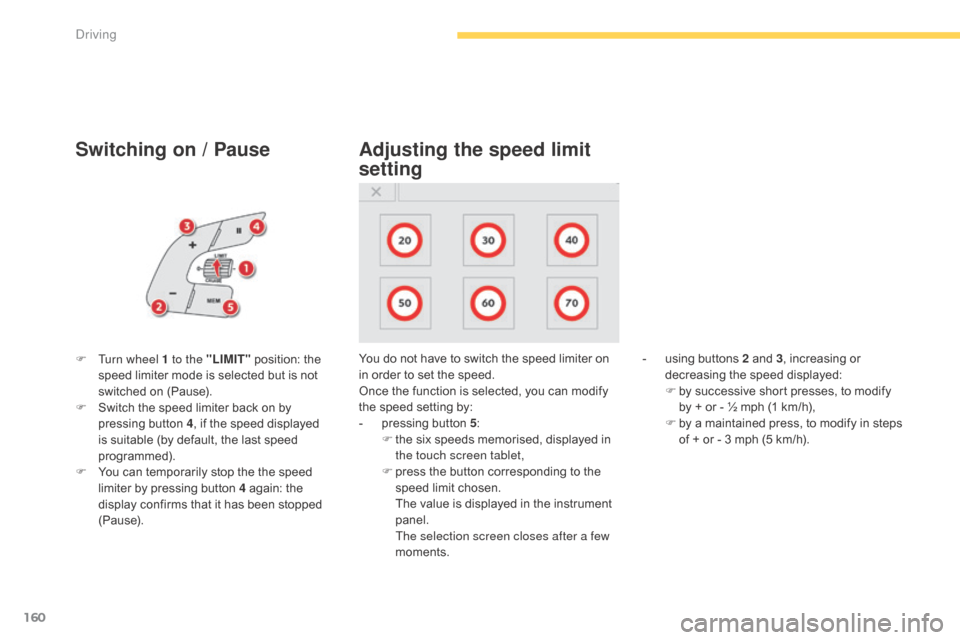
F Turn wheel 1 to the "LIMIT" position: the s
peed limiter mode is selected but is not
s
witched on (Pause).
F
S
witch the speed limiter back on by
p
ressing button 4,
if the speed displayed
i
s suitable (by default, the last speed
pro
grammed).
F
Y
ou can temporarily stop the the speed
l
imiter by pressing button 4 again: the
d
isplay confirms that it has been stopped
(
Pause). You
do not have to switch the speed limiter on i
n order to set the speed.
Once
the function is selected, you can modify
t
he speed setting by:
-
p
ressing button 5:
F
t
he six speeds memorised, displayed in
t
he touch screen tablet,
F
p
ress the button corresponding to the
s
peed limit chosen.
T
he value is displayed in the instrument
pan
el.
T
he selection screen closes after a few
moments.
Adjusting the speed limit
setting
- using buttons 2 and 3, increasing or d
ecreasing the speed displayed:
F
b
y successive short presses, to modify
b
y + or - ½ mph (1 km/h),
F
b
y a maintained press, to modify in steps
o
f + or - 3 mph (5 km/h).
Driving
Page 163 of 428

161
on sharp acceleration, as when
descending a steep hill, the speed
l
imiter will not be able to prevent
t
he vehicle from exceeding the
pro
grammed
s
peed.
The
limiter is temporarily deactivated
a
nd the displayed programmed speed
f
lashes.
An
audible signal accompanies the
f
lashing of the programmed speed
w
hen exceeding the speed is not due to
a
n action by the driver.
The
use of mats not approved by
C
ITROËN may inter fere with the
o
peration of the speed limiter.
To
avoid any risk of jamming of the
ped
als:
-
e
nsure that the mat is secured
c
o r r e c t l y,
-
d
o not fit one mat on top of another.
Flashing
of
the
dashes
indicates
a
fault
with
the
sp
eed l
imiter.
Have
it
checked
by
a
CITROËN
dealer
or
a
q
ualified
w
orkshop.
Operating fault
F Press f irmly on the accelerator pedal, g
oing beyond the point of resistance,
to
exceed
the programmed speed limit.
The
speed limiter is deactivated temporarily
a
nd the displayed programmed speed flashes.
An
audible signal accompanies the flashing
o
f the programmed speed when exceeding
t
he speed is not due to an action by the driver
(
steep
h
ill...).
As
soon as the vehicle's speed returns to the
p
rogrammed value, the limiter operates again:
t
he display of the programmed speed becomes
s
teady again.
Switching off Temporarily exceeding the
programmed speed
F Turn wheel 1 to the "0" p osition. T
he display of information related to the
sp
eed
l
imiter
d
isappears.
4
driving
Page 164 of 428
162
Steering mounted controls
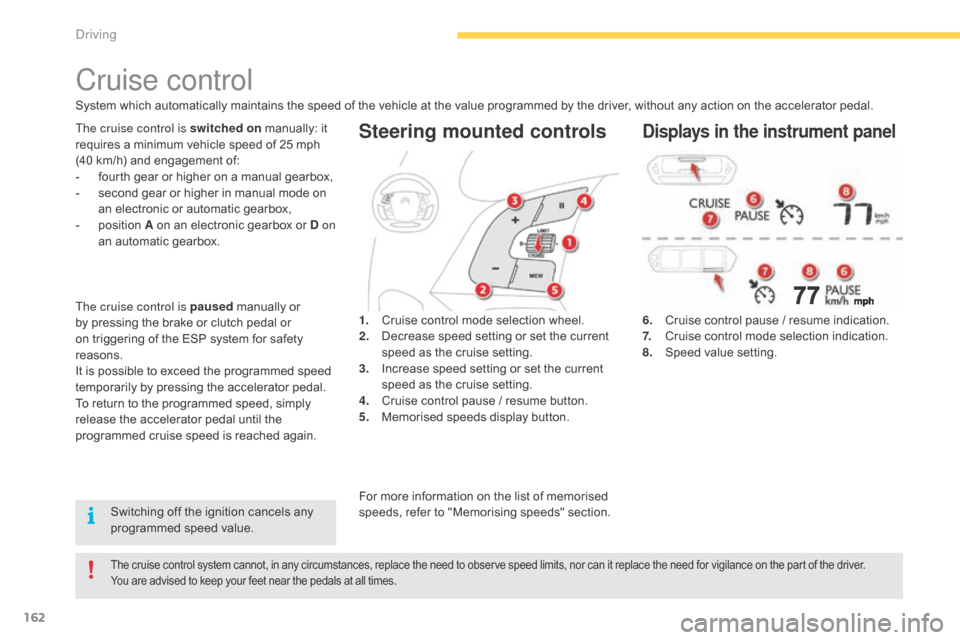
6. Cruise control pause / resume indication.
7. C ruise control mode selection indication.
8.
S
peed value setting.
Cruise control
System which automatically maintains the speed of the vehicle at the value programmed by the driver, without any action on the accelerator pedal.
The cruise control system cannot, in any circumstances, replace the need to observe speed limits, nor can it replace the need for vigilance on the part of the driver.
Y ou are advised to keep your feet near the pedals at all times.
The cruise control is switched on manually: it r
equires a minimum vehicle speed of 25 mph
(
40 km/h) and engagement of:
-
f
ourth gear or higher on a manual gearbox,
-
s
econd gear or higher in manual mode on
a
n electronic or automatic gearbox,
-
p
osition A on an electronic gearbox or D on
an
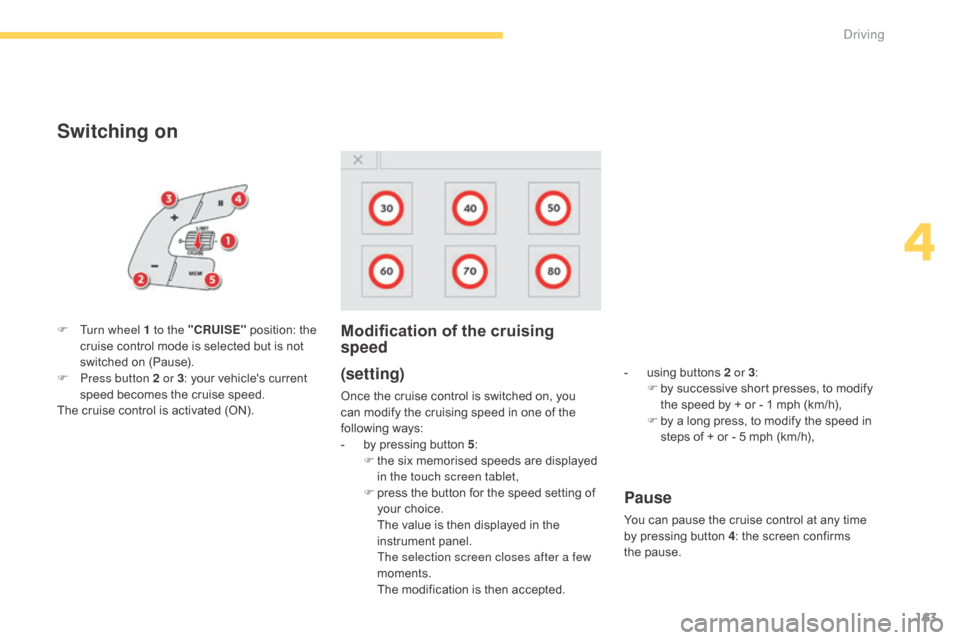
automatic gearbox. 1.
C
ruise control mode selection wheel.
2.
D
ecrease speed setting or set the current
s
peed as the cruise setting.
3.
I
ncrease speed setting or set the current
s
peed as the cruise setting.
4.
C
ruise control pause / resume button.
5.
M
emorised speeds display button.Displays in the instrument panel
Switching off the ignition cancels any programmed speed value.
The cruise control is paused
manually or
b
y
pressing the brake or clutch pedal or
o
n
triggering of the ESP system for safety
r
easons.
It
is
possible to exceed the programmed speed
t
emporarily by pressing the accelerator pedal.
To
return to the programmed speed, simply
r
elease the accelerator pedal until the
p
rogrammed cruise speed is reached again.
For more information on the list of memorised s
peeds, refer to "Memorising speeds" section.
Driving
Page 165 of 428
163
Switching on
(setting)
Once the cruise control is switched on, you can modify the cruising speed in one of the
f
ollowing
w
ays:
-
b
y pressing button 5:
F
t
he six memorised speeds are displayed
i
n the touch screen tablet,
F
p
ress the button for the speed setting of
y
our
c
hoice.
T
he value is then displayed in the
in
strument
pan
el.
T
he selection screen closes after a few
moments.
T
he modification is then accepted.
F
T
urn wheel 1 to the "CRUISE"
position:
the
c
ruise
control
mode
is
selected
but
is
not
s
witched
on
(Pause).
F
P
ress button 2 or 3
:
your
vehicle's
current
s
peed
becomes
the
cruise
speed.
The
cruise
control
is
activated
(ON).
Modification of the cruising
speed
- using buttons 2 or 3:
F b y successive short presses, to modify
t
he speed by + or - 1 mph (km/h),
F
b
y a long press, to modify the speed in
s
teps of + or - 5 mph (km/h),
Pause
You can pause the cruise control at any time by pressing button 4:
the screen confirms
t
he pause.
4
Driving