trip computer Citroen C4 RHD 2011 2.G User Guide
[x] Cancel search | Manufacturer: CITROEN, Model Year: 2011, Model line: C4 RHD, Model: Citroen C4 RHD 2011 2.GPages: 316, PDF Size: 9.93 MB
Page 271 of 316
269
The system is coded in such a way that it will only
operate in your vehicle. If it is to be installed in another vehicle, contact your CITROËN dealer for confi guration py
of the system.
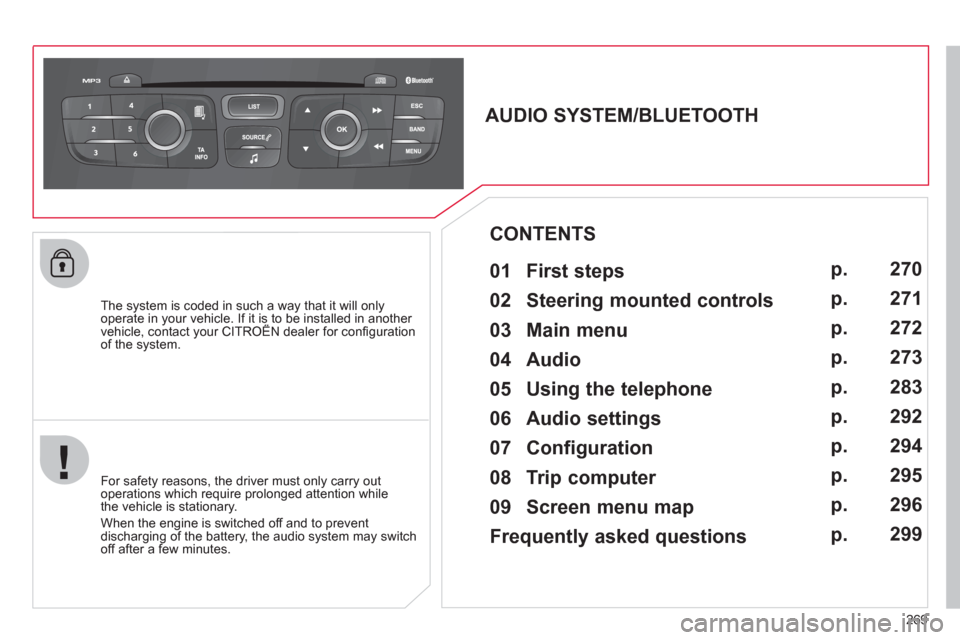
AUDIO SYSTEM/BLUETOOTH
01 First steps
For safety reasons, the driver must only carry out
operations which require prolonged attention while
the vehicle is stationary.
When the engine is switched o
ff and to prevent
discharging of the battery, the audio system may switch off after a few minutes.
CONTENTS
02 Steering mounted controls
03 Main menu
04 Audio
05 Using the telephone
06 Audio settings
07 Configuration
08 Trip computer
09 Screen menu map
Frequently asked questions p.
p.
p.
p.
p.
p.
p.
p.
p.
p.
270
271
272
273
283
292
294
295
296
299
Page 272 of 316
270
01
1
2
7
45
6
3
8
9
10
13
1112
14
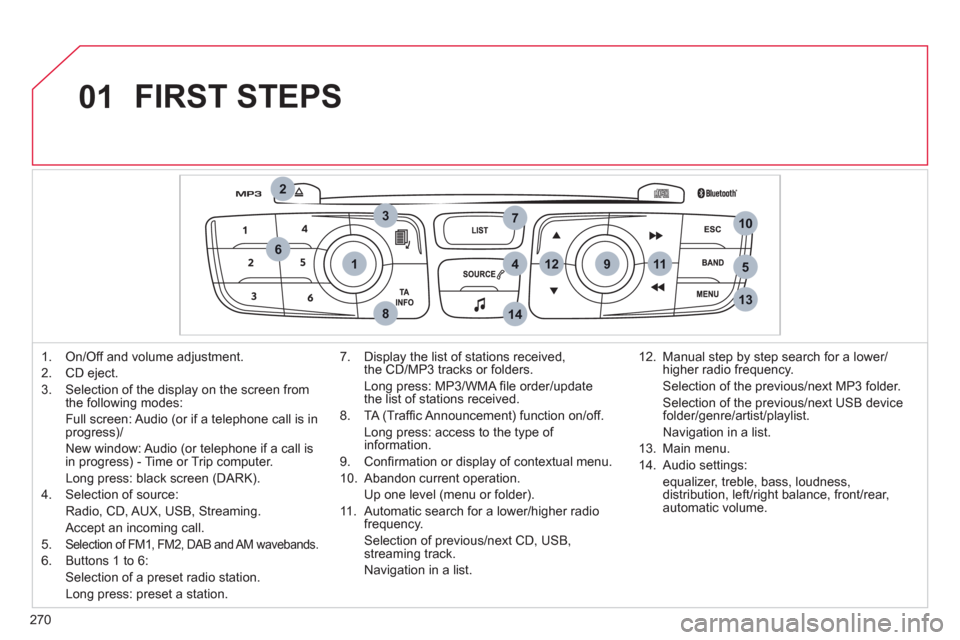
FIRST STEPS
1. On/Off and volume adjustment.
2.
CD eject.
3.
Selection of the display on the screen from
the following modes:
Full screen: Audio
(or if a telephone call is inprogress)/
New window: Audio
(or telephone if a call is
in progress) - Time or Trip computer.
Lon
g press: black screen (DARK).
4.
Selection of source:
Radio,
CD, AUX, USB, Streaming.
Accept an incomin
g call.
5. Selection of FM1, FM2, DAB and AM wavebands.
6. Buttons 1 to 6:
Selection of a preset radio station.
Long press: preset a station.
7. Displa
y the list of stations received,
the CD/MP3 tracks or folders.
Lon
g press: MP3/WMA fi le order/updatethe list of stations received.
8. TA
(Traffi c Announcement) function on/off.
Lon
g press: access to the type of information.
9. Confi rmation or displa
y of contextual menu.
10. Abandon current operation.
Up one level
(menu or folder).
11 . Automatic search
for a lower/higher radiofrequency.
Selection of previous/next CD, USB,
streaming track.
Navi
gation in a list.12. Manual step b
y step search for a lower/higher radio frequency.
Selection of the previous/next MP3 folder.
Selection of the previous/next USB device folder/genre/artist/playlist.
Navi
gation in a list.
1
3. Main menu.
14. Audio settin
gs:
equa
lizer, treble, bass, loudness,
distribution, left/right balance, front/rear, automatic volume.
Page 274 of 316
272
03
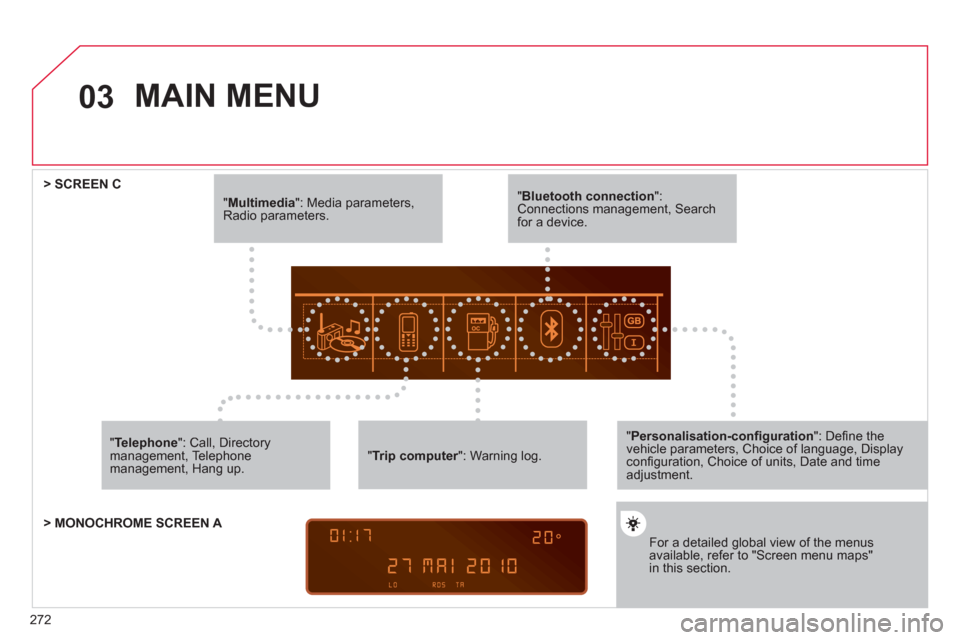
"Multimedia": Media parameters, Radio parameters.
"Trip computer ": Warning log. r
For a detailed global view of the menusavailable, refer to "Screen menu maps"in this section.
> SCREEN C
"Bluetooth connection ": Connections management, Search for a device.
" Telephone
": Call, Directorymanagement, Telephone management, Hang up.
MAIN MENU
> MONOCHROME SCREEN A
"Personalisation-confi guration": Defi ne thevehicle parameters, Choice of language, Display confi guration, Choice of units, Date and time adjustment.
Page 297 of 316
295
08TRIP COMPUTER
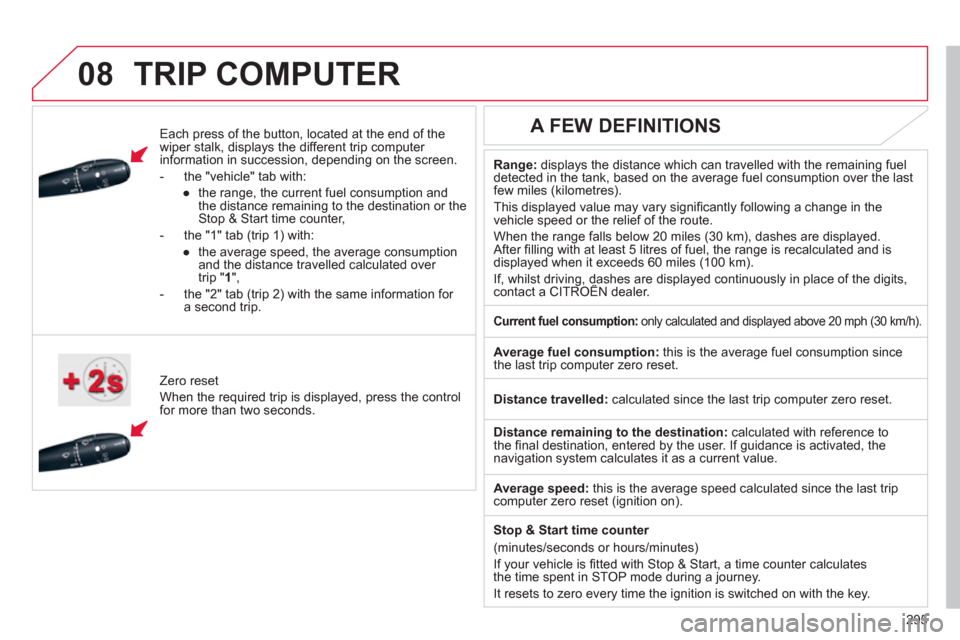
Each press of the button, located at the end of the
wiper stalk, displays the different trip computer
information in succession, depending on the screen.
- th
e "vehicle
" tab with:
●
the ran
ge, the current fuel consumption and
the distance remaining to the destination or the Stop & Start time counter,
- the "1" tab
(trip 1) with:
●
t
he average speed, the average consumptionand the distance travelled calculated over
trip " 1 ",
- the "2" tab
(trip 2) with the same information for a second trip.
Z
ero reset
When the required trip is displa
yed, press the control
for more than two seconds.
Range:displays the distance which can travelled with the remaining fuel
detected in the tank, based on the average fuel consumption over the last few miles (kilometres).
This displa
yed value may vary signifi cantly following a change in the
vehicle speed or the relief of the route.
When the ran
ge falls below 20 miles (30 km), dashes are displayed.After fi lling with at least 5 litres of fuel, the range is recalculated and is
displayed when it exceeds 60 miles (100 km).
If, whilst driving, dashes are displayed continuously in place of the digits, contact a CITROËN dealer. ,g,
A FEW DEFINITIONS
Current fuel consumption:only calculated and displayed above 20 mph (30 km/h).
Average fuel consumption:
this is the average fuel consumption since
the last trip computer zero reset.
Distance travelled:calculated since the last trip computer zero reset.
Distance remaining to the destination: calculated with reference to
the fi nal destination, entered by the user. If guidance is activated, the navigation system calculates it as a current value.
Avera
ge speed: this is the average speed calculated since the last tripcomputer zero reset (ignition on).
Sto
p & Start time counter
(minutes/seconds or hours/minutes)
I
f your vehicle is fi tted with Stop & Start, a time counter calculates
the time spent in STOP mode during a journey.
It resets to zero ever
y time the ignition is switched on with the key.
Page 298 of 316
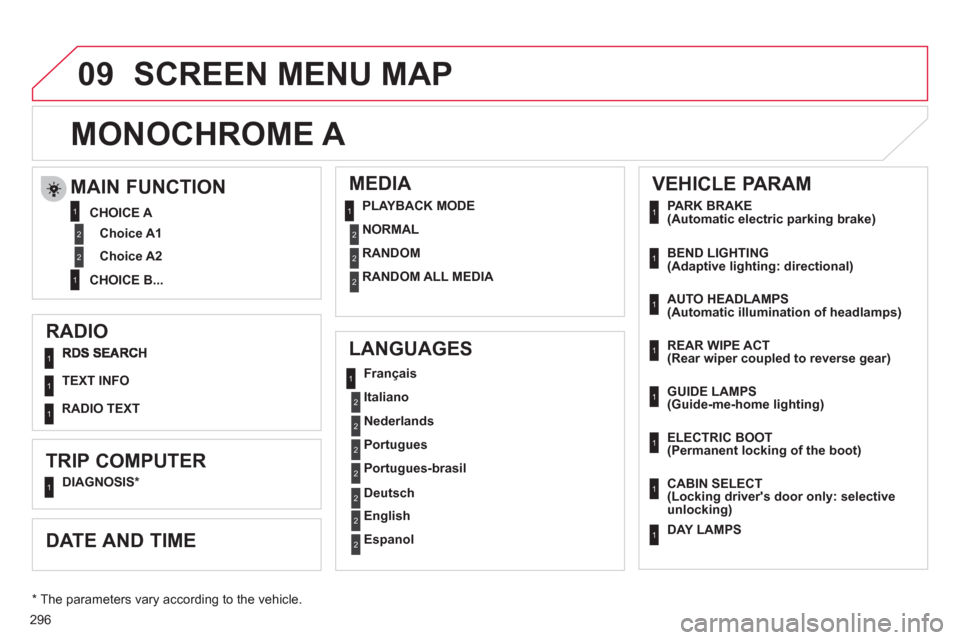
296
09
RADIO
LANGUAGES
MEDIA
TEXT INFO
TRIP COMPUTER
DIAGNOSIS *
Fran
çais
Italiano
Nederlands
Portu
gues
Portu
gues-brasil
En
glish
Deutsch
Espanol
SCREEN MENU MAP
MONOCHROME A
MAIN FUNCTION
Choice A1
Choice A2
CHOICE A
CHOICE B...
PLAYBACK MODE
NORMAL
RANDOM
RANDOM ALL MEDIA
DATE AND TIME
VEHICLE PARAM
PARK BRAKE (Automatic electric parking brake)
BEND LIGHTING (Adaptive lighting: directional)
AUTO HEADLAMPS(Automatic illumination of headlamps)
REAR WIPE ACT (Rear wiper coupled to reverse gear)
GUIDE LAMPS (Guide-me-home lighting)
CABIN SELECT (Locking driver's door only: selectiveunlocking)
ELECTRIC BOOT (Permanent locking of the boot)
DAY LAMPS
RADIO TEXT
*
The parameters vary according to the vehicle.
1
11
2
2
2
2
2
2
1
2
1
2
2
1
1
2
2
2
1
1
1
1
1
1
1
1
1
Page 299 of 316
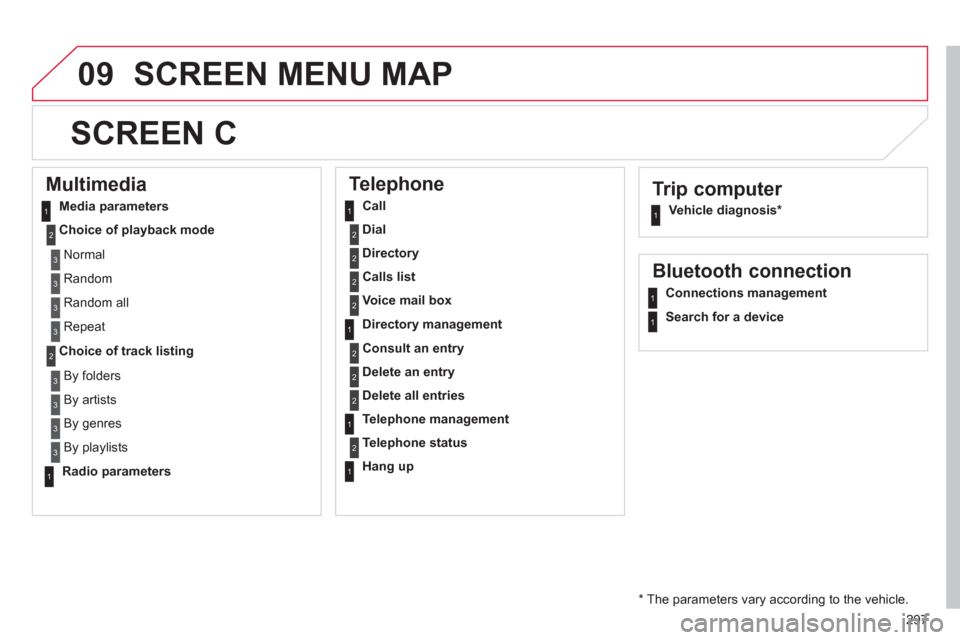
297
09SCREEN MENU MAP
Trip computer
Vehicle diagnosis *
SCREEN C
Multimedia
Media parameters
Choice of pla
yback mode
Choice of track listing
Telephone
Call
Dial
Directory
Calls list
Voice mail box
Directory management
Consult an entry
Delete an entry
Delete all entries
Telephone management
Telephone status
Han
g up
Bluetooth connection
Connections management
Search for a device
N
ormal
R
andom
R
andom all
Repeat
B
y folders
B
y artists
By genres
By playlists
Radio parameters
*
The parameters vary according to the vehicle.
11
2
2
1
2
2
2
2
1
2
2
2
1
2
1
1
1
3
3
3
3
3
3
3
3
1
Page 307 of 316
305
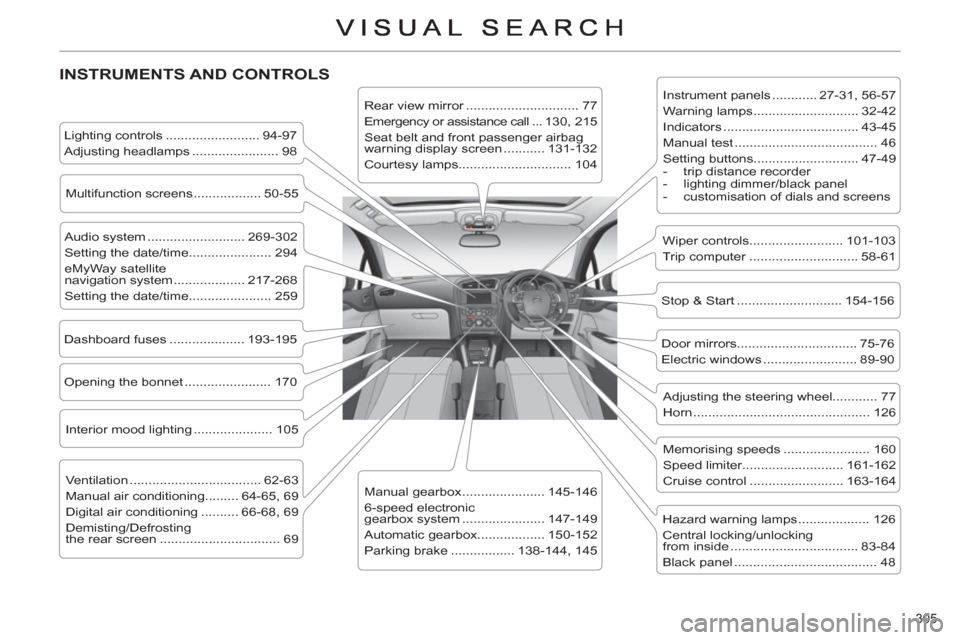
INSTRUMENTS AND CONTROLS
Instrument panels ............ 27-31, 56-57
Warning lamps ............................ 32-42
Indicators .................................... 43-45
Manual test ...................................... 46
Setting buttons............................ 47-49
- trip distance recorder
- lighting dimmer/black panel
- customisation of dials and screens
Lighting controls ......................... 94-97
Adjusting headlamps ....................... 98
Stop & Start ............................ 154-156
Door mirrors ................................ 75-76
Electric windows ......................... 89-90
Dashboard fuses .................... 193-195
Opening the bonnet ....................... 170
Adjusting the steering wheel............ 77
Horn ............................................... 126
Audio system .......................... 269-302
Setting the date/time...................... 294
eMyWay satellite
navigation system ................... 217-268
Setting the date/time...................... 259
Manual gearbox ...................... 145-146
6-speed electronic
gearbox system ...................... 147-149
Automatic gearbox.................. 150-152
Parking brake ................. 138-144, 145
Wiper controls......................... 101-103
Trip computer ............................. 58-61
Rear view mirror .............................. 77
Emergency or assistance call ...130, 215
Seat belt and front passenger airbag
warning display screen ........... 131-132
Courtesy lamps.............................. 104
Interior mood lighting ..................... 105
Hazard warning lamps ................... 126
Central locking/unlocking
from inside .................................. 83-84
Black panel ...................................... 48
Multifunction screens .................. 50-55
Ventilation ................................... 62-63
Manual air conditioning......... 64-65, 69
Digital air conditioning .......... 66-68, 69
Demisting/Defrosting
the rear screen ................................ 69
Memorising speeds ....................... 160
Speed limiter........................... 161-162
Cruise control ......................... 163-164
Page 312 of 316
310
ALPHABETICAL INDEX
S Steering mounted
controls .............................220, 271
Stopping the vehicle .....80, 147, 150
Stop Start .................. 61, 67, 69, 92,
154, 170, 176, 197, 295
Storage ........ 107, 108, 110-112, 115
Storage compartments ....... 107, 110
Storage drawer ........................... 113
Storage net ................................. 115
Stowing rings .............................. 115
Sun visor ....................................108
Synchronising
the remote control ......................81
Synthesiser, voice ......................234
Systems, ASR and ESP .............129
T Table of weights .................209, 212
Tables of engines ............... 207, 211
Tables of fuses ...........................193
Tank, fuel ......................................93
Technical data .....................207-214
Telephone ...........................240, 283
Temperature control
for heated seats .........................72
Temporary tyre repair kit ............178
Ticket holder ...............................107
Time .............................47, 259, 294
TMC (Traffi c info) .......................237
Tools ...........................................183
Torch .......................................... 117
Total distance recorder .................47
Towbar ........................................203
Towed loads .......................209, 212
Towing another vehicle ...............201
Traction control (ASR) ................129
Traffi c information
(TA) ..........................238, 251, 274T Traffi c information
(TMC) ...............................237, 238
Trip computer ..........................58-61
Trip distance recorder ..................47
Tyre pressures ...........................214
Tyre under-infl ation
detection .............................46, 127
U Under-infl ation
(detection) ................................127
Under fl oor storage .................... 117
Unlocking from the inside .............83
Unlocking the boot .................78, 88
Unlocking the doors .....................78
USB Box .............................109, 279
USB port .............................109, 279
V Ventilation ................................62-64
W Warning lamps ........................32-42
Weights ..............................209, 212
Welcome lighting ..................98, 106
Window controls ...........................89
Wipers ................................101, 102
X Xenon headlamps ......................187