parking brake Citroen C4 RHD 2013.5 2.G User Guide
[x] Cancel search | Manufacturer: CITROEN, Model Year: 2013.5, Model line: C4 RHD, Model: Citroen C4 RHD 2013.5 2.GPages: 328, PDF Size: 28.6 MB
Page 52 of 328
2
MULTIFUNCTION SCREENS
50
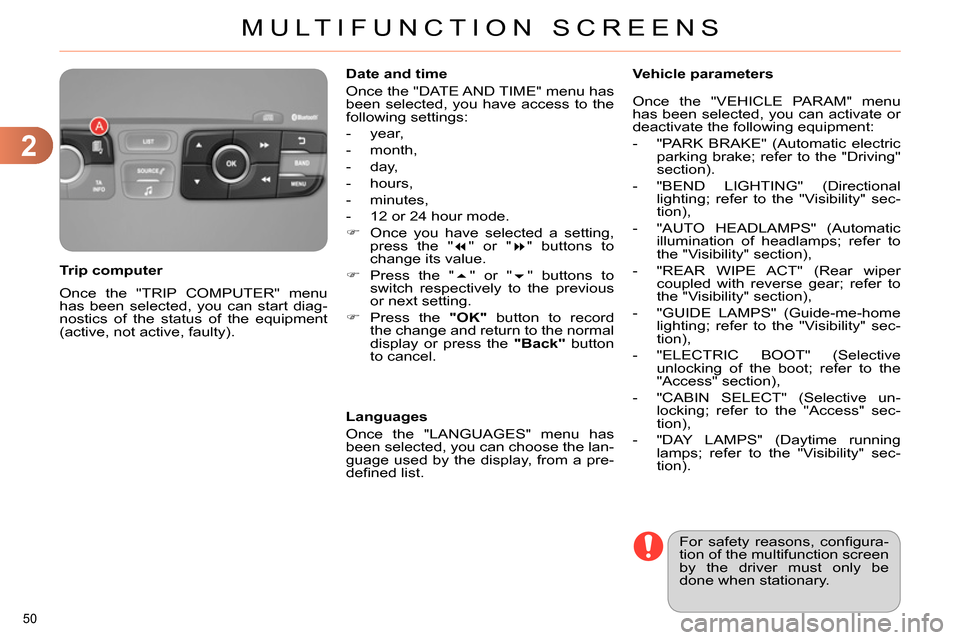
Once the "TRIP COMPUTER" menu
has been selected, you can start diag-
nostics of the status of the equipment
(active, not active, faulty).
Trip computer
Date and time
Once the "DATE AND TIME" menu has
been selected, you have access to the
following settings:
- year,
- month,
- day,
- hours,
- minutes,
- 12 or 24 hour mode.
Once you have selected a setting,
press the "
" or "
" buttons to
change its value.
Press the "
" or "
" buttons to
switch respectively to the previous
or next setting.
Press the "OK"
button to record
the change and return to the normal
display or press the "Back"
button
to cancel.
Languages
Once the "LANGUAGES" menu has
been selected, you can choose the lan-
guage used by the display, from a pre-
defi ned list.
For safety reasons, confi gura-
tion of the multifunction screen
by the driver must only be
done when stationary.
Vehicle parameters
Once the "VEHICLE PARAM" menu
has been selected, you can activate or
deactivate the following equipment:
- "PARK BRAKE" (Automatic electric
parking brake; refer to the "Driving"
section).
- "BEND LIGHTING" (Directional
lighting; refer to the "Visibility" sec-
tion),
- "AUTO HEADLAMPS" (Automatic
illumination of headlamps; refer to
the "Visibility" section),
- "REAR WIPE ACT" (Rear wiper
coupled with reverse gear; refer to
the "Visibility" section),
- "GUIDE LAMPS" (Guide-me-home
lighting; refer to the "Visibility" sec-
tion),
- "ELECTRIC BOOT" (Selective
unlocking of the boot; refer to the
"Access" section),
- "CABIN SELECT" (Selective un-
locking; refer to the "Access" sec-
tion),
- "DAY LAMPS" (Daytime running
lamps; refer to the "Visibility" sec-
tion).
Page 55 of 328
2
MULTIFUNCTION SCREENS
53
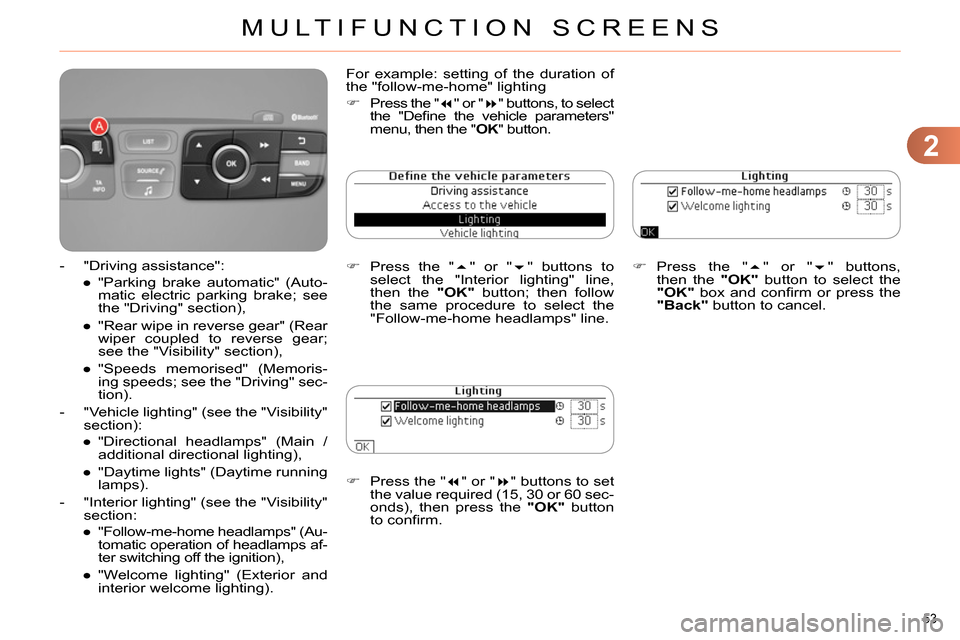
Press the "
" or "
" buttons to set
the value required (15, 30 or 60 sec-
onds), then press the "OK"
button
to confi rm.
Press the "
" or "
" buttons,
then the "OK"
button to select the
"OK"
box and confi rm or press the
"Back"
button to cancel.
For example: setting of the duration of
the "follow-me-home" lighting
Press the "
" or "
" buttons, to select
the "Defi ne the vehicle parameters"
menu, then the " OK
" button.
Press the "
" or "
" buttons to
select the "Interior lighting" line,
then the "OK"
button; then follow
the same procedure to select the
"Follow-me-home headlamps" line.
- "Driving assistance":
●
"Parking brake automatic" (Auto-
matic electric parking brake; see
the "Driving" section),
●
"Rear wipe in reverse gear" (Rear
wiper coupled to reverse gear;
see the "Visibility" section),
●
"Speeds memorised" (Memoris-
ing speeds; see the "Driving" sec-
tion).
- "Vehicle lighting" (see the "Visibility"
section):
●
"Directional headlamps" (Main /
additional directional lighting),
●
"Daytime lights" (Daytime running
lamps).
- "Interior lighting" (see the "Visibility"
section:
●
"Follow-me-home headlamps" (Au-
tomatic operation of headlamps af-
ter switching off the ignition),
●
"Welcome lighting" (Exterior and
interior welcome lighting).
Page 58 of 328
2
MULTIFUNCTION SCREENS
56
Choice of sounds
This menu allows you to choose a
family of polyphonic sounds from four
available. These sounds are grouped
together in a family and are adapted
to suit the situation and context (alert,
confi rmation, rejection, direction indica-
tors, lighting left on, key in ignition...).
Display confi guration
This menu is used to select the col-
our scheme for the screen, adjust the
brightness, set the date and time and
to choose the units for distance (km
or miles), fuel consumption (l/100 km,
mpg or km/l) and temperature (°Celsius
or °Fahrenheit).
Adjusting the voice synthesiser
This menu is used to adjust the volume
setting for navigation instructions and
to choose the type of voice (male or fe-
male).
Adjusting the date and time
- Press on SETUP
.
- Select "Display confi guration" and
confi rm.
- Select "Set date and time" and con-
fi rm.
Select "Minute adjustment via GPS" so
that the minutes are adjusted automati-
cally by satellite reception.
- Select the setting to modify. Confi rm
by pressing on OK
, then modify the
setting and confi rm again to save
the modifi cation.
- Adjust the settings one by one.
- Select " OK
" in the screen then con-
fi rm to save the setting.
Choice of language
This menu is used to choose the lan-
guage used by the screen from a de-
fi ned list.
Vehicle parameters
This menu is used to activate or deac-
tivate certain driving and comfort sys-
tems, classifi ed by category:
- "Driver aid":
●
"Electric brake * " (Automatic electric
parking brake; see "Driving" sec-
tion),
●
"Rear wiper" (Rear wiper coupled
to reverse gear; see "Visibility"
section),
●
"Speed limits" (Memorising speed
settings for the cruise control and
speed limiter; see "Driving" sec-
tion).
Alert log
This lists the active alerts by displaying
in turn the different messages associ-
ated with them.
- "Vehicle access" (see "Access" sec-
tion):
●
"Driver doors selectivity" (Se-
lective unlocking of the driver's
door),
●
"Rear doors selectivity" (Selective
unlocking of the boot using the
centre button on the remote con-
trol; see "Access section).
- "Driving lights" (see "Visibility" sec-
tion):
●
"Day lights * " (Daytime running
lamps),
●
"Directional headlights" (Main /
additional directional lighting).
- "Comfort lighting" (see "Visibility"
section):
●
"Welcome lights" (Interior welcome
lighting),
●
"Running lights" (Automatic timed
operation of headlamps).
*
Depending on country.
Page 147 of 328
9
DRIVING
145
ELECTRIC PARKING BRAKE
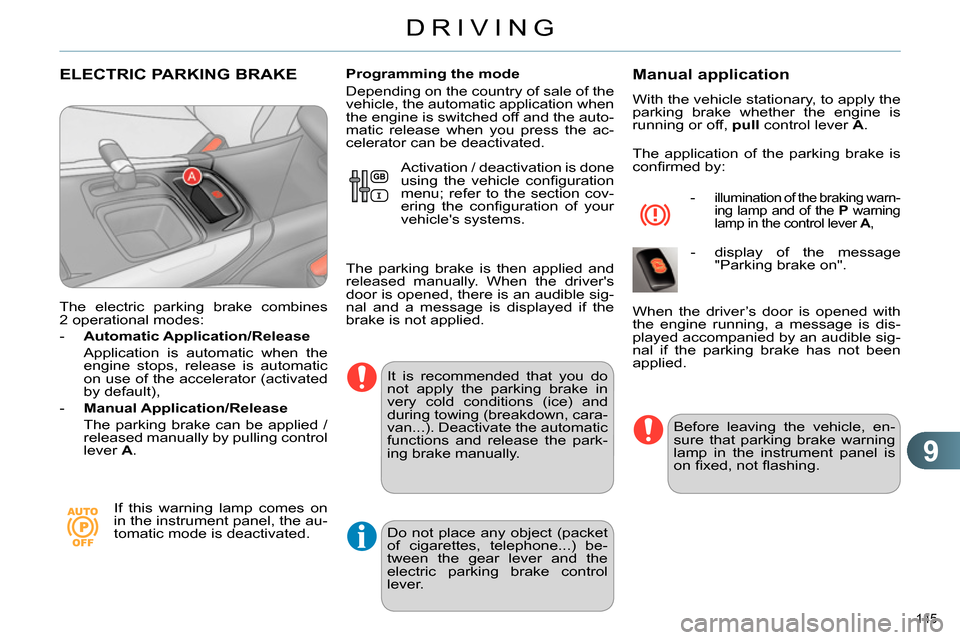
The electric parking brake combines
2 operational modes:
- Automatic Application/Release
Application is automatic when the
engine stops, release is automatic
on use of the accelerator (activated
by default),
- Manual Application/Release
The parking brake can be applied /
released manually by pulling control
lever A
.
If this warning lamp comes on
in the instrument panel, the au-
tomatic mode is deactivated.
Programming the mode
Depending on the country of sale of the
vehicle, the automatic application when
the engine is switched off and the auto-
matic release when you press the ac-
celerator can be deactivated.
It is recommended that you do
not apply the parking brake in
very cold conditions (ice) and
during towing (breakdown, cara-
van...). Deactivate the automatic
functions and release the park-
ing brake manually.
Manual application
With the vehicle stationary, to apply the
parking brake whether the engine is
running or off, pull
control lever A
.
The application of the parking brake is
confi rmed by:
- illumination of the braking warn-
ing lamp and of the P
warning
lamp in the control lever A
,
- display of the message
"Parking brake on".
Before leaving the vehicle, en-
sure that parking brake warning
lamp in the instrument panel is
on fi xed, not fl ashing.
When the driver’s door is opened with
the engine running, a message is dis-
played accompanied by an audible sig-
nal if the parking brake has not been
applied. Activation / deactivation is done
using the vehicle confi guration
menu; refer to the section cov-
ering the confi guration of your
vehicle's systems.
The parking brake is then applied and
released manually. When the driver's
door is opened, there is an audible sig-
nal and a message is displayed if the
brake is not applied.
Do not place any object (packet
of cigarettes, telephone...) be-
tween the gear lever and the
electric parking brake control
lever.
Page 148 of 328
9
DRIVING
146
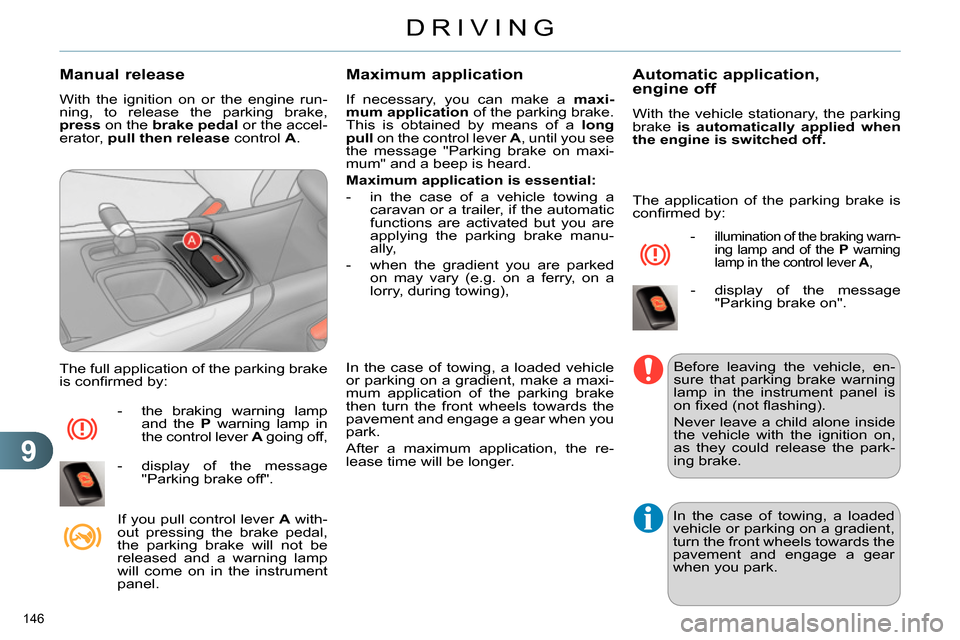
Manual release
With the ignition on or the engine run-
ning, to release the parking brake,
press
on the brake
pedal
or the accel-
erator, pull then release
control A
.
The full application of the parking brake
is confi rmed by:
- the braking warning lamp
and the P
warning lamp in
the control lever A
going off,
- display of the message
"Parking brake off".
If you pull control lever A
with-
out pressing the brake pedal,
the parking brake will not be
released and a warning lamp
will come on in the instrument
panel.
Maximum application
If necessary, you can make a maxi-
mum application
of the parking brake.
This is obtained by means of a long
pull
on the control lever A
, until you see
the message "Parking brake on maxi-
mum" and a beep is heard.
Maximum application is essential:
- in the case of a vehicle towing a
caravan or a trailer, if the automatic
functions are activated but you are
applying the parking brake manu-
ally,
- when the gradient you are parked
on may vary (e.g. on a ferry, on a
lorry, during towing),
In the case of towing, a loaded vehicle
or parking on a gradient, make a maxi-
mum application of the parking brake
then turn the front wheels towards the
pavement and engage a gear when you
park.
After a maximum application, the re-
lease time will be longer.
Automatic application,
engine off
With the vehicle stationary, the parking
brake is automatically applied when
the engine is switched off.
- illumination of the braking warn-
ing lamp and of the P
warning
lamp in the control lever A
,
- display of the message
"Parking brake on".
Before leaving the vehicle, en-
sure that parking brake warning
lamp in the instrument panel is
on fi xed (not fl ashing).
Never leave a child alone inside
the vehicle with the ignition on,
as they could release the park-
ing brake.
In the case of towing, a loaded
vehicle or parking on a gradient,
turn the front wheels towards the
pavement and engage a gear
when you park.
The application of the parking brake is
confi rmed by:
Page 149 of 328
9
DRIVING
147
Automatic release
The electric parking brake releases auto-
matically and progressively
when you
press the accelerator:
Manual gearbox:
press down fully
on the clutch pedal, engage fi rst
gear or reverse, press on the accel-
erator pedal and move off.
Electronic gearbox
: select position A
,
M
or R
then press on the accelerator
pedal.
Full release of the parking brake is con-
fi rmed by:
- the braking warning lamp
and the P
warning lamp in
the control lever A
going off,
- display of the message
"Parking brake off".
When stationary, with the engine
running, do not press the ac-
celerator pedal unnecessarily,
as you may release the parking
brake.
Immobilising the vehicle,
engine running
With the engine running and the vehi-
cle stationary, in order to immobilise the
vehicle it is essential to manually
ap-
ply the parking brake by pulling
control
lever A
.
- illumination of the braking
warning lamp and the P
warn-
ing lamp in the control lever A
,
- display of the message
"Parking brake on".
Before leaving the vehicle, en-
sure that parking brake warning
lamp in the instrument panel is
on fi xed, not fl ashing.
Particular situations
In certain situations (e.g. starting the
engine), the parking brake can auto-
matically alter its force. This is normal
operation.
To advance your vehicle a few centime-
tres without starting the engine, but with
the ignition on, press on the brake pedal
and release the parking brake by pull-
ing
then releasing
the control lever A
.
The full release of the parking brake is
confi rmed by the warning lamps in the
control lever A
and in the instrument
panel going off and display of the mes-
sage "Parking brake off".
If the parking brake develops a fault
while applied
or if the battery runs fl at,
an emergency release is always pos-
sible.
When the driver’s door is opened, a
message is displayed accompanied by
an audible signal, if the parking brake
has not been applied. The application of the parking brake is
confi rmed by:
Page 150 of 328
9
DRIVING
148
Emergency braking
In the event of failure of the
electronic stability control sys-
tem, signalled by the illumina-
tion of this warning lamp, brak-
ing stability is then not guaranteed.
In this event, stability must be assured
by the driver by repeating alternate
"pull-release" actions on the control
lever A
.
In the event of a failure of the main ser-
vice brake or in an exceptional situation
(e.g. driver taken ill, under instruction,
etc) a continuous pull on the control
lever A
will stop the vehicle.
The electronic stability control provides
stability during emergency braking.
If the emergency braking malfunctions,
the message "Parking brake faulty" will
be displayed.
The emergency braking must
only be used in exceptional cir-
cumstances.
Emergency release
In the event of the electric parking brake
malfunctioning or the battery running
fl at, an emergency device can be used
to release the parking brake manually.
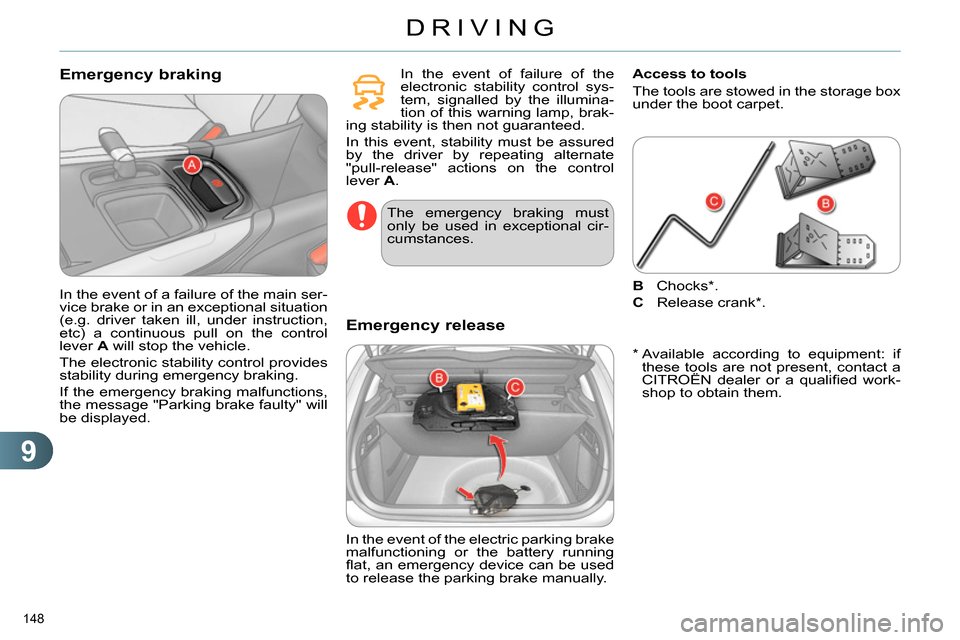
Access to tools
The tools are stowed in the storage box
under the boot carpet.
* Available according to equipment: if
these tools are not present, contact a
CITROËN dealer or a qualifi ed work-
shop to obtain them.
B
Chocks*.
C
Release crank*.
Page 151 of 328
9
DRIVING
149
Immobilise the vehicle (or keep
it stationary, if the brake pedal is
pressed), with the engine running,
by engaging fi rst gear (manual
gearbox) or position M
or R
(elec-
tronic gearbox).
Switch off the engine but leave the
ignition on. If it is not possible to im-
mobilise the vehicle, do not operate
the control and contact a CITROËN
dealer or a qualifi ed workshop with-
out delay.
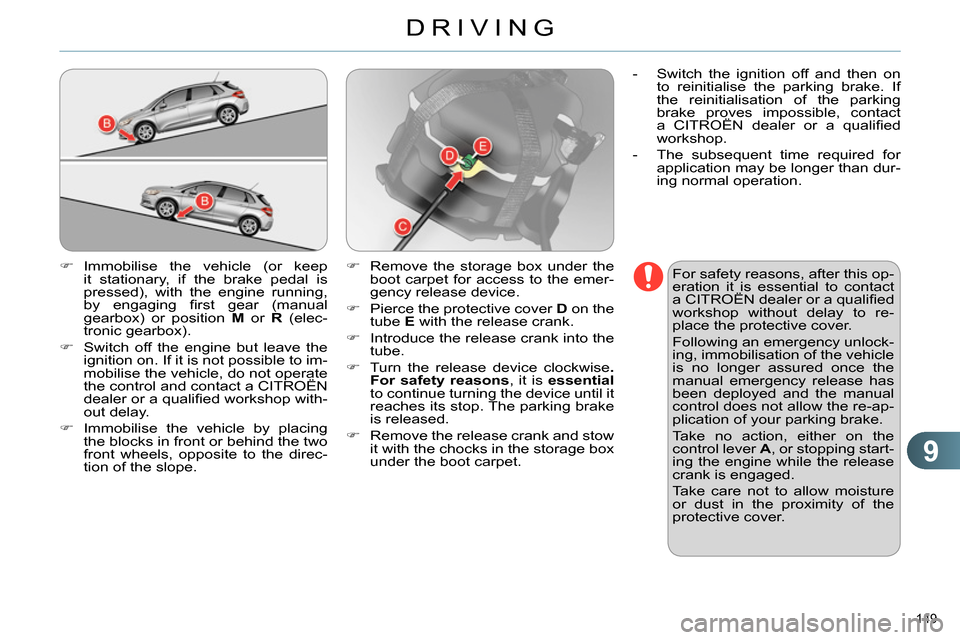
Immobilise the vehicle by placing
the blocks in front or behind the two
front wheels, opposite to the direc-
tion of the slope.
For safety reasons, after this op-
eration it is essential to contact
a CITROËN dealer or a qualifi ed
workshop without delay to re-
place the protective cover.
Following an emergency unlock-
ing, immobilisation of the vehicle
is no longer assured once the
manual emergency release has
been deployed and the manual
control does not allow the re-ap-
plication of your parking brake.
Take no action, either on the
control lever A
, or stopping start-
ing the engine while the release
crank is engaged.
Take care not to allow moisture
or dust in the proximity of the
protective cover.
Remove the storage box under the
boot carpet for access to the emer-
gency release device.
Pierce the protective cover D
on the
tube E
with the release crank.
Introduce the release crank into the
tube.
Turn the release device clockwise .
For safety reasons
, it is essential
to continue turning the device until it
reaches its stop. The parking brake
is released.
Remove the release crank and stow
it with the chocks in the storage box
under the boot carpet.
- Switch the ignition off and then on
to reinitialise the parking brake. If
the reinitialisation of the parking
brake proves impossible, contact
a CITROËN dealer or a qualifi ed
workshop.
- The subsequent time required for
application may be longer than dur-
ing normal operation.
Page 152 of 328
9
DRIVING
150
Operating faults
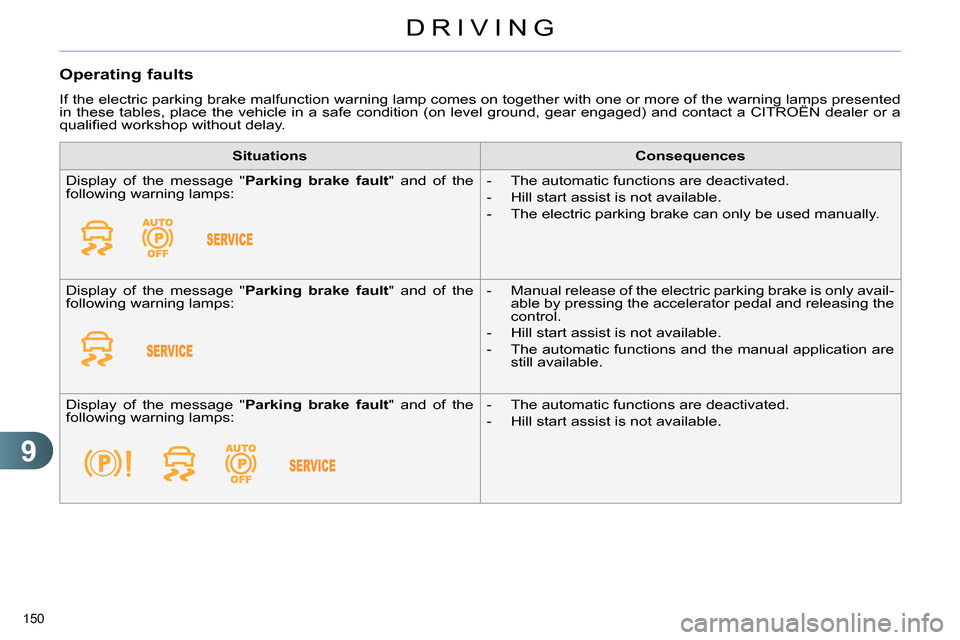
If the electric parking brake malfunction warning lamp comes on together with one or more of the warning lamps presented
in these tables, place the vehicle in a safe condition (on level ground, gear engaged) and contact a CITROËN dealer or a
qualifi ed workshop without delay.
Situations
Consequences
Display of the message " Parking brake fault
" and of the
following warning lamps:
- The automatic functions are deactivated.
- Hill start assist is not available.
- The electric parking brake can only be used manually.
Display of the message " Parking brake fault
" and of the
following warning lamps:
- Manual release of the electric parking brake is only avail-
able by pressing the accelerator pedal and releasing the
control.
- Hill start assist is not available.
- The automatic functions and the manual application are
still available.
Display of the message " Parking brake fault
" and of the
following warning lamps:
- The automatic functions are deactivated.
- Hill start assist is not available.
Page 153 of 328
9
DRIVING
151
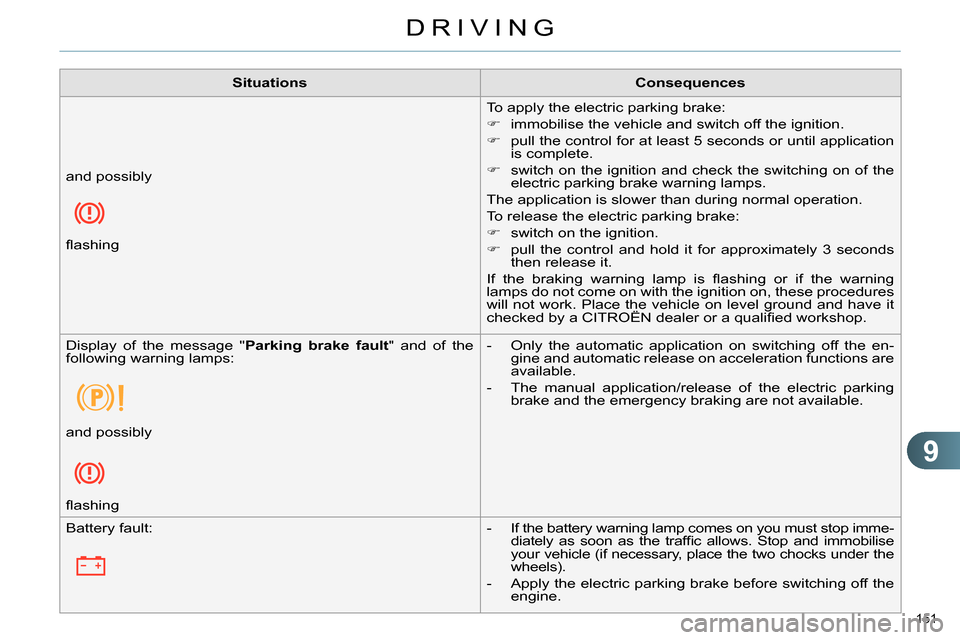
Situations
Consequences
To apply the electric parking brake:
immobilise the vehicle and switch off the ignition.
pull the control for at least 5 seconds or until application
is complete.
switch on the ignition and check the switching on of the
electric parking brake warning lamps.
The application is slower than during normal operation.
To release the electric parking brake:
switch on the ignition.
pull the control and hold it for approximately 3 seconds
then release it.
If the braking warning lamp is fl ashing or if the warning
lamps do not come on with the ignition on, these procedures
will not work. Place the vehicle on level ground and have it
checked by a CITROËN dealer or a qualifi ed workshop. and possibly
fl ashing
Display of the message " Parking brake fault
" and of the
following warning lamps:
- Only the automatic application on switching off the en-
gine and automatic release on acceleration functions are
available.
- The manual application/release of the electric parking
brake and the emergency braking are not available.
and possibly
fl ashing
Battery fault:
- If the battery warning lamp comes on you must stop imme-
diately as soon as the traffi c allows. Stop and immobilise
your vehicle (if necessary, place the two chocks under the
wheels).
- Apply the electric parking brake before switching off the
engine.