window Citroen C4 RHD 2016 2.G Owner's Manual
[x] Cancel search | Manufacturer: CITROEN, Model Year: 2016, Model line: C4 RHD, Model: Citroen C4 RHD 2016 2.GPages: 472, PDF Size: 13.96 MB
Page 56 of 472
54
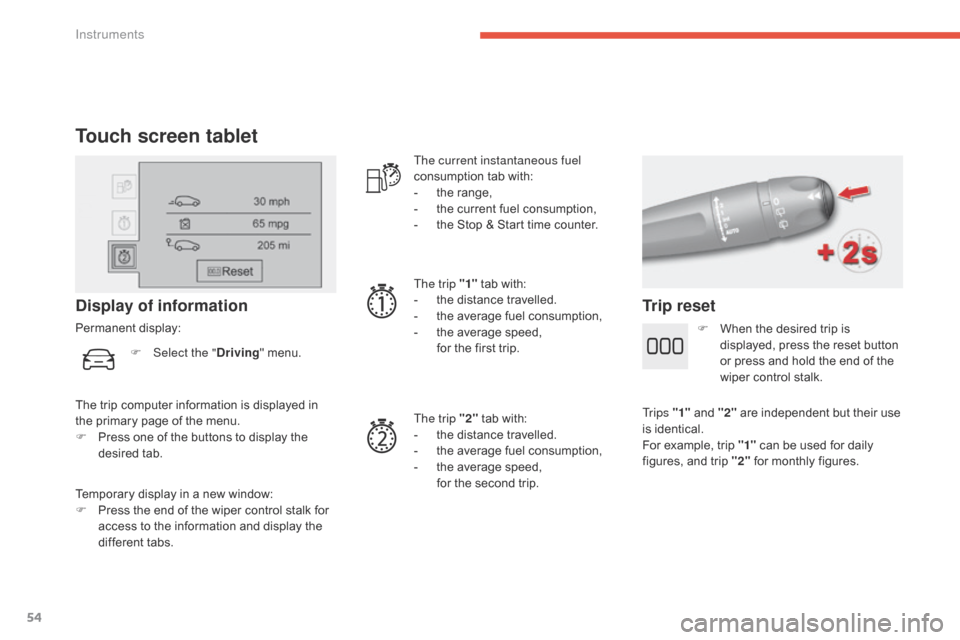
Touch screen tablet
Temporary display in a new window:
F Pr ess t he e nd o f t he w iper c ontrol s talk f or ac
cess
t
o
t
he
i
nformation
a
nd
d
isplay
t
he
di
fferent
t
abs.
Display of information
Permanent display: The current instantaneous fuel
consumption
t
ab
w
ith:
-
th
e
r
ange,
-
th
e
c
urrent
f
uel
c
onsumption,
-
th
e
S
top
& S
tart
t
ime
c
ounter.
The trip "1"
t
ab
w
ith:
-
th
e
d
istance
t
ravelled.
- th e a verage f uel c onsumption,
- th e a verage s peed,
fo
r
t
he
f
irst
t
rip.
The trip "2"
t
ab
w
ith:
-
th
e
d
istance
t
ravelled.
-
th
e
a
verage
f
uel
c
onsumption,
-
th
e
a
verage
s
peed,
fo
r
t
he
s
econd
t
rip.
Trip reset
The trip computer information is displayed in the p rimary p age o f t he m enu.
F
Pr
ess
o
ne
o
f
t
he
b
uttons
t
o
d
isplay
t
he
desi
red
ta
b.
F
Selec
t the "
Driving "
m
enu.
F
Wh
en
t
he
d
esired
t
rip
i
s
di
splayed,
p
ress
t
he
r
eset
b
utton
or p
ress
a
nd
h
old
t
he
e
nd
o
f
t
he
wi
per
c
ontrol
s
talk.
Tr i p s "1" a nd " 2" a re i ndependent b ut t heir u se is i
dentical.
For
e
xample,
t
rip
"
1"
c
an
b
e
u
sed
f
or
d
aily
fi
gures,
a
nd
t
rip
"
2"
f
or
m
onthly
f
igures.
Instruments
Page 58 of 472

56
Remote control key
System which permits central unlocking or locking of the vehicle using the door lock or from a distance. It is also used to locate and start the vehicle, as well a s p roviding p rotection a gainst t heft.
Unlocking the vehicle
Unfolding the key
F Press this b utton t o u nfold t he k ey.
F
Pr
ess
t
he
o
pen
p
adlock
t
o
u
nlock
th
e
v
ehicle
c
ompletely. F
Pr
ess
t
he
o
pen
p
adlock
o
nce
t
o
un
lock
t
he
d
river's
d
oor
o
nly.
Selective unlocking using the
remote control
F Maintain the press on the open
p
adlock u ntil t he d esired p osition is o
btained.
T
he
w
indows
s
top
a
s
so
on
a
s
y
ou
r
elease
t
he
b
utton.
Opening the windows using the
remote control
Unlocking using the key
F Turn the key f or wards i n t he d river's d oor lo
ck t o u nlock t he v ehicle c ompletely.
Complete unlocking using the
remote control
F Press the o pen p adlock a gain t o u nlock t he ot
her d oors a nd t he b oot.
The
d
irection
i
ndicators
f
lash
f
or
a fe
w seconds.
The
s
potlamps
i
n
t
he
d
oor
m
irrors
c
ome
o
n.
Depending
o
n
v
ersion,
t
he
d
oor
m
irrors
un
fold,
t
he
w
elcome
l
ighting
c
omes
o
n,
th
e
a
larm
i
s
d
eactivated.
The
c
omplete
o
r
s
elective
d
oor
un
locking
p
arameter
i
s
s
et
v
ia
t
he
ve
hicle
c
onfiguration
m
enu.
Access
Page 60 of 472

58
Closing the windows using the
remote control
F Press and h old t he c losed pa
dlock b utton u ntil t he d esired po
sition
i
s
o
btained.
T
he
wi
ndows
s
top
w
hen
y
ou
r
elease
th
e
b
utton.
When
c
losing
t
he
w
indows
u
sing
t
he
re
mote
c
ontrol
y
ou
m
ust
e
nsure
t
hat
no
thing
p
revents
t
hem
f
rom
c
losing
c o
r r e c t l y.
If
y
ou
w
ant
t
o
l
eave
t
he
w
indows
pa
rtly
o
pen,
y
ou
m
ust
d
eactivate
t
he
vo
lumetric
alarm mo
nitoring.
Deadlocking
r
enders
t
he
e
xterior
a
nd
in
terior
d
oor
c
ontrols
i
noperative.
It
a
lso
d
eactivates
t
he
c
entral
l
ocking
co
ntrol
b
utton.
Therefore,
n
ever
l
eave
a
nyone
i
nside
th
e
v
ehicle
w
hen
i
t
i
s
d
eadlocked.
Deadlocking using the remote
control
F Press t he c losed p adlock t o l ock th
e v ehicle c ompletely.
F
Pr
ess
t
he
c
losed
p
adlock
a
gain
w
ithin
f
ive
se
conds
t
o
d
eadlock
t
he
v
ehicle.
Deadlocking using the key
F Turn the key t o t he r ear i n t he d river's d oor lo
ck t o l ock t he v ehicle c ompletely.
F
Tu
rn
t
he
k
ey
t
o
t
he
r
ear
a
gain
w
ithin
f
ive
se
conds
t
o
d
eadlock
t
he
v
ehicle.
Deadlocking
i
s
c
onfirmed
b
y
f
ixed
l
ighting
o
f
th
e
d
irection
i
ndicators
f
or
a
pproximately
t
wo
sec
onds.
According
t
o
v
ersion,
t
he
d
oor
m
irrors
f
old
a
t
th
e
s
ame
t
ime. In
l
ow
l
ight,
d
eadlocking
a
lso
b
rings
o
n
t
he
gui
de-me-home
li
ghting.
For
m
ore
i
nformation
o
n
t
he
g
uide-me-home
li
ghting,
r
efer
t
o
t
he
c
orresponding
s
ection.
Access
Page 77 of 472
75
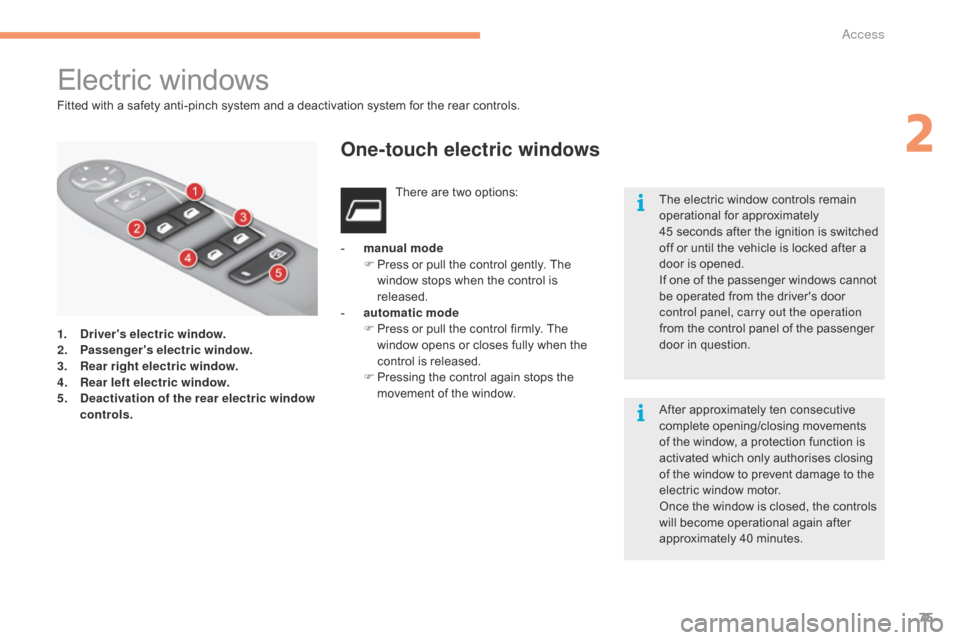
Electric windows
1. Driver's electric window.
2. Pa ssenger's electric window.
3.
Rea
r right electric window.
4.
Re
ar left electric window.
5.
De
activation of the rear electric window
controls. There
a
re
t
wo
o
ptions:
-
man
ual mode
F
Pr
ess
o
r
p
ull
t
he
c
ontrol
g
ently.
T
he
wi
ndow
s
tops
w
hen
t
he
c
ontrol
i
s
re
leased.
-
au
tomatic mode
F Pr ess o r p ull t he c ontrol f irmly. T he wi
ndow o pens o r c loses f ully w hen t he co
ntrol
i
s
r
eleased.
F
Pr
essing
t
he
c
ontrol
a
gain
s
tops
t
he
mov
ement
o
f
t
he
w
indow.
One-touch electric windows
The electric window controls remain operational f or a pproximately 45 s
econds
a
fter
t
he
i
gnition
i
s
s
witched
of
f
o
r
u
ntil
t
he
v
ehicle
i
s
l
ocked
a
fter
a do
or
i
s
o
pened.
If
o
ne
o
f
t
he
p
assenger
w
indows
c
annot
be o
perated
f
rom
t
he
d
river's
d
oor
co
ntrol panel, carry out the operation
from
t
he
c
ontrol
p
anel
o
f
t
he
p
assenger
do
or
i
n
q
uestion.
After
a
pproximately
t
en
c
onsecutive
co
mplete
o
pening/closing
m
ovements
of t
he
w
indow,
a p
rotection
f
unction
i
s
ac
tivated
w
hich
o
nly
a
uthorises
c
losing
of t
he
w
indow
t
o
p
revent
d
amage
t
o
t
he
el
ectric
w
indow
m
otor.
Once
t
he
w
indow
i
s
c
losed,
t
he
c
ontrols
wi
ll
b
ecome
o
perational
a
gain
a
fter
ap
proximately
4
0
m
inutes.
Fitted
w
ith
a s
afety
a
nti-pinch
s
ystem
a
nd
a d
eactivation
s
ystem
f
or
t
he
r
ear
c
ontrols.
2
Access
Page 78 of 472
76
Reinitialisation
After reconnecting the battery or a fault, you must b e r einitialise t he o peration o f t he e lectric wi
ndows.
F
or
e
ach
o
f
t
he
c
ontrol
s
witches
o
n
th
e
d
river's
s
ide
c
ontrol
p
anel:
F
pu
ll
t
he
c
ontrol
u
ntil
t
he
w
indow
s
tops,
F
re
lease
t
he
c
ontrol
a
nd
p
ull
i
t
a
gain
u
ntil
th
e
w
indow
c
loses
f
ully,
F
co
ntinue
t
o
h
old
t
he
c
ontrol
f
or
ap
proximately
on
e
sec
ond
af
ter
the wi
ndow
ha
s
clos
ed,
F
pr
ess
t
he
c
ontrol
t
o
l
ower
t
he
w
indow
au
tomatically
t
o
t
he
l
ow
p
osition,
F
wh
en
t
he
w
indow
h
as
r
eached
t
he
l
ow
po
sition,
p
ress
t
he
c
ontrol
a
gain
f
or
ap
proximately
o
ne
s
econd.
The safety anti-pinch function is not
operational during these operations.
Safety anti-pinch
When the window rises and meets an obstacle, it s tops a nd p artially l owers a gain.
If
t
he
w
indow
c
annot
b
e
c
losed
(
for
ex
ample,
i
n
t
he
p
resence
o
f
i
ce),
o
nce
th
e
w
indow
h
as
l
owered:
F
pr
ess
a
nd
h
old
t
he
c
ontrol
u
ntil
t
he
wi
ndow
o
pens
f
ully,
F
th
en
p
ull
t
he
c
ontrol
i
mmediately
an
d
h
old
i
t
u
ntil
t
he
w
indow
c
loses,
F
co
ntinue
t
o
h
old
t
he
c
ontrol
f
or
ap
proximately
o
ne
s
econd
a
fter
t
he
wi
ndow
h
as
c
losed.
The safety anti-pinch function is not
operational during these operations.
Access
Page 79 of 472
77
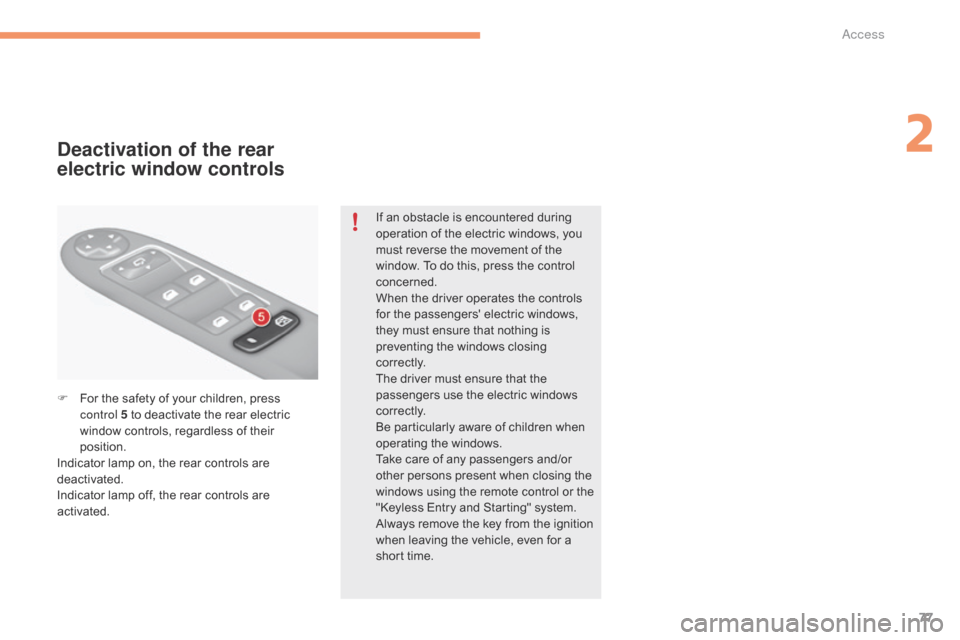
F For the safety o f y our c hildren, p ress co
ntrol 5 t o d eactivate t he r ear e lectric wi
ndow
c
ontrols,
r
egardless
o
f
t
heir
pos
ition.
Indicator
l
amp
o
n,
t
he
r
ear
c
ontrols
a
re
de
activated.
Indicator
l
amp
o
ff,
t
he
r
ear
c
ontrols
a
re
ac
tivated.
Deactivation of the rear
electric window controls
If an obstacle is encountered during op eration o f t he e lectric w indows, y ou mu
st
r
everse
t
he
m
ovement
o
f
t
he
wi
ndow.
T
o
d
o
t
his,
p
ress
t
he
c
ontrol
con
cerned.
When
t
he
d
river
o
perates
t
he
c
ontrols
fo
r
t
he
p
assengers'
e
lectric
w
indows,
th
ey
m
ust
e
nsure
t
hat
n
othing
i
s
pr
eventing
t
he
w
indows
c
losing
c o
r r e c t l y.
The
d
river
m
ust
e
nsure
t
hat
t
he
pa
ssengers
u
se
t
he
e
lectric
w
indows
c o
r r e c t l y.
Be
p
articularly
a
ware
o
f
c
hildren
w
hen
op
erating
the wi
ndows.
Take
c
are
o
f
a
ny
p
assengers
a
nd/or
ot
her
p
ersons
p
resent
w
hen
c
losing
t
he
wi
ndows
u
sing
t
he
r
emote
c
ontrol
o
r
t
he
"K
eyless
E
ntry
a
nd
S
tarting"
s
ystem.
Always
r
emove
t
he
k
ey
f
rom
t
he
i
gnition
wh
en
l
eaving
t
he
v
ehicle,
e
ven
f
or
a sh
ort
t
ime.
2
Access
Page 94 of 472
92
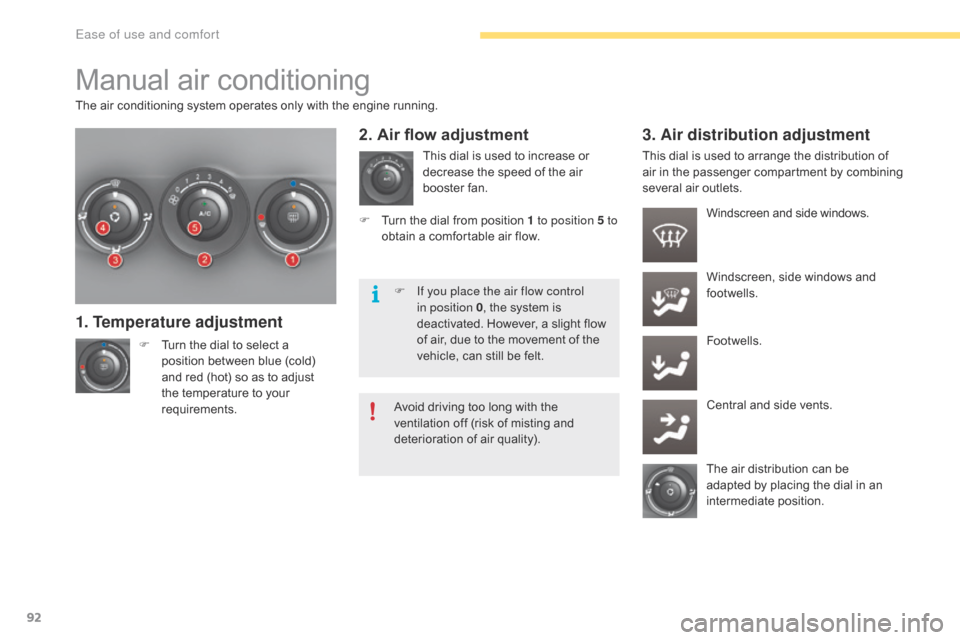
Manual air conditioning
The air conditioning system operates only with the engine running.
F
Tu
rn
t
he
d
ial
t
o
s
elect
a po
sition
b
etween
b
lue
(
cold)
an
d
r
ed
(
hot)
s
o
a
s
t
o
a
djust
th
e
t
emperature
t
o
y
our
re
quirements.
1. Temperature adjustment
This dial is used to increase or decrease t he s peed o f t he a ir bo
oster
f
an.
2. Air flow adjustment 3. Air distribution adjustment
Windscreen and side windows.
Wi ndscreen,
s
ide
w
indows
a
nd
fo
otwells.
Footwells.
Central
a
nd
s
ide
v
ents.
The
a
ir
d
istribution
c
an
b
e
ad
apted
b
y
p
lacing
t
he
d
ial
i
n
a
n
in
termediate
po
sition.
F Tu
rn t
he d
ial f
rom p
osition 1
to position 5 to
obtain
a c
omfortable
a
ir
f
low. This
d
ial
i
s
u
sed
t
o
a
rrange
t
he
d
istribution
o
f
ai
r
i
n
t
he
p
assenger
c
ompartment
by c
ombining
se
veral
a
ir
o
utlets.
F
If y
ou place the air flow control
in position 0 ,
t
he
s
ystem
i
s
de
activated.
H
owever,
a s
light
f
low
of a
ir,
d
ue
t
o
t
he
m
ovement
o
f
t
he
ve
hicle,
c
an
s
till
b
e
f
elt.
Avoid
d
riving
t
oo
l
ong
w
ith
t
he
ve
ntilation
o
ff
(
risk
o
f
m
isting
a
nd
de
terioration
o
f
a
ir
q
uality).
Ease of use and comfort
Page 234 of 472

232
Accessories
Conversion kits
You can obtain an "Enterprise" kit to convert a trade v ehicle t o a p rivate c ar a nd v ice-versa.
"Comfort":
door deflectors, side window blinds, rear screen b lind, i nsulated m odule, c oat h anger fi
xed
t
o
h
ead
r
estraint,
r
eading
l
amp,
m
irror
f
or
ca
ravan,
c
ruise
c
ontrol,
s
cented
a
ir
f
reshener
an
d
c
artridges,
p
arking
s
ensors...
"Transport systems":
boot carpet, boot liner, boot net, boot spacers,
transverse roof b ars, b icycle c arrier, s ki c arrier, ro
of
b
oxes,
t
owbars,
t
owbar
w
iring
h
arnesses...
"Styling":
gear lever knobs, aluminium foot rest, alloy wheels, w heel e mbellishers, c hrome m irror sh
ells,
c
hrome
d
oor
ap
erture
f
inishers,
d
oor
s
ill
fi
nishers,
t
ailgate
l
ower
c
hrome
f
inisher...
*
To a
void
a
ny
r
isk
o
f
j
amming
t
he
p
edals:
-
en
sure
t
hat
m
ats
a
re
c
orrectly
p
ositioned
an
d
s
ecured,
-
ne
ver
f
it
o
ne
m
at
o
n
t
op
o
f
an
other.
"Security and safety":
anti-intrusion alarm, microwave sensor, anti-tilt sensor, s tolen v ehicle t racking s ystem, c hild se
ats
a
nd
b
ooster
c
ushions,
b
reathalyser,
f
irst
ai
d
k
it,
f
ire
e
xtinguisher,
w
arning
t
riangle,
h
igh
vi
sibility
v
est,
d
og
g
uard,
p
et
s
eat
b
elt,
w
heel
se
curity
b
olts,
s
now
c
hains,
n
on-slip
c
overs,
fr
ont
f
oglamp
k
it...
"Protection":
mats*, seat covers compatible with la teral ai
rbags, d oor s ill p rotectors, m ud f laps, d oor pr
otective
r
ubbing
s
trips,
b
umper
p
rotection
st
rips, protective covers for pets, vehicle
cover...
If
a t
owbar
a
nd
w
iring
h
arness
a
re
f
itted
ou
tside
t
he
C
ITROËN
d
ealer
n
etwork,
th
e
i
nstallation
m
ust
b
e
d
one
u
sing
th
e
v
ehicle's
e
lectrical
p
re-equipment
an
d
i
n
l
ine
w
ith
t
he
m
anufacturer's
rec
ommendations.
A
w
ide
r
ange
o
f
a
ccessories
a
nd
g
enuine
p
arts
i
s
a
vailable
f
rom
t
he
C
ITROËN
d
ealer
n
etwork.
These
a
ccessories
a
nd
p
arts
a
re
a
ll
s
uitable
f
or
y
our
v
ehicle
a
nd
b
enefit
f
rom
C
ITROËN's
r
ecommendation
a
nd
w
arranty.
Practical information
Page 385 of 472
383
Under floor storage .......................................11 9
U nder-inflation
(d
etection)
.................................................. 18
9
Unlocking
.................................................
56,
6
2
Unlocking
f
rom
t
he
i
nside
..................................................... 69
U
nlocking
t
he
b
oot
......................................... 56
Unl
ocking
th
e
d
oors
................................................
56,
6
2
Updating
r
isk
a
reas
...................................... 295
U
pdating
t
he
d
ate
............................... 41
,
4
6,
5
0
Updating
t
he
t
ime
............................... 41
,
4
6,
5
0
UREA
.....................................................
33,
2
28
USB
..............................................
103,
3
08,
3
60
U
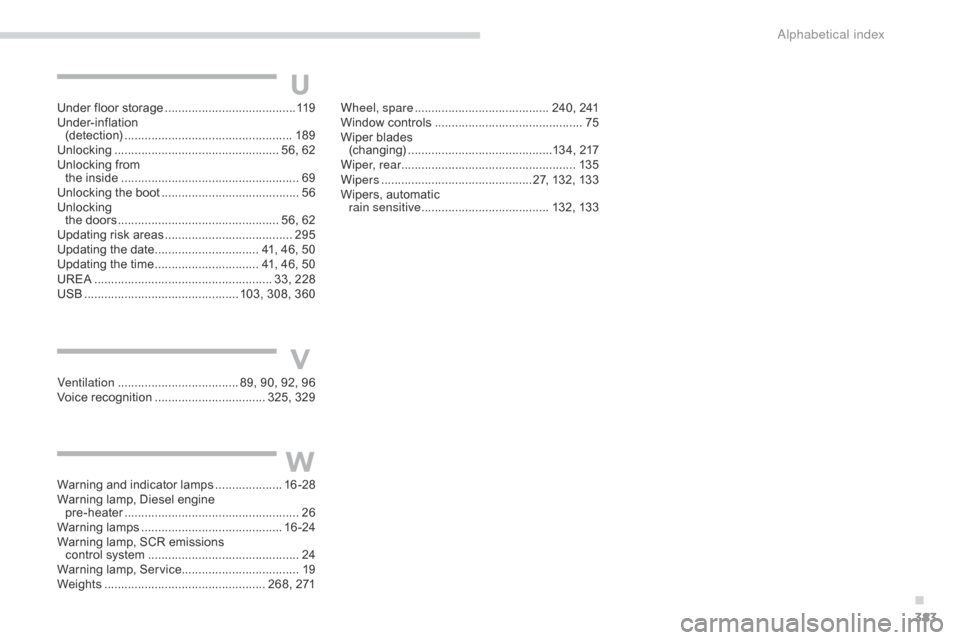
Ventilation ....................................89, 9 0, 9 2, 9 6
Voice r ecognition ................................. 325
, 329W
heel, spare
........................................ 24
0,
24
1
Window
c
ontrols
............................................
75
Wi
per
b
lades
(
changing)
...........................................13
4,
2
17
Wiper, rear .................................................... 13 5
Wipers
.............................................27
,
1
32,
1
33
Wipers,
a
utomatic
r
ain sensitive
......................................
132
,
13 3
V
Warning and indicator lamps ....................
16 - 28
Warning l amp, D iesel e ngine
p
re-heater
.................................................... 26
W
arning
lamp
s
.......................................... 16 -
24
Warning
l
amp,
S
CR
e
missions
c
ontrol
s
ystem
............................................. 24
Wa
rning
l
amp,
S
ervice................................... 19
Weights
................................................
268,
2
71
W
.
Alphabetical index
Page 471 of 472
63
ADD_C42_EVO_EN
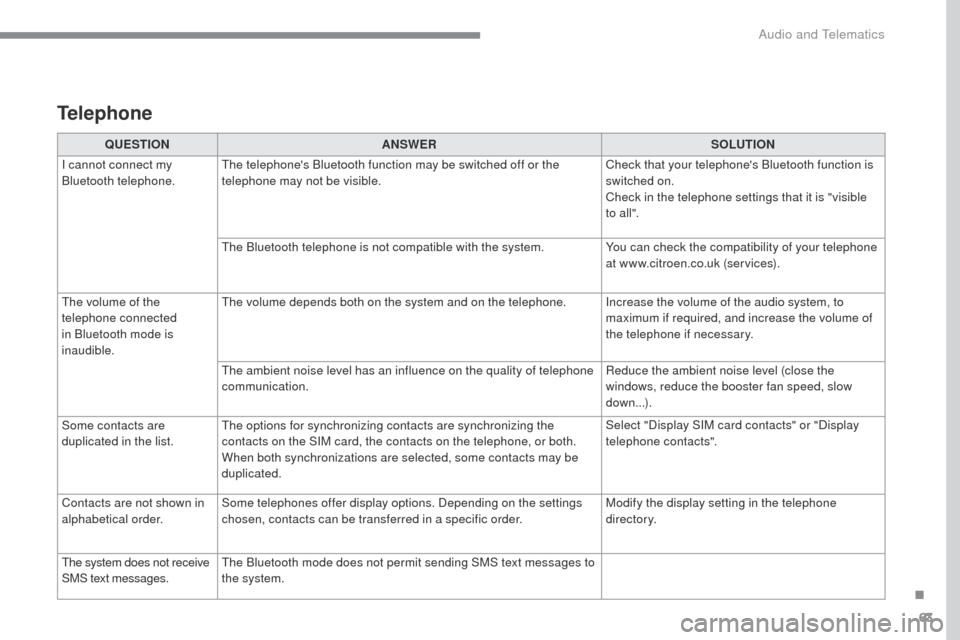
QUESTIONANSWER SOLUTION
I cannot connect my
Bluetooth telephone. The telephone's Bluetooth function may be switched off or the
telephone may not be visible. Check that your telephone's Bluetooth function is
switched on.
Check in the telephone settings that it is "visible
to all ".
The Bluetooth telephone is not compatible with the system. You can check the compatibility of your telephone
at www.citroen.co.uk (services).
The volume of the
telephone connected
in Bluetooth mode is
inaudible. The volume depends both on the system and on the telephone. Increase the volume of the audio system, to
maximum if required, and increase the volume of
the telephone if necessary.
The ambient noise level has an influence on the quality of telephone
communication. Reduce the ambient noise level (close the
windows, reduce the booster fan speed, slow
down...).
Some contacts are
duplicated in the list. The options for synchronizing contacts are synchronizing the
contacts on the SIM card, the contacts on the telephone, or both.
When both synchronizations are selected, some contacts may be
duplicated. Select "Display SIM card contacts" or "Display
telephone contacts".
Contacts are not shown in
alphabetical order. Some telephones offer display options. Depending on the settings
chosen, contacts can be transferred in a specific order. Modify the display setting in the telephone
di r e c to r y.
The system does not receive
SMS text messages. The Bluetooth mode does not permit sending SMS text messages to
the system.
Telephone
.
Audio and Telematics