ad blue CITROEN C5 2018 User Guide
[x] Cancel search | Manufacturer: CITROEN, Model Year: 2018, Model line: C5, Model: CITROEN C5 2018Pages: 348, PDF Size: 10.72 MB
Page 34 of 348

32
C5 _en_Chap01_instruments-bord_ed01-2016
Warning/indicator lampis on Cause Action / Observations
AdBlue
®
(BlueHDi Diesel) fixed, on switching
on the ignition,
accompanied by an
audible signal and a
message indicating the
remaining driving range. The remaining driving range is
between 350 miles (600 km) and
1500 miles (2400 km).
Have the AdBlue® tank topped-up as soon as
possible: go to a CITROËN dealer or a qualified
workshop, or carry out this operation yourself.
flashing, accompanied
by an audible signal
and a message
indicating the
remaining driving
range. The remaining driving range is
between 0 and 350 miles (600 km).
You must top-up the AdBlue
® tank to avoid a
breakdown : go to a CITROËN dealer or a qualified
workshop, or carry out this operation yourself.
flashing, accompanied
by an audible signal
and a message
indicating that starting
is prevented. The AdBlue
® tank is empty: the
starting inhibition system required
by legislation prevents starting of the
engine. To be able to start the engine, you must top-up the
AdBlue® tank: go to a CITROËN dealer or a qualified
workshop, or carry out this operation yourself.
It is essential to add at least 3.8 litres of AdBlue
® to
the fluid tank.
For topping-up the AdBlue
® fluid or for more information on AdBlue®, refer to the corresponding section.
Instruments
Page 35 of 348

33
C5 _en_Chap01_instruments-bord_ed01-2016
Warning/indicator lampis on Cause Action / Observations
+
+ SCR emissions
control system
(BlueHDi Diesel) fixed, on switching
on the ignition,
associated with the
SERVICE and engine
diagnostic warning
lamps, accompanied
by an audible signal
and a message. A fault with the SCR emissions
control system has been detected.
This alert disappears once the exhaust emissions
return to normal levels.
flashing, on switching
on the ignition,
associated with the
SERVICE and engine
diagnostic warning
lamps, accompanied by
an audible signal and
a message indicating
the remaining driving
range. After confirmation of the fault with the
emissions control system, you can
drive for up to 650 miles (1 100 km)
before the engine starting inhibition
system is triggered.
Contact a CITROËN dealer or a qualified workshop
without delay
, to avoid a breakdown .
flashing, on switching
on the ignition,
associated with the
SERVICE and engine
diagnostic warning
lamps, accompanied
by an audible signal
and a message. You have exceeded the authorised
driving limit following confirmation
of a fault with the emissions control
system: the engine starting inhibition
system prevents starting of the
engine.
To be able to start the engine, you must
call on a
CITROËN dealer or a qualified workshop.
1
Instruments
Page 40 of 348

38
C5 _en_Chap01_instruments-bord_ed01-2016
Main Menu"Audio functions"
menu
With the Audio system switched on, once
this menu is selected, you can activate or
deactivate functions associated with using the
radio (RDS, REG, RadioText), CD (introscan,
random play, CD repeat) or MP3 player (USB
port / auxiliary Jack socket). For more information on the Audio
system (and in particular the "Audio
functions" application), refer to the
corresponding section.
Press on the button A to view the "Main Menu"
of the multifunction screen. This menu gives
you access to the following functions:
-
a
udio functions,
-
d
isplay configuration,
-
t
elephone (Bluetooth
® hands-free kit).
With this menu selected, you have access to
the following settings:
-
b
rightness - video,
- d ate and time,
- c hoice of units.
"Display
configuration" menu
With the Audio system switched on, once
this menu is selected, you can configure
your Bluetooth
® hands-free kit (pairing), view
the different telephone directories (calls log,
services...) and manage your calls (start a call,
end a call, double call, secret mode...).
Adjusting the date and time"Bluetooth - Telephone -
Audio" menu
For safety reasons, configuration of the
multifunction screen by the driver must
only be done when stationary. For more information on the Audio
system, refer to the corresponding
section.
F
P
ress on A
.
F
Use
C to select the "Date and time" menu,
then confirm your choice with a press on
C
on the steering wheel or D on the audio
system.
F
S
elect the screen configuration using C
.
Confirm with a press on C on the steering
wheel or D on the audio system
F
S
elect the date and the time settings,
using B. Confirm with a press on C on the
steering wheel or D on the audio system. F
Press
C to select the values you wish to
modify. Confirm your choice with a press
on C on the steering wheel or D on the
audio system.
F
C
onfirm with "OK"
on the screen.
Instruments
Page 41 of 348
39
C5 _en_Chap01_instruments-bord_ed01-2016
Touch screen tablet
This system gives access to:
- m enus for adjusting settings for vehicle
functions and systems,
-
a
udio and display settings menus,
-
a
udio system and telephone controls and
the display of associated information,
-
t
he display of the exterior temperature (a
blue snowflake appears if there is a risk
of
ice),
-
t
he display of the trip computer.
And, depending on equipment, it also allows:
-
t
he display of visual parking sensors
information,
-
a
ccess to the controls for the navigation
system and Internet services, and the
display of associated information.
For safety reasons, the driver must
only carry out operations that
require close attention with the
vehicle stationary.
Some functions are not accessible
when driving. After a few moments with no action on
the secondary page, the primary page
is displayed automatically.General operation
Recommendations
It is necessary to press firmly, particularly for
"flick" gestures (scrolling through lists, moving
the map...). A light wipe is not enough.
The screen does not recognise pressing with
more than one finger.
This technology allows use at all temperatures
and when wearing gloves.
Principles
Press the MENU
button, then the virtual
buttons in the touch screen tablet.
Each menu is displayed over one or two pages
(primary page and secondary page).
Use this button to go to the
secondary page.
Use this button to return to the
primary page.
Use this button for access to
additional information and to the
settings for certain functions.
Use this button to confirm.
Use this button to quit.
Do not use pointed objects on the touch
screen tablet.
Do not touch the touch screen tablet
with wet hands.
Uses a soft clean cloth to clean the
touch screen tablet.
1
Instruments
Page 42 of 348
40
C5 _en_Chap01_instruments-bord_ed01-2016
Menus
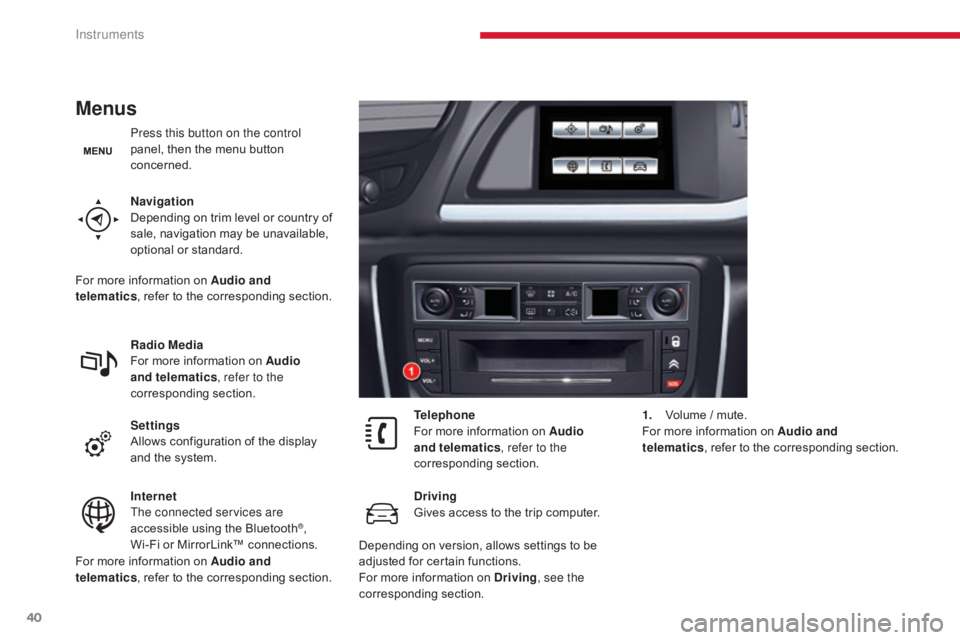
Press this button on the control
panel, then the menu button
concerned.
Navigation
Depending on trim level or country of
sale, navigation may be unavailable,
optional or standard.
Radio Media
For more information on Audio
and telematics, refer to the
corresponding section.
Settings
Allows configuration of the display
and the system.
Internet
The connected services are
accessible using the Bluetooth
®,
Wi-Fi or MirrorLink™ connections. Telephone
For more information on Audio
and telematics
, refer to the
corresponding section.
Driving
Gives access to the trip computer. 1.
V
olume / mute.
For more information on Audio and
telematics , refer to the corresponding section.
For more information on Audio and
telematics , refer to the corresponding section.
For more information on Audio and
telematics
, refer to the corresponding section.
Depending on version, allows settings to be
adjusted for certain functions.
For more information on Driving, see the
corresponding section.
Instruments
Page 112 of 348
110
C5_en_Chap04_conduite_ed01-2016
Stop & Start
Operation
- with a manual gearbox, at speeds below
12 mph (20 km/h) with BlueHDi Diesel
versions, when you put the gear selector
into neutral and release the clutch pedal,
-
w
ith an automatic gearbox, vehicle
stationary, when you press the brake pedal
or place the gear selector in position N .
Going into engine STOP
mode
The "ECO" warning lamp comes on
in the instrument panel and the engine
goes into standby automatically:
If your vehicle is fitted with the
system, a time counter calculates
the sum of the periods in STOP
mode during a journey. It resets
itself to zero every time the
ignition is switched on with the
key.
The Stop & Start system puts the engine
temporarily into standby - STOP mode - during
stops in the traffic (red lights, traffic jams...).
The engine restarts automatically - START
mode - as soon as you want to move off.
The restart takes place instantly, quickly and
silently.
Per fect for urban use, the Stop & Start system
reduces fuel consumption and exhaust
emissions as well as the noise level when
stationary.
Never refuel with the engine in STOP
mode; you must switch off the ignition
with the key.
For your comfort, when parking, STOP
is not available for a few seconds after
coming out of reverse.
The Stop & Start system does not affect
the functionality of the vehicle, such as
braking, power steering...
Driving
Page 113 of 348
111
C5_en_Chap04_conduite_ed01-2016
- with a manual gearbox, when you fully
depress the clutch pedal,
-
w
ith an automatic gearbox:
●
g
ear selector in position D or M , when
you release the brake pedal,
●
o
r gear selector in position N and brake
pedal released, when you place the gear
selector in position D or M ,
●
o
r when you engage reverse gear.
Going into engine START
mode
The "ECO" warning lamp goes off
and the engine starts automatically:
Special cases: START invoked
automatically
In this case the "ECO" warning
lamp flashes for few seconds, then
goes off.
This operation is perfectly normal. For safety reasons or to ensure smooth
operation, START mode is invoked
automatically when:
-
y
ou open the driver's door,
-
y
ou unfasten the driver's seat belt,
-
t
he speed of the vehicle exceeds 16 mph
(25 km/h) with a manual gearbox or 2 mph
(3 km/h) with an automatic gearbox for
BlueHDi Diesel versions,
-
t
he electric parking brake is being applied,
-
s
ome special conditions (battery charge,
engine temperature, braking assistance, air
conditioning setting...) where the engine is
needed to assure control of a system.
Special cases: STOP mode
unavailable
In this case, the "ECO" warning
lamp flashes for a few seconds, then
goes off.
This operation is perfectly normal. STOP mode is not invoked when:
-
t
he vehicle is on a steep slope
(up or down),
-
t
he driver's door is open,
-
t
he driver's seat belt is not fastened,
-
t
he vehicle has not exceeded 6 mph
(10 km/h) since the last engine start using
the key,
-
t
he electric parking brake is applied or
being applied,
-
t
he engine is needed to maintain a
comfortable temperature in the passenger
compartment,
-
d
emisting is active,
-
s
ome special conditions (battery charge,
engine temperature, braking assistance,
exterior temperature...) where the engine is
needed to assure control of a system.
With a manual gearbox in STOP mode,
if a gear is engaged without fully
depressing the clutch pedal, a warning
lamp comes on or an alert message
is displayed asking you to depress the
clutch pedal to restart the engine.
4
Driving
Page 131 of 348
129
C5_en_Chap04_conduite_ed01-2016
Reversing camera (Tourer)
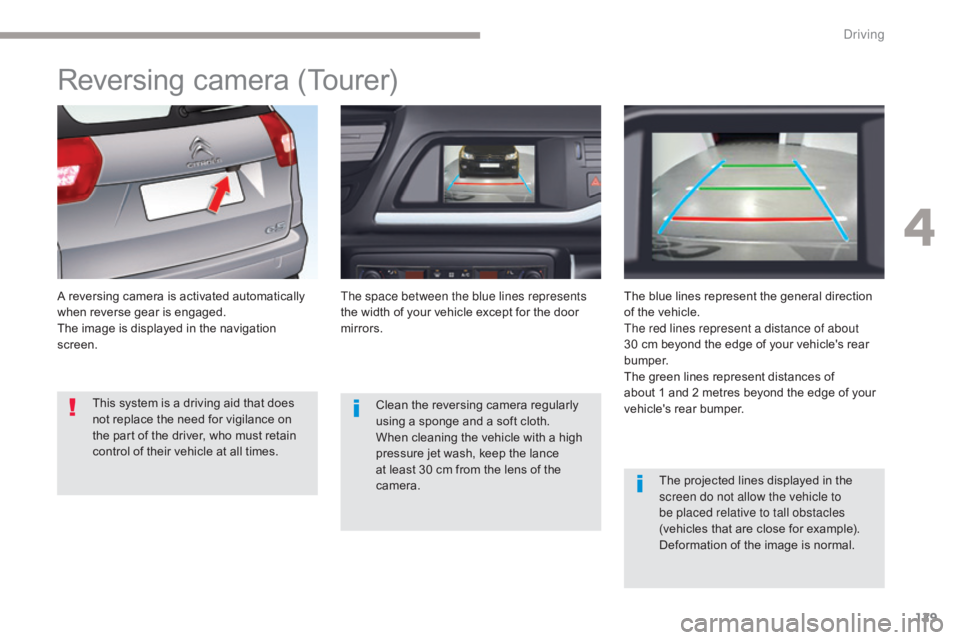
A reversing camera is activated automatically
when reverse gear is engaged.
The image is displayed in the navigation
screen.The space between the blue lines represents
the width of your vehicle except for the door
mirrors.
The blue lines represent the general direction
of the vehicle.
The red lines represent a distance of about
30 cm beyond the edge of your vehicle's rear
b u m p e r.
The green lines represent distances of
about
1 and 2 metres beyond the edge of your
vehicle's rear bumper.
The projected lines displayed in the
screen do not allow the vehicle to
be placed relative to tall obstacles
(vehicles that are close for example).
Deformation of the image is normal.
Clean the reversing camera regularly
using a sponge and a soft cloth.
When cleaning the vehicle with a high
pressure jet wash, keep the lance
at least 30 cm from the lens of the
camera.
This system is a driving aid that does
not replace the need for vigilance on
the part of the driver, who must retain
control of their vehicle at all times.
4
Driving
Page 181 of 348
179
C5_en_Chap07_info-pratiques_ed01-2016
Energy economy mode
System which manages the duration of use of
certain functions to conserve a sufficient level
of charge in the battery.
After the engine has stopped, you can still use
functions such as the audio and telematics
system, windscreen wipers, dipped beam
headlamps,
courtesy lamps, etc. for a
maximum combined duration of about forty
minutes.Switching to economy mode
A message appears in the instrument panel
screen indicating that the vehicle has switched
to economy mode and the active functions are
put on standby.
If a telephone call is being made at this
time, it will be maintained for around
10
minutes with the Bluetooth
® hands-
free system of your audio system.
Exiting economy mode
These functions are reactivated automatically
next time the vehicle is driven.
In order to restore the use of these functions
immediately, start the engine and let it run:
-
f
or less than ten minutes, to use the
equipment for approximately five minutes,
-
f
or more than ten minutes, to use the
equipment for up to approximately
thirty
m
inutes.
Let the engine run for the duration specified to
ensure that the battery charge is sufficient.
Do not repeatedly and continuously restart the
engine in order to charge the battery.
A flat battery prevents the engine from
starting.
For more information on the
12
V batter y, refer to the corresponding
section.
7
Practical information
Page 189 of 348
187
C5_en_Chap07_info-pratiques_ed01-2016
Diesel engines
HDi 160
BlueHDi 150 / BlueHDi 180
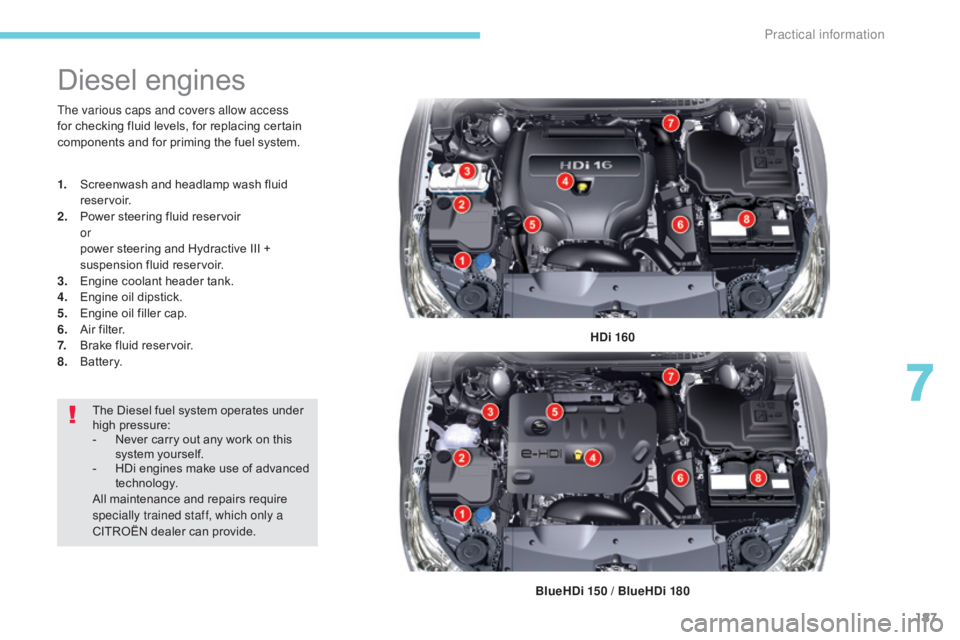
The various caps and covers allow access
for checking fluid levels, for replacing certain
components and for priming the fuel system.
1.
S
creenwash and headlamp wash fluid
reservoir.
2.
P
ower steering fluid reservoir
or
p
ower steering and Hydractive III +
suspension fluid reservoir.
3.
E
ngine coolant header tank.
4.
E
ngine oil dipstick.
5.
E
ngine oil filler cap.
6. A
ir filter.
7. B
rake fluid reservoir.
8.
B
attery.
The Diesel fuel system operates under
high pressure:
-
N
ever carry out any work on this
system yourself.
-
H
Di engines make use of advanced
technology.
All maintenance and repairs require
specially trained staff, which only a
CITROËN dealer can provide.
7
Practical information